
ARCTIC Case Fan Hub
4.7Editor score
10-fold PWM fan distributor
SATA power direct input
Compact dimensions for tight spaces
This guide compares the top ten fan control hub for PC models to help you optimize airflow, reduce noise, and manage cable clutter in your custom computer
Managing airflow in a modern PC case requires precision and flexibility. A fan control hub for PC simplifies wiring by connecting multiple fans to a single header while maintaining PWM signals and RGB synchronization for optimal cooling performance.
We evaluated ten popular hubs based on port count, mounting options, power delivery, and software compatibility. Each model was analyzed for build quality, ease of installation, and ability to handle high-load scenarios without voltage drops or signal loss.
Each pick highlights specific strengths like magnetic mounting, SATA power input, or ARGB support. Prices and availability change frequently, so verify current details before purchasing to ensure you get the best value for your specific cooling needs.
4.7Editor score

4.7Editor score
4.6Editor score
The following table provides a side-by-side comparison of all ten models. It highlights key specifications such as port counts, mounting methods, and power input types to help you quickly identify the right hub for your case.


The ARCTIC Fan Controller stands out as the most versatile hub available today. It earns the Editor's Choice badge for providing individual PWM control across ten ports. This level of granular management allows precise cooling tuning without relying on motherboard headers.
We may earn a commission when you buy through this link, at no additional cost to you.
Its power delivery is robust with a total capacity of 4.5A and 2A per port. This ensures stable operation even when driving high-speed industrial fans or multiple large case blowers. The magnetic mounting system makes installation effortless on steel chassis panels.
While highly capable, it requires a separate SATA power cable. This is a minor trade-off for the clean build experience it delivers. The lack of RGB lighting control means you will need a separate hub if you plan to synchronize fan lights.
This hub is ideal for enthusiasts who prioritize airflow management over lighting aesthetics. It offers professional-grade features at a consumer-friendly price point. We recommend it for builds requiring maximum cooling flexibility and software compatibility.
Unlike passive splitters, this controller manages each fan's speed independently. This enables advanced thermal strategies based on specific zone temperatures.
Native Linux kernel support ensures compatibility for server or home lab builds. It works seamlessly with open-source monitoring tools.
We may earn a commission when you buy through this link, at no additional cost to you.
The ARCTIC Case Fan Hub offers the best value for users needing basic expansion. It provides ten ports for connecting multiple fans to a single motherboard header. While it shares a single PWM signal, it ensures all fans run in perfect synchronization.
We may earn a commission when you buy through this link, at no additional cost to you.
Its compact size allows placement in tight spaces where larger hubs might not fit. The hub draws power directly from the PSU via SATA, ensuring stable voltage delivery. This eliminates the risk of voltage drops common with daisy-chained setups.
The lack of individual control means all connected fans spin at the same rate. This limits fine-tuning options for users with mixed fan sizes or types. However, for standard case cooling, this uniformity is rarely an issue.
We recommend this hub for budget builders or secondary systems. It delivers reliable performance without unnecessary features. It remains a top choice for anyone wanting to maximize fan count without breaking the bank.
Measuring just over five centimeters in height, it fits behind panels easily. This minimizes airflow obstruction within the chassis.
Direct SATA power prevents motherboard header overload. It keeps system stability high under heavy thermal loads.
We may earn a commission when you buy through this link, at no additional cost to you.
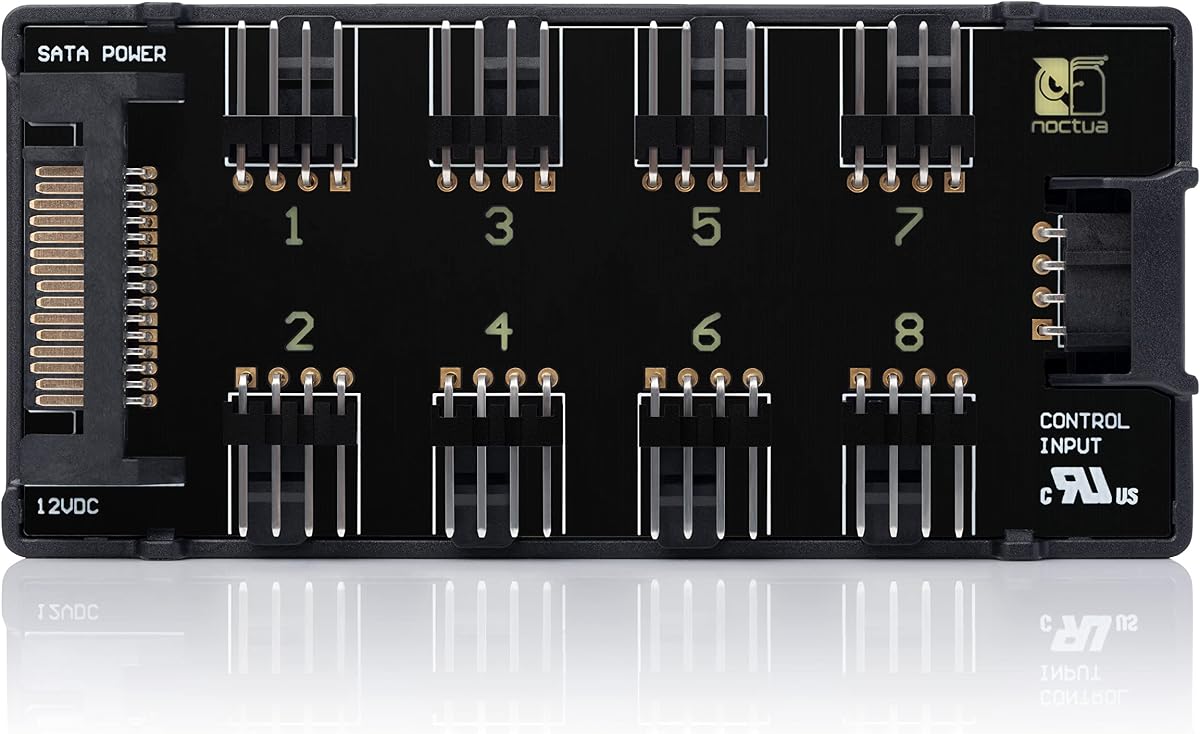
The Noctua NA-FH1 combines premium build quality with essential safety features. It stands out with built-in fuses to protect fans from short circuits. This level of protection is rare in standard fan hubs on the market today.
We may earn a commission when you buy through this link, at no additional cost to you.
It supports both 4-pin and SATA power inputs simultaneously. This dual-input capability allows flexible integration into complex power setups. The included mounting magnet ensures secure placement without adhesive residue on chassis panels.
While more expensive, the six-year warranty justifies the investment. Noctua products are known for longevity and consistent performance. It is suitable for users who demand absolute reliability and safety for their components.
We recommend this hub for professional workstations or high-end gaming rigs. It offers peace of mind through robust electrical protection. If you value quality over quantity, this remains the top tier choice.
Internal fuses prevent cascading failures if a fan short circuits. This protects both the motherboard and remaining fans.
Supports simultaneous usage of SATA and motherboard headers. This optimizes power distribution for diverse cooling needs.
We may earn a commission when you buy through this link, at no additional cost to you.
The Thermalright ARGB Hub provides a cost-effective solution for lighting management. It allows users to connect eight fan groups while maintaining synchronized 5V 3Pin lighting effects. This centralizes wiring that would otherwise clutter the case interior.
We may earn a commission when you buy through this link, at no additional cost to you.
Its mounting options include strong double-sided paste or magnetic suction. This flexibility ensures it can be secured to both steel and non-metal surfaces. The compact body design helps keep cables organized and visible inside the chassis.
Users should note that it does not adjust fan speeds or lighting colors. It functions strictly as a passive extension hub for existing signals. Also, older 12V RGB fans are not compatible with this 5V architecture.
We recommend this for budget-friendly RGB builds using modern ARGB fans. It offers solid value for the price while handling basic expansion needs. For advanced lighting control, ensure your motherboard supports 5V headers directly.
The strong paste ensures the hub stays fixed even under vibration. This prevents movement that might loosen connected cables.
Perfect for syncing multiple ARGB light bars or fans. Creates a uniform visual look without complex software.
We may earn a commission when you buy through this link, at no additional cost to you.
The ARCTIC Fan Controller excels as a comprehensive solution for cooling enthusiasts. It offers ten ports with individual PWM control. This granular adjustment allows precise tuning for each fan zone based on thermal requirements.
We may earn a commission when you buy through this link, at no additional cost to you.
Its support for Windows and Linux makes it universally compatible. Users can utilize software tools to create complex fan curves. The hardware ensures stable power delivery with up to 2A per port for demanding fans.
Magnetic mounting allows quick removal for maintenance. This convenience is unmatched by adhesive-only hubs. While it lacks lighting control, it focuses purely on thermal management efficiency.
We recommend it for users who need flexibility across different operating systems. It delivers professional performance without the bulk of complex controllers. Ideal for multi-purpose PCs or workstation setups requiring adaptability.
Manage airflow per zone independently for optimal cooling. This reduces noise while maintaining maximum performance.
Works seamlessly with open-source and proprietary apps. Ensures flexibility across different system configurations.
We may earn a commission when you buy through this link, at no additional cost to you.
The X12 model expands cooling options with support for twelve fan groups. It uniquely combines PWM fan control and ARGB lighting on one unit. This integration simplifies the cabling process significantly for large builds.
We may earn a commission when you buy through this link, at no additional cost to you.
Its white casing makes it ideal for clean, light-colored cases. The design ensures the hub blends seamlessly with other components. Stable SATA power direct input prevents voltage drop even under heavy load conditions.
Users should note that it does not adjust speed or lighting. It serves strictly as an expansion interface. Also ensure you have 5V ARGB headers rather than 12V RGB to avoid damage.
We recommend this for builds requiring high fan density without extra controllers. It balances functionality and aesthetics well. A solid choice for white-themed builds needing maximum expansion.
Reduces clutter by combining light and speed connections. Creates a single connection point for multiple devices.
White finish complements modern white PC builds. Maintains visual consistency across internal components.
We may earn a commission when you buy through this link, at no additional cost to you.
The upHere hub offers a complete kit for cooling and lighting. It includes an RF remote to manage ARGB colors without software. This is valuable for users who prefer physical control over digital dashboards.
We may earn a commission when you buy through this link, at no additional cost to you.
Magnetic mounting allows easy positioning inside the case. The high-power design ensures stable performance even when all fans are running at full speed. It supports nine PWM fans and ARGB devices simultaneously.
While it lacks advanced software integration, the remote adds convenience. This simplifies customization for those who do not want to rely on motherboard software. The included kit reduces the need to buy extra cables.
We recommend it for builders who want quick lighting changes. It balances control and power delivery effectively. A strong contender for RGB-centric builds needing easy access to effects.
Physical remote eliminates need for software control panels. Quick access to color changes and brightness levels.
Includes SATA and sync cables for plug and play. Reduces the need to purchase extra components separately.
We may earn a commission when you buy through this link, at no additional cost to you.
The Thermalright Integrated Hub provides robust fan expansion capabilities. It supports up to ten fans with stable PWM signal transmission. This ensures consistent cooling performance across all connected devices.
We may earn a commission when you buy through this link, at no additional cost to you.
Its compact design minimizes internal space usage. The double-sided sticker ensures it remains fixed even during vibration. This prevents accidental loosening during transport or heavy use.
The hub focuses purely on airflow management without lighting features. This specialization makes it efficient and cost-effective. Users requiring only cooling control will find this straightforward and effective.
We recommend this for minimalist builds focused on performance. It offers high capacity without complex RGB wiring. Ideal for systems needing maximum cooling headroom.
Supports ten fans for maximum airflow volume. Prevents bottlenecks in cases requiring high exhaust.
Direct SATA connection maintains constant voltage. Prevents dips during fan acceleration cycles.
We may earn a commission when you buy through this link, at no additional cost to you.
The X8 hub balances ARGB and PWM needs efficiently. It supports eight groups of fans with synchronized lighting capabilities. This combination simplifies cabling for users needing both cooling and visual flair.
We may earn a commission when you buy through this link, at no additional cost to you.
Adhesive mounting ensures secure placement without additional hardware. The black casing blends well with standard dark chassis interiors. Stable power output ensures consistent fan speeds even under high thermal loads.
It requires a separate SATA cable which may need purchase. Also note that 12V RGB is not supported. Verify your fan type before installation to avoid compatibility issues.
We recommend it for mid-range builds needing both cooling and lighting. It offers a compact solution for dual needs. Ideal for cases with limited space for multiple controllers.
Combines PWM and ARGB signals on one unit. Reduces need for separate controllers entirely.
Small enough to fit behind panels easily. Maintains clean airflow pathways inside case.
We may earn a commission when you buy through this link, at no additional cost to you.
The J-10 Pro hub stands out for remote and key control support. It allows users to adjust lighting effects without physical switches. This adds convenience for users who prefer remote access to PC settings.
We may earn a commission when you buy through this link, at no additional cost to you.
Magnetic suction mounting ensures quick installation without tools. The chassis key support enables integration into case front panels. Stable operation ensures reliable performance even under heavy thermal loads.
The compact size fits easily in modern cases without bulk. It focuses on lighting rather than advanced cooling control. Note that 12V RGB is not supported with this 5V hub.
We recommend this for builds prioritizing aesthetics and remote control. It offers flexibility for RGB enthusiasts. Ideal for cases with existing chassis key interfaces.
RF remote allows easy light adjustments from seating. Reduces need to access BIOS or software for changes.
Supports chassis key control for physical access. Creates a seamless user experience.
We may earn a commission when you buy through this link, at no additional cost to you.
This hub offers reliable expansion for eight fan groups. It provides stable output under high load conditions ensuring performance. The adhesive mounting ensures it stays securely in place inside the chassis.
We may earn a commission when you buy through this link, at no additional cost to you.
Its design focuses on essential connectivity for PWM and ARGB fans. The clear instructions guide users through safe installation. It supports synchronization without needing complex software settings.
Note that speed adjustment is not possible with this hub. Users must rely on motherboard headers for thermal control. It serves best as a simple extender rather than a controller.
We recommend it for builds needing basic expansion. It delivers consistent performance without extra features. Ideal for users prioritizing stability and simplicity.
Ensures steady voltage for consistent fan operation. Prevents flickering or speed drops.
Provides core ARGB PWM support effectively. Avoids unnecessary complexity for users.
We may earn a commission when you buy through this link, at no additional cost to you.
Selecting the right fan control hub depends on your specific cooling and lighting needs. Consider port count, power input, and mounting options carefully.
Determine how many fans you need to connect. Look for hubs that support at least the number of fans plus extra for future expansion.
Choose a hub with enough ports to avoid additional splitters.
Decide if you need speed control or lighting synchronization. Some hubs support only one feature while others combine both.
Ensure compatibility with your existing fan types before buying.
Check if the hub uses SATA or Molex power inputs. SATA is standard for modern cases but verify your PSU has available cables.
Select SATA power for better stability under high loads.
Look for magnetic, adhesive, or screw mounting. Magnetic options offer flexibility for placement without damaging surfaces.
Magnetic mounting is preferred for steel cases.
Ensure the hub matches your fan voltage requirements. 5V ARGB hubs will not work with 12V RGB fans.
Verify your motherboard supports the correct voltage headers.
Check for safety features like short circuit protection. High-quality hubs prevent damage to your motherboard or fans.
Prioritize hubs with fuses for better safety.
If you want software control, check OS compatibility. Linux support is crucial for server or home lab systems.
Choose hubs with native drivers for seamless integration.
Consider the color and size of the hub. A black or white match fits the visual theme of your build.
Compact designs ensure the hub hides easily behind panels.
First, verify all fan connectors are firmly plugged into the hub. Loose connections can cause intermittent lighting issues or fan stoppages. Ensure all fans connect securely before powering on.
Second, use a direct SATA power connection from your PSU. Avoid daisy-chaining to multiple hubs as this may cause voltage drop. Powering each hub separately ensures optimal performance.
Third, place the hub away from heat sources like GPU exhaust. Overheating can affect the circuit board over time. Secure it to a cool metal panel for maximum stability.
No, you cannot connect 12V RGB fans to a 5V ARGB hub. The voltage difference can damage both the hub and fans. Check your fan specifications before making a purchase.
Most passive hubs do not control fan speed. They extend the signal from the motherboard header. Software control must be handled by the motherboard or a smart controller.
Yes, hubs require a SATA power input to function. This connection draws power directly from the PSU to stabilize voltage. Verify your PSU includes available SATA cables.
Capacity depends on the hub model and current rating. Most support eight to ten fans. Exceeding the rated current may cause unstable operation or overheating.
Some hubs support adhesive mounting on plastic. Magnetic mounting requires a metal surface. Check the specifications for mounting options before installation.
Erratic spinning often indicates voltage instability. Ensure the hub connects to a dedicated SATA power source. Avoid overloading the hub beyond its rated current capacity.
Passive hubs do not require software. However, controllers with features may need OS support. Check if Windows or Linux drivers are provided for advanced features.
Yes, hubs work with pumps and water block fans. Ensure the hub provides stable power to pumps. Use a hub that supports PWM speed control for liquid cooling systems.
Choosing the right fan control hub for PC involves balancing port count and features. Our top picks offer distinct advantages for different build requirements. Prioritize capacity and stability for professional setups.
Consider mounting options and voltage compatibility carefully. Magnetic mounting and correct voltage support are key to reliable performance. Avoid mixing incompatible fan types to prevent hardware damage.
Verify current prices and availability before purchasing. Products often fluctuate in cost based on market trends. Choose a hub that fits your budget and offers long-term value.