
YOCTOSUN Magnifying Glasses with Light
4.5Editor score
Five interchangeable lenses
Three adjustable LED lights
Rechargeable battery included
Ergonomic comfortable fit
Finding the right magnifying glasses for computer monitors can transform your daily digital experience. Whether you need help reading small text or working on detailed projects, the right tool reduces eye strain and improves comfort during long sessions.
We analyzed ten highly rated products to bring you this comprehensive guide. Our comparison considers optical clarity, adjustability, comfort, and versatility to ensure you find a solution that fits your specific needs and workspace setup effectively.
Each pick below highlights key features, pros, and cons to help you decide quickly. Please note that prices and availability change frequently, so always check the latest offers on Amazon before making your final purchase decision today.
4.5Editor score

4.5Editor score
3.4Editor score
As an Amazon Associate we earn from qualifying purchases.
This side-by-side comparison covers all ten products to help you evaluate their specifications and features quickly. Look at the specs below to understand which option offers the best value and performance for your specific viewing requirements.


This magnifying glasses computer screen magnifier stands out as a top choice for desktop users who need reliable enlargement. With an HD optical lens and sturdy design, it provides clear visuals for reading text or watching videos on laptops and small monitors.
We may earn a commission when you buy through this link, at no additional cost to you.
The device features multiple pivot points that allow users to adjust the angle easily. This flexibility ensures you can find a comfortable viewing position whether you are sitting at a desk or working from a couch. The lens material is designed to be high definition for accurate image reproduction.
While it offers great optical performance, the weight might make it less ideal for travel. The frame is built for stability rather than portability, which is perfect for stationary setups but less convenient if you move often. The fixed size limits it to specific screen dimensions.
If you need a robust magnifier for daily office or home use, this product delivers consistent quality. It is especially useful for seniors or anyone who finds small screen text difficult to read without straining their eyes. The design supports various viewing needs efficiently.
The HD optical lens ensures text and images appear sharp without distortion, making reading more comfortable for long periods.
Multiple pivot points allow you to rotate the screen magnifier to suit different seating positions and task requirements.
We may earn a commission when you buy through this link, at no additional cost to you.
The YOCTOSUN Magnifying Glasses with Light offer incredible value for hobbyists and professionals who need hands-free magnification. Its interchangeable lens system lets you switch between five magnification levels quickly, while the LED lights ensure you see details clearly in low light.
We may earn a commission when you buy through this link, at no additional cost to you.
Comfort is a key strength here, with a rubber-wrapped nose bridge that reduces pressure during extended wear. The rechargeable battery system eliminates the need to buy disposable batteries, saving money over time. The lenses are scratch-resistant for long-lasting performance in daily tasks.
Some users might find the headband adjustment limited if they have a larger head size. The LED lights provide good illumination but may not last as long as desired on the brightest setting. These are minor trade-offs given the overall feature set.
For tasks like craft making, repairing small electronics, or reading fine print, these glasses are a practical choice. The hands-free design allows you to focus on your work without holding a lens, making it ideal for detailed projects that require steady hands.
Switch between 0.75X and 4.0X magnification easily to match different tasks and comfort preferences.
Three LED lights with adjustable brightness help reduce eye strain when working in dim environments.
We may earn a commission when you buy through this link, at no additional cost to you.
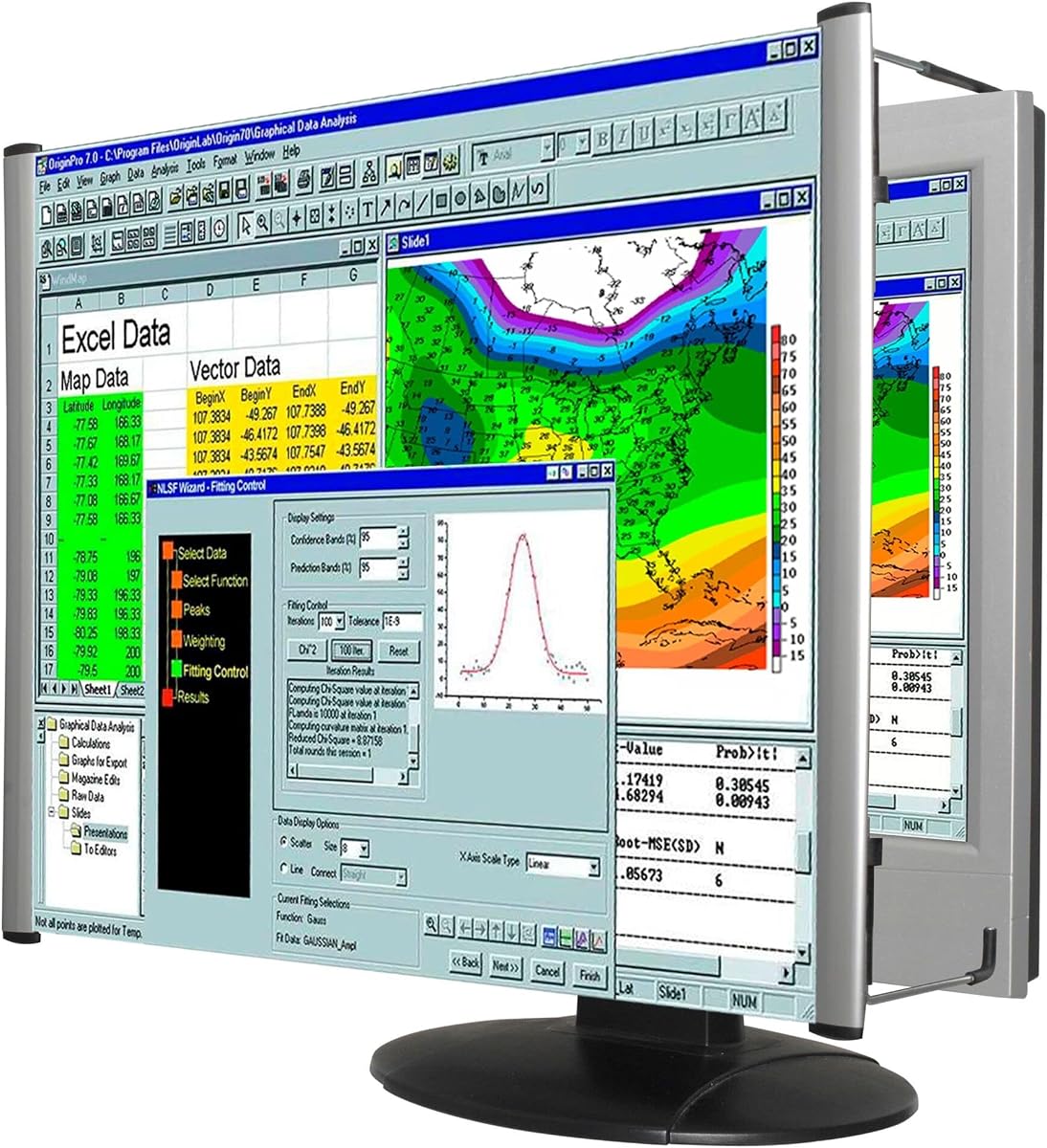
The Kantek MAXVIEW is a specialized tool designed for office workers using 22-inch monitors. Its optical grade acrylic lens enhances contrast and readability, making text larger and easier to read during long work hours without causing eye fatigue.
We may earn a commission when you buy through this link, at no additional cost to you.
The patented design allows you to adjust magnification by changing the distance between the magnifier and the screen. This flexibility helps you find the optimal view for your specific needs. The lightweight build makes it easy to handle and position on your desk.
However, it is important to note this magnifier is not compatible with laptops, limiting its use to desktop setups. Intense lighting around the workspace can cause reflections within the grooves of the lens, which might distract from the viewing experience.
If you use a large desktop monitor and need a reliable screen enlargement solution, this product is worth the investment. It is perfect for general office tasks where clear text and minimal eye strain are priorities for your daily productivity.
Designed specifically for 22-inch widescreen monitors to provide seamless integration with your office workspace setup.
Optical grade acrylic with light tint improves image contrast for better readability of small text and icons.
We may earn a commission when you buy through this link, at no additional cost to you.
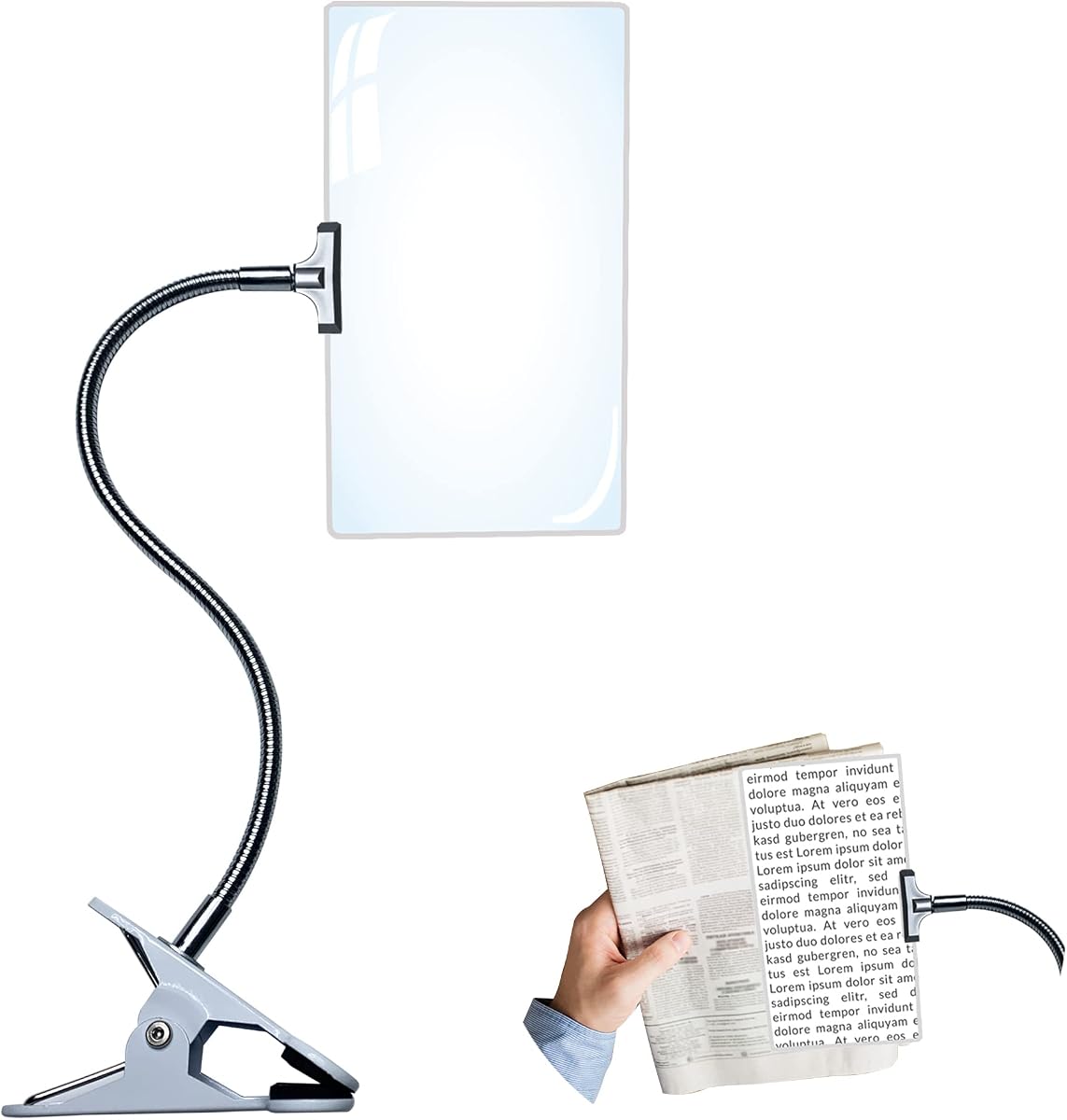
This 5X magnifying glass with clip is ideal for those who need a large clear area for reading or detailed crafts. Its optical grade PVC lens offers minimal distortion, ensuring that what you see is accurate and sharp across the entire 10×6 inch view.
We may earn a commission when you buy through this link, at no additional cost to you.
The flexible gooseneck allows you to position the lens precisely without moving the entire stand. This feature is particularly useful for tasks like embroidery or painting where you need to adjust the angle frequently. The clip allows it to be attached to various surfaces easily.
While the lens is high quality, the clip might not hold firmly on very thick desk edges. Over time, repeated adjustments could cause the gooseneck to loosen slightly. These issues are manageable and do not significantly impact the overall utility of the tool.
For hobbyists or anyone needing hands-free magnification at a desk, this is a practical and affordable option. It combines a large viewing area with easy adjustability to make detailed work more comfortable and efficient.
Superior PVC lens provides crystal clear image quality with minimal distortion for accurate viewing of small details.
14-inch gooseneck bends in any direction to help you adjust the lens position without constant readjustment.
We may earn a commission when you buy through this link, at no additional cost to you.
This laptop screen magnifier is designed to enhance the viewing experience for movies and videos on smaller screens. Its HD vision and adjustable angle design help reduce eye fatigue by allowing you to find the most comfortable position for your eyes.
We may earn a commission when you buy through this link, at no additional cost to you.
The device is lightweight and collapsible, making it easy to transport for use at home or while traveling. It fits various laptop sizes without obstructing keyboard operation, ensuring you can continue to work or type while viewing content comfortably.
However, the performance relies on good ambient light conditions. Using it in a backlight or reflective environment can reduce the viewing effect and cause glare. It is best used in low light settings where the magnification effect is most pronounced and effective.
If you often watch videos or read small text on a laptop and want a more comfortable viewing experience, this product is a strong choice. Its 3D vision and adjustable design make it a practical addition for seniors or anyone needing screen assistance.
The 3D screen amplifier helps you enjoy movies and games with less strain and better depth perception.
Lightweight and collapsible design allows you to take the magnifier anywhere for on-the-go screen assistance.
We may earn a commission when you buy through this link, at no additional cost to you.
This magnifying glass with light offers a versatile set of four lenses for different magnification needs. Its ergonomic frame is designed to feel like your own glasses, ensuring comfort during extended use for tasks like cross stitch or jewelry making.
We may earn a commission when you buy through this link, at no additional cost to you.
The rechargeable LED light provides adjustable illumination to suit your environment, and the battery lasts for hours on a single charge. The lenses are made of durable acrylic resin that resists scratching, ensuring clear visibility over time without degrading quality.
Some users might find the lens replacement mechanism a bit fiddly at first, requiring care to avoid fingerprints. The fixed focal length means you need to adjust the distance carefully to focus correctly on objects. These are minor usability points to consider.
For hobbyists and professionals who need reliable hands-free magnification with built-in light, this is an excellent tool. It supports a wide range of close work tasks while keeping your hands free and your vision clear for detailed precision.
Adjust the LED direction to get the perfect lighting angle for your specific task and reduce shadows.
Silicone-coated nose bracket and elastic headband ensure a secure fit that stays comfortable all day long.
We may earn a commission when you buy through this link, at no additional cost to you.
These magnifying glasses with light are uniquely designed with blue light blocking technology to protect your eyes from harmful emissions. They offer 200% magnification and built-in LED lighting to make reading small text or doing crafts much more comfortable and safer.
We may earn a commission when you buy through this link, at no additional cost to you.
The lightweight design ensures that they feel like regular glasses, reducing strain on your temples and head. The USB rechargeable system means you never need to buy batteries, and the quick charging allows you to use them frequently without interruption.
The LED lighting is positioned on the sides of the frame, which might not provide direct illumination for all tasks. The polycarbonate lens is durable but may not offer the same optical depth as glass options for some users. These are reasonable trade-offs.
If you spend long hours in front of screens or under artificial lighting, these glasses can help reduce eye strain. They are a practical choice for seniors or anyone who needs magnification and eye protection in a single convenient device.
Built-in blue light blocking technology helps protect your eyes from harmful light emitted by electronic devices.
Ergonomic lightweight fit allows you to work or read without holding the glasses, improving comfort.
We may earn a commission when you buy through this link, at no additional cost to you.
The Kantek LCD Monitor Magnifier Filter is a straightforward solution for enhancing readability on 22-inch monitors. Its fully assembled design and lightweight build make it easy to install quickly without needing additional tools or complex setup steps.
We may earn a commission when you buy through this link, at no additional cost to you.
The adjustable magnification and anti-glare coating help reduce visual fatigue during long work hours. It is designed to be durable and practical for office environments where users need to read text and data more clearly without eye strain.
However, it is not intended for visually impaired users who need high magnification levels. Some lighting conditions may still cause reflections within the grooves of the lens, which can be distracting during critical tasks. These factors should be considered.
For standard office workers who need a simple and effective way to make screen text larger and clearer, this filter is a good option. Its ease of use and adjustable features make it a convenient tool for everyday desktop tasks.
Fully assembled and lightweight design allows you to install the monitor magnifier quickly and easily.
Anti-glare coating helps reduce reflections and improves readability in various office lighting conditions.
We may earn a commission when you buy through this link, at no additional cost to you.
This large clip-on magnifier is perfect for reading books or labels without holding a lens. Its alloy spring clamp ensures stability on desks or tables, and the bendable hose design lets you adjust the lens angle easily to suit your viewing needs.
We may earn a commission when you buy through this link, at no additional cost to you.
The clear detail view is excellent for tasks like repair work or reading small text. It fits well in home or office settings, and the lightweight design allows you to move it around without much effort. The HD lens helps reduce eye strain effectively.
Some users may find the base shifts slightly if the desk is uneven or bumped during use. The bendable hose may require occasional retuning to keep the lens in position. These are minor inconveniences that do not detract from the overall utility.
For seniors or anyone who needs hands-free magnification for daily tasks, this is a practical and reliable tool. Its balance of stability and adjustability makes it suitable for reading, sewing, or repair work in various environments.
The clip and stand design allows you to keep your hands free while reading or working on detailed tasks.
Bendable hose design lets you change the lens angle and height to find the perfect viewing position.
We may earn a commission when you buy through this link, at no additional cost to you.
This magnifying glass with clip is designed to help low vision seniors read comfortably without holding a heavy device. Its large 10×6 inch viewing area allows you to see full pages of text or detailed craft work clearly and accurately.
We may earn a commission when you buy through this link, at no additional cost to you.
The flexible gooseneck allows you to position the lens at any angle to suit your task. The Fresnel lens is lightweight and durable, making it easy to use for extended periods without wrist strain. It is a practical tool for everyday reading.
Plastic lenses may scratch more easily than glass, so care should be taken when handling. The clip mechanism might not grip very thick surfaces firmly, but it works well on standard desks and tables. These are minor points to note.
If you need a reliable and easy-to-use magnifier for reading or crafts, this product is a great choice. Its combination of size, adjustability, and light weight makes it a useful tool for seniors and anyone who needs clear and strain-free viewing.
The 10×6 inch lens area lets you view entire pages or large sections of your work without moving often.
360 degree adjustable gooseneck allows you to find the perfect angle for your specific viewing needs.
We may earn a commission when you buy through this link, at no additional cost to you.
Choosing the right magnifying glasses for computer monitors involves considering several key factors to ensure comfort and clarity. This guide explains the main features you should look for to make an informed decision for your specific needs.
Magnification power determines how large objects appear on your screen or in your workspace. Look for options that offer a range of powers, such as 2X to 4X, so you can adjust based on the task. Too much magnification can limit your field of view, while too little may not help with small text.
Choose a magnification level that balances size with a comfortable viewing field for your daily tasks.
Lens material significantly impacts clarity and distortion. Optical grade PVC or acrylic Fresnel lenses are lightweight and offer good clarity. Avoid low-quality plastic that causes distortion or scratches easily. Higher clarity helps reduce eye strain during long viewing sessions.
Opt for optical grade materials that provide crystal clear images without significant visual distortion.
Hands-free designs like clips or headsets allow you to work without holding the magnifier. This reduces wrist fatigue and enables you to use both hands for detailed tasks. Consider whether a clip or headset better suits your workspace and comfort preferences.
Select a hands-free design that keeps your workspace accessible and reduces physical strain.
Adjustable goosenecks or multi-angle pivot points help you find the optimal viewing position. Flexibility is essential for different tasks like reading, working, or crafting. A rigid magnifier may not suit all angles, so look for products that bend or rotate easily.
Ensure the magnifier allows multiple viewing angles to accommodate various tasks and seating positions.
Built-in LED lighting can greatly enhance visibility in low-light environments. Check if the light is adjustable and whether it is powered by rechargeable batteries. Good lighting reduces eye strain and improves contrast, especially for detailed work or small text.
Choose a model with adequate adjustable lighting to suit your workspace conditions and reduce eye fatigue.
If you are using a screen magnifier, ensure it fits your monitor size. Some are designed for laptops while others work best on desktop monitors. Check the dimensions and aspect ratio to avoid obstructing the keyboard or screen. Proper fit ensures the best viewing experience.
Verify the magnifier size and design matches your monitor or laptop specifications before purchasing.
Comfort is crucial for extended use. Lightweight models with ergonomic nose bridges or headbands reduce strain. Heavy magnifiers can cause discomfort over time. Look for rubberized or soft padding to ensure the device feels comfortable on your face or desk.
Prioritize lightweight and ergonomic designs that allow for long use without discomfort.
Durability ensures the product lasts through daily use. Scratch-resistant lenses and sturdy frames are important. A good warranty or guarantee from the manufacturer provides peace of mind. Investing in durable products saves money in the long run.
Select products with scratch-resistant materials and reliable warranty support for long-term value.
To get the best performance, position the magnifier at a comfortable distance from your screen or work surface. Adjust any goosenecks or angles to align the lens with your eyes. Make sure lighting is adequate and avoid glare from bright windows or lights.
Clean the lenses regularly with a soft cloth to avoid scratches. Avoid touching the optical surface with fingers to prevent smudges. If using rechargeable models, charge the batteries fully before first use and maintain them according to the manufacturer's instructions.
Store your magnifier in a protective case when not in use to prevent damage. Keep it away from extreme temperatures and direct sunlight. Regular care and proper storage will extend the life of your magnifying glasses and ensure consistent optical clarity.
Not all screen magnifiers fit every monitor size. Some are designed for laptops, while others are optimized for desktop monitors like 22-inch displays. Check the product specifications for dimensions and aspect ratios to ensure compatibility with your specific screen.
Yes, using a magnifying glass can reduce eye strain by enlarging text. Look for models with adjustable angles and good lighting to maintain comfort. Taking breaks and ensuring proper viewing distance also helps prevent fatigue during long reading sessions.
Rechargeable battery life varies by model but often lasts between 3.5 to 7 hours of continuous use. Charging typically takes around 1.5 hours. Always check product specs for battery details and carry a charging cable for extended use.
Fresnel lenses are lightweight, flat, and often made of plastic, suitable for large areas like screen magnifiers. Optical lenses offer higher clarity and minimal distortion but may be heavier. Choose based on your need for portability versus image sharpness.
Some magnifying glasses include blue light blocking technology to reduce eye strain from screens. These models are designed to filter harmful blue light while maintaining clarity. Check product descriptions for blue light protection features if this is important to you.
Flexible goosenecks allow you to bend the arm into your desired position. Gently move the neck to adjust the height and angle until the lens is aligned with your viewing area. Be careful not to force it beyond its flexible limits.
Choosing the right magnifying glasses for computer monitors depends on your specific needs and workspace. The top picks offer a range of options from versatile headsets to specialized screen magnifiers to help you work with comfort and clarity.
Prioritize features like adjustable magnification, ergonomic design, and quality optics to reduce eye strain. Consider how you will use the tool whether for reading, crafts, or screen tasks to find the best fit for your routine.
Always check current prices and availability on Amazon before making your final purchase. Product details and offers change, so verifying the latest information ensures you get the best value for your needs.