
MATX Case Micro ATX Case B2Pro
5.0Editor score
Full aluminum construction
Compact 17.8L capacity
Mesh side panels
This guide compares the best aluminum PC cases for 2026 focusing on durability airflow and design to help you choose the right chassis for your build.
Aluminum PC cases offer exceptional durability and thermal performance for modern builds. Their sleek finishes resist scratches while their mass helps dissipate heat effectively. Enthusiasts prefer these enclosures for their premium look and sturdy construction.
We evaluated ten top models based on airflow material thickness and component compatibility. Our analysis covers full towers mid-towers and compact designs. Each entry highlights key strengths and trade-offs to guide your decision.
Every selection includes specific features like fan support and mounting options. Prices fluctuate frequently so verify current offers before buying. Read on to find the perfect aluminum chassis for your next system.
5.0Editor score
4.4Editor score

4.6Editor score
The following table provides a quick side-by-side overview of all ten aluminum cases. Compare their key specifications to find the model that fits your hardware needs best.




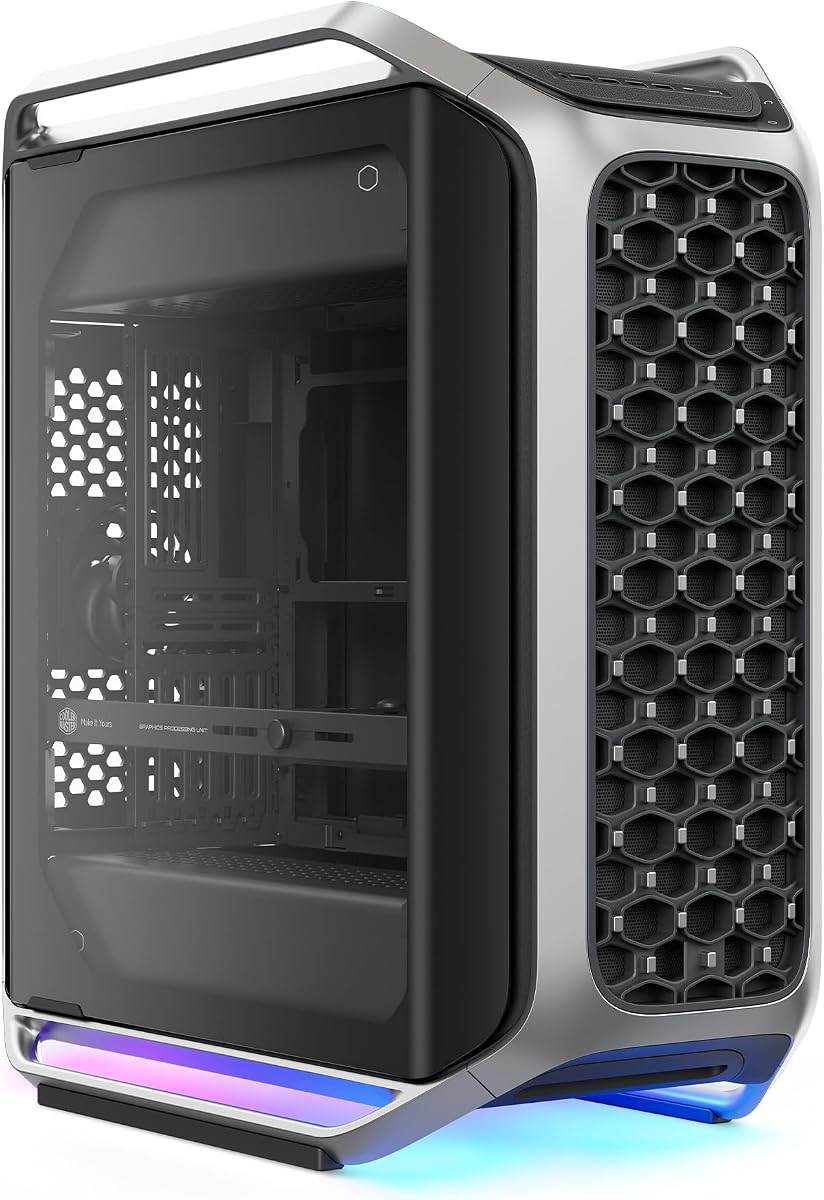
The Cooler Master Cosmos Alpha stands out as a flagship option for high-end builds. Its premium curved aluminum frame maintains the iconic COSMOS look while adding modern features. This case supports E-ATX motherboards and GPUs up to 400mm making it a powerhouse chassis.
We may earn a commission when you buy through this link, at no additional cost to you.
Its Freeform 2.0 rotatable layout allows you to change internal component orientations for better airflow or aesthetics. The modular sliding motherboard tray lets you switch between air and liquid cooling easily. Front I/O includes four USB-A and two USB-C ports for ultra-fast data transfer.
While the build quality is excellent the case is quite heavy which might make moving it difficult. The price is also higher than many alternatives but the materials justify the cost. Dust filters are removable for easy cleaning but the weight remains a trade-off.
Buy this case if you want a showpiece build with maximum hardware flexibility. The aluminum finish and ARGB glow make it visually stunning. It is ideal for enthusiasts who prioritize form and function equally.
The Freeform 2.0 system allows components to rotate left or right for optimized desk placement and airflow.
Full tempered glass panels and curved aluminum frame create a durable and aesthetically pleasing enclosure.
We may earn a commission when you buy through this link, at no additional cost to you.
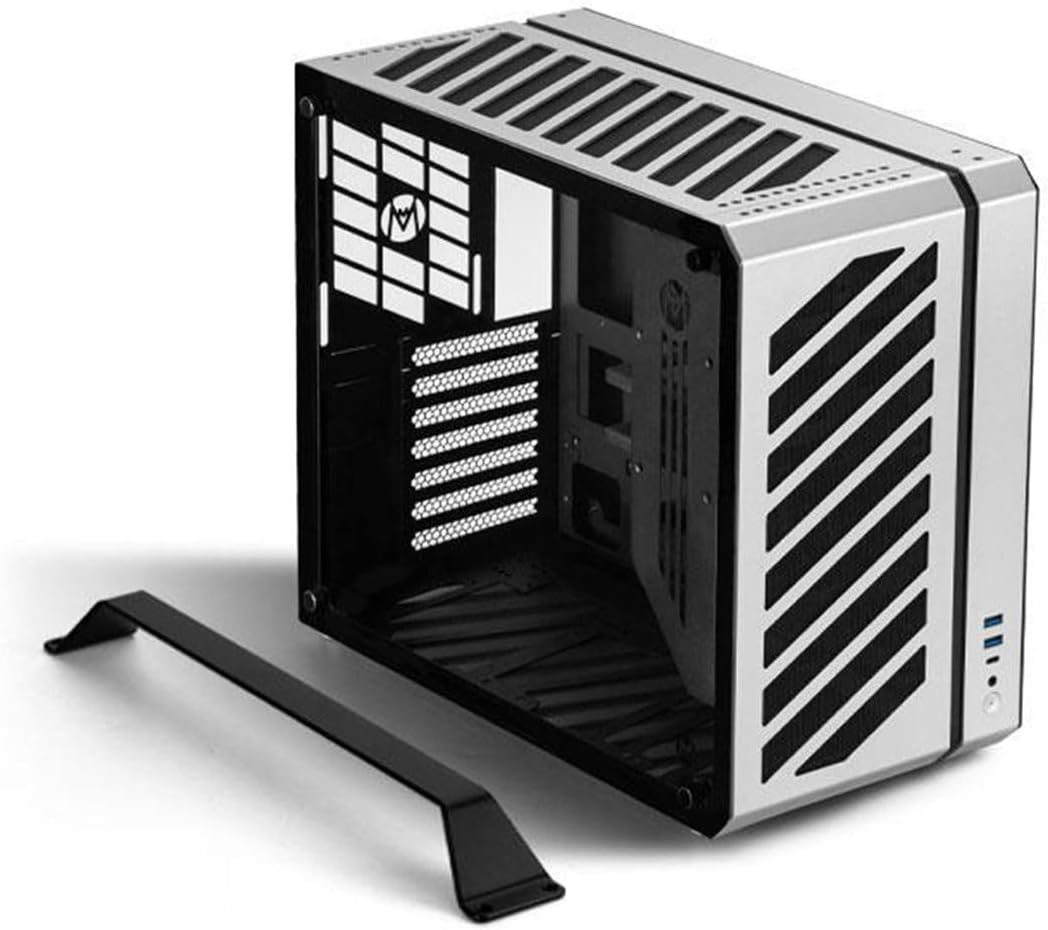
The B2Pro offers a full aluminum construction at a very affordable price point. It is designed for Micro ATX and ITX motherboards making it perfect for compact builds. The case features a unique exterior design with mesh side panels for heat dissipation.
We may earn a commission when you buy through this link, at no additional cost to you.
Its 17.8L capacity is ideal for desktop setups where space is limited. The silver anodized surface treatment gives it a premium look despite the low cost. It supports SFX power supplies and up to 240mm water cooling radiators for efficient thermal management.
Cable management might be tricky due to the compact dimensions. The mesh panels provide great airflow but might let more dust in than solid panels. Assembly requires attention to the specific mounting holes for the motherboard frame.
This case is the top budget choice for those wanting aluminum durability without spending much. It balances cost and build quality exceptionally well. Ideal for office PCs or small gaming rigs where size matters.
The footprint is small enough for desks while the handle design makes moving it convenient and safe.
Mesh side panels and high thickness aluminum help dissipate heat effectively from internal components.
We may earn a commission when you buy through this link, at no additional cost to you.
This open air frame case is built from aerospace magnesium aluminum alloy with an 8mm thickness for robustness. It supports standard ATX power supplies and multiple hard drives making it versatile for testing and benchmarking. The surface treatment reduces corrosion significantly over time.
We may earn a commission when you buy through this link, at no additional cost to you.
Its open design ensures maximum airflow for high-intensity tasks without obstruction. It supports various water-cooled drainage options including large radiators. Metal support rods and anti-slip pads provide stability during use on a desk surface.
Note that the unit ships as an unfinished product requiring assembly before use. Dust accumulation can be higher without side panels so regular cleaning is needed. It is not ideal for home living rooms due to its open nature.
Buy this for workstations or testing rigs where access and airflow are critical. The aluminum build ensures it remains stable and sturdy over years of heavy use. It is perfect for overclockers needing direct component access.
Integrated water cooling devices including large radiators fit easily without obstruction from traditional case walls.
Metal surface treatment improves service life and reduces corrosion risks even in humid environments.
We may earn a commission when you buy through this link, at no additional cost to you.
The C34 manages to fit standard ATX motherboards in a very small form factor. Its built-in carry handle makes it easy to transport to LAN events or between desks. It supports GPUs up to 335mm which covers most mid-range cards.
We may earn a commission when you buy through this link, at no additional cost to you.
Cooling options are flexible with support for 240mm liquid radiators or high tower air coolers. The internal layout simplifies building and cable management. Front I/O includes modern ports like USB 3.0 and USB Type-C for connectivity.
Space inside is tight so using an SFX power supply is recommended for cleaner cable management. The case is small enough to fit on small desks but still powerful. Assembly requires patience due to the compact internal dimensions.
Ideal for users who need portability without sacrificing ATX hardware performance. The aluminum shell provides a premium feel and protection. Choose this for mobile workstations or LAN party builds.
Integrated handle design allows for safe transportation during events or relocation without lifting risks.
Supports full ATX boards and power supplies while keeping the footprint small enough for limited desk space.
We may earn a commission when you buy through this link, at no additional cost to you.
The MasterFrame 500 features a FreeForm 2.0 aluminum exo-structure that supports various installation scenarios. It comes with two front 200mm intake fans pre-installed for powerful cooling. The open-frame design offers maximum flexibility for personalized builds and modding.
We may earn a commission when you buy through this link, at no additional cost to you.
It supports motherboards from Mini-ITX to E-ATX making it versatile for almost any system. You can accommodate up to 7 fans and 360mm radiators for strong thermal performance. The interchangeable panels allow you to customize the look easily.
Dust accumulation is higher with an open frame so regular maintenance is necessary. Sound insulation is minimal compared to enclosed cases so fans might be audible. The aluminum structure ensures rigidity despite the open layout.
Buy this for custom builds where airflow and aesthetics are top priorities. It is great for enthusiasts who enjoy modding and want a flexible foundation. The pre-installed fans provide immediate cooling out of the box.
Interchangeable panels and open layout offer endless possibilities for personalized build aesthetics and function.
Pre-installed 200mm fans and 360mm radiator support ensure excellent airflow for high-performance systems.
We may earn a commission when you buy through this link, at no additional cost to you.
The C34Pro offers modular flexibility supporting ATX and E-ATX motherboards in a compact size. It fits massive hardware like 420mm GPUs and 360mm radiators for flagship builds. The 2mm aluminum shell plus steel frame ensures a robust build quality.
We may earn a commission when you buy through this link, at no additional cost to you.
Efficient thermal design includes multi-zone fan mounts with dust filters to optimize airflow. Cable management space is generous at 18mm and a magnetic screwdriver kit aids assembly. Multiple power supply mounting positions allow for various layouts.
Some assembly can be tight due to the compact high-performance design. Dust filters help but the tight spaces may require frequent cleaning. The portable carry handle remains a great feature for transport.
Choose this if you need E-ATX support in a smaller footprint. It balances compactness with high component compatibility well. Ideal for gaming rigs needing top-tier hardware in a portable chassis.
Supports ATX and E-ATX boards with PCIe slot adjustments for maximum build adaptability.
Accommodates large radiators and GPUs while keeping the overall case dimensions small.
We may earn a commission when you buy through this link, at no additional cost to you.
The Define 7 XL features an expansive layout for E-ATX boards and SSI-EEB formats. Its brushed aluminum encases a refined front door with reversible hinges and magnetic latching. Install up to 18 HDDs alongside SSDs in the default storage layout.
We may earn a commission when you buy through this link, at no additional cost to you.
Convert to an open layout for custom water loops with radiators up to 480mm. Versatile multi-brackets convert fan positions to HDD or pump mounts. The design prioritizes silent operation through effective dampening materials and structure.
It is quite large and heavy requiring a dedicated desk or floor space. Cable management inside is detailed but takes time to organize. The brushed aluminum gives a premium feel but may show fingerprints.
This case is perfect for storage servers or silent workstations. The build quality justifies the price for professionals needing reliability. Ideal for media centers where sound and capacity matter most.
Up to 18 HDDs can be installed providing massive storage in a single chassis unit.
Dampening materials and thoughtful design ensure quiet performance even under heavy load.
We may earn a commission when you buy through this link, at no additional cost to you.
The V100-ATX comes with 4 pre-installed PWM-controlled 120mm ARGB fans for vibrant lighting. Integrated ARGB strips offer full spectrum color control synchronized with motherboard software. It supports standard and back-connect ATX boards for cleaner routing.
We may earn a commission when you buy through this link, at no additional cost to you.
Tool-less mounting mechanisms for side panels allow easy access to internal components quickly. It fits GPUs up to 420mm and coolers up to 178mm for high-end hardware. The fan bearing hydraulic technology ensures smooth operation.
Fan noise can reach 30 dBA at maximum speed which may be noticeable in quiet rooms. Some parts are plastic but the main structure remains solid. The daisy-chain connectivity simplifies wiring for lighting fans.
Choose this for a budget-friendly build with premium RGB features. The tool-less design speeds up assembly for first-time builders. Ideal for gamers wanting good looks without complex wiring.
Side panels mount without tools streamlining your build process for fast component access.
Integrated strips and fans provide full spectrum color control synchronized with your system.
We may earn a commission when you buy through this link, at no additional cost to you.
The O11D EVO RGB features a seamless view design without front support pillars. This allows an uninterrupted view of internal hardware. Supports large graphics cards with 455mm clearance and seven expansion slots for high-end builds.
We may earn a commission when you buy through this link, at no additional cost to you.
Two RGB strips sit at the top and bottom of the tempered glass panels for easy control. The internal layout allows adjustment for different fans and cooler performance options. Includes Velcro straps and dual-layered clips for tidy cable management.
Cable management requires effort to keep wires hidden behind the motherboard tray. Glass panels are thick but care is needed during installation to avoid damage. The modular design is great for custom loops.
Ideal for streamers and enthusiasts who prioritize visuals. The aluminum and glass combo looks premium. Choose this if you want a modern showcase build for your room.
Removable front pillars create a completely uninterrupted view of your internal components.
Two height options for motherboard installation allow different performance and aesthetic configurations.
We may earn a commission when you buy through this link, at no additional cost to you.
This Mini ITX case offers a 4.3L capacity for a truly portable setup. The body is made of 2.0mm aluminum alloy providing good heatsink performance. Includes a PCIe 3.0 riser cable to allow vertical GPU mounting in tight spaces.
We may earn a commission when you buy through this link, at no additional cost to you.
Supports standard ITX motherboards and FLEX small power supplies. It accepts GPUs up to 17x10x4cm and hard disks under 9mm thick. The compact design allows fitting a full PC into a backpack or small desk area.
Assembly requires precision due to the small internal dimensions. Cooling must be managed carefully as airflow is restricted by the small size. Ensure you buy compatible low-profile hardware for this case.
Perfect for travel builds or limited desk space. The aluminum body ensures durability despite the tiny size. Choose this for ultimate portability without sacrificing full PC power.
With only 4.3L capacity this case fits into small spaces while maintaining full functionality.
2mm alloy construction offers good heatsink performance and durability for small form factors.
We may earn a commission when you buy through this link, at no additional cost to you.
Selecting the right aluminum case requires balancing size thermal performance and features. This guide breaks down key factors to consider.
Determine if you need a full tower mid-tower or small form factor. Full towers hold more drives but take space. SFF cases save desk space but require specific hardware.
Measure your desk and compare to case dimensions.
Check supported motherboard sizes like E-ATX ATX or ITX. Some cases restrict expansion slots based on design.
Ensure your motherboard matches the case specs.
Verify maximum graphics card and power supply lengths. High-end GPUs are longer and may not fit compact cases.
Check clearance specs before buying components.
Look for fan mounts and radiator support for liquid cooling. Mesh panels improve airflow for air cooling.
Match cooling needs to case capabilities.
Assess aluminum thickness and panel construction. Thicker frames reduce vibration and improve durability.
Inspect reviews for build quality consistency.
Handles and weight affect transport ease. Portable cases need sturdy handles and balanced weight.
Consider handles if moving often.
Check for modern USB ports and ARGB control. Some cases offer unique features like rotating trays.
Choose features that match your workflow.
Consider finish types like brushed or black. Some cases offer open frames while others are enclosed.
Match the style to your room.
Install components carefully to avoid scratches on aluminum surfaces. Use anti-static mats during assembly.
Clean dust filters regularly to maintain airflow. Use compressed air for hard to reach spots.
Check for loose panels or handles before moving the case. Tighten screws if needed.
Aluminum has better thermal conductivity which helps dissipate heat. However good airflow design matters most. Look for mesh panels and fan mounts for best cooling.
Not all support it. Check radiator support sizes like 240mm or 360mm. Open cases allow larger loops than standard enclosed ones.
It allows changing component orientation for better cable management or airflow. It also helps if your GPU blocks other ports.
They are tighter than standard cases. You need patience and specific tools. Use magnetic screwdrivers for better access.
SFF cases often need SFX or FLEX power supplies. Full towers support standard ATX units easily. Always check PSU length limits.
Use a microfiber cloth and mild cleaner. Avoid harsh chemicals that damage the coating. Dry thoroughly to prevent residue.
Handles make transport easier for LAN parties or moves. Look for reinforced handles to support weight.
Open frames lack sound dampening so fans may be louder. Choose cases with noise dampening if silence is a priority.
The top picks offer a range of sizes and features to suit different needs. The Cosmos Alpha stands out for premium builds while the B2Pro is ideal for budget setups.
Prioritize compatibility with your hardware and cooling needs. Ensure the case supports your GPU and motherboard size.
Always check current prices and availability before buying. Models update frequently and deals change often.