
Amazon Basics Stereo
4.4Editor score
USB-powered operation
3.5mm aux input
Inline volume control
This guide compares ten top external speakers for MacBook setups, evaluating sound quality, connectivity options, and design to help you choose the perfect
Finding the right external speakers for your MacBook can transform your daily computing experience significantly. Whether you stream music, edit videos, or attend virtual meetings, quality audio matters. This guide helps you navigate the options available today to find the perfect match for your needs.
We compared ten highly rated speakers based on sound performance, connectivity features, and design compatibility with modern laptops. Each product was evaluated for its ability to integrate seamlessly into a MacBook setup while delivering clear, rich audio without cluttering your desk space unnecessarily.
Each pick highlights key strengths and potential trade-offs to help you make an informed decision quickly. Keep in mind that product availability and pricing can fluctuate over time, so check current listings before purchasing to ensure you get the best value for your budget.
4.4Editor score

4.4Editor score
4.5Editor score
This side-by-side comparison outlines the core specifications and features of each selected speaker to help you quickly identify which model aligns best with your specific MacBook setup requirements and audio preferences.




The Logitech Z207 stands out as a versatile option for MacBook users seeking wireless flexibility. With a solid 4.4 rating, it offers seamless Bluetooth pairing alongside a traditional 3.5mm cable option. This dual connectivity ensures you can connect to your Mac or mobile devices effortlessly.
We may earn a commission when you buy through this link, at no additional cost to you.
Key strengths include Logitech Easy-Switch technology, which allows you to pause audio on one device and play on another without complex re-pairing. Each speaker features an active driver and a passive radiator to deliver full-range audio. The included headphone jack adds convenience for private listening sessions.
While the bass is adequate for general media consumption, it lacks the depth found in higher-end models. The Bluetooth version is 4.2, which is older than current standards but remains reliable for basic streaming tasks. These trade-offs are acceptable given the competitive price point and ease of use.
This speaker is ideal for users who want a reliable, no-fuss setup for everyday tasks like video calls and music streaming. Its ability to switch between devices makes it a strong choice for multi-device households. We recommend it for those prioritizing convenience over audiophile-grade sound.
The Easy-Switch feature simplifies transitioning between your Mac and phone without manual reconnection steps.
Choose between Bluetooth or wired 3.5mm connection based on your specific usage scenario and preference.
We may earn a commission when you buy through this link, at no additional cost to you.
The Amazon Basics Stereo speakers deliver excellent value for budget-conscious MacBook users needing basic audio enhancement. Rated 4.4, these speakers are USB-powered, eliminating the need for extra power adapters. They are perfect for those seeking a straightforward, plug-and-play solution.
We may earn a commission when you buy through this link, at no additional cost to you.
A key strength is the in-line volume control, providing easy access without diving into system settings. The bottom radiator enhances bass slightly despite the compact form factor. The black finish and scratch-free padded base add a touch of polish to your workspace appearance.
Build materials are functional but not premium, which is expected at this price point. Bass response is springy but lacks richness for deep music tracks. These limitations are acceptable considering the low cost and reliability for casual listening and calls.
Ideal for students or professionals needing simple speakers for daily use without spending much. Their USB power means fewer cables cluttering your desk near your Mac. We suggest this for those prioritizing affordability and essential functionality over advanced audio features.
Draws power directly from your Mac's USB port, removing the need for an outlet or extra cable.
The in-line knob lets you adjust sound levels instantly without interrupting your workflow.
We may earn a commission when you buy through this link, at no additional cost to you.
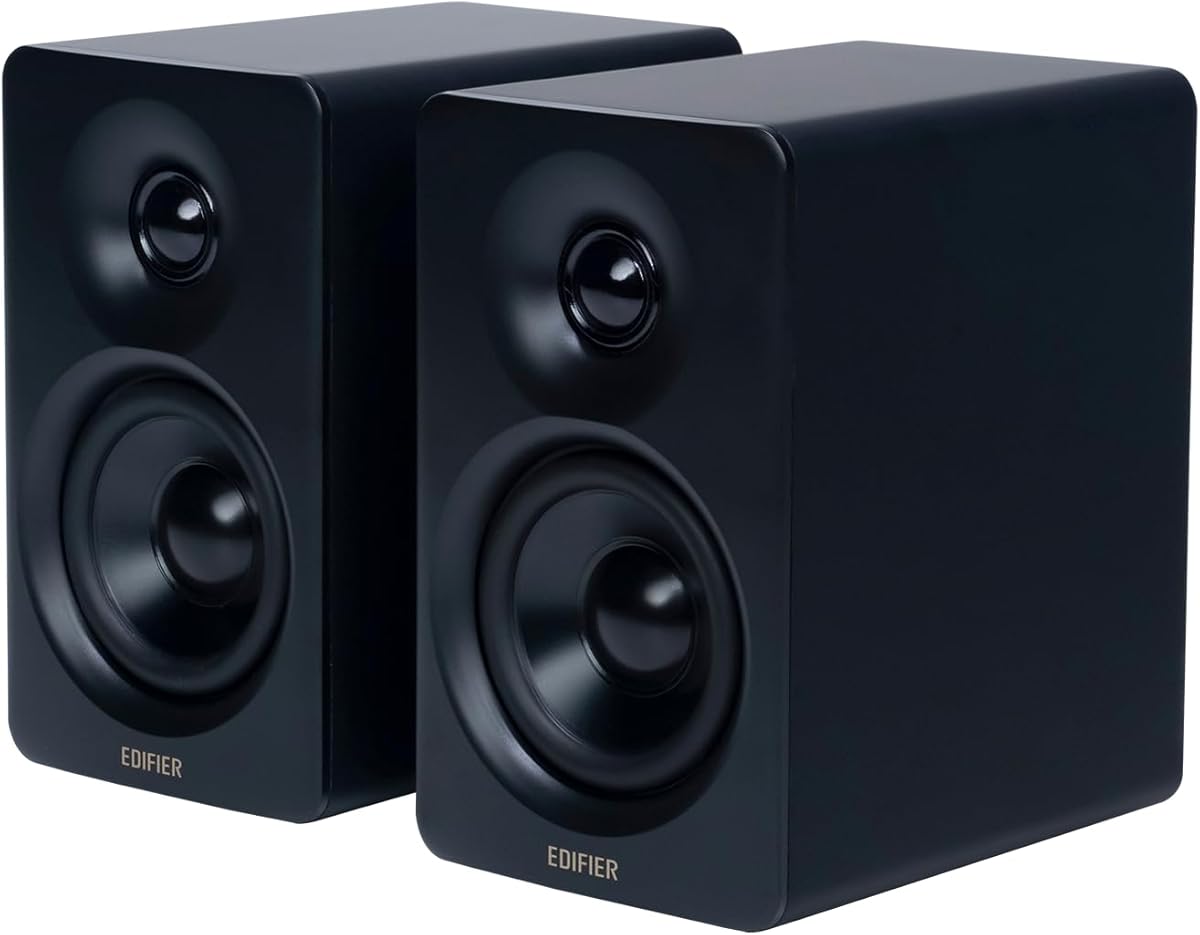
The Edifier M60 offers high-fidelity sound for discerning MacBook users who prioritize audio quality. With a 4.5 rating, it features 66W RMS power and Hi-Res Audio certification for detailed, clear playback. Its modern design fits well in professional or home office environments.
We may earn a commission when you buy through this link, at no additional cost to you.
Strengths include Bluetooth 5.3 with LDAC support for high-bitrate wireless streaming from compatible devices. The cap-sensitive touch panel provides intuitive control with automatic backlighting for nighttime use. Bundled aluminum stands angle speakers toward ear level to improve sound staging and reduce distortion.
The larger size and higher price may not suit smaller desks or tight budgets. While sound quality is exceptional, the setup requires more space than compact models. These factors are acceptable trade-offs for those seeking studio-quality sound on a desktop.
This speaker is perfect for audio editors or music enthusiasts using a Mac for creative work. The Hi-Res certification ensures you hear every detail in your tracks or movies. We recommend it for users willing to invest in superior audio performance.
Certified for high-resolution playback, delivering studio-grade clarity for music and media consumption.
Cap-sensitive panel offers seamless interaction with automatic lighting that activates when your hand approaches.
We may earn a commission when you buy through this link, at no additional cost to you.
The Creative Pebble V3 is tailored for MacBook users with USB-C ports seeking minimalist connectivity. Rated 4.4, it uses a single USB-C cable for power and audio, keeping your desk tidy. It also supports Bluetooth 5.0 for wireless listening when away from your computer.
We may earn a commission when you buy through this link, at no additional cost to you.
Standout features include Clear Dialog audio processing for intelligible spoken content without disturbing background effects. The gain switch allows amplified audio output when using high-power USB-C ports. The 45-degree elevated drivers direct sound precisely to your ears for a better listening sweet spot.
While the design is sleek, the build feels somewhat lightweight compared to premium models. The included USB-C to USB-A converter helps older Macs connect but adds slight bulk. These minor drawbacks do not overshadow the convenience and clarity it offers for everyday use.
Ideal for users wanting clean cable management and clear speech for meetings or videos. Its compact size fits easily on crowded desks near your Mac. We recommend it for those prioritizing simplicity and modern USB-C integration in their setup.
Single cable solution removes clutter while ensuring reliable power and audio transfer from your Mac.
45-degree elevated drivers aim sound directly to your ears for optimal listening comfort.
We may earn a commission when you buy through this link, at no additional cost to you.
The Edifier MR3 delivers studio-grade accuracy for professional MacBook users working in audio or video. With a 4.5 rating, it offers Hi-Res Audio certification and a flat frequency response for precise monitoring. It is ideal for creators needing reliable playback for editing work.
We may earn a commission when you buy through this link, at no additional cost to you.
Strengths include balanced TRS and RCA inputs for professional connections alongside standard AUX. Bluetooth supports multi-point connections, allowing simultaneous pairing with multiple devices. The EDIFIER ConneX app enables detailed EQ adjustments to customize sound for different music or work types.
Setup requires careful placement to achieve optimal sound staging due to its monitor design. Higher pricing reflects its professional features which may not suit casual listeners. These factors are acceptable for creators prioritizing accuracy over convenience.
Best for audio engineers or video editors using a Mac for content production. The ability to switch modes like Monitor ensures you hear the true source audio. We suggest this for those needing precise sound control for creative projects.
Flat response from 52Hz to 40kHz ensures you hear audio as intended without coloration.
Multi-point Bluetooth lets you connect to your Mac and phone simultaneously for seamless switching.
We may earn a commission when you buy through this link, at no additional cost to you.
This Computer Speakers USB model offers a unique clip-on design perfect for saving desktop space near your MacBook. Rated 4.2, it features a clamp that attaches to monitor edges, freeing up desk real estate. It includes a USB-C adapter for compatibility with modern Apple devices.
We may earn a commission when you buy through this link, at no additional cost to you.
Adaptive channel switching ensures left and right audio channels remain correct even when clipped upside down. Touch controls on the front allow quick muting and volume changes. Dual passive radiators enhance bass for a richer sound experience in a small footprint.
The clamp mechanism only works with monitors within a specific thickness range which may limit compatibility. Controls are simple but lack advanced customization options for audio tuning. These limitations are acceptable given the innovative space-saving form factor.
Ideal for users with limited desk space who want sound close to eye level. The ability to mount directly on your screen integrates well with sleek Mac setups. We recommend it for those prioritizing desk organization and easy audio access.
Securely attaches to monitor edges to save valuable desk space while keeping sound near eye level.
Includes adapter for both USB-A and USB-C ports ensuring connection to most modern Macs.
We may earn a commission when you buy through this link, at no additional cost to you.
The Upgraded USB Speaker simplifies setup with a true plug-n-play experience for MacBook users. Rated 4.2, it uses a single USB cable for both power and audio, eliminating extra wires. It works seamlessly with macOS after selecting it as the playback device.
We may earn a commission when you buy through this link, at no additional cost to you.
Built-in dual 3W drivers and a passive radiator provide loud sound with enhanced bass for the price. The design is lightweight and portable, making it easy to move between rooms or take with you. It avoids the need for separate AUX cables or drivers.
Aesthetics are functional rather than stylish, which might not match high-end decor. Volume range is good but may not fill very large rooms. These trade-offs are acceptable for users seeking simplicity and cost-effectiveness in their audio upgrade.
Perfect for temporary setups or shared spaces where easy connection is key. Its universal compatibility ensures it works well with MacBook systems out of the box. We suggest this for users prioritizing ease of use over premium features.
No driver installation needed; just plug into USB and select the device in system preferences.
One cable handles both power and audio to keep your desk cable clutter-free and organized.
We may earn a commission when you buy through this link, at no additional cost to you.
The FUNLOGY Speaker stands out with a 30-degree tilt design aimed directly at your ears. Rated 4.2, it delivers 14W stereo output with clear mids and highs for balanced sound. The design is compact yet powerful enough for everyday MacBook desktop usage.
We may earn a commission when you buy through this link, at no additional cost to you.
A key feature is the gold-plated AUX input which minimizes signal noise for consistent sound quality. The tactile volume dial offers precise control without reaching for software settings. Award-winning Japanese quality ensures reliable performance and a stylish matte finish that suits modern setups.
Bass response is punchy but not as deep as models with larger passive radiators. Requires both USB and AUX cables for full operation on devices without Bluetooth. These factors are minor given the ergonomic design and build quality at this price point.
Ideal for users who value precise sound delivery and tactile control. The tilt ensures you get the best audio angle without adjusting physical speaker positions. We recommend it for those prioritizing ergonomic sound delivery on a MacBook desk.
30-degree upward tilt optimizes audio delivery straight to your ears for immersive listening.
Japanese manufacturing and gold-plated inputs ensure reliable performance and reduced audio noise.
We may earn a commission when you buy through this link, at no additional cost to you.
The Dell Speakerphone SP3022 is designed specifically for professional MacBook users in virtual meetings. Rated 4.2, it offers full duplex audio allowing multiple people to speak simultaneously clearly. Microsoft Teams and Zoom certifications ensure seamless integration with common conference platforms.
We may earn a commission when you buy through this link, at no additional cost to you.
Features include an MS Teams button for quick meeting access and LED indicators for status like mute or volume. AI noise cancellation filters background sounds so your voice remains clear during calls. It connects easily via USB-A or USB-C to your Mac setup.
This unit prioritizes voice communication over high-fidelity music playback which may not suit entertainment needs. Price reflects its specialized professional features rather than general multimedia use. These factors are acceptable for business-focused users prioritizing call clarity.
Best for remote workers or executives needing reliable audio for daily conference calls. The full duplex capability prevents interruptions during collaborative meetings. We suggest this for those prioritizing communication quality over music streaming.
Certified for Teams and Zoom to guarantee seamless functionality with common business platforms.
Smart filters remove background noise ensuring your voice remains clear during video conferences.
We may earn a commission when you buy through this link, at no additional cost to you.
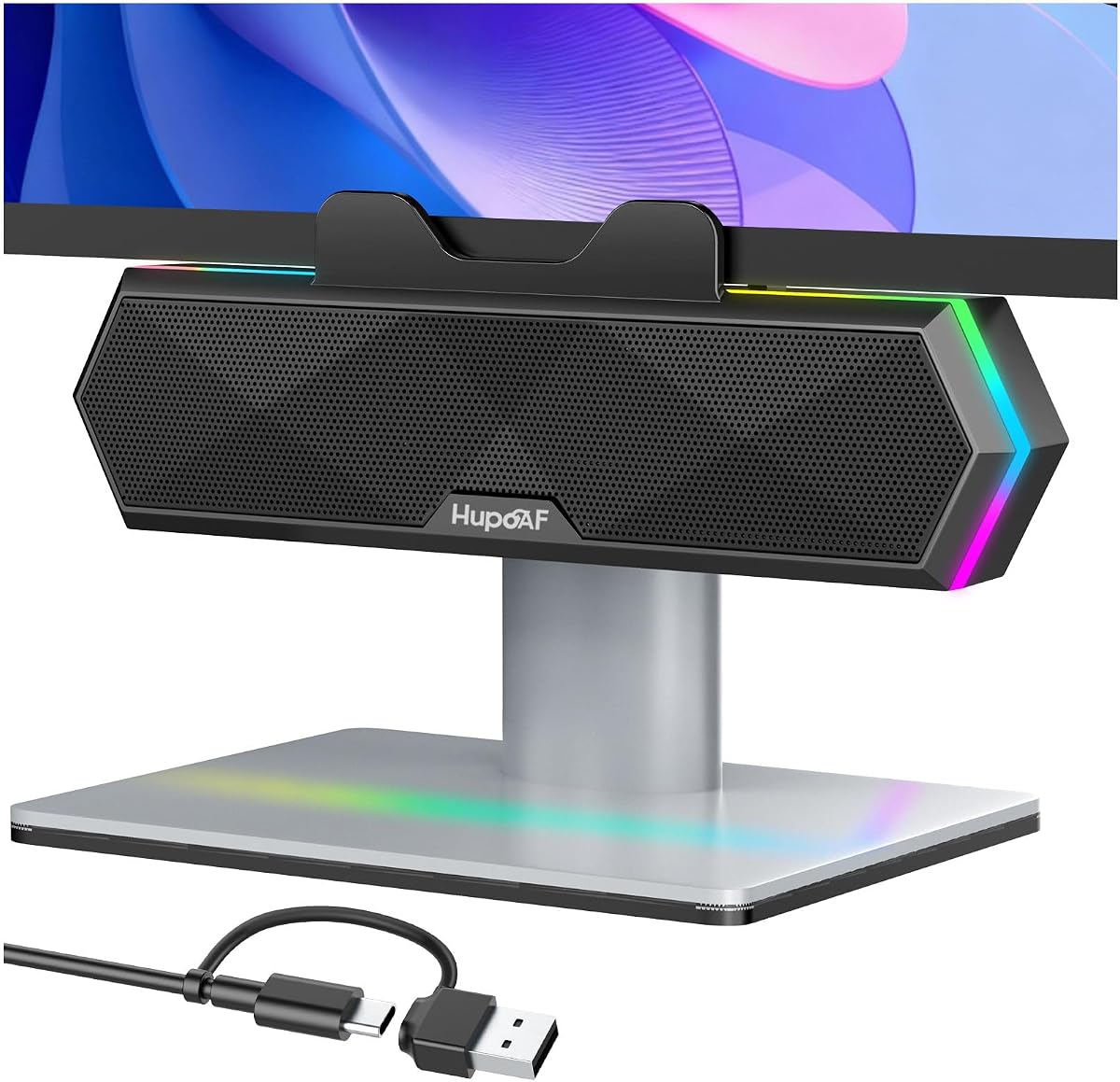
The RGB Clip-On Speaker blends functional audio with visual flair for MacBook users who value aesthetics. Rated 4.6, it features six dynamic lighting modes to match your mood or gaming rig. The clip-on design saves space while delivering crisp mids and deep bass.
We may earn a commission when you buy through this link, at no additional cost to you.
Controls include dedicated buttons for volume, mute, and lighting adjustment directly on the speaker. Dual ultra-magnetic drivers ensure sparkling sound performance despite the compact size. It works universally across macOS and other systems via simple USB-A or USB-C connection.
The lighting feature may distract some users in professional environments though it can be turned off. Clamp limits apply similar to other monitor-mounted speakers for physical compatibility. These factors are minor given the combination of style and sound at this price.
Ideal for gamers or creative professionals wanting a setup that reflects personal style. The ability to customize lighting adds a unique touch to your MacBook workspace. We recommend it for those prioritizing aesthetics alongside reliable audio performance.
Six dynamic modes allow you to match your setup vibe or turn lights off for focus.
Dedicated buttons for volume and lighting provide quick access without touching your Mac.
We may earn a commission when you buy through this link, at no additional cost to you.
Selecting the right external speakers requires understanding key factors like connectivity, sound quality, and physical design. This guide outlines essential considerations to help you find a model that enhances your MacBook experience without complicating your workflow.
Modern MacBooks often lack traditional 3.5mm audio jacks, making USB or Bluetooth essential for connection. Ensure the speaker supports USB-C or includes a reliable adapter to work seamlessly with your device. Bluetooth offers wireless convenience but may introduce minor latency compared to wired options.
Look for speakers with sufficient wattage to fill your room without distortion. Models with passive radiators or dedicated tweeters deliver better bass and clarity for music. If you edit audio or video, prioritize Hi-Res Audio certification for accurate playback.
Desktop space is often limited, so compact or monitor-clipping designs can save valuable real estate. Consider if the speaker needs a base or if it can stand freely on your desk. The height of the speaker should align with your ear level for comfortable listening.
Physical controls like volume dials or touch buttons offer quick adjustments without navigating menus. Some models include remote controls or companion apps for deeper customization. Decide how often you adjust volume to choose between physical knobs or software integration.
USB-powered speakers simplify setup by drawing electricity from your Mac or hub. Wall-plugged models might offer higher power output but require an extra outlet. Check if the speaker includes an adapter for older USB-A ports if you have an older MacBook.
Speakers range from budget options under $30 to premium models over $200. Determine your spending limit based on how critical audio quality is for your daily tasks. Investing slightly more often yields better longevity and sound fidelity over time.
Most modern speakers are plug-and-play compatible with macOS without needing extra software. Verify that the manufacturer supports macOS specifically to avoid potential driver issues. Plug-and-play setups reduce setup time and ensure a smooth user experience.
Extras like microphone integration or RGB lighting can add value depending on your use case. Business users might prefer speakers with dedicated mute buttons for meetings. Gamers might appreciate low latency or audio effects that enhance immersion during play.
Connect your speakers to your MacBook using the appropriate cable or Bluetooth pairing process. Navigate to System Preferences and select the new audio device under Sound settings to ensure output routes correctly. This simple step ensures you get immediate audio through your external setup.
Adjust the volume settings on your Mac and the physical controls on the speakers to achieve optimal levels. Avoid setting volume to maximum constantly to prevent speaker distortion and protect your hearing. Balanced levels ensure clear sound and extend the lifespan of your audio equipment.
Keep speakers in a clean, dry environment and wipe them with a soft cloth to remove dust. Regular cleaning prevents debris from clogging grilles and affecting sound quality over time. Proper maintenance ensures your setup continues to perform reliably for years to come.
Most modern MacBooks lack 3.5mm jacks so you may need a USB-C to 3.5mm adapter for wired speakers. Alternatively, choose USB-powered or Bluetooth speakers for direct connectivity. Always check your Mac's available ports before purchasing to ensure compatibility.
Wired USB or analog connections generally offer better sound quality and lower latency than Bluetooth. Bluetooth is convenient for wireless use but can compress audio slightly. Choose wired for critical listening or Bluetooth for casual and mobile use.
Most speakers with 3.5mm or USB inputs work across different devices like PCs and tablets. Just ensure the power source matches the device port type. Universal connectivity makes these speakers a flexible long-term investment for your tech setup.
Check if the correct output device is selected in macOS Sound settings. Ensure the volume is not muted in the system or on the speakers themselves. Some speakers have a gain switch that needs adjustment to reach full output levels.
USB-powered speakers draw power from your Mac which can reduce battery life during use. To conserve power, use speakers connected to a wall outlet when possible. Bluetooth speakers generally draw less power from the Mac since they have their own battery or adapter.
Place speakers on solid surfaces or included stands to reduce vibrations that dampen bass. Adjust any EQ settings in your software or speaker app to boost low frequencies. Ensure speakers are positioned to avoid corners that might cancel out sound waves.
Built-in microphones are useful for video conferencing but may lack audio quality. If you host many meetings, a dedicated mic might offer clearer sound. For casual use, a speaker with a mic is convenient and saves desk space.
Remove the device from Bluetooth settings on your Mac and power cycle the speakers. Press the pairing button again to re-initiate the connection process. This simple reset often resolves connection issues without needing a full system restart.
We reviewed ten distinct speakers ranging from budget-friendly models to premium audio setups. The Logitech Z207 offers wireless flexibility while the Edifier M60 delivers studio-quality sound for creators. Each choice fits different needs whether for office calls or immersive music listening.
Prioritize connectivity options that match your Mac's ports to avoid extra adapters. Consider your daily usage habits to decide between wired clarity and wireless convenience. Investing in the right speaker enhances both productivity and entertainment on your MacBook.
Prices and stock levels change frequently so verify current details before purchasing. Check user reviews for recent feedback on compatibility with your specific Mac model. A well-chosen speaker setup transforms your workspace into a more engaging environment.