
NOYAFA NF-488
4.5Editor score
Identifies standard and non-standard PoE
Backlit LCD screen for dark areas
Tests network cable continuity
This guide compares the top inline POE testers for 2026, evaluating features like voltage testing, OLED displays, and battery-free operation to help you choose
Inline POE testers are essential tools for network professionals who need to verify power delivery over Ethernet cables. These devices ensure that switches and injectors provide the correct voltage and wattage to powered devices like cameras and phones.
We compared ten leading models based on their testing modes, display clarity, and compatibility with various PoE standards. Our analysis focuses on reliability, ease of use, and the ability to troubleshoot complex network power issues efficiently in the field.
Each pick highlights specific strengths such as OLED screens, compact designs, or advanced continuity features. Please note that prices and availability can change frequently, so verify current listings before making your final purchase decision online.
4.5Editor score

4.1Editor score

4.0Editor score
The following table provides a side-by-side comparison of all ten selected inline POE testers, highlighting their key specifications, display types, and unique features to help you make an informed decision.



The TRENDnet TC-NTP1 stands out as a top choice for professionals needing reliable inline testing without external power. It supports multiple testing modes and provides clear voltage and wattage readouts for accurate diagnostics on the go.
We may earn a commission when you buy through this link, at no additional cost to you.
Its unique testing modes allow you to verify PSE devices, check non-standard passive PoE, and monitor inline power delivery in real time. The step button lets you lock specific readouts like wattage for continuous monitoring during installations.
While the rating is respectable, some users may find the lack of a graphical display compared to OLED models. However, the simplicity and battery-free operation make it a robust tool for field technicians.
This unit is ideal for installers working with government projects due to its NDAA compliance. If you need a straightforward tool that works right out of the box without charging, this is a strong recommendation.
The NDAA compliance ensures this tester meets strict government standards for U.S. and Canadian installations, making it a safe choice for public sector projects.
With three distinct testing modes, you can quickly identify whether an issue lies with the switch, the cable, or the powered device itself.
We may earn a commission when you buy through this link, at no additional cost to you.
The PoE-T100 offers an exceptional value for budget-conscious technicians who still demand high-quality data. Its OLED display provides sharp real-time readings of voltage, current, and power, making it easy to read in various lighting conditions.
We may earn a commission when you buy through this link, at no additional cost to you.
Self-powered operation means you never have to worry about carrying spare batteries during long installation days. It draws power directly from the PoE or DC line, ensuring continuous operation for extended field work.
While it is a newer model on the market, its feature set rivals more expensive units. The only minor drawback is the lack of extensive long-term user reviews to confirm long-term durability over years of heavy use.
For installers looking for an affordable yet advanced tool, this is a top pick. It covers all essential standards including 802.3af/at/bt and handles passive PoE with ease.
The OLED screen presents all critical data on a single page, reducing the need to cycle through menus and speeding up the diagnostic process significantly.
Beyond standard PoE, this tester handles DC supplies from 12 to 57 volts, allowing you to test a wider variety of network power sources with one device.
We may earn a commission when you buy through this link, at no additional cost to you.
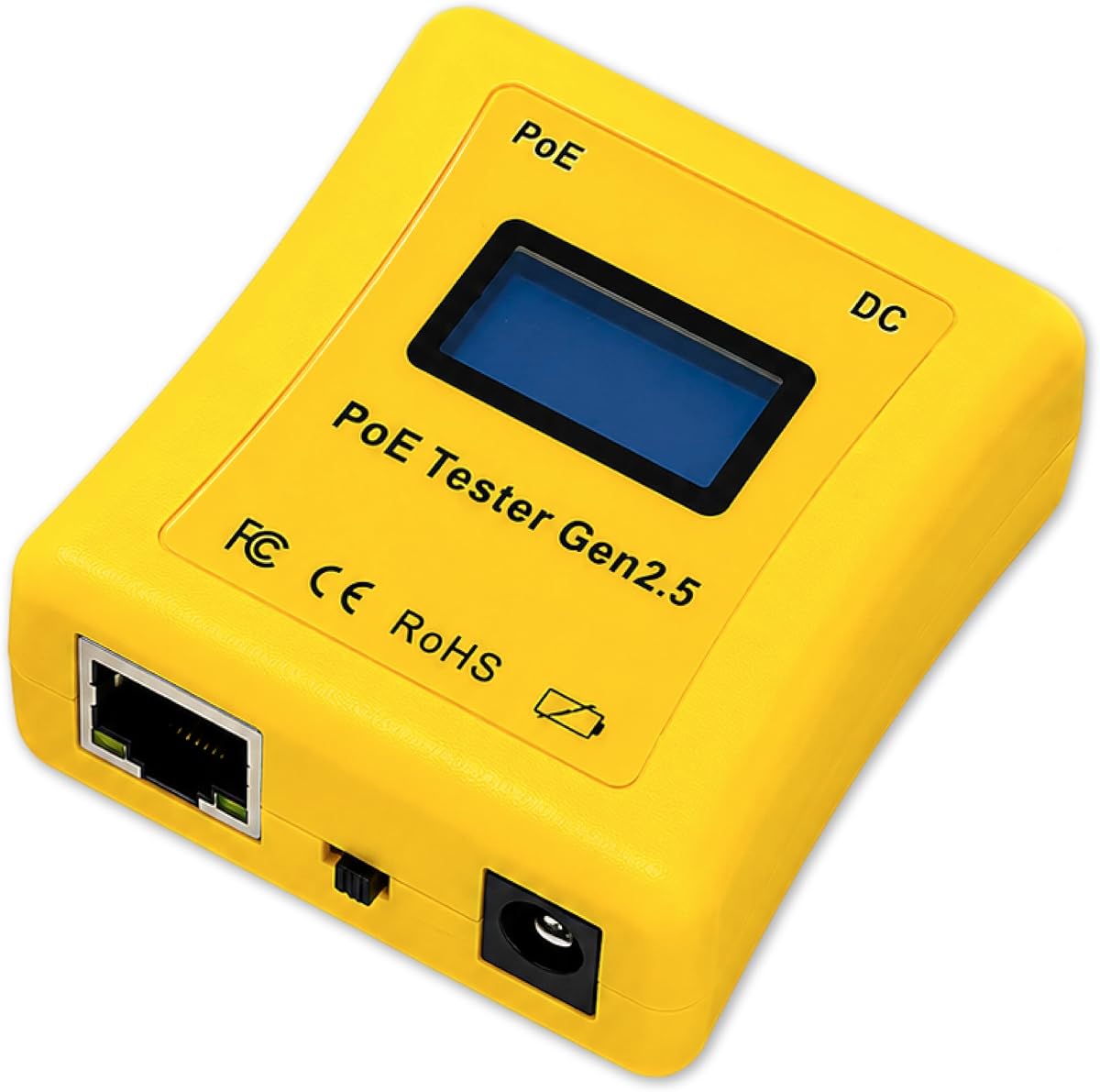
This unit from PoE Texas is designed for professionals who need to handle high-wattage devices and complex switch environments. It features a unique simulate mode that allows you to test managed switches without a device attached.
We may earn a commission when you buy through this link, at no additional cost to you.
The design has been refined in the Gen2.5 version to be smaller and more ergonomic, fitting comfortably in hand during extended use. It draws power from the line itself, eliminating battery anxiety during critical troubleshooting tasks.
The main trade-off is the cost, which is higher than many entry-level testers. However, the ability to measure up to 280 watts and the professional-grade build quality justify the investment for serious network engineers.
If you frequently work with 802.3bt standards or need precise DC supply measurements, this tool is worth the premium. It delivers accurate data and durable performance for demanding installation scenarios.
The simulate PoE device mode is invaluable for testing auto-negotiating switches where you need to verify power output without connecting a fragile device.
With support for up to 280 watts, this tester ensures you can verify power delivery for high-performance access points and PTZ cameras that demand more energy.
We may earn a commission when you buy through this link, at no additional cost to you.
The NOYAFA NF-488 is a versatile tool that combines PoE testing with basic continuity checks. Its high rating indicates strong user satisfaction, particularly regarding its ease of use and clear display.
We may earn a commission when you buy through this link, at no additional cost to you.
The large backlit LCD screen ensures visibility even in dark server rooms or outdoor environments. It can identify standard and non-standard PoE information, including voltage standards and jumper methods, automatically.
While it does not offer the high-wattage capabilities of premium models, it is excellent for standard installations where verifying cable integrity is just as important as power testing.
This device is a perfect fit for technicians who want a multi-tool approach. Its anti-slip casing and compact design make it easy to carry in a pocket for daily use.
Testing for open circuits and short circuits ensures your physical cabling is sound before you even attempt to test power delivery.
The concise display interface means you can see results at a glance without navigating complex menus or reading lengthy text.
We may earn a commission when you buy through this link, at no additional cost to you.
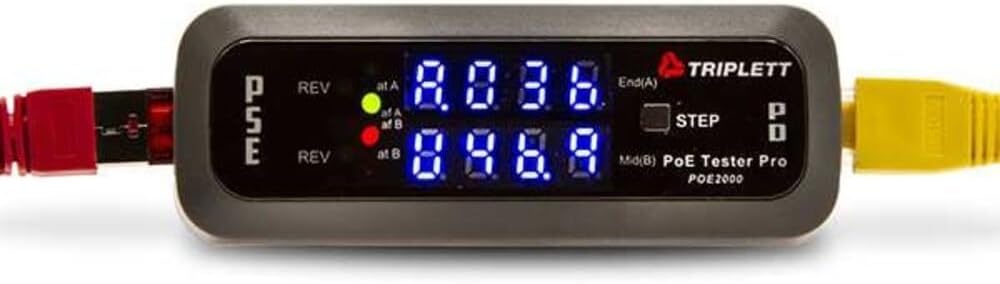
The Triplett POE2000 uses a classic LED-based interface to provide quick visual feedback on power status. It is designed to help you identify the source of power and check polarity quickly.
We may earn a commission when you buy through this link, at no additional cost to you.
Dual 7-digit LEDs show exactly which pairs are active, helping you understand if the power is coming from End Span or Mid Span devices. This visual clarity can be useful when physical access to the switch is limited.
The rating is lower than modern devices with screens, likely due to the limited data it provides. You will not get exact wattage numbers, but rather an indication of presence and status.
This model is best for technicians who prefer simple visual cues over complex data. It is a straightforward tool for checking basic power connectivity in older network setups.
The LED system allows you to quickly scan for power presence without needing to read small text on a screen.
Knowing if power is supplied via End Span or Mid Span helps in troubleshooting wiring issues within the infrastructure.
We may earn a commission when you buy through this link, at no additional cost to you.
This model from Triplett improves on the basic LED system with more comprehensive detection capabilities. It helps speed up the installation and troubleshooting of PoE system devices by providing clear status indicators.
We may earn a commission when you buy through this link, at no additional cost to you.
The tester detects PSE-type/class and provides visual indicators for IEEE standards, allowing you to verify compliance without digging into documentation. It cycles between voltage, current, and power for a complete view.
While it is a solid device, the lack of extensive reviews makes it slightly less certain than established competitors. However, the brand reputation suggests reliable performance in professional environments.
For installers needing a balance between visual simplicity and data depth, this is a strong contender. It covers the essential needs of modern network power verification effectively.
LEDs provide immediate feedback on IEEE compliance, saving time during initial setup and verification stages.
The ability to detect whether power is across all four pairs or specific pairs helps in diagnosing mismatched equipment.
We may earn a commission when you buy through this link, at no additional cost to you.
Jonard Tools delivers a comprehensive package that handles both power testing and cable continuity verification in one unit. It supports standard and passive PoE, making it versatile for different network environments.
We may earn a commission when you buy through this link, at no additional cost to you.
The tool is compact and lightweight, designed for easy portability. It includes a belt clip and a complete kit with adapters, ensuring you have everything needed for the job in the field.
While it is battery-free when in PoE mode, you will need AA batteries to test unpowered cables. This is a standard trade-off for many handheld tools but worth noting before purchase.
This tool is ideal for general network technicians who handle both cabling and power. Its ability to measure resistance ensures your cable plant is healthy before applying power to sensitive devices.
The inclusion of cables and adapters means you can start testing immediately without buying extra accessories separately.
Measuring resistance ensures that you are not sending power over a damaged cable, protecting your equipment from potential short circuits.
We may earn a commission when you buy through this link, at no additional cost to you.
With a high user rating, this tester stands out for its robust feature set that includes cable length measurement. It ensures you can verify not just power but also the physical integrity of the cable run.
We may earn a commission when you buy through this link, at no additional cost to you.
The rechargeable battery provides extended testing sessions without the hassle of replacing batteries constantly. It also features port flash detection to locate active ports quickly in busy panels.
One trade-off is that it requires charging, which means you need a power source to prepare the device for use. However, the convenience of not buying batteries often outweighs this minor inconvenience.
For technicians who frequently test cable lengths alongside power, this is an excellent choice. The customizable auto-shutoff helps manage power consumption during long workdays.
Locating active ports without calling a colleague to toggle the switch saves significant time during troubleshooting tasks.
Auto-shutoff and clear low-battery indicators ensure you never get caught in the field with a depleted unit.
We may earn a commission when you buy through this link, at no additional cost to you.
This unit represents a high-end approach to PoE testing, combining it with digital multimeter capabilities for power panels. It is designed for users who need advanced diagnostic data and physical measurement accuracy.
We may earn a commission when you buy through this link, at no additional cost to you.
While the description is brief, the integration with CAT5/CAT6 DVM suggests it can handle complex voltage and current checks beyond simple PoE verification. This makes it suitable for specialized industrial or data center environments.
The main drawback is the high cost and limited public information on its exact specs. However, for professionals who need precision instrument-level data in a handheld form factor, it offers a unique value.
Choose this if you require a tool that bridges the gap between a network tester and a multimeter. It provides the depth of data needed for complex infrastructure maintenance.
Combining digital multimeter functions with PoE testing allows you to carry one tool instead of two separate devices.
The robust build and advanced features make this a reliable option for heavy-duty commercial and industrial networking tasks.
We may earn a commission when you buy through this link, at no additional cost to you.
This NF-488 model is a strong budget option with a high user rating, making it a popular choice for basic network maintenance tasks. It covers essential POE testing and continuity checks effectively.
We may earn a commission when you buy through this link, at no additional cost to you.
The inclusion of a loop-back test function helps diagnose switch loop issues, while the LED lamp aids visibility in dark closets. It also offers lifetime friendly customer service which adds peace of mind.
While it may not have the advanced features of premium models, it performs core functions reliably. It is perfect for technicians who need a straightforward tool for routine network checks and repairs.
For general IT support and small business installations, this unit offers great value. It balances cost and functionality well for day-to-day network troubleshooting.
Diagnosing loop issues is critical for preventing network storms, and this tool makes it easy to identify such problems.
Lifetime customer service ensures you have help available if you encounter any issues with the tool or need setup advice.
We may earn a commission when you buy through this link, at no additional cost to you.
Selecting the right inline POE tester requires considering several factors to ensure it meets your specific technical and financial requirements.
Different testers offer various modes such as T-mode, N-mode, and I-mode for testing PSE devices and PD devices. Ensure the model you choose supports the specific standards you work with like 802.3af/at/bt.
Look for versatile modes that allow you to simulate devices and measure inline power without needing multiple tools.
The display type significantly impacts readability. OLED screens provide sharp contrast, while LCDs with backlighting are essential for low-light environments.
Choose a display that presents all key data clearly in one view to speed up your diagnostic process.
Some testers are battery-free and draw power from the PoE line, while others require rechargeable batteries or AA batteries for unpowered testing.
Consider your workflow to decide if you prefer no maintenance or the flexibility of a battery-powered unit.
Ensure the tester supports the voltage and wattage of your devices. Some units cap at 100W while others go higher for 802.3bt devices.
Check the voltage range to ensure compatibility with non-standard passive PoE systems you might encounter.
Many modern testers also check for cable continuity and shorts. This dual functionality saves time by allowing you to verify physical cables alongside power.
If you often deal with faulty cabling, choose a model that includes continuity verification features.
Field work requires a compact and ergonomic tool. Look for lightweight designs with belt clips or pockets that fit easily in a work kit.
An anti-slip casing can improve grip and safety during testing in unstable or crowded areas.
For government or enterprise projects, NDAA compliance might be a requirement. Verify if the manufacturer states compliance with specific regulations.
Prioritize models that explicitly state compliance if you work in regulated industries.
Technical support and warranty periods vary by brand. Tools backed by years of manufacturer protection offer better peace of mind for investments.
Always check the warranty duration and availability of customer support before purchasing.
To start testing, plug the inline tester between the switch or injector and the powered device. Ensure the connections are secure to avoid false readings during the test.
Observe the display for voltage, current, and wattage values. Cycle through the modes to identify if the power source is standard or non-standard and check for polarity errors.
After use, disconnect the tester and store it in a protective case to prevent damage to the ports. Clean the connectors regularly to maintain reliable contact with your cables.
An inline POE tester verifies that switches and injectors provide the correct power over Ethernet cables. It checks voltage, current, and wattage to ensure devices like cameras receive stable power without data interruption.
No, many modern testers are battery-free and draw power directly from the PoE line. However, some models require batteries for testing unpowered cables or for continuity checks.
Yes, most advanced testers support both standard IEEE 802.3af/at/bt and non-standard passive PoE. They can differentiate between different voltage ranges like 12V to 57V.
High-quality testers offer precise measurements for voltage and wattage. Look for models with OLED displays and multiple testing modes for the most accurate results in professional settings.
Many models combine POE testing with continuity checks. They can detect open circuits and shorts in the cable, helping you troubleshoot both power and data issues simultaneously.
Yes, PD testing simulates a device to check the switch output, while PSE testing checks the power sourcing equipment. Advanced tools allow you to switch between these modes easily.
We have reviewed ten top inline POE testers ranging from budget options to premium tools with advanced features. Each offers unique benefits for network professionals and installers.
Prioritize the display quality and testing modes that match your daily workflow. If you need high-wattage support, choose a model with higher capacity and professional-grade durability.
Prices and availability change frequently so always check the current listings for the best deal. These tools are essential for maintaining reliable power delivery in modern network infrastructure.