
Surface Thunderbolt 4 Docking Station
4.3Editor score
Dual 4K at 60Hz HDMI
100W DC charging
Triple display support
This guide compares the top docking stations for Surface Pro 11 in October 2026, evaluating connectivity, video output, charging power, and build quality to
Finding the right docking station for your Surface Pro 11 is essential for transforming a portable tablet into a powerful desktop workstation. A quality hub expands connectivity options, supports multiple high resolution displays, and ensures stable charging while you work on demanding projects.
We evaluated ten top rated models based on their port selection, video output capabilities, data transfer speeds, and overall compatibility with the Surface ecosystem. Each product was analyzed for its ability to handle professional workflows including video editing, coding, and multimedia presentations without bottlenecks.
This guide highlights the standout features of every pick so you can match a dock to your specific needs. Please note that product availability and pricing may vary over time so check current details before making your final purchase decision.
4.3Editor score
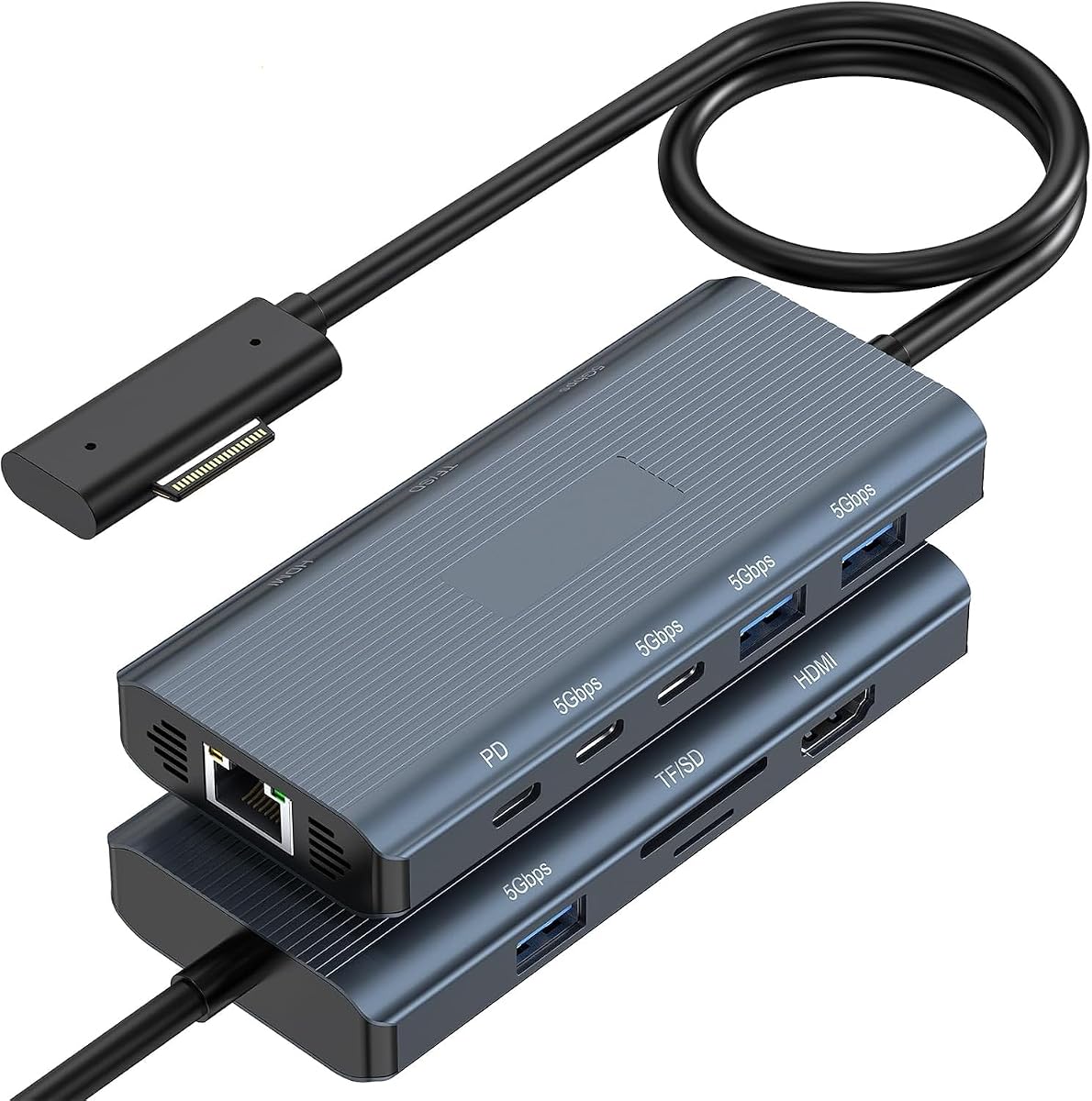
4.8Editor score
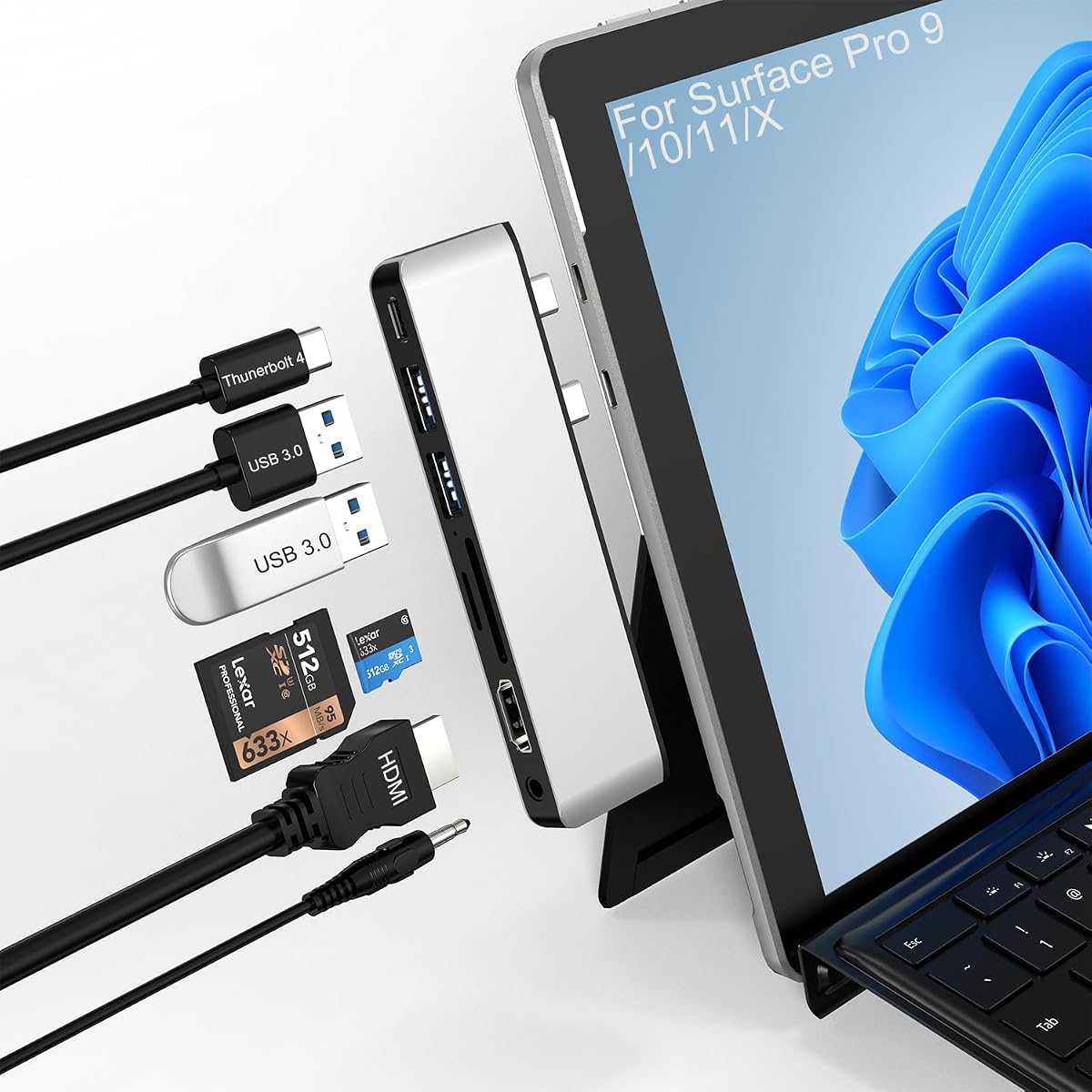
4.2Editor score
The following table provides a side by side overview of the key specifications for each docking station evaluated in this guide to help you quickly compare connectivity and performance features.



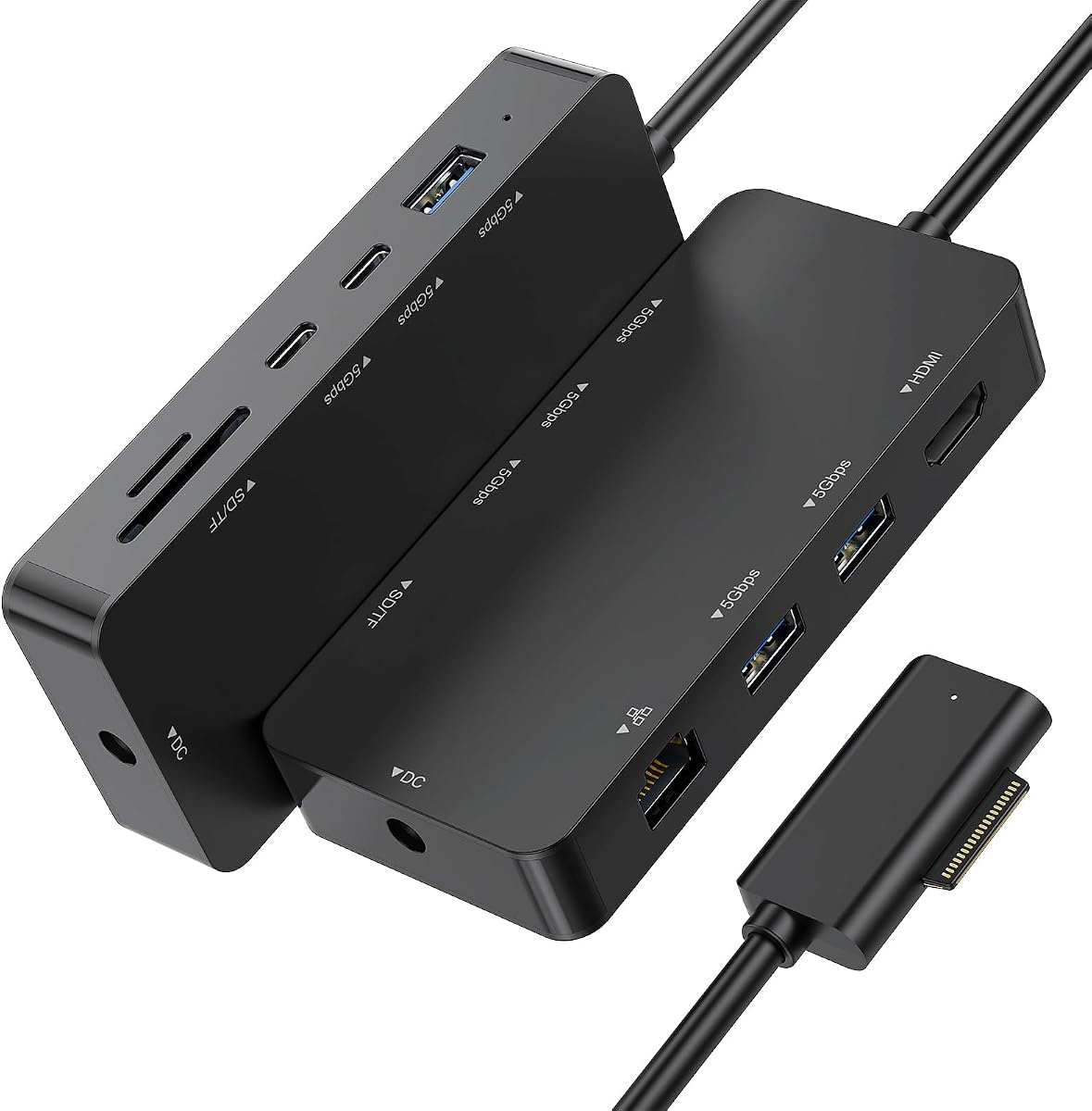
This 11-in-1 docking station stands out as the top choice for Surface Pro 11 users seeking a balance of performance and versatility. With a strong rating and robust feature set it delivers reliable connectivity for both work and entertainment needs.
We may earn a commission when you buy through this link, at no additional cost to you.
Its standout quality is the support for 4K resolution at 60Hz over HDMI which ensures smooth visuals for video playback and professional design work. The inclusion of a 1000Mbps Gigabit Ethernet port guarantees a stable wired network connection essential for large file transfers or video conferencing.
While it offers exceptional video and network performance users must remember that a power supply is required for usage. The magnetic Surface connection is convenient but must be aligned correctly which may take a moment to learn initially.
Anyone needing high refresh rate display output and stable networking should consider this dock highly. It remains a solid investment for productivity focused setups that require multiple ports and reliable charging capabilities.
The 4K at 60Hz HDMI support allows for fluid motion in videos and smoother cursor movement compared to standard 30Hz docks.
With three USB 3.0 ports and separate USB C data ports this hub connects most peripherals without needing additional adapters.
We may earn a commission when you buy through this link, at no additional cost to you.
This 12 in 1 docking station is designed specifically for users who need to connect three external screens simultaneously. It transforms your tablet into a multi monitor workstation ideal for coding or financial trading.
We may earn a commission when you buy through this link, at no additional cost to you.
The key strength lies in its triple display capability using two HDMI ports and one VGA port. While HDMI outputs are limited to 30Hz this setup provides ample screen real estate for multitasking across different applications.
However the Ethernet port is limited to 100Mbps which may be slower than Gigabit options found in other models. Additionally HDMI refresh rates are capped meaning fast moving content may not be as smooth.
Professionals who prioritize screen count over high refresh rates will find this dock valuable. It simplifies connectivity for complex desk setups requiring multiple visual outputs at once.
Users can extend their desktop across three screens by turning off the Surface screen when connecting three external monitors.
The 3.5mm audio jack and USB C data ports allow for headphones and fast storage connections alongside video outputs.
We may earn a commission when you buy through this link, at no additional cost to you.
This Thunderbolt 4 hub offers impressive performance for its price point making it a top budget choice. It utilizes modern Thunderbolt technology to provide high speed data and video transfer.
We may earn a commission when you buy through this link, at no additional cost to you.
Its standout feature is the Thunderbolt 4 USB C port which supports 40Gbps data transfer and 100W charging. This allows for fast file syncing and full speed charging of your Surface Pro 11.
The aluminum case helps with heat dissipation and durability though users should note that it might not fit if a protective case is on the device. Also SD and TF cards cannot be read at the same time.
Travelers and users needing quick data access will appreciate the compact form factor. It delivers premium Thunderbolt features without a premium price tag.
The Thunderbolt 4 port ensures future proof connectivity with high bandwidth for data and video combined in one connection.
The 100W PD charging keeps your laptop powered during intensive tasks without needing a separate charger cable.
We may earn a commission when you buy through this link, at no additional cost to you.
Rated highly by users this docking station excels at office multitasking with its triple display support. It comes with a dedicated 72W adapter to ensure stable power during long work sessions.
We may earn a commission when you buy through this link, at no additional cost to you.
The key strength is its ability to handle three external monitors simultaneously via dual HDMI and VGA ports. It also supports simultaneous access to SD and TF cards which speeds up media workflows.
A limitation is that the Ethernet port maxes out at 100Mbps which may be insufficient for heavy network tasks. Additionally VGA outputs are limited to 1080p resolution.
Office professionals needing multiple screens for spreadsheets and coding will find this model ideal. The included adapter ensures reliability without needing extra purchases.
Users can insert both SD and TF cards at once for quick photo transfers without swapping cards manually.
The 72W adapter maintains laptop power while running multiple external displays and USB peripherals efficiently.
We may earn a commission when you buy through this link, at no additional cost to you.
This dock is designed for hybrid work environments with features that support presentations and remote calls. It offers triple display support and audio output for versatile setups.
We may earn a commission when you buy through this link, at no additional cost to you.
Its key strengths include high user satisfaction and a robust 72W power supply that keeps devices charged during meetings. The 3.5mm audio jack allows for direct headphone connection which is useful for private audio.
On the downside the Ethernet connection is limited to 100Mbps which might not suit high bandwidth internet needs. Also VGA ports are restricted to 1080p resolution.
Remote workers needing a reliable conference setup will appreciate the audio and display options. It balances connectivity and ease of use effectively.
The headphone jack enables direct connection to wired headphones for private calls or music without extra dongles.
Dual HDMI and VGA ports allow mixing different monitor types to maximize workspace efficiently.
We may earn a commission when you buy through this link, at no additional cost to you.
This Thunderbolt 4 dock represents a premium option for users who need top tier performance. It offers dual 4K at 60Hz HDMI ports and a dedicated Gigabit Ethernet port for reliable connectivity.
We may earn a commission when you buy through this link, at no additional cost to you.
Its standout quality is the combination of high refresh rate video and fast networking which is rare in docking stations. The 100W DC charging adapter ensures full power delivery even with multiple peripherals attached.
While it delivers high performance it comes at a higher price point and may require careful setup to manage triple display modes correctly. Also SD and TF card readers are included but are not 40Gbps.
Creative professionals and power users will find this dock worth the investment. It eliminates bottlenecks in high resolution video and data workflows.
Dual 4K at 60Hz HDMI outputs support smooth editing timelines and professional visual work without lag.
The Gigabit Ethernet port provides stable high speed internet for large downloads and video conferencing.
We may earn a commission when you buy through this link, at no additional cost to you.
This 10-in-1 dock is well suited for video editing workflows with strong 4K HDMI support and fast Ethernet. It includes a 65W adapter to keep devices powered during editing tasks.
We may earn a commission when you buy through this link, at no additional cost to you.
Its key strength is the combination of video output and data transfer speeds which supports high speed file access from external drives. The SD and TF slots enable direct camera card access.
The HDMI port is limited to 30Hz which is acceptable for static editing but may show lag in high speed content. It also lacks Thunderbolt connectivity for ultra high bandwidth needs.
Video editors needing a straightforward plug and play setup will appreciate this dock. It balances display quality and storage access well.
Integrated card slots allow quick import of footage from cameras without removing cards from the camera body.
The included 65W adapter ensures the laptop stays powered while running external displays and drives.
We may earn a commission when you buy through this link, at no additional cost to you.
This 12-in-1 dock is designed for home office setups requiring multiple screens and strong charging. It supports dual HDMI and VGA for triple display output with high user satisfaction.
We may earn a commission when you buy through this link, at no additional cost to you.
Its key strength is the inclusion of a 72W power input which allows for reliable charging of the Surface while connected. It also supports USB data transfers up to 5Gbps.
The Ethernet port is limited to 100Mbps and VGA is older technology which may not suit high resolution external monitors. However it remains versatile for general office use.
Home users needing extra screens for multitasking will find this dock practical. It provides broad connectivity without complex setup steps.
The 72W power input ensures consistent laptop charging even with multiple peripherals connected for hours.
A 3.5mm audio jack allows direct connection to speakers or headphones for clear sound.
We may earn a commission when you buy through this link, at no additional cost to you.
This 12-in-1 dock is built for users who need high power and triple 4K at 60Hz support. It comes with a 120W power adapter to handle intensive charging and peripheral needs.
We may earn a commission when you buy through this link, at no additional cost to you.
Its standout quality is the ability to support three external 4K displays at 60Hz which is rare for docking stations. The USB C Thunderbolt 4 port adds versatile data and charging capabilities.
The setup may be more complex due to the high bandwidth requirements and power needs. Also Thunderbolt features may need specific hardware support to work at full speed.
Power users with high resolution monitors will find this dock unmatched. It delivers performance that supports demanding multi screen workflows.
The 120W adapter ensures full power for charging and peripherals even when driving three 4K screens.
Triple 4K at 60Hz output via HDMI DP and USB C enables smooth visuals on all connected displays.
We may earn a commission when you buy through this link, at no additional cost to you.
This 10-in-1 dock features a magnetic Surface Connect interface for quick and secure attachment. It supports 4K at 60Hz HDMI and includes a 50cm cable for flexible desk placement.
We may earn a commission when you buy through this link, at no additional cost to you.
Its standout quality is the magnetic connection which makes attaching and detaching the dock effortless compared to physical connectors. It also includes a Gigabit Ethernet port for reliable network access.
The 50cm cable may be short for some desk layouts which could limit placement options. Also USB-C ports are for data only and do not support video output.
Users valuing quick connection and stable video will find this dock convenient. It simplifies daily docking workflows effectively.
The magnetic Surface Connect allows instant attachment and detaching without worrying about port alignment.
4K at 60Hz HDMI support ensures smooth visuals for video work and entertainment.
We may earn a commission when you buy through this link, at no additional cost to you.
Selecting the right docking station requires evaluating several factors to ensure it meets your workflow needs and device compatibility.
Look for HDMI ports that support 4K resolution. Higher refresh rates like 60Hz provide smoother visuals for video and gaming compared to standard 30Hz models.
Prioritize docks with 60Hz support if you use external monitors for creative work to avoid motion blur.
Ensure the dock supports 100W PD input if you need fast charging. A dedicated power adapter ensures your laptop stays powered during intensive tasks.
Always check the wattage of the included adapter to confirm it meets your laptop's charging requirements.
For stable internet choose a dock with Gigabit Ethernet. This ensures faster downloads and lower latency during video calls compared to 100Mbps models.
Gigabit Ethernet is essential if you transfer large files frequently over a network.
Check for USB 3.0 ports that support 5Gbps speeds. This allows fast transfers of large files between external drives and your Surface.
Make sure you have enough USB ports for all your peripherals to avoid needing additional hubs.
SD and TF card slots are vital for photographers and videographers. Ensure the dock supports your card types and transfer speeds.
Some docks only allow one card at a time so check specifications if you need dual access.
Aluminum cases help dissipate heat and improve durability. A compact design is beneficial for travel and desktop space saving.
Consider how the dock looks and feels when connected to ensure it fits your workspace aesthetic.
Magnetic Surface Connect docks offer convenience and quick connection. USB C Thunderbolt docks provide high bandwidth for advanced users.
Choose based on your preference for ease of use versus maximum data transfer capabilities.
If you need triple displays check the dock supports MST. Some models require turning off the Surface screen to enable three external monitors.
Ensure the resolution of all outputs meets your productivity needs for spreadsheets or coding.
Connect your Surface Pro 11 to the dock using the provided cable or magnetic connector. Ensure the power adapter is plugged in for full functionality and stable charging.
Attach external peripherals such as monitors keyboards and storage drives to the appropriate ports. The dock should auto detect devices for plug and play operation.
Keep the dock in a well ventilated area to prevent overheating. Clean ports regularly with a soft cloth to ensure consistent connections and avoid debris.
Most docking stations connect via the Surface Connect port which may be blocked by thicker cases. It is best to remove the case or use a thin protective cover to ensure a secure connection.
No many models support 4K at 30Hz which is standard for basic displays. Check specifications carefully to confirm 60Hz support if you need high refresh rates.
Most docks come with an adapter but always verify the product details. Some bus powered models may not include an adapter and rely on the Surface's internal battery.
Yes most modern docks support Power Delivery charging. The dock draws power from the adapter to charge your Surface while connected to peripherals.
Many 12-in-1 docks support up to three external monitors. You may need to turn off the Surface screen to enable triple display mode on some models.
Yes standard USB devices work with docks. Ensure your drives or cameras have standard USB 3.0 or C connectors to be compatible with the ports.
Disconnect the dock and power adapter completely then reconnect them. Restart your Surface to ensure it detects the connection properly.
This guide covers the top docking stations offering high refresh rates and reliable connectivity for Surface Pro 11 users. Each model provides unique benefits depending on your workflow and screen needs.
Prioritize video resolution and power delivery if you work with complex visual content. Ethernet speed and port selection matter more for data heavy tasks and general office use.
Always check current specifications and availability before purchasing. Prices may vary and product details can change so ensure the latest information matches your requirements.