
LG UltraFine evo 32U990A
4.5Editor score
Thunderbolt 5 Support
Nano IPS Black Panel
DisplayHDR 600
Choosing the right display is crucial for modern workflows requiring high precision and detail. A 6K monitor offers exceptional clarity, making it ideal for video editing, design, and professional content creation tasks.
We evaluated ten leading models based on resolution, color accuracy, connectivity options, and overall build quality. Each product was selected for its ability to deliver sharp visuals and reliable performance in demanding environments.
Our picks highlight unique strengths like touch input, high refresh rates, and Thunderbolt connectivity. Prices and availability change frequently, so verify current offers before making your final purchasing decision today.
4.5Editor score

3.9Editor score

3.7Editor score
As an Amazon Associate we earn from qualifying purchases.
The following table provides a side-by-side overview of key specifications for each model, helping you quickly identify the best fit for your specific workspace needs and budget.




The ASUS ProArt PA32QCV stands out as a top-tier choice for professionals seeking precision. With its factory calibration and wide color gamut, it ensures that what you see matches your final output.
We may earn a commission when you buy through this link, at no additional cost to you.
Its connectivity options are robust, featuring dual Thunderbolt 4 ports that support high power delivery and daisy-chaining. This makes it a central hub for Mac users needing reliable data and video transfer.
While it is limited to 60Hz which may not suit high-speed gaming, the trade-off is worth it for stable color performance. The included software subscription adds significant value for designers and editors.
Buyers who prioritize color fidelity and seamless workflow integration will find this monitor an excellent investment. It bridges the gap between hardware and creative software effectively.
Factory calibration ensures Delta E under 2, providing trusted accuracy for print and digital media workflows.
USB-C hub and Thunderbolt ports allow single-cable charging and data transfer, simplifying desk setups.
We may earn a commission when you buy through this link, at no additional cost to you.
This Dell monitor offers an expansive workspace that is hard to match. Its 52-inch curved design wraps around the viewer, creating an immersive environment for multitasking and media consumption.
We may earn a commission when you buy through this link, at no additional cost to you.
The IPS Black panel improves contrast significantly over standard IPS screens, delivering deeper blacks and more vivid colors. Combined with 120Hz, it handles both static content and motion well.
Power delivery is a standout feature, allowing it to charge high-wattage laptops easily. The KVM functionality lets users switch between multiple systems without extra hardware clutter.
Ideal for power users and traders who need multiple windows open simultaneously, this monitor transforms a desk into a command center. Its size demands planning but rewards with productivity.
The 21:9 aspect ratio and curvature reduce eye movement, keeping content comfortably within your field of view.
KVM support and Picture-by-Picture modes let you manage two computers from one keyboard and mouse setup.
We may earn a commission when you buy through this link, at no additional cost to you.
The G32P delivers stunning clarity thanks to its high pixel density. At 223 PPI, text and details are crisp, making it perfect for design work where precision is non-negotiable.
We may earn a commission when you buy through this link, at no additional cost to you.
It supports 10-bit color and wide gamuts, ensuring rich gradients and accurate tones. The 500-nit brightness also makes it capable of handling HDR content with visible contrast.
The honeycomb stand suggests a focus on thermal management and stability. This is a solid choice for long editing sessions where eye comfort and screen stability are priorities.
Users who need every detail visible without zooming will appreciate this display. While connectivity is standard, the visual performance is its strongest asset for professional tasks.
With over 200 pixels per inch, small UI elements and fine design details appear smooth and perfectly defined.
Flicker-free backlight and low blue light modes help reduce eye strain during extended daily usage.
We may earn a commission when you buy through this link, at no additional cost to you.
Samsung brings innovation with this 6K gaming monitor that supports Dual Mode. Users can switch between high resolution for detail or lower resolution for ultra-fast refresh rates.
We may earn a commission when you buy through this link, at no additional cost to you.
The Fast IPS panel ensures quick response times, minimizing ghosting in fast-paced scenes. This makes it a rare find for those wanting 6K visuals with gaming performance.
While it lacks some professional color calibration tools, it excels in visual fluidity. HDR10+ gaming further enhances the depth of visuals for compatible titles and systems.
Gamer who want to explore 6K visuals without sacrificing frame rates will find this compelling. It represents a unique niche between productivity and high-end entertainment.
Toggle between 6K for clarity or 3K for higher refresh rates depending on your current task needs.
NVIDIA G-SYNC and AMD FreeSync compatibility ensure smooth, tear-free gameplay across supported graphics cards.
We may earn a commission when you buy through this link, at no additional cost to you.
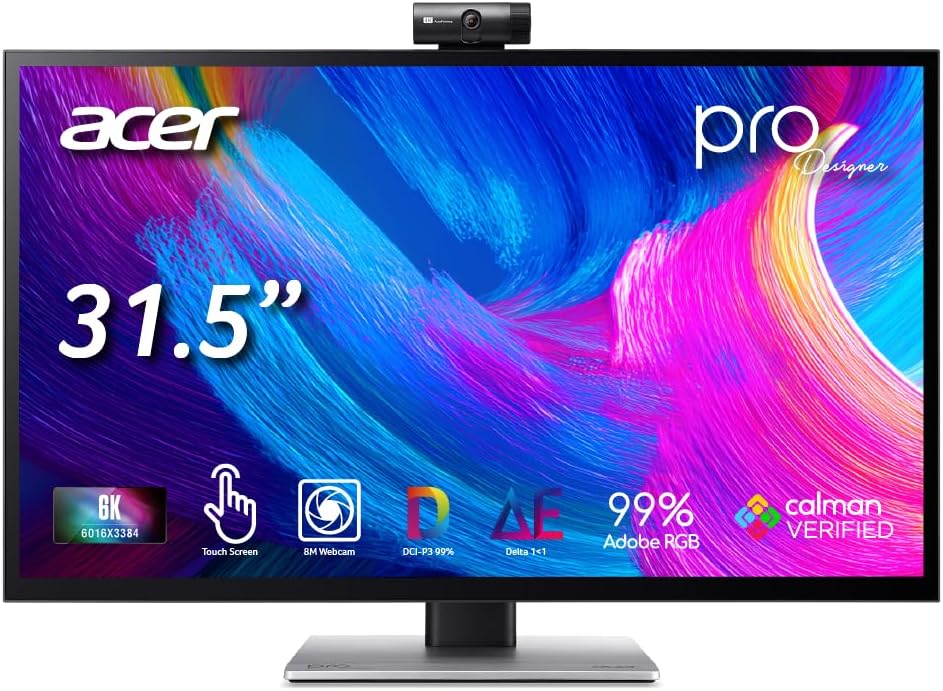
This monitor transforms a traditional screen into an interactive workspace. With 10-point touch and stylus support, it allows direct annotation and editing without a separate tablet.
We may earn a commission when you buy through this link, at no additional cost to you.
Color accuracy is paramount here, verified by Calman with a low Delta E. The inclusion of a built-in webcam simplifies video calls, keeping your setup clean and efficient.
DisplayHDR 600 ensures that high dynamic range content looks as intended, bridging the gap between consumer and professional needs. It covers major color spaces essential for modern design.
Creatives who draw or annotate directly on screen will love this utility. It merges display input into one unit, reducing clutter and increasing workflow speed.
No extra tablet needed; sketch and edit directly on the high-resolution surface using your finger or stylus.
Factory calibration ensures your edits match print or delivery standards, building trust with clients.
We may earn a commission when you buy through this link, at no additional cost to you.
The G32X focuses on essential performance with a clean look. It offers 6K resolution with a minimalist stand that fits well in modern office environments without distraction.
We may earn a commission when you buy through this link, at no additional cost to you.
Anti-glare coating helps manage reflections, making it easier to view content in varied lighting. The power delivery is sufficient for most laptops, simplifying your cable management.
With strong user feedback, it suggests reliability and satisfaction. It lacks some niche features like touch or high refresh rates, but delivers solid standard performance.
Ideal for users who want a straightforward high-resolution screen, this model balances cost and functionality. It is a practical choice for general professional use.
The minimalist stand and bezels keep the focus on content, making it suitable for professional settings.
Standard USB-C power and video transfer meet daily needs without unnecessary complexity.
We may earn a commission when you buy through this link, at no additional cost to you.
This model is designed around connectivity, serving as a central hub for complex setups. It supports high power delivery and offers multiple ports for peripherals and laptops.
We may earn a commission when you buy through this link, at no additional cost to you.
The 52-inch curved display provides ample room for multiple tasks. It is particularly useful for managing multiple operating systems or workflows on one physical desk.
While ratings are lower, potentially due to pricing or setup complexity, the feature set is robust. It targets users who need extensive docking capabilities directly from their monitor.
Consider this for advanced workstation needs where connectivity is key. It reduces cable clutter by acting as a primary docking station for your devices.
Integrated USB hub and Thunderbolt 4 allow connection of drives and peripherals directly to the screen.
The wide curved screen accommodates multiple windows side by side without needing a second monitor.
We may earn a commission when you buy through this link, at no additional cost to you.
LG sets a high bar with Thunderbolt 5 support, enabling faster data speeds and better bandwidth. This positions the monitor for future needs as software demands increase.
We may earn a commission when you buy through this link, at no additional cost to you.
The Nano IPS Black panel offers improved contrast and color depth. Combined with HDR 600, it delivers a professional visual experience for both video and static content.
KVM and Picture-in-Picture features make it efficient for multitasking. It is a strong candidate for those who want the latest tech standards in their workflow.
Early adopters and pros who need maximum bandwidth should consider this option. It balances cutting-edge connectivity with reliable color performance.
Thunderbolt 5 offers significantly higher data rates, ideal for large file transfers and multi-device connections.
Nano IPS Black technology enhances dark details, providing deeper blacks compared to standard panels.
We may earn a commission when you buy through this link, at no additional cost to you.
This UltraSharp model focuses on dependable productivity. It delivers a clear 6K image suitable for office tasks and general professional work with consistent performance.
We may earn a commission when you buy through this link, at no additional cost to you.
The bundle includes a protection plan, offering peace of mind for business users. Brightness is high enough for well-lit environments, ensuring readability at all times.
Response time is fast, making it acceptable for occasional media consumption. While not specialized for color grading, it serves general design and coding well.
Business buyers who prioritize stability and warranty support will find this value. It offers a safe choice for corporate or team deployments.
The bright screen and fast response make it suitable for daily office work and occasional gaming.
Extended protection included in the bundle adds value by reducing long-term risk for the owner.
We may earn a commission when you buy through this link, at no additional cost to you.
This renewed option offers a large screen at a lower entry point. It is ideal for those who have a custom mount setup or prefer a wall-mounted design.
We may earn a commission when you buy through this link, at no additional cost to you.
Even without a stand, the core features like Thunderbolt 4 and curved display remain. It is a budget-friendly way to get a massive 52-inch workspace.
While conditions may vary, it presents a chance to own premium tech at a reduced cost. It is a good fit for secondary offices or dedicated setups.
Buyers comfortable with renewed goods and who need a large screen will appreciate this value. Check the condition details carefully before purchasing.
Certified refurbished models offer significant savings while keeping essential features intact.
Without a stand, it is perfectly suited for VESA arms or wall mounting systems.
We may earn a commission when you buy through this link, at no additional cost to you.
Selecting the right 6K monitor involves considering resolution, color accuracy, connectivity, and specific use cases. This section breaks down the essential factors to help you make an informed decision.
6K resolution provides significantly more screen real estate than 4K, allowing you to fit multiple windows side-by-side. High pixel density (PPI) ensures text remains sharp even when scaled, which is vital for designers and coders.
Look for monitors with high PPI to avoid pixelation. Aim for 200+ PPI on 32-inch models for the clearest text and image details.
Professional work requires precise color reproduction. Key metrics include DCI-P3 and Adobe RGB coverage. Factory calibration ensures that the colors you see are accurate from day one.
Prioritize models with Delta E under 2 for professional trust. Wide gamut coverage is essential for video and print work.
A modern monitor should act as a hub. Thunderbolt 4 or USB-C ports can carry video and data while charging your laptop simultaneously. This reduces cable clutter and simplifies your desk.
Check power delivery (PD) wattage. At least 60W to 100W is recommended to fully charge most modern laptops.
While 60Hz is common for professional panels, higher rates like 120Hz or 165Hz benefit users who also game or edit video. Fast response times reduce motion blur and ghosting.
Select higher refresh rates if you need smooth motion. For static design work, 60Hz is often sufficient and more cost-effective.
IPS panels offer wide viewing angles and consistent colors, which is ideal for collaboration. OLED and Nano IPS models may provide better contrast and deeper blacks but can be more expensive.
Choose IPS for standard color work and viewing angles. Consider OLED or IPS Black if contrast and depth are priorities.
An ergonomic stand that adjusts height, tilt, and pivot is crucial for long sessions. VESA mount compatibility allows you to use third-party arms if the stand is insufficient.
Look for features like tilt and swivel. Ergonomic adjustments help prevent strain during extended use.
Touchscreens and stylus support are valuable for artists and annotators. Built-in webcams and microphones can also simplify remote communication without extra hardware.
Consider these features if they fit your workflow. They add convenience but may come at a higher price point.
Long warranties and protection plans provide peace of mind for expensive electronics. Some models include extended coverage that covers defects and accidental damage.
Check the warranty length. Extended protection adds value and ensures your investment is covered over time.
Proper setup is key to unlocking the full potential of a 6K monitor. Ensure your computer's graphics card supports the resolution and refresh rate you intend to use. For Apple users, check if the display supports the specific scaling and color profiles of your Mac.
Keep the screen clean using a microfiber cloth and appropriate LCD cleaner. Avoid using harsh chemicals or rough materials that could damage the coating. A gentle touch prevents scratches and maintains clarity over time.
Calibrate your monitor periodically if you work with color-critical files. Tools like hardware calibrators can help maintain accuracy as the panel ages. Adjust brightness to match ambient light to reduce eye strain during long sessions.
Yes, running a 6K display requires significant GPU and CPU resources. Ensure your computer has a modern graphics card and sufficient RAM to handle the pixel count without lag or stuttering.
6K offers more screen real estate and sharper text, which is beneficial for multitasking and detailed design work. If you need extra space or high precision, it is a worthwhile upgrade.
Yes, several 6K models support high refresh rates and adaptive sync. However, you will need a very powerful GPU to achieve high frame rates at native 6K resolution.
Most modern 6K monitors work well with MacBooks via Thunderbolt or USB-C. Look for models with Mac-specific features like P3 presets for the best experience.
You typically need Thunderbolt 4, DisplayPort 2.1, or HDMI 2.1 cables to support 6K resolution and high refresh rates. Check the manufacturer's recommended cable specifications.
Many 6K monitors include low blue light and flicker-free technologies. High resolution also allows for larger text without blur, which can reduce eye strain.
Daisy-chaining is possible if the monitor supports Thunderbolt daisy-chaining. This allows you to connect multiple screens in a series without running cables back to the computer.
With proper care, a quality 6K monitor can last five to seven years. Factors like brightness settings and usage patterns affect panel degradation over time.
The ASUS ProArt PA32QCV remains a top pick for professionals needing reliable color accuracy and Mac integration. For those prioritizing speed, the LG UltraFine evo offers cutting-edge Thunderbolt 5 connectivity.
Your choice should depend on whether you value productivity, design precision, or gaming performance. Each model on this list brings unique strengths to the table to suit different needs.
Prices and availability change frequently, so checking current listings is recommended. We hope this guide helps you find the perfect 6K monitor to elevate your workspace.