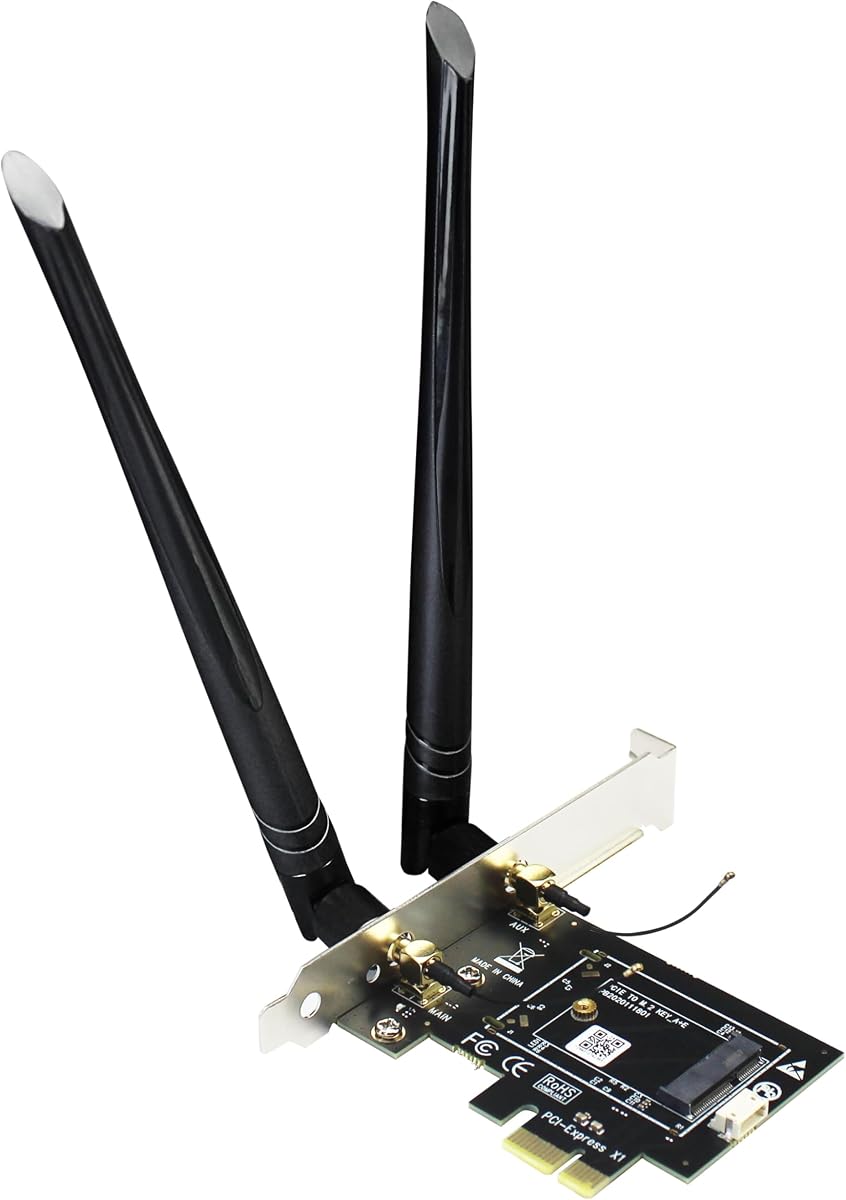
GLOTRENDS WA01 Adapter
4.1Editor score
M.2 E to PCIe Adapter
Supports WiFi 4/5/6/7
Includes 6-dBi Antennas
This comprehensive guide compares the top M2 Key E WiFi Cards for laptops and desktops, evaluating speed, compatibility, and performance for upgrades.
Upgrading your wireless connectivity is essential for modern computing tasks like gaming, streaming, and remote work. M2 Key E WiFi cards offer a versatile solution for enhancing network performance across various devices. Choosing the right card ensures stable connections and faster data transfer speeds.
We evaluated ten top-rated M2 Key E WiFi cards based on performance, compatibility, and feature sets. Our analysis covers WiFi 6E and WiFi 7 models, examining their support for different frequency bands and Bluetooth versions. Each product was assessed for its ability to handle demanding network loads efficiently.
Each pick highlights key specifications and real-world performance characteristics to help you make an informed decision. We focus on compatibility with different motherboards and operating systems to ensure seamless integration. Please note that product availability and prices may fluctuate over time.
4.1Editor score

4.5Editor score

4.6Editor score
The following table provides a side-by-side comparison of all ten M2 Key E WiFi cards reviewed in this guide. It highlights key specifications such as supported WiFi standards, Bluetooth versions, and included accessories to help you identify the best fit for your needs.


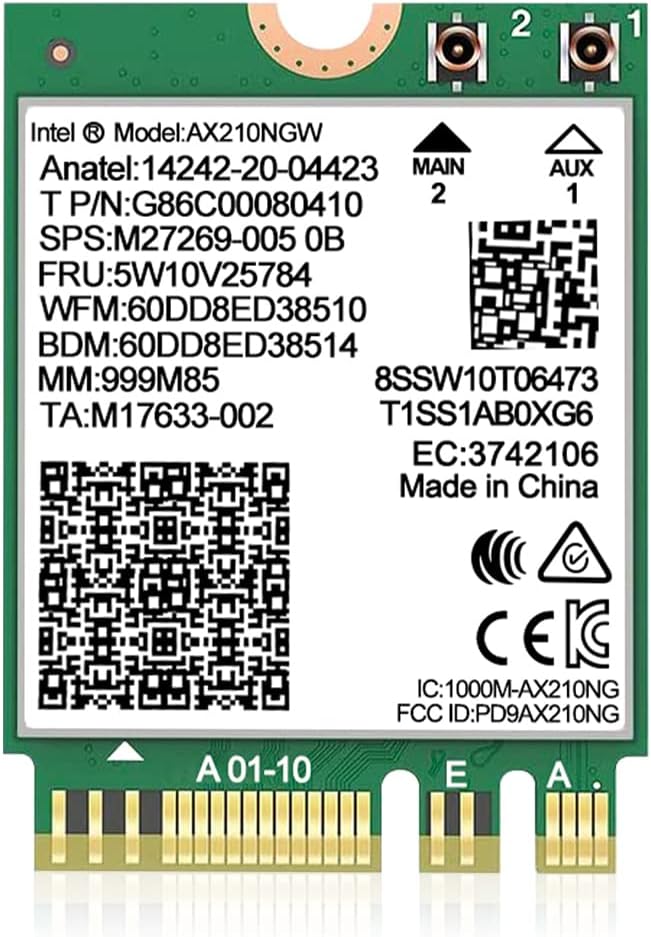




The AX210NGW DTK WiFi Card stands out as a top choice for upgrading network connectivity. With WiFi 6E technology it offers tri-band support including the new 6GHz band for interference free performance. It is a highly rated solution for users seeking faster speeds and better reliability.
We may earn a commission when you buy through this link, at no additional cost to you.
This card is built on the Intel AX210 chipset which provides robust performance across 2.4GHz, 5GHz, and 6GHz bands. It includes 5dBi high gain antennas and brackets ensuring strong signal reception. The Bluetooth 5.3 support enhances connectivity for peripherals like earbuds with lower latency.
While it offers excellent performance users must ensure their system supports M.2 E key slots. Driver installation is required and may take some time on older systems. However the benefits of reduced latency and higher throughput make these steps worthwhile for most users.
If you need a reliable and fast network upgrade this card is an excellent investment. It works well with modern routers and provides the latest WiFi features. We recommend it for anyone looking to improve their wireless network experience significantly.
Tri-band support reduces congestion by utilizing the 6GHz band which is less crowded than older frequencies.
Bluetooth 5.3 offers improved connection stability and range for wireless peripherals without needing separate hardware.
We may earn a commission when you buy through this link, at no additional cost to you.
The GLOTRENDS WA01 adapter is an ideal solution for users who want to upgrade existing M.2 WiFi cards. It converts an M.2 E key slot to a PCIe X1 interface allowing for greater flexibility. This adapter supports a wide range of WiFi modules from older to newer standards.
We may earn a commission when you buy through this link, at no additional cost to you.
This adapter comes with 6-dBi SMA antennas which provide strong signal capture capabilities. It is compatible with WiFi modules up to 7 and various Bluetooth versions. This makes it a versatile option for custom builds or older desktops needing modern connectivity.
Keep in mind this product is an adapter only so the WiFi module itself is not included. You must connect the USB cable for Bluetooth functionality which adds complexity. Despite this it offers a cost effective way to leverage existing hardware.
For DIY enthusiasts this adapter provides a practical way to extend the life of your network setup. It supports many popular modules and offers good value. We suggest purchasing a compatible module separately if you do not have one.
Supports modules from Intel, Broadcom, and Realtek allowing you to choose the best WiFi speed for your needs.
Includes brackets and cables ensuring a secure fit in desktop cases with standard expansion slots.
We may earn a commission when you buy through this link, at no additional cost to you.
The Intel Killer BE200 Card represents the cutting edge of wireless networking technology with WiFi 7 support. It is designed specifically for gaming and high performance tasks needing ultra low latency. This card offers tri-band connectivity and speeds up to 5.8Gbps with compatible routers.
We may earn a commission when you buy through this link, at no additional cost to you.
It features Bluetooth 5.4 which provides better power efficiency and connection stability. The hardware is optimized for Intel processors ensuring seamless integration and performance. This makes it a top choice for gamers and professionals relying on stable high-speed connections.
Note that this card is limited to Intel based systems and may not work on AMD platforms. You will also need a WiFi 7 router to fully utilize its advanced capabilities. Without these requirements the performance benefits may be limited compared to older standards.
If you have a compatible system this card offers the highest potential speeds available today. It is built to handle demanding network traffic with ease. We recommend it for users seeking the absolute best in wireless performance.
Killer Intelligence Suite helps prioritize gaming traffic for reduced lag during online matches.
Supports 320MHz channels and 4K QAM for significantly higher throughput compared to WiFi 6.
We may earn a commission when you buy through this link, at no additional cost to you.
The QCNCM865 WiFi 7 Card offers next-generation speeds for laptops and desktops with M.2 Key E slots. It supports WiFi 7 technology which includes multi-link operation for better stability. This card allows simultaneous connection across multiple bands reducing congestion.
We may earn a commission when you buy through this link, at no additional cost to you.
Bluetooth 5.3 ensures smooth peripheral connectivity with low latency. The card supports both Intel and AMD platforms making it versatile. It includes 5.8Gbps theoretical speeds when paired with compatible routers enabling fast file transfers.
Users must have Windows 11 installed to activate full functionality. The card may not reach top speeds without a WiFi 7 router. Despite these requirements it is a forward-looking option for future-proofing your device.
Choose this card if you need high-speed connectivity for streaming or gaming. It is well suited for users wanting to upgrade to the latest WiFi standards. Ensure your system meets the OS requirements before purchasing.
MLO allows the device to connect to multiple bands at once improving throughput and reliability.
Unlike some Intel cards this model works with both AMD and Intel CPUs offering broader compatibility.
We may earn a commission when you buy through this link, at no additional cost to you.
This AX210 NGW Wireless Card delivers reliable WiFi 6E performance for laptops needing an upgrade. It supports tri-band connectivity including the 6GHz band which reduces interference. The card provides speeds up to 5400Mbps ensuring smooth streaming and downloading.
We may earn a commission when you buy through this link, at no additional cost to you.
It includes Bluetooth 5.3 which offers improved range and connection stability. Windows 10 and 11 users can easily install drivers from Intel official resources. This compatibility makes it a reliable choice for many laptop models.
Be aware this card will not work in slots using the CNVio2 protocol. You must verify your motherboard supports standard M.2 E key before purchasing. For supported systems it offers excellent performance and stability.
This card is perfect for travelers or remote workers needing dependable internet. It balances speed and efficiency well. We recommend checking system specs before buying to ensure compatibility.
Tri-band speeds allow simultaneous high-speed tasks without slowing down the network.
Intel provides long-term driver updates ensuring compatibility with future OS versions.
We may earn a commission when you buy through this link, at no additional cost to you.
The AX210 NGW Module is a solid choice for adding WiFi 6E capabilities to laptops. It provides tri-band speeds and Bluetooth 5.3 support for modern connectivity. The module is designed for 2230 M.2 slots common in many devices.
We may earn a commission when you buy through this link, at no additional cost to you.
It supports WPA3 security ensuring your connection remains protected. The hardware is reliable and works well with Windows 10 and 11 systems. This makes it a good option for those looking to secure and speed up their network.
Note this listing is for the card itself without antennas or brackets. You must have an existing setup with antenna connections for this to work fully. It is best for users replacing an old module rather than starting from scratch.
Select this card if you already have antenna ports and want an upgrade. It offers a great balance of price and performance. Ensure you have the required drivers installed for optimal operation.
WPA3 offers improved encryption making your wireless connection more secure against attacks.
The 2230 standard fits into most laptop M.2 slots with E key designation.
We may earn a commission when you buy through this link, at no additional cost to you.
This AX210 WiFi Card Kit offers a complete solution with the card and necessary accessories. It includes 8dBi high gain antennas and brackets for a secure installation. This makes it perfect for users building or upgrading desktop systems.
We may earn a commission when you buy through this link, at no additional cost to you.
The WiFi 6E support provides tri-band connectivity reducing congestion. Bluetooth 5.3 enhances peripheral connectivity with low latency. The kit ensures you have everything needed to get started without buying extra parts.
Installation requires basic tools and some patience. Ensure your case can accommodate the provided antennas and brackets. The performance gains are worth the effort for improved wireless speeds.
Choose this kit for a hassle-free upgrade experience. It is ideal for those who want a ready-to-use solution. Verify your system compatibility before beginning installation.
8dBi antennas provide longer range and better signal reception in larger spaces.
Includes brackets and cables ensuring a professional look and secure setup.
We may earn a commission when you buy through this link, at no additional cost to you.
This QCNCM865 WiFi 7 Card offers next-gen speeds at an accessible price point. It supports multi-link operation which improves stability and speed. The card is designed for Windows 11 systems to maximize performance.
We may earn a commission when you buy through this link, at no additional cost to you.
It delivers up to 5800Mbps with compatible routers. Bluetooth 5.3 provides reliable peripheral connectivity. This makes it a great choice for users wanting to upgrade to WiFi 7 without spending a premium.
Installation requires downloading drivers from the manufacturer site. Ensure your system meets the OS requirements before purchasing. Once installed it performs well for gaming and streaming.
Select this card if you want early access to WiFi 7 features. It balances cost and capabilities well. Always check compatibility notes for your specific system.
Multi-link operation combines bands for faster speeds and fewer dropouts.
Offers WiFi 7 speeds at a competitive price for early adopters.
We may earn a commission when you buy through this link, at no additional cost to you.
The BrosTrend WiFi 6 Card is a solid choice for dual-band WiFi 6 performance. It supports AX1800 speeds ensuring good throughput for general use. This card is compatible with Windows and most Linux systems.
We may earn a commission when you buy through this link, at no additional cost to you.
Bluetooth 5.2 enhances connectivity for devices like headphones. The card is designed for 2230 slots making it easy to swap. It is a reliable option for users needing a simple upgrade.
Keep in mind it does not support the 6GHz band. If you need WiFi 6E features this may not be the best choice. For standard dual-band needs it performs well.
Choose this card for reliable connectivity at a reasonable price. It works well for general browsing and streaming. Verify your system supports standard M.2 before purchasing.
Kernel 6.5 support ensures good compatibility for Linux users.
AX1800 speeds provide smooth performance for everyday tasks and streaming.
We may earn a commission when you buy through this link, at no additional cost to you.
This Intel Killer BE200 Card provides top-tier performance for gaming and power users. It offers WiFi 7 support with ultra low latency features. The hardware is designed for Intel processors ensuring seamless integration.
We may earn a commission when you buy through this link, at no additional cost to you.
Bluetooth 5.4 is included for latest peripheral support. The card handles high traffic loads well reducing lag. This is ideal for users needing the best network reliability.
It may require specific motherboard support for M.2 E key slots. The cost is higher than basic cards but justified by features. Ensure your system matches the requirements before purchase.
Choose this card for high-end performance needs. It delivers the latest WiFi capabilities. Always verify platform compatibility for a smooth upgrade.
Killer features prioritize gaming traffic to reduce lag during critical moments.
Bluetooth 5.4 offers best-in-class power efficiency and range.
We may earn a commission when you buy through this link, at no additional cost to you.
Selecting the right M2 Key E WiFi card requires understanding your system capabilities and network needs. This guide explains the key factors to consider.
Modern cards support WiFi 6E or WiFi 7 which offer improved speeds and lower latency. Older standards may limit your network performance especially in crowded environments.
Choose a card that matches or exceeds your current router capabilities to ensure you benefit from upgrades.
Tri-band cards include a 6GHz band which reduces congestion compared to dual-band models. This is crucial for high throughput tasks like gaming or streaming.
Ensure your router also supports the 6GHz band to utilize the full potential of tri-band cards.
Bluetooth versions affect peripheral connectivity and power consumption. Newer versions like 5.3 or 5.4 offer better range and efficiency.
Look for cards with Bluetooth 5.3 or higher to support latest devices effectively.
Some cards work only with specific CPU families like Intel or AMD. Others may require Windows 11 for full functionality.
Check motherboard specs and OS requirements before purchasing to avoid compatibility issues.
Some kits include antennas and brackets essential for desktop installations. Others sell the card only requiring you to source accessories.
Choose a complete kit if you need antennas and mounting hardware included.
Higher speeds like 5.8Gbps require compatible routers and network settings. Basic users may find lower speeds sufficient for browsing.
Match your card speed to your internet plan and usage needs for efficiency.
Reliable driver support ensures long term stability and security updates. Check manufacturer websites for availability.
Prioritize brands with active driver updates for better support.
Prices vary based on features and generation. Older WiFi 6 models cost less than WiFi 7 equivalents.
Balance cost against features to find value without unnecessary spending.
Power off your device before installing the card. Remove the case and locate the M.2 E slot. Insert the card at an angle and secure it with a screw.
Install drivers from the manufacturer website for best performance. Use the included antennas if available to boost signal range.
Regularly update drivers to maintain security and performance. Keep the internal components free of dust for longevity.
An M2 Key E WiFi card is a wireless network module using the M.2 Key E interface. It fits in laptops and desktops to provide WiFi and Bluetooth connectivity.
Yes, to use WiFi 6E features like the 6GHz band you need a router supporting WiFi 6E. Otherwise the card works with older routers but loses advanced benefits.
No, compatibility depends on slot type and BIOS. Check your laptop manual to confirm support for M.2 E key modules before buying.
Power down the system, open the case, insert the card into the slot, secure it, and attach antennas if included. Install drivers after powering on.
Multi-Link Operation allows simultaneous use of multiple bands for higher speed and reliability. It is a feature in newer WiFi standards like WiFi 7.
Yes, you must download drivers from the manufacturer site for full functionality. Windows may install basic drivers but manufacturer ones are recommended.
Some cards work with AMD but others are Intel only. Check product specs for platform support before purchasing to ensure compatibility.
WiFi 6E includes the 6GHz band for less interference. Standard WiFi 6 uses only 2.4GHz and 5GHz bands.
We have reviewed ten M2 Key E WiFi cards offering various options for different needs. From budget adapters to premium WiFi 7 cards there are choices for every user.
Focus on compatibility and features like band support to ensure you get the best performance. Consider your existing hardware and OS requirements before deciding.
Prices and availability change regularly so check current offers for the best deal. Upgrading your network card can significantly improve your computing experience.