
MEKO Stylus Pen for Touchscreen
4.6Editor score
Includes protective cap
Dual-sized rubber tips
No battery required
Discover the best fine point stylus pens for touchscreen devices. This guide compares top models for precision writing, drawing, and everyday use on tablets
Finding the right tool for digital note-taking or creative work can transform your workflow significantly. A fine point stylus offers the precision needed for detailed tasks that fingers simply cannot match on modern touchscreens.
We evaluated ten highly rated capacitive styluses based on tip accuracy, build quality, and versatility. Our comparison focuses on models that deliver consistent performance across iOS, Android, and Windows touch interfaces without lag.
Each selection highlights specific strengths like replaceable tips, magnetic attachment, or bulk value. Please note that current availability and pricing may fluctuate, so verify details before purchasing to ensure you get the latest version.
4.6Editor score

4.5Editor score

4.2Editor score
The following table provides a side-by-side overview of key specifications for each stylus. Use this to quickly identify which model matches your device type and usage requirements for optimal performance.




This versatile stylus pen stands out for its 3-in-1 design that combines rubber and disc tips for different tasks. With a 4.5 rating, users appreciate the high precision it offers for detailed digital work without needing battery power.
We may earn a commission when you buy through this link, at no additional cost to you.
The transparent disc tip is the standout feature, allowing you to see exactly where your mark is being made. The 180-degree flexible writing angle ensures smooth movement without interruption, making it ideal for students and professionals alike.
While it lacks active pressure sensitivity found in premium styluses, the responsiveness is impressive for a capacitive model. The tips are easily replaceable without tools, which helps maintain performance over the long term despite frequent use.
Buyers seeking a reliable tool for note-taking and navigation on iPads or Android devices will find this a practical choice. It offers a natural writing feel that reduces finger fatigue while protecting your screen from scratches.
The transparent disc tip provides clear visibility of the contact point, ensuring precise control for detailed tasks.
The 180-degree flexible angle allows for comfortable writing positions without lag or screen interruptions.
We may earn a commission when you buy through this link, at no additional cost to you.
This affordable stylus delivers consistent performance for users needing reliable input on touchscreens. Its 4.6 rating reflects satisfaction with the precision and ease of use across various platforms like iOS and Android.
We may earn a commission when you buy through this link, at no additional cost to you.
The upgraded 3-in-1 design includes a transparent disc tip that ensures visibility and accuracy during writing or drawing. The included protective cap helps maintain the tip condition when not in use, extending the pen's longevity significantly.
While it lacks advanced features like pressure sensitivity, the dual-sized rubber tips handle navigation and scrolling effectively. The soft silicone material prevents fingerprints and screen damage, making it safe for daily use.
Budget-conscious buyers looking for a dependable tool for note-taking or gaming will find this an excellent choice. It offers high accuracy and versatility without the complexity of pairing or charging requirements.
The included protective cap keeps the tips safe from damage and dirt during storage or transport.
Works seamlessly on all capacitive touchscreens including phones, tablets, and laptops.
We may earn a commission when you buy through this link, at no additional cost to you.
This active stylus offers a unique combination of precision and active pen features without Bluetooth pairing. Rated 4.2 stars, it appeals to users who need a realistic writing feel for journaling or artistic sketches on various devices.
We may earn a commission when you buy through this link, at no additional cost to you.
The 1.5mm ultra fine tip provides exceptional control for detailed tasks. The built-in buffer unit at the tip reduces resistance, allowing the pen to glide smoothly like a real pen on paper.
While it requires charging via micro USB, the 8-hour battery life ensures you can work throughout the day. The lightweight design makes it comfortable to hold during extended sessions without causing hand fatigue.
Creators and professionals needing consistent precision will value this stylus for its reliability. It bridges the gap between passive capacitive pens and advanced active styluses at a competitive price point.
The fine 1.5mm tip allows for detailed drawing and accurate text entry on touch screens.
An 8-hour active use time ensures uninterrupted creativity throughout long work sessions.
We may earn a commission when you buy through this link, at no additional cost to you.
This white stylus distinguishes itself with a magnetic design that keeps it securely attached to your device. With a 4.4 rating, it offers reliable performance for users who need quick access to their writing tools during work or study.
We may earn a commission when you buy through this link, at no additional cost to you.
The magnetic adsorption works on select iPad Pro models, ensuring the stylus is always within reach. The one-touch switch allows you to power it on quickly without navigating complex menus, saving valuable time.
A full charge takes only 40 minutes, providing up to 10 hours of continuous use. This efficiency means you can rely on it for long note-taking sessions without worrying about frequent interruptions for power.
Users with compatible iPads will appreciate the convenience of magnetic storage. While setup requires Bluetooth adjustments, the performance and portability make it a strong choice for digital artists.
The magnetic design ensures the stylus attaches securely to your iPad, preventing accidental loss.
A quick 40-minute charge provides sufficient power for all-day usage.
We may earn a commission when you buy through this link, at no additional cost to you.
This black active stylus is designed for users who want a realistic writing experience on touchscreens. Rated 4.0 stars, it performs well for note-taking and drafting across various devices including iPads and Samsung tablets.
We may earn a commission when you buy through this link, at no additional cost to you.
The 1.5mm tip offers a fine point that provides precision without the need for complex software. Powering on within one second allows for immediate use, which is helpful for quick sketches or comments.
It features an automatic power-off mode after 30 minutes of inactivity to preserve battery life. The lithium battery supports over 10 hours of use, making it a dependable companion for daily tasks.
Those seeking an active pen that works without Bluetooth will find this model suitable. It simplifies digital input with reliable hardware performance at a straightforward price point.
The stylus powers on in just one second, allowing for immediate and seamless writing.
An automatic shut-off feature conserves battery power when the pen is not in use.
We may earn a commission when you buy through this link, at no additional cost to you.
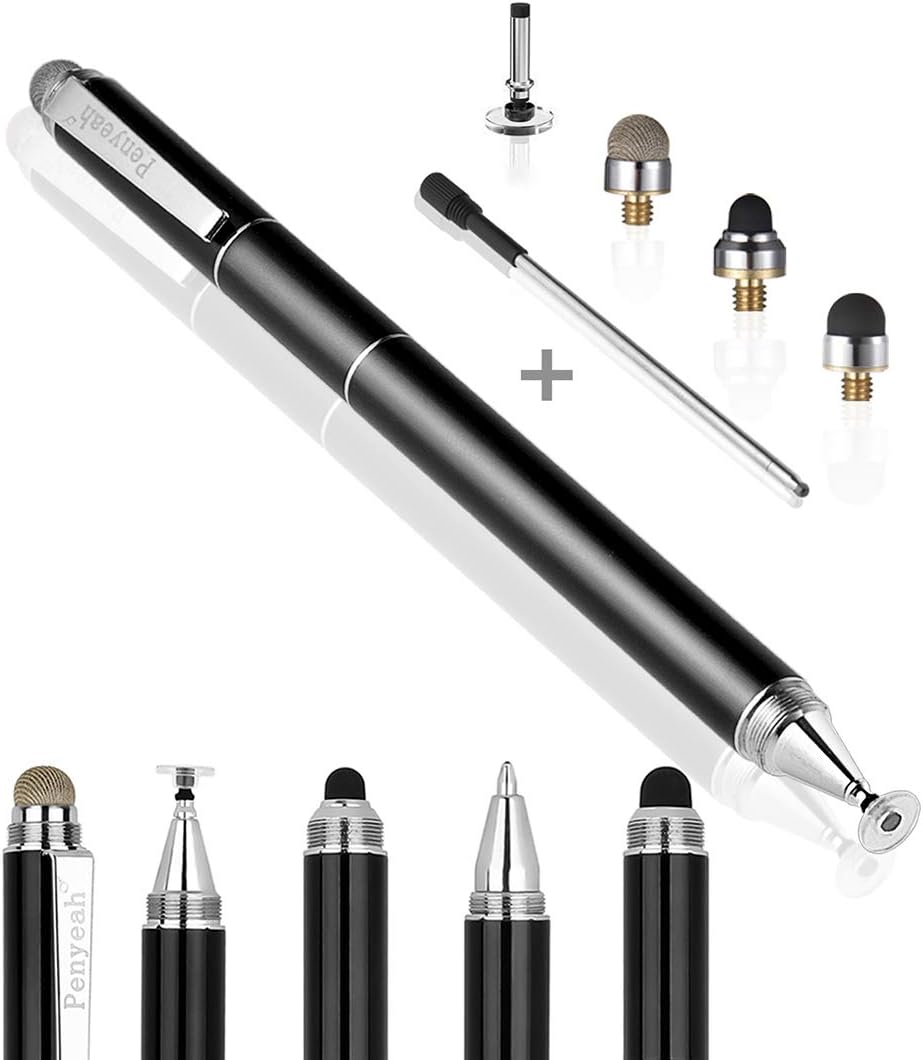
This unique 4-in-1 stylus blends digital utility with traditional writing. With a 4.4 rating, it serves users who need versatility in a single device for navigating screens and drafting on paper alike.
We may earn a commission when you buy through this link, at no additional cost to you.
The disc tip offers high accuracy for digital work, while the included ballpoint pen handles physical notes. The metal body ensures durability, and the screw-type tips allow for easy customization based on task needs.
While it does not support palm rejection, the precision of the tips makes it reliable for careful input. The included pocket clip ensures it is always accessible when you need to switch between physical and digital tasks.
Buyers who want a dual-purpose tool will find this an efficient solution. It reduces the number of devices you need to carry while maintaining high-quality performance across different mediums.
Combines a high-precision stylus with a standard ballpoint pen for maximum versatility.
The metal body provides a solid feel and long-lasting protection against daily wear.
We may earn a commission when you buy through this link, at no additional cost to you.
This active stylus is celebrated for its lightweight construction that reduces hand fatigue during long sessions. Rated 4.2 stars, it appeals to users prioritizing comfort and precision for digital writing and journaling tasks.
We may earn a commission when you buy through this link, at no additional cost to you.
Weighing only 13.3 grams, it feels comfortable in hand for extended periods. The buffer unit design enhances accuracy, allowing for smooth strokes that mimic real pen on paper without lag.
The 8-hour battery life ensures you can rely on it throughout the workday. It requires no Bluetooth pairing, simplifying the setup process and ensuring it works instantly on compatible devices.
Users seeking a portable tool for sketching will appreciate the design. It offers high precision and comfort without the complexity of advanced connectivity features.
The ultra-light 13.3g body ensures comfortable use during extended writing or drawing.
Bluetooth-free operation means instant connection and easier use across multiple devices.
We may earn a commission when you buy through this link, at no additional cost to you.
This 6-pack set offers excellent value for offices or households with multiple users. Rated 4.6 stars, it provides reliable tools for writing and navigation across a variety of capacitive touchscreen devices.
We may earn a commission when you buy through this link, at no additional cost to you.
The responsive rubber tips glide smoothly without scratching screens, ensuring a clean experience. The built-in clip allows you to attach the pen to a notebook or pocket, keeping it secure and accessible.
Since it requires no battery or pairing, these pens are ready to use immediately. This simplicity reduces frustration and ensures you can focus on your work without worrying about technical setup.
Users needing reliable tools for a team or school will find this bundle practical. It ensures everyone has access to a high-quality stylus without the hassle of individual purchases.
A 6-pack set ensures multiple users have reliable tools without individual purchases.
Built-in clips allow easy attachment to bags or notebooks for quick access.
We may earn a commission when you buy through this link, at no additional cost to you.
This 4-pack set stands out for the generous supply of replacement tips included with the purchase. Rated 4.5 stars, it ensures you have enough parts for long-term use without needing to buy extras separately.
We may earn a commission when you buy through this link, at no additional cost to you.
The 2-in-1 design features a transparent disc tip for precise writing and a rubber tip for navigation. The aluminum barrel provides a comfortable grip, reducing hand fatigue during extended digital work.
The tips are easy to install and durable, ensuring consistent performance across all touchscreens. This high sensitivity makes them suitable for detailed sketching and precise icon selection without errors.
Users who value having spare parts ready will find this bundle practical. It offers reliability and versatility for daily tasks on a variety of devices.
Includes 12 replacement tips to ensure your stylus stays functional over time.
High sensitivity tips allow for accurate digital input and smooth navigation.
We may earn a commission when you buy through this link, at no additional cost to you.
This 10-pack stylus offers unmatched bulk value for schools or large teams. With a 4.7 rating, it provides reliable tools for digital note-taking and navigation across various capacitive touchscreen devices.
We may earn a commission when you buy through this link, at no additional cost to you.
The dual rubber tips allow for both precision writing and general navigation. The alloy metal body ensures durability, while the lack of charging requirements means these pens are always ready to use.
Smooth rubber nibs glide without scratching screens, protecting your device while providing a natural feel. The mixed colors help distinguish pens for different users, which is helpful in shared environments.
Users needing a cost-effective solution for large groups will find this ideal. It ensures everyone has a reliable tool without the complexity of electronic features or charging needs.
A 10-pack set ensures every student or team member has a reliable stylus ready.
The alloy metal body provides a sturdy feel and resists daily wear.
We may earn a commission when you buy through this link, at no additional cost to you.
This 10-pack set provides an extensive supply of tools for users who need reliable backups. Rated 4.6 stars, it ensures you have enough pens for daily tasks without worrying about running out.
We may earn a commission when you buy through this link, at no additional cost to you.
The dual silicone tips offer smooth performance and protect screens from scratches. The aluminum body adds a premium feel to the design, making it comfortable to hold during extended writing sessions.
The replaceable ends allow for easy maintenance without tools. The high precision tips work well for detailed input, ensuring consistent performance across various touch devices.
Users needing a reliable bulk supply will find this excellent. It balances quality construction with cost-effective pricing for teams and families.
The aluminum body provides a comfortable grip and a sturdy feel.
Soft silicone tips glide smoothly without scratching or damaging your device screen.
We may earn a commission when you buy through this link, at no additional cost to you.
Selecting the right stylus involves balancing features like tip size, battery life, and build quality against your specific workflow needs.
The tip material significantly impacts how the stylus feels on your screen. Disc tips allow visibility for high precision, while rubber tips offer a softer touch suitable for scrolling. A fine point tip ensures accuracy for detailed sketching or handwriting.
Choose disc tips for precision tasks and rubber tips for general navigation to balance comfort and accuracy.
Some active styluses include batteries that offer longer battery life and enhanced features like pressure sensitivity. Passive models rely on capacitive touch and require no charging, making them always ready. Consider how much maintenance you are willing to perform.
Opt for active pens if you need advanced features or passive ones for hassle-free daily use.
Ensure the stylus works with your specific operating system and device model. Universal options work on most capacitive screens, but some advanced features may be limited to specific brands. Check the manufacturer list before purchasing.
Verify the device list to ensure your chosen stylus is compatible with your tablet or phone.
Materials like aluminum or alloy provide durability and a premium feel. A comfortable grip is essential for long writing sessions to prevent hand fatigue. Look for textured surfaces or ergonomic shapes that suit your hand size.
Prioritize ergonomic designs with durable materials to ensure comfort during extended use.
Tips wear out over time, so replaceable components extend the lifespan of your stylus. Bundles that include extra tips offer better value and ensure you are not left without a tool when one wears out.
Select models with easy-to-replace tips to maintain consistent performance over time.
Budget options often provide essential functionality while premium models offer advanced features. Evaluate the cost against the features you actually need to avoid overspending. Bulk packs are cost-effective for teams or schools.
Balance the price with your needs to find the best value for your specific use case.
Some active styluses allow you to rest your hand on the screen without accidental input. This feature is crucial for natural drawing and writing. Ensure the model you choose supports this if you plan to use it for art.
Look for models with palm rejection if you need to rest your hand naturally on the display.
Features like magnetic attachment or multi-function tips add convenience. Magnetic designs prevent loss, while multi-tip options offer versatility for different tasks. Determine which extras enhance your workflow effectively.
Choose additional features that add genuine convenience rather than unnecessary complexity.
Keep your screen clean to ensure smooth movement and accurate input. Dust and oils can reduce sensitivity, so wipe the display before using your stylus for precise tasks.
Replace worn tips immediately to avoid scratching your screen. If you notice the pen leaving marks or feeling rough, check the tips and swap them out for fresh ones.
Store active styluses in a cool, dry place when not in use. Protect the tips from physical damage by using a protective cap or storing them in a dedicated pocket.
Most capacitive touchscreens work with standard styluses, but active models may have limitations. Always check the manufacturer specifications to confirm compatibility with your specific device model and operating system.
Tip lifespan depends on usage frequency and screen texture. Heavy users may need to replace tips every few months, while occasional users can go longer. Keep a spare tip on hand to maintain performance.
Passive styluses work like fingers using capacitance, while active styluses have batteries for features like pressure sensitivity. Passive options are simpler and cheaper, whereas active ones offer more precision for creative tasks.
Yes, many fine point styluses are designed for gaming navigation and control. They offer precision for menu selection and character control without the bulk of a controller.
Skipping usually results from dirty tips, screen dirt, or low battery in active models. Clean your tips and screen regularly to ensure smooth and responsive performance.
Most basic capacitive styluses lack pressure sensitivity, but advanced active models include it. Check the product features to see if your model supports varying line thickness based on pressure.
Use a soft, lint-free cloth to gently wipe the tips. Avoid harsh chemicals or abrasive materials that could damage the rubber or disc material.
Yes, they work with most screen protectors. However, textured protectors may reduce precision, so a smooth glass protector is recommended for the best experience.
The top picks highlight the best options for various needs, from budget bundles to high-precision active pens. Each model brings unique strengths to digital workflows.
Consider your primary tasks like note-taking or drawing to prioritize features like tip accuracy and battery life.
Prices fluctuate frequently, so check the current listing before buying to ensure you get the best value today.