
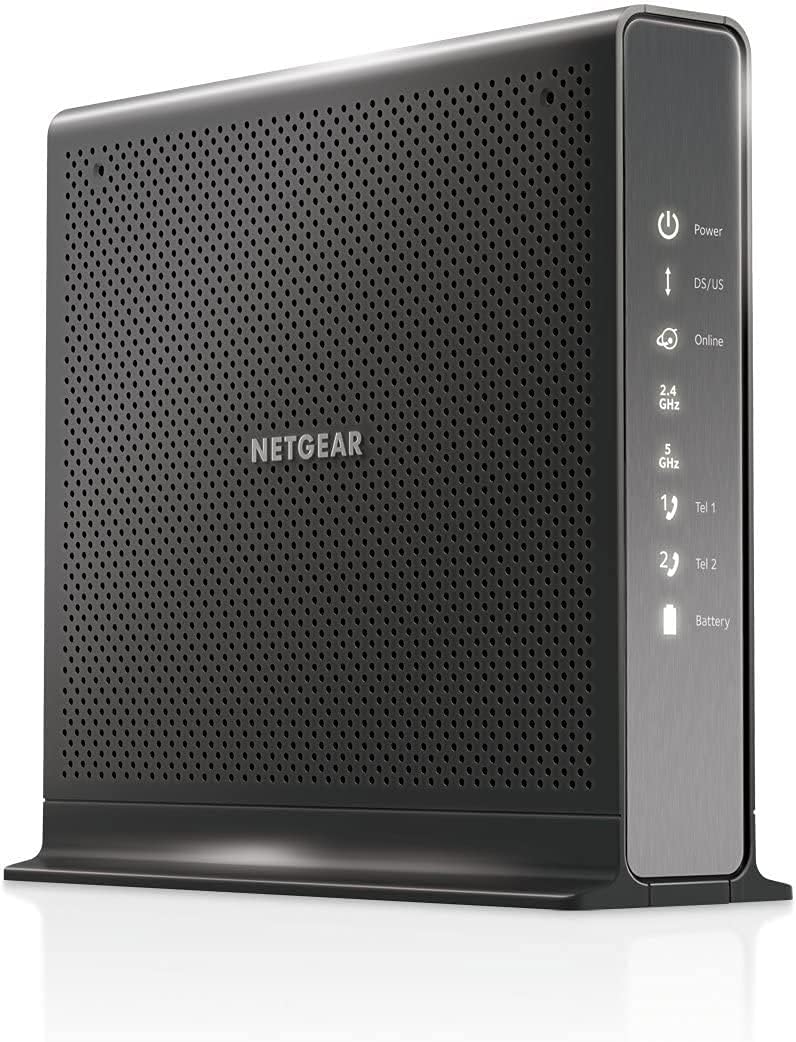
NETGEAR Nighthawk C7000
4.2Editor score
AC1900 WiFi 5 Speed
DOCSIS 3.0 Modem
Compatible With Xfinity
This guide compares the top cable modem wifi router combo units for speed and coverage to help you choose the right device for your home internet needs.
Finding the right internet hardware is crucial for modern homes. A cable modem wifi router combo simplifies your setup by merging two devices into one. This reduces clutter and often lowers monthly rental fees from your service provider.
We evaluated ten leading models based on speed capabilities and provider compatibility. Each unit was reviewed for its wireless range and wired connection options. Our analysis focuses on real-world performance and ease of installation for users.
Each pick below highlights key strengths and ideal use cases for buyers. Ratings reflect user feedback and technical specifications from manufacturers. Prices can change frequently so verify current deals before making your final purchase decision.
4.2Editor score

4.1Editor score

3.9Editor score
The following table provides a side-by-side comparison of all ten products featured in this guide. It highlights key specifications like wireless speed and modem technology to help you distinguish between models quickly.





This device stands out as a top choice for homes needing speed and reliability. It combines a DOCSIS 3.1 modem with a WiFi 6 router. Users report stable connections across multiple devices during peak usage times.
We may earn a commission when you buy through this link, at no additional cost to you.
The AX2700 speed class supports up to 2.7 Gbps wireless throughput. It covers up to 2000 square feet which suits most medium to large homes. The inclusion of four Gigabit Ethernet ports allows hardwiring of critical devices.
Some users note the price is higher than older WiFi 5 models. The device is also limited to cable providers excluding DSL or fiber. These limitations are acceptable given the performance benefits for cable subscribers.
Buyers seeking a reliable all-in-one solution should consider this model first. It is ideal for households with many connected smart devices and high bandwidth needs. The setup process is streamlined via the mobile app.
WiFi 6 technology allows more devices to connect simultaneously without slowing down speeds. This ensures consistent performance during gaming or video streaming sessions.
DOCSIS 3.1 prepares your network for faster internet plans as your provider rolls them out. You avoid needing to upgrade hardware soon after purchase.
We may earn a commission when you buy through this link, at no additional cost to you.
This model offers a cost effective entry point for combined modem and router units. It supports cable plans up to 800 Mbps which covers most standard home needs. Many users find it reliable for daily streaming and browsing.
We may earn a commission when you buy through this link, at no additional cost to you.
The AC1900 speed class provides up to 1.9 Gbps combined wireless throughput. It features four Gigabit Ethernet ports and a USB 2.0 port for storage. The Nighthawk app allows remote management of connected devices.
The main drawback is the lack of WiFi 6 support for newer devices. It may not fully utilize future gigabit plans compared to DOCSIS 3.1 models. However it remains a solid choice for budget conscious buyers.
Homeowners wanting to save on rental fees will appreciate this option. It works well with major providers like Xfinity and Cox. The balance of performance and cost makes it a top budget pick.
Buying this device eliminates monthly equipment rental charges from your internet provider. Over time these savings offset the initial purchase cost significantly.
With a strong track record of user satisfaction this unit delivers consistent performance. It handles multiple devices well during typical household usage patterns.
We may earn a commission when you buy through this link, at no additional cost to you.
This renewed version provides the same high performance as the new model at a lower price. It maintains the DOCSIS 3.1 and WiFi 6 capabilities essential for modern internet speeds. Users report it works well with major cable providers.
We may earn a commission when you buy through this link, at no additional cost to you.
The AX2700 speed ensures smooth streaming and gaming across the home. It supports link aggregation for faster wired connections if needed. The device handles multiple devices with ease thanks to modern WiFi standards.
Buyers should check the warranty terms carefully as they differ from new units. The cosmetic condition may show minor signs of use. These trade-offs are often worth the savings for tech savvy consumers.
Anyone looking to save money without sacrificing speed should consider this option. It is suitable for households needing reliable connectivity on a budget. Ensure you buy from a reputable seller for peace of mind.
Choosing a renewed product reduces electronic waste by extending device lifespans. This supports environmental sustainability while delivering top tier performance.
You get advanced features like WiFi 6 at a fraction of the new cost. The savings can be significant compared to buying a brand new unit.
We may earn a commission when you buy through this link, at no additional cost to you.
This unit matches the top pick in performance but offers different availability or pricing. It supports cable plans up to 2 Gbps which is ample for most users. The WiFi 6 standard ensures efficient data transmission.
We may earn a commission when you buy through this link, at no additional cost to you.
Coverage extends up to 2000 square feet making it ideal for spacious homes. It includes four Gigabit Ethernet ports and a USB 3.0 port for fast external storage. Security features like WPA3 help protect your network from threats.
The price may fluctuate compared to other versions of the same model. It is not compatible with fiber or DSL internet services. These factors should be weighed against your specific home internet type.
Households needing robust wireless coverage and speed will find this model satisfying. It is best suited for those with high speed cable internet plans. The app makes network management straightforward for all users.
The USB 3.0 port supports external hard drives for network storage. This allows easy file sharing across all connected devices in your home.
Built in WPA3 encryption protects your wireless traffic from potential intruders. Additional security subscriptions can further enhance your online safety.
We may earn a commission when you buy through this link, at no additional cost to you.
This model focuses on delivering high speed internet in a small footprint. It supports cable plans up to 2.5 Gbps which is very fast for streaming and gaming. The design is modern and fits easily on shelves or desks.
We may earn a commission when you buy through this link, at no additional cost to you.
The AX3000 wireless performance provides solid speed across your home. Setup involves connecting the coaxial cable and powering it on. You can join the default network or customize it immediately via the app.
User feedback suggests it works well but lacks some advanced management tools. It may not suit power users needing detailed network controls. However it is reliable for standard home usage requirements.
Buyers prioritizing size and raw speed over advanced features should choose this. It is a strong candidate for those wanting a simple high performance solution. Verify compatibility with your specific internet provider before buying.
The compact build saves valuable surface space compared to larger routers. This makes it ideal for apartments or small living areas.
With support for 2.5 Gbps plans it is ready for future internet upgrades. You get headroom for faster speeds without buying new hardware.
We may earn a commission when you buy through this link, at no additional cost to you.
This renewed unit offers excellent value for users with moderate internet needs. It supports plans up to 800 Mbps and covers most standard home sizes. Users appreciate its reliability and ease of setup without complex steps.
We may earn a commission when you buy through this link, at no additional cost to you.
The AC1900 speed class delivers up to 1.9 Gbps combined wireless performance. It connects up to 30 devices efficiently making it suitable for families. The four Ethernet ports ensure stable connections for desktops or consoles.
It lacks the latest WiFi 6 features which may limit future proofing. The physical condition is used but tested for functionality. This makes it a great choice for budget conscious home users.
Anyone looking for a simple reliable modem router without high costs should consider this. It works well with major providers and avoids rental fees effectively. Check the warranty coverage before finalizing your purchase.
The low price point makes it accessible for most households needing a new combo. You get reliable performance without breaking the bank.
This model is known for steady performance over long periods of use. It handles typical daily tasks like browsing and streaming well.
We may earn a commission when you buy through this link, at no additional cost to you.
This unit is built for homes needing maximum wireless and wired performance. It supports cable plans up to 2 Gbps with AX6000 WiFi 6 speeds. Coverage extends up to 2500 square feet which suits very large homes.
We may earn a commission when you buy through this link, at no additional cost to you.
One 2.5 Gigabit Multi-Gig port supports devices faster than standard Ethernet. The other four ports are Gigabit for general use. This setup is ideal for gaming rigs and desktops needing high bandwidth.
The price is high compared to average consumer models on the market. It may offer more features than necessary for basic browsing needs. However it ensures top performance for demanding users.
Buyers seeking the best possible speed and coverage should look at this model. It is perfect for tech enthusiasts or homes with heavy network loads. The investment pays off in consistent high speed connectivity.
The 2.5 Gig port allows wired devices to exceed standard Gigabit limits. This is crucial for high end gaming PCs or NAS storage.
The extended range ensures signal reaches the furthest corners of your home. You avoid dead zones even in large multi story properties.
We may earn a commission when you buy through this link, at no additional cost to you.
This device uniquely supports home voice plans along with standard internet. It includes two VoIP ports for telephone lines making it essential for bundled services. Users in Xfinity areas find it reliable for calls and web access.
We may earn a commission when you buy through this link, at no additional cost to you.
The AC1900 speed provides solid WiFi performance for general use. It supports plans up to 600 Mbps which handles streaming and gaming well. The design integrates voice features without extra hardware clutter.
It is not compatible with non Xfinity providers or pure data plans. The WiFi standard is older than the latest models available. These restrictions mean it is only useful for specific bundled service users.
Households with Xfinity Voice plans will benefit significantly from this choice. It consolidates your internet and telephone hardware into one box. Ensure your plan requires this specific modem before purchasing.
Two built in phone ports allow direct connection of traditional handsets. This supports Xfinity Voice services without a separate modem.
Using this device reduces equipment rental costs for voice and data. It simplifies your home network setup for bundled service customers.
We may earn a commission when you buy through this link, at no additional cost to you.
This model is designed for basic internet needs in smaller households. It supports plans up to 300 Mbps which is sufficient for streaming and browsing. The price point is low making it an easy upgrade for rental users.
We may earn a commission when you buy through this link, at no additional cost to you.
Coverage reaches up to 1500 square feet providing good signal for apartments. It includes two Gigabit Ethernet ports for wired devices. Security protocols help keep your wireless network safe from unauthorized access.
The lower speed limit means it cannot support very fast internet plans. Two ports might be fewer than needed for multiple wired devices. These limitations are acceptable for entry level users on a budget.
Users with moderate internet needs should consider this option for simplicity. It saves money on rentals and works with major cable providers. Verify your speed tier matches the modem's capabilities before buying.
This unit offers a cost effective way to stop paying rental fees. It delivers basic performance at a very accessible price point.
Includes standard wireless security protocols to protect home data. It is suitable for most typical home internet usage scenarios.
We may earn a commission when you buy through this link, at no additional cost to you.
This modem offers solid performance with a trusted brand reputation for reliability. It supports plans up to 800 Mbps which is strong for mid tier internet. Many users find the setup process straightforward with the central app.
We may earn a commission when you buy through this link, at no additional cost to you.
The AC2350 speed class delivers reliable wireless performance across the home. It includes four Gigabit ports for wired connections to key devices. Parental controls allow management of internet access times for family members.
It uses DOCSIS 3.0 which is older than the latest available standards. This may limit compatibility with upcoming super fast internet plans. However it remains a popular choice for stable mid speed services.
Buyers looking for a reliable mid range option should consider this model. It balances cost and performance well for standard household needs. Check provider compatibility to ensure full support for your area.
Parental controls allow you to set time limits and pausing internet for devices. This helps manage screen time for children effectively.
The app allows easy setup and real time monitoring of connected devices. You can manage network settings directly from your mobile phone.
We may earn a commission when you buy through this link, at no additional cost to you.
Selecting the right device requires understanding your home internet needs and provider requirements. This guide outlines key factors to consider before making your final purchase.
DOCSIS versions determine the maximum internet speed your modem can handle. DOCSIS 3.1 supports speeds up to 2 Gbps while 3.0 tops out around 800 Mbps. Always match the modem to your current internet plan.
Choose DOCSIS 3.1 if you want to avoid hardware upgrades when your provider increases speeds.
WiFi 6 is the current standard offering better efficiency for multiple devices. It supports faster speeds and reduced congestion in crowded homes. Older WiFi 5 standards may struggle with many connected smart devices.
Prioritize WiFi 6 for future proofing and smoother performance across your smart home.
Coverage ratings estimate the square footage the router can serve effectively. Walls and building materials impact actual range. Look for units covering more than your home size to avoid dead spots.
Buy a model with slightly more coverage than your home needs for consistent signal.
Not all modems work with every internet service provider. Check your ISP's approved device list before purchasing to avoid activation issues. Most combos support major cable providers like Xfinity or Spectrum.
Verify compatibility on your provider's website to ensure the device is authorized.
Ethernet ports allow wired connections for devices needing stability. Gaming consoles and desktop PCs benefit from being hardwired. Most combos offer at least four Gigabit ports.
Ensure there are enough wired ports for all critical devices in your home.
Built-in security helps protect your network from threats. Features include firewalls and encryption like WPA3. Some brands include a free trial for advanced security services.
Look for WPA3 support to ensure your wireless traffic remains secure.
Buying your own combo unit eliminates monthly rental fees from your ISP. Over years these savings can outweigh the cost of the device. Calculate the break-even point for your specific provider.
Consider the long term savings when deciding between owning or renting equipment.
Prices vary widely based on speed and features. Basic models cost less while high speed options carry a premium. Determine what speed features you actually need.
Balance the initial cost with the performance you require for daily use.
Start by connecting the coaxial cable to the modem port and plugging in the power. Wait for the online light to stabilize which can take up to five minutes.
Access the setup page via a browser or mobile app. Set a strong WiFi password and update the admin credentials for security.
Keep the device in a central location away from walls or large electronics. Periodically restart the unit to maintain optimal performance.
You must check if the device is approved by your internet service provider. Most units support Xfinity Spectrum and Cox but you should verify specific model compatibility online. If it is not approved you may face activation issues.
Connect the coaxial cable to the modem port and power on the device. Use a computer or phone to follow the setup instructions on the web page or app. This process usually takes less than ten minutes.
Only specific combo models support telephone voice plans. Look for units that explicitly state they support VoIP or Xfinity Voice. Standard data modems will not work for bundled phone services.
Place the router in a central open location away from walls. Ensure your modem supports your current plan speed. Restarting the device occasionally can also clear network congestion.
Renewed units can offer significant savings but check warranty terms carefully. Ensure the seller provides return protection and that the unit is in working condition. This option is viable for tech savvy buyers.
A combo unit includes both modem and router functions so you do not need a separate router. This simplifies your network setup. However some advanced users may still prefer a standalone router for more control.
Many devices update automatically but check the app periodically for notifications. Keeping firmware current ensures security patches are applied. Most updates improve performance and fix minor bugs.
Typically a modem router combo lasts between three to five years. After that it may not support newer internet standards. Plan to upgrade when your provider rolls out faster plans.
The top picks offer a range of options from budget friendly to high performance. The CAX30 and C7000 models lead for overall value and speed.
Prioritize DOCSIS 3.1 and WiFi 6 if you plan to keep the device for several years. This ensures you can handle future internet upgrades.
Always verify current prices and provider compatibility before making your final decision. Deals change frequently and may offer additional savings.