
Netgate 1100 pfSense+ Security Gateway
4.1Editor score
Pre-loaded with pfSense+ software
Compact and silent operation
Includes lifetime software updates
This guide compares the top hardware firewalls for businesses and homes, evaluating security features, performance, and ease of use to help you choose the
Hardware firewalls provide essential network security by filtering traffic before it reaches your devices. They offer robust protection against threats that software solutions might miss. Choosing the right appliance ensures your data remains safe from sophisticated cyber attacks.
We evaluated ten leading hardware firewalls based on throughput, features, and ease of management. Each product was selected for its ability to secure different network sizes effectively. Our analysis focuses on real-world performance and the specific security capabilities each unit offers.
Each pick highlights key strengths and ideal use cases for various environments. Prices and availability can change frequently so always check current listings before purchasing. We aim to provide clear insights to help you make an informed decision for your network.
4.1Editor score
4.2Editor score

4.7Editor score
The following table provides a side-by-side comparison of all ten hardware firewalls reviewed in this guide. Use this overview to quickly assess key specifications and capabilities before diving into detailed reviews.


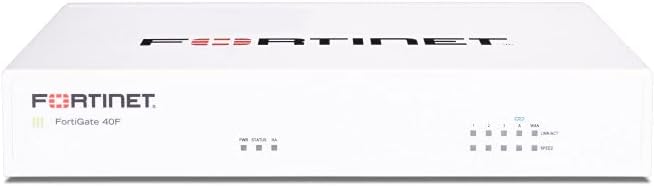
The FortiGate-40F Firewall Appliance stands out as a top choice for small businesses needing reliable network security. With a rating of 4.2 stars, it offers a compact, fanless design that fits easily on any desktop while delivering robust protection. Its high-performance security processor ensures efficient handling of threats without slowing down your network.
We may earn a commission when you buy through this link, at no additional cost to you.
This device is equipped with 5 GE RJ45 ports providing essential connectivity and flexibility for various network configurations. The integrated Fortinet's AI-powered FortiGuard Labs helps identify and mitigate both known and unknown threats effectively. Its user-friendly management console offers comprehensive network automation and visibility making deployment straightforward for IT teams.
While it offers excellent performance the appliance alone does not include a subscription which is needed for full security services. This might require additional investment for businesses wanting complete protection. However the hardware itself is reliable and the Zero Touch Integration simplifies setup significantly.
Small businesses and enterprise branch offices looking for a secure and manageable network solution should consider this model. Its balance of performance and ease of use makes it a strong contender. Investing in the FortiGate-40F ensures your network remains protected against evolving cyber threats.
The fanless desktop form factor ensures quiet operation and minimizes space usage in your office.
Five GE RJ45 ports including WAN and internal ports provide essential flexibility for network setups.
We may earn a commission when you buy through this link, at no additional cost to you.
The Netgate 1100 pfSense+ Security Gateway is an excellent budget-friendly option for those needing a reliable firewall and router. It comes pre-loaded with pfSense+ software ensuring you can get up and running quickly without extra setup. The dual core ARM Cortex-A53 processor delivers near gigabit routing performance suitable for common traffic needs.
We may earn a commission when you buy through this link, at no additional cost to you.
This device includes pfSense+ software updates for the product lifetime which adds significant value over time. Its compact form factor and low power draw allow it to run unnoticed on a desktop or wall. The included TAC Lite technical support and one year hardware warranty provide peace of mind for users.
While it offers great value the firewall throughput is limited to 650 Mbps which might not suit high bandwidth environments. The delivery process requires an adult signature which could be an inconvenience for some. However these trade-offs are acceptable given the competitive pricing and robust feature set.
Businesses and individuals seeking an affordable yet capable security gateway will find this model appealing. It protects AI workloads and data effectively while offering flexible configuration options. Choosing this gateway ensures secure edge networking without breaking the bank.
Pre-loaded with pfSense+ software allows you to customize for your secure edge networking needs immediately.
Three GbE switched ports allow you to configure separate WAN LAN and OPT ports easily.
We may earn a commission when you buy through this link, at no additional cost to you.
The Zyxel USGFLEX100H Firewall is designed for businesses needing secure and manageable network protection with unique offline capabilities. It supports up to 50 users and includes a 1 Year Entry Defense Pack offering essential security features out of the box. Its compact fanless design ensures quiet operation while delivering high throughput performance.
We may earn a commission when you buy through this link, at no additional cost to you.
This device allows firmware updates via FTP on the local network keeping the web interface accessible even without internet access. The flexible software-defined ports let you assign 8 x 1G RJ-45 ports as WAN or LAN dynamically. Centralized configuration and policy sync via Nebula make management effortless across multiple devices.
While it includes an Entry Defense Pack advanced features like anti-malware and sandboxing require an optional Gold Security Pack license. This might add to the cost if you need full UTM capabilities immediately. However the offline setup feature is a significant advantage for maintaining network integrity.
Small to medium businesses looking for resilient connectivity and centralized management should consider this model. Its ability to handle 300000 concurrent sessions and support VLANs adds to its versatility. Investing in the USGFLEX100H ensures a robust and flexible network security solution.
Update firmware via FTP on the local network while the web interface remains accessible after updates.
Assign 8 x 1G RJ-45 ports as WAN or LAN for versatile network configurations and failover.
We may earn a commission when you buy through this link, at no additional cost to you.
The SonicWall TZ280 Next-Gen Firewall Appliance delivers impressive performance with up to 2.5 Gbps firewall inspection speeds. It features SonicWall's patented Reassembly-Free Deep Packet Inspection engine ensuring deep visibility and protection against threats. The device supports secure SD-WAN and Zero-Trust Network Access making it ideal for distributed sites and remote workers.
We may earn a commission when you buy through this link, at no additional cost to you.
This appliance includes 8x1GbE and 2x1G SFP ports providing extensive connectivity options in a desktop form factor. Zero-touch deployment and cloud management via Network Security Manager simplify setup and ongoing maintenance. However the hardware is sold without a service subscription so you must purchase protection separately.
While the initial cost covers hardware adding the subscription for threat protection and firmware updates increases the total investment. This might be a consideration for budget-conscious buyers. Nevertheless the performance and feature set justify the cost for businesses needing reliable security.
Small businesses and branch offices requiring high-speed inspection and modern security features should prioritize this model. Its ability to maintain consistent security policies across locations adds significant value. Choosing the TZ280 ensures your network remains protected against sophisticated threats.
Up to 2.5 Gbps firewall inspection driven by RFDPI engine ensures deep visibility and protection.
8x1GbE + 2x1G SFP ports and cloud management simplify deployment and network control.
We may earn a commission when you buy through this link, at no additional cost to you.
The Fortinet FortiGate-70G Firewall is a robust solution for branch and small offices needing advanced network security. It features 10 Gigabit Ethernet RJ45 ports ensuring high-speed connectivity for modern network demands. The appliance includes NGFW IPS and web filtering built-in providing comprehensive protection out of the box.
We may earn a commission when you buy through this link, at no additional cost to you.
Secure SD-WAN capability improves cloud and SaaS performance while maintaining consistent security policies across locations. Deep visibility with SSL inspection allows you to identify and govern encrypted traffic effectively. Simple deployment and centralized management via FortiGate Cloud make it easy to oversee multiple sites.
While it offers exceptional performance the higher price point might be a consideration for smaller budgets. Additionally maximizing features may require purchasing additional subscriptions. However the seamless integration with FortiSwitch and FortiAP adds significant value for unified security.
Branch offices and small businesses seeking reliable and scalable security should consider this model. Its ability to improve performance while maintaining security is a key benefit. Investing in the FortiGate-70G ensures your network remains efficient and protected.
Secure SD-WAN improves cloud and SaaS performance while maintaining consistent security policies.
SSL inspection and application control help identify and govern encrypted traffic effectively.
We may earn a commission when you buy through this link, at no additional cost to you.
The Sophos XGS 128 Network Security Appliance is designed for larger offices requiring enterprise-grade firewall performance. It features 9 x 2.5 GE copper ports and 1 SFP fiber port providing extensive connectivity options. The appliance supports up to 19.1 Gbps firewall throughput ensuring it can handle high traffic volumes effectively.
We may earn a commission when you buy through this link, at no additional cost to you.
SD-WAN optimization provides resilient connectivity and intelligent traffic routing across multiple WAN connections. The VPN ready architecture supports secure site to site networking and encrypted remote employee access. However the hardware is sold without a subscription you must add Sophos subscription to enable full protection.
While it offers exceptional throughput the cost of adding subscriptions might increase the total investment significantly. This might be a factor for budget-conscious buyers. Nevertheless the performance and reliability make it a strong choice for demanding network environments.
Businesses with larger offices needing high performance and reliable operation should prioritize this model. Its purpose-built hardware ensures visibility and stability. Choosing the XGS 128 ensures your network remains secure and efficient.
Up to 19.1 Gbps firewall throughput supports larger offices with high traffic needs.
SD-WAN optimization provides resilient connectivity and intelligent traffic routing across multiple WAN connections.
We may earn a commission when you buy through this link, at no additional cost to you.
The Zyxel USGFLEX700 ZyWALL Cyber Security Firewall is a robust solution for mid-size to large offices needing comprehensive security. It includes a 1-Year UTM Security Pack featuring anti-malware ransomware blocking and web filtering. With up to 500 users supported it handles high traffic volumes effectively.
We may earn a commission when you buy through this link, at no additional cost to you.
The device features 12x configurable GbE and 2x SFP Gigabit fiber ports providing flexible configuration options. Complete security bundle includes 1 year of essential security services and Nebula cloud Pro management. This centralized approach makes monitoring and configuring network security straightforward for IT teams.
While it includes a security pack the higher cost might be a consideration for smaller budgets. The recommended internet speed up to 900 Mbps is also a constraint for very high bandwidth needs. However the overall feature set and ease of management justify the investment.
Businesses needing a secure and manageable network solution should consider this model. Its ability to protect against sophisticated threats while simplifying management is a key benefit. Investing in the USGFLEX700 ensures a robust and scalable security infrastructure.
Includes 1 year anti-malware ransomware blocking web filtering and IDP security services.
Use Zyxel's award winning Nebula Cloud Management solution to easily manage and monitor security.
We may earn a commission when you buy through this link, at no additional cost to you.
The SonicWall TZ680 Next-Gen Firewall Appliance is designed for high-end SMBs requiring top-tier performance and security. It features 8x1GbE and 2x5G SFP+ ports providing extensive connectivity options for modern networks. The appliance supports up to 5 Gbps firewall inspection ensuring it handles high traffic volumes effectively.
We may earn a commission when you buy through this link, at no additional cost to you.
This device uses SonicWall's patented Reassembly-Free Deep Packet Inspection engine for deep visibility and protection against threats. Secure SD-WAN and Zero-Trust Network Access help keep distributed sites and remote workers protected. However the hardware is sold without a service subscription requiring additional investment for full features.
While the higher cost might be a consideration the performance and feature set justify the investment for demanding environments. The need for a separate subscription adds to the total cost. Nevertheless the reliability and advanced capabilities make it a strong choice.
Distributed and high-end SMBs needing robust security should prioritize this model. Its ability to maintain consistent security policies across locations adds significant value. Choosing the TZ680 ensures your network remains protected against sophisticated threats.
Up to 5 Gbps firewall inspection driven by RFDPI engine ensures deep visibility and protection.
Secure SD-WAN and Zero-Trust Network Access keep distributed sites and remote workers protected.
We may earn a commission when you buy through this link, at no additional cost to you.
The Fortinet FortiGate 60F Hardware is a reliable solution for medium-sized businesses needing comprehensive security. It includes 36 Month Unified Threat Protection covering web filtering and anti-botnet technologies. FortiCare Premium ensures high-quality support and service continuity making maintenance easy for IT teams.
We may earn a commission when you buy through this link, at no additional cost to you.
This appliance secures against advanced online threats with effective filtering technologies to safeguard your network. Tailored for businesses needing robust security without large enterprise infrastructure it balances performance and cost. The bundled security services simplify the setup process significantly.
While the bundled security adds to the price it saves costs compared to purchasing services separately. Limited to medium-sized businesses the model might not suit larger enterprises. However the reliability and comprehensive protection justify the investment for targeted users.
Medium-sized businesses seeking robust and supported security should consider this model. Its ability to protect against sophisticated threats is a key benefit. Investing in the FortiGate 60F ensures your network remains safe and compliant.
Secures against advanced online threats with comprehensive web filtering and anti-botnet technologies.
FortiCare Premium ensures high-quality support and service continuity for your network.
We may earn a commission when you buy through this link, at no additional cost to you.
The Cisco ASA5525-X ASA5525-K9 Security Appliance Firewall is a cost-effective choice for basic network security needs. As a renewed product it offers enterprise-grade security at a lower price point. The 8 port gigabit Ethernet provides solid connectivity options for smaller setups.
We may earn a commission when you buy through this link, at no additional cost to you.
This device is known for its proven reliability making it a stable choice for environments requiring consistent performance. While it may lack the latest features its core security capabilities remain strong. It is suitable for those needing a straightforward and affordable firewall solution.
While it is an older model the lower cost makes it attractive for budget-conscious buyers. However renewed products may lack full warranty support which could be a consideration. Overall the reliability and basic features make it a viable option for specific use cases.
Small offices or users seeking an affordable and reliable firewall should consider this model. Its enterprise-grade capabilities offer peace of mind at a reasonable price. Choosing the Cisco ASA5525-X ensures basic network security without significant investment.
As a renewed product it offers enterprise-grade security at a lower price point.
Known for proven reliability making it a stable choice for environments requiring consistent performance.
We may earn a commission when you buy through this link, at no additional cost to you.
Selecting the right hardware firewall requires evaluating several key factors to ensure it meets your network's security and performance needs.
Performance is critical as the firewall must handle your network traffic without bottlenecks. Look for devices that offer inspection speeds matching your internet plan and internal data demands. Higher throughput ensures smooth operation during peak usage times.
Always choose a firewall with throughput exceeding your expected maximum traffic to avoid slowdowns.
Modern firewalls should offer advanced protection like intrusion prevention and deep packet inspection. Ensure the device supports necessary protocols such as IPSec and SSL VPN for secure remote access. Built-in threat intelligence helps mitigate emerging risks effectively.
Prioritize models with comprehensive threat protection to safeguard against evolving cyber attacks.
Effective management tools simplify setup and ongoing maintenance of your network security. Look for user-friendly consoles that offer centralized control and monitoring capabilities. Zero-touch deployment can save significant time during initial configuration.
Select a firewall with intuitive management features to reduce administrative overhead and errors.
Consider your current needs and future growth when evaluating the number and type of ports available. Devices with flexible port assignments allow you to adapt configurations as your network expands. Sufficient ports prevent the need for additional switches or hardware.
Ensure the firewall supports enough ports and scalability options to accommodate your network's growth.
Many firewalls require service subscriptions for full security features and firmware updates. Factor in the ongoing cost of these subscriptions when budgeting for your purchase. Some models include basic protection but advanced features may cost extra.
Always check the total cost of ownership including hardware and necessary subscriptions before buying.
The physical design of the firewall should fit your environment whether desktop rack or wall mounted. Fanless designs offer quieter operation which is beneficial for office spaces. Proper ventilation ensures the device operates reliably over time.
Choose a form factor that suits your space constraints and operational noise requirements.
Reliable customer support and warranty coverage are essential for resolving technical issues quickly. Check if the manufacturer offers 24/7 assistance and access to technical resources. A solid warranty provides peace of mind regarding hardware durability.
Prioritize brands known for strong support and comprehensive warranty terms to protect your investment.
Ensure the new firewall integrates well with your current network infrastructure and devices. Compatibility with existing switches and access points prevents configuration conflicts. Seamless integration helps maintain a unified and secure network environment.
Verify compatibility with your existing hardware to avoid disruptions during deployment.
Begin by connecting the firewall to your network using the provided Ethernet cables. Configure basic settings through the web interface following the manufacturer's quick start guide. Ensure all firmware is up to date to maximize security and performance.
Regularly update the firewall's firmware to patch vulnerabilities and gain new features. Monitor traffic logs frequently to identify and address any suspicious activity early. Adjust security policies as needed to adapt to changing network requirements.
Keep the device in a well-ventilated area to prevent overheating and ensure longevity. Clean dust from vents periodically to maintain proper airflow. Perform periodic backups of your configuration to simplify recovery in case of failure.
A hardware firewall is a dedicated device that filters network traffic before it reaches your internal network. It provides robust protection against external threats that software firewalls might miss. This is essential for businesses and homes needing reliable network security.
Many hardware firewalls offer basic functionality without a subscription but advanced features require one. Subscriptions typically enable threat updates and advanced services like intrusion prevention. Check the product details to understand what is included in the hardware only.
Installation involves connecting the firewall between your modem and router or directly to your network. Configure settings via a web interface following the manufacturer's guide. Most devices support zero-touch deployment to simplify the process.
Yes most hardware firewalls support secure remote access via VPN protocols like IPSec or SSL. This allows employees to connect securely to the network from outside. Ensure the device supports the VPN type you need for your use case.
Next-gen firewalls offer advanced features like deep packet inspection and application control. They provide more granular security and visibility into traffic compared to standard models. This makes them ideal for modern networks needing sophisticated protection.
You should update firewall firmware as soon as new versions are released to patch security issues. Regular updates ensure your device remains protected against emerging threats. Set reminders or enable auto updates if available on the device.
Choosing the right hardware firewall depends on your specific network size and security needs. The FortiGate-40F Netgate 1100 and SonicWall TZ280 offer excellent options across different budgets and requirements. Each model provides unique strengths to help secure your network effectively.
Prioritize performance throughput and management features to ensure long-term reliability and ease of use. Consider subscription costs and compatibility with existing infrastructure when making your decision. These factors will impact your overall experience with the device.
Prices and availability can change so always verify current listings before purchasing any hardware. Our guide aims to simplify your choice with clear insights into top options. With the right firewall you can secure your network confidently against evolving threats.