
DJI Osmo Pocket 3 Creator Combo
4.5Editor score
1-inch CMOS sensor
4K/120fps recording
3-axis mechanical stabilization
Discover the top cameras for social media content creators in October 2026. This guide compares features, video quality, and portability for YouTube, TikTok
Creating engaging social media content requires reliable tools that deliver high-quality visuals without complicated setups. Whether you are filming TikToks, YouTube vlogs, or live streams, the right camera can make a significant difference in your audience engagement and production value.
We have carefully selected and analyzed the best cameras available for creators in November 2026. Our comparison focuses on essential factors like resolution, stabilization, audio capabilities, and ease of use to help you find the perfect fit for your specific content creation needs.
Each pick in this list highlights unique strengths, from budget-friendly point-and-shoot options to advanced pocket gimbals. Please note that prices and availability can change frequently, so checking the current listings before purchasing is always recommended for the best deal.
4.5Editor score

4.4Editor score
5.0Editor score
This side-by-side comparison outlines the key specifications and strengths of each camera option to help you quickly identify which model aligns best with your content creation goals and budget constraints.


This 4K vlogging camera is an excellent entry point for aspiring content creators who want high-quality video without breaking the bank. With a rating of 4.4 stars, it delivers solid performance for beginners looking to start filming travel vlogs or daily content.
We may earn a commission when you buy through this link, at no additional cost to you.
The standout feature is the 330° rotating lens, which allows you to frame yourself easily without needing a mirror or second person. It also supports 4K video recording and 75MP photos, ensuring your content looks sharp on platforms like YouTube and TikTok. Built-in WiFi lets you transfer files quickly to your phone for editing.
While it is a budget option, you may notice limitations in low-light scenarios compared to more expensive models. The audio is decent but benefits from an external mic for professional interviews. These trade-offs are acceptable given the price and the included accessories like a tripod and memory card.
If you are new to content creation and need a reliable, easy-to-carry camera, this is a top recommendation. It covers all the basics for social media without overwhelming you with complex settings or expensive gear requirements.
The rotating lens design allows you to film yourself confidently while maintaining natural framing and stable shots.
Its compact size makes it perfect for hiking, vacations, or everyday recording where bulkier cameras would be inconvenient.
We may earn a commission when you buy through this link, at no additional cost to you.
The DJI Osmo Pocket 3 Creator Combo is a powerhouse for serious content creators who demand professional-grade quality in a pocket-sized device. With a 4.5-star rating, it stands out for its advanced sensor and stabilization capabilities that rival much larger cameras.
We may earn a commission when you buy through this link, at no additional cost to you.
Its 1-inch CMOS sensor delivers stunning 4K video at 120fps and exceptional low-light clarity. The 3-axis mechanical stabilization ensures smooth footage even while walking or dancing. ActiveTrack 6.0 keeps you centered effortlessly, and the inclusion of DJI Mic 2 support means your audio matches your video quality.
While it offers top-tier performance, the higher cost and need for separate SD cards might be a consideration for casual users. However, for creators focusing on high production value, these investments pay off significantly in the final output quality and workflow efficiency.
If you are ready to elevate your social media game with cinema-like visuals and reliable tracking, this camera is the ultimate tool. It simplifies complex shooting scenarios while delivering results that impress audiences and brands alike.
With 10-bit color depth and D-Log M, you have extensive creative control during post-production to achieve stunning visual effects.
Stereo recording and direct microphone integration ensure your voice and ambient sounds are captured with crystal clarity.
We may earn a commission when you buy through this link, at no additional cost to you.
The FlyFrost 8K Video Camera offers an impressive array of features and accessories for its price point, making it a strong contender for budget-conscious creators. With a 4.3 rating, it provides versatility with 8K video recording and 88MP photo capture.
We may earn a commission when you buy through this link, at no additional cost to you.
One of its major strengths is the inclusion of an IR night vision feature, allowing you to shoot in dimly lit environments without extra lights. The kit comes with a stabilizer, remote, lens hood, and two batteries, giving you everything you need to start recording immediately after unboxing.
Keep in mind that the 8K video is limited to 15FPS, which is suitable for stills but may feel choppy for fast motion. The camera is also bulkier than pocket models, so portability is slightly compromised. These trade-offs are acceptable for users prioritizing feature density and kit completeness.
If you need a camera that offers robust features and a full set of tools without spending a fortune, this is a great choice. It is particularly well-suited for outdoor adventures or scenarios where night vision and remote operation are valuable.
Accessories like the stabilizer, remote, and dual batteries ensure you are ready to film anywhere without buying extras.
IR night vision lets you capture black and white photos or videos in dark environments where other cameras struggle.
We may earn a commission when you buy through this link, at no additional cost to you.
This 8K Digital Camera is designed for creators who need high-resolution output and a large screen for framing shots. With a 4.4-star rating, it offers 96MP photos and 20X zoom, making it versatile for both photography and videography.
We may earn a commission when you buy through this link, at no additional cost to you.
The 180° flip screen is excellent for self-recording, ensuring you can see yourself clearly while filming. HDR imaging support adds realism to images, and the included SD card means you can start using it right away. The ergonomic design makes it comfortable for extended shooting sessions.
However, the interface may feel a bit complex for absolute beginners compared to simpler point-and-shoot options. Battery life can vary depending on usage intensity, so keeping a spare charged is wise. These factors are minor considering the high-resolution capabilities.
If you want a camera that excels at photography alongside video and offers great zoom flexibility, this is a solid pick. It serves well for travel vlogs, events, and daily content where detail and framing matter.
With 96MP resolution and HDR support, you can capture incredibly detailed images suitable for prints or high-res online posts.
The lightweight build and easy-to-use controls make it a great choice for beginners and intermediate creators.
We may earn a commission when you buy through this link, at no additional cost to you.
The Mini Camcorder is the ultimate tool for spontaneous moments and travel where convenience is paramount. With a 4.0 rating, it prioritizes simplicity and portability over high-end specs, making it perfect for casual vlogging and family memories.
We may earn a commission when you buy through this link, at no additional cost to you.
It features a 180° rotating lens for selfie-style recording and offers up to 7 hours of battery life on a single charge. Since it comes with a 32GB memory card and requires no app setup, you can start filming immediately without any technical hurdles.
The main trade-off is image quality, as it does not deliver DSLR-level clarity. It is best suited for social media stories or casual clips rather than professional productions. For users seeking a no-fuss device, these limitations are perfectly acceptable.
If you want something that fits in your pocket and is ready to roll anytime, this mini camcorder is ideal. It removes the barriers to recording daily life, allowing you to capture moments effortlessly.
No downloads or codes are needed; just turn it on and press record for instant content creation.
With 7 hours of continuous recording, you can film entire days of travel without worrying about charging.
We may earn a commission when you buy through this link, at no additional cost to you.
This 4K Vlogging Camera is another strong contender for beginners, featuring a rotating lens similar to top models but at a competitive price point. With a 4.4 rating, it provides the essentials needed to start producing content for platforms like TikTok and YouTube.
We may earn a commission when you buy through this link, at no additional cost to you.
The 330° rotating lens makes solo filming much easier, and the included accessories like a tripod and carrying bag add value. WiFi transfer ensures you can quickly share your shots without cables. It is designed to be user-friendly for those who might feel overwhelmed by technical settings.
Audio quality remains a common constraint in budget models, so external mics are recommended for voice-heavy content. Manual controls are limited compared to advanced cameras, but this keeps the device intuitive. These trade-offs are minor for the target audience.
If you want a reliable starter camera with helpful accessories and a rotating lens, this is a solid choice. It removes barriers to entry and helps you focus on creating rather than technical setup.
Comes with essential accessories like a tripod and carrying bag so you can start filming immediately.
Built-in WiFi allows you to transfer photos and videos to your phone for quick editing and social posting.
We may earn a commission when you buy through this link, at no additional cost to you.
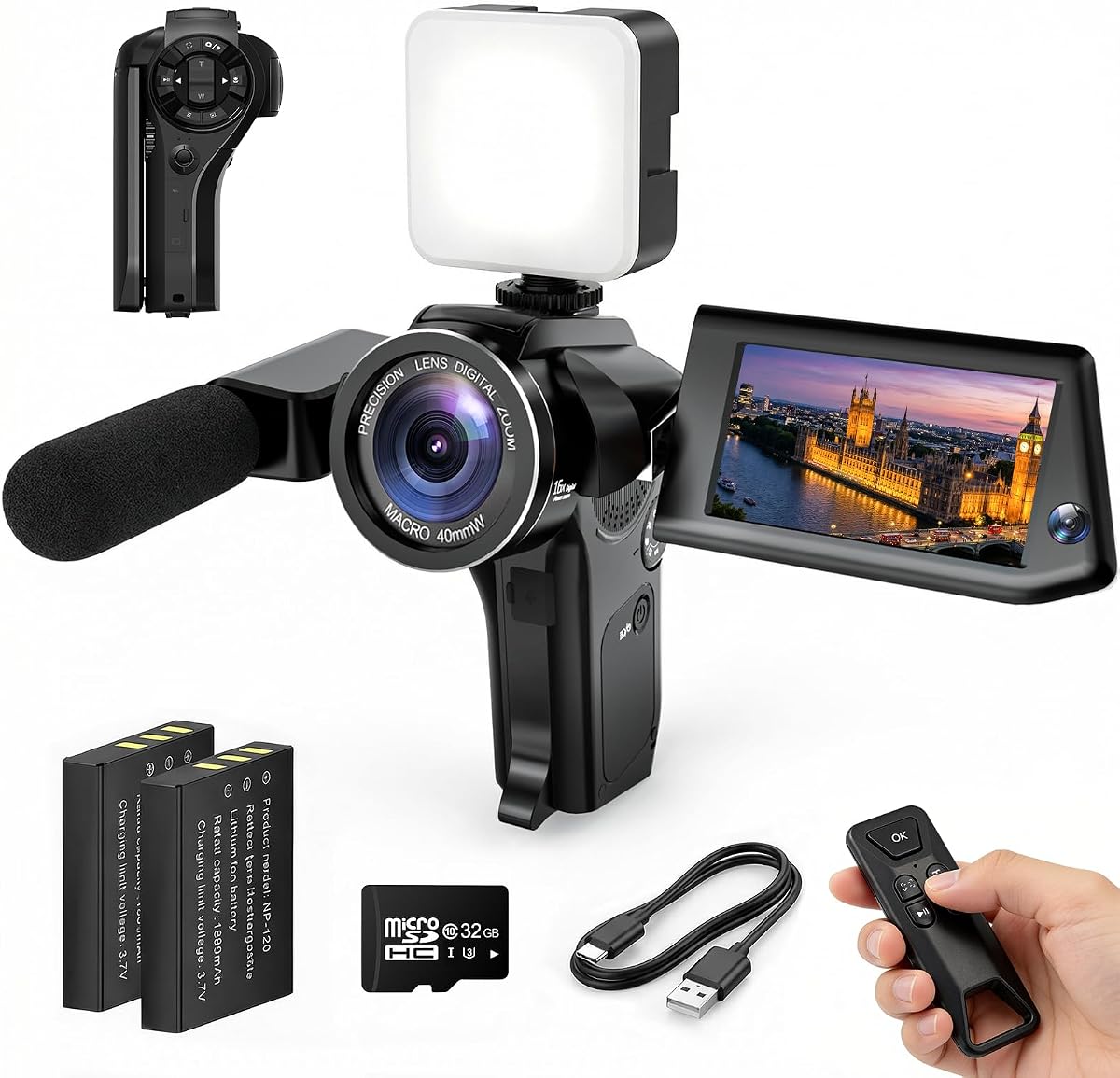
The Vlogging Camera with Picture-in-Picture offers a unique feature set that stands out for reaction videos and personal vlogs. With a perfect 5.0 rating, users love how it allows them to show both the scene and their facial reactions simultaneously.
We may earn a commission when you buy through this link, at no additional cost to you.
This dual-view capability is perfect for tutorials, family memories, or unboxing videos where your face adds context to the content. The WiFi flip screen ensures you can frame shots easily, while the 8K Creator Kit branding suggests a focus on high-quality output for social media.
While the PIP feature is innovative, it may not be needed for all types of content, making it a niche choice. Availability might also vary compared to more common models. However, for creators focused on personality-driven content, it offers a distinct advantage.
If you want to add a personal touch to your videos by showing your reactions alongside the main action, this camera is ideal. It bridges the gap between traditional recording and modern interactive storytelling.
See the moment and your reaction at the same time, making videos feel more personal and connected.
Perfect for capturing milestones like first steps where seeing your joy on screen enhances the memory.
We may earn a commission when you buy through this link, at no additional cost to you.
This Vlogging Kit is not a camera itself but a comprehensive set of tools to upgrade your existing smartphone or camera setup. With a 4.4 rating, it provides wireless audio, lighting, and stable mounts, addressing common pain points for creators using mobile devices.
We may earn a commission when you buy through this link, at no additional cost to you.
The wireless microphone ensures clear sound, while the RGB fill light lets you adjust tones for professional-looking videos. Both flexible and standard tripods offer stability in various environments, and the phone clamp ensures your device stays secure during shooting.
Since it relies on a phone camera, you are limited by that device's sensor capabilities. However, audio and lighting are often bigger bottlenecks than camera quality for beginners. These accessories solve those issues effectively without buying new camera hardware.
If you already have a good smartphone but want professional audio and lighting, this kit is a smart upgrade. It turns your existing device into a capable studio setup for social media content.
The wireless microphone delivers crisp sound so your voice is heard clearly without background noise.
Adjustable RGB lighting ensures your video looks professional and well-lit in any environment.
We may earn a commission when you buy through this link, at no additional cost to you.
This Face Tracking Kit automates framing with gesture-based face tracking, making it easy to shoot hands-free content. With a 4.4 rating, it simplifies the workflow for solo creators who need their device to follow them naturally.
We may earn a commission when you buy through this link, at no additional cost to you.
You control tracking with gestures like OK or a palm sign, avoiding the need for extra apps. Dual wireless microphones capture clear audio, and LED lights add polish to your visuals. The 70-inch height allows for versatile angles in a portable design.
Tracking relies on your phone's camera performance, which might not match dedicated devices. The range is also limited compared to professional systems. However, for budget-friendly automation, it offers significant convenience and usability.
If you want automatic tracking without complicated software, this kit is an excellent choice. It simplifies shooting while delivering professional results for social media videos.
Use simple gestures to start or stop tracking without downloading extra apps or fumbling with settings.
Dual wireless microphones ensure sound is picked up in real-time as you move around the room.
We may earn a commission when you buy through this link, at no additional cost to you.
The Logitech Brio 101 is a dedicated webcam designed for streaming and meetings, offering reliable 1080p quality at a reasonable price. With a 4.4 rating, it is known for its ease of use and consistent performance in video calls.
We may earn a commission when you buy through this link, at no additional cost to you.
Auto-Light Balance brightens your face in low-light conditions, ensuring you look your best without extra gear. The privacy slide provides security when not in use, and the built-in mic captures clear audio. It is compatible with most platforms out of the box.
Since it requires a USB connection and cannot run on battery power, mobility is limited compared to standalone cameras. It is best for stationary setups like desks. However, for streaming and remote work, these limitations are acceptable.
If you are streaming from a fixed location and want reliable video quality, this webcam is an ideal choice. It simplifies your setup while delivering consistent results for professional and casual video calls.
The integrated slide cover makes it easy to keep your camera private when not on a call.
Auto-Light Balance boosts brightness by up to 50% so you look your best in any lighting.
We may earn a commission when you buy through this link, at no additional cost to you.
Choosing the right camera involves balancing image quality, portability, and features that fit your content style. Below are key factors to consider before you buy.
Resolution determines how sharp your footage looks on high-definition screens. Most modern cameras offer 4K, which is standard for YouTube and social platforms. Higher frame rates allow for smooth slow-motion effects and better stability in action scenes.
Look for at least 4K resolution if you want future-proof content that scales well across devices. Frame rates of 60fps or higher are beneficial for dynamic content.
Larger sensors, like 1-inch CMOS, capture more light and produce cleaner images in dim environments. This is crucial for indoor vlogging or evening content where lighting may be inconsistent.
If you often shoot in low-light conditions, prioritize a camera with a larger sensor to avoid grainy footage. Budget models usually have smaller sensors, so check reviews for night performance.
Stabilization keeps your footage smooth when moving. Mechanical stabilization is superior to electronic options and makes handheld walking shots look professional.
Ensure the camera has built-in stabilization, either mechanical or optical, if you plan to film while walking or traveling. This reduces the need for external gimbals.
Reliable autofocus ensures your subject stays sharp even when moving. Advanced tracking features keep you centered automatically, which is useful for solo creators.
Test the autofocus speed and tracking accuracy if you move often. Models with touch screen focus are generally more intuitive for quick adjustments.
Good audio is just as important as video. Built-in microphones often pick up wind and background noise. Check if the camera has a mic input for external gear.
Choose a camera that supports external microphones for better sound quality. Wireless lavalier mics are great for vlogs to ensure your voice is clear.
Portability matters if you travel frequently. Pocket cameras fit in your bag, while larger ones offer more controls. Consider the weight for long recording sessions.
Pick a size that matches your lifestyle. If you carry gear daily, a compact model ensures you are ready to capture moments instantly.
WiFi and Bluetooth allow you to transfer files quickly to your phone for editing. This speeds up the workflow for social media posts.
Check if the camera has a companion app for easy transfer and control. Wireless features save time when you need to post content fast.
Kits often include essential items like SD cards, tripods, or batteries. This can save money upfront and ensure you have everything to start immediately.
Look for warranties and customer support options. Reliable support helps resolve issues quickly so you can keep creating without interruption.
Start by reading the manual to understand the button layout and menu system. Customize your settings for the most used formats, like 4K at 30fps for social media. Ensure your battery is fully charged and the SD card is formatted before shooting.
Protect your camera from dust and moisture by storing it in a dry bag when not in use. Clean the lens with a microfiber cloth to prevent smudges. If your camera has a mechanical shutter, handle it gently to avoid wear over time.
Keep firmware updated for the best performance and security features. Regularly backup your footage to avoid data loss. Organize files into folders by project to streamline editing workflows efficiently.
Not necessarily. Many modern pocket cameras and smartphones can produce excellent 4K video suitable for platforms like TikTok and YouTube. Consider your specific needs and budget.
4K is ideal as it downscales well to high-quality 1080p formats used by these platforms. It gives more detail during cropping and editing. Higher resolutions ensure future-proofing.
For professional-sounding vlogs, yes. Built-in mics often struggle with wind and background noise. External mics improve clarity significantly and are affordable.
Budget cameras start around $100 while premium ones go up to $1000. Choose a price that fits your income. You can start with entry-level and upgrade later.
Mini camcorders and dedicated travel cams often offer longer runtimes like 7 hours. Some models support recording while charging. Check reviews for specific battery performance.
Yes, with apps or accessories like kits that include mounts. Dedicated webcams offer better optical quality and light handling. Choose what suits your setup best.
We have reviewed 10 versatile options ranging from budget-friendly starters to advanced creator kits. Each model brings unique strengths to help you produce engaging and polished content for your audience.
Prioritize features like stabilization and audio based on your specific shooting needs. A camera that matches your workflow will encourage more consistent content creation and higher quality results.
Prices and stock change often so always verify the latest details before purchasing. We hope this guide helps you make a confident choice for your social media journey.