
ASUS Prime AP201 Micro-ATX PC Case
4.7Editor score
Quasi-Filter Mesh Panels for airflow
Optimized for cooling high performance
Tool-Free Side Panels for access
This guide compares the top ten ASUS PC Case models for performance, cooling, and aesthetics to help you find the perfect chassis for your custom build.
Choosing the right chassis is fundamental to any custom PC build. An ASUS PC Case offers robust construction, excellent airflow, and distinctive styling that matches modern gaming rigs. Whether you need a compact tower or a full-sized enthusiast chassis, ASUS provides reliable options for every budget and performance tier.
We evaluated ten distinct models based on thermal performance, build quality, and feature sets. Our analysis focuses on how each case supports hardware compatibility, cable management, and cooling potential. This list covers everything from budget-friendly micro-ATX solutions to premium E-ATX full-tower enclosures designed for extreme overclocking.
Each pick highlights specific strengths like panoramic glass, dual-chamber designs, or RGB integration. Note that product availability and pricing fluctuate frequently across retailers. Always verify current stock and shipping details before finalizing your purchase to ensure you get the exact model you need for your setup.
4.7Editor score

4.6Editor score

4.5Editor score
This side-by-side comparison outlines the key specifications and unique features of all ten selected ASUS PC Case models. Use this table to quickly identify which chassis best fits your hardware requirements and aesthetic preferences.


The ASUS TUF Gaming GT501 stands out as a top-tier chassis for enthusiasts seeking robust protection and style. With a 4.8 rating from users, it delivers on promises of durability and cooling efficiency. The metal chassis features custom TUF gaming spatter patterns that define its rugged aesthetic while protecting internal components from damage during use.
We may earn a commission when you buy through this link, at no additional cost to you.
Its cooling capabilities are highlighted by three 120mm Aura Sync RGB-illuminated fans and one 140mm rear PWM fan included out of box. You can mount up to seven optional fans and support top or front mounted 360mm radiators for liquid cooling setups. Pre-drilled holes for water pump and reservoir make custom loops easier to manage without extra tools.
While the GT501 is impressive, vertical GPU expansion slots are standard rather than dedicated riser support in some configurations. The smoked tempered-glass side panel offers a great view but requires careful handling during installation. These trade-offs are acceptable given the price point and the overall build quality offered for mid-range to high-end gaming systems.
Buyers looking for a balance of form and function will appreciate this TUF series option. It supports EATX motherboards comfortably and includes woven-cotton carry handles for moving the system safely. If you need a case that looks premium and handles heat well, the GT501 is a strong recommendation for your next build.
The combination of included fans and multiple mounting points allows for aggressive airflow strategies.
Handles enable safe transport of heavy builds without compromising structural integrity during movement.
We may earn a commission when you buy through this link, at no additional cost to you.
The ASUS Prime AP201 Micro-ATX PC Case is a fantastic choice for builders prioritizing airflow and efficiency on a budget. With a 4.7 user rating, it proves that small cases do not need to compromise on thermal performance. The quasi-filter mesh panels consist of over 57,000 precision-machined holes that significantly boost air intake and component visibility.
We may earn a commission when you buy through this link, at no additional cost to you.
This chassis supports 280 and 360mm radiators and up to six fans, making it primed to deal with high-performance hardware thermal loads. The tool-free side panels use a simple clip mechanism that allows easy removal without accidental dislodging. Inside, extended motherboard trays and strategically placed cutouts help hide cables behind the back panel for a clean look.
One trade-off is the footprint which restricts you to Micro-ATX motherboards though ATX PSUs fit comfortably. The industrial design lacks RGB flair but focuses on spatial efficiency and functionality. For workstation builds or small form factor gaming rigs, this efficiency outweighs the lack of decorative elements in most scenarios.
We recommend the AP201 for users needing a reliable, small footprint chassis with strong cooling potential. It supports ATX PSUs up to 180mm and graphics cards up to 338mm. If you value practical design and thermal performance over flashy lighting, this case offers incredible value for money in the current market.
The quasi-filter mesh ensures maximum ventilation while keeping dust intake manageable for long-term stability.
Strategically placed cutouts and gaps allow cables to be tucked out of sight for a tidy setup.
We may earn a commission when you buy through this link, at no additional cost to you.
The ASUS ROG Hyperion GR701 is a high-end gaming PC case designed for those who demand extreme cooling and luxury build quality. With a 4.6 rating, it balances performance features with premium materials like a sturdy diecast aluminum-alloy frame. This chassis supports up to two 420mm radiators, making it ideal for enthusiasts planning complex water cooling loops.
We may earn a commission when you buy through this link, at no additional cost to you.
Convenience features include a hinged tool-free side panel, built-in storage drawer, and an integrated graphics card holder supporting vertical or horizontal installation. Two front panel Type-C ports offer 60W fast charge support for peripherals. Top bars can be used as carry handles capable of supporting up to 80KG ensuring the unit stays secure during transport.
The semi-open structure improves airflow but may expose components to dust without proper filtering. The price reflects its premium nature so budget-conscious builders might find alternatives more suitable. However, for those building a flagship system with top-tier components, the features justify the investment in this robust chassis.
This case is best for users seeking the ultimate in cooling flexibility and build convenience. The storage drawer is a unique touch that helps keep small tools or cables organized nearby. If you want a case that combines industrial strength with gamer-friendly features, the ROG Hyperion GR701 is a top-tier contender.
The semi-open structure and radiator support allow for massive cooling solutions that standard cases cannot handle.
Integrated holders and storage drawers reduce cable clutter and tool usage during hardware installation.
We may earn a commission when you buy through this link, at no additional cost to you.
The ASUS TUF Gaming GT502 Horizon features a boundless panoramic design with tempered glass panels at the front and side for a fully unobstructed view. With a 4.5 rating, it highlights innovation in cooling architecture. Internals are divided into two chambers establishing independent cooling zones for the CPU and graphics cards to prevent heat soak.
We may earn a commission when you buy through this link, at no additional cost to you.
It includes a front panel High-Speed USB Type-C port for 10 Gbps data transfer. Tool-free side panels can be easily removed by pressing a button hidden on the rear of the chassis for quick access. Most panels and mounting components are detachable which streamlines hardware installation and cleanup significantly.
While the panoramic view is stunning, the glass needs regular cleaning to maintain clarity. The modular design adds complexity to assembly for first-time builders but pays off in flexibility. This chassis is best for those who want a modern aesthetic paired with functional thermal separation strategies.
Buyers prioritizing aesthetics and independent airflow should consider this Horizon model. The dual chamber design allows you to isolate hot components effectively. If you need a mid-tower that looks premium and keeps temperatures in check, this Horizon case offers a unique solution in the TUF lineup.
Dual chambers prevent GPU heat from affecting CPU cooling performance during intensive gaming sessions.
Front and side glass provide a stunning display of your custom build without obstructions.
We may earn a commission when you buy through this link, at no additional cost to you.
The ASUS A31 PLUS is an ATX case designed to work seamlessly with motherboards featuring hidden connectors. With a 4.1 rating, it focuses on clean aesthetics and cable management optimization. Four pre-installed ARGB fans ensure effective cooling while delivering a vibrant lighting display that enhances both functionality and visual appeal immediately.
We may earn a commission when you buy through this link, at no additional cost to you.
It supports up to 360mm radiators with thick fans and graphics cards up to 380mm. The panoramic design uses dual tempered glass panels on front and side for unobstructed views. An 8-degree angled base enhances airflow efficiency and widens the viewing angle for a more immersive experience during use.
While the price is competitive, the lower rating suggests users should check quality control upon arrival. It is a solid option for those specifically seeking hidden connector support to hide cables effectively. If you value a tidy build without paying for premium features, this fits the bill well.
We recommend this for builders wanting a balance of cooling and style without high costs. The angled base is a unique feature that aids thermal performance. If you have a motherboard with hidden connectors, this case helps maximize that feature for a clutter-free setup.
Designed specifically for hidden connectors to optimize setup and reduce clutter inside the chassis.
The 8-degree angle widens the viewing angle and improves airflow for better thermal performance.
We may earn a commission when you buy through this link, at no additional cost to you.
The ASUS TUF Gaming GT501 White Edition is the aesthetic sibling to the standard model featuring a custom white spatter pattern on the metal front panel. With a 4.7 rating, it retains all the functional strengths of its predecessor. This includes three 120mm Aura Sync RGB fans and one 140mm rear PWM fan for robust cooling performance.
We may earn a commission when you buy through this link, at no additional cost to you.
It is designed for visibility with a 4mm-thick smoked tempered-glass side panel to showcase your build's internals. The ergonomic woven-cotton carry handles enable safe transport of up to 30Kg. Fan and cable placement are optimized for TUF Gaming motherboards and ready for Fan Xpert 4 software control.
White cases are prone to showing dust so regular cleaning is needed to maintain the look. The price is marginally higher due to the finish but offers great value for white builds. If you need a high-performance white case that stands out, this edition delivers on both looks and specs.
Buyers focused on building a white-themed gaming rig will appreciate this model. It supports 360mm water cooling radiators at front and top. For those who want the TUF durability in a lighter color scheme, this GT501 White Edition is a top recommendation.
The custom white spatter pattern creates a distinctive look for white-themed gaming builds.
Matches the cooling and build strength of the standard model with same fan and radiator support.
We may earn a commission when you buy through this link, at no additional cost to you.
The ASUS TUF Gaming GT301 is a stylish mid-tower with a honeycomb front panel aiding airflow significantly. With a 4.6 rating, it balances compact design with performance features. The chassis includes three 120mm Aura Sync addressable RGB fans and one 120mm rear fan plus up to six fan-mounting points for targeted airflow management.
We may earn a commission when you buy through this link, at no additional cost to you.
It features an integrated 6 port Aura Sync addressable-RGB controller hub with a dedicated front panel button for lighting effects. Space is reserved for 280/360mm radiators in front. An integrated headphone hanger adds convenience for gamers using headsets daily. The tempered-glass side panel showcases internals effectively.
While compact, it supports ATX boards but may limit very long graphics cards or storage setups. The RGB controller hub simplifies cable management for lighting. If you want a small but powerful case with good lighting control, this GT301 delivers solid results for the price.
We recommend this for mid-range gaming builds needing good airflow and styling. The headphone hanger is a nice touch for desk setups. If you need a balance of size and cooling in a TUF branded case, the GT301 is a reliable choice.
The built-in RGB hub simplifies lighting setup and allows easy customization via front panel button.
Honeycomb front panel ensures high airflow despite smaller footprint compared to full-towers.
We may earn a commission when you buy through this link, at no additional cost to you.
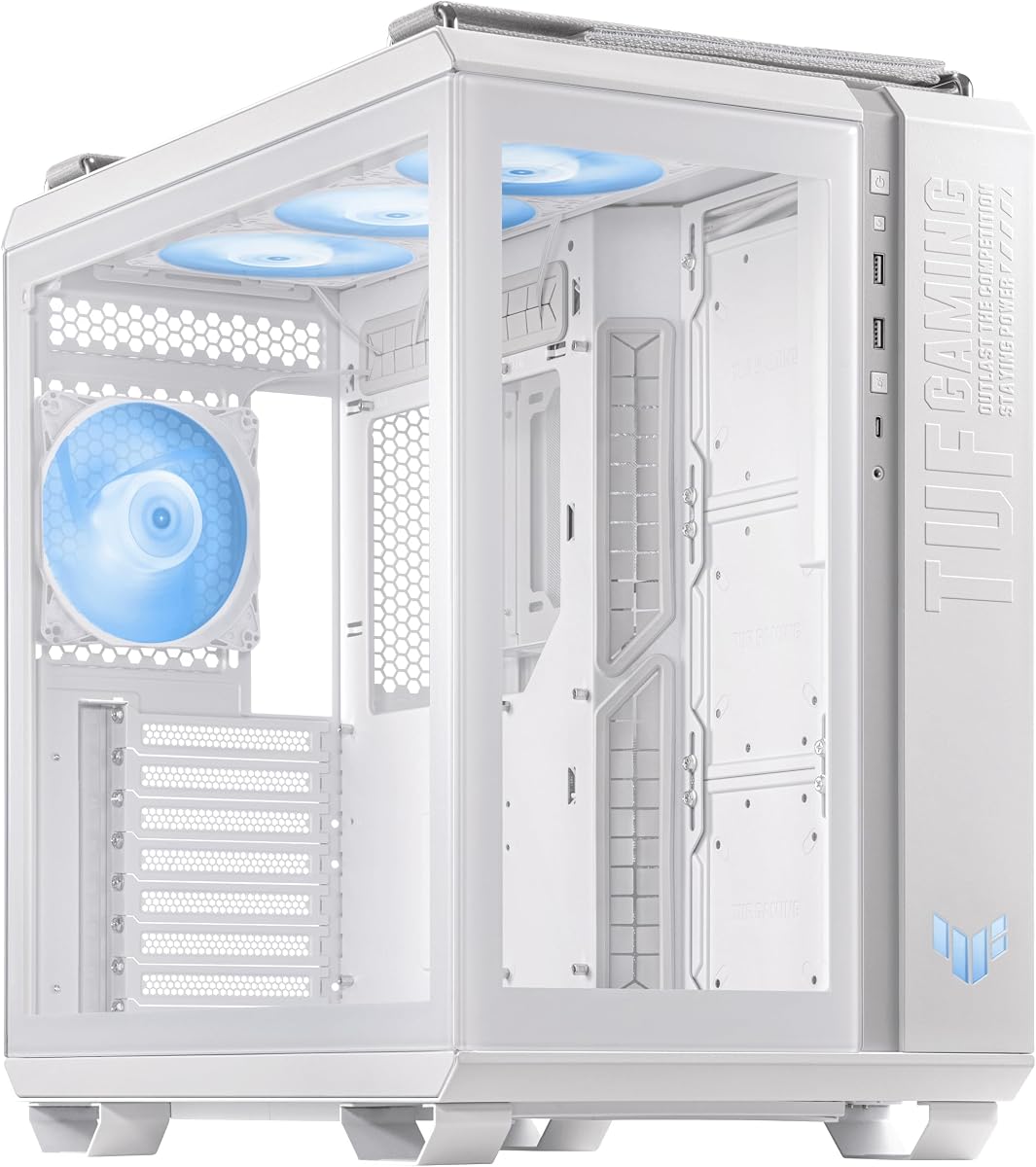
The ASUS TUF Gaming GT502 Horizon TG ARGB White offers a limitless panoramic design with tempered and tinted glass panels on front and sides. With a 4.7 rating, it provides a completely unobstructed view of the main chamber. The interior is divided into two chambers that form independent cooling zones for the CPU and graphics card effectively.
We may earn a commission when you buy through this link, at no additional cost to you.
The front panel features a USB 20Gbps Type-C port for high-speed storage devices. Four ARGB fans with vivid lighting effects ensure balanced cooling performance out of the box. The fully modular design means most panels and mounting hardware are removable to simplify hardware installation and access.
This white version offers a cleaner look for those preferring bright aesthetics. The USB Type-C port is faster than standard ports found on other models. If you need a high-end white case with premium connectivity and cooling separation, this Horizon ARGB model is a top pick.
Buyers wanting independent thermal zones for high-end builds should look at this chassis. The panoramic glass is stunning when lit up with RGB. For a white gaming rig with advanced connectivity options, the Horizon ARGB White delivers on style and performance.
The 20Gbps Type-C port provides faster transfer speeds for modern storage devices and peripherals.
Panoramic tempered glass offers a completely clear view of your build's interior components.
We may earn a commission when you buy through this link, at no additional cost to you.
The ASUS A31 Plus TG ARGB Black ATX PC Case features a concealed port ready design built for motherboards with hidden connectors. With a high 4.9 rating, it delivers on cable management optimization. The tempered glass panels on front and sides provide an unobstructed view of the main chamber for a clean look.
We may earn a commission when you buy through this link, at no additional cost to you.
Supports up to 360mm radiators combined with up to 80mm fans and graphics cards up to 380mm. An 8-degree angled base combines functionality and aesthetics improving airflow efficiency. It supports CPU air coolers up to 165mm high ensuring compatibility with standard air cooling solutions.
The high rating reflects user satisfaction with its balance of features and ease of use. The concealed port design reduces cable clutter significantly. If you want a case that supports modern motherboard features without costing a fortune, this is a strong option.
Buyers prioritizing high ratings and cable management should consider this model. The angled base helps with both airflow and viewing angle. For a reliable black ATX case with hidden connector support, the A31 Plus is a highly recommended choice.
Built for motherboards with concealed connectors to optimize cable management for a clutter-free setup.
Supports large GPUs and radiators ensuring your future upgrades will fit comfortably inside.
We may earn a commission when you buy through this link, at no additional cost to you.
The ASUS TUF Gaming GT502 Plus features a dual chamber chassis dividing internals for independent cooling zones for CPU and GPU. With a 4.6 rating, it offers a tactfully tinted view of the main chamber to showcase your build. The front panel includes a USB 3.2 Gen 2 Type-C port ripe for transfer speeds up to 10 Gbps.
We may earn a commission when you buy through this link, at no additional cost to you.
Tool-free side panels can be removed simply by pressing a button hidden on the rear of the chassis for easy access. The fully modular design means most panels and mounts are removable to ease hardware installation. Four ARGB case fans ensure cooling performance and lighting effects included.
This white version provides a clean look for builds that match white components. The USB Type-C port is a practical addition for modern connectivity. If you need a white case with dual chamber cooling and fast ports, this GT502 Plus is a solid option.
Buyers wanting a balance of dual chamber cooling and modern connectivity should consider this case. The tinted glass reduces glare while maintaining visibility. For a white gaming PC build with good thermal management, the GT502 Plus delivers on key features.
Panoramic glass panels reduce glare while maintaining a clear view of internal components.
Most panels and mounts are removable to ease hardware installation and access to components.
We may earn a commission when you buy through this link, at no additional cost to you.
Selecting the right PC case involves balancing cooling needs, hardware compatibility, and aesthetic preferences. This guide outlines key factors to consider when choosing an ASUS chassis for your next build.
Ensure the case supports your motherboard form factor such as ATX E-ATX or Micro-ATX. The ASUS Prime AP201 is Micro-ATX only while the GT501 supports E-ATX boards. Check dimensions before buying to avoid fitting issues.
Always verify that the case interior dimensions match your motherboard size and expansion card length.
Look for mesh panels and multiple fan mounting points to ensure proper airflow. The GT502 Horizon uses dual chambers for independent CPU and GPU cooling which reduces heat soak significantly.
Prioritize models with included fans or radiator support if you plan to use liquid cooling.
Steel cases offer durability while aluminum frames like in the ROG Hyperion provide premium feel and rigidity. Smoked glass side panels offer great views but require careful handling to avoid damage during transport.
Choose tempered glass for aesthetics if you plan to showcase internal components and RGB lighting.
Cases with concealed port support like the A31 PLUS allow hidden connectors to be used effectively. Extended motherboard trays and cutouts make hiding cables behind the back panel easier for a cleaner look.
Good cable management improves airflow and reduces clutter inside the chassis.
USB Type-C ports are standard on modern cases like the GT502 Horizon providing faster transfer speeds. Check that the case includes necessary USB 3.2 Gen 2 ports if your peripherals require them.
Ensure the front I/O matches your connectivity needs for devices and charging.
ASUS cases range from rugged TUF spatter patterns to sleek ROG diecast frames. Decide if you want a white or black finish to match your build theme before purchasing a model.
Color and design impact how the system looks on your desk and gaming setup.
Tool-free side panels and modular mounting allow easy access for upgrades and maintenance. The GT502 Horizon and AP201 both support easy removal without needing screwdrivers.
Convenience features reduce setup time and simplify component swapping over the system lifecycle.
Compare prices against included features like RGB fans and cooling support. Premium cases like the ROG Hyperion cost more but offer superior radiator support and build quality for high-end systems.
Budget options like the A31 PLUS provide essential features without extra cost for niche amenities.
Install components securely using the provided screw mounts and trays. For models with dual chambers or tool-free panels follow the manual guides to access internal parts without forcing connections.
Clean dust filters and glass panels regularly to maintain optimal airflow and appearance. Use compressed air to clear the mesh holes especially on cases like the AP201 to prevent thermal buildup.
When transporting use the carry handles on cases like the GT501 to avoid stress on the chassis. Ensure fans and radiators are secured tightly before moving to prevent damage during transit.
Many models like the GT501 and A31 PLUS come with pre-installed RGB or PWM fans. Check the product details to confirm the number and type of fans included before purchase.
Yes most cases support 360mm or larger radiators especially the ROG Hyperion GT502 Horizon. These models provide space for front top and rear mounts for custom water cooling loops.
Use a microfiber cloth and glass cleaner to avoid streaks on tempered glass. Clean frequently to maintain clarity since smudges can reduce visibility of internal components.
Only if the case supports that form factor. Verify the maximum motherboard size supported by the case before committing to ensure future upgrades fit inside.
Most ASUS cases feature tool-free side panels and mounting brackets. A standard screwdriver may still be needed for GPU installation but many parts require no tools.
Many models include ARGB fans and hubs like the GT301. You may need a motherboard or controller to sync lighting effects across components.
Our review highlights the ASUS ROG Hyperion GR701 as the top choice for premium builds needing extreme cooling. The Prime AP201 offers unmatched value for budget builders and the GT502 Horizon stands out for dual chamber thermal management.
Prioritize cooling and motherboard compatibility first before focusing on aesthetics. A well-ventilated case protects components and ensures stable performance during intensive tasks like gaming or rendering.
Always check current pricing and stock availability before buying as offers fluctuate frequently. Choosing the right ASUS PC Case ensures your system runs cool and looks great on your desk.