
ASRock J4125M
3.4Editor score
Intel Quad Core J4125
DDR4 memory support
Compact Micro ATX form
This guide compares the top 10 low power motherboard options for NAS, home servers, and efficient computing to help you choose the right efficient.
Finding a low power motherboard is essential for building energy-efficient servers and workstations that run 24/7 without excessive heat or electricity costs.
We compared ten leading models based on processor efficiency, connectivity options, thermal design, and overall value to create this comprehensive ranking list.
Each pick highlights key strengths and trade-offs so you can match the right board to your specific needs while noting that prices fluctuate frequently.
3.4Editor score

4.5Editor score

4.1Editor score
The following table provides a side-by-side overview of the key specifications and features for all ten low power motherboards reviewed in this guide.





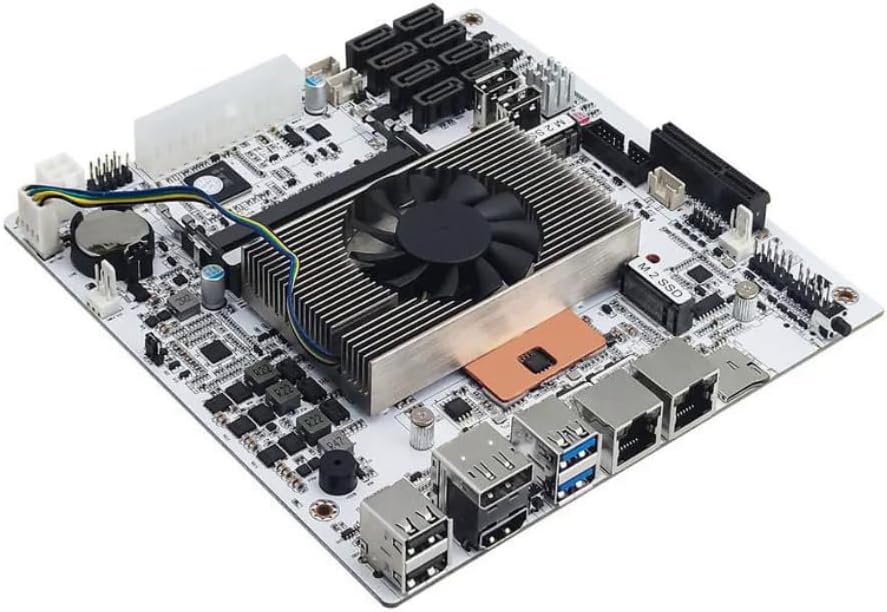
This industrial NAS motherboard stands out for its balanced combination of low power consumption and robust networking features suitable for home labs and servers.
We may earn a commission when you buy through this link, at no additional cost to you.
It includes four high speed network ports along with ample SATA and M.2 storage options to support extensive data storage and virtualization needs.
While it requires dual power connections and shows a brief boot delay, these minor trade-offs are acceptable for the level of performance and stability provided.
Buyers looking for a reliable low power motherboard for a network appliance or multimedia server will find this board meets their requirements effectively.
The four i226 2.5GbE ports ensure fast and stable connections ideal for firewall appliances or high throughput NAS environments.
Dual HDMI and DP ports allow for dual 4K 60Hz displays enabling flexible multi-monitor setups for management or media tasks.
We may earn a commission when you buy through this link, at no additional cost to you.
This budget friendly option offers a straightforward solution for basic low power computing needs using older but reliable legacy components.
We may earn a commission when you buy through this link, at no additional cost to you.
It supports DDR3 memory and includes essential ports like HDMI and USB making it suitable for simple office or home media tasks.
The use of SATA2 and older memory standards means it is best for very light workloads where cost savings are more important than speed.
Those needing an ultra low cost entry point into low power builds can consider this board while understanding its legacy limitations.
With a very low price tag this board serves as an economical choice for users who do not require modern high speed interfaces.
It provides enough USB and video ports to connect essential peripherals without unnecessary bloat or complex configuration steps.
We may earn a commission when you buy through this link, at no additional cost to you.
This board brings AMD AM4 flexibility with PCIe 4.0 support making it a solid choice for users prioritizing CPU upgrade paths and speed.
We may earn a commission when you buy through this link, at no additional cost to you.
Its digital VRM design ensures steady power for Ryzen processors while the heatsink helps manage thermal output during extended operation.
While it lacks built-in WiFi and uses a compact layout the performance and compatibility options make it attractive for custom low power builds.
Buyers wanting a reliable foundation for efficient Ryzen systems will appreciate the balance of modern features and dependable power delivery.
The digital 3+3 VRM design with premium components provides stable voltage for Ryzen CPUs ensuring reliable performance under load.
Support for PCIe 4.0 allows faster data transfer speeds for GPUs and storage drives enhancing overall system responsiveness.
We may earn a commission when you buy through this link, at no additional cost to you.
This model focuses on delivering high performance stability with its Core Boost technology and flexible storage options suitable for demanding low power tasks.
We may earn a commission when you buy through this link, at no additional cost to you.
It supports high speed DDR4 memory and provides double M.2 connectors to enable fast NVMe boot drives and additional data storage.
Although it lacks integrated wireless and focuses on a practical design the thermal and performance features make it a strong contender for efficient builds.
Users who need reliable CPU support and quick storage access without excessive power draw will find this board a sensible investment.
The chipset heatsink and AI cooling system adjust fan settings based on temperatures to maintain efficiency and quiet operation.
Two M.2 slots including one Gen4 offer versatile storage configurations for operating systems and large media libraries.
We may earn a commission when you buy through this link, at no additional cost to you.
Offering an affordable entry point this board delivers a low power Intel Quad Core processor suitable for simple home server or office tasks.
We may earn a commission when you buy through this link, at no additional cost to you.
It supports DDR4 memory and provides a dedicated slot for WiFi modules allowing some expansion while keeping the overall footprint small.
While it does not offer high end features the core functionality and price make it a practical choice for tight budgets.
Buyers seeking a no fuss low power motherboard for basic connectivity and storage can rely on this model for dependable daily use.
The board uses quality components to ensure durability and stability even in compact low power environments.
PCIe slots and M.2 E allow users to add cards or connectivity as needed for specific project requirements.
We may earn a commission when you buy through this link, at no additional cost to you.
This board provides excellent value with support for a wide range of Ryzen processors and high speed DDR4 memory for responsive performance.
We may earn a commission when you buy through this link, at no additional cost to you.
It includes legacy display outputs which are useful for systems needing VGA or DVI connections alongside modern HDMI options.
While it lacks WiFi the robust power protection and stable phases make it a reliable choice for consistent low power usage.
Those needing a cost effective board for efficient computing with strong memory support will find this model fits their needs well.
Multiple video outputs ensure compatibility with older monitors and specialized displays in office or industrial settings.
The 6 Power Phase design with premium chokes ensures steady power to the CPU for reliable performance and longevity.
We may earn a commission when you buy through this link, at no additional cost to you.
This Mini ITX board is designed for compact builds with integrated wireless and digital power phases that optimize efficiency and stability.
We may earn a commission when you buy through this link, at no additional cost to you.
It supports two DDR4 DIMMs and provides three display interfaces for versatile visual setups in small form factor systems.
While the PCIe bandwidth is limited compared to newer standards the small size and feature set make it ideal for space constrained projects.
Buyers looking for a compact low power solution with wireless connectivity and strong VRM performance should consider this board seriously.
The digital PWM design with DrMOS offers precise power control for stable CPU operation in a tiny chassis.
Gigabit LAN combined with Intel WiFi ensures reliable high speed networking for wireless or wired connections.
We may earn a commission when you buy through this link, at no additional cost to you.
This board stands out with built-in Wi-Fi 6E and high quality audio making it a premium choice for wireless low power server setups.
We may earn a commission when you buy through this link, at no additional cost to you.
It offers four DDR4 slots and ample USB connectivity which supports flexible memory expansion and peripheral connections easily.
While it comes at a higher price point the integrated features and robust design provide significant convenience and performance benefits.
Users who want a complete low power motherboard with modern wireless and audio capabilities will find this model excellent.
Support for the 6GHz band ensures low latency connections ideal for wireless data transfer or streaming tasks.
The ALC1220 codec with Nahimic delivers immersive sound quality for multimedia applications without external hardware.
We may earn a commission when you buy through this link, at no additional cost to you.
This board combines an 8-thread low power CPU with extensive storage and network options for high performance home servers and virtualization.
We may earn a commission when you buy through this link, at no additional cost to you.
It supports dual 2.5GbE ports and eight SATA connections enabling robust data throughput and storage redundancy for demanding workloads.
While it may have sleep mode issues and requires careful initial setup the performance capabilities justify the effort for professional users.
Buyers needing a compact yet powerful low power solution for virtualization and storage will find this board a strong premium option.
The 8-thread processor offers superior performance for multitasking and virtual machines compared to standard low power chips.
With eight SATA ports and M.2 options users can build large and fast storage arrays for media or data services.
We may earn a commission when you buy through this link, at no additional cost to you.
This specialized motherboard is built for NAS systems with eight SATA ports and a low power i5 processor for continuous operation.
We may earn a commission when you buy through this link, at no additional cost to you.
It supports dual NVMe drives and high speed LAN to ensure quick access to data and reliable networking for storage appliances.
While it does not support sleep mode and uses an ES version processor the dedicated features make it ideal for dedicated storage builds.
Those focused on building a reliable home server or NAS will find this board tailored specifically to their storage and efficiency needs.
The i5 8265U offers a balance of performance and efficiency perfect for 24/7 NAS operation without high electricity costs.
Headers for USB and TF slots provide flexible options for boot drives and external connectivity in tight cases.
We may earn a commission when you buy through this link, at no additional cost to you.
Selecting the right low power motherboard requires evaluating several technical factors to ensure compatibility with your CPU and system goals.
The first step is to verify that the motherboard supports the CPU socket type and generation you intend to use. Low power CPUs like Celeron or Pentium often use specific sockets different from desktop Ryzen or Core chips. You must check the supported CPU list to avoid incompatibility which can prevent the system from powering on. Efficiency is also key so look for boards that match the TDP of your chosen processor for optimal thermal performance.
In summary always cross reference the CPU support list and socket type before purchasing a low power motherboard to ensure basic compatibility.
Low power builds often benefit from smaller cases which means choosing the right form factor is essential. Mini ITX boards are the smallest but limit upgrade slots while Micro ATX offers a balance of size and expansion. Measure your intended case interior carefully because some industrial boards have specific dimensions or mounting hole layouts that differ from standard ATX. Failing to check this can result in a board that does not fit your chosen chassis.
Always confirm the board dimensions and mounting points match your case to ensure a proper physical fit.
RAM speed and capacity determine how smoothly your server handles multitasking and virtualization tasks. Some low power boards only support DDR3 which is outdated while newer ones support fast DDR4. Check the maximum RAM capacity supported especially if you plan to run memory intensive applications like multiple virtual machines. Dual channel support also improves bandwidth which is helpful for storage performance.
Ensure the motherboard supports the desired RAM type and amount for your intended workload to avoid bottlenecks.
NAS and server builds rely heavily on drive connectivity so check the number of SATA and M.2 slots available. Some boards offer eight SATA ports which is ideal for large storage arrays while others limit you to four. NVMe support via M.2 slots provides faster boot and read speeds which is beneficial for OS drives. Also consider if the SATA ports are native or chip extended as this can impact reliability.
Select a board with enough native storage ports to meet your drive count needs without relying on external controllers.
Network performance is critical for servers so look for boards with sufficient Ethernet ports and speed. Gigabit LAN is standard but many modern low power boards offer 2.5GbE ports which provide faster data transfer for media streaming. Some models include multiple ports for network bonding or VLANs which is useful for firewall appliances. Wireless connectivity can also be important if running a router setup where built-in Wi-Fi reduces cable clutter.
Prioritize boards with fast network ports or multiple Ethernet connections if your use case involves high throughput traffic.
Stable power delivery ensures your CPU runs reliably over long periods without thermal throttling or shutdowns. Boards with proper VRM heatsinks and power phases maintain efficiency better than those with minimal cooling. Low power CPUs usually generate less heat but passive cooling options are preferred for silent operation. Check if the board requires additional power connectors beyond the main ATX plug to avoid installation issues.
Verify the cooling design and power connectors align with your case airflow and power supply configuration.
Even for low power systems having some expansion slots allows future upgrades like adding a GPU or capture card. Look for at least one PCIe slot which could be x16 or x4 depending on the board layout. Some compact boards limit slots to x1 which restricts high bandwidth upgrades. Wireless expansion slots are also useful for adding specific network cards or WiFi modules to enhance connectivity.
Ensure there is at least one usable PCIe slot for future hardware needs to extend the system lifespan.
Many users need to connect a monitor for management or media playback so checking video outputs is important. Modern boards include HDMI and DisplayPort for high resolution support like 4K which is useful for multimedia servers. Older boards may rely on VGA or DVI which limits resolution options. If you plan to run dual displays check the number of video ports available on the rear panel.
Confirm the available video ports match your monitor requirements to avoid needing a graphics card.
Install the motherboard in a clean static free environment to protect sensitive components from electrical discharge. Connect all power cables properly ensuring dual connectors are plugged in if required for booting. Seat RAM modules firmly to avoid boot failures that can occur from loose memory.
Update the BIOS to the latest version immediately after assembly to fix bugs and improve hardware compatibility. Configure fan curves in the BIOS to balance cooling with noise levels especially if the board supports fan control headers.
Perform regular cleaning of dust from heatsinks and ports to maintain optimal airflow. Monitor temperatures via software to ensure the low power system remains within safe thermal ranges during continuous operation.
A motherboard is considered low power when it supports processors with a low TDP and features efficient power delivery design. These boards often use integrated graphics and modern chipsets that consume less energy while idle. This efficiency reduces electricity costs and heat output making them ideal for 24/7 systems.
Most modern low power boards support standard DDR4 memory but you must check the supported speed ranges. Some industrial boards may require specific non ECC modules to ensure stability. Always verify the QVL list to confirm compatible RAM kits before buying.
Yes many low power CPUs like Intel Celeron and Core i5 include VT-x and VT-d features for virtualization. The motherboard BIOS must enable these settings to allow virtual machines to run efficiently. Check the processor specs and BIOS options to confirm virtualization support is available.
Not all low power boards include built-in WiFi as some focus on wired connectivity for stability. However premium models often include Wi-Fi 6 or 6E to reduce cable needs. If wireless is important look specifically for boards with integrated antenna connectors.
The number of drives depends on the SATA and M.2 ports available on the board. Basic models may support only two drives while NAS focused boards can handle eight or more. Check the storage section of the specs to match your drive count.
Low power boards typically work with standard ATX power supplies but some require additional connectors for full power. If you have a small form factor case a SFX PSU might be necessary to fit physically. Ensure your PSU has enough connectors for the board requirements.
While they can run light games on integrated graphics they are not designed for high-end gaming due to limited PCIe lanes. Their focus is on efficiency and reliability for servers rather than graphics performance. For gaming you would need a dedicated graphics card and more power.
Some users report boot delays or memory initialization checks especially on industrial boards. Ensuring a compatible CPU and RAM helps avoid these issues. Updating the BIOS version often resolves early boot inconsistencies.
We reviewed ten distinct low power motherboards ranging from budget options to feature rich premium boards. Each model offers unique strengths for storage networking and general computing efficiency depending on your specific needs.
When choosing prioritize the CPU compatibility and storage connectivity that match your project goals. A board with enough SATA ports and fast network links will serve you well in a home server environment.
Always verify current pricing and availability as these figures change frequently. Check user reviews and support forums to ensure the board meets your performance expectations before finalizing your purchase.