
Logitech K120
4.6Editor score
Spill resistant design
Full size layout
Plug and play USB
Selecting the right keyboard for a point of sale system is crucial for smooth daily operations in retail and hospitality environments. A reliable input device ensures staff can process transactions quickly without errors or technical interruptions during peak hours.
We have evaluated ten top-rated models based on build quality connectivity options and specialized features like programmable keys and integrated touchpads. Our analysis focuses on how well each unit integrates with standard POS software and withstands high-volume usage scenarios.
Each product entry below highlights key specifications real-world performance expectations and user feedback to help you make an informed decision for your business needs. Please note that availability and pricing may fluctuate so always check the latest details before purchasing.
4.6Editor score
4.5Editor score

4.3Editor score
As an Amazon Associate we earn from qualifying purchases.
This side by side comparison highlights the core specifications and unique selling points of each ranked model to help you identify the best fit for your specific point of sale setup requirements.


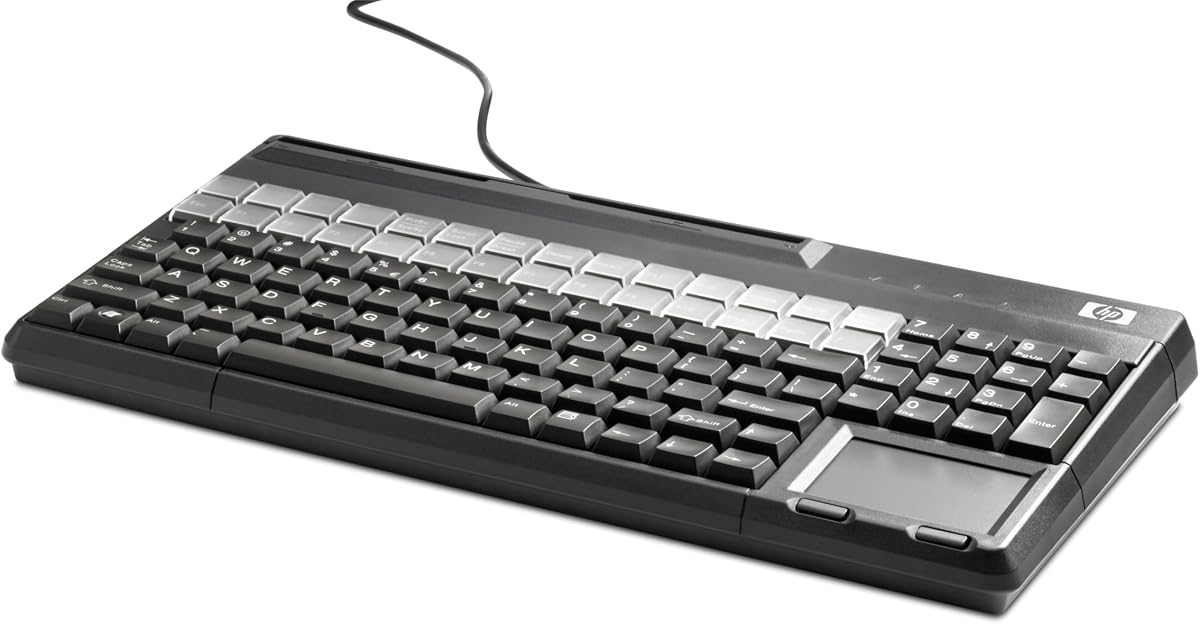
The HP POS Keyboard stands out as a top choice for retail environments due to its integrated magnetic stripe reader and fully customizable key layout. It delivers reliable performance with a 4.5 star rating based on user feedback regarding stability and ease of use.
We may earn a commission when you buy through this link, at no additional cost to you.
Its 28 relegendable keys allow staff to quickly adapt the keyboard to specific POS software requirements without needing external programming tools. The 106 key QWERTY layout ensures that all standard functions are accessible while the USB interface provides a stable connection to the terminal.
While it comes at a higher price compared to generic office keyboards the time saved during checkout and reduced need for additional peripherals justify the investment. Some users note it lacks wireless capability which may limit flexibility in larger open counter setups.
This model is ideal for retail stores and supermarkets where speed and accuracy are paramount for daily transactions. We recommend it for businesses seeking a dedicated all in one solution to streamline their point of sale workflow efficiently.
Having the magnetic stripe reader built into the keyboard eliminates the need for a separate peripheral and reduces cable clutter on the counter.
The relegendable keys enable staff to program frequently used commands directly onto the keyboard for faster data entry during busy periods.
We may earn a commission when you buy through this link, at no additional cost to you.
The Cherry G86 Compact offers a premium solution for crowded POS counters by combining a full 106 key layout with an integrated touchpad in a single unit. It holds a 4.2 star rating reflecting its solid build quality and functional design for business use.
We may earn a commission when you buy through this link, at no additional cost to you.
Its spill resistant construction protects the internal electronics from accidental beverage spills which are common in food and beverage service environments. The compact footprint saves valuable counter space while the USB connection ensures plug and play compatibility with most POS systems.
Some users find the touchpad slightly smaller than a dedicated mouse which might require adjustment for precise cursor control. The lack of advanced programmable keys limits its suitability for highly customized workflows but it works well for standard retail operations.
We recommend this keyboard for cafes and small shops where counter real estate is limited and durability is a priority. Its balance of size and functionality makes it a strong contender for businesses needing a compact all in one input device.
By integrating the touchpad directly onto the keyboard surface this model frees up desk space for other essential peripherals like card terminals.
The spill resistant design ensures that minor accidents do not lead to costly replacements or downtime in critical service areas.
We may earn a commission when you buy through this link, at no additional cost to you.
The Logitech K120 is a top choice for businesses seeking a reliable and affordable input device for their point of sale systems. With a 4.6 star rating it is praised for its comfort and durability in high volume work environments.
We may earn a commission when you buy through this link, at no additional cost to you.
Its spill proof design protects against liquid accidents ensuring longevity even in busy kitchens or retail counters where drinks are nearby. The full size layout with dedicated number pad supports efficient data entry while the USB connection makes it simple to set up without drivers.
While it lacks specialized POS features like programmable keys or an integrated touchpad it excels as a straightforward dependable workhorse. Users may need a separate mouse for cursor control but the low cost often makes this a practical compromise for tight budgets.
This keyboard is perfect for small businesses or backup stations where cost effectiveness and reliability are more important than advanced features. We suggest it for entry level POS setups that need a no fuss solution to get started quickly.
At a very low price point the K120 offers robust construction that can withstand years of daily use without significant wear.
The deep profile keys provide a comfortable typing feel that reduces fatigue during long shifts of transaction processing.
We may earn a commission when you buy through this link, at no additional cost to you.
The Cherry Lpos G86 is designed for environments requiring complex data entry with a massive 169 key layout and 42 relegendable keys. It receives high marks for its ability to handle sophisticated POS software requirements efficiently and reliably.
We may earn a commission when you buy through this link, at no additional cost to you.
The inclusion of a magnetic stripe reader and programmable keys allows for streamlined workflows where specific actions can be mapped to single keystrokes. This reduces the time staff spend navigating menus and enhances overall transaction speed during peak hours.
Its large size may not fit well on smaller counters and the initial programming of keys can be time consuming for non technical users. However for businesses with complex inventory or service menus the customization benefits outweigh these physical and setup constraints.
We recommend this keyboard for large retail stores or distribution centers where advanced input capabilities are necessary for daily operations. It is best suited for environments that have the space and technical support to manage its full potential.
The 42 relegendable keys allow businesses to map specific commands or macros to single keys for faster access to common functions.
Built for continuous use this model supports heavy daily typing loads without losing responsiveness or key integrity over time.
We may earn a commission when you buy through this link, at no additional cost to you.
The Perixx PERIBOARD combines a full size keyboard with an integrated touchpad and multimedia hotkeys into a single cost effective unit. It is rated 4.2 stars for its versatile design that bridges the gap between office productivity and basic point of sale needs.
We may earn a commission when you buy through this link, at no additional cost to you.
The quiet scissor switch keys provide a smooth typing experience that does not disturb the surrounding environment which is ideal for quiet retail spaces. The dedicated number pad and full layout ensure data entry speed while the touchpad reduces the need for a separate mouse.
While it lacks dedicated POS programmable keys it offers a comfortable reliable alternative for businesses wanting to reduce peripheral clutter. Some users may find the touchpad less precise than a mouse but the space saving benefit is significant for compact counters.
This keyboard is well suited for small retail shops or administrative terminals where budget and desk space are key considerations. We suggest it for operations that need a standard input device without investing in specialized POS hardware.
The scissor switch design ensures that keystrokes are quiet and smooth making it suitable for environments where noise levels must be kept low.
Having a touchpad built in allows users to navigate interfaces without reaching for a separate mouse which saves valuable counter space.
We may earn a commission when you buy through this link, at no additional cost to you.
The Adesso Easy Touch is engineered to withstand harsh conditions with an IP67 waterproof rating that protects against submersion and spills. It earns a 4.2 star rating for its durability in demanding industrial or food service environments where hygiene is critical.
We may earn a commission when you buy through this link, at no additional cost to you.
Its large durable keys offer excellent contrast and readability which helps staff input data accurately even in low light or busy conditions. The sealed membrane switches prevent liquids and debris from entering the internal electronics ensuring a long lifespan despite rough treatment.
While the key feel may be less tactile than mechanical options the robust build quality makes it ideal for kitchens or outdoor counters. Some users may find the typing action softer than preferred but the trade-off for waterproofing is necessary for these settings.
We recommend this keyboard for restaurants or warehouses where exposure to water and debris is frequent and regular cleaning is required. It is the top choice for businesses that need a keyboard that can be hosed down or wiped thoroughly after each shift.
The IP67 rating ensures that the keyboard remains functional even if submerged in water for short periods protecting critical equipment from damage.
A smooth sealed surface makes cleaning quick and effective reducing the risk of cross contamination in food handling areas.
We may earn a commission when you buy through this link, at no additional cost to you.
The Cherry LPOS Touchpad model offers extensive customization with 127 programmable and 42 relegendable keys alongside an integrated touchpad. It aims to provide flexibility for various POS setups but currently holds a lower 2.4 star rating from users.
We may earn a commission when you buy through this link, at no additional cost to you.
The high number of programmable keys allows for complex workflow automation but may require significant technical setup to realize benefits. The USB interface ensures connectivity while the touchpad reduces the need for separate pointing devices on the counter.
Critics often cite the difficulty in configuring the programmable keys and lower build quality feedback as reasons for the lower score. While the feature set is robust in practice the learning curve may be too steep for casual or small business users.
This keyboard is best suited for IT managed environments where staff can configure the keys to match specific software demands. We suggest it for businesses that have dedicated support to handle the initial setup and customization challenges.
With over 120 programmable keys users can map virtually any function to the keyboard for maximum workflow efficiency.
The built in touchpad helps streamline operations by reducing the hardware footprint and allowing touch-based navigation.
We may earn a commission when you buy through this link, at no additional cost to you.
The Cherry KC 1000 is a specialized security keyboard designed for environments requiring smartcard authentication and secure PIN entry. With a 4.6 star rating it is highly rated for its compliance with strict security standards like FIPS 201.
We may earn a commission when you buy through this link, at no additional cost to you.
Its built in smartcard reader simplifies transactions that require card based verification reducing the need for external secure devices. The secure PIN entry mechanism ensures that sensitive data is handled safely making it ideal for government or high security retail contexts.
While it excels in security the specialized focus means it may be overkill for standard retail transactions that do not require card readers. The higher price reflects its certification and security features which might not fit every budget.
We recommend this keyboard for high security applications or businesses that require smartcard verification for staff access or customer transactions. It is the preferred choice where data security and regulatory compliance are the top priorities.
Being FIPS 201 approved means this keyboard meets strict government standards for security and data protection in sensitive environments.
The integrated card reader streamlines access control and transaction verification by allowing users to insert cards directly at the keyboard.
We may earn a commission when you buy through this link, at no additional cost to you.
The Cherry G80 Mechanical offers a compact and rugged input solution designed for industrial applications where space and durability are critical. It holds a 4.0 star rating reflecting its reliable performance in tough conditions and long lasting construction.
We may earn a commission when you buy through this link, at no additional cost to you.
Its mechanical switches ensure a long lifespan and consistent tactile feedback which helps maintain accuracy during repetitive data entry tasks. The inclusion of both USB and PS/2 connections provides flexibility for older systems or specialized hardware setups.
The compact layout may require users to rely on function keys for some standard features which can slow down workflow for those accustomed to full sized boards. Additionally mechanical switches can generate noise that may not suit quiet service environments.
This keyboard is best suited for manufacturing floors or industrial settings where robustness and reliability take precedence over typing comfort. We suggest it for businesses needing a durable compact input device that can withstand harsh environmental conditions.
The MX Black switches are designed for millions of actuations ensuring that the keyboard remains responsive even under heavy continuous use.
Having both USB and PS/2 support allows integration with a wider range of legacy and modern systems without needing adapters.
We may earn a commission when you buy through this link, at no additional cost to you.
The Logitech K270 brings wireless convenience to POS environments with a full size layout and long battery life for uninterrupted use. It is rated 4.3 stars for its reliability and ease of setup in office or service settings.
We may earn a commission when you buy through this link, at no additional cost to you.
Its 24 month battery life means users can operate without frequent battery changes while the wireless connection provides flexibility to move around the counter. The full size layout ensures that a number pad is available for data entry tasks.
Wireless connectivity can sometimes introduce minor latency or require battery management which might be less ideal for high speed transaction zones. However for backup stations or administrative tasks the freedom of movement is a valuable asset.
We recommend this keyboard for business managers or support roles where mobility and comfort are priorities over fixed counter setups. It is a strong choice for environments where cable management is difficult or flexibility is desired.
The wireless design allows staff to position the keyboard comfortably without being constrained by cable length or USB port availability.
With a battery life lasting up to two years users can focus on work without worrying about frequent maintenance or replacements.
We may earn a commission when you buy through this link, at no additional cost to you.
Choosing the right keyboard for your point of sale system involves evaluating key factors such as layout durability and connectivity to ensure smooth daily operations.
The layout of your keyboard directly impacts how fast staff can enter data during transactions. Look for models with programmable or relegendable keys if your software requires specific shortcuts or macros. A standard QWERTY layout with a full number pad is essential for most retail workflows to support quick numeric entry.
Prioritize keyboards that offer flexible key mapping to reduce the need for constant mouse navigation. Customization options can significantly speed up checkout times and reduce errors in busy service environments.
POS keyboards often operate in high traffic environments where spills and heavy use are common. Choose models with spill resistant or waterproof designs to protect internal electronics from liquids and debris. Look for robust construction materials that can withstand frequent cleaning and daily wear and tear.
Investing in a durable keyboard reduces long term maintenance costs and downtime. A sturdy build ensures that the input device remains functional even in demanding service conditions.
Most modern POS systems support USB connectivity which offers a reliable and simple plug and play experience. Some models also offer PS/2 or wireless options depending on your hardware setup needs. Ensure the connection type matches your POS terminal capabilities to avoid compatibility issues during installation.
Select a connectivity type that aligns with your workspace layout. Wired connections are often more stable while wireless offers flexibility for mobile operations or cleaner desk setups.
Some POS keyboards come with built in touchpads or card readers to reduce peripheral clutter on the counter. Integrated features can streamline workflows by consolidating input functions into a single device. This is particularly useful for compact counters where space is at a premium.
Evaluate whether integrated peripherals add value to your specific operations. While they save space they may not be as precise as dedicated devices so consider your accuracy requirements.
For high security or government applications keyboards with FIPS certification and secure PIN entry are crucial. These models protect sensitive data during input and ensure compliance with industry standards. Look for smartcard readers if your workflow requires authentication via physical cards.
Prioritize security features if your business handles sensitive customer data or financial transactions. Compliance with regulations can prevent costly penalties and protect customer trust.
Staff members may type for long shifts so a keyboard with comfortable keys and adjustable tilt can reduce fatigue. Ergonomic designs help maintain productivity and prevent repetitive strain injuries over time. Consider models with deep profile keys that offer tactile feedback without excessive force.
Choose a keyboard that supports comfortable posture and typing posture. Long term employee health and comfort should factor into your selection decision to maintain efficiency.
While initial price is important consider the total cost of ownership including potential repairs or replacements. A slightly more expensive durable keyboard may save money over time compared to cheaper models that break easily. Balance your budget with the needs of your specific business volume.
Set a realistic budget that accounts for necessary features without compromising reliability. Evaluate long term value rather than just the upfront cost to make a smart investment.
Ensure the keyboard is compatible with your POS software and operating system. Most modern keyboards support Windows but check for Linux or Mac support if your system uses different platforms. Drivers or specific software should be minimal to avoid setup issues.
Verify compatibility before purchasing to avoid integration delays. Simple plug and play functionality ensures that your team can start using the new keyboard immediately.
Proper setup begins with connecting the keyboard to your POS terminal using the appropriate USB or PS/2 cable. If your model has programmable keys refer to the manual to configure them for common shortcuts and functions. This customization step ensures that your workflow is optimized from the first use.
Regular cleaning is essential to maintain hygiene and functionality in busy environments. Use a soft cloth and mild disinfectant to wipe down keys and the surface avoiding excessive moisture. For waterproof models follow manufacturer guidelines to ensure seals remain intact during cleaning routines.
Store the keyboard in a dry and safe location when not in use to prevent accidental damage or spills. If using wireless models keep track of batteries and replace them before they drain completely to avoid unexpected downtime. Regular checks on cables and connections can prevent common connectivity issues.
A suitable POS keyboard should have durability spill resistance and a layout optimized for quick data entry. Integrated features like card readers or touchpads can also streamline operations. Compatibility with your specific software and hardware ensures smooth daily use.
Waterproof features are highly recommended for food service or outdoor POS setups where spills are common. They protect the internal electronics from damage and extend the lifespan of the device. For office environments spill resistance may be sufficient depending on usage frequency.
Yes many standard office keyboards work fine for basic POS tasks but specialized models offer better durability and customization. If you need specific shortcuts or card reading integrated POS keyboards are more efficient. Consider your workflow needs before deciding on a standard versus specialized model.
Wireless keyboards offer flexibility but may have slight latency or battery issues compared to wired models. They are reliable for backup stations or admin tasks but wired options are safer for high speed checkout lanes. Choose based on your priority for mobility versus stability.
Most models allow you to program keys using dedicated software or key combinations described in the user manual. Follow the steps to assign specific commands to keys for faster access to common functions. Ensure the software is compatible with your operating system for smooth operation.
A well maintained POS keyboard can last several years depending on usage intensity and build quality. Mechanical models often last longer than membrane keyboards due to durable switches. Proper cleaning and handling are essential to reach the maximum lifespan.
Most modern POS keyboards are plug and play and do not require special drivers. However programmable models may need software to customize keys which usually works on standard OS platforms. Check product specifications to confirm driver requirements for your system.
Yes if you handle sensitive data look for keyboards with secure PIN entry or FIPS certification. These features help protect against unauthorized access and ensure compliance with industry regulations. Integrated smartcard readers add another layer of security for staff or customer authentication.
We reviewed ten top models ranging from budget friendly standard layouts to specialized industrial and security focused options. Our top picks include the HP POS Keyboard for its integrated reader and the Logitech K120 for value with the Cherry G86 Compact for space saving.
When choosing prioritize features like durability customization and connectivity that match your daily workflow needs. A well selected keyboard improves speed accuracy and comfort which are critical for maintaining high customer satisfaction during peak hours.
Remember that availability and pricing may change so always verify the latest details on product pages before making your final decision. Investing time in the right choice ensures your POS system runs smoothly and supports your business growth effectively.