
Learning Resources Code & Go Robot Mouse
4.5Editor score
Simple button-based programming
Includes 16 maze grids
Ideal for ages four and up
This guide compares the top coding toys for kids in 2026, evaluating screen-free robots, buildable kits, and app-enabled devices to help parents choose the
Coding toys transform abstract programming concepts into tangible play experiences for children. These educational devices encourage logical thinking, problem-solving, and creativity through interactive robotics and coding activities that engage young minds effectively.
We evaluated ten top-rated products based on ease of use, educational value, build quality, and age appropriateness. Our analysis considers screen-free options, app-enabled robots, and modular kits designed to grow with a child's developing skills.
Each pick demonstrates unique strengths in teaching sequencing, loops, and algorithms through hands-on play. Note that product availability and features may change over time, so verify current details before purchasing to ensure the best fit for your child.
4.5Editor score

4.1Editor score

4.6Editor score
This side-by-side comparison highlights key specifications for each coding toy, helping you identify which product aligns best with your child's age, learning style, and interest in robotics or programming.






The Thames & Kosmos My Robotic Pet stands out as a top educational toy that blends engineering with play. Rated 4.1 stars, this robotic chameleon offers a unique screen-free experience where children build, code, and interact with a lifelike reptile.
We may earn a commission when you buy through this link, at no additional cost to you.
Its standout feature is the use of physical action cards to program movements, eliminating the need for tablets or apps. The robot responds to gestures, changes colors, and even retracts its tongue, teaching sequencing and logic through hands-on engagement.
While the assembly process can take time and may require adult assistance for younger builders, the result is a durable, interactive toy that encourages exploration of robotic components. The included 48-page manual guides users through lessons inspired by nature.
This product is ideal for children who enjoy tactile building projects and want to learn coding fundamentals without screen time. Parents looking for a thoughtful gift that sparks engineering curiosity will find this chameleon kit highly rewarding.
Children learn mechanics by assembling articulated eyes and joints, simulating realistic movements that deepen their understanding of robotics design.
The guide connects robotic behavior to natural adaptations, helping kids see how engineering can solve real-world design problems.
We may earn a commission when you buy through this link, at no additional cost to you.
The Makeblock mBot is designed for kids ages eight to twelve who want to explore electronics and robotics. With a 4.6 rating, it offers a seamless transition from Scratch to Arduino programming, making it a solid choice for early STEM learners.
We may earn a commission when you buy through this link, at no additional cost to you.
Its easy build process allows kids to assemble the robot within fifteen minutes, fostering a sense of accomplishment quickly. The open-source system supports compatibility with hundreds of electronic modules, encouraging creativity and customization as skills grow.
Though batteries are not included and advanced features rely on software, the comprehensive tutorials and physical build experience provide strong educational value. The metal material ensures durability, making it suitable for home or classroom use.
This kit suits children who enjoy building and want a robot that can evolve with their learning. Parents seeking a versatile STEM gift that grows with their child will appreciate its expandable design and clear instructions.
Compatible with 100+ modules and 500+ parts, the mBot supports long-term exploration of robotics and electronics without needing a new toy.
Three free Makeblock apps enable remote control and coding games, bridging physical assembly with digital programming skills.
We may earn a commission when you buy through this link, at no additional cost to you.
The Sphero Mini packs serious educational fun into a tiny ball, offering an accessible entry point for beginners. Rated 4.6 stars, it combines gaming with coding through the free Sphero Edu app, allowing customization via drag-and-drop blocks or JavaScript.
We may earn a commission when you buy through this link, at no additional cost to you.
Its compact size makes it ideal for limited spaces, while the included cones and pins enable immediate obstacle course play. The drive mode lets beginners interact through tilt, joystick, or slingshot controls, bridging fun and learning seamlessly.
Though play time is limited to an hour and requires a mobile device, the variety of coding methods and game modes keeps engagement high. The colorful LED lights and responsive gyroscope add excitement to programming exercises.
This robot works well for tech-savvy kids who enjoy apps and gaming. Parents wanting a portable, screen-based coding toy that teaches logic through play will find the Sphero Mini a fun and practical choice.
Users can play arcade-style games or code custom scenarios, blending entertainment with lessons in sequencing and algorithms.
The mini size allows play on-the-go, making it easy to take to school or friend's houses for collaborative coding fun.
We may earn a commission when you buy through this link, at no additional cost to you.
The Code & Go Robot Mouse offers an affordable way to introduce coding basics to young learners. With a 4.5 rating, this screen-free activity set uses simple buttons to teach sequencing and problem-solving through playful maze navigation.
We may earn a commission when you buy through this link, at no additional cost to you.
Children as young as four can build confidence by programming Colby the mouse to follow paths, avoiding walls and obstacles. The set includes grids and cards that support repeatable activities, making it ideal for classroom centers or home rotations.
While it lacks advanced coding features and requires batteries, the focus on early logic skills makes it highly accessible. The hands-on design encourages trial-and-error learning, helping kids develop critical thinking without digital distractions.
This product is perfect for educators or parents on a budget who want quality STEM toys. Its simplicity and durability make it a strong choice for introducing programming concepts to preschool and early elementary students.
Kids learn directional commands and sequencing by arranging coding cards, laying a foundation for future programming understanding.
Teachers can use the grids and tunnels for small-group work, fostering collaboration and independent problem-solving in STEM labs.
We may earn a commission when you buy through this link, at no additional cost to you.
The Mech-5 robot kit is designed for kids who love building complex mechanical projects. Rated 4.5 stars, this entry-level robot teaches coding and engineering through hands-on assembly, allowing kids to snap coding buttons onto a wheel to program actions.
We may earn a commission when you buy through this link, at no additional cost to you.
Unlike pre-assembled toys, this kit requires multiple hours of build time, rewarding patience with a functioning robot that can throw, kick, and draw. The mission-based approach encourages young engineers to explore mechanical principles while learning sequencing.
While the build time can be demanding for younger children, the deep engagement provides a true STEM experience. The focus on mechanical engineering makes it unique among coding toys, appealing to those who enjoy tinkering and design.
This product suits children ages ten and up who prefer hands-on challenges. Parents seeking a toy that combines robotics with mechanical engineering will find the Mech-5 an excellent tool for fostering technical skills and creativity.
Assembly involves real mechanical components, teaching kids how gears and motors work before they program the robot's actions.
The kit focuses on tasks like lifting or kicking, connecting coding logic to physical outcomes in an intuitive way.
We may earn a commission when you buy through this link, at no additional cost to you.
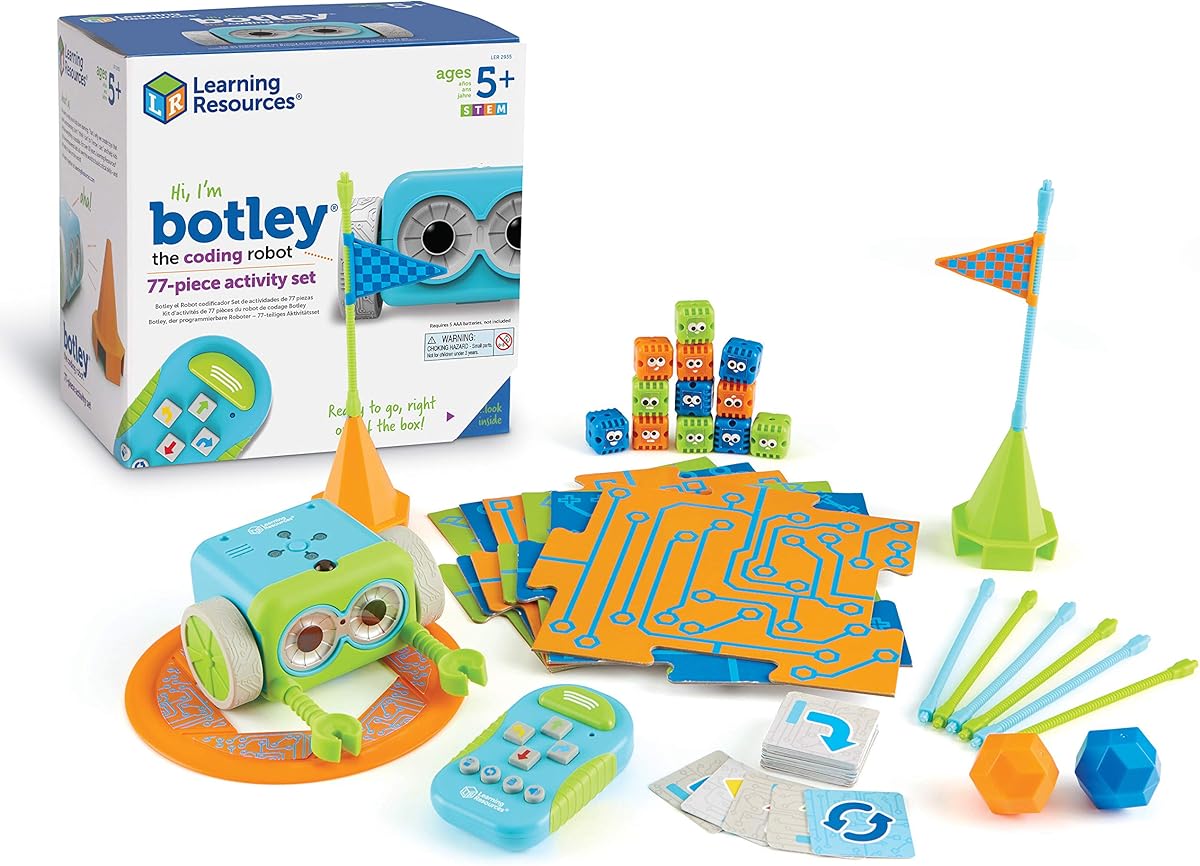
Botley stands out as a robust screen-free coding robot designed for children ages five and up. With a 4.6 rating, this activity set includes everything needed for immediate coding play, featuring a remote programmer that sends commands without any mobile devices.
We may earn a commission when you buy through this link, at no additional cost to you.
The robot can detect objects, follow looping commands, and track black-line paths, offering advanced features for early learners. The detachable arms and obstacle pieces allow customization, enabling kids to create custom mazes and imaginative adventures.
Though it needs batteries and the remote has limited range, the focus on critical thinking and problem-solving provides substantial educational value. The 77-piece set ensures long-term engagement, keeping kids challenged as their skills grow.
This toy is ideal for families seeking a comprehensive STEM activity that minimizes screen time. Parents who want a durable, interactive coding robot that encourages creativity and logic will find Botley an excellent investment.
The remote programmer lets kids focus on coding logic directly, making learning accessible even without tablets or smartphones.
With object detection and line following, Botley teaches spatial reasoning and adaptability in dynamic environments.
We may earn a commission when you buy through this link, at no additional cost to you.
The Ozobot Evo Kit offers a comprehensive educational experience for students from kindergarten through twelfth grade. Rated 4.6 stars, this kit supports both screen-free color-code learning and online Blockly coding, adapting to various learning styles and skill levels.
We may earn a commission when you buy through this link, at no additional cost to you.
Its five skill levels ensure the toy grows with the child, avoiding quick obsolescence. The included markers and durable case make it ideal for classroom use, while over 700 free lessons provide extensive resources for teachers and parents.
While the price is higher than basic kits, the long-term educational value and curriculum support justify the investment. The hard shell case keeps accessories organized, reducing stress for busy educators or families managing multiple activities.
This product suits schools or parents looking for a scalable STEM tool. The blend of art and coding through color codes makes it engaging for younger kids while challenging enough for advanced learners.
Kids can code with markers on paper or use Blockly apps, blending tactile and digital experiences for comprehensive STEM learning.
With over 700 free lessons, the kit integrates seamlessly into school or home curricula, saving time on lesson planning.
We may earn a commission when you buy through this link, at no additional cost to you.
Botley 2.0 builds on the original with advanced features like object sensing and 45-degree turns. With a 4.5 rating, this expanded 78-piece set adds depth to coding challenges, encouraging kids to design longer routes and refine strategies.
We may earn a commission when you buy through this link, at no additional cost to you.
The robot responds to obstacles and offers 16 secret code combinations for open-ended play. Lights, sounds, and music create a multisensory experience that keeps children engaged while they learn logic, sequencing, and planning skills.
While it requires batteries and is more complex than basic coding toys, the added features provide meaningful challenges for kids ready to advance. The stackable obstacle pieces allow for customization, keeping play fresh and exciting.
This product is perfect for children who have mastered basic coding and want more. Parents looking for a screen-free toy that offers room to grow will find Botley 2.0 a valuable educational resource.
With object-sensing reactions, kids learn to program adaptive behaviors, teaching problem-solving in dynamic scenarios.
Sixteen secret combinations unlock hidden features, motivating kids to experiment and discover new coding possibilities.
We may earn a commission when you buy through this link, at no additional cost to you.
Dash offers a friendly, approachable robot experience for kids ages six to eleven. With a 4.6 rating, this robot requires no assembly and comes ready to sing, dance, and respond to voice commands, making STEM accessible right out of the box.
We may earn a commission when you buy through this link, at no additional cost to you.
Five apps, including Blockly and Wonder, provide versatile coding options from simple sequences to advanced variables. The long battery life supports up to five hours of active play, allowing extended learning sessions without interruptions.
While it needs a mobile device and lacks a camera, its focus on interactive coding and engagement makes it a top classroom choice. Used in over 40,000 schools globally, Dash has proven effectiveness in teaching STEM skills.
This robot suits educators and families wanting an interactive learning tool. Parents seeking a durable, app-enabled robot that balances fun with education will find Dash an excellent gift for developing coding skills.
Voice commands and movement keep kids connected to the robot, enhancing retention of coding concepts through playful interaction.
Apps allow progression from block-based coding to more complex challenges, ensuring the robot remains engaging as skills improve.
We may earn a commission when you buy through this link, at no additional cost to you.
The TaleBot Pro introduces coding concepts to toddlers ages three to five through interactive storytelling. With a 4.7 rating, this screen-free toy provides voice feedback and maps that guide learning, helping kids build creativity and language skills while programming.
We may earn a commission when you buy through this link, at no additional cost to you.
It features recording functions that let children create their own tales, bringing imagination to life through the robot's movements. The map design encourages spatial reasoning and sequencing, making abstract coding concepts tangible for young minds.
While it focuses on basic commands, the support for ten languages and compatibility with LEGO blocks extend its educational reach. The multi-sensory feedback, combining visuals and tactile controls, makes it accessible for children with diverse learning needs.
This robot is ideal for parents seeking a gentle introduction to STEM for preschoolers. Its focus on storytelling and creativity provides a playful foundation for future learning, making it a standout choice for early childhood development.
By recording voice commands and creating tales, kids connect narrative skills with coding logic in an intuitive way.
Support for ten languages allows global accessibility, helping families teach coding in their native or target language.
We may earn a commission when you buy through this link, at no additional cost to you.
Selecting the right coding toy depends on age, learning style, and whether you prefer screen-free or app-enabled options. Consider these factors to match a product with your child's interests and developmental stage.
Choose products designed for your child's age range to ensure the difficulty level matches their abilities. Younger children benefit from simple button-based toys, while older kids can handle complex apps and modular kits.
Always check manufacturer age recommendations to avoid frustration or underwhelming play experiences.
Screen-free robots allow coding through physical cards or buttons, reducing digital distractions and promoting focus on logic. App-enabled toys offer broader programming options but require tablets or smartphones.
Select based on how much screen time you want to allow during learning sessions.
Some robots emphasize mechanical engineering with build-and-code kits, while others focus on pure coding logic or storytelling. Identify what skills you want to develop before purchasing.
Align the toy's learning goals with your child's interests for better engagement.
Look for toys with add-on packs or multiple skill levels that grow with your child. Kits compatible with LEGO or modular components offer long-term value and continuous challenges.
Expansible systems prevent boredom and support progressive learning over time.
Consider the materials and construction, especially if the toy will be used in classrooms or by multiple children. Metal or robust plastic components ensure longevity and resistance to rough handling.
Higher build quality often correlates with better long-term satisfaction.
Many robots require AAA or AA batteries, which add ongoing costs. Rechargeable options may have higher upfront costs but save money over time.
Factor in power needs and availability when planning your purchase.
Some toys include access to free lessons or teacher resources, enhancing the educational impact. Products with structured guides help parents and educators lead effective STEM activities.
Prioritize kits with strong educational backing for consistent learning outcomes.
Start by reading the manual thoroughly to understand assembly requirements and coding basics. For buildable kits, allow time for careful assembly with adult supervision if needed to prevent damage.
Store batteries properly when not in use to avoid corrosion, and charge rechargeable units regularly to maintain performance. Keep small parts organized using the provided cases or bins.
Encourage creative play by modifying challenges and combining robots with other toys or household objects. Regularly update apps or software to ensure access to new features and lessons.
Most coding toys introduce basics like sequencing, loops, conditionals, and problem-solving. Advanced models may include variables, algorithms, or JavaScript. They translate abstract programming logic into tangible actions for easier understanding.
Screen-free robots operate without internet, using physical cards or buttons. App-enabled models often need Wi-Fi for updates or online lessons, but many functions work offline. Check product specs for connectivity needs.
Many toys offer tactile controls and sensory feedback beneficial for children with autism or motor challenges. Look for screen-free options or those with customizable settings to ensure accessibility and inclusive play experiences.
Yes, robots with open-ended play support collaborative projects. Assign roles like programmer, builder, or navigator to encourage teamwork. This approach enhances communication and shared learning among peers.
Build time varies from fifteen minutes to several hours depending on complexity. Simple kits like mBot assemble quickly, while Mech-5 or similar mechanical projects require patience. Plan build sessions accordingly for best results.
Introduce challenges gradually and tie coding to personal interests like games or stories. Choose expandable systems with add-ons to maintain novelty. Encourage peer play to foster social engagement and motivation.
This guide highlights ten top-rated coding toys, from the screen-free Thames & Kosmos Chameleon to the versatile Wonder Workshop Dash. Each product offers unique ways to teach logic and engineering tailored to different ages and interests.
Prioritize toys that match your child's current abilities while allowing room to grow. Consider factors like screen-free options, expandability, and educational resources to maximize long-term learning value.
Before purchasing, verify the latest features and availability since models and accessories may change. Check current details to ensure the toy aligns with your goals for your child's STEM education journey.