
Logitech G305 Lightspeed Wireless Gaming Mouse – Black
4.6Editor score
HERO sensor up to 12000 DPI
Ultra fast LIGHTSPEED wireless technology
Long 250 hour battery life
Compact 3.4 oz lightweight design
This guide compares the top lightweight mice for gaming and productivity, evaluating sensors, battery life, and ergonomics to help you choose the right model
Finding a lightweight mouse can transform your daily computing experience by reducing hand fatigue and increasing precision. Whether you are a competitive gamer or a professional seeking efficiency, a well-designed mouse offers seamless control and comfort during extended sessions.
We have carefully evaluated ten top-rated models based on sensor accuracy, build quality, connectivity options, and user feedback. This list covers wireless and wired options across various price points, ensuring you find a device that matches your specific workflow and grip style.
Each selection highlights key specifications, standout features, and potential trade-offs to guide your decision-making process. Please note that product availability and pricing may fluctuate over time, so we recommend verifying current details before making a final purchase.
4.6Editor score

4.5Editor score

4.6Editor score
The following table provides a side by side comparison of all ten models, highlighting their primary specifications and unique selling points to help you quickly identify the device that best fits your requirements.





The Logitech G305 Lightspeed Wireless Gaming Mouse stands out as a top contender in the budget category with its robust performance and impressive efficiency. It holds a solid user rating of 4.6 stars, reflecting its reliability and value for money across diverse gaming and productivity tasks.
We may earn a commission when you buy through this link, at no additional cost to you.
Its next-generation optical HERO sensor delivers incredible performance and up to 10x the power efficiency over previous generations, ensuring precise tracking without unnecessary drain on resources. The ultra-fast LIGHTSPEED wireless technology provides a lag-free experience with a 1 ms report rate, making it competitive with wired alternatives.
While it lacks flashy RGB lighting, the focus on efficiency means it boasts an incredible 250 hours of continuous gameplay on just 1 AA battery, which can be extended further via software. The durable compact design with built-in nano receiver storage makes it an ideal travel companion for laptops.
This mouse is perfect for gamers and travelers who prioritize performance and portability without breaking the bank. We recommend the G305 for anyone seeking a reliable lightweight mouse that balances cost with high-end features.
The HERO sensor and efficient battery usage allow for months of play on a single AA cell, reducing waste and cost.
The compact size and integrated receiver storage make it easy to carry in a laptop bag without extra accessories.
We may earn a commission when you buy through this link, at no additional cost to you.
The white version of the Logitech G305 offers the same exceptional performance as its black counterpart while providing a distinct aesthetic appeal for clean setups. It maintains the high 4.6 star rating due to its consistent quality and functional design that appeals to style-conscious users.
We may earn a commission when you buy through this link, at no additional cost to you.
This unit features a next-gen 12,000 DPI HERO optical sensor that delivers unrivaled gaming performance, accuracy, and power efficiency. The advanced LIGHTSPEED wireless gaming mouse ensures super-fast 1 ms response time and faster than wired performance, making it ideal for competitive play.
Ultra-long battery life gives you up to 250 hours of continuous gaming on a single AA battery, ensuring uninterrupted sessions without frequent changes. Its lightweight mechanical design and classic shape provide maximum maneuverability, durability, and comfort for extended use without fatigue.
Ideal for users who prefer a lighter visual profile in their gaming or work setup, this mouse delivers high-end features at an accessible price. Choose this model if you value aesthetics alongside robust wireless performance and battery efficiency.
The white finish complements modern and minimalist desk setups while maintaining full functionality and performance.
Sharing the same internals as the black version, it offers the same trusted performance and wireless stability.
We may earn a commission when you buy through this link, at no additional cost to you.
The Logitech G PRO X Superlight 2 is a championship-winning wireless mouse that has been refined for even better performance, earning its spot as a top pick. It holds a rating of 4.5 stars, reflecting its status as a pro-grade tool designed for serious players and professionals.
We may earn a commission when you buy through this link, at no additional cost to you.
Better performance is key here with 8 kHz polling, USB-C charging, 95-hour battery life, and POWERPLAY compatibility at 60 g. The HERO 2 optical sensor is the most advanced in gaming, tracking over 328+ IPS with up to 34,000 DPI and zero smoothing or acceleration.
Zero-Additive PTFE mouse feet ensure the superlight mouse glides smoothly with seamless connection to your game, while LIGHTFORCE hybrid switches deliver pro-level precision and reliability with tactile click. This design is crafted in collaboration with world-leading esports pros to engineer a winning tool.
This mouse is ideal for competitive gamers who need the absolute lightest weight without sacrificing features. If you want a rechargeable, high-performance wireless mouse that prioritizes speed and precision, the Superlight 2 is the best choice.
Zero smoothing and high IPS tracking ensure every movement is recorded accurately for competitive gaming.
USB-C charging and POWERPLAY compatibility eliminate battery hassles for continuous professional use.
We may earn a commission when you buy through this link, at no additional cost to you.
Designed with pros and engineered to win, the Logitech G PRO X2 SUPERSTRIKE delivers the fastest fully customizable click on the market. It holds an impressive 4.6 star rating, highlighting its capability to meet the demands of top-tier esports athletes and enthusiasts.
We may earn a commission when you buy through this link, at no additional cost to you.
Dominate with industry-leading speed with clicks that are 30 ms faster for peak performance in every esports match. Deep customization includes 10-level actuation points and 5-level rapid trigger reset, giving you complete control over your input mechanics.
Haptic feedback provides real-time cues via the Haptic Inductive Trigger System for an immersive experience tailored to any game scenario. The HERO 2 sensor ensures pinpoint accuracy with tracking over 888 IPS and up to 44,000 DPI, while the ultra-durable 0.7 mm thin-wall case adds longevity.
This mouse is perfect for professional gamers who need the most advanced click technology and durability. If you seek a fully customizable, haptic-enabled wireless mouse that offers unmatched speed and reliability, the SUPERSTRIKE is the premium choice.
The Haptic Inductive Trigger System offers real-time feedback to enhance your connection to the game.
A thin-wall case and extra-large gliding UHMWPE feet ensure the device withstands intense usage over time.
We may earn a commission when you buy through this link, at no additional cost to you.
The Redragon M612 offers a robust wired solution with 8000 DPI remapping keys and a comfortable design that appeals to budget-conscious gamers. It holds a 4.6 star rating, confirming its reliability and satisfaction among users seeking high functionality without wireless overhead.
We may earn a commission when you buy through this link, at no additional cost to you.
Gear with 5 redefinable DPI levels, default 500/1000/2000/3000/4000, you can easily switch between different game needs. Any button is reassignable with 11 programmable buttons all editable with customizable tactical keybinds, including rapid fire and side macro buttons.
The skin-friendly frosted coating offers the most enjoyable fingerprint-free tactility, while rubber texture on the left side strengthens friction for better control. Five decent backlit modes allow you to customize your dynamic RGB vibe, making it a better fit for other accessories.
Ideal for users who prioritize affordability and customization over wireless freedom, this mouse provides a solid foundation for gaming. It is a great choice for anyone needing a lightweight, ergonomic wired device with extensive macro support.
With 11 programmable buttons, you can map complex commands to a single key for faster gameplay.
The ergonomic design and textured grip reduce fatigue and improve control during long sessions.
We may earn a commission when you buy through this link, at no additional cost to you.
The Logitech G502 Hero is a legendary gaming mouse that balances weight and functionality with its adjustable weight system and HERO sensor. It maintains a 4.6 star rating due to its versatile design that suits various hand sizes and grip styles for precise control.
We may earn a commission when you buy through this link, at no additional cost to you.
The next-generation HERO mouse sensor delivers precision tracking up to 25600 DPI with zero smoothing, filtering, or acceleration for exact tracking. It includes 11 programmable buttons and a dual mode hyper-fast scroll wheel, giving you fully customizable control over your gameplay.
Adjustable weights let you match your playing style by arranging up to five 3.6 g weights for a personalized weight and balance configuration. Mechanical Switch Button Tensioning uses metal springs for a crisp clean click feel with rapid click feedback, enhancing responsiveness.
This mouse is perfect for players who want full control over their mouse weight and feel without compromising on sensor quality. If you need a robust wired option with extensive customization, the G502 Hero is a top recommendation.
The weight system allows you to tailor the mouse feel to your preference for accuracy or speed.
Dual mode hyper-fast scroll wheel offers both ratcheted and free-spin modes for different tasks.
We may earn a commission when you buy through this link, at no additional cost to you.
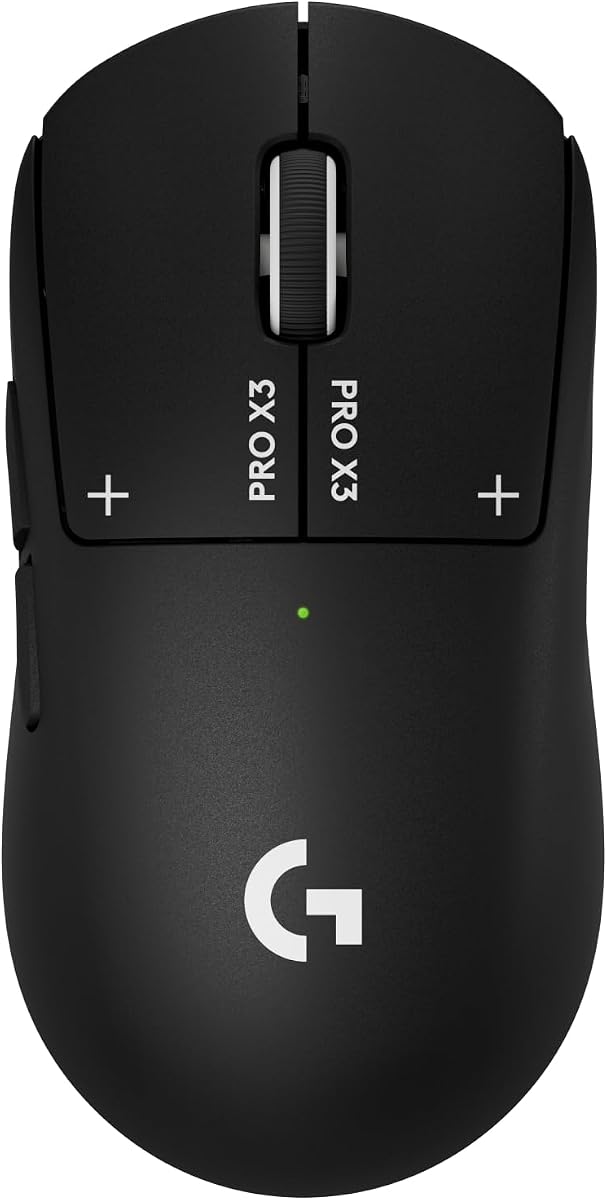
The Logitech G PRO X3 SUPERSTRIKE represents the latest innovation in wireless gaming mice, delivering the fastest and most customizable click technology. It holds a 4.3 star rating, showing strong performance despite the high price point associated with cutting-edge features.
We may earn a commission when you buy through this link, at no additional cost to you.
Experience true click innovation as the Haptic Inductive Trigger system replaces standard switches with an electromagnetic field, delivering 10 actuation and 5 reset points to your programmable mouse. Track with pinpoint accuracy using the HERO 2 sensor which tracks over 930 IPS and up to 48,000 DPI.
Enjoy zero lag with LIGHTSPEED wireless technology operating at up to 8 kHz polling for a tournament-grade connection. Play continuously with up to 135 hours of battery life on a single charge, recharged via USB-C or synced with POWERPLAY mouse pad.
This mouse is ideal for serious competitors who demand the absolute latest in click technology and battery efficiency. If you want a wireless mouse that prioritizes innovation and responsiveness, the X3 SUPERSTRIKE is a powerful option.
The electromagnetic Haptic Inductive Trigger system offers unprecedented control over actuation points.
With 135 hours of battery life, you can play for weeks without needing a recharge.
We may earn a commission when you buy through this link, at no additional cost to you.
The Logitech M185 Compact Ambidextrous mouse is designed for travel and everyday use with its comfortable contoured shape. It holds a 4.4 star rating, reflecting its reliability and ease of use for office workers and travelers needing a simple wireless solution.
We may earn a commission when you buy through this link, at no additional cost to you.
Compact and durable, this mouse features a line-by-line scroll wheel and up to 1 year of battery life thanks to smart sleep mode. It works with Windows PC, Mac, or laptop, making it a universal choice for different operating systems.
Just plug in the tiny nano USB receiver and start working in seconds with a strong reliable connection up to 33 feet. It is small and portable with smooth cursor control, suitable for small to medium hands and tight workspaces.
Ideal for casual users and travelers who need a simple, reliable wireless mouse, this model delivers solid performance without complex software. If you want a lightweight companion for your laptop, the M185 is a practical choice.
Works seamlessly across Windows, Mac, and Linux without requiring additional drivers.
Up to one year of battery life means fewer battery changes and less interruption.
We may earn a commission when you buy through this link, at no additional cost to you.
The Logitech M330 Silent Plus is built for those who need high-performance precision without the distraction of loud clicks. It holds a 4.5 star rating, praised for its ability to maintain productivity while respecting the environment around you.
We may earn a commission when you buy through this link, at no additional cost to you.
Logitech’s SilentTouch Technology reduces over 90 percent of clicking sounds, ensuring top performance while contributing to a quieter working environment. Design with naturally shaped contoured plastic grips, this mouse is built for long-lasting comfort and functionality.
M330 SILENT has a 18-month battery life and power saving auto-sleep mode, allowing you to focus on your work without the hassle of changing batteries. With a wireless range of up to 33 ft, it provides high-performance precision and smart cursor control on most surfaces.
Ideal for office settings or shared spaces, this mouse delivers a quiet, efficient experience. If you want a reliable wireless mouse that minimizes noise and maximizes battery life, the M330 is an excellent option.
Reducing click noise helps maintain focus in shared or quiet work environments.
The 18-month battery life ensures you rarely need to think about power replacement.
We may earn a commission when you buy through this link, at no additional cost to you.
The Logitech MX Master 4 introduces new haptic features and ergonomic design to enhance productivity and workflow for professionals. It holds a 4.2 star rating, showing strong utility for those who value comfort and advanced tooling in their daily work.
We may earn a commission when you buy through this link, at no additional cost to you.
Precision you can feel with the Haptic Sense Panel provides customizable haptic feedback on specific actions, shortcuts, and notifications. Effortlessly access favorite tools with Actions Ring on this MX Series mouse, placing filters and adjustments at your cursor.
Enjoy 2X more powerful connectivity with a USB-C dongle and optimized antenna, or use Bluetooth for versatility. Ergonomic design keeps you in flow with a natural tilt and intuitive buttons, including a thumb scroll wheel that reduces hand stress.
This mouse is perfect for power users and creatives who need speed and comfort during long work sessions. If you seek an ergonomic wireless mouse with advanced features for productivity, the MX Master 4 is a top pick.
Customizable haptic responses provide immediate tactile confirmation for specific tasks.
Natural tilt and intuitive buttons reduce stress and keep you focused on your work.
We may earn a commission when you buy through this link, at no additional cost to you.
Choosing the right lightweight mouse involves considering your usage patterns, preferred grip style, and necessary features. This section breaks down the key factors that influence performance and comfort.
A high-quality sensor ensures your cursor moves exactly as intended without jitter or acceleration. Look for sensors with high IPS (inches per second) tracking and adjustable DPI settings to match your desk space and game speed.
Lightweight mice are often made with thin-wall cases or honeycomb structures to reduce mass. Ensure the build quality remains durable so it can withstand daily use without compromising comfort or stability during rapid movements.
Wireless models offer freedom of movement but require battery management, while wired models provide constant power without charging. Consider LIGHTSPEED or equivalent technologies for wireless options to avoid input lag that can affect performance.
The shape of the mouse should fit your hand comfortably to prevent strain over long sessions. Ambidextrous mice work for both hands, while ergonomic shapes suit right-handed users who need more palm support.
Battery life varies significantly between models; some last weeks on AA batteries while others recharge via USB-C. Evaluate if you prefer the convenience of rechargeable cells or the simplicity of disposable batteries for travel.
Programmable buttons and software support allow you to tailor the mouse to specific tasks. Software like Logitech G HUB helps map macros and adjust settings, which is essential for productivity or complex gaming workflows.
The scroll wheel should offer precise control or free spin depending on your needs. A quality wheel ensures smooth navigation through documents or game maps without excessive resistance or slipping.
Prices range from budget-friendly options to premium models with advanced features. Determine which features matter most to you to find a balance between cost and performance that fits your budget.
Keep the sensor lens clean by gently wiping it with a soft microfiber cloth. Dust or debris can obstruct tracking and reduce accuracy during use.
Adjust DPI settings through your mouse software to match your screen resolution and personal preference. Finding the right sensitivity helps maintain control and comfort.
Store your mouse in a cool, dry place when not in use to preserve the battery and internal components. Avoid exposing it to extreme temperatures or direct sunlight.
Yes, a lighter mouse reduces hand fatigue and allows for faster, more precise movements. Many professional gamers prefer lightweight options for competitive play.
Modern wireless mice with advanced technologies like LIGHTSPEED offer response times comparable to wired mice. They eliminate lag effectively for gaming and work.
Enable power saving modes if available and avoid keeping RGB lights on when not needed. Using rechargeable batteries can also reduce waste over time.
Absolutely. While gaming mice focus on speed, many lightweight models also support customizable buttons that streamline daily work tasks.
A DPI between 800 and 1600 is suitable for most users. Higher DPI is beneficial for high-resolution screens but depends on your personal comfort.
Use a soft, dry cloth to wipe the surface and sensor. Avoid harsh chemicals that may damage the coating or internal components.
Our top picks include the Logitech G305 for budget gamers, the G PRO X Superlight 2 for overall performance, and the G PRO X2 SUPERSTRIKE for premium haptic features.
When choosing, prioritize sensor accuracy and ergonomics to ensure comfort and precision. Consider your specific needs whether wireless freedom or battery life.
Remember to check current prices and availability before purchasing as they may vary over time. We hope this guide helps you find the perfect lightweight mouse for your setup.