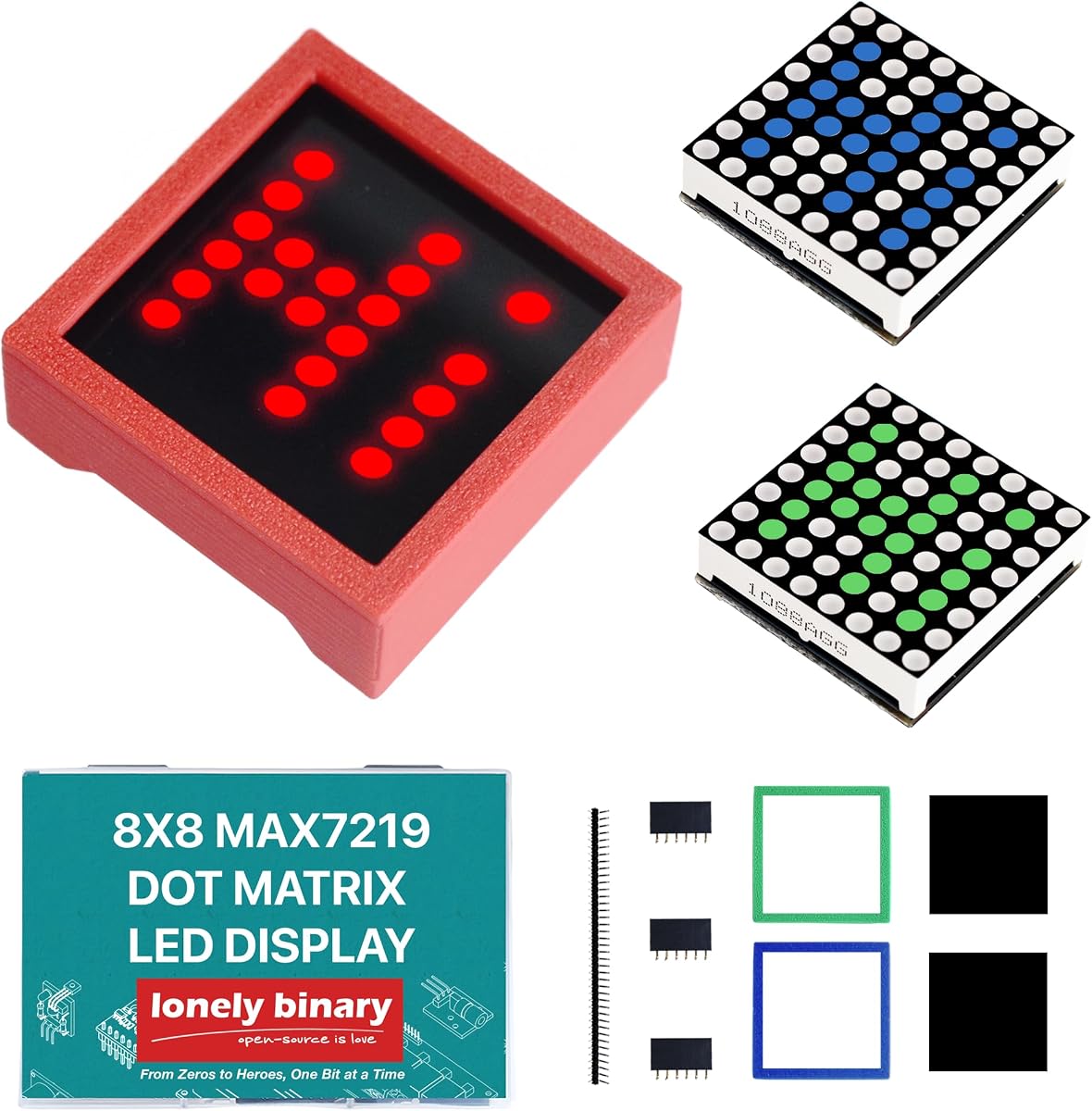
Lonely Binary 3-Pack 8×8 LED Matrix
4.7Editor score
Three color options included
MAX7219 driver chip
3D printed enclosures
This guide compares the top LCD dot matrix modules for display projects, evaluating resolution, backlight quality, and microcontroller compatibility for makers.
LCD dot matrix modules are essential components for embedding text and graphics into electronic projects. They provide clear visibility and reliable performance for various applications ranging from simple data readouts to complex user interfaces.
We evaluated ten leading products based on resolution, contrast, ease of integration, and build quality. Our selection includes graphic displays, character panels, and LED matrix options suitable for Arduino, ESP32, and other microcontroller platforms.
Each pick highlights unique strengths like backlight types, driver chips, and enclosure options. Please note that availability and pricing change frequently, so verify current details before purchasing your preferred display module today.
4.7Editor score

4.5Editor score
4.5Editor score
The following table provides a quick side-by-side comparison of all ten selected products to help you identify the right specifications for your specific project needs and integration requirements.


The Ximimark 12864 module offers a solid entry into graphic displays with its 128×64 pixel resolution and reliable blue backlight. It features an integrated potentiometer for quick contrast tuning without external components.
We may earn a commission when you buy through this link, at no additional cost to you.
Its standout quality lies in the provided Arduino library and examples, which significantly simplify integration for developers looking to display custom graphics or complex menus on a small screen.
While it provides excellent value and clarity, the blue backlight may not suit all environments, and the single unit pack means you get only one module per order.
This module is ideal for hobbyists needing graphical output on a budget. We recommend it for anyone building interfaces that require more than standard character text.
The onboard potentiometer allows precise visual tuning without needing external hardware or complex calibration code.
Pre-written code examples reduce setup time and help new users learn display commands quickly and effectively.
We may earn a commission when you buy through this link, at no additional cost to you.
This 128×64 LCD module provides a full graphic display with a high contrast blue backlight and wide viewing angle for better visibility in different lighting conditions.
We may earn a commission when you buy through this link, at no additional cost to you.
Its compatibility with MEGA 2560, Nano Due, and other controllers makes it a versatile choice for projects requiring detailed graphical output beyond simple text.
The module includes 1×20 pin headers which simplify mounting and connection to breadboards or PCBs, reducing the need for additional soldering work.
We recommend this module for users prioritizing screen visibility and controller flexibility. It is a strong candidate for custom interface builds needing reliable performance.
The wide viewing angle ensures readable content even when the display is tilted or viewed from off-center positions.
Support for multiple controller types like MEGA and Nano Due allows broad application across different project architectures.
We may earn a commission when you buy through this link, at no additional cost to you.
This product includes two 1602 LCD modules with blue backlights, providing an economical solution for projects requiring multiple text displays simultaneously.
We may earn a commission when you buy through this link, at no additional cost to you.
Each unit displays 16 characters across two lines using a standard parallel interface, making them straightforward to connect to common microcontroller boards.
While the parallel port limits connectivity options compared to I2C versions, the two-pack format makes it perfect for multi-screen setups or spare inventory.
Ideal for bulk projects or classroom sets where multiple displays are needed at once. We recommend this for builders needing reliable character output in pairs.
Getting two displays in one package saves cost and time compared to buying individual units separately for larger installations.
The 16×2 configuration is universally supported by libraries, ensuring easy integration with existing codebases and tutorials.
We may earn a commission when you buy through this link, at no additional cost to you.
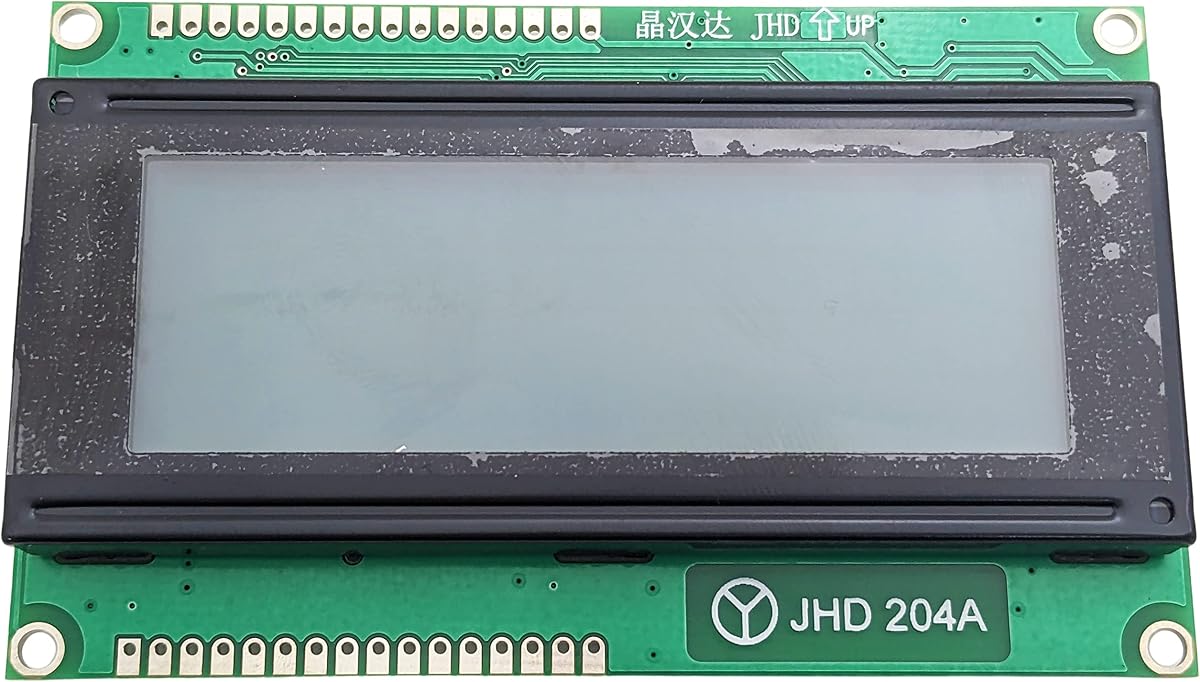
This module delivers a spacious 20×4 character display with a built-in driver and controller, offering a premium solution for text-heavy applications.
We may earn a commission when you buy through this link, at no additional cost to you.
The reflective gray screen and precise 98x60mm dimensions ensure consistent performance and easy integration into custom enclosures without guesswork.
Although it is priced higher than basic character displays, the inclusion of the driver module saves time and reduces compatibility risks during setup.
We recommend this for professional builds requiring stable, large text displays. It is an excellent choice for industrial or commercial interface panels.
Including the driver and controller simplifies circuit design by reducing external component count and potential wiring errors.
Exact dimensions like 98x60x9.5mm help designers plan enclosures with tight tolerances and proper mounting alignment.
We may earn a commission when you buy through this link, at no additional cost to you.
This 3-pack includes red, green, and blue 8×8 LED matrices with MAX7219 drivers and matching 3D-printed enclosures for a polished finished look.
We may earn a commission when you buy through this link, at no additional cost to you.
Each module features labeled IN/OUT ports for daisy-chaining, enabling wide displays like 24×8 scrolling text without complex wiring or controllers.
While soldering headers is needed to connect modules, the included cases and clear pin labels make assembly manageable even for intermediate hobbyists.
We highly recommend this kit for makers wanting colorful status indicators or games. It offers unmatched value with cases and multiple colors in one pack.
Custom 3D-printed cases protect modules from dust and give projects a professional aesthetic without extra fabrication work.
Daisy-chaining via DOUT to DIN ports allows seamless expansion to larger matrix sizes with minimal configuration effort.
We may earn a commission when you buy through this link, at no additional cost to you.
The HiLetgo module provides a reliable 8×8 dot matrix display with a 5-pin interface and mounting screws for secure installation in tight spaces.
We may earn a commission when you buy through this link, at no additional cost to you.
Its compact 12.8×12.8×1.3cm dimensions make it ideal for portable devices or embedded projects where space conservation is a priority for designers.
While it does not include enclosures, the included screws and standard SPI interface simplify integration and reduce setup time for experienced users.
We recommend this module for engineers needing small, reliable LED matrices. It is a solid choice for custom panels requiring straightforward mounting options.
Included fixing screws with 64 holes ensure the module stays stable during shipping and operation without additional brackets.
The 5pin line supports typical microcontroller communication protocols for seamless integration with Arduino or ESP32 systems.
We may earn a commission when you buy through this link, at no additional cost to you.
This module simplifies interfacing with 8-digit 7-segment displays using a built-in MAX7219 driver and a simple 4-wire SPI interface for control.
We may earn a commission when you buy through this link, at no additional cost to you.
It includes scan limit settings and brightness control to offer flexibility for custom configurations while maintaining high performance in portable systems.
While limited to one module per pack, its low-power shutdown mode and analog/digital brightness adjustments ensure efficient operation for long-term use.
We recommend this for clocks or counters needing precise numerical output. It is a robust choice for embedded systems prioritizing energy efficiency.
A 150µA shutdown mode helps conserve battery life in portable applications while maintaining full performance during active use.
Support for BCD decoding and direct segment control allows both automatic and manual programming styles as needed.
We may earn a commission when you buy through this link, at no additional cost to you.
This module displays 20 characters across four lines on a large blue screen, offering generous space for detailed text output and user feedback.
We may earn a commission when you buy through this link, at no additional cost to you.
Its 50K potentiometer allows onside contrast adjustment while the bright backlight ensures clear visibility even in varied ambient lighting conditions.
With dimensions of 97x59x12mm, it provides a spacious viewing area, though this may require larger enclosures compared to compact character displays.
We recommend this for interfaces needing substantial text area. It is an excellent choice for dashboards, logs, or multi-step process displays.
The bright backlight and white-on-blue contrast ensure characters remain readable across different lighting environments.
An onboard potentiometer lets users fine-tune contrast physically without needing to modify software code settings.
We may earn a commission when you buy through this link, at no additional cost to you.
This 3-pack features wide 32×8 LED matrices with 256 LEDs each, offering ample space for scrolling messages, animations, and visualizers.
We may earn a commission when you buy through this link, at no additional cost to you.
Standard MAX7219 chaining allows you to link modules into larger 64×8 displays effortlessly for expanded visual real estate in projects.
Each module includes a matching 3D-printed enclosure that protects from dust and scratches, ensuring a finished look for installed builds.
We recommend this for large display needs like clocks or ticker tapes. It provides the most width per module among standard matrix options.
The 32×8 format gives double the width of standard 8×8 modules, ideal for longer scrolling text or wider graphics.
Custom color-matched PLA cases shield modules from physical damage and provide a polished professional appearance.
We may earn a commission when you buy through this link, at no additional cost to you.
This 2-pack includes 4-in-1 dot matrix modules with a slim 13mm profile and 64 pre-drilled holes for secure panel or enclosure installation.
We may earn a commission when you buy through this link, at no additional cost to you.
A standard 5-pin SPI interface supports cascading multiple modules to expand display configurations for larger project needs.
Its compact 128mm footprint makes it suitable for space-constrained embedded displays requiring multiple matrices in a small area.
We recommend this for makers needing multiple modules at a lower cost. It is ideal for custom panels requiring flexible matrix layouts.
The slim 13mm profile allows for installation in narrow enclosures where bulkier panels would not fit properly.
64 pre-drilled 3mm holes provide numerous secure mounting points for various panel configurations and build styles.
We may earn a commission when you buy through this link, at no additional cost to you.
Choosing the right display involves balancing resolution, interface type, backlight quality, and driver availability for your specific project needs.
Resolution determines how much information you can show at once. Character modules like 16×2 or 20×4 display letters, while graphic modules like 128×64 support images and custom shapes. If your project needs icons or visual cues, a graphic matrix is essential. For simple text readouts, character modules are often easier to use and cheaper.
Choose graphic modules for visual interfaces and character modules for simple data. Ensure resolution matches your content size and screen real estate.
Backlight color affects readability in different environments. Blue backlights offer high contrast in dark rooms, while white or red options suit specific branding or visibility needs. Some modules allow dimming via software or hardware adjustments to save power and reduce glare in bright settings.
Select a backlight that contrasts well with your text. Blue or white typically offer the best legibility for general-purpose applications.
Most modules use parallel ports or SPI interfaces. Parallel is easy to connect but uses many pins, which may limit other components. SPI is efficient and supports daisy-chaining for larger displays. Check if your microcontroller has enough free pins for your chosen interface type before ordering.
SPI interfaces are more scalable and use fewer pins. Use parallel for legacy systems where pin count is not a constraint.
Some modules come with drivers and controllers included, reducing the need for extra components. This simplifies circuit design and lowers total system cost. However, standard displays without drivers require you to source separate chips like MAX7219 or HD44780.
Pre-included drivers save time and money. If you lack component knowledge, choose modules with built-in control logic.
Physical durability depends on whether enclosures or mounting hardware is included. Modules with 3D-printed cases or pre-drilled holes ensure easy integration into custom boxes. Without these, you may need to design and print your own cases for a finished look.
Prioritize options with included mounting hardware or cases if you want a polished project. It saves fabrication time significantly.
Most modules operate at 5V but some support 3.3V for modern boards. Verify your power supply matches the module requirements to prevent damage. Low-power shutdown modes are available in LED matrices and help extend battery life in portable designs.
Ensure power voltage matches your controller. If battery powered, pick modules with low-power modes to maximize runtime.
Good library support means you spend less time writing display code. Check if examples are available for your platform like Arduino or ESP32. Open-source projects often provide code snippets that can jumpstart your development process significantly.
Look for well-documented libraries and active support forums. Quality code reduces development friction and speeds up prototyping.
Connect the power supply matching your module voltage, usually 5V. Ensure VCC and GND are wired correctly to avoid damage to the display components during initial setup.
For SPI modules, connect pins like CLK, DIN, and CS to corresponding microcontroller pins. Use library code to initialize the display and clear the buffer before showing content.
Avoid direct sunlight on reflective screens to prevent glare. Clean with a dry soft cloth and store in cool, dry conditions to preserve backlight life and contrast.
Character modules display predefined text and symbols using standard fonts, while graphic modules render any image or custom pattern pixel by pixel. Graphic displays are more versatile but harder to program than character displays.
Yes, many modules support ESP32 if their voltage matches 3.3V or 5V. Ensure your wiring respects voltage logic levels for safe and reliable communication with the display.
Daisy-chain them using the DIN and DOUT ports on MAX7219 driver modules. Connect the DOUT of the first module to the DIN of the next to expand your display width.
Most operate at 5V, though some support 3.3V. Always check the datasheet for the specific module you buy to match your power supply correctly.
Backlights are optional but highly recommended for visibility in low light. Without them, characters may be hard to read unless the environment is brightly lit.
Many modules include a potentiometer or a pin for contrast control. Rotate the pot or adjust the voltage on the contrast pin until the text appears sharp.
Our top picks include the Lonely Binary 3-pack for versatility, SunFounder LCD2004 for large text, and the 20×4 module for premium reliability. These cover most needs from hobby to professional builds.
Prioritize resolution and interface type based on your design constraints. If you need custom graphics, choose a matrix module with driver support and clear pin definitions for smooth integration.
Always verify current availability and specs on product pages before buying. Prices and stock can change, and checking details ensures you get the correct module for your project today.