
Universal Keyboard and Case for 7-Inch Tablets
4.4Editor score
Affordable price point for entry level
Built in USB connectivity for ease
Magnetic flap closure secures tablet
Finding the right keyboard case for your 7 inch tablet can transform it into a productive workspace. These accessories combine protection with typing efficiency, making them ideal for travel and daily use.
We analyzed ten top-rated models based on connectivity, build quality, and user feedback. Each option offers unique features like Bluetooth or USB-C, ensuring compatibility across various tablet brands and operating systems.
Each pick highlights key strengths and potential drawbacks to guide your decision. Note that availability and pricing may fluctuate over time, so verify current details before purchasing to ensure you get the best value.
4.4Editor score

4.3Editor score
4.4Editor score
As an Amazon Associate we earn from qualifying purchases.
Below is a side-by-side comparison of all ten products to help you identify the best fit for your specific tablet model and usage needs based on key specifications.


This DETUOSI Universal case earns the Editor's Choice for its exceptional versatility. With a high rating from users, it delivers a reliable solution for converting your 7 inch tablet into a portable workstation without breaking the bank.
We may earn a commission when you buy through this link, at no additional cost to you.
The standout quality is its universal compatibility, supporting tablets from 7.0 to 7.9 inches across iOS, Android, and Windows systems. The detachable Bluetooth keyboard ensures you can use your tablet as a standalone device when needed, while the PU leather folio offers robust protection against scratches and daily wear.
While the design is robust, the lack of a rear camera hole means you will need to remove the tablet to take photos with the back camera. Additionally, the keys are compact to fit the form factor, which may take a short adjustment period for touch typists used to full-size keyboards.
This case is ideal for travelers and students who need a flexible setup that works with multiple devices. If you value convenience and broad compatibility over premium build specifics, this is the top recommendation for your 7 inch tablet.
Supports Samsung Galaxy Tab and Lenovo models ensuring broad use across brands.
Detachable keyboard allows standalone tablet use while maintaining connectivity over 10 meters.
We may earn a commission when you buy through this link, at no additional cost to you.
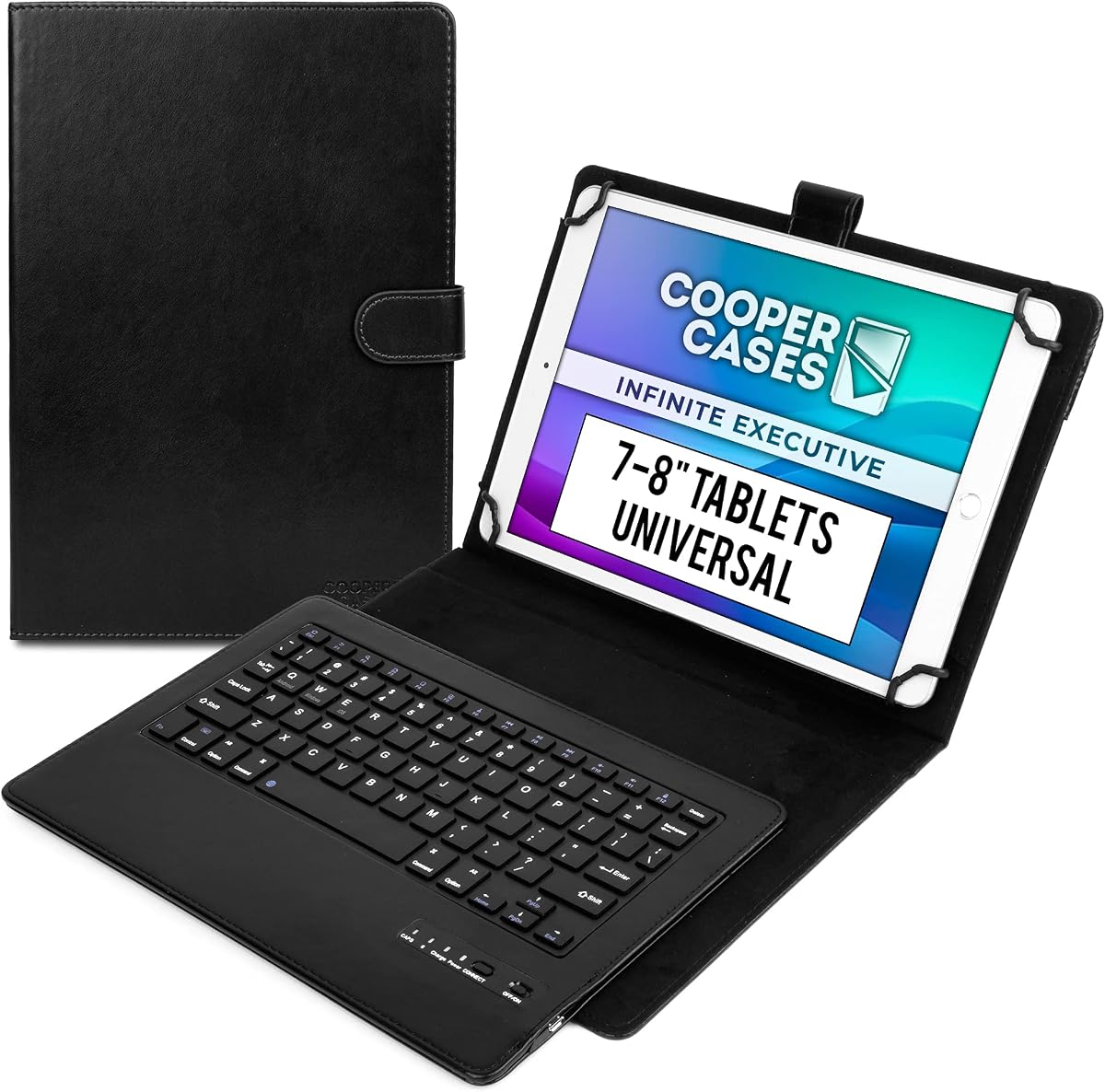
The COOPER Infinite Executive stands out as the Best Premium pick due to its sophisticated design and functional details. Rated highly by professionals, it combines a high-quality vegan leather exterior with a practical keyboard setup that boosts typing efficiency significantly.
We may earn a commission when you buy through this link, at no additional cost to you.
Its microfiber interior adds a layer of luxury and protection, while the secure grip claws ensure your tablet never slips during use. The inclusion of 14 hotkeys allows for quick shortcuts, making it a powerful tool for work and school environments where speed matters.
Prospective buyers must measure their tablet precisely, as the case fits devices between specific width and length ranges. The price is higher than basic models, but the added features and build quality justify the investment for those seeking a professional experience.
Choose this case if you prioritize aesthetics and durability alongside functionality. It is perfect for business users who want their tablet to look and feel like a dedicated laptop alternative.
Vegan leather exterior offers a polished look suitable for meetings and office settings.
Hotkeys and ergonomic scissor-cut keys streamline workflow for daily tasks.
We may earn a commission when you buy through this link, at no additional cost to you.
For users on a strict budget, the HHmei Universal Keyboard offers excellent value. It holds a strong rating because it delivers the essential functions of a keyboard case without the added cost of wireless technology, making it accessible for everyone.
We may earn a commission when you buy through this link, at no additional cost to you.
The built-in USB connection means you simply plug the keyboard into your tablet port for immediate use. This eliminates the need to charge a separate battery, and the PU leather case provides reliable protection against dust and bumps while traveling.
The trade-off is the lack of wireless flexibility, as the keyboard must remain connected via cable. This may limit portability slightly compared to Bluetooth models, but for stationary work or short trips, the convenience of not charging a separate device is worth it.
Select this option if you want a functional setup at the lowest cost. It is an ideal choice for students or casual users who need basic typing capabilities without complex features.
Provides essential typing and protection at a fraction of the cost of premium brands.
No pairing or charging required; simply plug the USB connector to start typing.
We may earn a commission when you buy through this link, at no additional cost to you.
The Sanpyl Bluetooth Keyboard Case has earned a perfect 5.0 rating for its simplicity and broad OS support. It is designed for users who switch between different systems like Android and OS X, offering a seamless connection without complicated setup steps.
We may earn a commission when you buy through this link, at no additional cost to you.
The plug-and-play Bluetooth feature ensures that you can start typing immediately after pairing. The premium PU case feels durable, and the integrated stand allows you to watch videos comfortably during breaks. The keyboard design is smooth, making it pleasant to type on for extended periods.
One limitation is that the keyboard is not detachable, meaning it adds weight even when not in use. Also, users must ensure their device is within the supported size range. However, for a 7 inch tablet, the fit is generally excellent.
Choose this set if you need a straightforward typing solution for a 7 inch tablet. Its compatibility and ease of use make it a fantastic all-rounder for home or office use.
Works with multiple systems allowing easy switching between tablets and phones.
High quality keyboard design ensures responsive keys for daily tasks.
We may earn a commission when you buy through this link, at no additional cost to you.
This folding folio case is designed for tablets with USB-C ports, offering a direct connection for typing. It is a solid choice for users who have newer 7 to 8 inch tablets and want to avoid the latency or pairing steps of Bluetooth.
We may earn a commission when you buy through this link, at no additional cost to you.
The kickstand is integrated into the leather cover, allowing you to prop the tablet up for watching videos or typing. The case protects against scratches and bumps, and the keyboard layout is designed for efficiency on the go.
The main requirement is that your tablet must support a USB host connection for the keyboard to function properly. If your tablet lacks this specific feature, the keyboard will not work. Always check your device specifications before purchasing this model.
Ideal for tech-savvy users with USB-C devices, this case transforms your tablet into a work machine. It offers a straightforward and reliable typing experience for productivity on the go.
Compatible with newer tablets utilizing USB-C interfaces for direct data transfer.
Folds to create a stable stand for watching content or typing comfortably.
We may earn a commission when you buy through this link, at no additional cost to you.
The Universal Type C Keyboard Cases focus on simplicity and portability for 7 inch tablets. Users appreciate the ease of connecting a keyboard without needing wireless pairing, which can be useful in environments where Bluetooth signals are weak.
We may earn a commission when you buy through this link, at no additional cost to you.
The leather stand folio case adds a layer of protection while allowing you to angle your tablet for better ergonomics. It is lightweight enough to carry around easily, and the keyboard integrates smoothly with the case design for a unified look.
Ensure your tablet has a Type-C port before buying, as this model does not support other connection types. The keyboard is fixed to the case, so you cannot use the keyboard separately. For those who need a quick typing setup, this is a reliable choice.
This product is best for users who prefer wired stability over wireless convenience. It offers a solid balance of protection and function for everyday use.
Uses a direct cable connection to ensure consistent typing performance without dropouts.
Leather case shields your device while the stand improves posture during typing.
We may earn a commission when you buy through this link, at no additional cost to you.
This USB Keyboard & Case is a straightforward accessory for 7 inch tablets. It provides the essentials without unnecessary features, making it a practical option for those who want a quick and reliable typing solution.
We may earn a commission when you buy through this link, at no additional cost to you.
The built-in clips hold your tablet securely in the case, ensuring it does not move while you type. The inclusion of a stylus adds value, allowing you to interact with the screen precisely. LED indicators for Num lock and Caps lock help you keep track of settings.
The Type A USB connection might not fit modern tablets without an adapter. However, if your device supports it, this case offers a good value. The magnetic strap keeps the cover closed, adding a layer of convenience during travel.
Choose this if you need a basic case with a keyboard and stylus. It is ideal for casual users who do not require wireless capabilities or premium materials.
Includes a stylus for precise touch input and navigation on your tablet screen.
Built-in clips and magnetic straps ensure your device stays protected during movement.
We may earn a commission when you buy through this link, at no additional cost to you.
The Navitech Rotational Bluetooth Keyboard Case is designed specifically for Tonysa 7 inch tablets but offers unique flexibility with its rotating mechanism. This allows you to adjust the keyboard position for comfortable typing in different scenarios.
We may earn a commission when you buy through this link, at no additional cost to you.
Its rechargeable battery supports extended use without frequent charging, and the elastic closure keeps the case secure when closed. The stand function works in both landscape and portrait modes, making it versatile for media consumption and productivity.
Note that this case is optimized for Tonysa devices, so users with other brands should check compatibility carefully. The multi OS support ensures you can connect to various devices if the physical dimensions fit correctly.
Select this case if you have a compatible Tonysa tablet and value the ability to rotate your keyboard. The warranty adds peace of mind to your purchase.
Rotational design allows keyboard adjustment for ergonomic comfort in any position.
Rechargeable power source ensures long usage periods between charging sessions.
We may earn a commission when you buy through this link, at no additional cost to you.
Another option from HHmei, this Universal Keyboard and Case offers a practical solution for 7-inch tablets. It focuses on providing a solid typing surface and protection through a simple and effective design.
We may earn a commission when you buy through this link, at no additional cost to you.
The USB interface ensures you can connect the keyboard immediately. The built-in stand allows you to prop your tablet up for watching videos or reading. The PU leather case is durable, protecting against daily wear and tear.
The magnetic flap closure secures the cover tightly. While it lacks wireless capabilities, it delivers what you need at a low cost. It is easy to place inside a bag or carry around alone.
This is a great choice for those who want a reliable and inexpensive case. It is perfect for school or home use where you need to type frequently without complex setup.
Cushioned PU leather guards against dust, shocks, and bumps for long-lasting use.
Allows you to watch videos comfortably while keeping the device secure in the case.
We may earn a commission when you buy through this link, at no additional cost to you.
This case stands out for its ability to support not just tablets but also large screen mobile phones. It offers a versatile solution for users who want a keyboard setup across multiple device types.
We may earn a commission when you buy through this link, at no additional cost to you.
The plug and play Bluetooth connection makes it easy to start typing. The premium PU case ensures your device stays protected, and the stand function lets you enjoy media hands-free. It is crafted for good tactile feel during typing.
While details on battery life are limited, the design emphasizes convenience and functionality. The multi-functional set provides a case, keyboard, and stand in one package. It is suitable for Android and iOS users.
Choose this if you need a case that adapts to different devices. It is a solid choice for a versatile setup that covers both phones and tablets.
Supports both 7 inch tablets and large screen phones for broader utility.
Stand function ensures hands-free viewing and comfortable typing angles.
We may earn a commission when you buy through this link, at no additional cost to you.
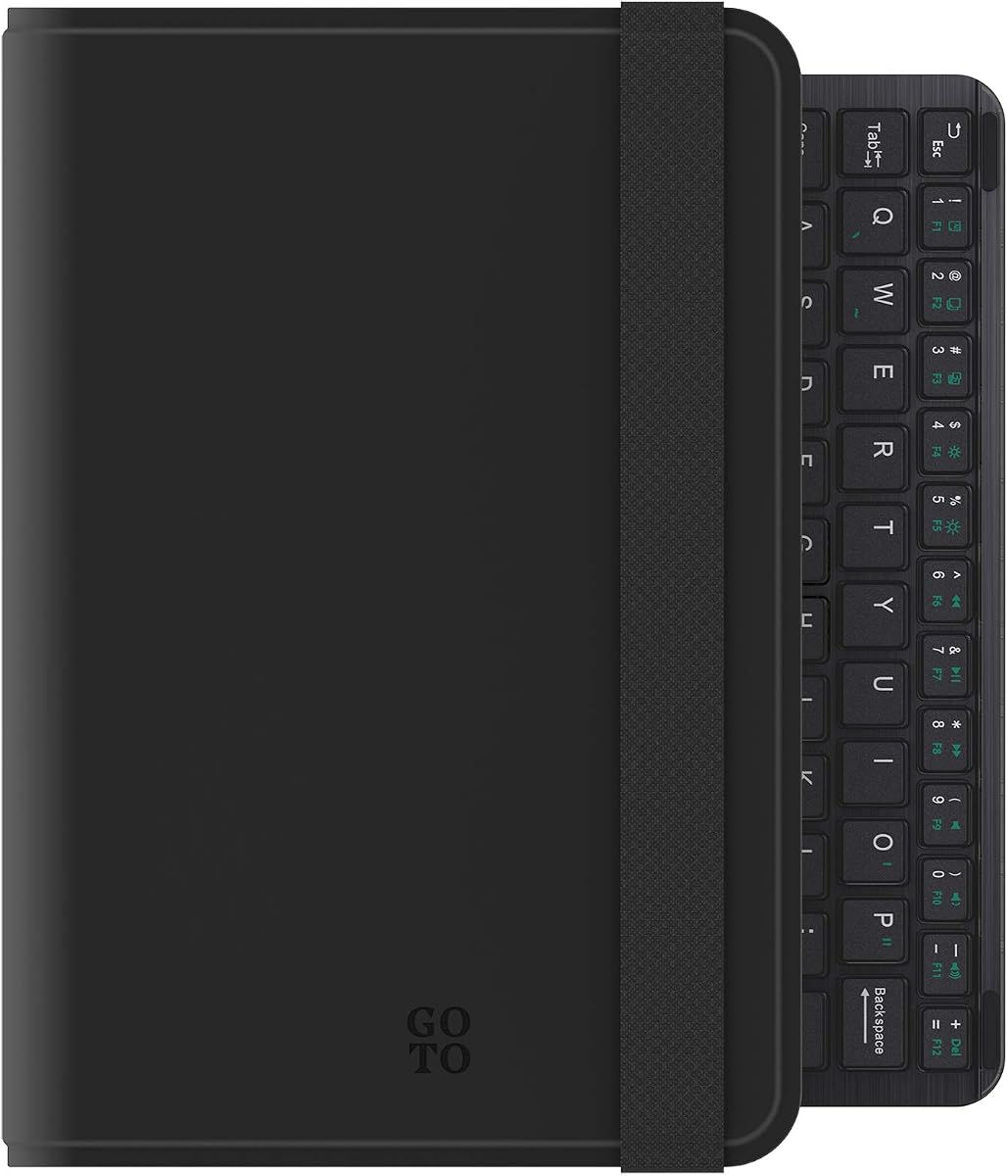
The GoTo Universal Folio Case offers adjustable bands to ensure a snug fit for your device. This flexibility makes it a strong candidate for users who want a secure case that can accommodate slight variations in tablet dimensions.
We may earn a commission when you buy through this link, at no additional cost to you.
Its seamless folding cover supports multiple viewing angles, making it easy to use the tablet in different positions. The included pencil holder adds practical storage for styluses, and the wireless keyboard allows for convenient typing on the go.
Designed to work across Apple, Android, and Windows systems, this case is built for broad compatibility. The protective materials keep your device safe from spills and scratches. While user ratings are currently unavailable, the features suggest a solid product.
This is a great option if you need a case that adapts to different tablet sizes and includes extra accessories like a pencil holder. It is ideal for users who value adjustability and storage.
Adjustable bands allow the case to adapt to different tablet widths for a tight hold.
Built-in pencil holder keeps your stylus organized and easily accessible.
We may earn a commission when you buy through this link, at no additional cost to you.
Choosing the right keyboard case for your 7 inch tablet involves weighing several factors to ensure compatibility, durability, and ease of use. This guide breaks down the key aspects to consider.
Decide between Bluetooth and USB connections. Bluetooth offers wireless freedom but requires battery charging, while USB provides stable connectivity without charging but may limit mobility.
Choose Bluetooth for portability and USB if you prioritize plug-and-play reliability without worrying about charging the keyboard separately.
Ensure the case fits your specific tablet model. Universal cases often support a range like 7.0 to 7.9 inches. Check your tablet dimensions against the case specifications to avoid fit issues.
Always verify the manufacturer's compatibility list before purchasing to ensure a proper fit for your device.
Look for durable materials like PU leather or synthetic leather. These materials protect your tablet from scratches, bumps, and daily wear. A microfiber interior adds extra protection for the screen.
Select a material that feels sturdy and provides enough protection for your usage environment.
Check the keyboard layout to ensure it has all necessary keys for your tasks. Some keyboards have extra hotkeys or number pads that can boost productivity for specific applications.
Choose a layout that supports your workflow, whether it is basic typing or advanced work functions.
A good case should offer multiple viewing angles. A sturdy stand allows you to watch videos or type comfortably without holding the device. Look for cases with adjustable or fixed stands that hold firm.
Prioritize a case with a reliable stand if you plan to use your tablet for media consumption frequently.
Assess the protective features such as corners or reinforced edges. Some cases include clips or straps to secure the tablet inside. Protection against drops and scratches is critical for daily use.
Choose a case that offers comprehensive protection to extend the lifespan of your tablet.
If using a Bluetooth keyboard, consider battery life. Rechargeable models are common and convenient. Ensure the battery lasts long enough for your typical usage sessions.
Look for models with clear battery indicators to avoid interruptions during work or travel.
Balance the features with the price. Budget options may lack premium features but still offer typing capability. Premium options provide better materials and more functions.
Set a budget and select a model that offers the best value for your specific needs.
To use your keyboard case, first ensure your tablet is compatible and securely placed inside the case. For Bluetooth models, pair the keyboard via your tablet settings. For USB models, connect the cable to the appropriate port.
Clean the keyboard surface regularly with a soft dry cloth to remove dust and debris. Avoid using wet cleaners on the keyboard to prevent moisture damage. Clean the exterior leather with a suitable cleaner for synthetic materials.
Store the keyboard case in a cool dry place when not in use. If it has a detachable keyboard, separate it to save space and reduce pressure on the tablet. Always close the magnetic or elastic flap to protect the screen from scratches.
Most cases in this guide are universal for 7 to 8 inch tablets. Check specific dimensions and OS requirements to ensure your device fits. Some models are designed for specific brands like Tonysa.
Bluetooth keyboards require charging via a provided cable. USB keyboards typically draw power from the tablet so they do not need separate charging. Check the product details for battery life info.
Many cases have removable Bluetooth keyboards so you can use the tablet freely. Some wired models keep the keyboard fixed so removal is not possible. Verify before buying.
Most cases are universal so they often lack rear camera cutouts. You may need to remove the tablet to take photos with the back camera. This is a common limitation for universal designs.
Most cases support Android Windows and iOS. Check compatibility lists for specific requirements. Some models have multi-OS support for easier switching between devices.
Use a soft dry cloth to wipe away dust and debris. Avoid liquid cleaners that could damage the electronics. Clean the exterior case with appropriate products for leather or synthetic materials.
Some cases include styluses charging cables or extra straps. Check the package contents to see what comes with the product. Accessories vary by model and manufacturer.
Try re-pairing the Bluetooth keyboard or reconnecting the USB cable. Check that your tablet has USB host support for USB models. Ensure the device is compatible with the case specs.
We have explored ten excellent keyboard cases for 7 inch tablets covering a wide range of features and budgets. The DETUOSI Universal, COOPER Infinite Executive, and HHmei Universal offer strong options for different user needs.
Consider your priority features such as connectivity type and build material. A wireless model offers flexibility while a wired one ensures reliability without charging. Find the balance that suits your daily workflow.
Before purchasing check current availability and pricing. Product details may change over time and verified specs ensure you get the right fit for your device.
