
TP-Link ER605
4.4Editor score
Five Gigabit Ports
Supports VPN Connections
Advanced Security Firewall
This guide compares the top ten Dual Wan Router models for reliability speed and security helping you choose the perfect network solution for your business or
A Dual Wan Router ensures uninterrupted internet by connecting multiple ISPs. This setup provides failover and load balancing to keep your network online even if one connection drops. It is essential for businesses and power users who cannot afford downtime during critical tasks.
We evaluated ten top rated routers based on port flexibility security features and management tools. Our analysis focuses on real world performance and ease of configuration. Each product offers unique strengths for different network sizes and requirements.
Every pick includes detailed specs and honest pros and cons. Prices and availability change frequently so check the links for current stock. These models represent the best options available today for secure and resilient connectivity.
4.4Editor score

4.2Editor score

4.4Editor score
This side by side comparison highlights key specs for all ten models. Find the right balance of speed security and manageability for your specific network needs.



The TP-Link ER605 stands out as an affordable wired router with solid security. It scores a 4.4 rating for its robust VPN and failover capabilities. Ideal for small offices needing backup internet without breaking the bank.
We may earn a commission when you buy through this link, at no additional cost to you.
This device features five Gigabit ports plus a USB port for mobile backup. Security is a priority with DoS defense and IP filtering. It supports twenty IPsec VPNs for secure remote access to your network.
While it lacks Wi-Fi, this keeps costs low for those using separate access points. The interface is functional but not as polished as premium models. Performance remains stable under typical business loads.
Buyers looking for a budget enterprise solution should consider this model. It offers essential failover and security tools. Ensure you have separate Wi-Fi hardware if wireless coverage is needed.
Five Gigabit ports allow flexible LAN WAN setups. You can optimize bandwidth usage with up to three active WAN connections simultaneously.
Supports multiple VPN protocols including OpenVPN and IPsec. This ensures secure connections for remote workers accessing your office network.
We may earn a commission when you buy through this link, at no additional cost to you.
The Peplink B-One delivers enterprise grade performance with a 4.4 rating. It features SpeedFusion technology for smooth failover and load balancing. This is perfect for branch offices requiring consistent connectivity.
We may earn a commission when you buy through this link, at no additional cost to you.
Its resilient dual WAN architecture ensures you stay online even if the primary link fails. It integrates seamlessly with Starlink and supports various ISP types. Automatic firmware updates keep the network secure and optimized.
While expensive, the reliability justifies the cost for critical business needs. The setup involves more steps than consumer routers. You gain professional features like detailed traffic management and monitoring tools.
Invest in this if you need maximum uptime and advanced features. It balances cable fiber and satellite connections effectively. The Starlink integration is a standout feature for modern deployments.
Ensures smooth video calls and continuous connectivity. SpeedFusion works with existing internet to create a robust network.
Two Gigabit WAN ports and a USB interface adapt to many configurations. It integrates easily with Starlink Cable and Fiber services.
We may earn a commission when you buy through this link, at no additional cost to you.
The NETGEAR PR60X offers high performance with 10G and 2.5G ports. It earns an Editor's Choice award for its cloud management and security. This router is designed for SMEs needing robust connectivity.
We may earn a commission when you buy through this link, at no additional cost to you.
Failover and load balancing optimize network performance. Secure remote access is supported via multiple VPN protocols like OpenVPN and WireGuard. The Insight platform enables management from anywhere.
The Insight subscription is included for one year but costs later. Hardware costs are higher than standard routers. However the speed and manageability make it a strong candidate for growing businesses.
Choose this for its blend of speed and smart management features. It integrates with other Pro devices easily. Ensure your budget allows for ongoing cloud service fees.
Includes configurable 10G and 2.5G ports for fast data transfer. This supports long distance backhaul and high bandwidth needs.
Supports IPSec and WireGuard for secure connections. Allows up to one hundred client device connections and thirty VPN tunnels.
We may earn a commission when you buy through this link, at no additional cost to you.
The Cudy R700 provides enterprise control with OpenWRT support at a low cost. It handles up to five ISPs with automatic failover and load balancing. This makes it ideal for home labs and remote offices.
We may earn a commission when you buy through this link, at no additional cost to you.
Full OpenWRT access allows custom QoS policies and VLAN segmentation. Built in VPN servers for WireGuard and OpenVPN simplify remote access. Security includes SPI firewall and DoS prevention.
While powerful, advanced features require technical know how. The web GUI is functional but not as user friendly as proprietary OS. It offers great value for tech savvy users seeking control.
Buy this if you want OpenWRT flexibility without high costs. It keeps businesses online by instantly rerouting traffic. Use the Cudy App or TR-069 for remote monitoring needs.
Connects up to five ISPs to ensure uptime. If one connection drops traffic instantly reroutes to keep you online.
Includes servers and clients for major protocols. Create site to site tunnels or route specific VLANs through VPN.
We may earn a commission when you buy through this link, at no additional cost to you.
The Omada ER707-M2 supports Multi-Gigabit speeds with 2.5G ports. It earns a 4.4 rating for its capacity to handle over one thousand clients. This is perfect for larger sites using Omada infrastructure.
We may earn a commission when you buy through this link, at no additional cost to you.
It features a 2.5G WAN port and an SFP port for flexible uplinks. Remote cloud access allows you to manage networks from anywhere. The router supports high numbers of VPN connections securely.
You need Omada controllers to unlock full features like cloud access. The five year warranty offers long term peace of mind. Setup involves more steps for multi site configurations.
Choose this if you are expanding an existing Omada network. It supports USB storage and LTE backup effectively. The centralized control is excellent for distributed business locations.
Includes 2.5G WAN and SFP ports for high speed. USB port supports LTE backup with a dongle for reliability.
Handles five hundred thousand concurrent sessions. Maximum number of clients exceeds one thousand for large deployments.
We may earn a commission when you buy through this link, at no additional cost to you.
The ASUS RT-BE88U brings next gen WiFi 7 speeds up to 7.2 Gbps. It features two 10G ports for a powerful wired backbone. This router is built for demanding networks needing maximum bandwidth.
We may earn a commission when you buy through this link, at no additional cost to you.
AI WAN detection ensures always-on internet with versatile configuration options. AiProtection Pro powered by Trend Micro provides commercial grade security. You can easily manage guest networks and IoT devices.
It is a premium choice with a higher price tag. The physical size is larger to accommodate powerful components. You gain excellent mesh capabilities if you expand your coverage later.
Buy this if you want future-proof speed and mesh flexibility. It supports mobile tethering via USB 5G. The AiMesh system simplifies whole home connectivity setup.
Boosts throughput up to 7200Mbps with Multi-Link Operation. Uses 4096-QAM for efficient data transfer and range.
One 10G SFP+ port and one 10G WAN/LAN port. This bolsters your wired network capacity up to 34G.
We may earn a commission when you buy through this link, at no additional cost to you.
The ASUS ExpertWiFi EBG15 is designed for simpler business setups. It offers up to three WAN ports for load balancing. This model earns a 3.8 rating for reliable wired performance.
We may earn a commission when you buy through this link, at no additional cost to you.
Its commercial grade security includes IPS and deep packet inspection. VLAN support allows you to segment traffic for added safety. The app makes management easier via Bluetooth or web browser.
The rating reflects a smaller user base or minor issues. It is a strong wired router but lacks high speed ports. Use it for small offices needing basic failover and security.
Choose this for easy setup and solid wired protection. The free AiProtection Pro subscription adds value. It supports USB mobile hotspots for backup internet connections.
Convenient and easy management via web browser or app. Setup is facilitated through Bluetooth for quick access.
Secure connections with IPS and free AiProtection Pro. Includes intrusion prevention and deep packet inspection features.
We may earn a commission when you buy through this link, at no additional cost to you.
The D-Link DSR-250V2 follows NDAA and TAA standards for trust. It is ideal for agencies needing secure remote network access. This router earns a 2.9 rating reflecting limited recent reviews.
We may earn a commission when you buy through this link, at no additional cost to you.
It offers enterprise grade encryption with IPSec and OpenVPN. The dual WAN failover minimizes disruptions for critical tasks. Management tools are simplified to reduce troubleshooting efforts.
Performance specs are decent but interface may feel dated. It supports dynamic routing and VLANs for flexibility. The limited lifetime warranty provides long term confidence for buyers.
Use this if you require compliance with strict government standards. It extends corporate networks to homes securely. Check user feedback before purchasing for current satisfaction levels.
Meets government and industry standards for enhanced trust. Well-suited for agencies under strict regulations.
Automatically switches to backup internet if primary fails. Ensures continuous connectivity for video calls and tasks.
We may earn a commission when you buy through this link, at no additional cost to you.
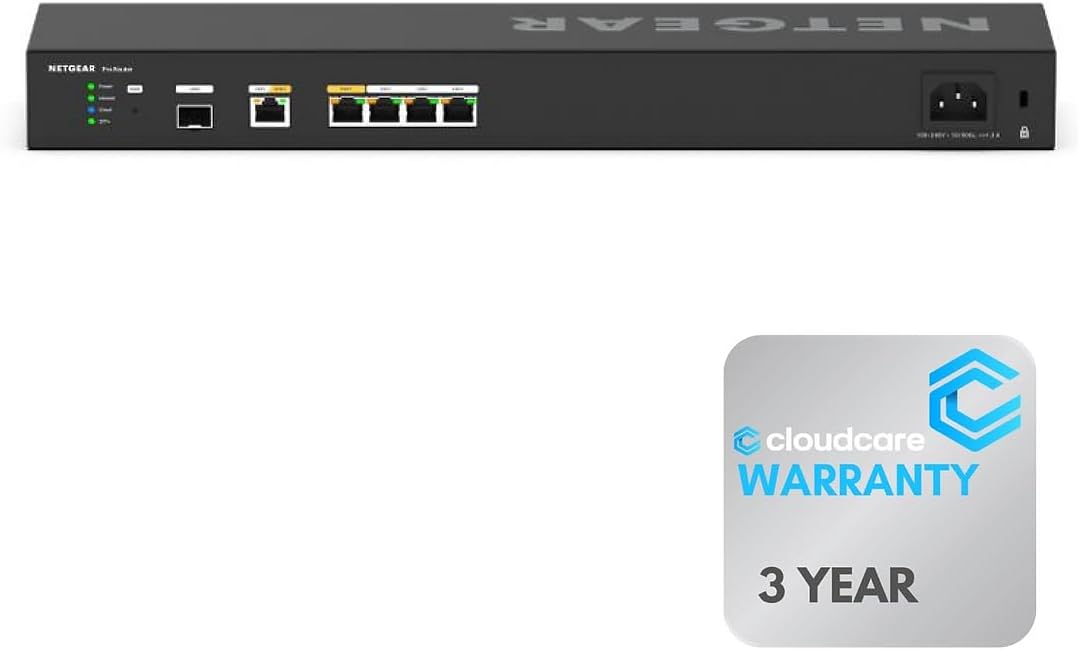
The Cloud Care PR60X offers 10G ports with a rack-mountable design. It earns a 4.6 rating for professional performance and warranty. Ideal for organizing equipment efficiently in enterprise environments.
We may earn a commission when you buy through this link, at no additional cost to you.
Cloud management via NETGEAR Insight allows remote control and monitoring. It ensures uninterrupted connectivity with load balancing support. The warranty support simplifies claims for Cloud Care buyers.
This listing adds extra warranty value over standard retail. The design is strictly professional with limited home features. It fits well into server rooms needing fast wired speeds.
Buy this for rack setups needing robust cloud management. The 10G ports support maximum speed for devices. The Insight cloud control streamlines maintenance tasks.
Save space and organize equipment efficiently. Ideal for professional and enterprise environments needing secure setups.
Manage and monitor your network remotely. Offers cloud-based control for easy setup and maintenance.
We may earn a commission when you buy through this link, at no additional cost to you.
The Linksys LRT224 is a reliable choice for small business needs. It earns a 4.0 rating for consistent performance and features. This router supports load balancing for highly reliable internet connectivity.
We may earn a commission when you buy through this link, at no additional cost to you.
It supports up to 50 IPsec tunnels for secure access. Firewall throughput reaches 900 Mbps for solid protection. It is feature-rich to meet a wide range of network requirements.
The design may feel older compared to modern multi-gig models. It lacks high speed ports but fits basic Gigabit needs. Use it for small offices needing essential VPN and failover.
Choose this if you need a stable business router. Ensure your network does not require speeds over 1Gbps. It provides essential protection and connectivity for hybrid work.
Up to 50 IPsec tunnels for site to-site and client VPN. Supports OpenVPN tunnels for iOS and Android users.
Supports load balancing and WAN failover. Ensures highly reliable internet connectivity for business tasks.
We may earn a commission when you buy through this link, at no additional cost to you.
Choosing the right Dual Wan Router requires evaluating your specific connectivity and security needs. We break down the key factors to help you select the perfect model.
Look for routers with enough Gigabit or Multi-Gigabit ports to match your ISP speeds. Ensure you have separate WAN and LAN ports or flexible ports for failover. High throughput ports are vital if you use fiber or 10G internet.
Prioritize 2.5G or 10G ports if you have fast internet plans. This ensures the router does not bottleneck your connection.
Verify that the router supports automatic failover to switch to backup internet instantly. Load balancing distributes traffic across connections to maximize speed. This dual functionality is critical for uninterrupted business operations.
Choose a model that balances traffic based on real-time speed tests. This keeps your network efficient and reliable.
Strong security includes SPI firewalls and IPS intrusion prevention. Look for DoS defense and VPN capabilities like OpenVPN or WireGuard. These protect your data from external threats and unauthorized access.
Ensure the router has regular firmware updates. Security is only as good as the maintenance behind it.
Business routers should support multiple IPsec or OpenVPN tunnels. This allows remote workers to connect securely to your office network. The number of tunnels depends on how many users need access.
Prioritize routers that support site-to-site and client-to-site VPNs. This covers both office connections and mobile workers.
Some routers offer cloud management tools like Insight or Omada. This simplifies setup and monitoring for multi-site networks. Others provide local web interfaces for simple control.
Choose cloud management if you need remote access. Local management suits single office setups.
Most enterprise routers are wired only and require separate access points. Some models include WiFi for convenience but may lack performance. Decide if you need wireless built-in or prefer dedicated APs.
Separate APs often provide better coverage. Ensure the router supports VLANs to segment traffic.
USB WAN ports allow you to connect mobile hotspots or 4G modems. This adds a physical backup layer for your primary ISP. It is useful if your business relies on mobile data.
Check compatibility with your specific modems or dongles. This ensures seamless failover when needed.
Prices range from affordable wired units to expensive enterprise solutions. Balance cost with needed features like speed or security. A longer warranty indicates manufacturer confidence in quality.
Invest more if you need high reliability. Budget models work for smaller or less critical networks.
Connect your primary ISP modem to the first WAN port. Plug your secondary connection into another WAN or WAN/LAN port. Ensure the router recognizes both connections before enabling failover.
Configure failover settings to automatically switch when the primary link fails. Test this by unplugging the primary cable. Verify the backup connection takes over without dropping active sessions.
Keep the router cool by placing it in a ventilated area. Regularly update firmware to patch security vulnerabilities. Clear logs occasionally to troubleshoot issues effectively.
A Dual WAN router connects two internet providers to ensure redundancy. If one link fails the router switches to the other. This provides continuous internet for offices and power users.
Yes, if load balancing is enabled. It can aggregate bandwidth from two connections. This speeds up downloads by using both links simultaneously.
No, standard modems work fine. You just need a separate device for each ISP. The router handles the integration of these two sources.
Look for SPI firewalls and intrusion prevention. Routers often include IP filtering and DoS defense. VPN support is also essential for remote access.
Yes, if the router has a USB WAN port. Connect your 4G/5G dongle to the USB port. It acts as a backup connection if wired internet fails.
Some routers include one year of cloud service. After that, you may need to renew. Check the product details for subscription details.
These ten models offer a range of options from budget wired units to premium enterprise solutions. The TP-Link ER605 leads for cost efficiency while the NETGEAR PR60X wins for features.
Prioritize speed and security based on your specific needs. Businesses should focus on failover and cloud management. Smaller networks may prefer simple wired setups.
Check current prices and stock for these items. Availability may change quickly in the current market. Ensure you select the model that fits your budget and technical needs.