
Redragon S101-3 PRO Gaming Keyboard and Mouse
4.5Editor score
Full RGB backlit customization
Dedicated macro record keys
Ergonomic wrist rest included
This guide compares the top Baldurs Gate 3 keyboard and mouse combos for performance, comfort, and customization to help you choose the best setup for your
Choosing the right input devices is crucial for immersive gaming experiences like Baldurs Gate 3. A reliable keyboard and mouse combo ensures precise spell casting, quick inventory management, and comfortable gameplay during long sessions. Whether you are a casual player or a competitive gamer, finding the perfect balance between functionality and comfort is essential for success in the Forgotten Realms.
We evaluated ten top-rated keyboard and mouse combos based on build quality, responsiveness, ergonomic design, and customization features. Our analysis focuses on how well each set handles the demands of action RPGs, including rapid key presses and accurate cursor movements. We considered user feedback and technical specifications to identify setups that deliver consistent performance and reliability over time.
Each product in this list offers unique strengths tailored to different budgets and preferences. From budget-friendly options to feature-rich wireless sets, you will find a variety of choices to enhance your gaming station. Remember that availability and pricing can change frequently, so checking the latest details before purchasing ensures you get the best value for your specific needs.
4.5Editor score
4.4Editor score

4.2Editor score
This side-by-side comparison highlights the key specifications and features of each selected keyboard and mouse combo. Use this table to quickly identify which model best fits your specific gaming requirements and ergonomic preferences for Baldurs Gate 3 sessions.


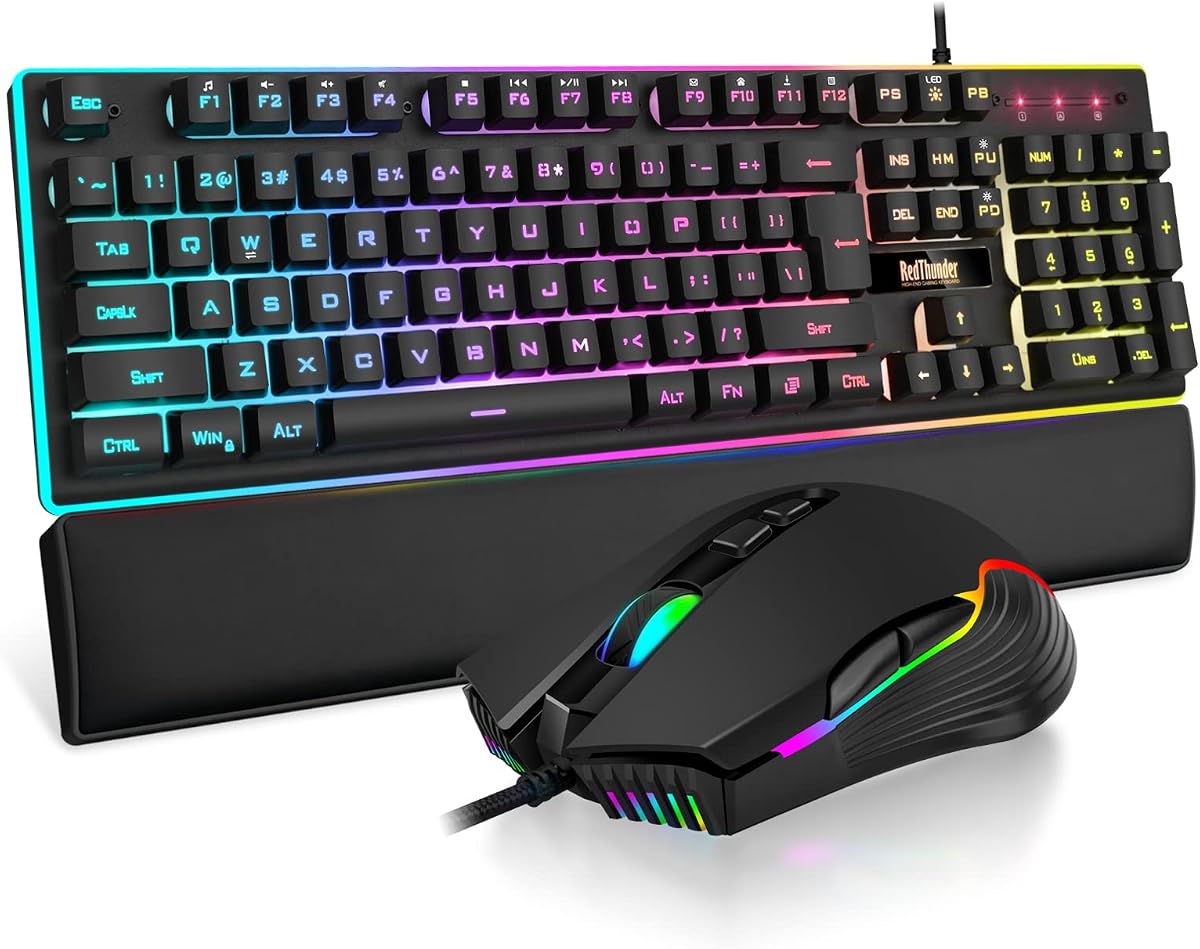
The Redragon S101-3 PRO stands out as a top contender for budget-conscious gamers seeking a complete solution for Baldurs Gate 3. With a solid rating and comprehensive features, this combo delivers excellent value without compromising on essential gaming needs. The inclusion of macro keys and RGB lighting makes it a versatile choice for both work and play.
We may earn a commission when you buy through this link, at no additional cost to you.
This set shines in its customization capabilities, allowing users to tailor lighting effects and record complex command sequences for in-game actions. The keyboard offers multiple backlight modes and the mouse supports various lighting patterns, creating an immersive atmosphere. The quiet membrane keys are ideal for shared spaces where noise reduction is prioritized during long gaming sessions.
While the non-mechanical switches may not offer the tactile feedback of high-end keyboards, they provide sufficient responsiveness for most RPG gameplay. The software interface is straightforward but may lack advanced features found in premium brands. However, for the price, the performance and durability make these trade-offs acceptable for most users.
This setup is best suited for students, first-time gamers, or anyone looking for a reliable upgrade from basic peripherals. The ergonomic wrist rest helps reduce fatigue during extended play, ensuring comfort throughout your adventures. We recommend this combo for those who prioritize value and essential features over premium mechanical feedback.
The ability to record macros provides a competitive edge by automating complex spell combinations or item usage sequences common in Baldurs Gate 3.
Built with durable materials and an ergonomic wrist rest, this combo is designed to withstand marathon gaming sessions while keeping your hands comfortable.
We may earn a commission when you buy through this link, at no additional cost to you.
The RedThunder K10 Wired combo is engineered for players who demand precision and reliability during intense gaming moments. Its high DPI sensor and anti-ghosting capabilities ensure that every input is registered accurately, which is critical for strategic maneuvers in Baldurs Gate 3. The mechanical feel keys offer a satisfying tactile response that enhances typing and gaming experiences.
We may earn a commission when you buy through this link, at no additional cost to you.
Key strengths include the robust build quality with a steel plate base that adds durability and stability. The soft leather wrist rest provides exceptional comfort, reducing strain during long sessions. The full RGB lighting not only adds aesthetic appeal but also helps visibility in low-light environments. The mouse supports high acceleration and tracking speeds, making it suitable for fast-paced movements.
The main trade-off is the wired connection which limits placement flexibility compared to wireless options. Additionally, the mouse design might feel bulky for users with smaller hands. However, the performance benefits and ergonomic features make it a strong choice for those who prioritize stability and accuracy over wireless convenience.
We recommend this setup for competitive gamers or enthusiasts who need a dependable input system. The combination of high precision tracking and comfortable ergonomics makes it ideal for mastering the nuances of Baldurs Gate 3. Choose this if you value performance and comfort in a traditional wired configuration.
The optical sensor with high DPI settings ensures accurate cursor movement, essential for targeting spells and items with precision during gameplay.
The integrated soft leather wrist rest offers superior support, helping maintain a natural hand position to minimize fatigue over extended use.
We may earn a commission when you buy through this link, at no additional cost to you.
The VEILZOR Wireless combo represents a modern approach to gaming peripherals, emphasizing convenience and comfort. Its silent operation and wireless connectivity make it perfect for users who prefer a clutter-free setup. The rechargeable battery eliminates the need for disposable cells, offering a sustainable and cost-effective solution for long-term use.
We may earn a commission when you buy through this link, at no additional cost to you.
This set stands out with its ergonomic wrist rest and contoured mouse shape designed to fit the natural curve of your hand. The silent keys and mouse clicks ensure that you can focus on the game without disturbing others in shared environments. RGB lighting effects add a customizable touch to your setup, enhancing visual appeal during nighttime gaming.
While the DPI settings are lower than some high-end wired options, they remain sufficient for most gaming scenarios including Baldurs Gate 3. The phone holder is a unique addition that might appeal to streamers or multitaskers but is not essential for all users. The wireless range is reliable, though some latency might be noticed in competitive FPS games.
This option is ideal for users who value a clean workspace and quiet operation. The combination of rechargeability and ergonomic comfort makes it a practical choice for daily gaming and work. We recommend it for those seeking a premium wireless experience without compromising on essential performance features.
Reduced noise from keys and mouse clicks allows for uninterrupted focus and avoids disturbing others in shared living or work spaces.
The rechargeable battery system reduces waste from disposable batteries, offering a convenient and eco-friendly power solution for your peripherals.
We may earn a commission when you buy through this link, at no additional cost to you.
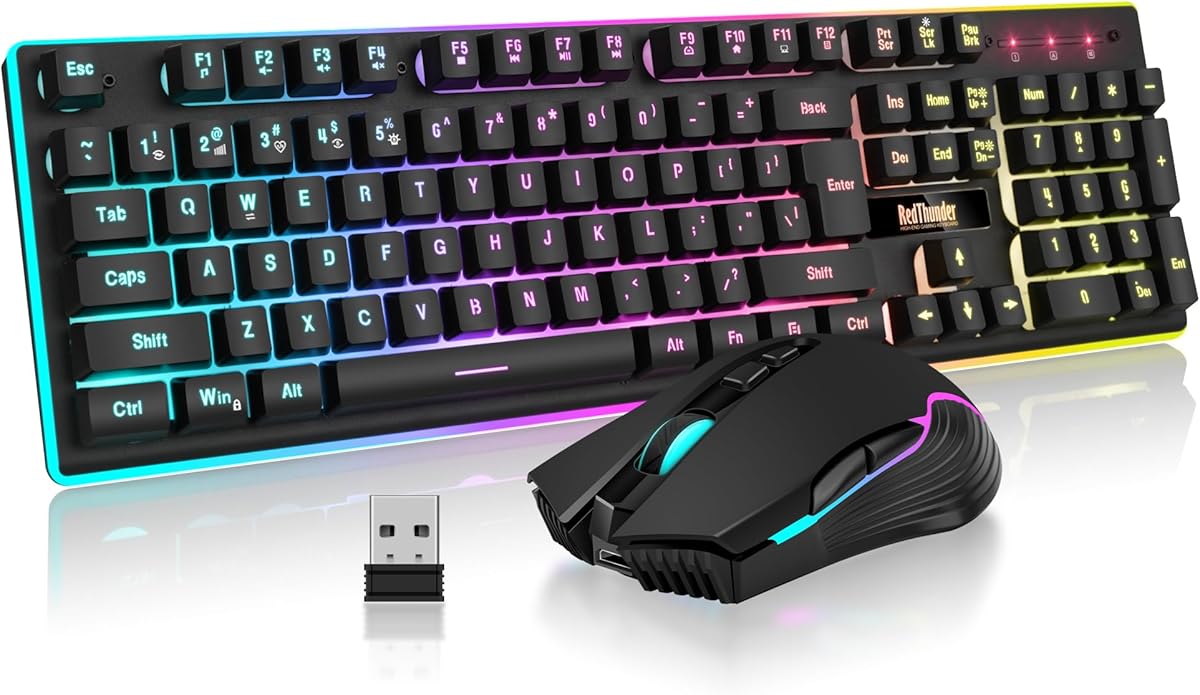
The RedThunder K10 Wireless offers a compelling balance of mobility and performance for gamers who want to move freely. With a high capacity battery, it promises extended usage before needing a recharge, making it suitable for long gaming sessions. The mechanical feel keys provide a tactile response that mimics more expensive mechanical keyboards.
We may earn a commission when you buy through this link, at no additional cost to you.
This combo features a shared USB receiver for both devices, simplifying setup and reducing clutter. The RGB lighting adds visual flair, and the wireless connection ensures minimal interference during use. The mouse offers adjustable DPI settings to suit different precision needs, whether for browsing or intense gameplay.
Battery life can be significantly reduced when lighting effects are enabled, requiring more frequent charging during heavy RGB use. The lightweight mouse may feel less substantial to users accustomed to heavier peripherals. However, the wireless freedom and responsive keys make it a solid choice for casual to intermediate gamers.
We recommend this set for those who prioritize wireless convenience and battery longevity. The ability to customize lighting and the durable build support a satisfying gaming experience. Ideal for users who want the flexibility of wireless without sacrificing tactile feedback or reliability.
The high capacity battery ensures you can play for hours without interruption, while the stable wireless transmission keeps inputs responsive and lag-free.
Mechanical feel keys provide a satisfying click and feedback, enhancing the overall typing and gaming experience without the cost of full mechanical switches.
We may earn a commission when you buy through this link, at no additional cost to you.
The Rii Gaming Keyboard and Mouse Set delivers reliable performance in a compact form factor. It is designed for users who need durability and simplicity without excessive features. The high click life rating ensures long-term usability, making it a practical choice for daily gaming and work tasks.
We may earn a commission when you buy through this link, at no additional cost to you.
This set features a standard layout that fits well on smaller desks. The LED backlighting provides enough visibility in low-light conditions without being distracting. The ergonomic design helps maintain a comfortable hand position during extended use. It works with a wide range of operating systems, enhancing versatility for different setups.
The mouse and keyboard have fewer customization options compared to more advanced models. Lighting is limited to basic modes which may not appeal to users seeking extensive RGB effects. However, the reliability and broad compatibility make it a solid entry-level choice for those new to gaming peripherals.
We recommend this set for students or casual gamers looking for a dependable and budget-friendly solution. The durability and ease of setup are significant advantages. It is best suited for users who prioritize functionality and longevity over advanced customization features.
The keys are rated for millions of clicks, ensuring that the keyboard remains functional and responsive even after years of regular use.
Support for multiple operating systems means you can use this set with various devices without needing additional drivers or complex setup processes.
We may earn a commission when you buy through this link, at no additional cost to you.
The K1 RGB LED Backlit Wired Keyboard and Mouse Combo offers a complete full-size layout ideal for users who need a numeric keypad. Its waterproof USB cable adds a layer of protection against spills, increasing the device's lifespan. The floating keycaps are removable, allowing for easy cleaning and maintenance.
We may earn a commission when you buy through this link, at no additional cost to you.
This keyboard supports multiple RGB lighting modes and brightness levels, giving users control over their aesthetic setup. The mouse provides adjustable speed settings to adapt to different tasks. The ergonomic design includes non-slip pads to keep the keyboard stable during intense gaming or typing sessions.
Without software, advanced customization like macros or complex lighting patterns is limited to keyboard shortcuts. The mouse sensor is adequate for general use but may not meet the needs of competitive gamers. Despite these limitations, the durability and lighting features make it a strong value option.
We recommend this combo for users who need a reliable full-size keyboard and basic gaming performance. The waterproof design is a practical benefit for long-term use. It is best suited for home offices or gaming setups where durability and aesthetics are key priorities.
Including a full numeric keypad and standard layout ensures compatibility with all software and games, providing versatility for work and play.
The waterproof cable and construction help protect the device from accidental liquid spills, extending its life and reliability in everyday environments.
We may earn a commission when you buy through this link, at no additional cost to you.
The Large Print Light Up Keyboard is designed with accessibility and ease of use in mind. The larger characters and high contrast keys make it easier to see, which is beneficial for users with visual impairments or those working in low-light conditions. The silent operation ensures a distraction-free environment for focused tasks.
We may earn a commission when you buy through this link, at no additional cost to you.
Its ergonomic design includes foldable feet to adjust typing angle, reducing strain during long sessions. The mouse complements the keyboard with standard optical tracking suitable for general use. The backlight options allow customization of color and brightness to suit personal preferences and lighting conditions.
While excellent for readability and comfort, this set lacks advanced gaming features like high DPI or macro keys. It is optimized for productivity and accessibility rather than competitive gaming. However, for users who prioritize clear visibility and quiet operation, it is an outstanding choice.
We recommend this keyboard and mouse combo for students, seniors, or anyone who needs better visibility. The ergonomic design supports comfortable typing for extended periods. It is best suited for work environments or casual gaming where readability and quietness are more important than advanced performance.
The large print keys and adjustable backlighting make it easy to identify characters quickly, reducing eye strain and improving typing accuracy.
Adjustable feet and a comfortable layout help maintain a natural hand position, reducing fatigue during prolonged typing sessions.
We may earn a commission when you buy through this link, at no additional cost to you.
The BlueFinger RGB Gaming set distinguishes itself by including a quality mouse pad with the combo. This addition provides a smooth surface for precise mouse tracking, enhancing the overall gaming experience. The keyboard features a built-in steel plate that adds stability and durability to the setup.
We may earn a commission when you buy through this link, at no additional cost to you.
Rainbow backlighting covers all keys, creating a vibrant look that enhances visibility in dark rooms. The anti-conflict key design allows multiple key presses simultaneously, ensuring accurate input during complex game actions. The mouse offers adjustable DPI to accommodate different sensitivity preferences.
The lighting patterns are fixed and cannot be customized extensively, which may limit personalization. The mouse is functional but lacks the precision of high-end gaming sensors. Nevertheless, the value provided by the included mouse pad and robust build makes it a practical option for beginners.
We recommend this set for those looking for a complete entry-level gaming kit. The included mouse pad is a significant bonus for budget-conscious users. It is ideal for casual gamers who want a reliable and visually appealing setup without breaking the bank.
The inclusion of a dedicated mouse pad ensures optimal tracking conditions for your mouse, improving accuracy and comfort during gameplay.
A built-in steel plate reinforces the keyboard structure, preventing flex and ensuring consistent performance over time.
We may earn a commission when you buy through this link, at no additional cost to you.
This USB Wired Keyboard and Mouse Combo focuses on functionality and comfort for office and accessibility needs. The oversized keys provide clear visibility, reducing errors and strain during typing. The integrated wrist rest supports a natural hand position, making it comfortable for extended use throughout the day.
We may earn a commission when you buy through this link, at no additional cost to you.
The quiet low-profile keys ensure minimal noise, which is ideal for shared workspaces or quiet gaming environments. The mouse complements the keyboard with adjustable DPI settings for versatility. A spill-resistant design helps protect against accidental liquid spills, extending the device's life.
Gaming features are minimal, as the focus is on productivity and accessibility. Lighting options are limited to three colors, which may not satisfy users seeking vibrant RGB effects. However, for those who need a reliable and comfortable setup, this set delivers solid performance.
We recommend this set for office workers, seniors, or anyone needing better keyboard visibility. The ergonomic design and quiet keys make it a pleasant choice for daily tasks. It is best suited for environments where comfort and readability are more important than gaming performance.
Large print keys make it easier to identify characters quickly, helping users with visual impairments or those who type in dim lighting conditions.
The integrated wrist rest helps maintain a neutral wrist position, reducing fatigue during long hours of typing or computer use.
We may earn a commission when you buy through this link, at no additional cost to you.
The SABLUTE Wired Large Print combo is designed for users who prioritize clarity and comfort in their daily computer use. The 4X larger print keys are highly visible, reducing eye strain and typing errors. An adjustable palm rest adds ergonomic support to maintain a comfortable posture during extended sessions.
We may earn a commission when you buy through this link, at no additional cost to you.
This set includes a mouse with backlighting for visibility in low light conditions. The plug-and-play setup ensures compatibility with most devices without the need for additional drivers. The backlight colors and modes allow users to customize the look to their preference.
While it excels in accessibility and comfort, it lacks specialized gaming features like high DPI or macro keys. The cable length is fixed, which might limit flexibility in some desk setups. However, for daily productivity and general use, the ergonomics and readability are excellent.
We recommend this set for students, seniors, and office workers seeking a comfortable typing experience. The adjustable palm rest and large keys make it a practical choice for reducing strain. It is ideal for those who value accessibility and everyday usability over gaming-specific capabilities.
The adjustable palm rest helps maintain a natural hand angle, reducing wrist strain during long periods of typing or computer use.
Large print keys ensure that characters are easy to read, helping users with visual impairments or those working in low-light environments.
We may earn a commission when you buy through this link, at no additional cost to you.
Selecting the right input devices for Baldurs Gate 3 requires considering several key factors to ensure comfort, performance, and value. This guide outlines essential aspects to evaluate before making your purchase.
Mechanical keyboards offer tactile feedback and durability but may be louder and more expensive. Membrane keyboards are quieter and more affordable but may lack the same precision. For Baldurs Gate 3, choose based on your preference for feedback and noise level.
Select switches that match your comfort needs, whether tactile or quiet, to prevent fatigue during long play sessions.
An ergonomic keyboard and mouse reduce wrist strain and improve comfort during extended gaming sessions. Look for features like adjustable tilt, wrist rests, and contoured shapes that fit your hand naturally.
Prioritize designs that support a neutral wrist position to minimize fatigue and potential repetitive strain injuries.
Wired connections provide stable input with no latency, which is ideal for competitive gaming. Wireless options offer flexibility and a cleaner desk but require battery management and may have slight latency.
Choose wired for reliability or wireless for convenience based on your setup and preference for cable management.
Customizable RGB lighting and programmable macro keys allow you to personalize your setup and automate complex in-game commands. Software support can enhance usability but may vary in quality and features.
Ensure the device offers the level of customization you need for gameplay and aesthetics without overly complex software.
Materials like steel plates and high-quality plastics contribute to a keyboard's longevity and stability. Check for key life ratings and construction quality to ensure the device withstands heavy use.
Invest in durable builds that promise long-term reliability to avoid frequent replacements and maintain consistent performance.
Confirm that the keyboard and mouse work with your operating system without requiring extensive driver installation. Most modern devices support Windows and Mac systems seamlessly, but checking specific requirements avoids potential issues.
Look for plug-and-play functionality to ensure immediate usability and hassle-free setup across different devices.
Set a budget that aligns with your needs, balancing cost with essential features. Higher-priced options often provide better build quality and customization, but many affordable combos offer solid performance for casual gaming.
Focus on value by identifying features that directly enhance your experience without paying for unnecessary extras.
To ensure optimal performance, always connect your devices securely to USB ports and allow the system to recognize them before starting your game. If your keyboard supports software customization, download and install the latest drivers from the manufacturer's website to unlock all features.
Keep your keyboard clean by regularly dusting the keys and using compressed air to remove debris between switches. Avoid drinking liquids near your setup to prevent spills that can damage internal components, and consider using a keyboard cover for added protection.
For the mouse, clean the sensor lens gently with a soft cloth to maintain accurate tracking. Periodically check and replace batteries if using wireless models, or recharge them fully to avoid interruptions during gameplay. These simple maintenance steps extend the lifespan of your peripherals.
Mechanical keyboards provide tactile feedback and faster response times that some players prefer for quick inputs. However, membrane keyboards are quieter and more affordable, offering sufficient performance for most RPG gameplay. Choose based on your comfort and noise tolerance.
Modern wireless keyboards use high-speed 2.4G connections that minimize latency to imperceptible levels for most users. While there may be slight differences compared to wired models, they generally perform well for RPGs like Baldurs Gate 3.
Most gaming keyboards come with software that allows you to record and assign macros to specific keys. Open the software, select a macro key, and record the sequence of keystrokes you want to automate for spells or actions.
DPI preferences vary by player, but a setting between 800 and 1600 is common for general gaming. Adjust based on your mousepad size and personal comfort to balance speed and precision.
Most keyboard and mouse combos listed are compatible with Mac systems, though some advanced features may not work. Check product descriptions for macOS support to ensure full functionality on Apple devices.
With proper care, gaming keyboards can last several years depending on usage frequency. Consider replacement when keys become unresponsive or the device shows significant wear affecting performance.
This guide has highlighted ten diverse keyboard and mouse options tailored to different budgets and gaming styles. Whether you prioritize wireless freedom, mechanical feedback, or ergonomic comfort, there is a setup here to enhance your Baldurs Gate 3 experience.
Focus on features that matter most to you, such as macro support for spell casting or ergonomic designs for long sessions. Balancing performance with comfort ensures that your input devices remain reliable partners throughout your adventures.
Always check current availability and pricing before purchasing to secure the best deal. With the right tools, you can fully immerse yourself in the world of Baldurs Gate 3 without distractions or discomfort.