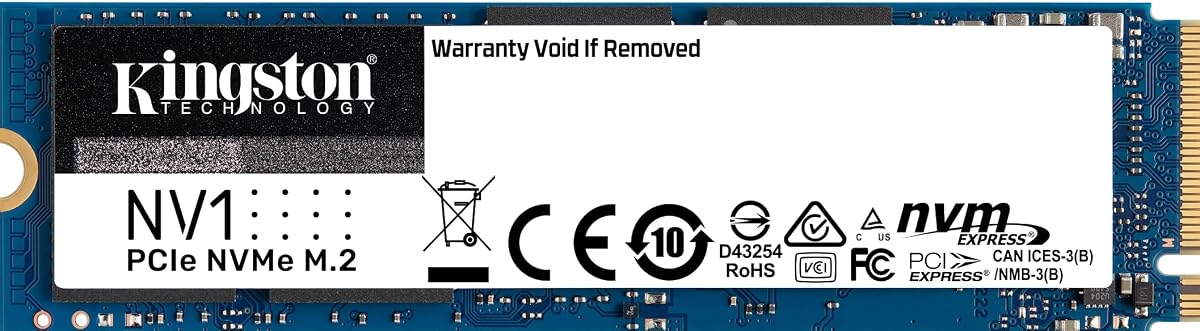
Kingston NV1 500G
4.8Editor score
Ideal for laptops
Up to 2100MB/s Read
Up to 2TB Capacity
This guide compares the top Kingston Internal NVME SSD options for speed and reliability helping you choose the perfect drive for gaming or storage needs today.
Finding the right storage solution is crucial for modern computing needs. Kingston Internal NVME SSD models offer exceptional speed and reliability for various systems.
We evaluated ten top models based on performance data and user feedback to create this comprehensive list. Each option stands out in specific use cases like gaming or workstations.
Each pick highlights key strengths and ideal scenarios for real-world usage. Please note that prices fluctuate frequently so check current listings before making your final decision.
4.8Editor score
4.7Editor score

5.0Editor score
The following table provides a side-by-side comparison of all ten products to help you quickly identify which model fits your specific requirements.


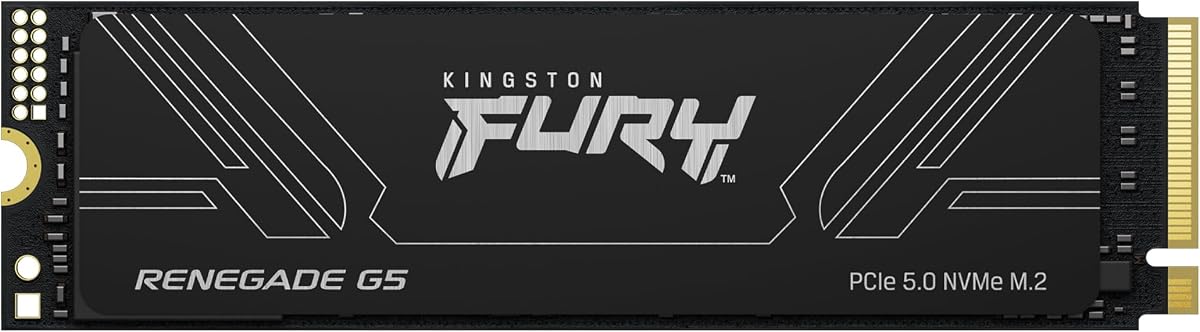
This model stands out with incredible PCIe 5.0 speeds reaching up to 14800MB/s read. It has a rating of 4.7 and is designed for power users needing top-tier responsiveness.
We may earn a commission when you buy through this link, at no additional cost to you.
The advanced thermal design features an SM2508 controller with low-power DDR4 cache ensuring stable performance during demanding tasks. Its 12-layer PCB supports efficient cooling for long sessions.
While it is expensive, the performance gains justify the cost for those building high-end systems. It requires motherboards with Gen 5×4 support which limits compatibility slightly.
Hardcore gamers and content creators should buy this for ultra-fast load times. It remains the top recommendation for those prioritizing speed above all else in their build.
Read speeds up to 14800MB/s ensure games and large files load instantly without delays.
Efficient cooling components keep the drive running at peak performance even under heavy workloads.
We may earn a commission when you buy through this link, at no additional cost to you.
This 1TB SSD delivers read speeds of 7000MB/s and write speeds of 6000MB/s with a perfect 5.0 rating. It is compatible with notebooks and offers quality assured product standards.
We may earn a commission when you buy through this link, at no additional cost to you.
The M.2 2280 form factor ensures it fits seamlessly into modern laptops and desktops. Its reliable performance makes it ideal for professionals who need consistent output during work.
The higher price reflects the quality assurance and robust performance metrics. Users should ensure their system supports the required PCIe interface for optimal speed utilization.
Professional users and content creators should buy this for reliable storage. It is a solid choice for those who value quality and speed over budget constraints.
Read and write speeds ensure smooth operation for demanding applications and large file transfers.
Every unit undergoes rigorous testing to ensure longevity and consistent performance over time.
We may earn a commission when you buy through this link, at no additional cost to you.
This model offers up to 2100MB/s read and 1700MB/s write speeds with an excellent 4.8 rating. It is ideal for laptops and small form factor PCs requiring reliable storage.
We may earn a commission when you buy through this link, at no additional cost to you.
Available in capacities up to 2TB it meets diverse data storage requirements without breaking the bank. Its compact design fits well in slim devices where space is limited.
While it lacks the highest speeds of premium options it provides sufficient performance for everyday tasks. The lower price makes it a great value for budget-conscious buyers.
Students and office workers should buy this for general computing needs. It delivers dependable performance where budget is a primary concern for system upgrades.
Its small form factor ensures easy installation in laptops and portable devices without bulk.
Provides a significant speed boost over older drives at a very accessible price point.
We may earn a commission when you buy through this link, at no additional cost to you.
This drive delivers Gen 4×4 NVMe PCIe performance with up to 6000MB/s read and 4000MB/s write speeds. It has a 4.7 rating and comes with Acronis cloning software for easy setup.
We may earn a commission when you buy through this link, at no additional cost to you.
Ideal for high speed and low power storage it balances efficiency with rapid data access. The included software makes migrating data to this new drive simple and safe for users.
It requires a Gen 4 slot to reach full speed which may limit older systems. However for compatible machines it offers significant improvements over previous generations of storage.
Gamers and general users should buy this for fast system responsiveness. It is an excellent choice for those wanting modern speeds without the highest price tag.
High sequential speeds ensure your operating system and applications load quickly every day.
Acronis software simplifies the process of moving your existing data to the new drive.
We may earn a commission when you buy through this link, at no additional cost to you.
This model offers incredible PCIe Gen 4×4 NVMe performance with speeds up to 7300MB/s. It has a 4.8 rating and comes available with a heatsink making it ideal for gaming systems.
We may earn a commission when you buy through this link, at no additional cost to you.
The slim M.2 2280 form factor fits easily into various motherboards and consoles. With PS5 Ready certification it ensures compatibility with next-gen console storage expansion requirements.
Heat sinks can sometimes obstruct nearby RAM slots so check your motherboard layout before purchase. The included thermal management helps maintain peak speeds during long gaming sessions without throttling.
Console and PC gamers should buy this for rapid game loading. It is a premium choice for those who want top-tier performance and included cooling solutions.
PS5 Ready certification ensures easy installation and reliable performance in next-generation consoles.
The included heat sink keeps the drive cool to prevent slowdowns during intensive use.
We may earn a commission when you buy through this link, at no additional cost to you.
This SSD features Gen 4×4 NVMe PCIe performance with up to 6000MB/s speed. It has a 4.7 rating and is designed for compatible handheld gaming devices and small form factor PCs.
We may earn a commission when you buy through this link, at no additional cost to you.
Capacities up to 2TB allow for extensive game libraries without compromising on portability. The compact form factor fits perfectly into devices like Steam Deck or ROG Ally where space is tight.
Finding specific 2230 drives can be challenging as they are less common than 2280 models. Ensure your device specifically requires this size before purchasing to avoid compatibility issues.
Portable gamers should buy this for expanding their device storage quickly. It brings desktop-class speeds to handheld consoles for a better on-the-go experience.
The 2230 size is specifically engineered for popular portable gaming consoles and laptops.
Gen 4 speeds mean games load fast even in portable environments without overheating.
We may earn a commission when you buy through this link, at no additional cost to you.
This model offers sequential read/write speeds up to 7450/6900 MB/s reaching near max PCIe 4.0 performance. It has a 4.7 rating and features a nickel-coated controller for effective thermal control.
We may earn a commission when you buy through this link, at no additional cost to you.
Random read/write speeds are 40/55% faster than the 980 PRO enabling faster loads for gaming. The Samsung Magician software helps monitor drive health and receive important updates regularly.
While not a Kingston product it serves as a strong competitor in the same performance tier. Users should consider it if they prioritize specific software features or thermal design needs.
Power users and gamers should consider this for peak performance on PC. It offers a reliable alternative for those needing top-tier 4.0 speeds and robust software support.
Improved performance per watt allows sustained speeds without excessive power consumption.
Samsung Magician provides deep insights into drive health and performance optimization settings.
We may earn a commission when you buy through this link, at no additional cost to you.
This drive offers up to 2100MB/s read and 1700MB/s write speeds with a 4.7 rating. It is ideal for laptops and small form factor PCs meeting data storage requirements up to 2TB.
We may earn a commission when you buy through this link, at no additional cost to you.
Available in a range of capacities this model scales to fit different user needs effectively. Its design prioritizes reliability and space efficiency for modern portable computing environments.
While speeds are lower than Gen 4 models they are sufficient for standard tasks. The large capacity at an accessible price point makes it a practical choice for media storage.
Users needing large storage space should buy this for bulk data. It is a smart pick for those who value capacity over raw sequential transfer speeds.
Choose from various capacities to match your specific budget and storage needs.
Optimized for power efficiency and thermal performance in battery-powered devices.
We may earn a commission when you buy through this link, at no additional cost to you.
This drive delivers read/write speeds up to 3500/2900MB/s with a 4.6 rating. It is a self-encrypting drive supporting end-to-end data protection using XTS-AES 256 bit Hardware encryption.
We may earn a commission when you buy through this link, at no additional cost to you.
It allows usage of independent software vendors with TCG Opal 2.0 security management solutions. Built-in Microsoft eDrive support ensures compatibility with BitLocker for added security layers.
The added security features may complicate setup for casual users but are essential for professionals. Its superior NVMe speeds make it suitable for secure high-performance computing workflows.
Business users handling sensitive data should buy this for protection. It offers enterprise-grade security features in a consumer-friendly form factor.
Built-in encryption ensures data remains secure without significantly impacting system performance.
Supports industry standards to meet corporate and regulatory security requirements easily.
We may earn a commission when you buy through this link, at no additional cost to you.
This 128GB PCIe NVMe M.2 Gaming Internal Solid State Drive has a 4.3 rating. It is compatible with Stream Deck laptops and desktops offering compact internal storage options.
We may earn a commission when you buy through this link, at no additional cost to you.
Its small form factor makes it ideal for secondary storage or specific device expansions like Stream Deck. While capacity is limited it serves well for applications needing quick access.
Users requiring massive storage should look at higher capacity options like the 1TB or 2TB models. However for specific hardware expansions this size is often exactly what is required.
Stream Deck users and hobbyists should buy this for secondary storage. It provides essential expansion capabilities for creative setups where size matters most.
Ideal for tools like Stream Deck where compact storage fits the device design perfectly.
Adds extra space for applications without taking up primary drive room.
We may earn a commission when you buy through this link, at no additional cost to you.
Selecting the right SSD involves understanding your system requirements and usage needs to ensure maximum value and performance.
Check your motherboard specifications to confirm whether it supports PCIe 3.0 PCIe 4.0 or PCIe 5.0. Newer generations offer faster speeds but only if your hardware can utilize them.
Select the latest generation your system supports to maximize data transfer rates and future-proof your investment.
Estimate how much space you need for games applications and files. Modern games can take up over 100GB each so 1TB is a common minimum for serious users.
Choose capacities like 1TB or 2TB to avoid constant file management and ensure you have room for growth.
Most modern laptops and desktops use the M.2 2280 size but handhelds may require 2230. Measure your slot or check the manual to avoid fit issues.
Verify the physical dimensions before buying to ensure the drive fits into your specific device slot.
Sequential read write speeds determine how fast files transfer while IOPS affect application responsiveness. Higher numbers generally mean faster loading times and smoother multitasking.
Prioritize sequential speeds for boot drives and high-performance tasks to ensure your system feels responsive.
High-speed drives generate heat which can lead to throttling if not dissipated properly. Models with built-in heatsinks help maintain performance during heavy usage.
Look for drives with heatsinks or adequate cooling to prevent performance drops during long sessions.
Warranty terms vary by model and manufacturer offering protection against premature failure. A longer warranty often indicates higher confidence in product durability.
Always check the warranty period to ensure you have recourse if the drive fails unexpectedly.
Balance cost against performance and capacity to find the best deal for your needs. Sometimes paying slightly more for better speed or durability saves money in the long run.
Compare options based on cost per gigabyte to find the most efficient storage investment for your budget.
Some models support hardware-based encryption which protects data if the device is lost or stolen. This is especially important for business users or those handling sensitive information.
Select a drive with encryption features if data security is a top priority for your usage.
Before installing the drive ensure your system is powered off and static electricity is discharged. Gently insert the SSD into the M.2 slot at an angle and secure it with the provided screw.
After installation update your system BIOS and install any relevant drivers to ensure compatibility. Partition the drive using your operating system tools so you can start storing files immediately.
Keep the system clean and ensure proper airflow to prevent overheating. Periodically check for firmware updates from Kingston to maintain optimal performance and security.
Yes select specific Kingston models like the Fury Renegade are PS5 Ready. Ensure the drive meets the required speed and capacity standards to work properly with the console.
Gen 5 drives offer significantly higher speeds than Gen 4 models but require newer motherboard support. If your system only supports Gen 4 a Gen 5 drive will not reach its top speed.
Most drives work immediately upon installation without extra software. However tools like Acronis cloning software or Kingston utility apps can help manage data migration and performance.
Check your laptop manual or use system tools to identify the M.2 slot type. Most laptops use 2280 but some slim models may require 2230 sizes.
Yes desktop motherboards usually have M.2 slots that support NVME SSDs. If your board lacks one you may need a PCIe adapter card to connect the drive.
Heat sinks help maintain performance during heavy usage but are not always required. Desktops often have enough airflow but laptops may benefit from the added cooling.
We highlighted top models like the FURY Renegade G5 KC3000 and NV1 500G to suit different needs. These options offer a range of speeds and capacities for any type of user.
Prioritize capacity and thermal management if you are upgrading a gaming or workstation system. For general use the NV1 series provides reliable performance at an affordable price point.
Always verify compatibility and check current prices before purchasing. Storage values fluctuate so keeping an eye on deals helps you secure the best value for your investment.