
HDMI Tester Portable High Definition
4.4Editor score
Multi-function testing
Compact main and remote
USB power option
Detects wiring faults
This comprehensive guide compares the top ten HDMI cable and port testers to help you choose the right diagnostic tool for your audiovisual setup.
Finding the right HDMI cable and port tester is essential for anyone working with audiovisual equipment. These tools help identify connectivity issues quickly and ensure your signals are transmitted correctly without costly downtime or frustration during setup.
We evaluated ten distinct models based on their testing accuracy, port compatibility, ease of use, and build quality. Our comparison focuses on how well each device handles common faults like open circuits and short circuits across different HDMI versions and network standards.
Each pick highlights unique strengths for specific user needs ranging from hobbyists to professional installers. Please note that availability and pricing can change rapidly so checking the current product page is recommended before making your final purchase decision.
4.4Editor score

4.8Editor score

4.5Editor score
The following table provides a side-by-side overview of the ten selected HDMI cable and port testers highlighting their key specifications and unique capabilities for various testing scenarios.


The UT681 HDMI Cable Tester stands out as the top choice for technicians who need a reliable yet portable solution for verifying high definition connections. With an impressive rating it delivers accurate diagnostics for short circuits open connections and misordered wires across multiple HDMI standards.
We may earn a commission when you buy through this link, at no additional cost to you.
Its rapid analysis capability allows users to scan all 19 wires quickly while the LED indicator zones provide immediate visual feedback on any faults found. The device supports both Type A standard and Type C mini interfaces making it versatile for various modern equipment setups.
While the device offers intelligent power consumption with an automatic shut-off feature users should be aware that it requires a specific battery type and includes a voltage warning system to prevent unexpected failures during critical testing moments.
This tester is ideal for installers or hobbyists who frequently work on-site and need to confirm cable integrity without carrying bulky equipment. Its lightweight design ensures efficient workflow even when testing long runs or confined spaces.
The LED indicator zones simplify the troubleshooting process by showing abnormal points clearly on the device body.
Weighing around 175 grams this tester allows for field testing with a separate transceiver for efficient single person operation.
We may earn a commission when you buy through this link, at no additional cost to you.
For users seeking an economical entry into cable diagnostics the HDMI Tester Portable High Definition offers a practical solution without compromising core functionality. It effectively scans for wiring faults across HDMI and network cables using a straightforward LED based feedback system.
We may earn a commission when you buy through this link, at no additional cost to you.
The main unit pairs with a compact remote that stores conveniently on the side ensuring you can test cables in different locations easily. This multi function approach saves time by allowing one tool to handle both video signal lines and Ethernet connections.
Power flexibility is a key advantage as the unit can run on a single AAA battery or be powered via a phone USB charger. However the device is primarily designed for standard Type A connectors which may limit use with micro HDMI setups.
This model is perfect for homeowners or small business owners who need to verify basic connectivity during installation or maintenance. Its simplicity ensures that even those with minimal technical experience can identify broken wires quickly and accurately.
This tester can quickly scan and test up to 19 wires for HDMI and also handles RJ45 network cables efficiently.
The main unit can be powered by a single 1.5V AAA battery or using your phone's USB charger power supply.
We may earn a commission when you buy through this link, at no additional cost to you.
The STEREN Handheld Portable HDMI Tester represents a premium solution for professionals who need to validate audio video signals without relying on an external television. Its integrated HD LCD display provides full color assurance that the signal is reaching the device correctly.
We may earn a commission when you buy through this link, at no additional cost to you.
Built with a ruggedized housing and a tempered glass display this unit is resistant to dust water and shocks making it suitable for demanding environments. The patented design includes multiple HDMI ports to facilitate continuity tests and connections to set top boxes.
While it carries a higher price point than simpler continuity testers it eliminates the need to carry a separate monitor or rely on guesswork. The device also includes a micro USB port for battery charging offering several hours of continuous use in the field.
This tool is essential for AV integrators or theater technicians who must verify signal quality on site before handing over a system. Its ability to check channel lineups and provide video output ensures a comprehensive setup validation process.
This HDMI tester provides the technician with an HD LCD screen to check that the set-top box is installed correctly.
It is resistant to dirt water and shock and contains a hybrid dual layer of silicone rubber and plastic with a ruggedized housing.
We may earn a commission when you buy through this link, at no additional cost to you.
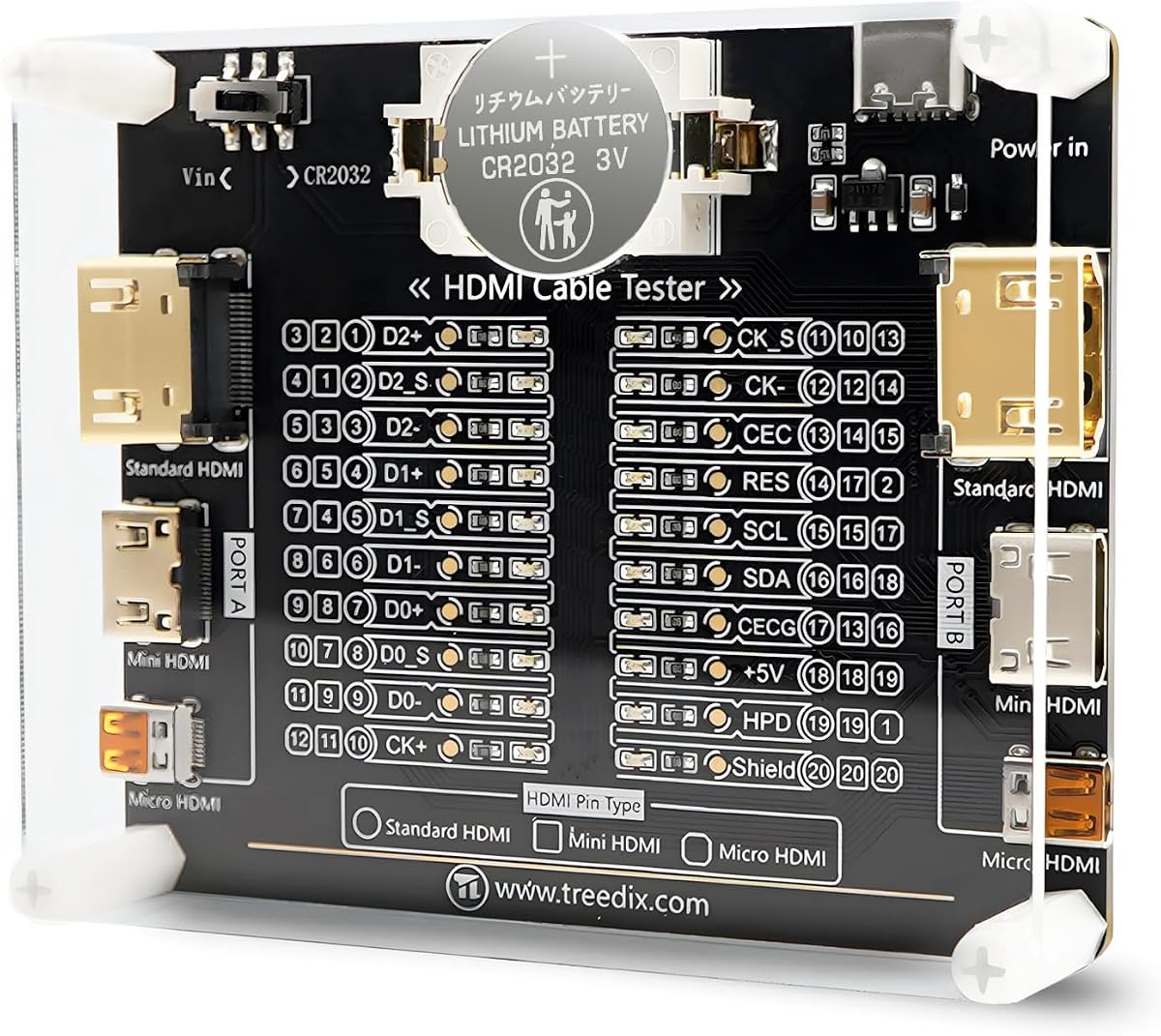
The Treedix Cable Tester Board offers a unique approach to HDMI diagnostics by utilizing a dedicated board with 20 LED indicators that map directly to each pin. This design helps users understand the specific function of the cable connections beyond simple continuity.
We may earn a commission when you buy through this link, at no additional cost to you.
It supports a wide range of HDMI versions from 1.0 to 2.1 and accommodates Type A Mini C and Micro D interfaces making it versatile for various setups. The included acrylic housing protects the internal components from damage during transport or storage.
Power flexibility is another strong point as it supports battery or external power supply with reverse connection protection for safety. However the lack of a detachable remote unit limits its utility for testing installed cables that are difficult to reach.
This board is ideal for workshop use or bench testing where the cable can be easily accessed and manipulated. It provides a detailed view of pin functionality which is beneficial for repairing or customizing HDMI cables.
The test results are displayed by 20 LED indicators each pin corresponds to 1 LED light to help users understand the function of the cable.
Support battery or external power supply in the range of 3-12V two power supply modes with reverse connection protection.
We may earn a commission when you buy through this link, at no additional cost to you.
The Jonard Tools HDMI-100 is designed for professional environments where precision and reliability are paramount. It evaluates HDMI cables for shorts open circuits or incorrect wire pairings ensuring that every connection meets high standards of quality.
We may earn a commission when you buy through this link, at no additional cost to you.
A key feature is the detachable remote unit which allows you to quickly and easily test HDMI cables that are installed or very long. This capability is supported by a test range that extends up to 500 meters making it suitable for large installations.
The device includes both a scan mode for individual connections and a full display mode for an overview of all tested connections at once. While it requires a 9V battery for operation this ensures consistent power delivery during critical diagnostic tasks.
This tester is best suited for IT professionals or AV technicians who need a robust tool for verifying long run cables in commercial settings. The brand reputation suggests a focus on durability and accuracy for daily use.
Remote can be detached from the main unit allowing you to quickly and easily test HDMI cables that are installed or very long.
Scan mode allows you to see each individual connection being tested while full display mode shows all connections at once.
We may earn a commission when you buy through this link, at no additional cost to you.
The Monoprice HDMI Signal Generator serves a different purpose by acting as a source of test signals rather than just a continuity checker. It can be used as a signal generator or display emulator to verify the capabilities of displays and receivers.
We may earn a commission when you buy through this link, at no additional cost to you.
Users can set video resolution and HDCP content using a 4-pin DIP switch enabling testing for 4K @60Hz and various HDR formats. This level of control is essential for validating that equipment supports specific modern video standards and content protection protocols.
It supports four different test patterns for HDCP versions which helps in diagnosing issues related to content playback restrictions. While it does not check wire continuity it is invaluable for ensuring that signal output and handshake protocols function correctly.
This tool is targeted at system integrators or electronics enthusiasts who need to stress test display performance or troubleshoot handshake issues. It complements continuity testers by addressing signal generation and protocol validation needs.
Used as HDMI signal generator or display emulator providing various video resolutions and HDCP content settings.
Supports HDCP OFF HDCP 1.4 and HDCP 2.2 outputs along with four different test patterns for HDCP versions.
We may earn a commission when you buy through this link, at no additional cost to you.
This HDMI Cable Tester Portable offers a straightforward way to check both HDMI and network cables with a focus on ease of use. It scans up to 19 wires to detect short circuits open circuits or wrong order which helps in saving time during basic troubleshooting.
We may earn a commission when you buy through this link, at no additional cost to you.
The auto shut-down function is a thoughtful addition that saves battery life after 10 minutes of inactivity making it efficient for intermittent use. Users can choose between fast scan mode and full display mode depending on how detailed they want the test to be.
While it may have fewer advanced features compared to high-end models it remains a solid option for general household or office checks. It is compatible with HDMI Type A and RJ45 connectors which cover most common devices found in a typical setup.
Consider this tool if you need a quick verification method without investing in more complex equipment. Its energy-efficient design ensures that batteries last longer between replacements or recharges.
Save battery life with automatic shut-down after 10 minutes of inactivity making it convenient and energy-efficient.
Choose between fast scan mode and full display mode for more comprehensive testing based on your needs.
We may earn a commission when you buy through this link, at no additional cost to you.
The MFL Detachable Professional Cable Tester stands out for its extensive compatibility with various cable types beyond just HDMI. It includes ports for XLR USB RCA BNC and Type-C making it a versatile tool for audio video and network professionals.
We may earn a commission when you buy through this link, at no additional cost to you.
The detachable design allows for split testing of cables in different locations which is particularly useful for long runs in large buildings. Clear LED indicators provide instant visual feedback on cable connectivity and pin configuration status to facilitate quick diagnostics.
Built with a durable metal housing this unit is designed to withstand the rigors of professional use. It is a more complex device that requires some familiarity with multiple interface types but rewards users with broad diagnostic capabilities.
Choose this tester if you work in environments where you need to troubleshoot multiple signal types with a single device. Its professional design ensures that connections are clearly labeled for efficient cable testing and troubleshooting.
Features XLR HDMI USB RCA BNC TRS/Jack Type-C and RJ11 connections for extensive compatibility across signal types.
Includes separate working modes with detachable design allowing split testing of cables in different locations efficiently.
We may earn a commission when you buy through this link, at no additional cost to you.
The Parts Express HDMI Cable Signal Tester is a compact tool designed for easy use in diagnosing common signal issues. It simply requires you to plug cables into the tester's DVI-F and HDMI-F connectors to check the status of each HDMI signal component.
We may earn a commission when you buy through this link, at no additional cost to you.
This device helps diagnose the cause of color shift sparkle or missing picture which are often symptoms of wiring faults. It can be located at the source or display end of the system providing flexibility in where you need to test.
While it may not offer the detailed pin-by-pin analysis of more advanced models it is effective for quick checks during setup. Its small size makes it easy to carry in a toolkit for on-the-spot verification without burdening the user.
This tester is suitable for home theater enthusiasts or technicians who need a basic sanity check before connecting a final display. It ensures that the basic signal path is intact before investing time in calibration or settings adjustments.
Diagnoses the cause of color shift sparkle or missing picture to help you identify signal issues quickly.
Simply plug your cables into the tester's DVI-F and HDMI-F connectors to check the status of each HDMI signal component.
We may earn a commission when you buy through this link, at no additional cost to you.
This HDMI Cable Tester and RJ45 Tool has earned a perfect rating from users due to its reliability in basic connectivity checks. It quickly tests HDMI cables up to version 2.1 and network cables using the main and remote unit setup.
We may earn a commission when you buy through this link, at no additional cost to you.
The LED lights flash in rotation if all the wires are properly connected otherwise the corresponding light will not flash indicating a fault. This clear visual signal helps users identify issues without needing technical expertise to interpret complex data.
It supports power from a 9V battery or a phone's USB charger power supply making it convenient for various work environments. The remote unit stores conveniently on the side of the main unit to save space and protect components.
Choose this tool if you need a straightforward and highly rated solution for verifying HDMI and Ethernet connections regularly. Its high user satisfaction suggests it performs well for routine maintenance and installation tasks.
The LED lights will flash in rotation if all the wires are properly connected otherwise the corresponding light will not flash.
The main unit can be powered by a single 9V battery or using your phone's USB charger power supply.
We may earn a commission when you buy through this link, at no additional cost to you.
Selecting the right tester depends on your specific needs such as whether you require simple continuity checks or detailed signal analysis.
Ensure the device supports the HDMI versions you work with such as 1.4 2.0 or 2.1 to avoid limitations. Newer devices may require specific testing modes for HDR or high bandwidth features.
Look for testers that explicitly state support for your target standards in the specifications.
Check if the tester accommodates Type A Type C and Type D connectors to match your equipment. Some models are limited to standard ports which may not work with compact devices.
Choose a model that covers all connector types you encounter in your setup.
If you also work with Ethernet cables a device with RJ45 support adds significant value to your toolkit. Dual function testers save money by combining video and network diagnostics.
Verify that the network testing feature matches your Ethernet standards like Cat5 or Cat6.
LED indicators are common for showing faults but some models include LCD screens for more detailed output. Visual feedback helps you quickly identify which pin or wire is causing an issue.
Opt for clear and intuitive display options to speed up your troubleshooting process.
Consider whether the unit runs on disposable batteries or has a USB charging capability. USB power allows for longer use without needing spare batteries in the field.
Look for automatic shut-off features to extend battery life during idle periods.
A compact and lightweight design is crucial if you need to carry the tester to various locations. Ruggedized cases protect the device from damage during transport or on-site use.
Select a model that balances durability with portability for your workflow.
Some testers offer multiple modes such as scan or full display which can help in different scenarios. Scan mode allows checking individual wires while full mode shows all connections at once.
Choose a device with modes that suit the complexity of your testing needs.
Well-known brands often provide better quality control and support for their diagnostic tools. Reviews can give insight into long-term durability and accuracy of the device.
Invest in a reputable brand to ensure consistent performance and reliability.
Begin by connecting the main unit to one end of the HDMI cable and the remote unit to the other. Ensure both units are powered on and the batteries are sufficiently charged for accurate readings.
Observe the LED indicators or display to see if all connections are active. If a light is off it indicates a break or short in that specific wire requiring replacement or repair.
After use turn off the device and store it in a protective case to prevent damage. Avoid exposing the unit to extreme temperatures or moisture to maintain its longevity.
Most basic continuity testers only check if the wires are connected properly and cannot determine bandwidth or resolution support. However signal generators and advanced analyzers may provide more detailed data on signal quality and handshake capabilities.
Most devices run on standard batteries like AAA or 9V but some may require specific types. Always check the power requirements in the product description before purchasing to ensure you have the correct power source.
The tester sends a signal through each pin and uses LEDs to show if the signal returns correctly. If a pin is not connected or shorted the corresponding light will not activate or will show an error state.
Standard electrical testers may not work effectively with fiber optic HDMI cables as they use light signals instead of electrical ones. Specialized optical testers are needed to verify the integrity of fiber connections.
Yes many models are designed to test cables up to 500 meters or more. The remote unit allows you to test cables that are installed in difficult to reach locations.
A continuity tester checks if the wires are physically connected while a signal generator produces video signals to verify performance. Use a continuity tester for wiring faults and a signal generator for video quality checks.
We hope this guide has helped you narrow down the options for HDMI and port testing based on your needs. The top picks offer a range of features from simple continuity checks to advanced signal validation.
Prioritize a device that matches your frequency of use and the complexity of your setups. Investing in the right tool can save time and prevent frustration during installations or repairs.
Remember to check current availability and specifications before making your purchase to ensure you get the latest model available.