
XPPen 10.95 Standalone Drawing Tablet
4.4Editor score
10.95 inch X-Paper display
16K pressure sensitivity levels
90Hz refresh rate for smooth lines
Android 14 standalone operating system
Discover the top electronic sketch pads for artists and students. This guide compares features, screen quality, and portability to help you choose the perfect
Electronic sketch pads have revolutionized how artists create, allowing for digital precision without the mess of traditional media. Whether you are a professional designer or a student taking notes, finding the right device ensures your creativity flows smoothly. These tools combine the tactile feel of paper with the versatility of digital files.
We evaluated ten leading electronic sketch pads based on screen quality, pressure sensitivity, portability, and overall value. Our analysis focuses on standalone tablets, drawing monitors, and simple writing boards to cover every use case. Each product was reviewed for its ability to deliver a natural drawing experience and reliable performance.
Each pick in this list highlights specific strengths, from budget-friendly options for kids to premium displays for professionals. Keep in mind that prices and availability can change frequently on major retailers. We recommend checking current deals before purchasing to ensure you get the best value for your specific needs.
4.4Editor score

4.2Editor score

4.6Editor score
This side-by-side comparison details the key specifications and capabilities of each electronic sketch pad to help you make an informed decision based on your specific artistic or note-taking requirements.



The HUION Note Digital Notebook stands out as a unique hybrid device that blends traditional paper with digital convenience. Rated 4.2 stars, it allows you to write on physical A5 paper while simultaneously capturing vector lines via a battery-free pen. This is ideal for students or professionals who want the feel of pen on paper without losing their notes digitally.
We may earn a commission when you buy through this link, at no additional cost to you.
Its standout quality is the ability to record audio that syncs with your handwriting process, ensuring you never miss a word during lectures or meetings. The free Huion Note app available on iOS and Android makes sharing notes as images or PDFs incredibly easy. Bluetooth 5.0 connection ensures fast pairing once you open the app.
While it relies on a mobile app for digital access which might be a slight friction point for desktop users the trade-off is significant paper-free organization. The battery life lasts 18 hours of active use and standby time is about 30 days. It also offers a graphics tablet mode if you replace the inner pages with the panel inside the box.
Who should buy it: This device is perfect for anyone who wants to keep tactile writing but needs digital backups for organization. It fits well for classroom note-taking meeting brainstorming or journaling. We recommend it for its balance of analog comfort and digital utility.
Everything you write is captured with vector lines and transferred to your device via the free app.
Record audio to sync with notes and relive your handwriting process to ensure nothing gets lost.
We may earn a commission when you buy through this link, at no additional cost to you.
The XPPen Magic Note Pad is a premium standalone drawing tablet designed for realistic sketching experiences. Rated 4.4 stars, it features a 10.95-inch X-Paper display with AG nano-etching technology that delivers true paper-like texture. This device offers precise control for shading and doodling while mimicking traditional sketchbooks effortlessly with 16K pressure sensitivity.
We may earn a commission when you buy through this link, at no additional cost to you.
Its key strengths include three color modes allowing nature light, and black and white modes to suit different tasks like annotating or sketching. The 90Hz refresh rate ensures smooth line transitions and TÜV-certified low blue light reduces eye strain. Pre-installed with XPPen Notes app and Android 14, you can download various apps from Google Play for advanced sketching.
The trade-offs involve a higher price compared to basic electronic pads which may be steep for casual users. However, the standalone nature means no computer is needed. It is ultra-portable at 495g and 7mm thick making it convenient to use on the go without needing external power for the stylus.
Who should buy it: This is the top choice for artists and students needing a dedicated digital canvas. It handles advanced sketching and PDF annotation well. We recommend it for professionals who want a versatile all-in-one creative tool.
X-Paper display with AG nano-etching technology delivers true paper-like texture and friction for natural pencil strokes.
Pre-installed with XPPen Notes app and Android 14 allowing you to download various apps from Google Play.
We may earn a commission when you buy through this link, at no additional cost to you.
The Kayoubi LCD Writing Tablet offers a jumbo drawing space perfect for young artists exploring their imagination. Rated 4.6 stars, its massive 14.5-inch screen provides endless creative room without the mess of paper stacks. It is a reusable doodle pad that allows drawing erasing and repeating endlessly making it a sustainable choice.
We may earn a commission when you buy through this link, at no additional cost to you.
Its standout quality is the eye-friendly display designed for little eyes with zero harsh blue light or glare. A one-click erase button lets you clear drawings in a flash and a lock function prevents accidental deletions. This makes it perfect for on-the-go use in homes cars and classrooms without cleanup needs.
While it lacks color features and advanced pressure sensitivity the trade-off is a highly affordable and simple device for kids. The screen is safe for prolonged use and the device is lightweight. It serves as an educational toy that keeps children engaged during hours of doodling storytelling or learning.
Who should buy it: Parents looking for a fun educational gift for children ages 3 to 8 will love this. It is also great for travel to keep kids quiet. We recommend it for its simplicity and value as a mess-free creative tool.
With a massive 14.5-inch screen this kids doodle board lets little artists explore their imagination freely.
Erase in a flash with a single button or lock the screen to save masterpieces easily.
We may earn a commission when you buy through this link, at no additional cost to you.
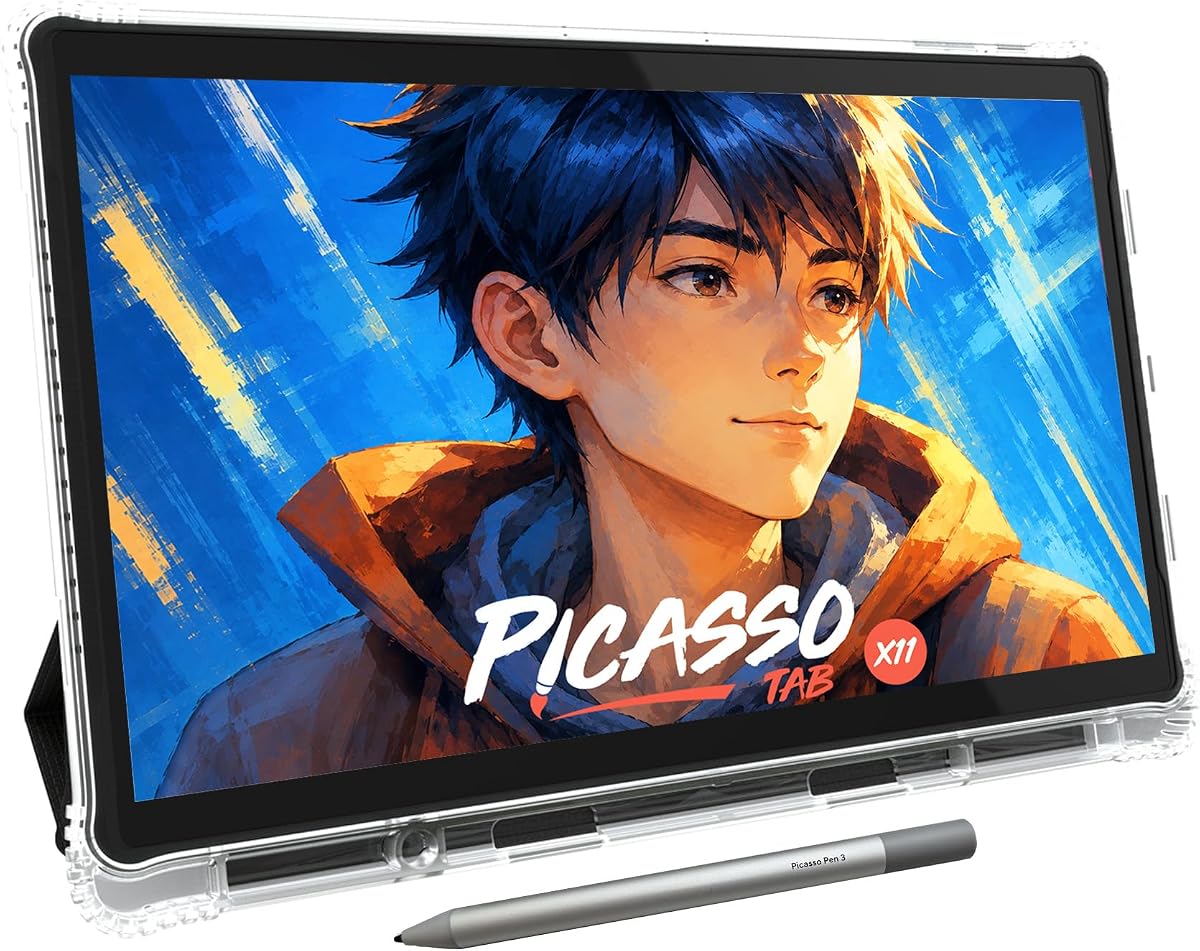
The PicassoTab X11 is a compact standalone drawing tablet that needs no computer for design and animation. Rated 4.2 stars, it comes preloaded with 5 creative apps for sketching painting animation and tutorials. It is fully standalone making it easy to draw and learn on the go with a larger immersive screen.
We may earn a commission when you buy through this link, at no additional cost to you.
Its key strengths include the 6 bonus items worth 100 dollars such as lifetime app upgrades for Concepts and Artixo. The fully laminated 11 inch 2K screen reduces parallax and glare for a realistic paper-like drawing feel. The upgraded 4096-level pressure-sensitive stylus delivers precise strokes for sketching and illustration.
While the octa-core processor handles most drawing apps schoolwork multitasking efficiently the trade-off is that it is not as powerful as a full PC. The 6GB RAM and 128GB storage expandable up to 1TB are generous but heavy media files may fill it fast. Certified quality and a 1-year warranty provide reliability.
Who should buy it: Beginners and students looking for a dedicated device for art without computer dependence should choose this. The included tutorials make it beginner-friendly. We recommend it for its ease of use and bonus value.
Artixo Lifetime VIP upgrade gives you step-by-step lessons guided practice and beginner-friendly exercises.
Fully standalone tablet that needs no computer preloaded with creative apps for sketching painting and animation.
We may earn a commission when you buy through this link, at no additional cost to you.
The Bravokids 10 Inch LCD Writing Tablet is an educational birthday gift designed for girls and boys aged 3 to 8. Rated 4.6 stars, it features an eye protection color screen that is safe and comfortable for long use without radiation or glare. It allows children to quietly immerse themselves in a rainbow world of creativity.
We may earn a commission when you buy through this link, at no additional cost to you.
Its standout quality is environmental protection saving thousands of paper and ink with over 100000 times rewriting. The drawing tablet is durable with a round corner design and weighs only 150 grams making it easy to carry in school bags. It is perfect for travel essentials like airplanes cars restaurants and sofas.
While the screen is not as large as some models the trade-off is its extreme portability and ease of use. Children can draw lines by pushing with a stylus nails or hard objects. The erase button clears content in one second and the lock key saves masterpieces accidentally preventing loss.
Who should buy it: Parents seeking a reliable safe and portable toy for kids should consider this. It helps keep noisy kids silent during travel. We recommend it for its durability and educational value.
Over 100000 times smoothly rewriting saves thousands of paper and ink with just one drawing board.
Perfect for airplane car restaurant sofa and other places to keep children quiet and engaged.
We may earn a commission when you buy through this link, at no additional cost to you.
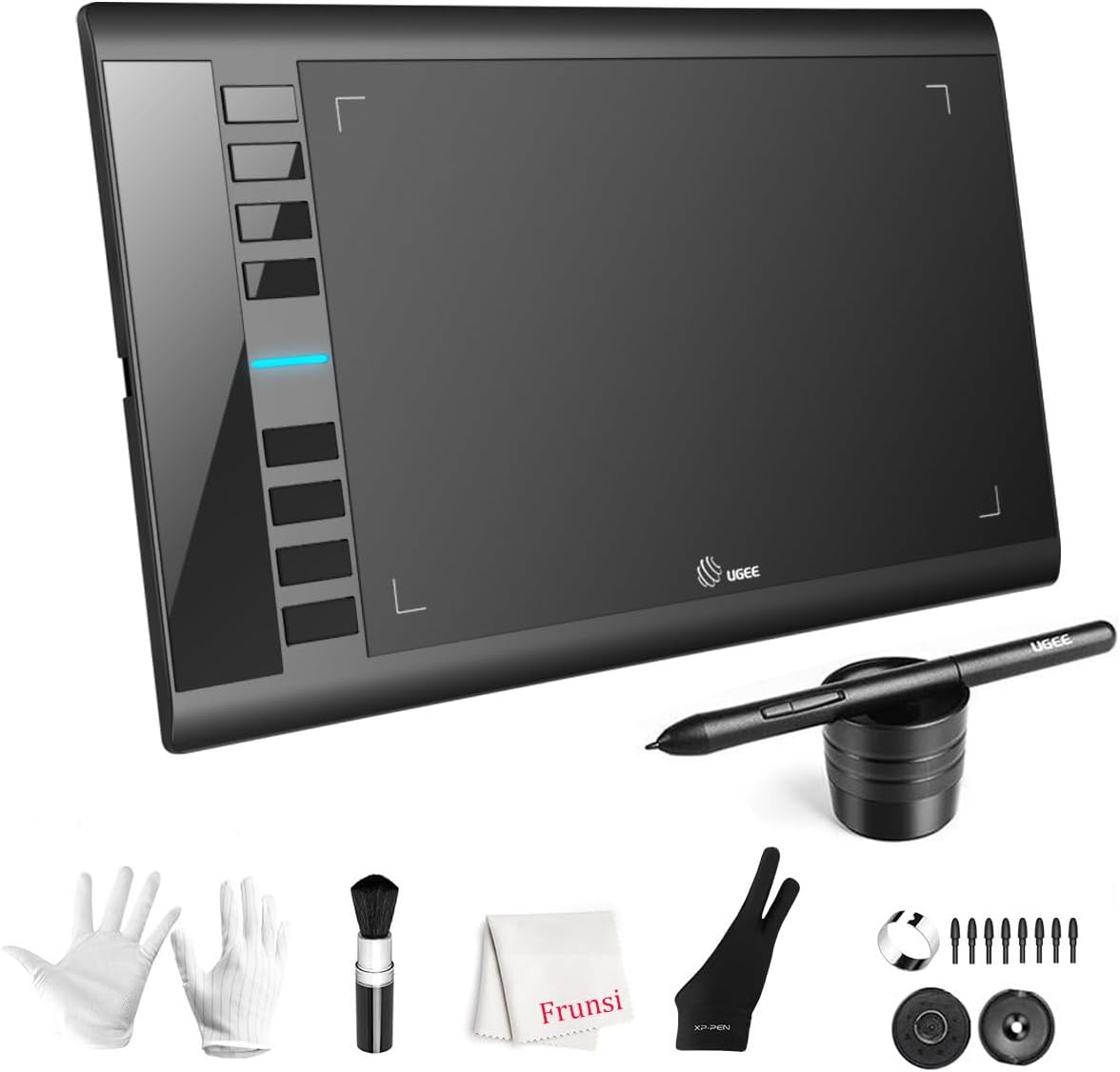
The UGEE M708 Drawing Tablet offers a large active drawing space of 10 x 6 inches with a papery texture surface. Rated 4.4 stars, it provides enormous and smooth drawing for digital artwork creation with no-lag sketch and painting experience. The passive stylus technology offers 16384 levels of pressure sensitivity for accurate lines and opacity control.
We may earn a commission when you buy through this link, at no additional cost to you.
Its key strengths include powerful compatibility with Windows 11/10/8/7 Mac OS X Android and Linux. It works well with creative software like Photoshop Illustrator and Macromedia Flash. The ergonomically designed shortcuts include 8 customizable express keys on the side for eraser zoom scrolling and undo functions.
While it requires a computer connection which limits standalone use the trade-off is a professional-grade tool at an affordable price. USB to USB-C connectivity ensures easy connection to various devices. It is ambidextrous suitable for right and left hand users with a pen holder and extra pen tips.
Who should buy it: Beginners and professional artists needing a large active area for computer-based digital art should choose this. We recommend it for its compatibility and value for money.
Features 10 x 6 inch large active drawing space with papery texture surface for smooth digital artwork creation.
16384 levels of pressure sensitivity allows you to draw accurate lines of any weight and opacity.
We may earn a commission when you buy through this link, at no additional cost to you.
The Mafiti LCD Writing Tablet is an 8.5 inch electronic writing drawing pad portable for kids office memo and home use. Rated 4.2 stars, the update version features thicker writing that is easy to view and write. It includes a lock-protection switch to preserve your content and a replaceable coin-cell battery CR2016 3.0V.
We may earn a commission when you buy through this link, at no additional cost to you.
Its standout quality is the kick-stand function allowing you to display written messages to family friends and co-workers. Built-in stylus dock provides convenient storage when not in use. The device is ultra-lightweight and portable at 1/8 inch thin making it easy to take anywhere you go.
While the screen is smaller than the Kayoubi or Bravokids models the trade-off is extreme thinness and portability. Writing and erasing can happen more than 100000 times before battery replacement. It is a perfect gift idea for boys and girls for back to school birthday Easter and other occasions.
Who should buy it: Those needing a quick portable memo board for office or home use should choose this. It is also great for kids travel. We recommend it for its convenience and easy writing experience.
Update version features thicker writing more easy to view and write with lock-protection switch.
Stylus can be used as a kick-stand to display your written messages to family friends and co-workers.
We may earn a commission when you buy through this link, at no additional cost to you.
The TEKFUN LCD Writing Tablet offers 10 inches of space for kids writing and drawing with a colorful screen. Rated 4.5 stars, its eye-protection colorful screen provides a better painting experience avoiding injury to a child eyes eyes. The built-in battery has a 6-month lifespan and allows 100000 times writing and drawing.
We may earn a commission when you buy through this link, at no additional cost to you.
Its key strengths include the key lock preventing accidental clearing and the ability to clear content in one second. Made of high-quality plastic it weighs only 150 grams and is waterproof and anti-fall. This makes it suitable for multiple occasions like living room car plane restaurant and outdoor places.
While the battery replacement may be needed after 6 months the trade-off is a durable and portable device. It is an educational toy for preschoolers and a travel toy for long drives and road trips. Customer support is responsive if you run into any issues with the product.
Who should buy it: Parents looking for a travel toy that keeps kids entertained and safe on road trips should consider this. It is also great for homeschool and birthday gifts. We recommend it for its durability and support.
Perfect for airplane travel toys for boys and toddlers road trip essentials and gifts for 3 to 8 year olds.
Reliable after-sales support with Amazon contact to resolve any issues fast and friendly.
We may earn a commission when you buy through this link, at no additional cost to you.
The Wacom Intuos Small is a wired graphic drawing tablet with pen and software designed for precision. Rated 4.6 stars, it offers industry leading tablet performance in superior control and precision with Wacom EMR battery free technology. This feels like pen on paper and works with any software program to explore new facets of digital creativity.
We may earn a commission when you buy through this link, at no additional cost to you.
Its standout quality is that it is the preferred drawing tablet of professional graphic designers for over 40 years. Register your Intuos tablet and gain access to some of the best creative software and Wacom online training. Wacom is the global leader in drawing tablet and displays ensuring trust and reliability.
While it has a smaller active area than some models the trade-off is its proven professional quality and extensive software support. The pen to paper feeling is unmatched in its price range. It is ideal for drawing painting editing photos videos creating designs and marking up documents.
Who should buy it: Professionals and serious hobbyists wanting a reliable tool for design should choose this. We recommend it for its brand reputation and included training resources.
Enjoy industry leading tablet performance in superior control and precision with Wacom EMR battery free technology.
Only Wacom gives you software with every purchase gain access to best creative software and online training.
We may earn a commission when you buy through this link, at no additional cost to you.
The XP-PEN Artist12 is a 11.6 inch FHD drawing monitor pen display graphic monitor with PN06 battery-free multi-function pen holder and glove. Rated 4.4 stars, it features an 11.6 HD IPS display with 1920×1080 resolution paired with 72% NTSC color gamut for vivid images and extreme detail. It is pre-installed with an anti-reflective screen protector.
We may earn a commission when you buy through this link, at no additional cost to you.
Its key strengths include compatibility with Windows Mac Linux and creative software like Photoshop Illustrator and SAI. It is ideal for digital drawing animation sketching photo editing 3D sculpting and more. The slim touch bar can be programmed to zoom in and out scroll up and down and its 6 shortcut keys are customizable.
While it requires HDMI USB-A ports which may need a converter for modern laptops the trade-off is a high quality pen display that connects directly to your computer. The battery-free stylus with a digital eraser delivers a traditional pencil-like feel with 8 replacement pen nibs included. XP-PEN provides a one-year warranty and lifetime technical support.
Who should buy it: Students and remote workers needing an extended display for handwritten notes should choose this. We recommend it for its color quality and online education suitability.
Compatible with Windows 7/8/10/11 Mac 10.10 or later Linux Photoshop Illustrator SAI Painter and more.
XP-PEN advanced P06 passive pen made for a traditional pencil-like feel with digital eraser at the end.
We may earn a commission when you buy through this link, at no additional cost to you.
Choosing the right electronic sketch pad requires considering your specific needs as a creator student or professional. This guide breaks down the most important factors to help you find the perfect device for your workflow.
Screen quality directly impacts your drawing experience. Look for displays with anti-glare coatings and high resolution to ensure clear visuals. Larger screens offer more workspace but may reduce portability so consider your primary use case.
Choose a screen size that balances comfort and portability based on your needs.
Pressure sensitivity determines how well the stylus reacts to your drawing force. Higher levels like 16K or 8K provide more nuanced control for shading and line variation. This is crucial for artists seeking a natural drawing feel.
Prioritize high pressure sensitivity for professional artwork and digital painting.
Standalone tablets run their own operating system like Android and do not require a computer. Connected tablets need to be plugged into a PC or Mac. Decide whether you need mobility or plan to work from a desktop station.
Select standalone for portability and connected for desktop power.
Battery life varies significantly across devices. Some have battery-free pens while others require charging. Check the battery capacity to ensure it supports your daily usage without interruption.
Look for devices with long battery life or battery-free pen technology.
Ensure the device supports your preferred operating system and software. Many tablets work with Windows Mac and Android but some have specific app ecosystems. Check for included software licenses that add value.
Verify software compatibility to avoid workflow disruptions.
Portability is key for students and traveling artists. Lightweight and durable materials ensure the device survives daily use. Slim designs fit easily in bags but may lack protection.
Opt for durable lightweight builds if you carry the device frequently.
Electronic sketch pads range from affordable LCD boards to premium displays. Determine your budget and look for devices that offer the best features within that range. Consider long-term value like included software and warranties.
Balance your budget with the features you actually need.
Reliable customer support and warranty coverage protect your investment. Look for brands that offer technical support and have a good track record for repairs. This reduces risk when buying electronics.
Choose brands with strong warranties and customer support policies.
Start by setting up your device according to the manufacturer instructions. Connect to Wi-Fi if needed and install any required software or apps. Adjust settings like pressure sensitivity and screen brightness to suit your preference.
Use the stylus with the correct grip to avoid fatigue. Clean the screen regularly with a soft cloth to prevent scratches. Avoid exposing the device to extreme temperatures or moisture.
Charge the device fully before first use and maintain battery health by not overcharging. Store the pen in a safe place to prevent damage. Follow the warranty terms and register your device for support.
Yes, many electronic sketch pads are designed with beginners in mind. They offer intuitive interfaces and included software to help you start creating right away. Look for models with tutorials or user-friendly designs.
It depends on the type. Standalone tablets operate independently without a computer. Wired tablets require a connection to a PC or Mac to function. Check the product specifications to confirm connectivity.
LCD tablets typically use a screen to display your drawing directly. Graphics tablets without screens require you to look at your computer monitor while drawing. LCDs offer a more natural feel but cost more.
Use a soft dry microfiber cloth to wipe the screen gently. Avoid harsh chemicals or abrasive materials. For deeper cleaning use a slightly damp cloth and ensure the device is off and dry before use.
Absolutely many of these devices are excellent for note-taking. Standalone tablets often have note apps built-in. Ensure the pressure sensitivity is comfortable for writing if that is your primary use.
Most manufacturers offer a one-year limited warranty covering defects. Some brands provide extended warranties or customer support services. Check the product details before purchasing to confirm coverage.
We have explored ten top electronic sketch pads ranging from budget-friendly options to premium standalone displays. Each device offers unique strengths whether you need portability or professional-grade features. The XPPen Magic Note Pad leads for art while the HUION Note excels at hybrid note taking.
Prioritize your specific needs such as screen size pressure sensitivity and compatibility when choosing. Consider whether you prefer a standalone device or one that connects to a computer for your workflow. Balancing these factors will help you find the perfect tool.
Prices and availability change frequently so check current deals before purchasing. We recommend verifying the latest specs and software updates for each model. With the right electronic sketch pad you can unlock your full creative potential.