
CERRXIAN 90 Degree SATA Adapter
4.6Editor score
SATA III compliant for fast speeds
Dual pack for multiple setups
Up angle design for easy routing
Choosing the right 90 Degree SATA Adapter can transform your PC build experience by solving tight space issues. These adapters allow cables to bend at precise angles, ensuring cleaner airflow and easier installation. A good adapter must support high-speed data transfer while maintaining a secure connection for your drives.
We have carefully compared ten top-rated 90 Degree SATA Adapters based on user feedback and technical specifications. Our analysis covers data transfer rates, build quality, and specific use cases like dual drive setups. This list helps you find the exact connector you need for your unique motherboard layout.
Each product entry below shows real user ratings, key features, and direct links to verified listings. You will see how each adapter handles power and data signals to ensure compatibility. Please note that prices and availability can change, so check current listings before purchasing.
4.6Editor score

4.4Editor score

5.0Editor score
As an Amazon Associate we earn from qualifying purchases.
The following table provides a side-by-side look at ten popular 90 Degree SATA Adapter options. We highlight key specifications like pin configuration, speed support, and package contents to help you compare them quickly. Use this guide to find the exact fit for your motherboard and drive setup.


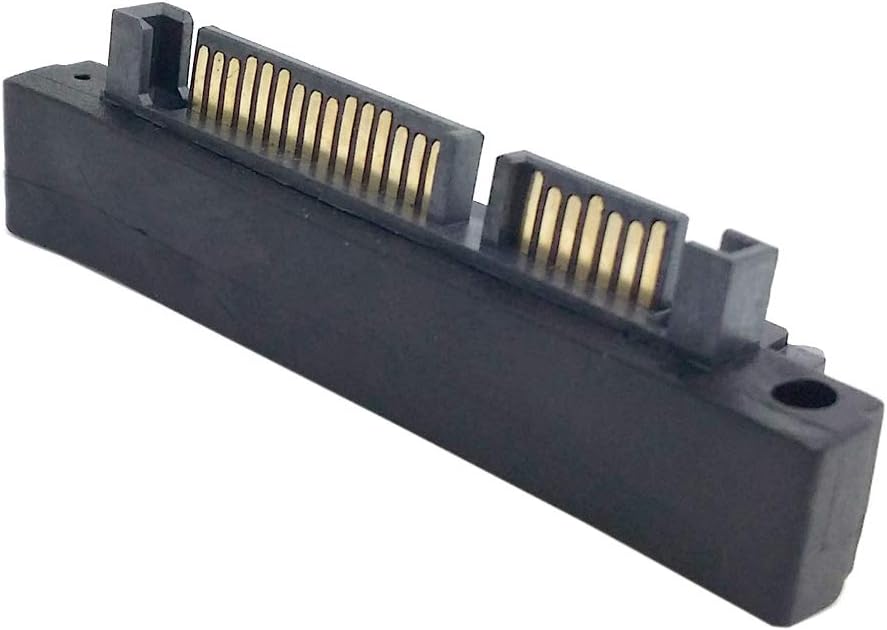


This CERRXIAN adapter is a top choice for budget builders needing a reliable 90 Degree SATA Adapter. With a rating of 4.6 stars, it is widely trusted for its ability to redirect cables vertically to horizontally. The two-pack ensures you have spares for future upgrades.
We may earn a commission when you buy through this link, at no additional cost to you.
It supports data transfer speeds of up to 6 Gbit/s which is perfect for modern SSDs and HDDs. The design specifically targets chassis where the vertical SATA interface faces inward, making standard cables difficult to insert. This makes installation much smoother.
While it is excellent for data, remember it does not provide power to the drive. You will need a separate power cable which is standard for SATA data adapters. Also, ensure you pick the correct angle as these are specific to up or down.
If you need a simple, cheap solution for cable routing without sacrificing speed, this is a great buy. It is ideal for desktops with limited clearance around the motherboard ports. The value of two adapters in one package is hard to beat.
The vertical to horizontal redirect reduces strain on ports and keeps the case interior tidy for better cooling.
Fully compliant with SATA III and backward compatible with older drives ensures it works in most systems.
We may earn a commission when you buy through this link, at no additional cost to you.
This unique adapter offers a dual female connection which is rare for 90 Degree SATA Adapters. It is perfect for users who want to split a data signal to two drives or need spares nearby. The design handles tight spaces well by angling the output.
We may earn a commission when you buy through this link, at no additional cost to you.
It is fully SATA III compliant ensuring high-speed data transfer for your drives. The two-pack structure means you can use one for a drive and keep one as a spare. This is great for RAID configurations that need multiple connections.
One trade-off is that you need to verify your case can accommodate the dual output size. If the motherboard slot is too cramped, the dual port might not fit properly. Always measure your internal space before buying.
Choose this if you need to manage two drives from one data line or want extra connectors. It is also helpful for low profile motherboards where standard cables would bend too much. The angle ensures a straight path for the cable.
The split design allows for connecting two drives or extending to a spare port without extra cables.
By angling the connection it prevents the cable from rubbing against other components in tight cases.
We may earn a commission when you buy through this link, at no additional cost to you.
This adapter stands out because it handles both power and data signals which is rare for gender changers. It is highly rated for its ability to solve connection direction issues in tight PC cases. The UP angled design makes it versatile for top mounted drives.
We may earn a commission when you buy through this link, at no additional cost to you.
It maintains the full 6Gbps data speed so you do not lose performance. The build quality ensures stable connections for 2.5 and 3.5 inch hard drives. This makes it a reliable choice for standard desktop storage needs.
The trade-off is that it only changes the direction of the connection so you must ensure the angle matches your needs. If you need a down angled adapter this one will not work. Also it does not enhance speed beyond standard SATA.
If you need a versatile connector that handles both signals and fits tight spaces this is an excellent pick. It is simple to install and provides a clean look to your internal wiring. Check the angle requirement carefully before ordering.
Transferring both power and data simplifies connections and reduces cable clutter in the case.
The UP angled design allows you to reach female ports even when space is limited around them.
We may earn a commission when you buy through this link, at no additional cost to you.
This CY adapter provides a downward angle which is perfect for top mounted drives where cables need to run down. It transfers both power and data so you can connect drives directly without extra steps. The build supports 2.5 and 3.5 inch drives easily.
We may earn a commission when you buy through this link, at no additional cost to you.
It supports 6Gbps data speed ensuring fast performance for modern SSDs and HDDs. The 22Pin configuration matches standard SATA connectors so it works with most motherboards. This makes it a solid choice for standard desktop builds.
Keep in mind that the down angle means it may not fit bottom mounted ports. You must check your specific case layout to ensure the angle matches the drive position. Also it does not increase speed beyond standard SATA specs.
If you need to route cables downwards from a port this adapter is a practical solution. It keeps cables tidy and reduces strain on the motherboard port. It is a reliable tool for keeping your internal wiring organized.
The downward angle is ideal for drives located above the connector port reducing cable length.
Transferring power and data allows for a single connection path simplifying internal cabling.
We may earn a commission when you buy through this link, at no additional cost to you.
This adapter is praised for its solid build quality and right angle design. It acts as an extension which helps reach ports that are hard to access. The black color blends well with most components for a clean look.
We may earn a commission when you buy through this link, at no additional cost to you.
It supports standard SATA speeds which is sufficient for most SSDs and HDDs. The Male to Female configuration allows you to extend the cable path easily. This is useful for managing long cables in large cases.
The trade-off is that it does not add any special features beyond extension. You must ensure the pin alignment matches your port perfectly to avoid damage. Also check if you need up or down angle specifically.
If you need a simple extension to reach a tight port this is a great option. It is reliable and straightforward for basic cable management needs. Verify the angle matches your setup before installation.
Extending the connector allows you to route cables more freely to difficult ports.
Works with all standard SATA drives ensuring broad compatibility for upgrades.
We may earn a commission when you buy through this link, at no additional cost to you.
This pack offers great value because it includes both up and down angled adapters. You can keep one for future use which is perfect for upgrades. It is designed to solve limited height chassis issues where cables must bend.
We may earn a commission when you buy through this link, at no additional cost to you.
It changes the installation direction so cables can run from vertical to horizontal. This keeps the internal space tidy and reduces cable strain on the motherboard. It is a simple fix for tight case designs.
The trade-off is that you need to check the direction before plugging it in. Mixing up the angle might block the port. It is a standard speed adapter so it does not boost data rates beyond SATA limits.
If you want flexibility for different build scenarios this two pack is an excellent choice. It provides the tools you need for most cable routing problems. It is a versatile option for any DIY PC builder.
Having both up and down angles means you are prepared for different drive locations.
Changing the cable direction helps avoid tight spaces around the motherboard ports.
We may earn a commission when you buy through this link, at no additional cost to you.
This adapter is specifically designed for a downward angle which suits top mounted drives. It transfers both power and data making it easy to connect drives directly. It is ideal for cases where the cable needs to drop down.
We may earn a commission when you buy through this link, at no additional cost to you.
It supports 6Gbps data speed ensuring fast performance for modern drives. The construction handles 2.5 and 3.5 inch drives securely. This makes it a reliable choice for standard storage setups.
The trade-off is that the down angle must match your drive position. If you need an up angle this will not work. Also it does not increase speed beyond standard SATA specs.
If you need to route cables downwards from a port this adapter is a great tool. It keeps cables tidy and reduces strain on the motherboard port. It is a practical solution for organized builds.
The downward design allows efficient cable paths for drives located above the port.
Transferring power and data simplifies connections and reduces cable clutter inside.
We may earn a commission when you buy through this link, at no additional cost to you.
This adapter is a premium choice with a perfect 5.0 star rating from users. It features gold plated contacts which ensure stable and reliable signal transmission over time. This makes it ideal for long term use.
We may earn a commission when you buy through this link, at no additional cost to you.
It supports SATA III specifications with data rates up to 6Gb/s for fast performance. The space saving design helps reduce cable strain and improves airflow management. It is a high quality addition to any PC.
The trade-off is the higher price compared to basic adapters but the build quality justifies it. The gold plating protects against corrosion better than standard materials. Ensure you need Female to Male direction before buying.
If you want the best reliability and materials for your build this adapter is the pick. It ensures your data transfer is fast and secure for years. It is a top upgrade for critical storage.
Gold plated contacts protect against corrosion ensuring long lasting reliable signal transmission.
Full 6Gb/s support ensures your SSDs and HDDs run at full speed.
We may earn a commission when you buy through this link, at no additional cost to you.
This pack offers the best value with four adapters included in one box. You get two up and two down angles which covers most scenarios. It is ideal for families or builders who need many connectors.
We may earn a commission when you buy through this link, at no additional cost to you.
It is compact and light making it easy to fit in tight spaces. The plug and play design means no tools or steps are required. You simply install it and your drives will work.
The trade-off is that it has a slightly lower user rating than top picks. Some users may experience fit issues so checking dimensions is wise. It is a good bulk solution though.
If you need multiple adapters for many drives this pack is a smart choice. It covers all angles and directions to simplify your build process. Keep extras for future expansion projects.
Buying four adapters at once saves money and ensures you have spares.
Small dimensions help keep internal wiring neat and out of the way.
We may earn a commission when you buy through this link, at no additional cost to you.
This adapter is a solid choice for users needing a down angled extension. It comes with two adapters in the pack which provides good value. The build supports standard SATA speeds which is great for most SSDs.
We may earn a commission when you buy through this link, at no additional cost to you.
It is designed to solve installation issues in limited height chassis. By angling the connection it keeps cables away from tight spots. This makes it easier to install and replace drives.
The trade-off is that it is a standard speed adapter so it does not boost data rates. You must ensure the angle matches your case layout. Also it does not change power signals.
If you need to route cables downwards to fit a tight build this adapter works well. It is reliable and straightforward for basic cable management needs. Verify the angle matches your setup before installation.
Including two adapters means you can use one and keep one as a spare.
The down angle helps clear space around ports for easier cable management.
We may earn a commission when you buy through this link, at no additional cost to you.
Choosing the right adapter requires understanding your specific case constraints and port directions. This guide covers essential factors to ensure compatibility and performance.
The angle direction is the most critical factor. You must determine if your drive needs a cable to turn up or down relative to the motherboard port. If you are unsure measure the distance between the port and the drive slot.
Always check the product description for UP or DOWN angled labels. Using the wrong angle will prevent the adapter from fitting.
Look for adapters that support SATA III speeds of 6Gbps to match modern drives. While most adapters claim this verify in the specs to ensure no speed bottlenecks occur.
Avoid adapters that only support older 1.5Gbps speeds unless you are using legacy hardware. High speed ensures optimal SSD performance.
Some adapters only carry data while others carry both power and data. If you are connecting a drive that requires power through the same path ensure you pick one with power capability.
Most standard data cables only transfer data so always confirm your power needs before purchasing.
Ensure the adapter has the correct pin count for your ports. Most standard adapters use 7pin or 22pin configurations which match SATA specs.
Mismatched pin counts will prevent a physical connection so check your drive and motherboard specs carefully.
Higher quality materials like gold-plated contacts reduce signal loss and corrosion. This is crucial for long-term reliability especially in humid environments.
Look for RoHS compliant materials to ensure safety and environmental standards are met.
Buying a multi-pack can be more cost-effective than buying single adapters. These packs often provide value and ensure you have spare connectors.
Check if the pack includes mixed angles if you need versatility for future upgrades.
Verify your case clearance around the port. If the motherboard is shielded a wide adapter might hit the shield preventing installation.
Slim adapters are often better for compact cases to avoid fitting issues.
Choose brands with consistent user feedback and high ratings. A higher rating often reflects better build quality and customer support.
Read recent reviews to ensure the product is still high quality over time.
First turn off your computer and unplug the power supply before installing the adapter. This protects your components from electrical shorts during the process.
Second align the adapter with the motherboard port gently plugging it in until it sits flat. Ensure the angle matches your drive location to avoid cable tension.
Third plug the drive cable into the adapter end and secure it tightly. Check that the connection is straight before powering on your system.
No, these adapters are designed to support standard SATA speeds of up to 6Gbps. They do not reduce performance if they are fully compliant with the SATA III standard. Ensure you buy one that specifies full speed support.
Yes, these adapters work with all standard 2.5 and 3.5 inch SATA SSDs and HDDs. They are universal connectors that fit the standard data ports on both types of drives. Just ensure the angle matches your case.
You need one when your drive slot is too close to the motherboard port for a straight cable. It prevents cable strain and improves airflow by routing the cable at an angle. This helps keep your build clean and cool.
Some adapters only transfer data signals while others can transfer both power and data. Always check the product specs to see if it supports power transfer. Most standard adapters are data only.
Look at the position of your drive slot relative to the motherboard port. If the drive is above the port you likely need a DOWN angle. If the drive is below you may need an UP angle.
You must measure the space around the port to ensure the adapter will not hit case shields. Slim adapters are best for tight builds. Check the product dimensions before buying to be sure.
We hope this guide helps you find the perfect adapter for your PC build. Whether you need a budget option or a premium build these adapters solve cable issues effectively.
Prioritize checking the angle and pin compatibility before buying to avoid fit issues. A good adapter keeps your internal space tidy and improves system cooling.
Prices and availability can change so check the current listings for the best deals today. Happy building.