
Epson Workforce ES-60W
4.1Editor score
Wireless mobile scanning
Fast 4-second page scan
Nuance OCR included
This guide compares the top document scanners for iPhone 18 users, covering portable, wireless, and high-resolution models for seamless mobile digitization.
Finding the right document scanner for iPhone 18 users means looking for portable, wireless options that integrate smoothly with iOS devices. These scanners help you digitize receipts, contracts, and notes on the go without bulky hardware.
We evaluated ten top-rated models based on speed, connectivity, software compatibility, and ease of use with iPhone 18. Each product was analyzed for its ability to deliver clear scans, support OCR, and connect reliably to mobile devices.
Each pick below highlights key features, pros, and cons to help you choose the best scanner for your workflow. Keep in mind that product availability and pricing may change, so verify details before purchasing to ensure compatibility.
4.1Editor score
4.4Editor score

4.3Editor score
The following table provides a side-by-side comparison of all ten scanners, highlighting key specs like scanning speed, connectivity options, and paper handling capabilities to help you quickly identify the best fit for your needs.


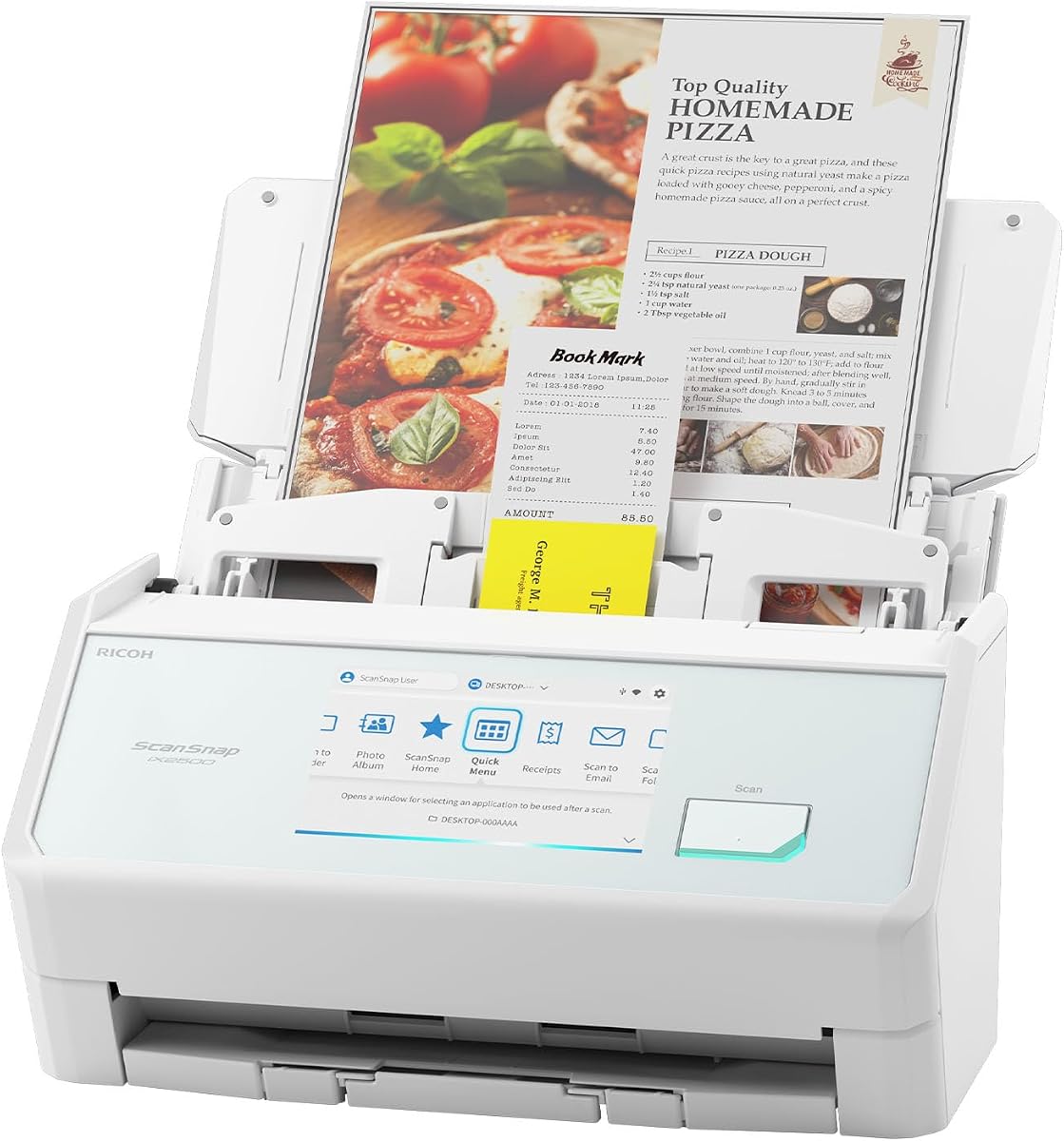
The ScanSnap iX2500 stands out as a top choice for iPhone 18 users who need high-speed, wireless scanning. With a 4.4 rating, it delivers reliable performance through its built-in Wi-Fi 6, allowing direct scans to mobile devices without a computer.
We may earn a commission when you buy through this link, at no additional cost to you.
Key strengths include its 100-sheet feeder and automatic optimizations that save time on large jobs. The touchscreen enables customizable profiles, and the scanner supports cloud services directly, making it ideal for professionals managing heavy document workflows.
Trade-offs involve a higher price and occasional software maintenance. These are acceptable given the speed and wireless convenience, especially when compared to USB-dependent models that require a PC for scanning to iPhone.
Buyers prioritizing speed, wireless flexibility, and high-volume scanning should choose this model. It remains the most versatile option for iPhone 18 integration, offering seamless digitization for any mobile office setup.
Direct Wi-Fi connectivity means you can scan straight to your iPhone 18 without cables or intermediary computers, streamlining your workflow.
Built-in optimization and naming tools ensure scanned files are sorted and ready to use immediately, reducing post-scan manual effort.
We may earn a commission when you buy through this link, at no additional cost to you.
The Epson Workforce ES-60W is a premium wireless mobile scanner tailored for on-the-go iPhone 18 users. With a 4.1 rating, it offers fast scanning in about 4 seconds per page and supports direct wireless transfers to iOS devices.
We may earn a commission when you buy through this link, at no additional cost to you.
Its standout feature is the ability to switch seamlessly between USB and battery power, ensuring scanning wherever outlets are unavailable. Nuance OCR creates searchable PDFs, and cloud scanning options enhance its versatility for remote work.
While the paper length is limited and battery inclusion varies, these are minor issues for a portable device. The speed and wireless integration make it a strong premium pick for professionals needing quick digitization.
Choose this scanner if wireless convenience and speed are your top priorities for iPhone 18 use. It delivers reliable performance and integrates smoothly with mobile workflows for efficient document management.
USB and battery power modes ensure you can scan anywhere, making it ideal for travel or remote offices without constant access to outlets.
Built-in cloud scanning and OCR capabilities allow you to organize and search documents directly on your iPhone after scanning.
We may earn a commission when you buy through this link, at no additional cost to you.
The Brother DS-640 offers an affordable entry into mobile scanning for iPhone 18 users. With a 4.3 rating, it combines portability and speed, scanning at 16ppm and fitting easily in bags or pockets for travel.
We may earn a commission when you buy through this link, at no additional cost to you.
Its compact design and USB power mean you can connect to a laptop and then share scans to your iPhone via cloud services. The iPrint&Scan app provides essential features for organization, and color scanning matches black-and-white speed.
While it lacks wireless scanning, its affordability and speed justify the PC intermediary step. This makes it a practical choice for budget-conscious users who occasionally need to digitize documents with iPhone integration.
Buyers seeking a cost-effective, portable scanner should consider this model. It balances performance and convenience, delivering reliable scans for mobile workflows when paired with cloud connectivity.
At under 1 foot long and 1.5lbs, it fits anywhere, making it perfect for travel and quick scanning sessions on the go.
Color scans match black-and-white speed at 16ppm, ensuring you don't sacrifice quality for convenience when digitizing colored documents.
We may earn a commission when you buy through this link, at no additional cost to you.
The Epson Workforce ES-50 is a lightweight, fast portable scanner for iPhone 18 users who rely on USB connections. With a 4.3 rating, it scans a page in 5.5 seconds and includes Nuance OCR for creating searchable PDFs.
We may earn a commission when you buy through this link, at no additional cost to you.
Its ability to handle receipts up to 72 inches and integrate with cloud services makes it versatile for fieldwork. Windows and Mac compatibility ensures easy setup, and automatic feeding mode simplifies multi-page scans.
While it lacks wireless and an automatic feeder, its speed and OCR make it reliable for occasional mobile scanning. This model suits users who prioritize affordability and speed over wireless connectivity.
Choose this scanner for fast, budget-friendly digitization with USB support. It delivers consistent results for iPhone 18 workflows when paired with appropriate file transfer methods.
Scans pages in 5.5 seconds, ensuring efficiency when you need to digitize documents quickly during meetings or travel.
OCR software allows you to make scanned documents searchable and editable, enhancing usability for text-heavy files.
We may earn a commission when you buy through this link, at no additional cost to you.
The Brother DS-740D offers duplex scanning in one pass for iPhone 18 users who need efficient two-sided digitization. With a 4.3 rating, it scans at 16ppm and fits into any bag or pocket, making it ideal for mobile professionals.
We may earn a commission when you buy through this link, at no additional cost to you.
Its Desk Saving Design reduces footprint, and USB power ensures usability without outlets. The iPrint&Scan app supports scanning to multiple destinations including cloud services, enabling seamless sharing to iPhone devices.
While it lacks wireless connectivity, its duplex capability and speed provide strong value for users managing double-sided documents. This model is practical for those prioritizing efficiency over wireless features.
Choose this scanner for fast, compact duplex scanning. It delivers reliable performance for iPhone 18 workflows when connected through a computer and shared via cloud services.
Scans both sides of a page in one pass, doubling efficiency for double-sided documents compared to single-pass models.
The Desk Saving Design minimizes space requirements, perfect for shared workspaces or limited desk areas.
We may earn a commission when you buy through this link, at no additional cost to you.
The Canon imageFORMULA R10 is a lightweight, USB-powered portable scanner for iPhone 18 users. With a 4.1 rating, it scans duplex at 12ppm and includes built-in software for easy setup, making it convenient for mobile offices.
We may earn a commission when you buy through this link, at no additional cost to you.
Its 20-sheet feeder and ability to handle various media types like cards and receipts add versatility. ENERGY STAR certification ensures efficiency, and preview options let you organize files before finalizing scans.
While wireless is absent and daily volume is limited, it suits users with moderate scanning needs. The built-in software and compact design make it reliable for iPhone 18 workflows via computer and cloud.
Choose this scanner for easy setup and moderate duplex scanning. It delivers consistent results for mobile document digitization with minimal configuration.
Pre-installed software requires no installation, allowing immediate scanning right out of the box for quick productivity.
ENERGY STAR certification ensures low power consumption, making it eco-friendly and safe for continuous mobile use.
We may earn a commission when you buy through this link, at no additional cost to you.
The Epson Perfection V19 II is a flatbed scanner ideal for iPhone 18 users scanning photos and delicate documents. With a 3.9 rating, it offers 4800 dpi resolution and easy Photo Fix for restoring faded images.
We may earn a commission when you buy through this link, at no additional cost to you.
Its removable lid accommodates books, and USB power ensures portability. Scans convert to searchable PDFs or editable files via OCR, making it suitable for mixed media digitization needs.
While slower than sheet-fed models, its versatility for photos and books justifies the trade-off. This model suits users prioritizing image quality over speed for iPhone-compatible outputs.
Choose this scanner for high-resolution photo and document scanning. It delivers excellent detail and is perfect for iPhone 18 workflows involving archival or creative content.
4800 dpi resolution captures fine details in photos and documents, ensuring archival-quality scans for important files.
Flatbed design accommodates photos, books, and fragile documents that cannot go through sheet-fed scanners safely.
We may earn a commission when you buy through this link, at no additional cost to you.
The Portable Scanner Blue offers a budget-friendly handheld option for iPhone 18 users needing occasional scanning. With a 3.9 rating, it features 900DPI resolution and stores scans on a 32G SD card, making it ultra-compact and portable.
We may earn a commission when you buy through this link, at no additional cost to you.
Handheld scanning allows flexibility for any document size, and AA battery power ensures operation anywhere. The plug-and-play design requires no software, and multiple resolution modes accommodate different clarity needs.
While manual scanning is slower, its portability and price make it ideal for quick scans. This model suits users prioritizing minimalism and cost for iPhone-compatible file transfers via SD card or computer.
Choose this scanner for ultra-budget, manual scanning. It delivers functional results for iPhone 18 workflows requiring occasional document digitization without complex hardware.
Lightweight wand design fits in any pocket, allowing you to scan documents anywhere without bulky equipment.
Powered by AA batteries, it operates independently of outlets, perfect for fieldwork or travel where power is scarce.
We may earn a commission when you buy through this link, at no additional cost to you.
The Portable Scanner Silver offers a budget-friendly handheld option for iPhone 18 users needing occasional scanning. With a 3.9 rating, it features 900DPI resolution and stores scans on a 32G SD card, making it ultra-compact and portable.
We may earn a commission when you buy through this link, at no additional cost to you.
Handheld scanning allows flexibility for any document size, and AA battery power ensures operation anywhere. The plug-and-play design requires no software, and multiple resolution modes accommodate different clarity needs.
While manual scanning is slower, its portability and price make it ideal for quick scans. This model suits users prioritizing minimalism and cost for iPhone-compatible file transfers via SD card or computer.
Choose this scanner for ultra-budget, manual scanning. It delivers functional results for iPhone 18 workflows requiring occasional document digitization without complex hardware.
Lightweight wand design fits in any pocket, allowing you to scan documents anywhere without bulky equipment.
Powered by AA batteries, it operates independently of outlets, perfect for fieldwork or travel where power is scarce.
We may earn a commission when you buy through this link, at no additional cost to you.
The CZUR Shine Ultra offers patented book flattening technology for iPhone 18 users scanning curved pages. With a 4.2 rating, it scans at 1 second per page and uses AI to flatten book pages after capture, ensuring readability.
We may earn a commission when you buy through this link, at no additional cost to you.
Its high 13MP resolution and adjustable neck support scanning larger documents and books, while foot pedal operation adds convenience. The USB document camera doubles as a teaching tool for remote sessions.
While it does not support iOS directly, it excels for iPhone users who transfer files via PC. This model is unmatched for digitalizing books and curved documents that other scanners struggle to handle.
Choose this scanner for book and large document digitization. It delivers high-quality results for iPhone 18 workflows requiring advanced document handling and optimization.
Curved book page technology flattens surfaces digitally, removing shadows and ensuring text is readable after scanning.
Two-level height adjustment accommodates thick books and large documents, making it versatile for diverse scanning tasks.
We may earn a commission when you buy through this link, at no additional cost to you.
Choosing the right document scanner for iPhone 18 requires evaluating connectivity, speed, portability, and software compatibility. This guide outlines key factors to consider before making a decision.
Wireless scanners allow direct connection to iPhone 18 via Wi-Fi, eliminating cables and intermediaries. USB-only models require a PC but remain affordable and reliable for occasional scanning. Evaluate how often you need to scan directly to your iPhone versus transferring files later.
For seamless mobile workflows, prioritize scanners with native wireless support. If you primarily scan at a desk with a computer, USB models offer strong value and performance.
Speed varies from 4 seconds per page to 16ppm. Faster models save time during heavy workloads, while slower handheld units suit occasional use. Document feeder capacity ranges from single-sheet to 100-sheet, impacting efficiency for batch scanning.
Select a scanner with speed and capacity matching your expected volume. For iPhone users frequently digitizing large contracts or receipts, higher speed and feeder capacity are essential.
Compact, lightweight scanners are vital for travel. USB-powered models work without outlets but depend on computer power, whereas battery-powered units offer true mobility. Weight and dimensions determine how easily the scanner fits into bags or pockets.
For iPhone 18 users working on the go, prioritize ultra-compact designs with battery or USB options. This ensures scanning anywhere without relying on fixed power sources.
Built-in software and OCR convert scans into editable or searchable files. Some scanners include OCR licenses, others rely on cloud or third-party apps. iOS-compatible apps enhance integration, while desktop-based tools require file transfers.
Ensure the scanner supports OCR for searchable documents and offers apps that work with iPhone 18. This reduces manual work and improves organization for mobile users.
Some scanners handle long receipts, ID cards, or curved pages. Flatbeds are best for photos and books, while sheet-fed models excel with standard documents. Consider what types of documents you regularly scan to choose the right handling mechanism.
For iPhone users needing versatile digitization, prioritize models supporting mixed media types. This ensures flexibility for both standard documents and specialty items.
Direct cloud scanning lets you save to services like Google Drive or Dropbox from the scanner. This avoids manual transfers and keeps files organized. Compatibility with iPhone storage apps is crucial for seamless document management.
Prioritize scanners with native cloud integration to streamline workflows on iPhone 18. Automatic file naming and sorting further enhance usability.
Prices vary widely from budget handhelds to premium wireless models. Higher cost typically includes wireless, OCR, and faster speeds. Balance your needs with price to ensure you get the most value for your intended use.
For iPhone 18 users, consider whether premium features justify the cost. Budget models may require extra steps but can still meet occasional digitization needs effectively.
Frequent use requires a durable scanner with reliable warranty support. Look for reputable brands and check warranty length to protect your investment. Some models offer better build quality for daily office use.
Choose scanners from established brands with strong customer support. This ensures longevity and peace of mind when integrating scanning into daily iPhone 18 workflows.
To begin, connect your scanner to power and install any required software. For wireless models, pair directly with your iPhone via Wi-Fi settings. For USB models, connect to a computer and transfer files via cloud or email.
Place documents correctly in the feeder or flatbed, ensuring they are flat and aligned. Press scan and review the output on your iPhone. Use software to organize and name files before saving to your preferred location.
Keep the scanner clean by gently wiping glass and rollers with a soft cloth. Avoid dust accumulation and follow maintenance guidelines. Store the scanner in a protective case when traveling to prevent damage to lenses and components.
Some models offer wireless connectivity that allows direct scanning to iPhone 18 via Wi-Fi and apps. Others require a PC as an intermediary for file transfer. Check connectivity options carefully to ensure seamless mobile integration.
Wireless scanning connects directly to iPhone via Wi-Fi without cables or computers. USB scanning requires connecting to a PC first. Wireless offers more convenience for iPhone 18 users working remotely.
Most portable models support receipts and ID cards within paper width limits. Always check specs for supported document sizes. Some scanners have adjustable guides for different media types.
Many models include Nuance OCR or similar software to make documents searchable. Others require additional apps. Verify OCR licenses when purchasing to avoid extra costs later.
Most produce PDFs including searchable formats, plus JPEGs for images. Some support Word or Excel editable files. Check software capabilities to match your workflow needs.
Flatbed models like V19 II are ideal for photos. Sheet-fed models generally scan documents better. Choose based on whether photo digitization is a priority for your iPhone workflows.
The top picks offer wireless, speed, and compatibility tailored to iPhone 18 users. The ScanSnap iX2500 leads in performance and direct iPhone integration. Budget options like the Brother DS-640 provide solid value for basic needs.
Prioritize wireless connectivity and OCR features if you frequently scan documents to your iPhone. For photo or book digitization, consider flatbed or specialized models. Balance portability with your volume requirements.
Verify current pricing and availability before purchasing. Product features and software may update over time. Choose the model that best aligns with your mobile scanning goals and workflow.