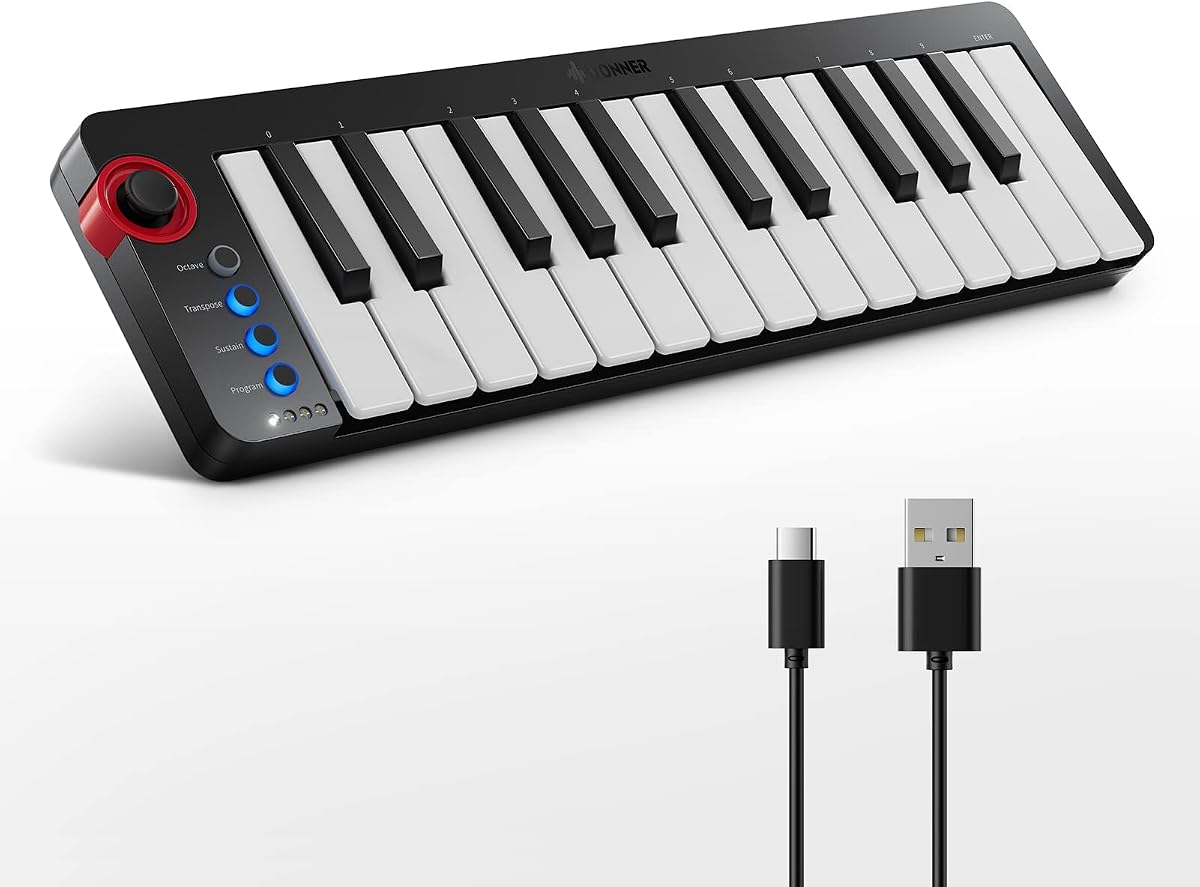
Donner Mini MIDI Keyboard N-25
4.1Editor score
Compact design with mini keys
Includes 40 teaching courses
Light-up rocker for visual feedback
This guide compares the top 25 Key MIDI Controllers for production and performance, evaluating features and compatibility to help you choose the right
Choosing the right MIDI controller can transform your music production workflow significantly. A good 25 key controller offers portability without sacrificing essential controls like pads and knobs for mixing and tweaking sounds.
We compared leading models based on build quality, software integration, and keybed responsiveness. Our list covers options for beginners to professionals, ensuring you find a unit that matches your specific creative needs.
Each pick includes detailed specs and real-world performance insights to guide your decision. Please note that prices and availability may change over time, so check current listings before purchasing.
4.1Editor score

4.6Editor score

4.6Editor score
The following table provides a side-by-side comparison of all ten models reviewed in this guide. It highlights key specifications to help you quickly identify the controller that best fits your studio setup.


The Akai Professional MPK Mini MK3 stands out as a top choice for producers seeking a balance of portability and functionality. With a solid build and responsive keys, it delivers a professional feel in a compact chassis that fits easily on any desk. Its integration with popular DAWs ensures smooth workflow for both beginners and experienced musicians.
We may earn a commission when you buy through this link, at no additional cost to you.
Key strengths include the 8 backlit MPC-style pads which are perfect for drum programming and sampling. The 4-way thumbstick offers dynamic control over pitch and modulation without cluttering the interface. Additionally, the included software bundle provides immediate value, giving users access to instruments and effects right out of the box.
While the mini keys require an adjustment period for those used to full-size keyboards, the trade-off is justified by the portability. Some users might miss battery power for standalone use, but the USB power requirement is standard for this class of controller. The mapping software allows for deep customization if you need more than factory defaults.
We recommend this controller for anyone starting production or needing a reliable travel companion. Its combination of physical controls and software integration makes it a versatile tool for songwriting and beat-making. Overall, it remains the industry standard for compact MIDI controllers due to its consistent performance and support.
The unique thumbstick allows for expressive pitch bends and modulation that feel natural during performance sessions.
Comprehensive software packages include sample libraries and virtual instruments to jumpstart your creative process immediately.
We may earn a commission when you buy through this link, at no additional cost to you.
The Akai Professional LPK25 is designed for those who need a minimalist controller that takes up minimal space. Its slim profile makes it ideal for laptops or small setups where desk real estate is at a premium. The keys are responsive enough for melody lines and bass parts, ensuring you can play with feel even in a compact form.
We may earn a commission when you buy through this link, at no additional cost to you.
This controller excels in simplicity, featuring essential controls like octave buttons and a sustain pedal input. The built-in arpeggiator adds creative functionality without needing external software, allowing you to generate complex patterns quickly. It connects via a single USB cable, eliminating the need for external power adapters or complex drivers.
The lack of drum pads is a deliberate design choice aimed at players who prioritize piano-style input over percussive sequencing. While this limits some production workflows, it keeps the cost down and the interface clean. Users might find the keybed less weighted than larger models, but it is sufficient for sketching ideas.
Ideal for students or travelers, this unit offers great value for basic MIDI control tasks. It works seamlessly with major DAWs like Logic and Ableton Live, ensuring broad compatibility. If you just need a keyboard interface without extra faders or pads, this is a reliable and affordable solution.
The integrated arpeggiator lets you create rhythmic patterns instantly, saving time during composition sessions.
Works out of the box with all major music software, making it accessible for any user regardless of their studio setup.
We may earn a commission when you buy through this link, at no additional cost to you.
The Donner Mini MIDI Keyboard N-25 targets beginners who want a complete package without a high initial investment. Its main selling point is the inclusion of forty engaging keyboard courses designed to teach music production basics. The visual light-up buttons add a fun element to play, making practice more interactive for new users.
We may earn a commission when you buy through this link, at no additional cost to you.
Beyond the educational aspect, the hardware covers essential needs with velocity-sensitive keys and a pitch-bend wheel. It supports multiple operating systems and connects easily via USB or OTG adapters for mobile use. This flexibility ensures you can produce music on the go or at home without complex configuration steps.
The build quality is functional rather than robust, reflecting its budget positioning. While the keys are responsive, they may not withstand heavy professional use over many years. The basic layout means you will not find advanced features like aftertouch or extensive mapping capabilities, but it serves its purpose well.
We suggest this for students or hobbyists starting their first production journey. It provides enough tools to learn the ropes and create decent tracks. With the added value of learning materials, it offers a comprehensive entry point into music making that goes beyond just hardware.
Built-in courses help you learn music theory and arrangement quickly, accelerating your learning curve significantly.
Light-up rocker buttons help you track your playing, making learning melodies and notes more intuitive and fun.
We may earn a commission when you buy through this link, at no additional cost to you.
Novation has long been a leader in DAW integration, and the Launchkey Mini 25 MK4 continues this legacy. It is designed to work effortlessly with major software platforms, allowing you to control mixing and sequencing without looking away from your screen. The premium keybed offers a more satisfying tactile response than many competitors.
We may earn a commission when you buy through this link, at no additional cost to you.
The 16 FSR pads are sensitive and support polyphonic aftertouch, which adds expressiveness to drum programming. Scale Mode is a standout feature that locks notes to a specific key, helping you avoid wrong notes while composing. The included software suite provides access to high-quality sounds to complement the hardware capabilities.
While the price is higher than basic models, the build quality justifies the cost for serious producers. Some users may need to install drivers to unlock full functionality, which adds a minor setup step. The reliance on specific software features means it shines brightest when used with supported DAWs.
This controller is ideal for creators who prioritize workflow efficiency and musical correctness. It suits those looking for a robust tool for live performance as well as studio work. If you want a controller that feels like an extension of your software, this is a top contender.
Scale Mode ensures you only play notes that fit your song, helping you compose confidently without music theory skills.
Polyphonic aftertouch on the pads lets you add dynamics to individual notes, enhancing your drum and synth sounds.
We may earn a commission when you buy through this link, at no additional cost to you.
The Arturia MiniLab 3 combines a unique aesthetic with practical features for modern producers. Its white finish makes it a standout piece in any setup, appealing to those who value style as much as utility. The faders are fully adjustable in height, allowing you to customize the controller to your ergonomic needs.
We may earn a commission when you buy through this link, at no additional cost to you.
Key features include 8 pads and a responsive keybed that feels great for melodic work. The included Analog Lab V software provides access to a massive library of synth sounds, adding significant value. It is lightweight and compact, making it easy to transport between studio sessions or gigs.
Arturia requires specific software to manage mappings and features, which can be a hurdle for some users. While the controller supports standard MIDI, unlocking its full potential involves installing their own tools. The design is sleek, but it may not offer the same rugged durability as heavier units.
We recommend this for visual-oriented users who also want quality sound options. It is particularly strong for electronic music production where synth patches are key. If you appreciate unique hardware design and comprehensive software bundles, this model offers a refreshing alternative to standard black controllers.
Height-adjustable faders let you tailor the feel to your hand size, improving comfort during long mixing sessions.
Comprehensive software bundle offers thousands of classic synth sounds ready to use right out of the box.
We may earn a commission when you buy through this link, at no additional cost to you.
The Rhymo 25 Key MIDI Controller brings modern connectivity options to a budget-friendly package. Featuring USB-C power and Bluetooth MIDI, it bridges the gap between desktop and mobile production setups. This allows for seamless integration with iPads and Android devices for making music anywhere.
We may earn a commission when you buy through this link, at no additional cost to you.
It includes essential performance tools like an arpeggiator with multiple modes and a loop function. The X-Y joystick provides intuitive control over pitch and modulation without needing separate wheels. While it lacks extensive controls, it offers a clean layout that is easy for beginners to navigate.
Build quality is adequate for light use but may not withstand rough handling. The plastic housing is durable enough for typical home studio conditions but lacks the premium feel of higher-end models. However, for the price, it delivers a surprising amount of functionality and versatility.
We suggest this for mobile producers who need wireless connectivity without breaking the bank. It works well with major DAWs like GarageBand and Ableton Live. If you value modern connections and flexibility over heavy-duty construction, this is a practical choice.
Bluetooth MIDI allows connection to tablets and phones, enabling you to produce music without tangled cables.
Modern USB-C power and data transfer ensure compatibility with newer laptops and tablets easily.
We may earn a commission when you buy through this link, at no additional cost to you.
The M-VAVE 25 Key MIDI Controller stands out for its robust Bluetooth capabilities and included battery. This makes it highly portable for composing outside the studio without relying on a computer for power. The RGB backlit pads add a visual flair that can enhance live performance settings.
We may earn a commission when you buy through this link, at no additional cost to you.
It features 8 assignable knobs and a dynamic keybed suitable for both studio and casual use. The software bundle provides a range of tools to get started quickly without extra purchases. Connectivity covers multiple platforms including Windows, Mac, and mobile devices, ensuring broad accessibility.
Bluetooth connectivity can occasionally introduce latency on older systems, though it is generally stable. The internal battery provides long life but adds to the weight compared to bus-powered units. Users might find the key action lighter than standard weighted keys, but it is sufficient for most tasks.
We recommend this for gigging musicians who need wireless options at a budget price. The combination of pads, knobs, and keys makes it a versatile all-in-one solution. If wireless flexibility is a priority for your workflow, this unit delivers excellent value.
Internal battery supports hours of unplugged use, making it perfect for outdoor sessions or travel writing.
RGB backlit pads provide visual confirmation during performances, helping you track triggers visually.
We may earn a commission when you buy through this link, at no additional cost to you.
The Akai Professional MPK Mini Play MK3 is unique for its ability to function without a computer. With a built-in speaker and battery support, it offers a standalone experience that lets you compose anywhere instantly. The OLED display provides clear feedback on notes and settings during use.
We may earn a commission when you buy through this link, at no additional cost to you.
It includes 100 internal drum and instrument sounds for immediate playback without needing a DAW. The MPC-style pads and knobs offer familiar control structures for beatmakers. You can also use it as a standard MIDI controller connected via USB for full integration with your studio software.
The built-in speaker is convenient for quick checks but lacks the quality of external audio gear. The price is higher than standard controllers, reflecting the added hardware features. Battery operation adds convenience but requires maintaining power packs which adds to the total cost.
This unit is ideal for songwriters who need immediate inspiration without setting up a full studio. It serves as both a travel instrument and a production tool. If standalone capability is a key requirement for your creative process, this is a compelling option.
Play and record music directly on the device using internal sounds without needing a connected computer.
On-board screen displays note info and settings clearly, improving ease of use during performance.
We may earn a commission when you buy through this link, at no additional cost to you.
The Akai Professional APC Key 25 MK2 is engineered specifically for users of Ableton Live. Its dedicated clip launching pads provide visual feedback and intuitive control for live performance. This model allows you to navigate sessions using arrow keys, making clip management efficient without touching the mouse.
We may earn a commission when you buy through this link, at no additional cost to you.
It includes Ableton Live Lite, providing a full production suite to start creating music right away. The 8 knobs control parameters like volume and pan, giving you tactile mixing options. The layout is clean and straightforward, reducing clutter while maintaining essential transport functions.
While it is excellent for Ableton, it is less flexible for other DAWs compared to universal controllers. The keybed is functional but not designed for expressive piano performance. Users outside the Ableton ecosystem may find the specialized features less useful for their workflows.
We recommend this for electronic musicians focused on live looping and session-based production. If you live in Ableton Live, this controller integrates seamlessly into your process. For those seeking a dedicated tool for performance, it offers unmatched support.
RGB pads offer clear visual feedback for triggering clips instantly, essential for live looping and sets.
Dedicated arrow buttons allow quick scrolling through tracks and scenes without using a computer mouse.
We may earn a commission when you buy through this link, at no additional cost to you.
The Akai Professional MPK Mini Play MK3 in Black offers a sleek aesthetic with a functional design. It features the same robust controls as previous models including velocity-sensitive pads and a versatile thumbstick. This model is designed to fit into modern workflows with ease and precision.
We may earn a commission when you buy through this link, at no additional cost to you.
It comes bundled with essential software tools that help you produce professional sounding tracks immediately. The integration with Native Instruments software ensures you have access to a wide range of sounds. The compact design allows it to sit comfortably on any desk without obstructing your view.
Users may find the mini keys take time to master, but they are suitable for quick idea capture. The lack of battery power limits standalone use compared to other models, but USB connectivity is stable. It provides a consistent experience that aligns with Akai's reputation for quality.
This is an excellent choice for producers needing a reliable portable solution for home studios. Its balance of size and features makes it adaptable for various genres. If you prioritize quality construction and software support, this model delivers strong performance.
Velocity-sensitive pads and knobs give you precise control over sound parameters and drum programming.
NKS support allows direct browsing and control of Native Instruments presets and sound libraries.
We may earn a commission when you buy through this link, at no additional cost to you.
Selecting the right controller depends on your specific workflow needs and software requirements. This section explores key factors to help you narrow down the best options for your studio.
The feel of the keys is critical for your playing experience. Some controllers offer velocity-sensitive keys that react to how hard you press, adding dynamics to your performance. Others may lack weight which can make playing complex parts harder. Consider if you need a piano-style feel or just a basic input method for melodies.
Look for velocity sensitivity to ensure your music has expression and dynamic range.
Deep integration with your Digital Audio Workstation can speed up your workflow significantly. Controllers designed for specific software like Ableton Live often have pre-mapped buttons for transport and clips. Universal controllers work across platforms but might require some setup to map controls effectively.
Choose a controller that supports your specific DAW to reduce manual setup time.
Modern controllers offer various connection types including USB, USB-C, and Bluetooth. USB is standard and reliable for desktops, while USB-C is becoming the norm for newer devices. Bluetooth MIDI enables wireless connection to tablets and phones which is great for mobile production.
Ensure the controller has the connection type your devices support to avoid adapter needs.
If you travel often, the physical dimensions and weight matter. 25-key controllers are generally light and slim, making them easy to carry. Check if the unit needs external power or runs on USB bus power to minimize cable clutter when on the go.
Prioritize lightweight and compact designs if you move between locations frequently.
Extra controls like faders, knobs, and pads add versatility to your controller. Knobs help with mixing and tweaking synth parameters without touching the mouse. Pads are essential for drum programming and triggering samples, turning your keyboard into a full production hub.
Select a model with enough knobs and pads to match your production complexity needs.
Many manufacturers bundle software to add value to the hardware purchase. This can include virtual instruments, effects plugins, and even DAW Lite versions. Check what is included to understand if you get a complete package or if you need to buy extras.
Software bundles can save you money and help you start creating right away.
Prices range widely depending on features and build quality. Budget models are great for beginners but might lack durability or advanced features. High-end models offer better materials and integration but cost more. Balance your financial constraints with the features you really need.
Determine your budget first to find the best value without overspending on unused features.
Construction affects how long the controller lasts. Metal frames or heavy plastic can withstand frequent transport better than lightweight plastic. Check user reviews regarding reliability to ensure the model stands up to daily use over time.
Invest in a well-built model to ensure longevity and consistent performance.
Start by connecting the controller to your computer via USB or Bluetooth depending on your model. Install any required drivers provided by the manufacturer to ensure full functionality. Most modern controllers are plug-and-play but specialized software can enhance performance.
Configure your DAW to recognize the controller by mapping knobs and faders to your preferred parameters. Use the included software tools to save presets for different tracks or projects. This setup allows for quick access to controls during mixing and recording sessions.
Keep your controller clean and stored in a safe place to prevent damage. Dust can accumulate on keys and pads, so use a soft brush to clean regularly. Avoid exposing it to extreme temperatures or moisture to maintain its electronic integrity over time.
Most controllers require a computer to process MIDI data and produce sound. However, some standalone models have built-in sounds and speakers so they work without a computer. Check the specific product capabilities to see if standalone operation is supported.
Yes, many professional producers use them for sketching ideas and controlling synth parameters. They are portable and easy to manage on crowded desks. While they lack full keyboard range, their utility in production workflows makes them valuable tools.
USB-C is the newer standard that supports faster data transfer and charging. It is becoming common on modern laptops and controllers. If your computer only has USB-A ports, you may need an adapter for a USB-C controller.
Many models support MIDI connectivity with tablets via Bluetooth or USB OTG adapters. This allows you to use mobile music apps effectively. Always check if the controller is compatible with iOS or Android before buying.
Some controllers are class-compliant and work without drivers. Others require specific software from the manufacturer for advanced features. Check the product page for driver requirements to avoid setup issues.
Manufacturers often include virtual instruments and DAW Lite versions. These packages vary by brand and model. Review the included software list to understand the value added to your purchase.
We explored ten diverse models offering a range of features to suit different needs. From the portable LPK25 to the integrated Launchkey Mini, each option brings unique benefits to your production setup.
Prioritize factors like keybed feel and DAW integration based on your workflow style. Whether you need a budget entry or a premium tool, there is a choice that fits your goals.
Prices and availability may fluctuate so check current listings before purchasing. This guide aims to simplify your decision by highlighting the best features in today's market.