
CENMATE Aluminum 8 Bay Hard Drive Enclosure
4.3Editor score
USB 3.0 interface
Tool-free installation
Active cooling fans
Finding reliable external storage is crucial for professionals managing large data sets. Eight bay enclosures offer significant capacity and flexibility for diverse workflows.
We evaluated leading models based on connectivity, cooling, drive compatibility, and build quality. Our analysis covers both RAID and DAS configurations for various needs.
Each pick highlights specific strengths and trade-offs to guide your decision. Prices fluctuate frequently, so verify current offers before purchasing any unit.
4.3Editor score

5.0Editor score

3.7Editor score
As an Amazon Associate we earn from qualifying purchases.
The following table provides a side-by-side overview of key specifications across all ten models to simplify your selection process.



The CENMATE Aluminum 8 Bay Hard Drive RAID Enclosure offers robust storage flexibility for users needing hardware RAID capabilities without a full NAS system. Its 3.8 rating reflects a mix of functional utility and user concerns regarding setup complexity. The enclosure supports up to 160TB total capacity and includes eight distinct RAID modes for various redundancy and performance needs.
We may earn a commission when you buy through this link, at no additional cost to you.
Key strengths include the ability to mix 2.5 and 3.5 inch drives and the inclusion of both USB-A and USB-C ports for modern connectivity. The aluminum alloy build helps dissipate heat generated by multiple drives, complemented by dual 2.9 inch fans. Users can choose from CLONE, LARGE, NORMAL, and various RAID 0 and 5 combinations to suit their workflow requirements effectively.
Honest trade-offs involve the setup process which requires careful adherence to instructions to avoid data loss during RAID configuration. Fan noise around 40 to 50 decibels may be distracting in quiet environments. Additionally, the unit requires a minimum of two hard drives in specific groups to function correctly in RAID mode which adds to the initial hardware cost.
This enclosure is ideal for individuals or small teams needing scalable storage with hardware-level redundancy. It suits desktop environments where noise is secondary to capacity and flexibility. For those prioritizing data safety across multiple drives without a network setup this unit delivers reliable performance at an accessible price point.
Users can switch between eight modes to balance speed and redundancy without needing a NAS controller.
Dual USB A and C 3.0 ports ensure compatibility with older and newer computers alike.
We may earn a commission when you buy through this link, at no additional cost to you.
The SanDisk Professional G-RAID Shuttle 8-Bay Thunderbolt 3 RAID Array stands out as a premium solution for professionals handling large media files. With a perfect 5.0 rating it delivers on promises of speed and reliability. The array includes eight removable Ultrastar drives totaling 160TB and supports Thunderbolt 3 transfers up to 2000MB/s for seamless 4K or 8K video editing.
We may earn a commission when you buy through this link, at no additional cost to you.
Its standout qualities include the ability to switch between RAID modes on the fly and daisy-chain up to five additional devices. The dual Thunderbolt 3 ports also provide up to 85W USB-C Power Delivery reducing charger clutter for laptops like the MacBook Pro. The transportable design makes it suitable for on-location work or studio environments requiring high bandwidth.
Trade-offs primarily involve the significant investment required and the dependency on Thunderbolt capable systems to achieve maximum performance. While USB-C is supported speeds are lower compared to Thunderbolt 3. However, for mission-critical workflows where data integrity and speed are paramount the cost is often justified by the productivity gains.
This RAID array is best suited for creative professionals who need massive storage with enterprise-grade reliability. It serves well in post-production houses or mobile editing rigs. If budget allows and you need top-tier transfer rates with minimal latency this unit offers the best performance in its class.
Thunderbolt 3 ensures rapid data access essential for editing uncompressed or RAW video files.
Removable Ultrastar drives provide enhanced durability and easier replacement without system downtime.
We may earn a commission when you buy through this link, at no additional cost to you.
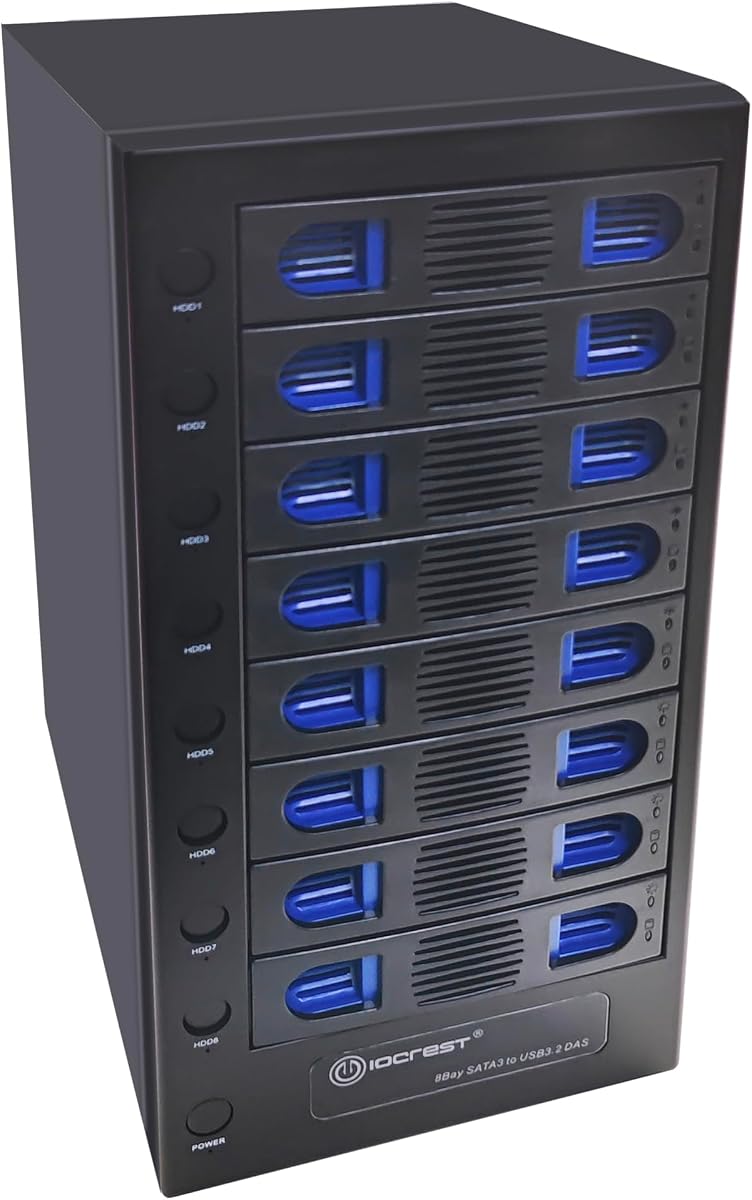
The CENMATE Aluminum 8 Bay Hard Drive Enclosure offers a straightforward DAS solution for users who do not require hardware RAID. Rated at 4.3 it combines practical features with an accessible price point. The enclosure supports up to 160TB of storage across eight bays and allows hot swapping for convenient drive management without powering down the system.
We may earn a commission when you buy through this link, at no additional cost to you.
Key strengths include the aluminum alloy build which aids heat dissipation alongside dual cooling fans. The USB 3.0 interface supports UASP for faster transfers compared to standard USB 2.0. Daisy chain capabilities allow expansion up to 480TB by connecting three units together providing significant scalability for growing storage needs.
Trade-offs involve the lack of hardware RAID which means data protection must be handled via software backups. Fan noise may be noticeable in quiet rooms though it ensures drive longevity. For users prioritizing capacity and ease of access over redundancy this unit delivers excellent value for personal or enterprise usage.
This enclosure is ideal for media libraries or backup repositories where individual drive access is frequent. It suits home users or small businesses needing expandable storage without network complexity. If hot swapping and simple plug-and-play functionality are priorities this model meets those requirements effectively at a lower cost.
Replace or add drives without shutting down the enclosure for uninterrupted workflow continuity.
Daisy chain multiple units to scale total storage up to 480TB as needed.
We may earn a commission when you buy through this link, at no additional cost to you.
The OWC ThunderBay 8 Eight-Bay Thunderbolt 40Gb/s External Storage Enclosure provides a robust option for users needing high-speed external storage. Its 3.9 rating suggests solid performance with some nuances in usability. The enclosure supports both 2.5 and 3.5 inch SSDs and HDDs and offers dual Thunderbolt 3 ports for daisy-chaining multiple devices.
We may earn a commission when you buy through this link, at no additional cost to you.
Key strengths include universal drive compatibility and quick thumb screw release trays for easy drive swaps. It is certified for both Mac and Windows systems and requires no drivers for immediate plug-and-play functionality. The included Thunderbolt 3 cable ensures out-of-box readiness for modern computers.
Trade-offs involve potential configuration steps for optimizing performance and limitations in hardware RAID options compared to specialized arrays. Users may find the initial setup more involved than simple DAS units. However for those invested in the Thunderbolt ecosystem this unit offers reliable connectivity and scalability.
This enclosure is best for creative professionals needing fast external storage without internal installation. It suits video editors or designers requiring quick access to large projects. If Thunderbolt speeds and cross-platform compatibility are essential this model delivers consistent performance.
Accommodates both SSD and HDD formats for flexible storage configurations.
Connect up to five additional Thunderbolt devices for expanded peripheral setups.
We may earn a commission when you buy through this link, at no additional cost to you.
The CENMATE Aluminum 8 Bay 10Gbps Hard Drive Enclosure upgrades USB connectivity for faster data transfers. Rated at 4.1 it supports up to 160TB across eight bays using USB 3.2 Gen 2 interfaces. This model offers hot swappable functionality allowing drive replacements without powering down the device.
We may earn a commission when you buy through this link, at no additional cost to you.
Key strengths include the Type-C interface which supports various computer standards including Thunderbolt 3 and 4. The aluminum alloy construction with dual fans helps maintain optimal drive temperatures during heavy use. Daisy chain expansion allows up to 480TB total capacity when connected with compatible units.
Trade-offs involve dependency on host systems with USB 3.2 Gen 2 ports to achieve full speeds. Fan noise may be noticeable in quiet settings. For users needing higher speeds than USB 3.0 provides this unit offers a practical upgrade path without full RAID complexity.
This enclosure is ideal for users needing fast access to large data sets locally. It suits media archiving or backup tasks requiring quick file transfers. If USB-C connectivity and speed are priorities this model balances performance and cost effectively.
10Gbps transfer rates significantly reduce file copy times compared to older USB versions.
Supports Thunderbolt 3 and 4 interfaces for broader system compatibility.
We may earn a commission when you buy through this link, at no additional cost to you.
The 8 Bay Tool Less Tray Hot Swapable enclosure provides granular control over each drive bay. Rated at 4.3 it supports individual power switches allowing users to manage drive activity independently. The USB 3.2 10Gbps interface ensures fast data access while smart fan modes adjust cooling based on thermal sensors.
We may earn a commission when you buy through this link, at no additional cost to you.
Key strengths include support for large 22TB drives per bay and wide OS compatibility including Windows Linux and Chrome OS. Tool-free trays simplify installation and replacement. Independent switches help reduce power consumption and heat by powering down unused drives when not needed.
Trade-offs involve the absence of RAID features which limits data redundancy options. Initial setup may require careful testing of each drive. For users prioritizing drive management and flexibility this unit offers practical benefits.
This enclosure suits users needing flexible storage with individual drive control. It fits well in home labs or small offices requiring scalable capacity. If power management and drive isolation are important this model provides effective solutions.
Power off unused drives individually to save energy and reduce heat.
Adjustable fan modes optimize noise and cooling based on real-time temperature.
We may earn a commission when you buy through this link, at no additional cost to you.
The OWC ThunderBay Flex 8 Storage/Dock/PCIe Expansion Enclosure combines storage with expansion capabilities. Rated at 3.7 it supports U.2 NVMe drives in top bays and includes a PCIe x16 slot for audio video or I/O cards. This hybrid design offers versatility beyond standard storage enclosures.
We may earn a commission when you buy through this link, at no additional cost to you.
Key strengths include front-mounted USB-C and USB-A ports for peripherals along with SD and CFexpress card readers. SoftRAID integration provides advanced RAID management for macOS users. The enclosure supports up to 144TB capacity with real-world speeds up to 2750MB/s.
Trade-offs involve higher cost and more involved setup compared to simpler enclosures. Users need to manage PCIe card compatibility carefully. For professionals requiring both storage and expansion in one unit this model delivers unique value.
This enclosure is best for video production or streaming workflows needing additional hardware interfaces. It suits users who want storage and peripheral expansion in a compact form. If flexibility and speed are priorities this unit offers comprehensive features.
Add capture cards or networking hardware via the internal PCIe slot.
Quickly transfer footage from SD and CFexpress cards using front slots.
We may earn a commission when you buy through this link, at no additional cost to you.
The QNAP TL-D810TC4-US 8-Bay Desktop DAS/JBOD Storage Expansion Enclosure offers robust expansion options. Rated at 4.0 it delivers up to 10Gbps via USB 3.2 Gen 2 ports and integrates with QNAP NAS systems. It supports high capacity 3.5 inch drives for scaling storage efficiently.
We may earn a commission when you buy through this link, at no additional cost to you.
Key strengths include the QNAP JBOD Manager utility for drive health monitoring and configuration. It is plug-and-play for QNAP NAS Windows macOS and Ubuntu workstations. The straightforward hardware solution expands capacity without needing a full new NAS system.
Trade-offs involve optimal performance with QNAP systems which may limit utility with others. It is priced higher than generic DAS units. For users with QNAP infrastructure this unit provides seamless and reliable storage expansion.
This enclosure is ideal for expanding existing QNAP storage for media or backups. It suits home users needing additional space with easy management. If QNAP integration and stability are priorities this model meets requirements well.
Expands storage for existing NAS systems without complex configuration.
Manage drive status efficiently with dedicated management utilities.
We may earn a commission when you buy through this link, at no additional cost to you.
The 8 Bay Mini ITX Micro ATX NAS Case offers a complete chassis for custom NAS builds. Rated at 4.0 it features dual independent air channels and hot swap bays for efficient cooling and access. The full steel chassis ensures durability and protection for internal components.
We may earn a commission when you buy through this link, at no additional cost to you.
Key strengths include compatibility with Mini-ITX and Micro-ATX motherboards and various low-power PSUs. Three temperature-controlled silent fans maintain quiet operation under load. Front USB 3.0 ports and indicator lights add convenience for daily use.
Trade-offs involve required assembly and purchase of motherboard and CPU separately. It lacks built-in RAID hardware requiring software configuration. For DIY enthusiasts wanting a custom NAS this case provides the right foundation.
This case is ideal for building home servers or media centers. It suits users comfortable with PC assembly needing reliable drive management. If customization and quiet operation are priorities this model offers great flexibility.
Separate air ducts prevent heat buildup for drives and motherboard.
Choose hardware that fits specific performance and budget needs.
We may earn a commission when you buy through this link, at no additional cost to you.
The ICY DOCK MB998SK-B 8 Bay 2.5 SATA HDD and SSD Backplane Cage provides secure internal drive management. Rated at 5.0 it supports 2.5 inch drives with locking trays and a full metal structure. It fits into one external 5.25 inch bay and accepts SATA or single channel SAS drives.
We may earn a commission when you buy through this link, at no additional cost to you.
Key strengths include robust build quality ensuring drive security and longevity. Locking trays prevent accidental removal during operation. For users needing internal expansion of 2.5 drives this cage offers excellent protection and organization.
Trade-offs involve needing internal installation and appropriate host controllers. It is not a standalone external unit. For server builds or desktop upgrades requiring internal drive bays this cage is highly reliable.
This cage is ideal for server setups or desktop upgrades needing secure 2.5 drive access. It suits IT professionals managing internal storage efficiently. If build quality and security are top priorities this model delivers exceptional performance.
Locking trays prevent accidental drive removal during operation.
Supports both SATA and SAS drives for versatile internal storage setups.
We may earn a commission when you buy through this link, at no additional cost to you.
Selecting the right 8 bay enclosure requires evaluating connectivity capacity and redundancy needs.
Choose between USB 3.0 USB 3.2 or Thunderbolt based on host capabilities and speed needs.
Thunderbolt offers highest speeds but costs more while USB remains versatile and affordable.
Decide if hardware RAID is needed for redundancy or if DAS suffices for simple storage.
RAID protects against drive failure but adds cost and setup complexity compared to DAS.
Ensure support for 2.5 or 3.5 inch drives and maximum capacity per drive.
Check for 20TB or 22TB support to future proof your storage expansion plans.
Active fans are essential for eight bays to prevent overheating during continuous operation.
Look for models with thermal sensors to manage noise and cooling balance effectively.
Hot swap features allow drive replacement without powering down the enclosure for uptime.
This is crucial for systems needing constant availability or frequent drive changes.
Aluminum or steel chassis provide better heat dissipation and protection for expensive drives.
Durability ensures long-term reliability especially in high-usage or mobile environments.
Daisy chaining or additional ports allow scaling storage beyond eight bays over time.
This flexibility supports growing data needs without replacing the entire enclosure setup.
Stable high-amperage adapters ensure consistent performance across all active drives.
Insufficient power can lead to drive drops or data corruption under heavy loads.
Connect the enclosure to a compatible computer using the provided cables and power adapter ensuring stable voltage.
Install drives carefully into trays or bays following manufacturer instructions to avoid damage during insertion.
Regularly check firmware updates and clean fan vents to maintain performance and prevent overheating over time.
Most enclosures support both 2.5 and 3.5 inch drives simultaneously. Check compatibility for mixed capacity drives to avoid issues.
Hardware RAID offers independent management and often better performance. Software RAID is more flexible but relies on the host system.
Typically you must disconnect power toggle a physical switch or use software and reboot. Always back up data before changing modes.
Yes many models support Mac OS but file system formatting like ExFAT or APFS may be required for compatibility.
Most units support both SSDs and HDDs. SSDs reduce noise and increase speed but may cost more per TB.
Fans usually range from 40 to 50 decibels which is noticeable but acceptable in offices or studios.
Top picks like the SanDisk G-RAID and CENMATE models cover professional and budget needs effectively.
Prioritize connectivity and RAID features based on your workflow to ensure seamless performance.
Always verify current prices and promotions as models vary widely in value and availability.