
Dell 23.8 All-in-One Desktop FHD Intel Core 5
4.5Editor score
Intel Core 5 120U
23.8 Inch FHD Display
Windows 11 Home
Dell ComfortView Plus
Finding the perfect All in One Desktop PC with Touchscreen can transform your workspace into a sleek, efficient hub. These devices combine powerful computing with intuitive touch interfaces, making them ideal for creative work, education, and daily productivity tasks.
We evaluated leading models based on processor speed, display clarity, memory capacity, and user feedback. Our analysis focuses on real-world performance, build quality, and value to ensure you get a reliable machine that meets your specific needs without unnecessary compromises.
Each pick highlights unique strengths, from AI-enhanced workflows to premium display technologies. Prices and availability change frequently, so check the latest listings before purchasing. Use this guide to find the best balance of power, portability, and touchscreen functionality for your setup.
4.5Editor score

4.7Editor score

5.0Editor score
As an Amazon Associate we earn from qualifying purchases.
The following comparison table provides a side-by-side overview of all ten selected All in One Desktop PC with Touchscreen models. Review the key specifications including processor type, memory, storage, display size, and operating system to quickly identify which model aligns best with your performance requirements and budget constraints.




This HP model stands out as a top contender in the All in One Desktop PC with Touchscreen category. With a strong rating of 4.7 stars, it balances premium features and user-friendly design effectively. The integration of Copilot technology offers a modern workflow experience that appeals to professionals.
We may earn a commission when you buy through this link, at no additional cost to you.
The AMD Ryzen AI 7 350 processor delivers exceptional performance for multitasking and creative work. Combined with 16GB of DDR5 RAM and a massive 1TB SSD, you can handle heavy applications and store large files without slowdowns. The 27-inch touchscreen provides an immersive display with anti-glare technology for long sessions.
While the price is higher than some competitors, the included accessory bundle like pen and USB drive adds value. The privacy camera and AI noise reduction ensure professional video calls. These trade-offs are acceptable given the robust performance and comprehensive feature set offered in one sleek unit.
Ideal for power users and content creators, this machine is a strong investment for long-term productivity. The Windows 11 Pro pre-installation ensures security and business features. If you need a reliable, high-performance All in One Desktop PC with Touchscreen that supports AI tools, this is the top recommendation.
The dedicated Microsoft Copilot key and AMD Ryzen AI 7 350 processor enable rapid AI tasks. This helps streamline document editing, data analysis, and smart assistance without external tools.
The 27-inch FHD IPS touch display supports 178-degree viewing angles. The adjustable stand and anti-glare panel reduce eye strain during extended use or presentations.
We may earn a commission when you buy through this link, at no additional cost to you.
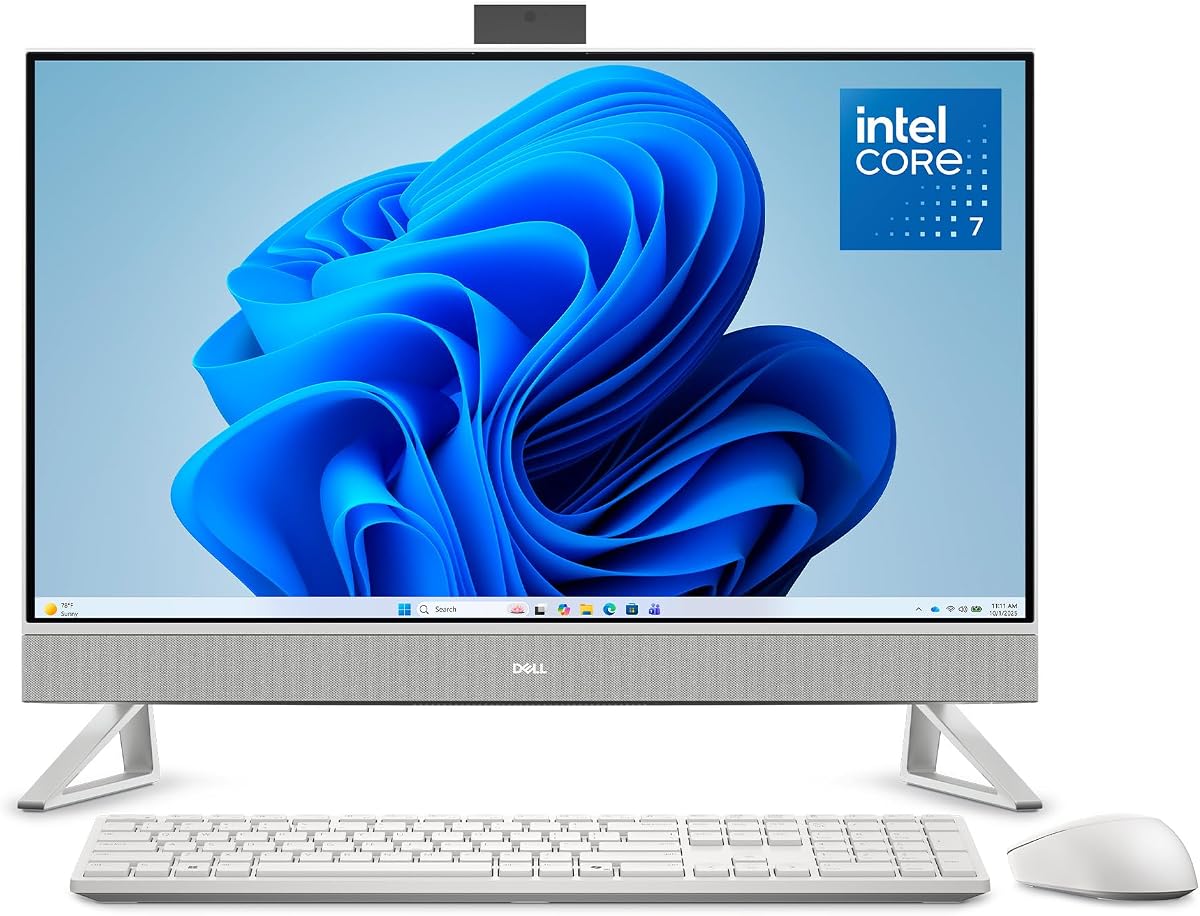
The Dell 23.8 All-in-One offers exceptional value for those seeking an All in One Desktop PC with Touchscreen without breaking the bank. Rated 4.5 stars, it delivers solid performance for daily tasks and entertainment. Its compact design and rich color display make it a favorite for home offices.
We may earn a commission when you buy through this link, at no additional cost to you.
The Intel Core 5 120U provides responsive processing for web browsing and light productivity. The FHD IPS display boasts 99 percent sRGB and ComfortView Plus to protect eyes during long use. Dolby Atmos audio enhances media consumption, while the 5MP plus IR camera ensures clear video meetings.
Some users might find the storage and RAM configuration basic compared to premium models. However, for standard office work or streaming, these specs are sufficient. The one-year onsite service adds peace of mind for buyers concerned about maintenance or warranty claims.
Best for students or families needing a cost-effective desktop, this Dell model is a smart buy. It balances essential features with a sleek design. If you want a reliable All in One Desktop PC with Touchscreen under a tight budget, this is the ideal choice.
ComfortView Plus reduces harmful blue light emissions for safer viewing. The narrow border and 50 percent higher contrast improve visual clarity for work and media.
Dual Bluetooth speakers with Dolby Atmos spatial sound deliver clear audio. This setup supports music, video chats, and movies without needing external speakers.
We may earn a commission when you buy through this link, at no additional cost to you.
This ASUS model earns a perfect 5.0 rating as a high-end All in One Desktop PC with Touchscreen. It excels with powerful AI features and robust connectivity. Designed for professionals, it supports complex workflows and multimedia editing with speed and precision.
We may earn a commission when you buy through this link, at no additional cost to you.
The AMD Ryzen AI 7 350 processor includes a dedicated 50 TOPS NPU for on-device AI acceleration. Paired with 32GB DDR5 RAM and a 1TB PCIe 4.0 SSD, it offers blazing-fast multitasking. The 27-inch touchscreen has a 93 percent screen-to-body ratio for immersive visuals.
The HDMI-in port allows the display to function as a secondary monitor for consoles or media devices. Security features like Microsoft Pluton and BIOS protection add enterprise-grade safety. While expensive, the performance and flexibility justify the cost for demanding users.
Ideal for creative studios or business teams, this ASUS desktop is a top-tier pick. It handles heavy loads effortlessly. If you need a premium All in One Desktop PC with Touchscreen with maximum power and connectivity, this model is the ultimate choice.
The dedicated NPU handles complex multitasking and creative projects efficiently. This accelerates AI-enhanced tools and boosts daily productivity significantly.
HDMI-in lets you use the display for external devices. HDMI-out connects a second monitor, expanding workspace flexibility for professional setups.
We may earn a commission when you buy through this link, at no additional cost to you.
Rated 5.0 stars, this Dell All-in-One offers a robust All in One Desktop PC with Touchscreen experience for professionals. The 10 Core Intel processor ensures smooth multitasking for business applications. Its design prioritizes workflow efficiency and user comfort in modern offices.
We may earn a commission when you buy through this link, at no additional cost to you.
The Intel Core 7 150U handles demanding tasks with ease, supported by 16GB RAM. Windows 11 Pro brings advanced security and management tools. The HDR webcam and ComfortView Plus features enhance video calls and eye safety. Easy-access ports simplify connecting peripherals quickly.
Storage is limited to 512GB SSD which might require external drives for large archives. The 24-inch screen is compact but sufficient for focused tasks. These limits are acceptable for users prioritizing speed and security over massive local storage space.
Best for business users needing a secure and fast desktop, this model is reliable. It offers great value for corporate environments. If you want an efficient All in One Desktop PC with Touchscreen optimized for work, this Dell is a strong option.
Ten cores enable seamless handling of multiple apps and browser tabs. This keeps productivity high without slowdowns during complex workflows.
HDR technology on the webcam ensures clear images in any lighting. Privacy features let you hide the camera easily when not in use.
We may earn a commission when you buy through this link, at no additional cost to you.
With a perfect 5.0 rating, this Dell 24 All-in-One is a top All in One Desktop PC with Touchscreen for business users. It combines latest-gen connectivity with powerful AI-driven processing. The sleek design saves desk space while delivering high performance for daily operations.
We may earn a commission when you buy through this link, at no additional cost to you.
The Intel Ultra 7 355 processor supports AI-accelerated workflows via NPU technology. With 32GB DDR5 RAM and 1TB SSD, it handles large spreadsheets and creative apps smoothly. Pen support and Wi-Fi 7 connectivity enhance versatility for note-taking and fast internet.
The cost is high, but enterprise features justify it for companies. The compact footprint reduces clutter effectively. Some users may miss extra ports, but the available options cover most needs. This balance of power and design suits modern office environments well.
Ideal for business professionals seeking advanced connectivity, this model is recommended. It supports remote work and collaboration efficiently. If you need a future-proof All in One Desktop PC with Touchscreen with business specs, this Dell is a top pick.
Wi-Fi 7 and Bluetooth 6 provide faster wireless speeds. This ensures low latency for video calls and file transfers across networks.
Pen support enables precise navigation and note-taking. This enhances creativity and annotation capabilities on the touchscreen display.
We may earn a commission when you buy through this link, at no additional cost to you.
Rated 4.4 stars, this HP model offers a vibrant All in One Desktop PC with Touchscreen experience focused on display quality. The 27-inch IPS screen delivers accurate colors and wide viewing angles. It is a solid choice for visual tasks and general productivity.
We may earn a commission when you buy through this link, at no additional cost to you.
The AMD Ryzen 5 7520U processor handles daily tasks smoothly. LPDDR5 RAM ensures quick response times for apps. The anti-glare panel reduces eye strain during extended use. Windows 11 Pro adds business features while dual microphones support clear calls.
Memory is onboard which limits upgrade options later. Performance is good for office work but not heavy gaming. These limits are acceptable given the strong display and affordable price. Users prioritizing visual clarity will find this model appealing.
Best for users focused on media and visuals, this HP is a good fit. It balances performance with a high-quality screen. If you want a reliable All in One Desktop PC with Touchscreen with great color, this is a great option.
The three-sided micro-edge bezel maximizes screen space. 99 percent sRGB coverage ensures vivid colors for photos and videos.
Onboard LPDDR5 memory optimizes power and speed. This keeps system latency low for smooth multitasking and app switching.
We may earn a commission when you buy through this link, at no additional cost to you.
This Dell 27-inch model receives 4.3 stars for delivering a large-screen All in One Desktop PC with Touchscreen. The 32GB RAM supports heavy multitasking effectively. Its design focuses on comfort and space-saving features for larger workspaces.
We may earn a commission when you buy through this link, at no additional cost to you.
The 27-inch display offers room for multiple windows. ComfortView Plus reduces blue light for eye safety. The pop-up camera adds privacy convenience. The innovative stand stores the keyboard underneath to keep the desk tidy. These features enhance ergonomics significantly.
It lacks detailed storage specs in the main data but is generally fast. The high RAM is a plus for power users. Cost is higher than 24-inch models. However, the screen real estate and memory justify it for complex tasks.
Best for those needing more screen space, this Dell is recommended. It supports design and analysis work well. If you need a large All in One Desktop PC with Touchscreen with strong RAM, this is a great choice.
The 27-inch display allows side-by-side task management. This boosts productivity by reducing app switching during busy work sessions.
The stand includes a dedicated slot for the keyboard. This feature keeps the desk clutter-free and improves overall workspace organization.
We may earn a commission when you buy through this link, at no additional cost to you.
Rated 4.3 stars, this HP model is a budget-friendly All in One Desktop PC with Touchscreen for home and school. The Intel Processor N100 handles standard educational apps well. Its white design fits neatly in modern classrooms or study areas.
We may earn a commission when you buy through this link, at no additional cost to you.
The 23.8-inch FHD display supports clear reading. 16GB DDR4 RAM ensures smooth browsing and multiple tabs. The 1TB SSD offers ample space for projects. Wi-Fi 6 and Bluetooth 5.3 maintain connectivity for modern peripherals and networks.
Performance is sufficient for light work but not heavy rendering. Standard memory is adequate for daily use. The low price makes it accessible for schools or families. These trade-offs are acceptable for the intended user base.
Ideal for students and home users, this HP is a practical choice. It provides essential features without bloat. If you want an affordable All in One Desktop PC with Touchscreen for learning, this model is well suited.
The Intel Processor N100 handles school and home tasks efficiently. This ensures smooth operation during web browsing and document creation.
Wi-Fi 6 and Bluetooth 5.3 enable fast connections. This supports wireless peripherals and stable internet for remote learning.
We may earn a commission when you buy through this link, at no additional cost to you.
With a perfect 5.0 rating, this ASUS model stands out as a premium All in One Desktop PC with Touchscreen. It offers an advanced Copilot experience and strong AI performance. Ideal for business and education, it streamlines complex workflows efficiently.
We may earn a commission when you buy through this link, at no additional cost to you.
The AMD Ryzen AI 7 350 processor delivers up to 5GHz speeds. With a dedicated Copilot Key, AI tasks are accessible instantly. 32GB DDR5 RAM and 1TB SSD provide fast data access. The IPS anti-glare display ensures clear visuals and eye comfort.
The price reflects these high-end specs. Fixed RAM may limit future upgrades. However, the performance and AI features are robust. This balance suits users needing a reliable tool for daily business or school productivity.
Best for those integrating AI tools, this ASUS is a top pick. It supports professional environments well. If you need an All in One Desktop PC with Touchscreen with Copilot focus, this model is highly recommended.
The 50 TOPS NPU accelerates modern tools and apps. This helps manage data and tasks faster with less manual effort.
IPS anti-glare display with wide viewing angles reduces eye strain. This ensures clear visibility during long meetings or work sessions.
We may earn a commission when you buy through this link, at no additional cost to you.
This msi model offers solid specs as an All in One Desktop PC with Touchscreen for business users. While ratings are pending, the hardware suggests reliability. It provides strong processing and storage at a competitive entry price point for small teams.
We may earn a commission when you buy through this link, at no additional cost to you.
The 14th Gen Intel Core 7-150U supports multitasking well. Dual external monitor support expands workspace options. The 1.2TB storage handles large data files. Wireless accessories ensure a clean setup for desks. This hardware fits standard office workflows.
Base RAM is low which may affect heavy multitasking. Users can upgrade RAM in many cases. The storage and processor are strong. This balance offers good value for budget-conscious businesses needing expandable options.
Best for office users needing extra monitors, this msi is a good fit. It supports productivity and storage. If you want a versatile All in One Desktop PC with Touchscreen for business, this model is worth considering.
Dual external monitor support allows multi-screen setups. This helps manage complex tasks by spreading apps across multiple displays.
The 14th Gen Intel Core 7 provides high performance. This ensures fast processing for business apps and daily workflows.
We may earn a commission when you buy through this link, at no additional cost to you.
Selecting the right All in One Desktop PC with Touchscreen involves evaluating several critical hardware and software factors. This guide breaks down essential elements to help you match device capabilities with your specific workflow requirements.
Modern All in One Desktop PC with Touchscreen models now include dedicated NPUs for AI acceleration. Look for AMD Ryzen AI 7 or Intel Ultra 7 Series 3 chips for tasks like image editing or language assistance. Traditional processors like Intel Core 5 or 7 are fine for standard office work without AI needs.
RAM capacity affects how many apps run simultaneously without slowing down. Aim for at least 16GB DDR5 for smooth multitasking on newer systems. Storage should be an NVMe SSD for fast boot and load times. 512GB is minimal; 1TB offers better longevity and file space.
Touchscreen quality impacts interaction comfort and visual clarity. 23.8-inch models suit compact desks while 27-inch options support wider workspaces. Check for anti-glare coatings and IPS panels for consistent colors. A refresh rate above 60Hz provides smoother touch navigation and animations.
Windows 11 Pro offers business features like encryption and remote management. Home versions work for personal use but lack these advanced tools. Ensure compatibility with your existing software stack. Some models include trial suites like McAfee LiveSafe but consider long-term licensing plans.
Verify the availability of USB-C and USB-A ports for peripherals. Wi-Fi 6 or 7 ensures fast wireless internet access. HDMI-in ports add versatility by using the screen for external sources. Bluetooth 5.3 or newer supports modern mice and headsets without lag.
Video conferencing demands high-resolution cameras with privacy controls. 5MP or 1080p IR sensors work well for facial recognition and clarity. Dolby Atmos speakers enhance media playback. AI noise cancellation helps reduce background sounds during calls for a professional experience.
Onsite service options provide peace of mind for hardware failures. Look for at least one year of manufacturer warranty. Dell often includes onsite support for business models. Check return policies for online purchases to ensure a risk-free buying experience.
A slim bezel and sturdy stand improve desk usability and aesthetics. VESA mount compatibility allows wall mounting for extra desk space. Keyboard trays that hide cables keep the workspace tidy. Choose light finishes like white or ash to match office decor.
Clean the touchscreen regularly with a soft microfiber cloth to prevent smudges. Avoid harsh chemicals that might damage the anti-glare coating. Gently wipe the screen in circular motions when needed to maintain clarity.
Keep the device well-ventilated by placing it on a flat surface with airflow. Do not block air vents near the base of the stand. Dust buildup can cause overheating which affects performance over time.
Update drivers and firmware through the manufacturer app for best security. Backup important files to external storage or cloud services regularly. Restart the machine weekly to refresh memory and clear temporary system files.
A touchscreen offers intuitive interaction for apps designed with touch features. It is ideal for education, design, and casual browsing. If you use keyboard-heavy workflows, touch may be optional but still useful for presentations.
16GB of RAM is a solid baseline for running multiple apps smoothly. For heavy data processing or video editing, 32GB provides better performance. Lower RAM can lead to lag when too many tabs or programs are open.
Use a dry microfiber cloth for daily cleaning to remove dust. For tougher smudges, slightly dampen the cloth with distilled water. Avoid alcohol-based cleaners to prevent damage to the protective coating.
Most All in One Desktop PC models support external displays via HDMI or USB-C ports. Some models like the ASUS VM670 offer HDMI-in for using the main screen as a second monitor. Check the I/O specs before purchasing.
Yes, many models include high-resolution IR cameras with noise-canceling microphones. Features like ComfortView Plus and HD video support ensure clear visuals. Look for Windows Hello facial recognition for secure logins during meetings.
With proper care, these devices last around 5 to 7 years. Regular updates and physical protection extend usability. SSD storage avoids mechanical failures common in traditional hard drives. Warranty support also helps manage early hardware issues.
Our top picks highlight the best All in One Desktop PC with Touchscreen options available in November 2026. The HP 27 Copilot PC leads in AI productivity while the Dell 23.8 offers budget value. ASUS models shine with premium RAM and connectivity features.
Prioritize specs that match your daily workload. For business, look for Pro OS versions and security features. For education, focus on display quality and portability. Always check warranty terms before purchasing to ensure support availability.
Prices fluctuate frequently so compare current listings before buying. Use this guide to narrow down choices based on your needs. Investing in a reliable machine ensures long-term efficiency and satisfaction for your workspace.