
ASUS Pro WS W890E-SAGE SE
5.0Editor score
Intel Xeon 600 Ready
NitroPath DRAM technology
Server-grade IPMI management
This guide compares the top ASUS Server Motherboard models for workstations and servers, evaluating performance, connectivity, and stability for professionals.
Choosing the right ASUS Server Motherboard is critical for building reliable workstations and servers that handle demanding tasks without failure or downtime.
We compared ten models based on socket support, PCIe lanes, memory capacity, and remote management features to help you find the best fit.
Each pick shows key specs and real-world strengths so you can decide confidently while keeping in mind that prices and availability may change.
5.0Editor score

3.7Editor score
4.3Editor score
This table provides a side-by-side look at all ten models so you can quickly compare sockets, memory support, and key connectivity features.


This board stands out for high-end workstation needs with support for AMD Threadripper PRO 7000 series CPUs up to 96 cores.
We may earn a commission when you buy through this link, at no additional cost to you.
It offers seven PCIe 5.0 x16 slots which is rare and ideal for multi-GPU setups or heavy data throughput tasks.
While the price is high, the robust cooling and dual 10Gb LAN ports justify it for professional rendering or AI training.
Buy this if you need maximum I/O bandwidth and server-grade stability in a workstation form factor.
Seven full-speed PCIe 5.0 slots allow you to add multiple accelerators without bandwidth compromises common in other boards.
Dedicated IPMI LAN and BMC controller let you manage the system remotely which is essential for unattended server environments.
We may earn a commission when you buy through this link, at no additional cost to you.
Designed for advanced AI PC workloads this board prepares you for future Intel Xeon 600 processors with a perfect EEB platform.
We may earn a commission when you buy through this link, at no additional cost to you.
NitroPath DRAM technology enhances ECC memory performance giving you speed and reliability needed for complex calculations.
The 16+ power stages ensure stable power delivery even under heavy loads making it reliable for continuous operation.
Invest in this if you need top-tier Intel workstation performance with server-class management features.
The architecture is tailored for demanding AI applications ensuring you get the most out of next-gen processors.
Dual 10Gb LAN ports provide fast data transfers which are critical for large datasets or networked storage.
We may earn a commission when you buy through this link, at no additional cost to you.
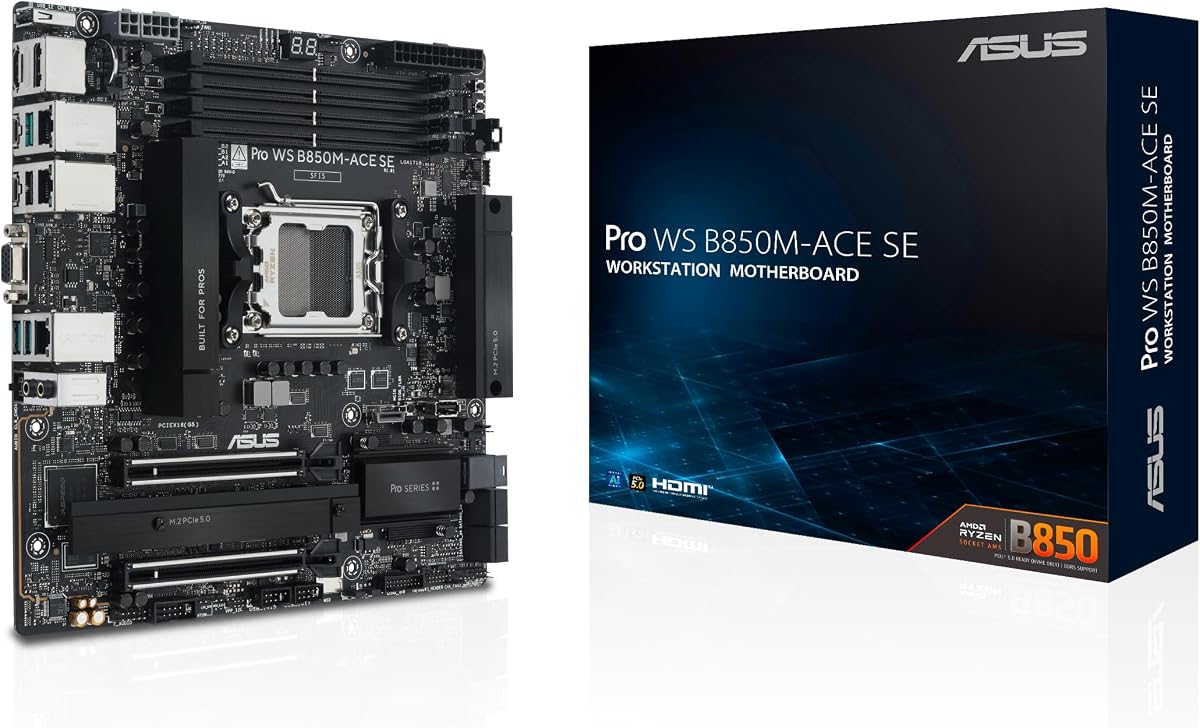
This MicroATX board brings server-grade features to a more accessible price point without sacrificing essential reliability.
We may earn a commission when you buy through this link, at no additional cost to you.
It supports Ryzen 9000 and EPYC 4005 processors offering great performance for small offices or edge computing.
Despite its size it includes BMC IPMI support which is rare for budget boards and useful for remote monitoring.
Perfect for small businesses needing robust features without the cost of full EEB or E-ATX systems.
You get professional management tools in a smaller footprint ideal for limited desk or rack space.
10G and 2.5G LAN ensures your workstation keeps up with modern network speeds efficiently.
We may earn a commission when you buy through this link, at no additional cost to you.
Ideal for mobile workstations this model integrates WiFi 7 for ultrafast wireless connectivity alongside robust wired options.
We may earn a commission when you buy through this link, at no additional cost to you.
With 36 power stages it handles heavy loads well ensuring stability even with high-power Threadripper processors.
The inclusion of IPMI support means you can manage it remotely if needed in a professional environment.
Choose this if you need wireless freedom and strong performance for content creation.
WiFi 7 provides low latency and high throughput essential for wireless data transfers or remote access.
36 power stages ensure stable performance during long rendering sessions or intensive computations.
We may earn a commission when you buy through this link, at no additional cost to you.
This model offers similar performance to the SAGE version but focuses on value with essential features for workstations.
We may earn a commission when you buy through this link, at no additional cost to you.
USB4 ports on the rear provide 40Gbps speeds for fast external storage or high-speed peripherals.
It supports both Threadripper PRO and regular series CPUs giving you flexibility in processor choices.
Great for users who want server features without needing the highest tier power delivery specs.
USB4 support allows you to daisy-chain high-speed drives or displays efficiently without internal clutter.
Compatibility with both PRO and standard Threadripper series lets you tailor performance to your budget.
We may earn a commission when you buy through this link, at no additional cost to you.
This board brings workstation reliability to standard Intel Core processors with ECC memory support for data integrity.
We may earn a commission when you buy through this link, at no additional cost to you.
The inclusion of an IPMI expansion card out of the box makes remote management easy right from installation.
Thunderbolt 4 header support allows for future expansion to high-speed external displays or storage solutions.
Perfect for small businesses needing professional management features on a budget.
Having an IPMI card bundled saves you extra costs and ensures you have server tools immediately.
Thunderbolt 4 header prepares your system for high-bandwidth peripherals that are becoming standard.
We may earn a commission when you buy through this link, at no additional cost to you.
This model is ideal for smaller servers needing reliable 10G networking without the cost of newer enterprise hardware.
We may earn a commission when you buy through this link, at no additional cost to you.
The Micro ATX size makes it easy to fit in compact cases or existing office setups easily.
It supports Xeon E-2300 processors which are sufficient for light virtualization or file serving tasks.
Choose this if you need a dependable legacy server platform for small-scale deployments.
Integrated 10G ports eliminate the need for add-on cards saving you space and money.
Small size fits easily into tight spaces allowing you to hide servers behind monitors or desks.
We may earn a commission when you buy through this link, at no additional cost to you.
This board targets heavy workloads with support for up to 4TB of RAM and dual Intel Xeon processors.
We may earn a commission when you buy through this link, at no additional cost to you.
It is ideal for virtualization servers or database hosting where memory capacity is more critical than GPU power.
Integrated IT management tools allow you to monitor health and performance across a large infrastructure.
Invest in this if you need maximum memory scalability for enterprise server roles.
Handling 4TB of RAM lets you run dozens of virtual machines without resource bottlenecks.
Dual CPU sockets double your compute power for parallel processing tasks efficiently.
We may earn a commission when you buy through this link, at no additional cost to you.
Similar to the ACE IPMI version this board focuses on providing server-grade manageability for Intel workstations.
We may earn a commission when you buy through this link, at no additional cost to you.
It includes three M.2 slots offering plenty of fast storage for OS and active data workloads.
The IPMI card bundle ensures you get remote management features without extra hardware purchases.
Suitable for users needing basic server capabilities in a standard workstation chassis.
Three M.2 slots mean you can install OS and apps on separate drives for better organization.
The bundled IPMI card provides essential remote control tools without extra costs or adapters.
We may earn a commission when you buy through this link, at no additional cost to you.
This board provides a straightforward path to server management features for standard Intel workstation users.
We may earn a commission when you buy through this link, at no additional cost to you.
With multiple display outputs it supports multi-monitor setups useful for editing or trading workloads.
DDR5 support ensures you can use faster memory to improve overall system responsiveness.
Good for entry-level server tasks where budget is a primary concern.
Multiple display outputs allow you to connect several screens without buying extra GPUs.
DDR5 support means faster data transfer rates which improve overall system responsiveness.
We may earn a commission when you buy through this link, at no additional cost to you.
Selecting the right board depends on your processor, memory needs, and required connectivity features.
Ensure the board supports your intended CPU such as AMD sTR5 or Intel LGA 4710-2 for Xeon processors.
Check that the socket matches your processor model to avoid incompatibility issues during installation.
Servers often need more RAM than PCs so check if the board supports ECC R-DIMM DDR5 memory.
Higher capacity boards allow for better multitasking and virtualization performance.
Count how many expansion cards you need for GPUs or network adapters and check available PCIe slots.
More slots provide flexibility for future upgrades and high-bandwidth expansion cards.
IPMI support allows remote system administration which is essential for unattended server use.
Look for dedicated BMC chips and LAN ports for reliable remote management.
Dual 10Gb LAN ports offer fast data transfers crucial for NAS or high-speed workloads.
Ensure the board supports the network speed you require to avoid bottlenecks.
Robust power stages ensure stable performance under heavy load and reduce risk of crashes.
Check VRM cooling solutions to ensure longevity during continuous operation periods.
Check that the board size matches your case such as EEB or ATX to avoid fit issues.
Smaller boards save space but may offer fewer expansion options for future needs.
Multiple M.2 slots provide fast boot drives while SlimSAS adds flexibility for additional storage.
More storage options allow better organization of OS and data drives.
Install the board in a static-free environment using a grounded mat to avoid damage during setup.
Ensure adequate cooling airflow inside the case to keep VRM and chipset temperatures within safe limits.
Update BIOS and firmware regularly to maintain compatibility and security for your server environment.
Server boards usually support ECC memory and IPMI remote management while workstation boards balance performance with user features.
Most models support both workstation and regular CPUs but verify socket compatibility before buying to avoid issues.
IPMI is useful for remote management but not strictly needed for home users who are always nearby the system.
Yes especially models with multiple PCIe 5.0 slots and support for high-end GPUs used in AI workflows.
Server boards often require higher wattage PSUs with 8-pin connectors so check your power requirements carefully.
They use active cooling which can produce noise but fans are configurable in BIOS for quieter operation.
We covered ten models ranging from high-end TRX50 options to budget-friendly AM5 boards for different needs.
Prioritize IPMI support and PCIe count if you plan to run remote servers or expand with multiple GPUs.
Prices change frequently so verify current availability and deals before placing your order today.