
Creality Ender 3 V3 SE
3.8Editor score
CR Touch auto leveling
Sprite direct extruder
Dual Z-axis stability
This guide compares the top auto bed leveling 3D printers for beginners, evaluating speed, ease of use, build quality, and reliability to help you choose the
Starting your 3D printing journey can feel overwhelming without the right tools. Auto bed leveling technology simplifies setup by ensuring the print bed is perfectly aligned before every job. This feature is crucial for beginners who want consistent results without manual calibration hassles.
We analyzed ten highly rated models to find the best options for new users. Our comparison focuses on ease of setup, printing speed, build volume, and overall reliability. Each product was selected based on user feedback and technical specifications to ensure quality.
Each pick in this list highlights key strengths and potential trade-offs for your needs. We include detailed reviews to help you understand what makes each printer stand out. Keep in mind that prices and availability may change over time as markets shift.
3.8Editor score

4.3Editor score

4.3Editor score
This side-by-side comparison breaks down the key specifications and features of each printer to help you make an informed decision based on your specific printing needs and budget constraints.


The FLASHFORGE Adventurer 5M stands out as a top contender for beginners who want speed without complexity. With its one-click auto leveling system, it eliminates the tedious manual adjustments that often frustrate new users. The printer achieves impressive speeds up to 600mm/s while maintaining quality through vibration compensation technology. Its direct extruder system ensures consistent filament flow for various materials. Users appreciate the quick detachment of the nozzle and the PEI coating for easy print removal.
We may earn a commission when you buy through this link, at no additional cost to you.
Performance-wise, this machine excels in consistency. The acceleration capabilities allow it to reach max speed in just 0.025 seconds. This means less time waiting for prints and more time creating. The run-out sensor and power loss recovery features provide peace of mind during long jobs. The open design allows for good ventilation which is beneficial for materials like PLA and PETG. The overall build quality feels robust for the price point offering stability during rapid movements.
Despite its strengths, there are trade-offs to consider. The build volume is standard but may limit larger projects compared to some competitors. The lack of an enclosed chamber means it is less suitable for materials that require temperature control like ABS. However for beginners focusing on PLA and PETG this is rarely an issue. The learning curve is minimal thanks to the user-friendly interface and setup process.
This printer is ideal for hobbyists and educators who need reliability and speed. It removes the guesswork from bed leveling allowing you to focus on design. The combination of speed and ease of use makes it a standout choice in its category. If you value getting prints done quickly without sacrificing first layer adhesion this model delivers on those promises effectively.
The one-click leveling system ensures a perfect first layer every time without manual tweaks.
Vibration compensation keeps print quality high even when pushing the machine to 600mm/s.
We may earn a commission when you buy through this link, at no additional cost to you.
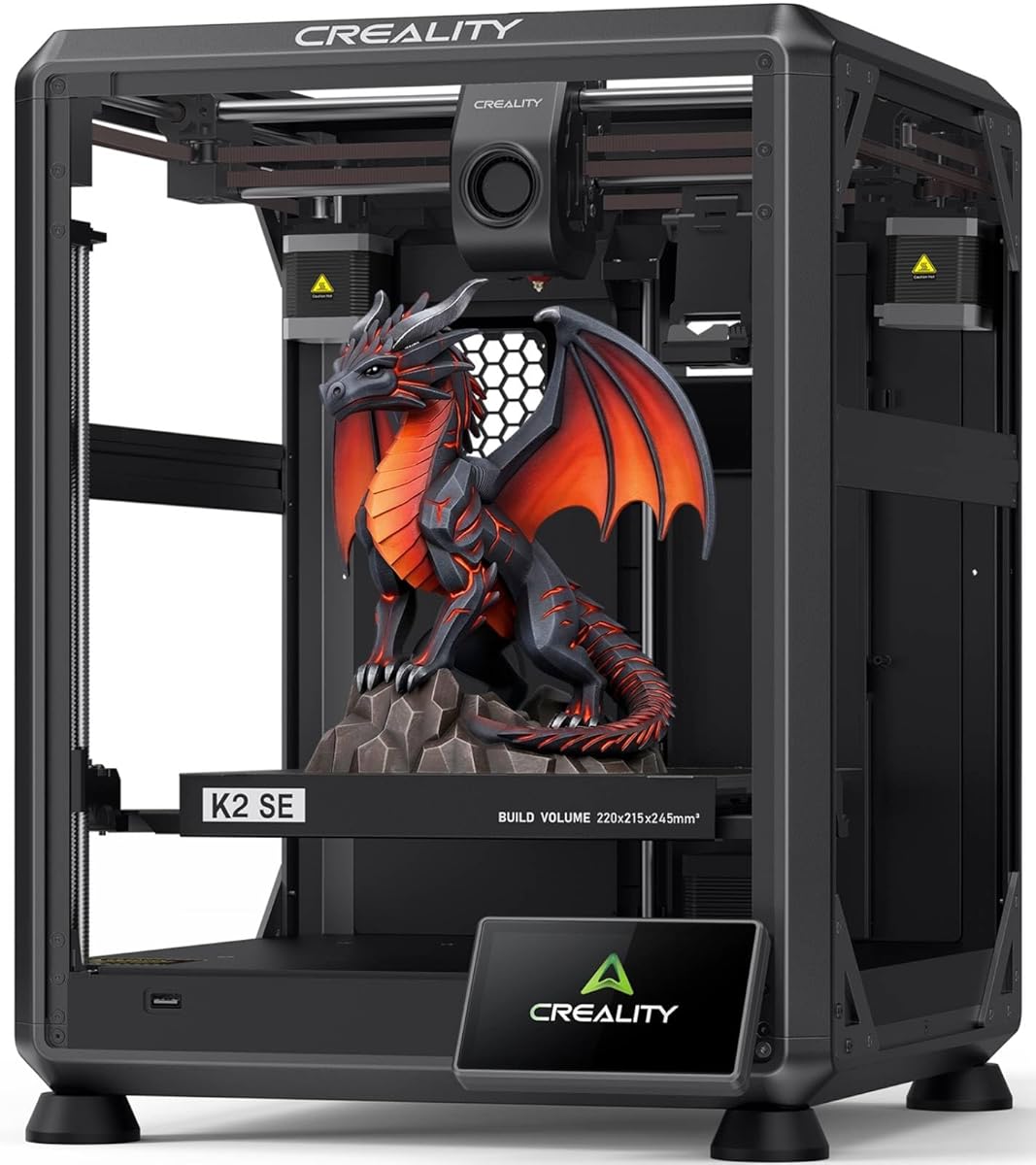
The Creality K2 SE is designed with future expansion in mind offering a solid foundation for multi-color printing. Its compatibility with the Creality Filament System (CFS) allows users to upgrade later for vibrant prints. The metal build provides exceptional rigidity which helps maintain accuracy at high speeds. Auto leveling is seamless with a one-tap system that simplifies the workflow significantly. The direct drive extruder handles a wide range of filament types effectively.
We may earn a commission when you buy through this link, at no additional cost to you.
Assembly is remarkably fast taking only about five minutes from box to first print. The touchscreen guide walks you through calibration and setup making it accessible for novices. The vibration sensor and input shaping algorithms reduce ringing on prints ensuring cleaner surfaces. While the current rating suggests some inconsistency the hardware potential is high. Creality OS and cloud features offer remote control and model downloading capabilities.
The main drawback is the dependency on external purchases for full multi-color capability. The CFS unit is sold separately adding to the total cost. Additionally user feedback indicates some variability in quality control out of the box. However for those willing to tinker or upgrade the K2 SE offers excellent value. The large build volume supports functional parts and prototypes with ease.
This machine suits users who plan to grow into complex projects. The metal frame and direct drive system suggest longevity and reliability. If you want a printer that can evolve with your skills the K2 SE is a strong candidate. Just ensure you account for potential extra costs when budgeting for the full ecosystem experience.
Seamless integration with CFS allows for automatic multicolor printing when upgraded later.
Die-cast aluminum and gussets minimize frame flex for higher dimensional accuracy.
We may earn a commission when you buy through this link, at no additional cost to you.
The E-Leveler 2 is a specialized tool rather than a printer itself. It is designed to assist with manual bed leveling on standard FDM machines. The LED light provides clear visual feedback when the bed is properly adjusted. This eliminates the guesswork associated with paper sliding methods. It is an excellent addition for beginners who already own a printer but struggle with calibration.
We may earn a commission when you buy through this link, at no additional cost to you.
Its design is straightforward and effective. The tool features balancing end caps that act as legs to keep it stable on the bed. Improved LED indicators and a simplified nozzle target make usage intuitive. It is compatible with most printers that have manually adjustable beds. This versatility makes it a practical investment for any workshop looking to improve print quality without buying new hardware.
Limitations include incompatibility with resin and delta printers. It requires manual adjustment of the printer bed by the user so it does not automate the process entirely. For those seeking a fully automatic solution this tool may fall short. However for the price it offers significant value in reducing failed prints due to poor leveling.
If you are on a budget or own an older printer this tool is a smart buy. It bridges the gap between manual and automatic leveling at a low cost. Beginners can learn proper leveling techniques while achieving better results. It is a niche product but highly effective for its intended purpose in the 3D printing workflow.
LED lights provide immediate feedback ensuring you stop adjusting at the correct height.
Works with most manual beds making it a versatile upgrade for existing setups.
We may earn a commission when you buy through this link, at no additional cost to you.
The FLASHFORGE AD5M leverages CoreXY technology for high-speed precise movement. Its all-metal structure ensures durability and stability during operation. The one-click auto leveling system measures nozzle distance to set offsets automatically. This removes the hassle of manual calibration for every new print. Users can swap nozzles in seconds without tools which is great for varied tasks.
We may earn a commission when you buy through this link, at no additional cost to you.
Maintenance is simplified with the patent quick-release nozzle feature. You can switch between 0.25mm and 0.8mm nozzles depending on your needs. The Orca-flashforge slicer supports network monitoring for multi-printer setups. If power fails the machine saves your progress and resumes later. This feature is essential for long jobs to avoid losing hours of work.
While it offers excellent performance the build volume is standard at 220x220x220mm. Open frame design means it is best suited for well-ventilated spaces. The app support allows you to manage devices from anywhere which adds convenience. For hobbyists needing reliability and flexibility this printer delivers consistent results with minimal intervention.
This model is perfect for those who want speed and precision in a user-friendly package. The auto leveling and nozzle swapping make it very accessible. It balances professional features with ease of use effectively. If you value low noise and quick maintenance this is a strong choice for your workspace.
Quick-release nozzle system reduces downtime and simplifies changing print requirements.
Flash Maker APP allows remote status checks and parameter adjustments from any device.
We may earn a commission when you buy through this link, at no additional cost to you.
The QIDI Q2 redefines the entry-level experience with professional-grade features. Its 65C heated chamber minimizes warping and ensures strong layer adhesion. The 370C nozzle unlocks advanced materials like PPS-CF. This capability is rare in printers targeting beginners. The nozzle doubles as a leveling sensor for unmatched first-layer accuracy.
We may earn a commission when you buy through this link, at no additional cost to you.
Safety is a priority with a triple filtration system reducing odors and particles. The closed-loop temperature controls and flame-retardant chamber ensure safe indoor use. AI camera monitoring adds an extra layer of oversight during prints. Power-loss recovery and run-out detection keep jobs running smoothly. The 1.5GT synchronous belt reduces vibration artifacts for smoother surfaces.
While expensive the Q2 justifies its cost with versatility. It covers everything from entry to expert projects. The QIDI BOX enables multi-color printing up to 16 colors with dry-while-print tech. This level of customization is significant for growing users. Customer service and lifetime support add further value to the purchase.
This printer is ideal for makers who need engineering-grade materials. If you plan to print ABS or carbon fiber the heated chamber is essential. It balances ease of use with advanced capabilities effectively. For those ready to invest in a long-term solution the Q2 offers unmatched reliability.
High-temp nozzle and heated chamber allow you to print industrial strength composites.
Triple filtration keeps your workspace clean and healthy while printing indoor.
We may earn a commission when you buy through this link, at no additional cost to you.
The FLASHFORGE 5M Pro focuses on comfort with a low noise design. It operates at around 50 dB allowing for focused work or study nearby. The automatic leveling system calculates offsets to ensure flawless first layers. Its enclosed design with dual filtration optimizes air quality for safe home use. The bundle includes multiple nozzles for diverse printing needs.
We may earn a commission when you buy through this link, at no additional cost to you.
CoreXY structure ensures smooth and low-noise performance even at high speeds. You can switch to low-speed silent mode for uninterrupted sessions. Remote monitoring via app allows you to check status from anywhere. The flexible PEI plate makes removing prints easy and prevents warping. This model balances speed with a user-friendly environment.
The main limitation is the standard build volume similar to other models in this class. It may not be sufficient for very large objects. However the quiet operation and air quality management make it great for shared spaces. The included nozzle bundle adds value and flexibility out of the box.
This printer suits students or remote workers who need quiet operation. The safety features like filtration make it ideal for bedrooms or offices. If noise and air quality are concerns for your setup this is a top pick. It maintains high performance without disrupting your daily routine.
Silent mode ensures minimal disturbance allowing you to print during work hours.
HEPA filters block particulate matter making home printing cleaner and safer.
We may earn a commission when you buy through this link, at no additional cost to you.
The Creality Ender 3 V3 SE is a budget-friendly upgrade over older models. It features CR Touch auto leveling and a strain sensor for easy setup. The Sprite direct extruder handles PLA and TPU smoothly without slipping. Assembly takes only three steps making it quick to start printing. Auto loading and unloading streamline the filament change process.
We may earn a commission when you buy through this link, at no additional cost to you.
Performance is solid for the price with speeds up to 250mm/s. Dual Z-axis lead screws reduce wobbling for consistent results over time. The quiet mainboard enhances comfort during operation. It saves time compared to older printers which is a huge plus for beginners. Official support ensures help is available if issues arise.
The main trade-off is the lower speed compared to premium models. However for general hobbyist projects this is rarely a bottleneck. Some users may find the manual firmware updates for advanced tweaks tricky. But for standard use the experience is smooth and reliable. It remains a top choice for affordability.
This machine is perfect for those starting their first printer journey. It offers modern features at a low cost making the barrier to entry smaller. If you need a reliable workhorse without breaking the bank this is it. The simplicity and support make it a safe bet for new users.
Pre-assembled steps mean you can start printing within twenty minutes of unpacking.
Auto loading feature allows you to feed filament with a simple tap on the screen.
We may earn a commission when you buy through this link, at no additional cost to you.
The Creality CR Touch Kit adds auto leveling to older Ender models. It uses multi-point detection to build a virtual plane for compensation. This improves accuracy without replacing the entire printer. You must update firmware to match your motherboard version but guides exist online. It is a stable and cost-effective solution for retrofitting.
We may earn a commission when you buy through this link, at no additional cost to you.
Installation involves mounting brackets and connecting to the Z-axis. The sensor works with PEI glass and metal platforms. It can be reused over 100,000 times offering long-term value. For owners of older printers this kit brings modern convenience at a fraction of the cost. It bridges the gap between old and new hardware effectively.
The requirement to flash firmware can be intimidating for some users. Ensuring the correct version is critical to avoid bricking the board. Once set up the leveling process is automatic and reliable. It is compatible with many popular models making it a versatile option. However new printers include this feature out of the box.
This kit is ideal for those who want to upgrade their current setup. If you have an older Ender with a 32-bit board this adds significant value. It transforms a manual leveling task into a streamlined process. For the price it is one of the best investments for existing printer owners.
The system builds a virtual plane to calculate tilt angles automatically for accuracy.
Durable sensors ensure consistent performance over hundreds of thousands of uses.
We may earn a commission when you buy through this link, at no additional cost to you.
The FLASHFORGE AD5X brings multi-color printing within reach of more users. Its Intelligent Filament System (IFS) handles multiple colors seamlessly without downtime. Auto leveling and 600mm/s speed ensure quick and accurate results. The build volume is standard but supports a wide range of materials including TPU. This expands creative possibilities significantly for artists and designers.
We may earn a commission when you buy through this link, at no additional cost to you.
CoreXY structure minimizes vibrations for smoother prints across all colors. You can create vibrant models without switching manual filament spools. The 300C nozzle allows for varied material choices. While multi-color adds complexity the system simplifies the workflow. It is a great step up for those ready to explore beyond single color prints.
The IFS system requires careful filament loading to function correctly. Beginners might need some guidance to avoid jams or color mixing issues. However once mastered the productivity gains are substantial. It allows for efficient workflow without constant intervention. For hobbyists looking to add flair to models this is a key feature.
This printer suits users who want to expand beyond basic printing. If you value color variety and speed the AD5X is a strong contender. It balances advanced features with user-friendly management. Consider this if you plan to create detailed or artistic designs regularly.
Multi-color technology allows for intricate designs and vibrant visual models.
Automated filament refilling keeps prints running longer without manual interruptions.
We may earn a commission when you buy through this link, at no additional cost to you.
The Creality Ender 3 V3 SE emphasizes ease of use for beginners. Assembly is simple with a few steps to get started quickly. CR Touch auto leveling ensures a reliable first layer with minimal manual adjustments. The flexible PC spring steel plate allows for quick model removal after prints. It is designed to be straightforward and efficient for new users.
We may earn a commission when you buy through this link, at no additional cost to you.
Consistent results are supported by dual Z-axis lead screws that reduce wobble. The quiet mainboard ensures a comfortable printing experience even in living spaces. It handles standard materials like PLA and PETG well. While speeds are moderate it is reliable for prototyping. This version offers a polished experience for those just starting out.
The main limitation is the lack of a heated chamber for ABS printing. However for PLA and other common filaments it performs reliably. The price point makes it accessible for most households. It balances modern features with practical design. If you want a printer that is ready quickly this is ideal.
This model is perfect for anyone seeking a hassle-free start. It avoids the setup headaches common with older units. For home use or basic prototyping it delivers consistent value. Prioritize this if simplicity and speed of setup are your main goals.
Quick assembly and auto Z-offset help you start printing almost immediately.
Low noise levels ensure the printer does not disturb daily activities.
We may earn a commission when you buy through this link, at no additional cost to you.
Selecting the right printer involves weighing several key features to match your needs and budget.
Auto leveling sensors like CR Touch or BLTouch measure the bed surface to adjust the Z-height automatically. This feature is essential for beginners to avoid failed prints due to uneven surfaces. Some systems use direct measurement while others use capacitive sensing. Look for reliable sensors that are well-supported by the manufacturer.
The build volume determines the maximum size of your prints. Standard 220mm cubes are common but larger models offer more flexibility for bigger projects. Consider what you want to print before deciding on dimensions. Larger volumes often come with higher costs and more setup complexity.
Faster speeds can reduce wait times but must be balanced with quality. High acceleration and vibration control ensure sharp details even at fast rates. Beginners might prioritize stability over raw speed. Look for printers with input shaping or vibration compensation features.
Ensure the printer supports the materials you plan to use. PLA and PETG are easy but advanced materials like ABS require heated chambers. Check nozzle temperatures and build surface types. A versatile printer opens up more possibilities for future projects.
Simple setup processes save time and frustration for new users. Look for features like auto filament loading and intuitive touchscreens. Some models come pre-assembled while others require steps. Consider how much time you want to spend on assembly.
Wi-Fi and app support allow remote monitoring and control. Cameras help track progress without physical presence. This connectivity enhances convenience for home environments. Ensure the manufacturer provides stable firmware for these features.
Quick-swap nozzles and modular parts simplify maintenance. Check for community support for upgrades and troubleshooting. Printers with accessible parts can grow with your skills. Easy maintenance extends the machine's lifespan.
Reliable support ensures you have help when issues arise. Look for warranties that cover key components like the mainboard or extruder. Manufacturer support can save time during the learning phase. Research brand reputation before buying.
Start by calibrating the bed according to the manufacturer guidelines. Even with auto leveling a quick manual check ensures accuracy. Keep the build surface clean to maintain adhesion and reduce failures.
Store your filaments in dry places to prevent moisture absorption. Moisture can cause clogs and poor print quality. Use silica gel packs or drying boxes if needed for long-term storage.
Regularly clean the nozzle and check belts for tension. Lubricate moving parts as recommended to reduce wear. Schedule maintenance tasks after every 100 hours of print time.
Not typically. Auto leveling systems adjust for the bed automatically. However occasionally a quick check is wise to ensure the sensor is calibrated properly. This helps maintain print consistency.
Yes these printers are designed with beginners in mind. Features like auto leveling and simple assembly make the process straightforward. Many come with guides to help you get started right away.
For standard PLA it is not required. If you plan to print ABS or high temp materials a chamber helps. For starters PLA is usually sufficient and easier to manage.
PLA and PETG are most common and work well with all listed printers. TPU is also supported by direct drive extruders. Check specific nozzle temperatures for other material choices.
Check bed adhesion first. Ensure the Z-height is correct and the nozzle is clean. Review slicer settings and make sure you are using the right filament profile.
Some models like the AD5X support multi-color systems. Others may require add-ons like dual extruders. Check the specific capabilities before purchasing for multi-color needs.
These ten printers offer a range of options tailored to beginners. The FLASHFORGE Adventurer 5M excels in speed and ease while the Ender 3 V3 SE offers value. Consider your specific needs before deciding on a model.
Prioritize features that matter most for your projects like speed or build size. A good printer should grow with you as your skills develop. Balance budget with essential features like auto leveling and support.
Prices and availability may shift so check current listings before purchase. Investing time in research ensures you pick a reliable machine. Start small and expand as you gain confidence in your printing journey.