
4K AI-Powered Conference Webcam with Microphones Speakers
4.1Editor score
120° wide angle lens
AI auto framing
Physical lens cover
This guide compares the top auto tracking conference camera systems for 2026, evaluating video quality, audio features, and AI tracking performance for
Selecting the right auto tracking conference camera is essential for modern hybrid work environments. These systems ensure remote participants see and hear everyone clearly without manual adjustments during meetings. Choosing a reliable model improves collaboration and reduces technical friction in professional settings.
We evaluated ten leading auto tracking conference camera systems based on video resolution, AI tracking accuracy, audio clarity, and ease of setup. Our analysis covers everything from compact all-in-one units to professional PTZ setups designed for larger rooms and broadcast needs.
Each review highlights key strengths, real-world performance, and ideal use cases to help you find the perfect fit for your space. Please note that product specifications and availability may change over time, so verify current details before purchasing to ensure compatibility with your existing infrastructure.
4.1Editor score

4.8Editor score

4.6Editor score
The following comparison table provides a side-by-side overview of the ten selected auto tracking conference camera systems, highlighting their core specifications and connectivity options.




The TONGVEO 4K Conference Room Camera System stands out as a comprehensive solution for professional video conferencing needs. With its high 4K rating and robust feature set, it delivers sharp visuals and clear audio for small to medium meeting spaces.
We may earn a commission when you buy through this link, at no additional cost to you.
Its standout feature is the smart AI auto-tracking algorithm, which precisely follows speakers using facial and humanoid recognition. The included wireless Bluetooth speakerphone ensures everyone is heard clearly, making this kit an all-in-one value proposition for teams needing reliable hardware.
While the system offers excellent performance, the speakerphone battery may require charging after extended sessions. Additionally, users must ensure their computer has a USB3.0 port to fully utilize the high-definition output capabilities of the camera.
This system is ideal for businesses and organizations seeking a plug-and-play conferencing solution without complex IT setup. Its versatility across platforms like Zoom and Teams makes it a top recommendation for enhancing remote collaboration efficiency.
The 4K resolution ensures remote participants see details clearly, fostering better engagement during presentations and discussions.
Combining camera and speakerphone in one kit simplifies setup and ensures synchronized audio and video experiences.
We may earn a commission when you buy through this link, at no additional cost to you.
Designed specifically for small conference rooms, this 4K webcam offers a budget-friendly entry into high-quality video conferencing. Its certification ensures compatibility and stability during critical meetings, making it a safe choice for small businesses.
We may earn a commission when you buy through this link, at no additional cost to you.
The 120° wide angle lens allows the camera to capture entire teams without needing multiple devices. AI auto framing helps keep group meetings organized by adjusting the frame dynamically, though presenter tracking is less robust than premium models.
While cost-effective, users may find the audio pickup range limited to about 5 meters, which could be restrictive for larger tables. The lack of advanced PTZ controls also means less flexibility for dynamic presentations compared to more expensive systems.
This webcam is perfect for startups or small offices needing reliable video quality without breaking the bank. Its simplicity and privacy features make it a practical tool for daily virtual interactions where extensive customization is not required.
Compact design and wide angle lens make it ideal for smaller desks and meeting spaces without clutter.
Zoom certification provides confidence that the camera will perform consistently within the Zoom ecosystem.
We may earn a commission when you buy through this link, at no additional cost to you.
This camera is engineered for professional broadcasters and high-end conference rooms that demand flawless performance. With official NDI integration and SDI outputs, it fits seamlessly into complex production setups requiring network video and long cable runs.
We may earn a commission when you buy through this link, at no additional cost to you.
The 20x optical zoom ensures clear views from distant angles, while the AI auto-tracking maintains focus on speakers even if partially obstructed. Its versatility across HDMI, USB, and IP streaming makes it a powerhouse for hybrid events and livestreaming.
While the feature set is robust, it comes at a premium price and may require technical expertise to configure fully. Users should also note that the SDI and NDI features are most beneficial for professional environments rather than simple office meetings.
For churches, schools, and enterprises investing in professional video production, this camera delivers the quality and flexibility needed. Its advanced connectivity options justify the cost for those needing scalable, broadcast-ready video solutions.
NDI and SDI outputs allow integration with professional switchers and software for high-end productions.
Support for PoE and multiple ports ensures adaptability across various installation environments and needs.
We may earn a commission when you buy through this link, at no additional cost to you.
This all-in-one system combines a PTZ camera with a Bluetooth speakerphone, offering a complete video conferencing experience. The 60fps output provides smoother motion, which is beneficial for active meetings or presentations where fluidity matters.
We may earn a commission when you buy through this link, at no additional cost to you.
Despite being 1080p, the camera delivers crisp visuals, and the speakerphone ensures reliable audio pickup up to 16.4 feet. The AI auto-tracking works seamlessly to keep speakers in focus, enhancing engagement for remote participants.
The only trade-off is the lack of 4K resolution and the separation of audio and video units. However, the extended battery life of the speakerphone and ease of setup make it a practical choice for most medium-sized meeting rooms.
Ideal for teams prioritizing motion clarity and audio reliability over ultra-high definition, this kit simplifies conferencing workflows. It balances performance and affordability effectively for users who need consistent quality without excessive complexity.
60fps frame rate ensures natural movement capture, reducing lag during dynamic presentations or discussions.
Integrated speakerphone reduces the need for additional audio hardware, streamlining the meeting setup.
We may earn a commission when you buy through this link, at no additional cost to you.
This model introduces gesture control, allowing users to toggle AI tracking and zoom with hand signs. The 4K resolution and 120° wide-angle lens ensure every participant is captured clearly, making it versatile for both meetings and streaming.
We may earn a commission when you buy through this link, at no additional cost to you.
The gesture features add a hands-free convenience factor, ideal for dynamic environments where users frequently move around. Combined with a remote control and speakerphone, it offers robust functionality for small to medium conference spaces.
Digital zoom may not match optical zoom quality when magnifying details significantly. Additionally, users may need practice to master the gesture controls effectively, though the remote offers a traditional backup option.
Perfect for tech-savvy teams or educators seeking interactive features, this camera blends innovation with utility. Its ability to adapt to different room sizes and usage scenarios makes it a compelling choice for modern workspaces.
Gesture commands provide intuitive operation without needing to reach for remotes or software interfaces.
Wide-angle lens ensures entire rooms are visible without requiring multiple camera setups or manual adjustments.
We may earn a commission when you buy through this link, at no additional cost to you.
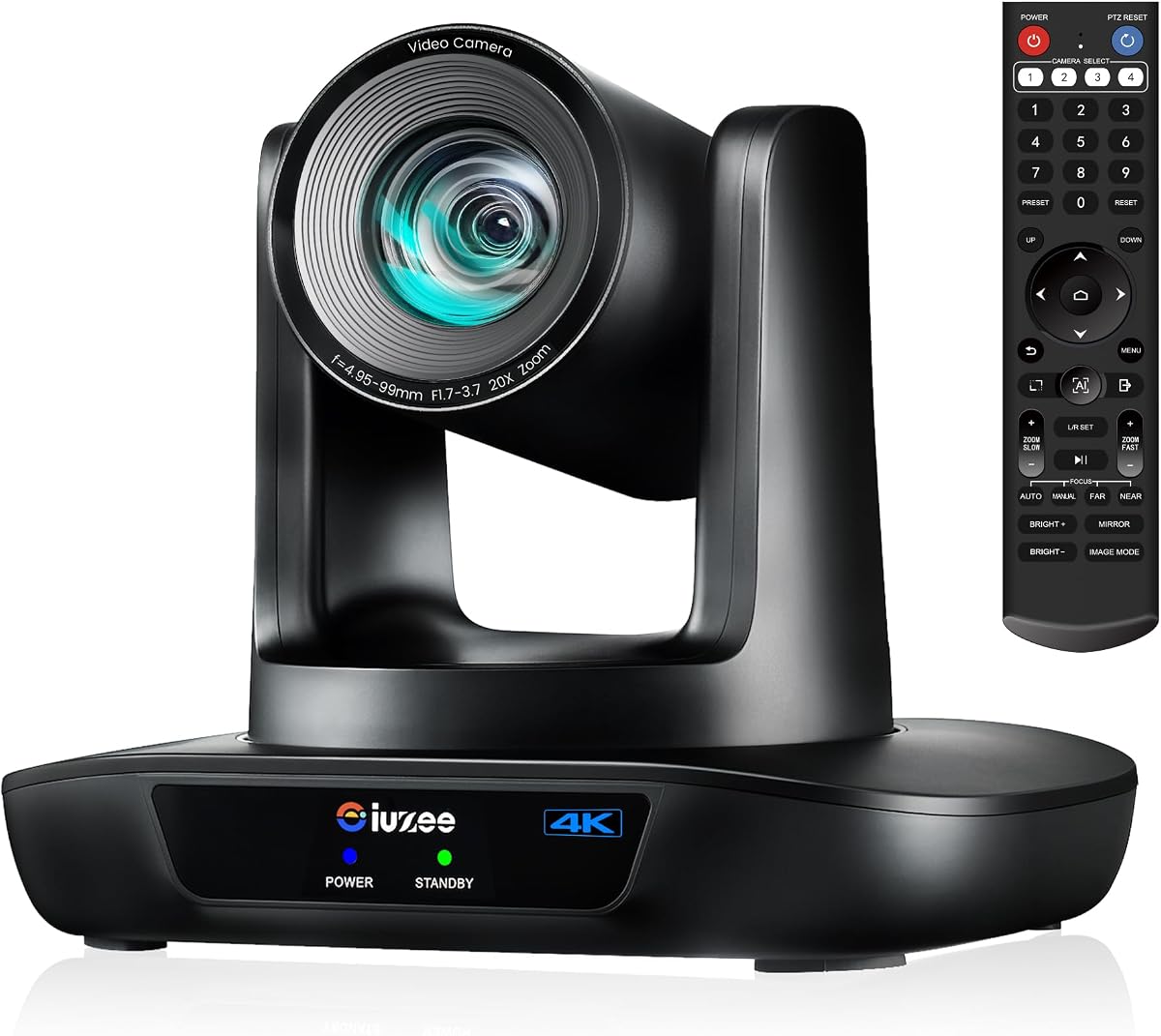
Designed for larger venues, this system combines 20x optical zoom with AI tracking to capture distant speakers clearly. The PoE support allows single-cable power and data, simplifying installations in large rooms or fixed setups like churches.
We may earn a commission when you buy through this link, at no additional cost to you.
The AI auto-tracking ensures presenters are followed smoothly, while the Bluetooth speakerphone provides clear audio pickup over significant distances. This makes it suitable for worship services, classrooms, or conference halls requiring extensive coverage.
While powerful, configuring PoE and managing separate audio units may require more technical effort than plug-and-play kits. Users should also consider the battery life of the speakerphone for extended events to avoid interruptions.
Best for organizations with fixed installations or large spaces, this camera delivers professional coverage and audio reliability. Its robust features justify the setup complexity for users who need dependable performance in demanding environments.
20x optical zoom brings distant subjects into sharp focus without losing image clarity or detail.
PoE capability reduces cable clutter and simplifies power management for permanent or large room setups.
We may earn a commission when you buy through this link, at no additional cost to you.
This camera is designed for professional broadcast and live streaming applications, offering triple simultaneous outputs. Its 20x optical zoom and AI tracking ensure high-quality visuals, while PoE support simplifies long-distance connectivity.
We may earn a commission when you buy through this link, at no additional cost to you.
The ability to stream via LAN and support protocols like RTMP makes it ideal for YouTube, OBS, or custom streaming platforms. Noise reduction technology enhances image clarity, ensuring professional output even in varying lighting conditions.
The lack of a built-in microphone means users must provide external audio solutions, adding to setup complexity. However, this trade-off allows for greater flexibility in audio equipment choices tailored to specific production needs.
For content creators, churches, and educators focused on high-quality broadcasting, this camera delivers exceptional versatility. Its robust feature set supports complex workflows where visual fidelity and streaming control are priorities.
Multiple encoding and output options enable compatibility with diverse streaming software and hardware setups.
Advanced noise reduction and optical zoom ensure crisp, clean visuals for professional broadcast standards.
We may earn a commission when you buy through this link, at no additional cost to you.
This model bridges the gap between conferencing and broadcasting, offering powerful zoom and AI tracking. Its 4K resolution and 20x optical zoom allow for flexible framing in large rooms or distant viewing scenarios.
We may earn a commission when you buy through this link, at no additional cost to you.
Connectivity options include HDMI, USB, LAN, and PoE, making it adaptable to various network and hardware configurations. This versatility suits environments where both standard meetings and streaming might occur on the same setup.
Users should note the default 4K output may require resolution adjustments on lower-end monitors. The absence of an integrated speakerphone means separate audio hardware is necessary for full conferencing capabilities.
Ideal for organizations needing flexible video solutions, this camera balances quality and adaptability. Its robust feature set supports diverse applications, from corporate boardrooms to educational institutions seeking reliable video tools.
Multiple interface options ensure the camera works across different devices, networks, and use case scenarios.
High optical zoom maintains image detail even when framing distant subjects, enhancing meeting visibility.
We may earn a commission when you buy through this link, at no additional cost to you.
Designed for medium and large conference rooms, this all-in-one system combines 4K video with integrated microphones and speakers. Its AI auto framing ensures all participants are visible, reducing the need for manual adjustments during meetings.
We may earn a commission when you buy through this link, at no additional cost to you.
The 4-mic array with noise reduction captures clear audio across the room, while built-in speakers eliminate external audio devices. This simplifies setup and cable management, making it ideal for hybrid workspaces.
While effective for general meetings, the camera may lack advanced zoom control found in PTZ models. Additionally, its all-in-one design might be larger than standalone webcams, requiring sufficient desk or mounting space.
Perfect for teams seeking a single device to handle both video and audio, this system simplifies conferencing workflows. Its reliability and ease of use make it a strong contender for busy meeting environments.
Built-in microphones and speakers provide a complete audio solution without additional hardware requirements.
Auto framing keeps all participants in view, enhancing inclusivity and engagement in larger meetings.
We may earn a commission when you buy through this link, at no additional cost to you.
This compact webcam is ideal for individual workspaces or mobile conferencing, offering 4K resolution and AI tracking. The adjustable field of view allows users to customize framing, ensuring flexibility for solo or group calls.
We may earn a commission when you buy through this link, at no additional cost to you.
Built-in speakers and microphones make it a standalone solution for small meetings, while the privacy cover adds security. It is easy to deploy and compatible with major platforms, requiring no driver installations.
However, digital zoom may not match optical quality for close-ups, and audio pickup is limited compared to dedicated speakerphones. These factors make it better suited for personal or small team use rather than large rooms.
Best for remote workers or small offices needing a versatile and portable video tool, this webcam simplifies daily communication. Its balance of quality and convenience supports effective virtual collaboration with minimal setup.
Compact design and USB connectivity make it easy to move between workstations or travel with.
Adjustable field of view adapts to different group sizes and meeting formats without hardware changes.
We may earn a commission when you buy through this link, at no additional cost to you.
Selecting the right auto tracking conference camera requires understanding your room size, connectivity needs, and video quality expectations.
Higher resolution like 4K ensures crisp visuals for remote participants. This is crucial for detailed presentations and professional impressions. While 1080p suffices for basic calls, 4K offers future-proofing.
Look for cameras supporting 4K to maintain clarity across all meeting scenarios and ensure compatibility with modern displays.
Optical zoom preserves image quality when magnifying distant speakers, unlike digital zoom which can degrade resolution. Choose based on room size and typical seating arrangements to ensure all participants are visible.
For larger rooms or dynamic presentations, prioritize models with optical zoom features for clear close-ups.
Effective AI tracking uses facial and humanoid recognition to keep speakers in focus. Check if the system supports both individual and group framing to adapt to various meeting types.
Ensure the camera tracks smoothly without lag to maintain a professional flow during discussions and presentations.
Audio clarity is just as important as video. Integrated speakerphones simplify setup but may have limited pickup range. For larger rooms, separate audio units may offer better performance.
Consider systems with noise reduction and wide pickup ranges to ensure everyone is heard clearly without external microphones.
Multiple ports like USB, HDMI, and LAN provide flexibility in connecting to different devices and networks. USB plug-and-play is simple for laptops, while HDMI suits TV connections.
Select cameras with versatile connectivity to fit existing infrastructure and avoid unnecessary hardware adapters.
Options for desk, wall, or ceiling mounting allow optimal positioning for different room layouts. Ensure the camera supports your preferred installation method without compromising stability.
Check for included mounting accessories to streamline setup and ensure secure installation.
Compatibility with major conferencing platforms like Zoom and Teams is essential for seamless operation. Ensure drivers or firmware support your specific software environment.
Verify official certifications to guarantee reliable performance and minimize technical issues during critical meetings.
Reliable customer support and warranty coverage protect your investment against defects and technical issues. Look for companies offering responsive service and clear documentation.
Choose brands with proven after-sales support to ensure long-term reliability and quick resolution of any problems.
Begin by connecting the camera to your computer via USB or HDMI, ensuring all cables are secure. Install any necessary software and adjust the field of view to cover your meeting space adequately.
Calibrate the AI tracking settings to recognize speakers accurately by following the manufacturer's instructions. Position the camera at eye level and ensure no obstructions block the lens for optimal performance.
Clean the lens regularly with a soft cloth to prevent dust and smudges from affecting video quality. Store the device in a safe location when not in use to extend its lifespan and reliability.
Auto tracking allows the camera to automatically follow speakers during meetings. It uses AI to detect human presence and adjust the frame, ensuring remote participants see active presenters without manual intervention.
Most modern auto tracking conference cameras are certified for Zoom and other major platforms. Always check the product specifications to confirm compatibility with your specific software version.
Many systems include integrated microphones, but larger rooms may benefit from separate audio devices. Evaluate your room size and audio needs before deciding on a standalone versus all-in-one solution.
Ensure good lighting and place the camera at eye level for best results. Avoid having speakers move too quickly or block each other, as this can confuse the tracking algorithm temporarily.
Yes, many models support HDMI and IP streaming outputs suitable for platforms like YouTube. Check for NDI or RTMP support if you require advanced broadcast features for public streaming.
Small units work well in personal offices, while larger PTZ systems suit meeting rooms. Consider ceiling heights and seating arrangements to ensure the camera covers the necessary area effectively.
Most cameras are plug-and-play, but some offer optional software for advanced control. Check if your preferred setup requires additional apps or if browser control is sufficient.
Quality cameras are designed for daily use with proper care. Regular cleaning and avoiding excessive force on controls can extend their operational lifespan significantly beyond several years.
The right auto tracking conference camera enhances hybrid work by ensuring clear visuals and audio for all participants. Top picks like the TONGVEO 4K system offer balanced features for most professional needs.
Prioritize resolution, zoom, and AI accuracy based on your room size and meeting formats. A system with integrated audio simplifies setup but verify pickup ranges for larger spaces.
Prices and availability fluctuate regularly, so confirm current details before purchase. Investing in a reliable camera ensures consistent performance and smoother collaboration for your team.