Keyboard Clickers for 3D Prints
4.7Editor score
Crisp clicky feedback
Dustproof design
50 million cycles
This guide compares the top automated keyboard clicker devices for gaming and productivity, evaluating physical tools and switches to help you choose the best
Finding a reliable automated keyboard clicker can transform how you handle repetitive tasks or maintain activity during long gaming sessions. These devices simulate human input to keep systems active without constant manual effort.
We evaluated ten physical devices and switches based on durability, speed control, ease of setup, and compatibility. Our analysis focuses on real-world performance to ensure you get a tool that works consistently across different keyboards.
Each pick highlights key strengths, potential limitations, and ideal use cases so you can make an informed decision. Keep in mind that prices and availability may fluctuate over time, so check current listings before purchasing.
4.7Editor score

5.0Editor score

4.3Editor score
The following table provides a side-by-side comparison of all ten products, highlighting their core specifications and key features to help you quickly identify the right fit for your needs.


This physical click auto keyboard stands out as a top choice due to its perfect rating and focus on mimicking human activity through random click intervals. It is designed to keep your game active without manual intervention, simulating keyboard and mouse input effectively.
We may earn a commission when you buy through this link, at no additional cost to you.
The device operates independently of your computer's software, which means no installation is required and there is no risk to your system's security. Users can simply set it up on their computer, adjust settings for specific needs, and let it manage repetitive clicking tasks.
While it is a physical device that requires manual adjustment of the click head height and position, this design ensures it does not heat up and remains durable over time. The low noise motor makes it suitable for various environments without causing distractions.
If you need a reliable tool to prevent your game from going offline or automate repetitive clicking tasks, this product offers an efficient and safe solution. It is particularly beneficial for users who prioritize consistent performance without software dependencies.
Random intervals are customizable to enhance effectiveness across different online platforms by simulating natural user behavior.
The physical device works without installation, ensuring consistent performance while avoiding potential security risks from software solutions.
We may earn a commission when you buy through this link, at no additional cost to you.
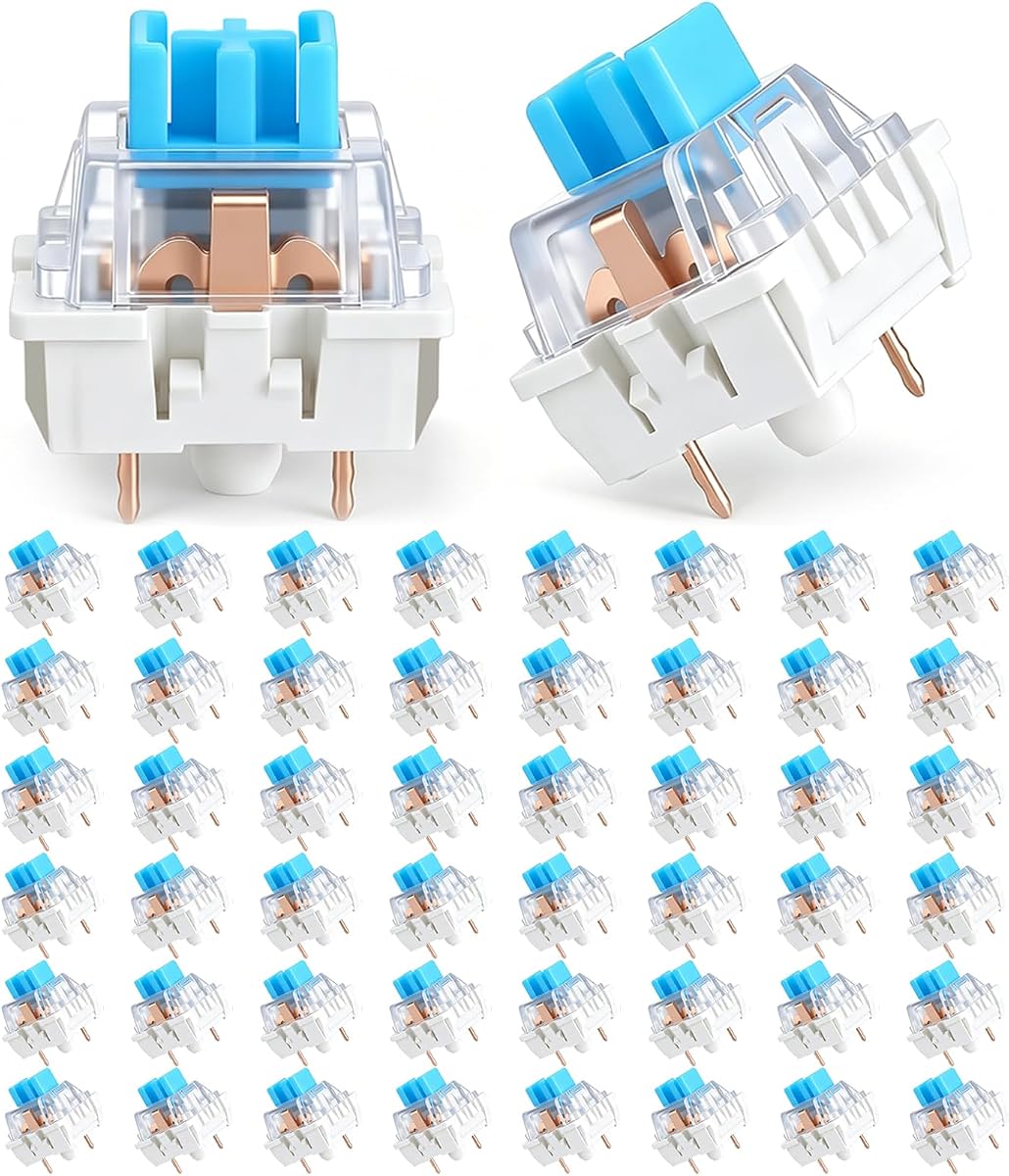
These keyboard clickers are mechanical switches designed to provide a crisp clicking sound and tactile feedback, offering a budget-friendly option for enhancing your typing experience. They are made of premium materials including plastic housing, copper washers, and precision steel springs.
We may earn a commission when you buy through this link, at no additional cost to you.
With a service life of up to 50 million cycles, these switches are built to last and feature waterproof and dustproof properties that protect against common hazards. The transparent blue casing complements LED backlighting and provides excellent tactile feedback for a pleasant typing experience.
While these are replacement switches rather than automated tools, they are ideal for users who want to upgrade their mechanical keyboards with clicky switches that deliver consistent performance. They are also suitable for 3D-printed clickers and fidget builds.
If you are looking for durable mechanical switches that offer a satisfying click and are compatible with most gaming keyboards, this 50-piece set is an excellent value. It is perfect for enthusiasts who want to customize their setup without breaking the bank.
Built with copper washers and precision springs, these switches offer waterproof and dustproof protection with a lifespan of 50 million cycles.
The clear housing and blue casing provide excellent tactile feedback that complements LED backlighting for a visually pleasing experience.
We may earn a commission when you buy through this link, at no additional cost to you.
This auto keyboard clicker offers a premium experience with its adjustable height design and wide range time settings, making it suitable for various devices like tablets, desktops, and laptops. It simulates manual clicking with fixed drop and irregular timing for realistic effects.
We may earn a commission when you buy through this link, at no additional cost to you.
The device allows you to set time directly without programming, making it easier to use, and features a rubberized cover that protects the keyboard from damage and reduces sound. It is designed to provide a real simulation of manual clicking with random time intervals.
While it comes at a higher price point, the adjustable height and wide compatibility justify the investment for users who need a versatile solution that works across different setups. The rubberized cover ensures your keyboard remains safe during automated use.
If you need a reliable and adjustable auto clicker that offers extensive control over timing and protects your device, this product is a strong choice. It is ideal for gamers and professionals who value flexibility and premium build quality.
The clicker can be adjusted to fit different heights of keyboards, ensuring it works with a wide range of devices on the market.
A rubberized cover protects the keyboard from damage and reduces noise, providing a quieter and safer automated clicking experience.
We may earn a commission when you buy through this link, at no additional cost to you.
The Pankia Auto Keyboard Clicker offers 15 different random click speeds to choose from, allowing users to release their hands during gaming or work tasks. It is designed to click the keyboard at the speed you set, providing basic automation for repetitive actions.
We may earn a commission when you buy through this link, at no additional cost to you.
With a wide compatibility feature, this clicking arm can extend and adjust to different positions, supporting most keyboards and mice to save you time. Pressing the button for 3 seconds starts the device, and the indicator light flashes to indicate the mode number.
While it has a lower rating, the device provides a simple and effective solution for users who need basic automation without complex programming. The satisfaction guarantee adds confidence for those looking to try a budget-friendly physical clicker.
If you need a straightforward tool to keep your game active or automate clicking tasks, this Pankia model offers random speeds and wide compatibility. It is best for users who prioritize simplicity over advanced features.
The device offers 15 different random click speeds across three ports, allowing users to select the speed they need.
This clicking arm supports most keyboards and mice, adjusting to different positions to save time and effort.
We may earn a commission when you buy through this link, at no additional cost to you.
This physical keyboard clicker meets your computer clicking requirements with hands-free operation, placing the clicking arm on the keyboard or mouse to click automatically. It offers a high degree of customization, allowing you to define loop time, click interval, and random click count.
We may earn a commission when you buy through this link, at no additional cost to you.
Each of the three ports can have its clicking speed adjusted independently, fulfilling various needs across different applications. The clicking arm is equipped with 3 adjustable parts to make clicking the keyboard easier, but it is advised not to exceed 5 clicks per second.
While it saves significant time for game assistance or repetitive tasks, users should be mindful of potential heat damage if used excessively. The wide application ensures it is suitable for both keyboards and mice, acting as an efficient simulated finger tapper.
If you need a programmable device that offers customizable settings for diverse clicking needs, this tool provides a practical solution. It is ideal for users who want to automate tasks without installing software on their system.
The device allows you to define loop time, set click interval, and specify random time range to meet diverse clicking needs.
Each of the three ports can have its clicking speed adjusted independently, fulfilling various needs you may have.
We may earn a commission when you buy through this link, at no additional cost to you.
The Pankia Box Physical Click meets your screen click needs by automatically clicking when the arm is placed on the keyboard or mouse. It allows you to release your hands during tasks, providing a convenient solution for keeping your computer or laptop active.
We may earn a commission when you buy through this link, at no additional cost to you.
All three ports can adjust the speed separately, meeting different needs for various applications. The clicking arm has 3 adjusting parts to make it easier to click the keyboard, though users should avoid clicking more than 5 times per second to prevent heat damage.
While it is designed to save time and offer satisfaction through high-quality products, it is part of a box solution that may require specific components. The wide compatibility ensures it supports both keyboards and mice for a variety of clicking applications.
If you need a box solution that offers adjustable speeds and supports multiple devices, this Pankia product provides a simple and effective tool. It is best for users who prefer hardware-based automation over software.
All three ports can adjust the speed separately, allowing different click speeds to meet various needs.
The device supports keyboard and mouse, suitable for a variety of clicking applications to save time.
We may earn a commission when you buy through this link, at no additional cost to you.
This physical click auto keyboard clicker uses advanced ABC logic with configurable content including click head travel distance and press start key direction. It features a digital display function that clearly shows click speed, allowing users to maintain precise control over the action.
We may earn a commission when you buy through this link, at no additional cost to you.
The device supports arbitrary combination of fixed time and random time from 0.1 to 999 seconds, enabling combinations that can last from 0.1 second to 80 hours. It allows you to set the number of clicks and control them by maintaining the pressing time.
While it offers advanced functions like delay stop running and group execution, the complexity may require careful setup. The safe use ensures it is powered by 5V and works with various power sources like mobile phone chargers or power banks.
If you need a tool with advanced programmable features for long-duration automation, this product offers extensive control. It is best for users who are comfortable with detailed configuration and need precise timing.
The clicker has its own digital display function, clearly showing the click speed in numbers for precise control.
ABC groups are executed sequentially, allowing arbitrary combinations of fixed and random time for extended automation.
We may earn a commission when you buy through this link, at no additional cost to you.
This Pankia Box Physical Click product is specifically the clicking arm only and cannot be used alone without the Pankia Box. It is designed to meet your screen click needs by automatically clicking when placed on the keyboard or mouse to release your hands.
We may earn a commission when you buy through this link, at no additional cost to you.
The clicking arm has 3 adjusting parts to make it easier to click the keyboard, though users should avoid clicking more than 5 times per second to prevent heat damage. It supports keyboard and mouse, suitable for a variety of clicking applications to save time.
While it is a replacement part rather than a standalone tool, it offers the same satisfaction guarantee and wide compatibility as the full box solution. Users must ensure they have the Pankia Box to utilize this component effectively.
If you need a replacement arm for an existing Pankia Box setup, this product offers the same functionality and compatibility. It is essential for users who have lost or damaged their original arm.
The clicking arm supports keyboard and mouse, suitable for a variety of clicking applications to save time.
The clicking arm can only click the keyboard or mouse and requires the Pankia Box to function properly.
We may earn a commission when you buy through this link, at no additional cost to you.
This keyboard clicker fidget set includes two profiles: a quiet pink option for discreet pressing and a clicky green option for audible feedback. Each uses four mechanical-style keys for a familiar finger-pressing feel that helps relieve stress during work or travel.
We may earn a commission when you buy through this link, at no additional cost to you.
The compact design includes a keychain clip for carrying on keys, bags, or work pouches, making it easy to share between spaces. Users can choose the softer low-noise press for offices and the louder clicky feedback for home settings.
While it is a fidget toy and not an automated tool, it offers a tactile experience that mimics keyboard keys for stress relief. The two-pack ensures you have options for different environments, whether shared or private.
If you need a portable stress reliever that provides mechanical key feedback, this fidget set is a great choice. It is perfect for adults and office workers who enjoy tactile interaction during breaks.
The pink fidget is quiet for discreet pressing, while the green delivers audible clicky feedback when sound is welcome.
Each compact fidget toy includes a keychain clip for carrying on keys, bags, or work pouches during commutes.
We may earn a commission when you buy through this link, at no additional cost to you.
ZhouWang provides 108 pieces of blue click switches that deliver distinct tactile feedback with a pronounced click sensation and audible mechanical sound. They offer rapid and responsive key travel that minimizes fatigue during extended use for gaming or typing.
We may earn a commission when you buy through this link, at no additional cost to you.
These switches are made of plastic housing, copper spacers, and high-quality springs with a service life of 80 million cycles. They are waterproof and durable, suitable for gaming, typing, office work, and content creation, though the loud sound may not be ideal for quiet environments.
The switches come in a delicate PVC plastic box to protect from damage and prevent pin bending. They can also serve as anxiety-reducing tools for relief, acting as a fingertip clicker or keychain gift.
If you need a large pack of durable clicky switches for keyboard customization or stress relief, this product is a strong choice. It is best for mechanical enthusiasts who value distinct feedback and durability.
Made of plastic housing and high-quality springs, these switches offer waterproof protection and a service life of 80 million cycles.
The distinct tactile feedback provides a pronounced click sensation with rapid and responsive key travel for a precise typing experience.
We may earn a commission when you buy through this link, at no additional cost to you.
Selecting the right automated keyboard clicker involves understanding your specific needs, whether for gaming, productivity, or testing. This guide outlines key factors to consider.
Ensure the device works with your keyboard or mouse model. Some tools require specific layouts or have limits on key types.
Check that the clicker supports your device's height and key size for reliable performance.
Look for adjustable speed settings to mimic natural usage or meet task requirements. Random intervals help avoid detection.
Choose a model with clear speed indicators or digital displays for precise control.
Devices should have protection against overheating, especially when used for long durations. Physical limits on clicks per second prevent damage.
Prioritize models with low noise and heat protection to ensure safe and quiet operation.
The best tools are easy to set up without software installation. Physical devices that plug in and adjust easily save time.
Choose a model that allows direct time or speed settings through buttons or simple interfaces.
Check for materials that resist wear and tear, such as reinforced click arms or waterproof components. A longer lifespan ensures value.
Look for products with a high cycle count and warranty support for peace of mind.
Define if you need a simple auto clicker, a fidget, or a mechanical switch. Different tools suit different goals.
Select a device that matches your primary use case, such as gaming or testing.
Consider the sound level for your environment. Quiet or rubberized options are better for shared spaces like offices.
Choose a model with noise reduction features if you work in a collaborative setting.
Compare costs based on features and durability. Budget options may lack advanced controls, while premium ones offer more customization.
Find a balance that meets your needs without overspending on unnecessary features.
Start by placing the clicker arm securely on the desired key or button. Ensure it is stable and will not shift during use.
Set the desired speed and time settings according to your needs. Use the manual to adjust intervals or random patterns.
Clean the device regularly with a soft cloth to prevent dust buildup. Avoid liquids that could damage the internal components.
An automated keyboard clicker helps you perform repetitive clicking tasks without manual effort. It is useful for gaming, keeping systems active, or testing software. These devices simulate human input to save time and reduce fatigue.
Yes, most physical clickers are safe and do not harm your computer. However, avoid using them for too long to prevent overheating. Follow the manufacturer's guidelines for safe operation.
Physical devices typically do not require software installation. They work independently of your computer's software, making them safer and easier to set up for various tasks.
Many models offer adjustable speed settings to match your needs. Some allow you to set random intervals or fixed times for precise control over the clicking action.
Yes, devices often have a maximum click speed to prevent overheating. Exceeding these limits can damage the tool or reduce its lifespan significantly.
Most clickers are designed to work with both keyboards and mice. Check the product specs to confirm compatibility with your specific setup before purchasing.
We highlighted top picks like the Physical Click Auto Keyboard for overall value and the Pankia model for budget needs. Each device offers unique features to suit different tasks.
Prioritize compatibility, speed control, and durability when selecting a clicker. These factors ensure the tool performs reliably and meets your requirements.
Check current prices and availability before buying since listings may change over time. This ensures you get the best value for your choice.