
UGREEN Power Bank
4.3Editor score
High wattage USB C output
Massive battery capacity
Wide device compatibility
This guide compares the top 10 battery backup solutions for Dell laptops including UPS units and portable power banks to ensure reliable power during outages.
Finding a reliable battery backup for your Dell laptop is essential for protecting your work and data during unexpected power outages. Whether you need a UPS for your desktop setup or a portable power bank for travel, choosing the right device ensures uninterrupted productivity and device safety.
We have evaluated the market to identify the most effective power solutions compatible with Dell systems. Our comparison includes UPS units with surge protection and high-capacity power banks capable of charging laptops on the go. Each product meets specific criteria for reliability and output.
Each pick below highlights key features and compatibility details to help you make an informed decision. Please note that product availability and pricing can change frequently. Always check the current listing details before purchasing to ensure the specifications match your Dell laptop model requirements.
4.3Editor score

4.4Editor score

4.2Editor score
The following table provides a side by side overview of all selected power backup solutions. Each entry lists critical specifications to help you compare output capacity and connectivity options quickly for your specific Dell laptop needs.




This CyberPower unit stands out as a robust solution for protecting desktop setups and connected laptops from power fluctuations. With a solid rating and comprehensive features it offers peace of mind for home offices relying on stable electricity. The inclusion of surge protection and battery backup makes it a complete power safety net.
We may earn a commission when you buy through this link, at no additional cost to you.
The multifunction LCD panel provides immediate feedback on battery health and current load conditions which is crucial for managing power usage effectively. Its ECO mode feature intelligently disconnects power to peripherals when the main computer is off or sleeping significantly lowering energy costs over time.
While it is not designed for portability its fixed installation nature is ideal for permanent workspaces. The three year warranty covering the battery and connected equipment ensures long term reliability and reduces concerns about potential power component failures or electrical damage.
This UPS is best suited for users who need reliable backup for stationary workstations rather than mobile use. If you want to safeguard your Dell laptop and monitors from unexpected outages this model delivers consistent performance and advanced energy saving features.
The ECO mode automatically turns off power to connected peripherals when the computer is idle reducing unnecessary energy consumption.
Included free software allows you to monitor power events and manage system shutdowns safely during extended outages.
We may earn a commission when you buy through this link, at no additional cost to you.
This Ostrich charger is an excellent alternative for Dell laptops that utilize the round tip power connector. It meets strict safety standards and offers reliable power delivery which is essential for preventing hardware damage. Users appreciate the comprehensive compatibility list covering Inspiron XPS and Vostro series laptops.
We may earn a commission when you buy through this link, at no additional cost to you.
The charger features built in safety mechanisms against short circuiting overvoltage and overheating which provide confidence in its daily use. It includes a converter cable for different tip sizes making it versatile for various Dell models. The product also comes with a strong exchange policy for added consumer protection.
Although it does not store energy like a power bank it ensures your laptop can stay charged during outages if connected to a stable source. Its high rating reflects consistent performance and reliability over time. The design meets industry standards for electrical safety in the United States and Canada.
Buyers looking for a dependable replacement for lost or damaged original adapters will find this model highly suitable. It offers a balance of affordability and quality ensuring your Dell device receives the correct voltage and current for optimal performance and longevity.
Works with all 65W and 45W Dell laptops featuring round power connectors including multiple Inspiron and XPS models.
Listed by a leading consumer product testing laboratory ensuring it meets high standards for electrical design and safety.
We may earn a commission when you buy through this link, at no additional cost to you.
The UGREEN power bank delivers impressive charging performance capable of powering high wattage laptops like Dell XPS models on the go. With 25000mAh capacity it can fully recharge a laptop multiple times ensuring extended usage without access to wall outlets. This makes it a top contender for travelers and remote workers.
We may earn a commission when you buy through this link, at no additional cost to you.
Its 145W total output via USB C PD allows for fast charging that keeps pace with demanding modern devices. The digital display provides clear visibility of remaining battery life so you can plan your power usage effectively. Bi-directional technology enables simultaneous charging of the bank and your devices when needed.
While the power bank itself charges quickly with a high watt adapter using a low watt charger will extend refill time significantly. The compact design makes it easy to carry in a backpack without adding excessive weight. It works well with a wide range of brands beyond just Dell.
This product offers exceptional value for those needing a reliable backup power source for laptops and mobile devices. Its high capacity and fast charging capabilities make it a practical investment for maintaining productivity during travel or emergency power situations anywhere.
A single USB C port can deliver up to 140W allowing you to charge a laptop from zero to over fifty percent in minutes.
Supports numerous devices including MacBook Pro Dell XPS iPhone Samsung Galaxy and gaming devices like Steam Deck for versatile use.
We may earn a commission when you buy through this link, at no additional cost to you.
The Omni 20C+ offers a premium solution for users who need versatile charging options in one portable package. It combines high wattage laptop charging with wireless phone charging and a built in USB hub making it a comprehensive travel companion. The 20000mAh capacity ensures ample power for extended use.
We may earn a commission when you buy through this link, at no additional cost to you.
Its USB hub mode allows you to connect additional peripherals directly to the power bank while charging your laptop. This functionality is unique and reduces the need for separate adapters. The pass through charging feature lets you use the bank and charge it simultaneously which adds convenience to daily workflows.
Although the wall charger is not included the bank supports fast charging with compatible high watt adapters. The wireless charging pad is convenient for keeping phones topped up without cables. The build quality reflects its premium positioning with overcharge protection for safe usage.
This power bank is ideal for professionals who carry multiple devices and need a centralized power source. Its ability to act as a hub and a battery makes it stand out in the market for users seeking advanced features and reliable performance on the go.
Connect USB devices through the USB ports on the power bank to transfer files or charge accessories while on the go.
Place Qi compatible devices on top of the bank to charge them wirelessly while your laptop connects via the USB C ports.
We may earn a commission when you buy through this link, at no additional cost to you.
This adapter is designed to match the specifications of original Dell chargers for Latitude XPS and other USB C laptops. It provides stable power output at 65W which is sufficient for most daily tasks and charging scenarios. The product includes a power cord ready for immediate use upon arrival.
We may earn a commission when you buy through this link, at no additional cost to you.
It supports multiple voltage modes to accommodate different charging needs and device requirements. This flexibility ensures efficient power delivery that can adapt to various system states. The compatibility list covers many recent Latitude models ensuring users find the right fit for their specific machine.
While the cord length is standard some users might prefer a longer cable for more flexible desk setups. However the adapter delivers reliable performance that aligns with manufacturer expectations for safety and efficiency. It is a practical choice for those needing a direct replacement.
This charger is suitable for Dell users who prioritize compatibility with factory settings and model specific requirements. It offers a straightforward solution to keep your laptop powered without compromising on safety standards or electrical specifications required for optimal device operation.
Compatible with specific factory model numbers ensuring it works seamlessly with the power management systems of supported Dell laptops.
Delivers 65W of power which is adequate for most business laptops during normal use and battery charging cycles.
We may earn a commission when you buy through this link, at no additional cost to you.
This external DVD drive is a useful peripheral for Dell users who need to access physical media or install software from discs. It is slim and lightweight making it easy to carry in a laptop bag for travel. The drive draws power from the USB port eliminating the need for extra cords.
We may earn a commission when you buy through this link, at no additional cost to you.
It comes with preloaded software to play and burn DVDs which simplifies the setup process for new users. The sleek black design complements the aesthetic of modern Dell notebooks and Ultrabooks. Setup is as simple as plugging it into a USB port and installing the drivers if required.
While it does not offer battery backup functionality it supports productivity by enabling legacy media access. This is particularly useful for accessing older installation discs or media archives. The performance is reliable for playback and burning tasks at home or on the go.
This drive is recommended for users who still rely on optical media for specific tasks. It adds functionality to thin laptops that lack built in disc drives and ensures compatibility with physical software or entertainment media without requiring complex connections or external power.
Weighing only 200 grams the drive is extremely easy to transport and fits easily in small laptop bags or pockets.
The preloaded CyberLink Media Suite allows for immediate playback of discs and installation of disc-based programs.
We may earn a commission when you buy through this link, at no additional cost to you.
This charger is designed to support a wide range of Dell Inspiron laptops with different tip sizes. The 8.8 foot cord provides flexibility for placement of your power source which is convenient for home office setups. It matches the standard voltage and wattage requirements for many Inspiron models.
We may earn a commission when you buy through this link, at no additional cost to you.
Safety certifications ensure that the charger meets regulatory standards for electrical safety. The package includes adapters to fit different connector sizes reducing the need for multiple purchases. Users appreciate the affordability and reliability for daily charging needs without significant issues.
While the cord is longer than many alternatives the build quality is basic but functional. It is an excellent choice for budget conscious users who need a dependable power supply. The compatibility extends to various Inspiron sub series making it versatile for different hardware generations.
This option is well suited for those looking to replace a lost or damaged adapter for an Inspiron laptop. The combination of price cord length and compatibility makes it a practical choice for maintaining your device without investing in premium branded alternatives.
The eight point eight foot cord offers significant reach allowing for convenient placement near desks or outlets.
Supports multiple tip sizes ensuring it can work with various Inspiron models that use different connector configurations.
We may earn a commission when you buy through this link, at no additional cost to you.
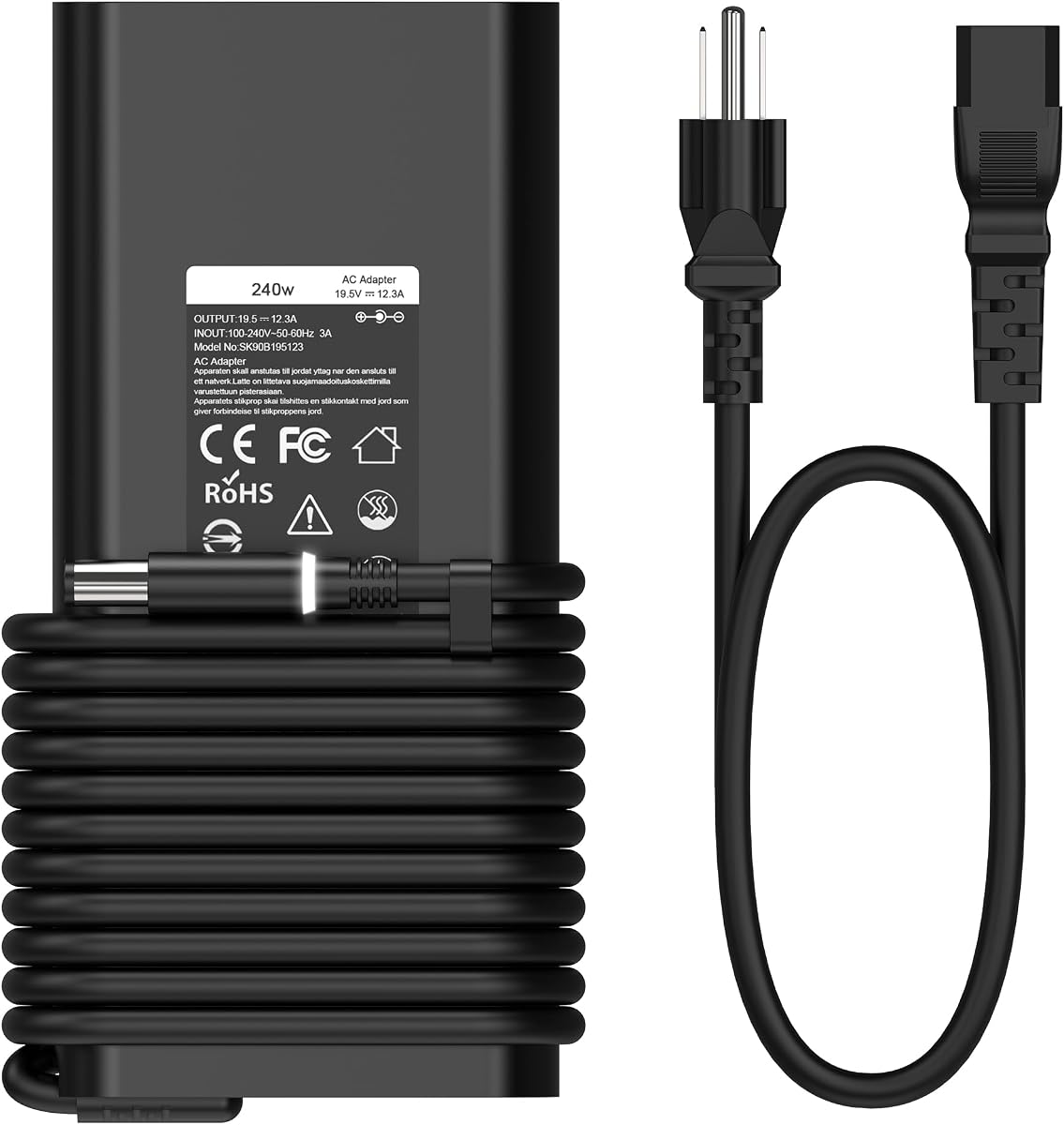
This charger provides the high wattage necessary to power demanding gaming laptops and workstations. It supports Alienware Precision and G series models which often require more power for optimal performance. The 240W output ensures that GPU and CPU can run without throttling due to power limits.
We may earn a commission when you buy through this link, at no additional cost to you.
The slim design makes it easier to transport than older bulkier high watt chargers. It is compatible with a wide range of part numbers and model series offering flexibility for users with different hardware versions. The supply cord is included to ensure you are ready to charge immediately.
While high power chargers tend to be heavier this model aims to balance portability and performance. It is a necessary component for maintaining the performance of gaming laptops during intensive tasks. The compatibility with Precision workstations adds value for professional users requiring reliable power.
This adapter is essential for owners of high performance laptops that require more than standard 65W charging. It ensures your system can draw the power it needs for heavy workloads without compromising speed or efficiency during extended sessions of gaming or rendering.
Delivers sufficient power to prevent thermal throttling during intensive gaming or rendering tasks on supported hardware.
Compatible with Dell Precision workstations ensuring reliable power for professional computing tasks and workflows.
We may earn a commission when you buy through this link, at no additional cost to you.
This 330W charger delivers the highest power output available for compatible Dell laptops. It is designed to support systems that require substantial power for gaming and professional rendering tasks. The stable power supply prevents frame drops and throttling ensuring smooth performance during intensive usage.
We may earn a commission when you buy through this link, at no additional cost to you.
It is backward compatible with lower wattage devices allowing flexibility for users with different laptop configurations. The safety features ensure reliable operation without overheating even under continuous load. The 7.4mm tip size matches the connectors found on many high-end gaming laptops.
While the high wattage comes with a higher cost it is necessary for specific high-performance machines. Using an undersized charger could result in slower charging or reduced performance. This model ensures that your device receives the power it requires for top-tier operation.
This charger is ideal for users with high-end gaming or workstation laptops that demand maximum power availability. It provides the reliability and output needed to support demanding applications and ensures your hardware performs at its best without power limitations.
The extra power headroom allows the charger to run cooler and avoid performance throttling during long intensive tasks.
Delivers stable voltage to eliminate frame drops and stuttering during gameplay or video editing on compatible laptops.
We may earn a commission when you buy through this link, at no additional cost to you.
This kit provides a universal solution for connecting USB C power sources to laptops with traditional DC tips. It includes fifteen different plug sizes covering most major brands. This versatility is useful for travelers or those who use multiple devices with different connectors.
We may earn a commission when you buy through this link, at no additional cost to you.
The cable includes a smart chip that adjusts current automatically to protect your device. It supports up to 100W PD power which is sufficient for most laptops. The cable length is standard for desktop or travel use ensuring you can connect easily to power banks or chargers.
Users must ensure their power source provides a 20V output for the kit to work correctly. It is not designed for data syncing but solely for charging which is appropriate for most users. The included tips cover standard sizes ensuring broad compatibility across devices.
This adapter kit is a practical choice for those who want to use a single USB C charger for multiple devices. It simplifies your charging setup by allowing you to adapt your preferred power source to the specific connector your laptop requires.
Includes fifteen different tips to connect to a wide variety of brands including Dell HP Lenovo and Asus laptops.
Built-in chip automatically adjusts current to safely charge devices without needing manual configuration.
We may earn a commission when you buy through this link, at no additional cost to you.
Selecting the right battery backup involves understanding your specific power needs and the type of Dell laptop you own. Consider the following factors to ensure compatibility and reliable performance during power outages or travel.
Ensure the backup unit provides sufficient wattage to charge your Dell laptop. High performance laptops may require 100W or more while standard models work with 65W. Check the adapter specs to match your device requirements.
Always choose a power source with output equal to or higher than your laptop's original adapter to maintain performance.
Dell laptops use different connector shapes including USB C and round barrel plugs. Verify the tip size matches your laptop to avoid connection issues. Some adapters include multiple tips for versatility.
Check your laptop model to confirm whether it uses USB C or a barrel connector before purchasing.
For portable power banks look at the mAh rating to estimate how many times you can charge your laptop. Higher capacity means longer usage away from outlets. This is crucial for travel.
Choose a capacity that provides at least one full charge for your laptop during emergencies.
If you travel frequently consider the weight and size of the power source. Larger UPS units are for home use while power banks are designed for carrying in a bag. Portability ensures you can charge on the go.
Select a lightweight option if you need to move around often with your backup power.
Reliable backups include protection against overvoltage short circuits and overheating. These features protect your laptop from damage. Look for certifications and safety standards in the product description.
Ensure the product has built-in safety mechanisms to protect your device during charging.
Fast charging capabilities via USB C PD reduce downtime when recharging your laptop. This is useful when you are in a hurry or in public spaces. Look for higher wattage PD support.
Prioritize units with fast charging support to minimize wait times during use.
A solid warranty protects your investment against defects. Longer warranties indicate confidence in product durability. Check the manufacturer policies for return options in case of issues.
Choose a product with a clear warranty policy to ensure support if problems arise.
Stick with well-known brands that have a history of quality electronics. These brands often adhere to higher safety standards. Reviews can help gauge real world performance of the battery.
Opt for reputable brands to ensure consistent quality and safety standards.
Always connect your Dell laptop directly to the battery backup using the correct power cable and tip. Ensure the connection is secure before plugging the power source into a wall outlet or turning it on.
Keep the battery unit in a cool dry place to prevent overheating or moisture damage. Avoid exposing it to extreme temperatures which can degrade the internal battery capacity over time.
Regularly charge and discharge the battery unit to maintain its health even when not in use. This prevents the battery from losing capacity due to long periods of inactivity.
For Dell XPS laptops with USB C ports the UGREEN Power Bank is an excellent portable option due to its high wattage output. For home office setups the CyberPower EC850LCD provides reliable protection against outages and surges for your entire desk.
Dell Latitude models often use USB C chargers so you need a PD capable power bank or adapter. Ensure the power output matches your original charger to avoid slow charging or system instability.
Check if the power bank supports at least 45W or 65W via USB C PD. Also verify the connector matches your laptop's charging port. Most modern Dell laptops work with standard USB C PD chargers.
Yes a UPS can power your laptop and monitor during outages. It protects against surges and provides time to save work. However it is not portable so it is best for stationary setups.
A high capacity power bank like 25000mAh can provide one to two full charges for a typical Dell laptop. The actual duration depends on screen brightness and active usage of the system.
Yes if they meet safety standards and have proper certifications. Ensure the wattage and voltage match your laptop requirements. Avoid extremely cheap unbranded adapters to prevent potential hardware damage.
A UPS is a stationary unit that protects against outages and surges while a power bank is portable for travel. UPS units usually have more capacity but cannot be carried easily compared to power banks.
Store the power bank at room temperature and avoid leaving it completely drained for long periods. Charge it regularly to keep the battery cells healthy and ensure it is ready for emergencies.
Choosing the right backup power solution depends on whether you need a portable power bank for travel or a UPS for home office stability. The CyberPower unit offers excellent surge protection while the UGREEN bank provides great mobility for on the go charging.
Prioritize output capacity and connector type to ensure your Dell laptop charges efficiently and safely. A reliable power source protects your data and hardware from unexpected power issues during critical work sessions or travel.
Always check current prices and product availability before making your purchase. Specifications can vary by region and model so verify compatibility details to find the best fit for your specific Dell device.