
5-in-1 Android Auto Wireless Adapter
4.4Editor score
Wireless CarPlay and Android Auto
Built-in Netflix and YouTube
TF Card Offline Playback
This guide compares the top Carplay Box with Google Play models for 2026, evaluating features like streaming apps, wireless connectivity, and Android performanc
Modern drivers crave seamless connectivity and entertainment while on the road. A Carplay Box with Google Play transforms your factory wired system into a wireless smart hub, allowing access to streaming apps and navigation tools directly on your dashboard screen.
We evaluated ten top-rated adapters based on connection stability, app availability, hardware specs, and user feedback. Our analysis focuses on devices that support Google Play Store access, enabling true customization beyond standard CarPlay limitations.
Each selection highlights unique strengths like AI integration, offline playback, or dual-band WiFi. Remember that product availability and pricing can change frequently, so always verify current details before purchasing to ensure the best fit for your vehicle.
4.4Editor score

4.7Editor score

5.0Editor score
The following table provides a side-by-side comparison of all ten selected devices, highlighting their core specifications, operating systems, and unique capabilities to help you make an informed decision.


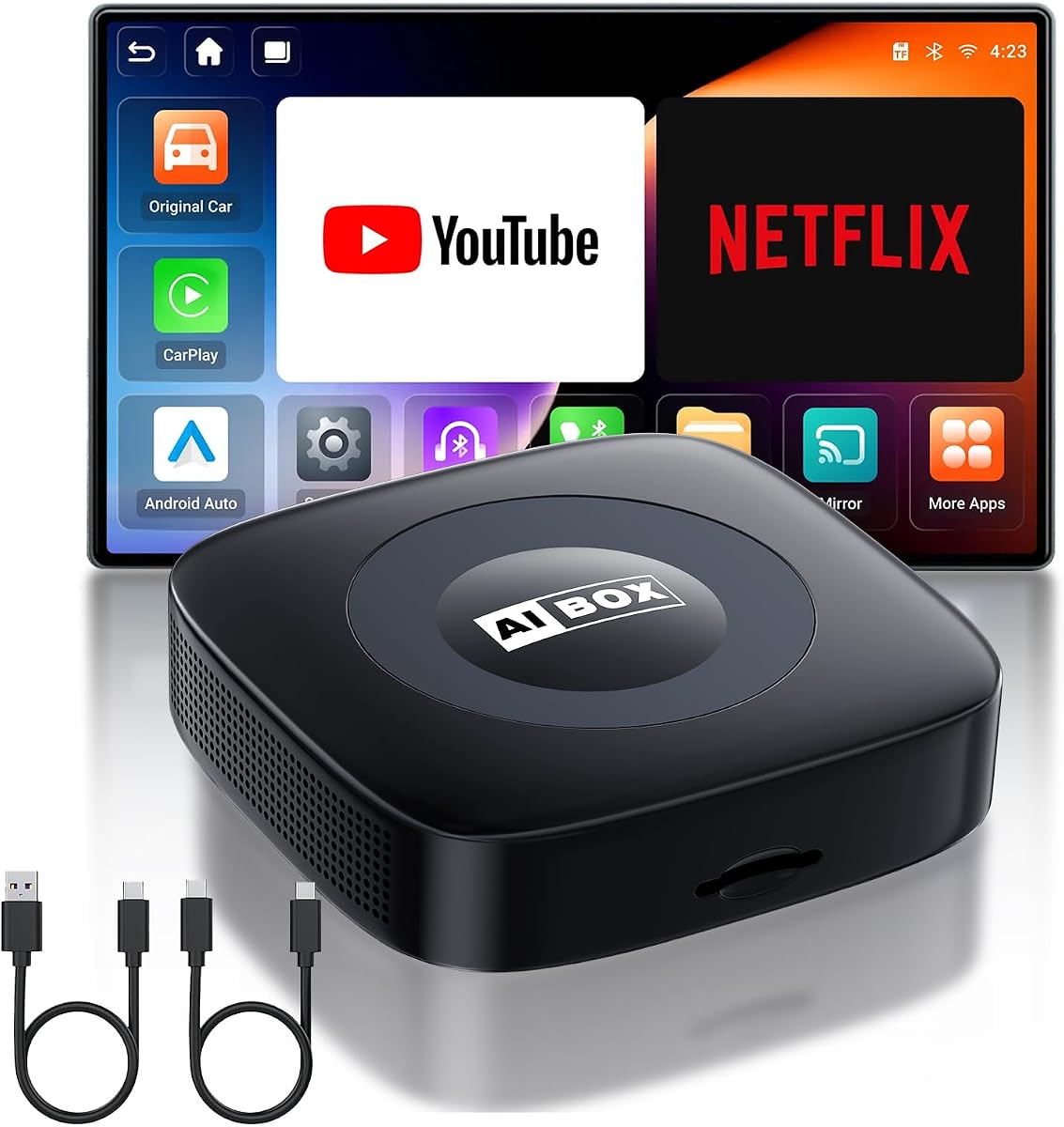

This AI Box Wireless CarPlay Adapter stands out as the top choice for drivers seeking a fully customizable in-car entertainment system. With a 4.7 rating from users, it delivers a seamless experience by transforming your factory wired CarPlay into a wireless smart hub.
We may earn a commission when you buy through this link, at no additional cost to you.
The device features a built-in Google Play Store, allowing you to download popular apps like YouTube, TikTok, and Hulu directly onto the car screen. This capability significantly expands functionality beyond standard navigation and music, turning your vehicle into a mobile entertainment center.
While highly capable, users should note that video playback is intended for parked use only to comply with safety laws. Additionally, streaming requires a mobile hotspot connection, which may impact data plans depending on usage intensity during long road trips.
For those who want maximum flexibility and app variety in their vehicle, this adapter is an excellent investment. Its easy setup and reliable connection make it a must-have for modern drivers looking to upgrade their tech experience.
The included Google Play Store lets you install any compatible Android app, giving you total control over your in-car software environment.
Built-in screen mirroring allows you to cast photos and videos from your phone to the car display with a single tap.
We may earn a commission when you buy through this link, at no additional cost to you.
The LAMTTO Wireless CarPlay Adapter integrates advanced AI capabilities through Gemini, offering a unique co-pilot experience for drivers. It combines standard wireless CarPlay functions with a full Android tablet experience for enhanced entertainment options.
We may earn a commission when you buy through this link, at no additional cost to you.
With 4GB of RAM and 32GB of storage, this device handles multitasking better than many entry-level adapters. The dual-band WiFi allows simultaneous use of navigation and streaming apps, while the HDMI output enables video playback on rear screens.
Despite its features, the device holds a lower average rating compared to others, suggesting potential connectivity issues. Users report needing to clear cached data periodically to maintain smooth performance, which adds minor maintenance overhead.
Tech-savvy drivers who value AI assistance and multitasking will find this model appealing. Its robust hardware specifications make it suitable for those planning heavy app usage during long commutes or road trips.
Gemini AI allows you to ask questions, plan routes, and control smart home devices using simple voice commands while driving.
The HDMI output lets you connect the adapter to external monitors or headrest screens for shared entertainment with passengers.
We may earn a commission when you buy through this link, at no additional cost to you.
This AI Box CarPlay 3-in-1 adapter is engineered for durability and performance, featuring a premium aluminum alloy build that handles extreme temperatures efficiently. It transforms wired CarPlay into a wireless experience while offering robust entertainment features.
We may earn a commission when you buy through this link, at no additional cost to you.
The device comes pre-loaded with popular streaming apps like Netflix and YouTube, ensuring immediate access to content upon setup. Dual-band WiFi technology ensures stable connections for navigation and media streaming without interference or dropouts during use.
While it offers excellent heat dissipation and build quality, it is restricted to vehicles with factory wired CarPlay systems. BMW and Tesla owners cannot use this device, limiting its applicability across all vehicle brands and models.
For drivers seeking a durable and reliable solution that supports high-definition media playback, this adapter is a strong contender. Its focus on hardware quality ensures longevity and consistent performance even under demanding conditions.
The aluminum alloy casing provides superior heat dissipation, protecting internal components during extended use in hot weather.
USB and TF card slots allow offline movie and music playback, ideal for areas with weak mobile signal coverage.
We may earn a commission when you buy through this link, at no additional cost to you.
This 5-in-1 adapter offers incredible value by supporting both wireless CarPlay and Android Auto in a single compact device. It is designed for users who need flexibility and basic streaming capabilities without spending a premium price.
We may earn a commission when you buy through this link, at no additional cost to you.
The built-in Netflix and YouTube apps allow passengers to enjoy media during trips, while the TF card slot enables offline playback. Setup is straightforward, requiring only a quick pairing process to establish a stable wireless connection.
Users should be aware that streaming services cannot run simultaneously with CarPlay or Android Auto. This limitation means you must switch modes depending on whether you want navigation or video entertainment at any given moment.
For budget-conscious drivers who want to upgrade their car's tech without breaking the bank, this model is an ideal choice. It delivers essential wireless convenience and entertainment features effectively for everyday use.
The adapter seamlessly switches between Apple CarPlay and Android Auto, accommodating both iPhone and Android users in the same car.
No apps or extra drives are required; just plug the device into the USB port and it auto-connects within seconds.
We may earn a commission when you buy through this link, at no additional cost to you.
The CarlinKit 3-in-1 CarPlay Multimedia AI Box features the latest Android 13 system, providing a modern and refined interface for in-car interactions. It stands out for its high-performance hardware that supports demanding apps smoothly.
We may earn a commission when you buy through this link, at no additional cost to you.
With an 8-core processor and 64GB of storage, this device offers ample room for multiple applications and media files. The option to insert a SIM card allows for independent internet connectivity, reducing reliance on a mobile hotspot.
While the hardware is powerful, users must purchase and activate a SIM card for mobile data features to work fully. This adds a step to the setup process and may involve ongoing subscription costs for data plans.
Drivers who prioritize performance and storage capacity will appreciate this unit's specifications. It is particularly suitable for those who want a comprehensive smart car solution with reliable multitasking capabilities.
Android 13 offers a sleek, user-friendly interface with updated features and improved app compatibility for a smoother experience.
The SIM card slot provides a dedicated internet source, allowing the box to function even if your phone is offline.
We may earn a commission when you buy through this link, at no additional cost to you.
This 2026 Upgraded Magic Box 3.0 is highly rated for its reliability and advanced connectivity options. It combines wireless CarPlay, Android Auto, and video playback capabilities in a single, user-friendly device.
We may earn a commission when you buy through this link, at no additional cost to you.
The inclusion of a 5G WiFi module and Bluetooth 5.0 ensures fast and stable connections for streaming and device pairing. Additionally, the HDMI port allows you to connect to external monitors, making it versatile for camping or outdoor viewing.
While the device is compact and efficient, users should verify their vehicle's compatibility before purchase. Ensuring your car supports factory wired CarPlay is essential for the adapter to function correctly.
For those who need a versatile and reliable adapter with modern connectivity standards, this model is an excellent choice. Its high user satisfaction rate suggests a polished and effective product for daily driving needs.
The HDMI output lets you project content to external screens, perfect for tailgating or camping trips where extra displays are useful.
5G WiFi ensures high-speed data transfer, reducing buffering times during streaming sessions compared to older WiFi standards.
We may earn a commission when you buy through this link, at no additional cost to you.
This adapter merges wireless convenience with advanced AI assistance, making it a strong option for hands-free operation. It offers a complete package of navigation, music, and entertainment tools powered by Gemini technology.
We may earn a commission when you buy through this link, at no additional cost to you.
The dual-band WiFi eliminates lag during streaming, while the auto-reconnect feature ensures the device is ready every time you start your engine. Passengers can enjoy HD content via the media output while the driver focuses on navigation.
Setting up the voice assistant correctly may take some time to optimize responses to your specific commands. This learning curve is a minor trade-off for the benefits of hands-free control and smart itinerary planning.
Drivers who prioritize smart technology and convenience will find this device valuable. It transforms the car into a connected hub where information and entertainment are easily accessible without distraction.
Gemini AI allows hands-free commands for reminders, questions, and smart home controls, keeping your focus on the road.
HD media output supports rear headrest displays, allowing kids to watch movies while the driver uses navigation.
We may earn a commission when you buy through this link, at no additional cost to you.
This high-end adapter offers a complete Android experience with an 8-core Qualcomm platform and ScenePilot AI ecosystem. It is designed for drivers who want extensive customization and privacy features in their vehicle's system.
We may earn a commission when you buy through this link, at no additional cost to you.
The device supports LTE connectivity via SIM card, allowing independent internet access. It also includes Bluetooth Lock and trip management tools, which help protect personal data and track driving history securely.
While powerful, the device requires specific setup steps for privacy features like Bluetooth Lock to function correctly. Users unfamiliar with advanced settings might find the initial configuration more complex than standard adapters.
For power users who value privacy and premium hardware, this device stands out. It offers a robust solution for those who want a secure, connected, and highly customizable in-car environment.
Bluetooth Lock protects your personal apps when you leave the car, ensuring your data remains secure in shared vehicles.
TrackHU records route history, helping drivers review past journeys for work or personal record-keeping needs.
We may earn a commission when you buy through this link, at no additional cost to you.
This compact adapter offers powerful performance in a small form factor, making it ideal for drivers who prefer minimal hardware clutter. It features the latest Android 13 OS with upgraded connectivity standards for smooth operation.
We may earn a commission when you buy through this link, at no additional cost to you.
The device supports WiFi 6 and Bluetooth 5.3, ensuring fast transmission and strong signal strength even in crowded areas. A 3-year warranty adds peace of mind, ensuring long-term support and reliability for the user.
While the storage and RAM are lower than top-tier models, the quad-core chip ensures efficient performance for daily tasks. However, it is incompatible with factory wireless systems, so owners must verify their setup before buying.
Drivers looking for a portable and reliable upgrade with strong warranty support will find this model appealing. Its focus on stability and size makes it a practical choice for everyday commuting.
WiFi 6 delivers faster speeds and lower latency, enhancing streaming and navigation performance compared to older WiFi standards.
The included 3-year warranty ensures you are protected against defects, providing confidence in the device's durability.
We may earn a commission when you buy through this link, at no additional cost to you.
This adapter provides essential wireless features and basic streaming capabilities at a budget-friendly price. It supports both CarPlay and Android Auto while offering pre-installed apps for popular video services.
We may earn a commission when you buy through this link, at no additional cost to you.
The TF card slot allows users to play offline content when internet is unavailable. Setup is straightforward, and the device connects automatically once paired, making it a convenient upgrade for older vehicles.
However, the ability to download new apps beyond those pre-installed is limited. Users are restricted to streaming content online via hotspot or offline via card, without full app store access.
For drivers who need simple wireless convenience and occasional video playback without advanced features, this adapter serves well. It is a practical entry point into the world of wireless car connectivity.
The TF card slot allows you to store videos locally, ensuring entertainment is available even in areas without internet.
Suitable for over 800 car models after 2016, this adapter offers wide support for various vehicle manufacturers.
We may earn a commission when you buy through this link, at no additional cost to you.
Selecting the right adapter requires careful consideration of several key factors to ensure compatibility and performance with your vehicle.
Always verify that your car has a factory wired CarPlay or Android Auto system before purchasing. Most adapters will not work with vehicles that already have wireless capabilities built-in or specific brands like BMW and Tesla.
Check your car settings to confirm Apple CarPlay or Android Auto is enabled in the system menu to ensure the adapter can connect properly.
Adapters running newer versions of Android offer better app compatibility and security features. Look for devices running Android 13 or higher to ensure future-proofing for app updates.
An updated OS also improves overall performance, reducing lag during multitasking between navigation and entertainment apps.
At least 4GB of RAM is recommended for smooth multitasking when using navigation and streaming simultaneously. Lower RAM may lead to slower app switching or crashes during heavy usage.
Storage space between 16GB and 64GB allows for offline content and multiple app installations. Higher capacity is beneficial if you plan to download many apps or save local media files.
Dual-band WiFi support ensures stable connections by allowing you to use 5GHz for speed and 2.4GHz for range. This prevents interference when streaming videos while navigating.
Some models offer 4G LTE SIM card slots for independent internet access, which is useful if you frequently drive in areas with poor phone signals.
Check if the device supports pre-installed apps like Netflix and YouTube or if you need to download them via a store. Full Google Play Store access provides maximum flexibility for choosing apps.
Ensure the adapter supports offline playback via USB or TF cards in case you encounter areas without reliable internet connectivity.
Materials like aluminum alloy offer better heat dissipation compared to plastic, which is crucial for devices running in hot environments like cars during summer.
Look for warranties that cover manufacturing defects, typically ranging from 12 to 36 months, to protect your investment against early failures.
Most modern adapters offer plug-and-play functionality with auto-connect features. This means you pair the device once via Bluetooth, and it reconnects automatically when you start the car.
Avoid models that require complex setup steps or additional software installation on your phone to reduce friction during daily use.
Extra features like HDMI output, screen mirroring, or AI assistants can enhance utility. Consider whether you need these functions to justify the cost over a basic adapter.
Privacy features like Bluetooth Lock are useful if you share your vehicle, ensuring your personal data is protected when you are not inside.
First, plug the adapter into your vehicle's USB port and ensure it is recognized by your car's infotainment system. Follow the on-screen prompts to pair the device via Bluetooth to establish a stable wireless link.
Once paired, select the appropriate mode (CarPlay or Android Auto) on your screen to begin using navigation and apps. For streaming content, connect to your mobile hotspot or a dedicated WiFi network if available.
To maintain performance, periodically clear cached data and ensure firmware is updated via OTA (Over-the-Air) settings. Avoid exposing the device to direct sunlight for extended periods to prevent overheating and extend its lifespan.
Generally, these adapters do not support BMW or Tesla vehicles due to unique system architectures. You will need specific alternatives designed for those brands or aftermarket solutions that integrate differently with the factory system.
Video playback is intended for parked use only to comply with safety laws. While the hardware may support it, legal restrictions prohibit drivers from watching video screens while the vehicle is in motion.
CarPlay mirrors your iPhone's apps, whereas an AI Box runs a full Android system. This allows you to use apps directly on the car screen without needing a phone connection.
Most boxes require a mobile hotspot or WiFi connection to stream apps like Netflix. However, some premium models include a SIM card slot for independent internet connectivity without relying on your phone.
Updates are typically handled via OTA (Over-the-Air) in the settings menu. Ensure the device is connected to the internet so it can download and install the latest firmware patches automatically.
Simply unplug the device from the USB port. Your car will revert to the standard factory system, and no permanent changes are made to your vehicle's original settings.
Using the box itself is legal, but watching video while driving is illegal in most regions. Ensure you only use video features when the vehicle is parked safely to comply with local traffic laws.
This guide has reviewed ten top-rated adapters that offer varying levels of performance and features. From the highly customizable AI Box Wireless CarPlay Adapter to the budget-friendly 5-in-1 options, there is a solution for every driver.
Prioritize models that align with your specific needs, such as AI assistance for navigation or high RAM for heavy app usage. Ensure you check compatibility with your vehicle's factory system before making a purchase decision.
Prices and availability can fluctuate frequently, so verify current details on Amazon before ordering. Choosing the right adapter can significantly enhance your driving experience with seamless entertainment and connectivity options.