
HUION Artist Drawing Glove
4.5Editor score
Soft lycra and nylon material
Black soiling resistant color
Flexible for both hands
This guide compares the top digital drawing glove options for artists using tablets and touchscreens to reduce friction and prevent smudges during creative
Digital drawing gloves are essential accessories for artists working with tablets and touchscreens. They reduce friction between your hand and the surface while preventing smudges caused by oils and sweat. Choosing the right one ensures comfort and precision during long creative sessions.
We compared ten popular options based on material quality, fit, design features, and user feedback. This list covers ambidextrous models, multi-pack sets, and specialized designs to help you find the perfect match for your setup and preferences.
Each pick highlights key strengths and trade-offs to guide your decision. Prices and availability may change over time, so check current listings before purchasing to ensure you get the best value for your specific needs today.
4.5Editor score

4.6Editor score
4.4Editor score
This table compares all ten products side by side to highlight their unique specifications and design features for quick reference.


This artist drawing glove stands out with its 3-layer design that enhances grip and prevents accidental touches. It has earned a solid 4.6 rating from users who value precision and comfort during long creative sessions.
We may earn a commission when you buy through this link, at no additional cost to you.
The soft stretchy fabric ensures comfort while moisture-wicking properties keep hands dry. The two-finger design works seamlessly with iPad and drawing tablets to prevent accidental palm touches.
While it offers excellent protection, users should note that sizing matters for the best fit. The package includes extra cleaning cloth which adds value but may not suit all preferences.
Artists seeking a reliable glove for multiple devices will appreciate this versatile option. It balances comfort and performance effectively for most digital drawing workflows today.
The 3-layer design provides better control and reduces smudges during detailed artwork creation on touchscreens.
Moisture-wicking fabric keeps hands cool and dry allowing uninterrupted creative work without discomfort.
We may earn a commission when you buy through this link, at no additional cost to you.
The HUION artist glove offers a budget-friendly entry into digital drawing accessories with solid performance. It features soft Lycra and nylon material for comfort and flexibility during use.
We may earn a commission when you buy through this link, at no additional cost to you.
Its black color resists soiling and the ambidextrous design fits both hands comfortably. The two-finger layout reduces friction without interfering with stylus control.
Users should note it is one size fits most which may not suit all hand sizes. The classic color is charming but limits style options compared to others.
This glove is ideal for beginners or those needing a reliable backup. It delivers essential protection without extra features keeping it simple and effective.
Soft Lycra and nylon blend ensures the glove moves naturally with your hand for precise strokes.
The black soiling resistant color means you rarely need to wash the glove frequently.
We may earn a commission when you buy through this link, at no additional cost to you.
XPPen offers a reliable glove focused on comfort and flexibility for daily digital drawing tasks. The high elastic material provides excellent air permeability for breathability and comfort.
We may earn a commission when you buy through this link, at no additional cost to you.
It comes in three sizes to ensure a better fit for different hand dimensions. The soft texture stops smudging while allowing an easier glide on the tablet surface.
Although it lacks special features like extra packs its core function is solid. The black color resists dirt making maintenance simple and hassle free.
Users prioritizing fit and breathability will find this model appealing. It balances practicality and comfort well for general artistic workflows and sketching.
High elastic material ensures excellent air permeability keeping hands cool during extended creative sessions.
Available in S M and L sizes so you can choose the best fit for your hand.
We may earn a commission when you buy through this link, at no additional cost to you.
The OTraki 4 pack offers great value for artists who want extras or replacements. Made from high elastic Lycra fiber for soft texture and strong tensile strength.
We may earn a commission when you buy through this link, at no additional cost to you.
Each glove reduces friction and leaves no scratches on the screen. The black color is soiling resistant and reduces the need for frequent washing.
Users should note that one pack contains same size gloves. If you need different sizes you must check the full product page before ordering.
This set is perfect for households with multiple users or as backup supplies. It delivers consistent performance across all four units at a competitive rate.
Getting four gloves in one pack provides excellent value and backup options for artists.
The lightweight design allows your hand to slide smoothly over the tablet screen easily.
We may earn a commission when you buy through this link, at no additional cost to you.
This product offers basic functionality for those seeking essential protection. While specific details are limited its core function aligns with typical glove designs.
We may earn a commission when you buy through this link, at no additional cost to you.
The two-finger layout helps reduce friction on drawing surfaces. It is suitable for simple tasks but lacks advanced features found in other options.
Users may find it adequate for casual use but professionals might want more. The lack of detailed specs means you should verify before purchasing.
Consider this if you need a simple solution without extras. It serves its purpose for basic tasks but may not satisfy advanced requirements.
This model provides essential barrier protection against smudges on your tablet screen.
A straightforward two-finger design focuses on core functionality without added complexity.
We may earn a commission when you buy through this link, at no additional cost to you.
XPPen brings a fun twist with a cute cat print that stands out from typical gloves. It maintains high elastic material for excellent air permeability and comfort.
We may earn a commission when you buy through this link, at no additional cost to you.
The soft texture allows for easy glide while stopping smudging on your tablet. The black base color remains resistant to dirt and soiling.
Artists who love unique accessories will enjoy this design. It balances functionality with personal style making it appealing for creative individuals.
While the print is the highlight performance remains consistent with other XPPen models. It is a great choice for those wanting something different.
The cute cat print adds charm and makes this glove stand out from standard options.
High elastic cloth ensures comfort and air permeability for long creative sessions.
We may earn a commission when you buy through this link, at no additional cost to you.
This model serves as a standard option for general digital drawing needs. While details are sparse it follows common design patterns for this category.
We may earn a commission when you buy through this link, at no additional cost to you.
It provides basic protection against smudges and helps reduce friction. The design is minimal which may appeal to those who prefer simplicity.
Due to limited information verify availability and specs before buying. It may suit casual users but professionals might prefer more detailed options.
Consider it for straightforward tasks where advanced features are not required. It is a practical choice for basic workflow needs.
A simple design focusing on core functionality without extra features or decorations.
Works well for basic sketching and inking on various tablet surfaces.
We may earn a commission when you buy through this link, at no additional cost to you.
An entry-level option for those starting with digital art basics. It provides fundamental protection to keep screens clean during use.
We may earn a commission when you buy through this link, at no additional cost to you.
The design follows typical two-finger patterns to reduce friction. While lacking detailed specs it performs core tasks adequately.
This is suitable for occasional users or as a spare glove. It may not offer the same comfort or durability as higher-end models.
Choose this if you need a simple solution at a basic level. It covers the essentials for light creative work without complications.
Provides essential protection against smudges for standard drawing tasks.
Focuses on core functionality without extra features or specialized materials.
We may earn a commission when you buy through this link, at no additional cost to you.
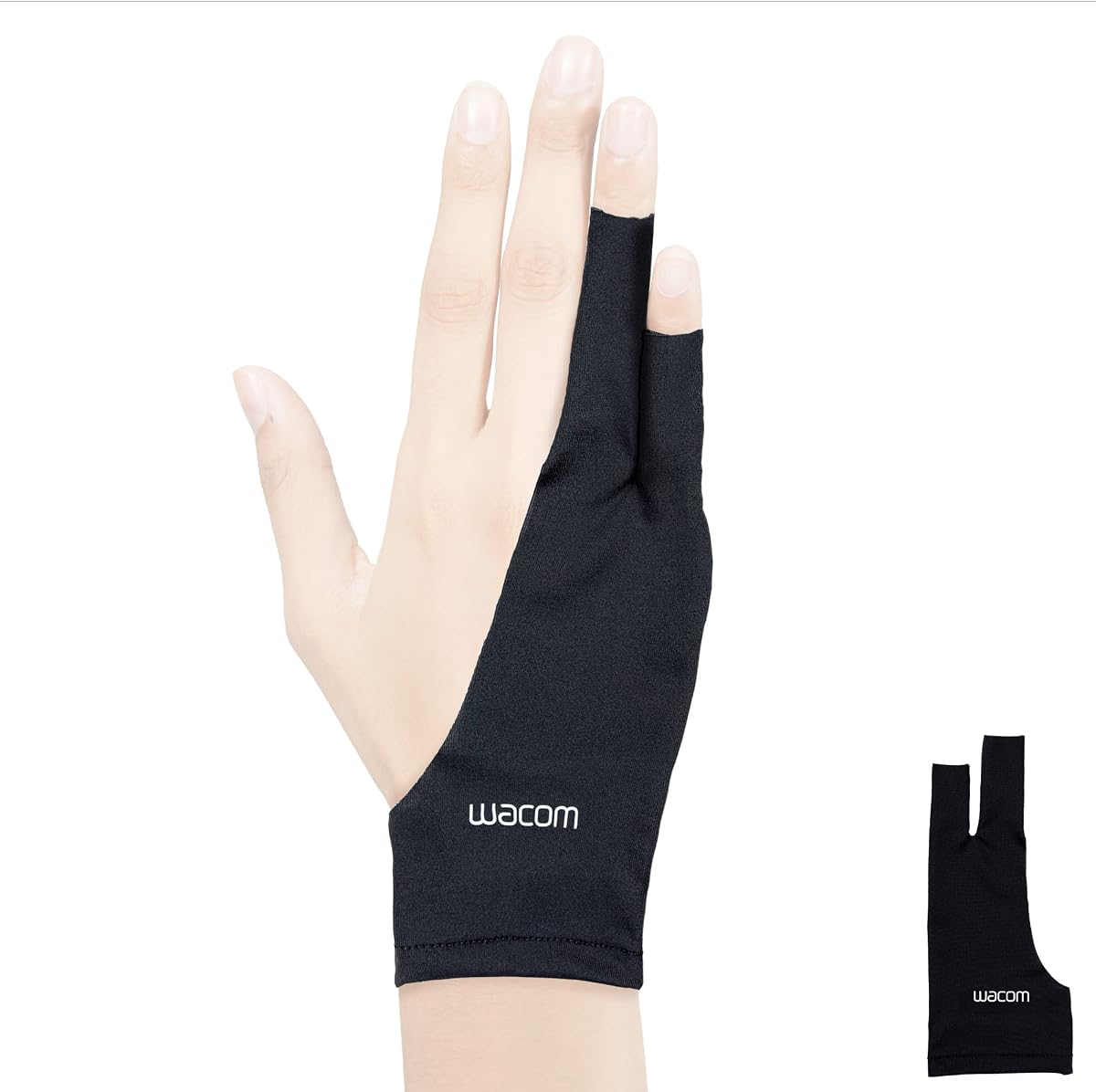
Wacom delivers a premium glove made from recycled materials emphasizing sustainability. The exposed fingertip design allows easy access to touchscreens and keyboards.
We may earn a commission when you buy through this link, at no additional cost to you.
It offers reduced friction for hours of comfort while keeping screens clear of smudges. The one-size fits most ambidextrous design adapts to different users.
Users should note it costs more than budget alternatives. The trade-off is better build quality and eco-friendly materials that appeal to conscious buyers.
This glove is ideal for professionals prioritizing comfort and sustainability. It balances functionality with ethical design making it a top choice.
Made of 90% recycled materials for durability and stretch while supporting sustainability.
Allows direct access to touchscreens and typing without removing the glove.
We may earn a commission when you buy through this link, at no additional cost to you.
This OTraki set offers four gloves with moisture-wicking fabric for comfort. It features high elastic Lycra fiber with strong tensile resistance for durability.
We may earn a commission when you buy through this link, at no additional cost to you.
The two-finger design ensures you focus on creating without distractions. The package includes options for different hand sizes to fit more users.
While it shares features with other packs its sizing variety stands out. The moisture-wicking fabric helps manage sweat during long sessions.
Ideal for artists needing reliable backups or sharing supplies. It delivers consistent performance and flexibility for varied creative needs.
Fabric wicks moisture away from your skin keeping hands dry during long drawing sessions.
Available in multiple sizes to find the perfect fit for different hand dimensions.
We may earn a commission when you buy through this link, at no additional cost to you.
Selecting the right glove depends on material, fit, and design features tailored to your drawing needs.
Look for Lycra or nylon blends that offer elasticity and breathability. These materials prevent heat buildup and allow natural hand movement during strokes.
Choose soft skin-friendly fabric to ensure comfort over extended hours.
Check if the glove offers multiple sizes or is ambidextrous. A proper fit prevents slipping and ensures consistent friction reduction.
One-size models work for most but dedicated sizes offer better precision.
The glove should reduce friction without hindering stylus control. Smooth glide prevents accidental touches and protects the screen from scratches.
Test glide performance on your specific device surface before committing.
Stain-resistant colors like black reduce washing frequency and extend lifespan. Strong tensile strength ensures the glove lasts through regular use.
Choose designs that resist dirt and sweat to minimize maintenance.
Exposed fingertips help with typing and touch access while keeping palms covered. Multi-layer designs can enhance grip and protection.
Unique prints or eco-friendly materials add style and value.
Sets with multiple gloves offer backups and better value. Compare unit counts against individual options to save cost.
Ensure all gloves in a pack fit your hand size properly.
Confirm the glove works with your tablet or touchscreen. Palm rejection features are critical for touch-enabled devices.
Check if the design suits your specific workflow tools.
Review user ratings for comfort and longevity insights. High ratings indicate consistent performance and reliability across users.
Read recent reviews to ensure current product quality.
Put on the glove before starting your creative session to reduce friction immediately. Ensure the two fingers are properly aligned for natural movement.
Keep your hand clean and dry while wearing the glove to maximize its effectiveness. The moisture-wicking fabric will help manage sweat during long use.
Wash the glove occasionally according to care instructions. Allow it to air dry completely before storing to maintain its elasticity and shape.
A digital drawing glove reduces friction between your hand and tablet screen preventing smudges and scratches. It enhances glide for smoother strokes and improves precision during long creative sessions.
Most models are ambidextrous and fit either left or right hand comfortably. Check the product details to confirm it matches your hand preference.
Many gloves come in one-size-fits-most but some offer Small Medium and Large options. Measure your hand to ensure the best fit before purchasing.
Wash the glove as needed based on usage and sweat levels. Many black resistant colors can go longer between washes to maintain elasticity.
Quality gloves are designed not to interfere with screen sensitivity. Some models have exposed fingertips to allow full touchscreen functionality.
Some brands use recycled materials in their construction. Look for labels mentioning recycled polyester or sustainable practices when shopping.
Yes many gloves work on light pads or paper surfaces too. They reduce friction for smoother drawing and protect surfaces from oils and dirt.
With proper care most gloves last several months of regular use. Durability depends on material quality how often you wash and store them.
The top picks highlight variety in comfort features and value. Our Editor's Choice offers three-layer protection while the budget pick delivers solid performance.
Prioritize fit and material breathability to ensure comfort during long sessions. Consider eco-friendly or unique designs if style matters to you.
Prices and availability change so review current listings before finalizing your choice. Investing in the right glove can elevate your digital art experience.