
MINISFORUM MS-S1 MAX
4.5Editor score
128GB unified memory pool
Ryzen AI Max+ 395 APU
Dual unit clustering support
This guide compares the top ten dual GPU AI setups for local model inference and training, highlighting performance and value for developers.
Building a powerful local artificial intelligence system requires careful hardware selection to handle massive models efficiently. A dual GPU AI setup offers the computational bandwidth necessary for training and inference without relying on cloud services. This guide explores the best available configurations for professionals and enthusiasts alike.
We evaluated ten distinct systems ranging from compact mini workstations to enterprise-grade servers. Each product was assessed on VRAM capacity, compute throughput, cooling efficiency, and software compatibility. Our goal is to help you find the right balance between performance and budget for your specific AI workload.
Every recommendation includes detailed specifications and real-world use cases to guide your decision. Keep in mind that hardware prices fluctuate frequently due to market demand and supply chains. Always verify the current pricing and availability before making your final purchase decision.
4.5Editor score


The following table provides a side-by-side comparison of the top ten dual GPU AI setups evaluated in this guide to help you identify the best fit for your needs.


The WEELIAO MAXSUN Intel Arc Pro B60 48G Turbo Workstation Graphics Card stands out as a compelling option for developers seeking affordable local large language model hosting. By combining two Arc Pro B60 GPUs on a single card, it delivers 48GB of VRAM and 394 TOPS of combined compute power.
We may earn a commission when you buy through this link, at no additional cost to you.
This architecture is specifically optimized for high-concurrency inference tasks, allowing multiple users or processes to run simultaneously without degradation. The card supports major frameworks like PyTorch, IPEX-LLM, and vLLM natively. It handles models like DeepSeek-R1:70B and QwQ-32B entirely on-device, reducing cloud costs.
While the performance is impressive for the price point, users must ensure their motherboard supports PCIe 5.0 x8 bifurcation to unlock full bandwidth. Additionally, the software ecosystem is not as mature as NVIDIA's CUDA platform, which may require troubleshooting for certain open-source models.
Overall, this card is ideal for budget-conscious AI researchers who need substantial VRAM without investing in enterprise-grade hardware. It eliminates the need for multi-card chassis configurations and offers a streamlined solution for local AI deployment in server environments.
This unified memory space allows you to run 70B-class quantized models entirely on a single card without needing cloud services or multi-card setups.
Each GPU operates at 2400 MHz with 20 Xe cores, delivering 197 TOPS per GPU for a combined total of 394 TOPS purpose-built for high-concurrency inference.
We may earn a commission when you buy through this link, at no additional cost to you.
The APC MES2X Dual GPU AI Workstation represents a turnkey solution for professionals requiring enterprise-grade performance out of the box. It features dual NVIDIA RTX PRO 6000 Blackwell GPUs backed by an AMD Ryzen 9-9950X processor and 256GB of DDR5 RAM for seamless multitasking.
We may earn a commission when you buy through this link, at no additional cost to you.
This system is designed for heavy data science pipelines and complex rendering tasks. The 8TB NVMe SSD setup ensures that large datasets are accessed with minimal latency. The liquid cooling system maintains stable thermal performance even under sustained loads, which is critical for long training runs.
A key advantage is the professional build quality with custom cable management and stress testing. However, the price reflects these premium features, making it less accessible for hobbyists. It is best suited for organizations that need immediate deployment without extensive configuration time.
If your workflow demands maximum throughput and reliability for generative AI tasks, this workstation delivers consistent results. The combination of high-end components ensures you can run large-scale models locally without bottlenecks.
The 16-core processor clocked at 4.3GHz provides the multi-threaded performance necessary to feed data to your dual GPUs efficiently.
These GPUs offer massive VRAM capacity and professional driver support essential for scientific computing and enterprise AI workloads.
We may earn a commission when you buy through this link, at no additional cost to you.
The APC ES620 Dual GPU AI Workstation is engineered for creators and researchers who need cutting-edge consumer hardware. It combines two NVIDIA GeForce RTX 5090 GPUs with 64GB of GDDR7 memory each, offering substantial VRAM for complex generative AI tasks and high-fidelity rendering.
We may earn a commission when you buy through this link, at no additional cost to you.
The system runs on an AMD Ryzen 9-9950X processor with 256GB of DDR5 memory, ensuring that data pipelines remain unblocked during intensive operations. Wi-Fi 7 and extensive connectivity options like 5Gb Ethernet make it ready for modern networked environments without extra adapters.
One notable consideration is the 1600W power supply requirement, which necessitates careful planning for electrical capacity. However, the included 360mm liquid cooler keeps the CPU running cool and quiet. This balance of raw power and thermal management makes it a standout for high-end desktop usage.
If you need a workstation that can handle large language model fine-tuning and real-time inference simultaneously, this unit delivers. It is a top choice for users prioritizing consumer-grade GPU performance in a stable workstation environment.
With 64GB of GDDR7 memory on each card, you get massive memory bandwidth for handling large models without offloading to slower RAM.
The inclusion of 5Gb Ethernet, Wi-Fi 7, and multiple DisplayPort outputs ensures you can connect multiple high-resolution displays and networks easily.
We may earn a commission when you buy through this link, at no additional cost to you.
The NVIDIA DGX Spark brings supercomputer performance directly to your desk in a compact, energy-efficient design. By utilizing the Grace Blackwell architecture, this desktop computer enables enterprise-scale AI and high-performance computing right where you need it without bulky server racks.
We may earn a commission when you buy through this link, at no additional cost to you.
It delivers up to 1 petaFLOP of AI performance for local model fine-tuning, inference, and analytics. This significantly accelerates your time-to-solution compared to cloud alternatives. The 128GB of unified memory allows you to experiment with large models up to 200 billion parameters directly on your desktop.
While powerful, this system is part of a specific ecosystem, which might limit compatibility with non-NVIDIA frameworks. The integration with the full NVIDIA AI software stack ensures seamless deployment across different environments but requires adherence to their standards.
If you need to prototype and innovate faster without leaving your local network, this device offers exceptional ROI. It is perfect for teams that want to validate ideas before deploying them to larger data centers or cloud clusters.
This advanced chip design delivers up to 1 petaFLOP of AI performance for local model fine-tuning, inference, and analytics right on your desk.
With 128GB of unified memory per unit, you can run large models up to 200 billion parameters at FP4 without external memory bottlenecks.
We may earn a commission when you buy through this link, at no additional cost to you.
This ASUS Dual EPYC configuration is a high-density 4U GPU server designed for high-performance computing clusters. It supports up to eight NVIDIA RTX PRO 6000 Blackwell GPUs and dual AMD EPYC processors, providing massive parallel processing power for enterprise AI training and inference.
We may earn a commission when you buy through this link, at no additional cost to you.
The system includes 2.3TB of DDR5 ECC RDIMM memory and supports up to 10 PCIe 5.0 x4 NVMe SSDs. This ensures that massive datasets are processed with speed and reliability. Toolless design and advanced management software streamline maintenance for IT administrators.
While incredibly powerful, this unit is intended for data centers rather than typical office or home environments. It requires significant power and cooling infrastructure. The toolless design helps mitigate maintenance downtime, ensuring maximum uptime for critical workloads.
If you are building a scalable AI infrastructure, this server offers unmatched density and performance. It supports up to 15 total NICs including 10 high-bandwidth 200GbE NICs for high-speed network throughput.
Dual AMD EPYC 9965 processors with up to 192 Zen 5c cores deliver unmatched multi-threaded power for training massive local LLMs without latency.
Supporting up to 15 total NICs including up to 10 high-bandwidth 200GbE NICs ensures low latency and high-speed data transfer across the network.
We may earn a commission when you buy through this link, at no additional cost to you.
The Cloud Ninjas Iron Bull AI Workstation is built for specific high-demand applications like PIX4Dsurvey, offering robust performance for mapping and AI tasks. It features a Ryzen Threadripper 9970X processor and a single RTX 5090 GPU with 32GB of memory for accelerated graphics processing.
We may earn a commission when you buy through this link, at no additional cost to you.
With 128GB of ECC Reg DDR5 memory, this system ensures data integrity during critical operations. The inclusion of 10G and 2.5G networking allows for fast data transfers. A 1600W Platinum power supply and 360mm AIO liquid cooler maintain system stability under heavy loads.
While this unit excels in targeted workflows, its specialized design may not fit all general AI use cases. However, for industries requiring precise geospatial analysis and local AI inference, it provides a reliable platform without unnecessary overhead.
If you are working on large-scale mapping or CAD projects, this workstation handles complex data pipelines effectively. It is a solid choice for professionals who need high-end computing power in a stable and managed package.
This workstation is specifically optimized for high-demand applications like PIX4Dsurvey, offering robust performance for mapping and AI tasks.
With 10G and 2.5G networking plus onboard AQtion LAN, you get fast data transfers essential for moving large datasets efficiently.
We may earn a commission when you buy through this link, at no additional cost to you.
This Empowered PC system unlocks unprecedented machine learning capabilities with a 192-core AMD EPYC 9965 processor. It supports triple NVIDIA RTX PRO 6000 Blackwell GPUs and 768GB of DDR5 ECC RDIMM memory, making it ideal for training massive local LLMs and complex neural networks.
We may earn a commission when you buy through this link, at no additional cost to you.
The workstation includes 2x4TB Gen5 NVMe SSDs to eliminate bottlenecks in data pipelines. It is built in the USA with a 3-year warranty and lifetime technical support. The 2800W Titanium PSU ensures 24-7 mission critical uptime for demanding engineering workflows.
Due to its size and power requirements, you must use a 240V outlet for maximum capabilities. The 4U-SP5 cooler keeps the hardware stable under continuous load. This system is perfect for organizations needing turnkey enterprise infrastructure without cloud latency.
If you require a server-class workstation for generative design and physics simulations, this unit delivers. It bridges the gap between high-performance desktop and enterprise server capabilities effectively.
Driven by the groundbreaking 192-core AMD EPYC 9965, this powerhouse delivers unmatched multi-threaded processing for training massive local LLMs.
Equipped with 2x4TB Gen5 NVMe SSDs, this workstation eliminates bottlenecks allowing you to ingest and manipulate massive datasets in real-time.
We may earn a commission when you buy through this link, at no additional cost to you.
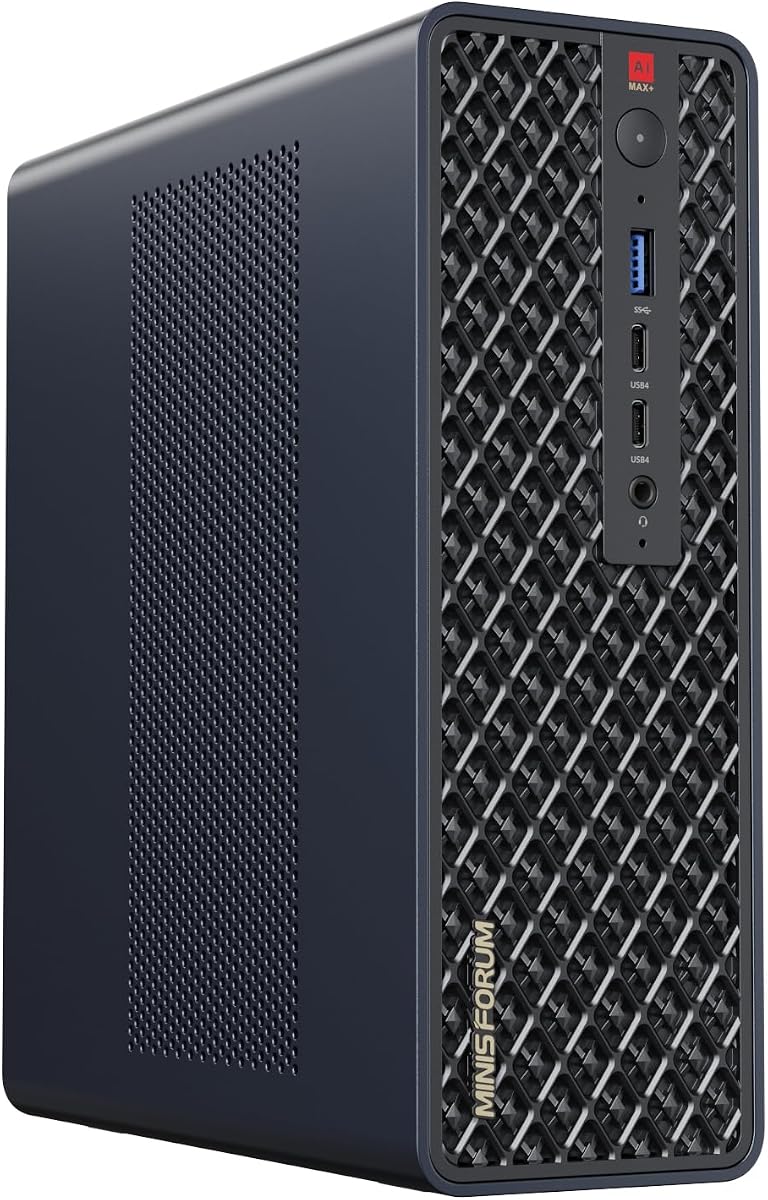
The MINISFORUM MS-S1 MAX Mini AI Workstation PC packs a powerful AMD Ryzen AI Max+ 395 APU into a tiny chassis. It features 128GB of LPDDR5x unified memory, enabling CPU and GPU to access a shared high-bandwidth pool with low latency for efficient workflows.
We may earn a commission when you buy through this link, at no additional cost to you.
Two units can be configured as a dual-unit cluster to run a large 235B Q4 model locally, achieving impressive output speeds. This modular approach allows you to build a distributed AI center without investing in a massive rack server. The PCIe x16 slot offers flexible expansion capabilities.
While the unit is small, its cooling system is robust enough for continuous load with a 130W continuous power design. However, running large models often requires clustering multiple units which increases cost. It is best for light to moderate AI tasks on a desk.
If you want a compact system that supports local LLMs and multimodal models without bulk, this is a smart choice. The slide-out design facilitates upgrades and maintenance easily for home or office environments.
The MS-S1 MAX features an AMD Ryzen AI Max+ 395 APU integrating Zen 5 architecture CPU with 126 TOPS total system output for parallel computing.
Two MS-S1 MAX units can be configured as a dual-unit cluster to run a large 235B Q4 model locally achieving 10.87 tok/s output speed.
We may earn a commission when you buy through this link, at no additional cost to you.
The NVIDIA RTX PRO 6000 Blackwell Max-Q Workstation Edition offers massive 96GB of next-gen GDDR7 ECC memory in a compact dual-slot design. It eliminates VRAM bottlenecks for hosting heavy open-source LLMs locally with a 512-bit bus width for high-speed data transfer.
We may earn a commission when you buy through this link, at no additional cost to you.
Delivering up to 3,511 TOPS of AI performance, this card accelerates high-performance computing tasks efficiently. The Max-Q Edition capping maximum power consumption at a modest 300 Watts, making multi-GPU scaling viable in standard desktops. It includes a 3-year manufacturer warranty for peace of mind.
This purchase is for users building their own workstation, so you must account for other system components separately. It fits seamlessly into standard desktops, enabling teams to scale intelligence rapidly without cloud latency or subscription overhead effectively.
If you need enterprise-grade reliability and rendering power for AI pipelines, this GPU delivers exceptional value. It bridges the gap between intense calculation and breathtaking visual output for independent developers and studios.
Supercharge your local generative AI pipelines with the RTX PRO 6000 96GB Max-Q engineered for agentic workflows and advanced data science.
Accelerate your high-performance computing tasks using the cutting-edge NVD Blackwell architecture delivering up to 3,511 TOPS of AI performance.
We may earn a commission when you buy through this link, at no additional cost to you.
The MINISFORUM MS-S1 Max Mini Workstation comes with AMD Ryzen AI Max+ 395 processor using the latest Zen 5 architecture. It offers 128GB LPDDR5 memory and Radeon 8060S graphics for high-performance computing and graphics processing in a compact form factor.
We may earn a commission when you buy through this link, at no additional cost to you.
This workstation supports five 8K video outputs via HDMI and USB4, making it ideal for digital signage and securities trading. The dual 10GbE ports allow for network isolation and router setups. Phase change cooling technology keeps it running quietly even at 130W power consumption.
While powerful for its size, it shares the cluster requirement for large models with the MS-S1 MAX variant. The five video outputs provide a wider field of view for CAD and animation production. It adapts well to studio environments needing multiple screens.
If you need a small PC that supports high-resolution displays and light AI tasks, this is a robust option. The large-area thermal conductive copper substrate ensures consistent performance output while maintaining a quieter operational environment.
This workstation comes with AMD Ryzen AI Max+ 395 processor which uses AMD's latest generation Zen 5 architecture for improved productivity.
This MS-S1 Max Workstation comes with five video outputs supporting multiple monitors display at the same time and providing larger wider filed of view.
We may earn a commission when you buy through this link, at no additional cost to you.
Selecting the right dual GPU AI setup requires evaluating hardware constraints and workflow needs.
VRAM is critical for storing model weights. Ensure your setup has enough combined memory to fit the models you intend to run locally.
Prioritize setups with at least 24GB VRAM per card for modern LLMs.
Look for high TOPS ratings to ensure fast inference speeds. Dual setups should combine throughput for parallel processing benefits.
Check that the architecture supports efficient data transfer between GPUs.
Memory bandwidth determines how fast data moves to the GPUs. High-speed memory like GDDR6 or HBM3e is preferred for heavy workloads.
Faster bandwidth reduces bottlenecks during complex calculations.
Dual GPU systems often have high power draws. Ensure your power supply and outlet capacity match the system requirements.
Plan for sufficient cooling and stable voltage to avoid thermal throttling.
Confirm support for frameworks like PyTorch or TensorFlow. NVIDIA CUDA is widely supported, but AMD and Intel alternatives are growing.
Check for specific drivers needed for your AI tools.
Heat dissipation is vital for stability during long training runs. Liquid cooling or high-efficiency fans prevent performance drops.
Look for chassis with good airflow to maintain temperatures.
PCIe lane availability affects how well multiple cards run together. Ensure your motherboard supports the necessary slot configuration.
Future-proof your system with room for extra storage or RAM.
Balance raw power with actual costs. Prebuilt systems offer convenience while building allows customization.
Factor in electricity and maintenance costs for total ownership.
Install drivers carefully and configure BIOS settings for PCIe bifurcation if needed. Ensure the system recognizes both GPUs correctly before starting tasks.
Monitor temperatures during workloads using system tools. Adjust fan curves or cooling settings if you see thermal throttling.
Back up your models and data regularly. Keep firmware updated for security patches and performance improvements.
For modern local models, aim for at least 48GB combined. Lower amounts limit the size of models you can load effectively.
Yes, ensure your board supports PCIe bifurcation or has enough lanes. Many consumer boards restrict bandwidth on secondary slots.
NVIDIA CUDA remains the most supported but AMD and Intel are catching up. Check software compatibility before switching ecosystems.
High-end dual setups often exceed 1000W. Ensure your PSU and electrical circuits can handle the sustained load safely.
Mini PCs with clustering support can run smaller models. Larger models require dedicated workstation or server hardware.
Yes, liquid cooling maintains lower temperatures for sustained loads. This ensures performance stability during long training sessions.
We highlighted ten setups ranging from compact mini PCs to enterprise servers. The MINISFORUM MS-S1 MAX and WEELIAO MAXSUN offer unique value for different needs.
Prioritize VRAM and software support for your specific tasks. A setup that fits your budget and workflow is better than raw power.
Prices change often so verify current pricing before purchase. Check for warranty coverage to protect your investment.