
Thermaltake View 380 TG ARGB
4.7Editor score
Dual tempered glass panels
Hidden connector support
Four ARGB fans included
This guide compares the top dual system PC cases for 2026, evaluating airflow, compatibility, and build quality to help you choose the right chassis.
Finding the right dual system PC case can transform your workstation into a powerhouse. These chassis support multiple motherboards or offer unique cooling layouts for serious enthusiasts. We review the best options for performance and flexibility.
We compared ten top models based on airflow, expansion options, and build quality. Each entry features real specifications and user feedback to ensure accuracy. Our list covers full towers and mid towers with innovative cooling designs.
Each pick highlights unique strengths like hidden connectors or dual chambers. Prices fluctuate often so check current listings before buying. We aim to help you find the perfect fit for your specific hardware needs.
4.7Editor score

4.6Editor score
5.0Editor score
Below is a side-by-side look at the top ten dual system PC cases available this year. We compare key specs like fan capacity and radiator support to help you decide quickly.


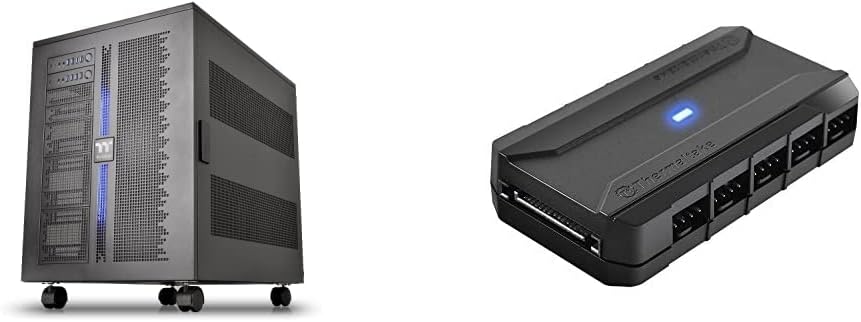
The Thermaltake Core W200 stands out as a true dual system computer case. It supports two separate systems in a back-to-back configuration. This makes it ideal for testers or users needing independent rigs. The bundle includes a Commander FP hub for extensive fan control.
We may earn a commission when you buy through this link, at no additional cost to you.
Its fully modular design allows for easy dismantling. You can break down the chassis completely for transport or cleaning. It supports up to 600mm radiators for extreme liquid cooling. The bundle adds a 10 port PWM fan hub for organized airflow.
The size is massive so desk space matters. It requires significant room for installation. The price point is high but reflects the unique capability. Most users find the dual system support justifies the cost for their specific workflow needs.
Buy this if you need two systems in one chassis. It suits workstations or specialized testing environments. The cooling options are unmatched in the market. Check current availability before purchasing to ensure stock.
This chassis uniquely supports two motherboards and power supplies simultaneously. It minimizes desk footprint while maximizing computational capacity.
Up to 600mm radiators allow for custom loop dominance. The Commander hub ensures all fans run smoothly under load.
We may earn a commission when you buy through this link, at no additional cost to you.
The NZXT H9 Flow RGB+ features a dual-chamber ATX design. It separates main components from the PSU for better airflow. Perforated steel panels ensure efficient cooling for high-performance builds. It includes an NZXT Control Hub for easy setup.
We may earn a commission when you buy through this link, at no additional cost to you.
Panoramic view glass wraps around to show off your build. You get support for up to 420mm radiators on top and front. The ten-fan capacity allows robust cooling setups. Back-connect ready compatibility simplifies cable routing significantly.
Cable management is streamlined with wide channels and Velcro. However some versions might not include all top fans. The design prioritizes airflow over absolute maximum size. It works well for standard high-end desktop configurations.
Choose this for a balanced mix of looks and performance. It fits well in modern setups. The thermal performance is strong for air or liquid. Verify fan inclusion with your specific retailer before ordering.
Separation of PSU and main board reduces heat soaking. Angled fans push cool air directly to the GPU.
Compatible with rear-connecting motherboards. Hidden cables keep the interior clean and modern.
We may earn a commission when you buy through this link, at no additional cost to you.
The ASUS TUF Gaming GT502 is a robust ATX mid tower. Its dual-chamber design divides internals for clean independent cooling zones. This helps manage heat for CPU and GPU effectively. It includes a vertical GPU mount for stylish setups.
We may earn a commission when you buy through this link, at no additional cost to you.
Side panels are tool-free requiring just a press of a button. Tempered glass panels offer a tinted view of the main chamber. Front panel connectivity includes USB 3.2 Gen 2 Type-C. This ensures fast data transfer rates for peripherals.
The build feels durable and premium. However the glass tint might hide RGB effects slightly. Weight can be a factor during transport. Overall it is a solid choice for gamers valuing structure and airflow.
This case is great for those needing vertical GPU display. It balances form and function well. The tool-free design is very convenient. Check dimensions to ensure it fits your desk space.
Included bracket lets you stand cards upright. It banishes sag with support included.
Hidden buttons on rear remove side panels instantly. No tools needed for maintenance.
We may earn a commission when you buy through this link, at no additional cost to you.
The Cooler Master HAF II 500 focuses on high airflow. It comes with two 220mm front fans and one 180mm rear exhaust. This massive system pushes air through efficiently. Low airflow resistance design boosts cooling throughput.
We may earn a commission when you buy through this link, at no additional cost to you.
Split-level cable management optimizes routing space. It creates room for oversized rear exhaust cooling. The MasterRail mounting system supports many radiator sizes. A dual-mode GPU holder supports single or dual cards.
Noise is managed well despite high airflow. The storage cage supports 3.5 and 2.5 inch drives. Some users might miss advanced RGB integration. It remains a top pick for raw thermal performance.
Select this for maximum air cooling efficiency. The included fans save money and effort. It supports large GPUs up to 72mm thick. Measure your case height before installing tall coolers.
Oversized fans deliver unmatched air volume. Front and rear openings reduce resistance.
Dual-mode holder clamps one card or supports two. Flexibility for SLI builds is present.
We may earn a commission when you buy through this link, at no additional cost to you.
The Antec Flux Pro combines metal glass and wood. This creates a high-quality texture different from standard cases. It supports up to 12 fans simultaneously for cooling. The iShift PSU mount offers unique installation flexibility.
We may earn a commission when you buy through this link, at no additional cost to you.
Pre-installed fans include Tranquil and P12R models. These provide good noise performance out of the box. The dual temperature display shows CPU and GPU heat. Removable cooling brackets allow easy customization.
The wood accents look premium but need gentle cleaning. It supports 420mm and 360mm radiators together. Cable routing is easy with the shroud. It suits builders wanting a refined look.
Choose this for a high-end workstation aesthetic. The fan inclusion reduces extra cost. Verify wood panel durability during shipping. Check if it fits your specific PSU length.
Combination of materials offers unique texture. Differentiates build from metal only.
90 degree PSU mount changes cable routing. Flexibility in internal layout is key.
We may earn a commission when you buy through this link, at no additional cost to you.
The ASUS ROG Strix Helios II is a premium EATX case. It features an aluminum front with diamond-grille design. This supports effective cooling and looks high-end. Pre-installed fans deliver ultimate airflow for builds.
We may earn a commission when you buy through this link, at no additional cost to you.
It supports graphics cards up to 450mm long. This clearance helps with modern large GPUs. Tidy PC building is enabled by multifunction covers. The I/O panel has two USB 20Gbps Type-C ports.
The graphics card braces add stability. It is heavy to move due to materials. The price is on the higher side. It works well for show builds needing space.
Buy if you need extreme component clearance. The USB-C speed is excellent for drives. Check weight limits for desk strength. Review warranty terms for peace of mind.
Up to 450mm GPUs fit easily. Room for massive cooling setups exists.
Two 20Gbps Type-C ports on front. Fast data transfer for external drives.
We may earn a commission when you buy through this link, at no additional cost to you.
The HAVN HS 420 offers a hybrid design. It balances airflow with traditional case ratios. This directs cool air onto the GPU. It fits eleven 140mm fans across many positions.
We may earn a commission when you buy through this link, at no additional cost to you.
Heat-Formed UniSheet glass provides panoramic view. The simplified cable routing system is user friendly. It supports up to 420mm radiators on top bottom and right. Vibration isolation pads reduce resonance noise.
The curved glass looks modern but requires handling. Space is customizable for storage or displays. It is a solid mid tower with good cooling. Verify local service options if needed.
Select this for balanced cooling and design. The cable system reduces frustration. It supports large radiators easily. Check panel dimensions before buying accessories.
Design balances cooling with ratios. Cool air targets GPU directly.
Grooved guides route cables cleanly. Appearance stays pristine inside.
We may earn a commission when you buy through this link, at no additional cost to you.
The Thermaltake Capo X houses two mATX systems. It allows parallel operation from one chassis. This opens desk space for tools. It supports thirteen 120mm fans for cooling.
We may earn a commission when you buy through this link, at no additional cost to you.
Hidden connector support keeps cables clean. Each system has its own I/O panel. Braces mount directly to the frame. Individual power controls simplify testing workflows.
It is a unique dual option with high value. mATX limit restricts big CPU coolers. It suits testing setups needing parallel runs. Check motherboard compatibility before buying.
Buy for parallel testing environments. The individual I/O is a great feature. Verify GPU support for both systems. Look at current listings for bundle offers.
Delivers two systems in minimal footprint. Extra desk space remains for tools.
Each system has power and USB. Controls located top and bottom.
We may earn a commission when you buy through this link, at no additional cost to you.
The NZXT H6 RGB+ is a compact dual-chamber case. A dedicated secondary chamber isolates power and cables. Angled front-right fans deliver targeted airflow. Seamless curved glass offers minimal distortion.
We may earn a commission when you buy through this link, at no additional cost to you.
It supports 10 120mm fans across mounts. Standardized mounts make customization flexible. The case ships without fans so you choose lights. Integrated anti-sag bracket supports heavy GPUs.
Compact size helps smaller desks. You must buy fans separately. This adds cost but allows choice. It balances looks with thermal needs for ATX.
Choose this for smaller builds. The curved glass is stunning. Verify fan compatibility with mounts. Check depth before buying long cards.
Saves desk space. Dual chamber keeps power hidden.
Single-piece glass with tight radius. No seams for cleaner look.
We may earn a commission when you buy through this link, at no additional cost to you.
The Thermaltake View 380 TG offers dual tempered glass. It supports hidden-connector motherboards. This hides cables for a cleaner build. Four ARGB Lite Fans are included out of box.
We may earn a commission when you buy through this link, at no additional cost to you.
Pillarless design offers unobstructed view. It has USB 3.2 Type-C ports. Max radiator size is 360mm. This fits most standard cooling setups well.
It is affordable for the design. Glass needs careful handling during install. Basic airflow is good for air cooling. A 3 year warranty adds security.
Buy this for value and clear view. Check if your GPU fits max length. Verify motherboard compatibility for hidden connectors. Review assembly instructions carefully.
Pillarless front and side glass. Show off components cleanly.
Supports hidden connector boards. Cables stay out of sight.
We may earn a commission when you buy through this link, at no additional cost to you.
Selecting a dual system case requires careful attention to size and support.
Look for cases that explicitly support two motherboards or chambers. Some allow parallel operation while others separate components. Check the manual for exact configuration limits.
Ensure the case fits your specific motherboard size for both slots.
Dual systems generate more heat so check radiator and fan support. Aim for high fan counts to maintain thermal headroom. Liquid cooling support is often critical for dense builds.
Verify max radiator sizes match your preferred liquid cooling loop.
If using two systems ensure each has access to ports. Some cases feature individual I/O panels to simplify connectivity. USB Type-C is increasingly important for modern peripherals.
Check that front panels meet your daily device connection needs.
Dual chassis often exceed standard footprints. Measure desk depth and height before purchasing. Ensure doorways allow transport without damage to walls or the case.
Verify clearance for tall CPU coolers in both zones.
Complex builds need clean routing to avoid clutter. Look for dedicated channels and tie-down points. Hidden connector support keeps wires out of sight.
Choose cases with ample space behind the motherboard tray.
Dual graphics cards require specific clearance. Check for vertical mounting options or strong braces. Ensure the PSU shroud does not block long cards.
Verify that each system has dedicated GPU space.
Look for sturdy steel and tempered glass panels. Materials impact vibration resistance and noise. High quality builds last longer under load.
Avoid thin metal that bends easily during assembly.
Dual system cases range widely in cost. Compare fan bundles and included features. Premium models may save money by including accessories.
Set a budget that balances features with total cost.
Start by planning the layout of both systems inside the chassis. Measure components and mark positions before installing. This avoids conflicts with drive cages or fans.
Connect power supplies carefully ensuring no short circuits occur. Use cable ties to organize wires into each system. This makes troubleshooting much easier later.
Clean filters and panels regularly to maintain airflow. Dust buildup can heat up components in dual setups. Vacuum gently or use compressed air every few months.
A dual system PC case is designed to house two independent computing environments. It may use separate chambers or parallel layouts. This allows users to run two OS instances on one desk footprint.
Most dual cases support ATX but some target mATX specifically. Check the product specs for compatibility limits. Mixing sizes may require brackets or adapters.
Dual systems need significantly more cooling than single ones. Aim for high airflow fans and large radiator support. Thermal separation between zones helps prevent heat soak.
Yes dual systems typically require two power supplies. Ensure the case has space for both units. Modular PSUs help keep cable clutter minimal.
Yes some cases support GPU risers for vertical mounting. Check if the included braces allow this setup. Vertical GPU mounting saves horizontal space in tight cases.
Modern cases like the Capo X support hidden connector boards. Look for extra cutouts in the I/O panel. This keeps cables hidden for a clean look.
It is harder because two systems mean double cables. Use the dedicated routing channels to manage this. Label wires clearly to avoid confusion.
Some models include fans like the HAF II 500. Others like NZXT H9 require separate purchases. Always verify fan count in the bundle details.
We reviewed ten top dual system cases for performance and design. Each offers unique strengths for testing or workstation needs.
Prioritize cooling capacity and component clearance before size. Ensure the case supports your specific motherboard and GPU models.
Prices change often so verify current listings before purchase. Check retailer stock for bundle deals on fans or hubs.