
EVEBOT Handheld Food PrintPen FancyBox
3.6Editor score
Portable handheld design
Food-grade ink pods
Easy cleanup process
This guide compares the top edible ink printers and bundles for custom cake decorating, featuring wireless options, refillable cartridges, and handheld coffee
Finding the right edible ink printer can transform your baking business or hobby into a professional venture. These specialized devices allow you to print detailed images directly onto wafer paper, icing sheets, and even coffee foam. Choosing the correct model ensures vibrant colors, safe food-grade inks, and reliable performance for every dessert project.
We evaluated ten leading products based on print quality, connectivity features, included accessories, and user compatibility. Our analysis covers complete bundle kits, standalone printers, and handheld devices designed for specific applications like coffee art. Each option was scrutinized for ease of use, ink capacity, and overall value for money in the current market.
Each pick in this list highlights key strengths and potential limitations to help you make an informed decision. You will find detailed reviews, comparison tables, and buying advice tailored to your specific decorating needs. Please note that product availability and pricing may change frequently, so verify current details before purchasing.
3.6Editor score

4.1Editor score

This table provides a side-by-side overview of the ten selected products, highlighting their core specifications, compatibility, and unique selling points to help you quickly identify the right fit for your needs.
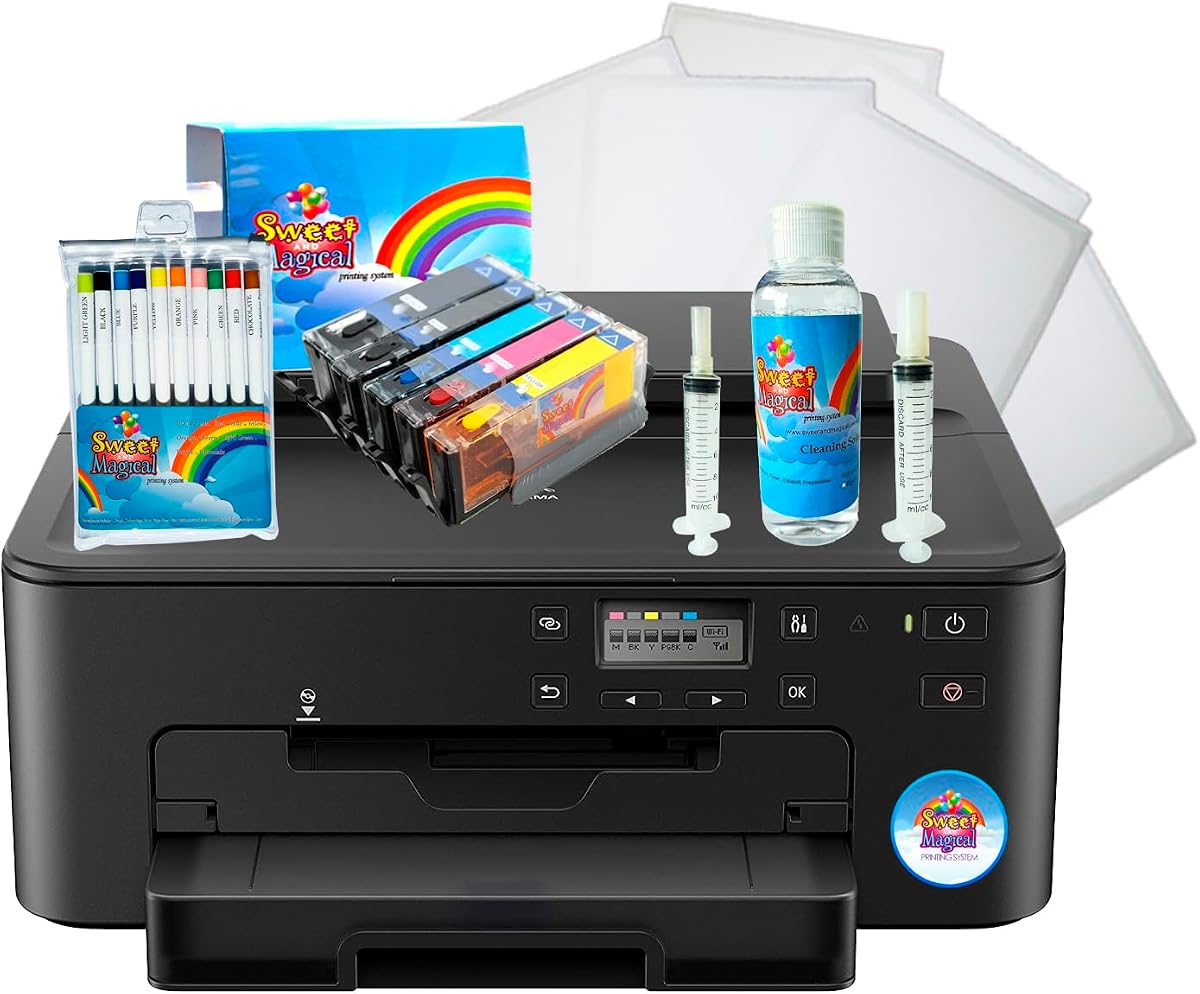


The Ediblethingz Cake Topper Image Printer Bundle Kit stands out as the top choice for those seeking a comprehensive solution. With a rating of 4.1 stars, this all-in-one package provides everything needed to begin printing custom designs immediately. It includes a wireless printer, premium wafer paper, icing sheets, and a cleaning kit.
We may earn a commission when you buy through this link, at no additional cost to you.
This bundle offers fast wireless 4-in-1 printing capabilities with touchscreen control for easy operation. The printer delivers impressive speeds of 15 ppm for black and 10 ppm for color with 4800 x 1200 dpi resolution. Built-in Wi-Fi, AirPrint, and Mopria support allow printing from any device including iPhones and Android phones.
While the price is higher than standalone options, the included accessories justify the cost for new users. The 50 sheets of premium wafer paper and 12 icing sheets provide ample material for immediate projects. The cleaning kit ensures long-lasting performance, though initial setup may require some time to configure wireless settings.
This bundle is ideal for bakers and decorators who want a ready-to-use system without sourcing separate components. It combines functionality with convenience, making it the best overall edible ink printer for most users. We recommend it for those prioritizing ease of use and complete package value.
Including 50 wafer sheets and 12 icing sheets saves buyers from immediate additional purchases for new projects.
Built-in Wi-Fi and AirPrint support ensure you can print designs directly from mobile devices without a computer.
We may earn a commission when you buy through this link, at no additional cost to you.
The Cake Birthday Printer Bundle is an excellent accessory kit for those who already own a compatible printer. Rated 4.2 stars, it focuses on providing essential consumables and tools rather than the printing device itself. The package includes five packs of ink cartridges, frosting paper, ten markers, and a print head kit.
We may earn a commission when you buy through this link, at no additional cost to you.
This set is designed to support existing edible ink printing setups with high-quality supplies. The inclusion of frosting paper allows for direct printing on frosting surfaces, expanding creative options. Ten markers offer additional manual decoration possibilities alongside printed designs.
Users should note that this is an accessory bundle and does not include the printer unit. It is best suited for individuals who need replenishment supplies or want to upgrade their current workflow with extra tools. The quick shipping adds convenience for urgent project needs.
We recommend this bundle for bakers looking to stock up on essential edible ink printing supplies. It complements existing printers well and provides the materials needed for multiple decorating sessions. Consider this if you already have a compatible printer and need reliable consumables.
Combining ink cartridges with frosting paper and markers offers a versatile range of decorating tools in one package.
Designed as an add-on for existing printers, this bundle helps maintain workflow continuity without buying new hardware.
We may earn a commission when you buy through this link, at no additional cost to you.
The Birthday Printer Bundle offers a curated selection of supplies for edible ink printing enthusiasts. Although no rating is currently available, the product description highlights essential items like five ink cartridges, ten markers, and twelve premium frosting sheets. A print head cleaner is also included to maintain device performance.
We may earn a commission when you buy through this link, at no additional cost to you.
This bundle serves as a convenient resupply option for those who need to restock on ink and paper. The inclusion of a cleaning kit is a thoughtful addition that helps prevent clogs and ensures consistent print quality. Markers provide an alternative decorating method for designs that do not require printing.
As an accessory kit, this product assumes the user already possesses a compatible printer. It is not a standalone solution but rather a support package for existing setups. The variety of included items makes it a solid choice for extending the life of current equipment.
We suggest this bundle for users who want to ensure they have fresh ink and paper ready for upcoming projects. The cleaning tool adds value by promoting regular maintenance. It is a practical purchase for maintaining your edible printing workflow effectively.
The included print head cleaner helps users maintain their devices and avoid common issues like clogging.
Having multiple cartridges and sheets on hand ensures you are prepared for large or unexpected decorating orders.
We may earn a commission when you buy through this link, at no additional cost to you.
The PGI-280XL CLI-281XL Compatible Ink Cartridges are a reliable option for users with Canon TS702 series printers. With a high rating of 4.7 stars, these cartridges offer significant value through extended page yields. The set includes one large black, one small black, and three color cartridges for comprehensive coverage.
We may earn a commission when you buy through this link, at no additional cost to you.
These cartridges are designed to reduce the frequency of replacements, making them cost-effective for high-volume printing. The large black cartridge yields approximately 600 pages while the small black can yield up to 6360 pages under certain conditions. Color cartridges provide around 830 pages each for consistent output.
It is important to note that photo blue is not included in this pack which might limit some specific photographic prints. However for general edible ink purposes the standard colors are usually sufficient. Compatibility is broad across many Canon models ensuring wide applicability.
We recommend these cartridges for users who need a dependable ink supply for regular printing tasks. The high yield and positive reviews make them a strong contender for cost-conscious buyers. Ensure your printer model matches before purchasing to guarantee compatibility.
High page yields reduce the cost per print, making these cartridges economical for frequent use.
Specifically designed for Canon TS series printers, these cartridges ensure a proper fit and reliable performance.
We may earn a commission when you buy through this link, at no additional cost to you.
Refillable 280XL 281XL Ink Cartridges provide a sustainable and cost-saving alternative to disposable cartridges. Rated 4.1 stars, this kit includes five cartridges that can be refilled multiple times. Smart chip technology ensures seamless compatibility and real-time ink level monitoring for Canon PIXMA series printers.
We may earn a commission when you buy through this link, at no additional cost to you.
The refillable nature of these cartridges significantly reduces long-term costs for users who print frequently. Each cartridge offers high capacity with specific yields listed for different colors. This setup is particularly appealing for those who want to minimize waste and expense.
Refilling requires some manual effort and care to avoid spills or damage. Users must follow instructions carefully to maintain printer performance. Despite this trade-off, the savings and environmental benefits often outweigh the extra work involved in maintenance.
We suggest these cartridges for environmentally conscious users or businesses looking to lower operational costs. The smart chip helps prevent errors, making the refilling process smoother. It is a great choice for those willing to invest time in maintaining their ink supply.
Reusable cartridges reduce plastic waste compared to single-use options, supporting sustainable practices.
Upgraded smart chips ensure the printer recognizes the cartridges without errors, streamlining usage.
We may earn a commission when you buy through this link, at no additional cost to you.
This Refillable 280XL 281XL Ink Cartridge set offers a practical solution for users seeking to reduce ink costs. With a rating of 4.3 stars, it provides clear printing results with rich hues. The set includes five cartridges equipped with smart chips that monitor ink levels in real time.
We may earn a commission when you buy through this link, at no additional cost to you.
Compatibility extends to a wide range of Canon PIXMA series printers ensuring flexibility for many users. The page yields are substantial, with color cartridges providing around 850 pages each at standard coverage. This makes them suitable for consistent production demands.
Users must refill these cartridges manually which requires time and attention to detail. While this adds a step to the workflow, the cost savings are significant over time. The smart chip technology helps avoid compatibility issues during the process.
We recommend this set for bakers who operate on tight budgets and need to print regularly. The vivid color output ensures designs look professional. It is a solid choice for those comfortable with basic maintenance tasks.
Smart chips allow you to track ink levels accurately, preventing unexpected runs during critical printing.
The ink delivers vibrant hues that enhance the visual appeal of edible prints on various surfaces.
We may earn a commission when you buy through this link, at no additional cost to you.
The S & M Topper Image Cak-Printer Bundle is designed specifically for birthday party preparations. Rated 4.0 stars, it includes branded printer inks and premium wafer sheets to get you started. The kit contains five bottles of ink with 100 ml each and twenty-five wafer sheets.
We may earn a commission when you buy through this link, at no additional cost to you.
This bundle emphasizes quantity with substantial ink volume suitable for multiple printing sessions. The branding targets cake images for parties, suggesting a focus on festive designs. It simplifies the purchasing process by combining essential consumables into one package.
While the rating is decent, users may find the branding less generic than other options. It is ideal for those organizing multiple events who need bulk supplies. The inclusion of wafer sheets ensures you can print immediately without additional purchases.
We suggest this bundle for event planners needing volume supplies for birthday parties. The ink quantity supports high output. It is a practical choice for specific seasonal or event-based decorating needs.
Five 100ml bottles provide ample ink for large orders without frequent refilling or repurchasing.
The product is tailored for cake decorating, aligning well with birthday party themes and requirements.
We may earn a commission when you buy through this link, at no additional cost to you.
The Edible Ink Coffee Printer is a specialized handheld device designed for customizing beverages and desserts. Although no rating is listed, its premium features justify its price. It offers a large design area of 5 by 10 cm and real-time visual positioning for accurate placement of graphics on foam.
We may earn a commission when you buy through this link, at no additional cost to you.
This device features a 5-inch touchscreen allowing direct uploads and adjustments without needing a mobile app. It delivers sharp 300 dpi resolution for refined finishes suitable for professional branding. The built-in camera ensures precise alignment every time reducing guesswork.
Its high price reflects its specialized nature targeting cafés and bars rather than home bakers. The standalone operation adds convenience by eliminating connection requirements. It is built for environments where visual consistency and speed are critical.
We recommend this printer for businesses wanting to enhance brand identity through custom latte art. The advanced positioning technology ensures high-quality results. It is a premium tool for commercial settings seeking a competitive edge.
Built-in cameras and real-time previews ensure logos are placed exactly where intended on curved surfaces.
The touchscreen interface allows full control without relying on external devices or software connections.
We may earn a commission when you buy through this link, at no additional cost to you.
The EVEBOT Handheld Food PrintPen is an affordable option for adding personalized designs to food items. Rated 3.6 stars, it offers a compact solution for decorating desserts, coffee, and cocktails. The device uses food-grade ink pods that are safe for consumption and easy to install.
We may earn a commission when you buy through this link, at no additional cost to you.
This printer supports high production with up to 7000 prints per pod allowing for extended use before replacement. Its portability makes it suitable for events or small setups where space is limited. Cleaning is straightforward with simple wiping instructions for optimal performance.
While the rating is modest, the convenience and low entry cost make it accessible. Pod replacement is required but ensures consistent food-safe ink quality. It is best for users who need occasional printing rather than high-volume industrial tasks.
We recommend this for hobbyists or small cafes on a budget. Its ease of use and safety features are valuable. It serves as a practical entry point for edible printing without significant investment.
All components are food-grade ensuring that printed designs are safe to consume with your creations.
Its handheld design allows for printing directly on various surfaces without needing a stationary setup.
We may earn a commission when you buy through this link, at no additional cost to you.
Refillable PGI-280XXL CLI-281XXL Ink Cartridges offer exceptional value with a rating of 4.5 stars. This 5-pack set is designed for Canon TS series printers providing crisp text and vivid colors. The high-yield cartridges support professional quality prints at a reduced cost.
We may earn a commission when you buy through this link, at no additional cost to you.
Each color cartridge yields around 830 pages while the black delivers up to 6360 pages depending on the specific model. This makes them suitable for extensive printing needs. The packaging ensures you have a full set of colors ready for use immediately.
Refilling is required which involves manual handling. Despite this the cost savings are substantial compared to original cartridges. The compatibility list is broad ensuring it fits many popular printer models.
We recommend these cartridges for users prioritizing cost efficiency and print volume. The positive feedback reflects reliable performance. It is a strong choice for those managing a printing operation where budget matters.
High yields mean fewer replacements, lowering the overall cost per page for extensive projects.
Compatibility with multiple Canon TS models ensures flexibility across different printer generations.
We may earn a commission when you buy through this link, at no additional cost to you.
Choosing an edible ink printer involves considering compatibility, cost, and output quality to match your specific decorating needs.
Ensure the ink used is food-grade and certified safe for consumption. Non-food-grade inks can contain harmful chemicals that make prints unsafe to eat. Always verify certifications or claims related to food safety before purchasing any consumable supplies.
Look for products explicitly labeled as food-grade or edible. This guarantees compliance with safety standards for direct contact with food items.
Check that the printer or cartridges are compatible with your existing device. Many edible ink systems work with specific Canon or Epson models using standard cartridge slots. Mismatched hardware can lead to errors or wasted investments.
Verify model numbers against the manufacturer's compatibility list. This prevents frustration and ensures the ink flows properly without clogging.
Different edible printers support different materials such as wafer paper, icing sheets, or fondant. Some machines handle thick wafer paper better than others which affects your design options. Select a printer that matches the materials you plan to use most.
Consider the range of surfaces you want to print on. A printer supporting multiple surface types offers more versatility for various dessert projects.
Modern printers often offer wireless connectivity allowing you to send designs from mobile devices. Features like AirPrint or Wi-Fi direct enhance convenience by removing the need for cables. This is useful when working in a kitchen environment away from a computer.
Opt for models with mobile printing support if you use smartphones for design creation. It streamlines the workflow and saves time during busy baking sessions.
Beyond the initial device cost, consider the ongoing expense of ink and paper. Refillable systems often save money over time compared to disposable cartridges. Calculate cost per page to understand the long-term financial commitment.
Balance the upfront price with recurring supply costs. A slightly more expensive printer with cheaper consumables may save money eventually.
Higher resolution ensures sharp details and smooth color gradients in your edible images. Aim for printers offering at least 1200 dpi for professional results. Speed matters if you are printing large volumes for commercial orders.
Check the pages per minute rating to ensure it meets your production needs. Faster printers reduce waiting time and increase workflow efficiency.
Edible ink printers require regular cleaning to prevent nozzle clogs which can ruin prints. Look for models with accessible cleaning kits or automatic maintenance cycles. Simple cleaning processes reduce downtime and extend device life.
Prioritize printers with user-friendly cleaning protocols. This ensures you can maintain peak performance without complex technical skills.
Bundles often include essential supplies like paper and cleaning kits which provide immediate value. Standalone devices might be cheaper upfront but require separate purchases for consumables. Assess whether you need a complete kit or just the device.
If you are starting out, a bundle reduces setup time. For experienced users, standalone devices may offer more customization options.
Start by loading the correct edible paper type into the printer's feed tray. Ensure the wafer or icing sheets are aligned properly to prevent jams. Feed them slowly and check alignment before starting the first print job.
Regular cleaning is essential to maintain print quality and prevent clogging. Use the included cleaning kit to wipe the print head gently after every few sessions. This keeps ink flowing smoothly and avoids streaks or missing colors.
Store your ink cartridges and paper in a cool, dry place to avoid moisture damage. Keep lids tightly sealed when not in use to prevent the ink from drying out. Proper storage extends the lifespan of your consumables significantly.
Yes, edible ink printers are safe when used with food-grade inks and papers. Always verify that the inks are certified safe for consumption before printing on items you plan to eat. Non-food-grade inks should never be used on surfaces that come in contact with food.
You can print on wafer paper, icing sheets, and some types of fondant depending on the printer. Wafer paper is the most common for cakes while icing sheets work well on frosting. Check your printer's manual for specific material thickness requirements.
Use a soft cloth or cleaning kit provided with the printer to wipe the print head. Run a cleaning cycle if the printer supports automatic maintenance. Avoid using harsh chemicals as they may damage the internal components or leave residues.
No, regular printer ink is toxic and not safe for consumption. Always use ink specifically labeled as edible or food-grade for any surface touching food. Using regular ink can pose health risks and is strictly discouraged for edible applications.
Cartridge life varies by capacity and usage but typically ranges from hundreds to thousands of pages. Refillable cartridges extend this significantly by allowing multiple refills. Keep track of ink levels to ensure timely replacements for consistent output.
Many modern edible printers support mobile printing so you do not need a computer. Features like Wi-Fi and AirPrint allow direct printing from smartphones or tablets. This adds flexibility especially when working in kitchen environments.
Direct printing on chocolate is challenging due to texture and surface irregularities. It is better to print on wafer paper and then transfer it to the chocolate surface. This ensures a clean image without smudging or distortion.
We explored ten distinct options ranging from complete bundles to specialized handheld devices. The Ediblethingz bundle leads with comprehensive value while the coffee printer offers premium features for professionals. Each choice serves different needs from hobbyists to commercial bakeries.
Prioritize food safety and compatibility when selecting your system. Ensure inks are certified and the device fits your existing workflow. A reliable printer will save time and produce vibrant results that delight customers.
Remember to check current availability and pricing before making a purchase. Prices fluctuate and stock levels vary by retailer. Use this guide to find the right model for your budget and decorating requirements.