
Excel/Word/PowerPoint/Windows Mouse Pad
4.7Editor score
Multi-application shortcut coverage
Waterproof spill-resistant surface
Stitched edges for durability
An Excel Cheat Sheet Desk Pad combines functionality with design to streamline your workflow. These mats provide quick access to essential shortcuts, formulas, and keys while protecting your desk surface from daily wear and tear.
We evaluated ten top-rated desk pads based on layout clarity, durability, size, and surface performance. Our analysis focuses on how well each option supports efficient spreadsheet work and integrates seamlessly into various office environments.
Each pick highlights unique strengths like extended sizing or multi-software support. Note that stock availability and pricing may vary over time, so verify details before purchasing to ensure you get the right tool for your needs.
4.7Editor score

4.7Editor score

4.6Editor score
As an Amazon Associate we earn from qualifying purchases.
This comparison table provides a side-by-side overview of the top ten Excel Cheat Sheet Desk Pad options. Each entry highlights key specifications such as size, surface material, and unique features to help you quickly identify the best fit for your workspace.


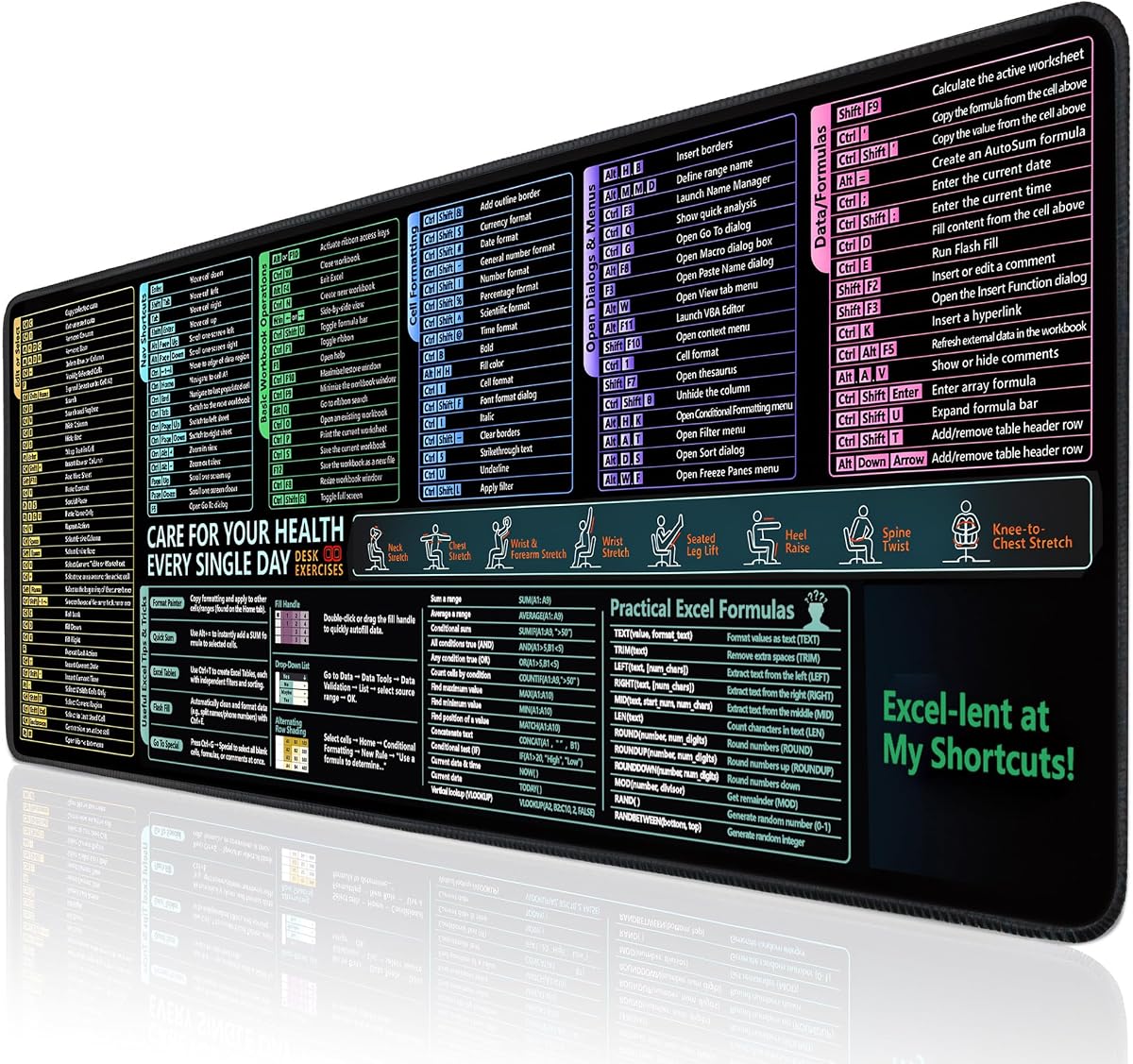


The Pixiecube Excel Cheat Sheet Desk Pad stands out as a top-tier choice for productivity. It combines a comprehensive shortcut reference with wellness features, earning a 4.7 rating from users who value both efficiency and comfort in their workspace.
We may earn a commission when you buy through this link, at no additional cost to you.
Its extended 31.5 by 11.8-inch surface provides ample room for laptops, keyboards, and mice. The layout groups navigation, selection, and formatting keys logically, while the 2 mm micro-weave fabric ensures smooth mouse tracking. The inclusion of desk exercise diagrams adds a unique health-focused element rarely seen in standard mats.
While the price is higher than budget alternatives, the added value justifies the cost for professionals. The UV-resistant inks and water-resistant surface ensure longevity, though those preferring a minimalist desk might find the colorful graphic too busy for their taste.
Ideal for data entry professionals, students, and designers who spend hours at their desks. This pad supports long work sessions with ergonomic references and desk protection. If you need a reliable, feature-rich mat to enhance workflow and well-being, this is the top recommendation.
The clearly organized sections for navigation and functions make finding commands instant, reducing the need to search online during critical tasks.
Built-in diagrams offering ten quick stretches help users recharge during long spreadsheets, promoting better posture and reducing physical strain.
We may earn a commission when you buy through this link, at no additional cost to you.
This Excel/Word/PowerPoint/Windows Mouse Pad offers exceptional value for users needing multi-software support. With a 4.7 rating, it balances cost and performance effectively. Its focus on practical shortcuts across multiple applications makes it a versatile tool for daily office tasks.
We may earn a commission when you buy through this link, at no additional cost to you.
Measuring 27.6 by 11.8 inches, it provides generous space for standard setups. The waterproof top layer protects against spills, ensuring long-term usability without staining. The smooth fabric ensures accurate control, while the reinforced edges prevent fraying over time, maintaining a professional appearance.
The main limitation is its size, which may not fit larger dual-device setups as well as XL pads. Additionally, the design is functional rather than stylish. However, for those prioritizing utility and affordability, these trade-offs are minor compared to the functional benefits offered.
Perfect for students, remote workers, and casual users who need a reliable, cost-effective solution. It supports efficient workflows by keeping key commands visible and accessible. If you want a practical mat without overspending, this is the ideal budget-friendly choice.
By including shortcuts for Excel, Word, PowerPoint, and Windows, this pad serves diverse users without requiring multiple reference tools.
The waterproof surface layer allows for quick cleaning of coffee or water spills, protecting both the mat and the underlying desk surface.
We may earn a commission when you buy through this link, at no additional cost to you.
This XL-sized pad focuses on delivering a robust collection of Excel functions. With a 4.5 rating, it appeals to users who want straightforward, no-frills assistance. The inclusion of common function meanings and FN keys adds practical value for navigating complex spreadsheets efficiently.
We may earn a commission when you buy through this link, at no additional cost to you.
Its 300 by 800 mm size ensures ample space for keyboards and mice. Advanced inkjet printing ensures graphics remain bright and clear without odors common in cheaper mats. The waterproof cloth surface provides a silky feel, enhancing user comfort during extended typing or mouse usage.
While reliable, the lack of additional wellness or multi-software features sets it apart from higher-rated options. The design is purely functional. For users who strictly need Excel references without extra bells and whistles, this is a solid middle-ground choice.
Ideal for office staff and accounting students who prioritize core Excel utility. It serves as a protective desk mat while keeping essential commands accessible. If your primary goal is mastering Excel shortcuts, this pad offers a reliable and affordable solution.
The nine major Excel categories cover a wide range of common needs, from data entry to complex calculations, in one organized view.
Bright and clear printing ensures that shortcuts remain legible and easy to read during long hours of use, reducing eye strain.
We may earn a commission when you buy through this link, at no additional cost to you.
This XL desk pad combines premium aesthetics with practical utility. Rated 4.6, it targets professionals seeking a sophisticated office look. The water-resistant leather surface and expansive 35.4 by 15.7-inch size make it a standout choice for those who value both style and function.
We may earn a commission when you buy through this link, at no additional cost to you.
Its generous space accommodates laptops, mechanical keyboards, and mice comfortably. The anti-slip natural rubber base keeps it secure, while the spill-repellent surface ensures durability. It acts as a writing pad and desk blotter, adding versatility beyond standard mouse mats for a polished workspace.
The higher cost reflects the materials and size, but may not fit all budgets. The leather-like texture can feel different than fabric mats, requiring user preference alignment. For those wanting a professional upgrade, the trade-off is worthwhile for the quality and appearance.
Ideal for corporate professionals and home office workers seeking a chic, functional upgrade. It protects desks from stains and scratches while streamlining workflows. If you prioritize a premium look and spacious layout, this pad is an excellent investment in your workspace.
The leather surface and professional design transform a standard desk into a polished, organized workspace that reflects professional pride and care.
Safeguarding desks from scratches, stains, and wear preserves their pristine state, reducing long-term maintenance costs for valuable furniture.
We may earn a commission when you buy through this link, at no additional cost to you.
This pad merges Excel and Word shortcuts into one convenient mat. With a 4.6 rating, it serves users juggling multiple applications daily. The layout includes common skills and FN key meanings, making it a practical aid for office productivity and academic assignments alike.
We may earn a commission when you buy through this link, at no additional cost to you.
At 300 by 800 mm, it provides enough space for keyboard and mouse use. The high-quality waterproof cloth ensures easy cleaning and a smooth gaming-like feel. Advanced printing keeps graphics clear, and double seam edges prevent wear, ensuring the mat lasts through heavy daily use.
While functional, it lacks the wellness features of other top picks. The focus remains strictly on productivity shortcuts. However, for users needing a reliable balance of Excel and Word help, it remains a solid, practical choice for any workstation.
Ideal for students and office workers handling mixed document tasks. It streamlines workflow by keeping both app commands visible. If you need a sturdy, functional mat for multitasking between apps, this option delivers consistent value and performance.
Integrating Word and Excel skills saves desk space and provides quick access to diverse commands without needing separate reference tools.
Double seam technology and waterproof cloth ensure the mat withstands spills and daily friction, maintaining its quality over long periods.
We may earn a commission when you buy through this link, at no additional cost to you.
This pad stands out for its thermal transfer printing and high user rating. Rated 4.8, it delivers crisp details and vibrant colors. The 7-zone layout ensures easy navigation through commands, while the buttery-smooth rubber base prevents slipping during daily work or gaming sessions.
We may earn a commission when you buy through this link, at no additional cost to you.
Its large size accommodates full setups comfortably. Precision-stitched edges prevent curling and fraying, maintaining a stable flat surface. This makes it a reliable choice for those who need a long-lasting mat that balances aesthetic clarity with practical utility effectively.
The main consideration is its standard functional design, which may not appeal to those seeking unique aesthetics. However, the high rating speaks to its performance. For users valuing reliability and clarity above all, this is a strong, consistent performer.
Ideal for professionals and gamers seeking a durable, functional mat. It supports smooth workflows and long sessions without surface degradation. If you need a high-quality, reliable desk protector with clear references, this mat offers excellent value and consistency.
Thermal transfer technology keeps shortcuts sharp and legible even after months of daily use, cleaning, or exposure to desk elements.
The buttery-smooth rubber base ensures the pad grips firmly, preventing unwanted sliding during precise mouse movements and typing tasks.
We may earn a commission when you buy through this link, at no additional cost to you.
With a stellar 4.9 rating, this XL pad excels in design and comfort. It features color-coded hotkeys and practical formulas to accelerate learning. The soft 2 mm surface cushions wrists, while built-in stretch diagrams offer ergonomic relief, making it a standout choice for wellness-focused users.
We may earn a commission when you buy through this link, at no additional cost to you.
Its 31 by 11.8-inch size fits most setups. Thermal-transfer printing keeps labels legible, while water-resistant fabric handles spills effortlessly. Reinforced stitching ensures durability. The comprehensive support for both productivity and comfort sets it apart in a competitive market of basic mats.
The design is distinct, which may not suit minimalist preferences. The thickness adds to comfort but changes the profile. However, given the rating, users prioritize its benefits. For those seeking ergonomic and functional excellence, this mat is a top-tier pick.
Ideal for finance students and office workers managing long hours. It supports posture and efficiency simultaneously. If you value both productivity and health, this mat delivers a unique, well-rounded solution that addresses common workplace pain points effectively.
Color-coded hotkeys allow for instant recognition of commands, speeding up workflow and reducing the cognitive load during critical tasks.
Soft cushioning and built-in stretch diagrams reduce physical strain, keeping users comfortable and focused during extended work sessions.
We may earn a commission when you buy through this link, at no additional cost to you.
This secret corner desk pad delivers a 7-zone layout for organized access. Rated 4.6, it suits those needing a clear, concise reference without clutter. The water-resistant surface handles spills easily, and the stitched edges ensure longevity, providing a reliable foundation for daily office tasks.
We may earn a commission when you buy through this link, at no additional cost to you.
Its 27.6 by 11.8-inch surface fits standard keyboard and mouse setups. The design prioritizes productivity references directly on the desk, reducing screen switching. This functional approach ensures you stay in the flow, making it a practical tool for accountants, analysts, and study-focused users.
The straightforward design may not appeal to those seeking unique styles. However, it excels at delivering core functionality effectively. For users needing a clean, organized reference tool, this option offers consistent value without unnecessary extras or complications.
Ideal for professionals and students seeking a practical workspace aid. It streamlines spreadsheet work and protects surfaces. If you need a dependable, efficient mat to support focused work, this pad provides the utility and durability needed for consistent performance.
By keeping shortcuts visible and accessible, the mat reduces search time, keeping users focused on data entry and analytical tasks.
Water-resistant and smooth surface allows for quick cleaning, ensuring the workspace stays tidy and professional throughout busy workdays.
We may earn a commission when you buy through this link, at no additional cost to you.
This iCasso mat offers a spacious surface with a soft touch. Rated 4.8, it provides comfort and utility for daily work. The extended 35.4 by 15.7-inch size accommodates laptops and mice well, while the lycra surface ensures smooth tracking for precise control during use.
We may earn a commission when you buy through this link, at no additional cost to you.
Its high-quality stitched edges prevent deformation over time, keeping the mat looking fresh. The flexible rubber base allows easy transport. Machine washable, it maintains hygiene without hassle. This practical approach makes it a reliable choice for both work and gaming.
The design lacks specialized features compared to others, but its comfort and durability stand out. For those valuing tactile quality and size, it offers a strong balance. If you need a clean, functional desk organizer that feels great to use, this is a solid pick.
Ideal for gamers and office users seeking a comfortable workspace. It keeps desks clean and organized while supporting various tasks. If you value tactile comfort and ease of care, this mat provides a practical solution for maintaining a tidy, efficient environment.
The comfortable lycra surface provides a pleasant touch and glide, reducing hand fatigue and enhancing the overall user experience.
Machine washable design allows for easy cleaning and upkeep, ensuring the mat remains fresh and presentable in any workspace.
We may earn a commission when you buy through this link, at no additional cost to you.
This Kinevolve pad offers a compact solution for on-the-go professionals. Rated 4.8, it fits easily in laptop bags and features multi-software shortcuts. The finely-textured surface ensures precise control, while stitched edges and a rubber base maintain stability during travel or office use.
We may earn a commission when you buy through this link, at no additional cost to you.
Its 11.8 by 9.8-inch size is ideal for laptops and minimal desks. High-resolution printing keeps text legible through regular cleaning. It serves as a handy reference for travelers and students needing essential commands without bulky accessories. The design prioritizes portability and functionality over large surface area.
The small size restricts extensive mouse movement, limiting use for desktop setups. However, for those with limited desk space or who travel often, this is a smart trade-off. If you need a portable, efficient reference tool, this mat delivers exactly what it promises.
Ideal for travelers, students, and remote workers. It supports productivity in diverse environments without clutter. If you need a lightweight, reliable tool to maintain efficiency on the move, this compact pad is the perfect companion for daily tasks.
Compact dimensions and a lightweight profile make it easy to pack, ensuring reference guides are always available for mobile workers.
Incorporating Excel, Word, and Windows shortcuts into a single compact design maximizes utility without requiring bulky or multiple reference tools.
We may earn a commission when you buy through this link, at no additional cost to you.
Choosing the right Excel Cheat Sheet Desk Pad involves evaluating several key factors that impact both usability and desk aesthetics. This guide breaks down what to consider.
The surface material dictates mouse tracking and comfort. Smooth fabrics offer speed and precision, while textured surfaces provide grip. Some options use leather or waterproof cloth for easier cleaning. Selecting the right texture ensures your mouse glides smoothly and your wrists stay comfortable during long sessions.
Prioritize a surface that matches your mouse sensitivity and cleaning needs. Smooth fabrics are ideal for gaming-style precision, while waterproof options suit busy desks.
Size determines how much of your workspace the pad protects. XL pads cover entire desks, accommodating laptops and multiple peripherals. Compact sizes fit minimal setups or travel bags. Ensure the dimensions match your keyboard and mouse layout to avoid clutter or restricted movement.
Choose a size that fits your desk space and peripheral count. XL pads offer maximum protection, while compact ones save space for smaller setups.
The layout should group commands logically for quick access. Color-coded or well-sectioned designs reduce search time during work. Ensure text is high-resolution and legible even after cleaning. A clear layout prevents eye strain and keeps you focused on tasks rather than deciphering commands.
Look for organized sections and high-quality printing. Clear visibility is essential for quick reference and maintaining workflow efficiency.
Stitched edges prevent fraying and curling over time, extending the mat's lifespan. A sturdy rubber base prevents slipping. Check for reinforced construction to withstand daily wear and spills. Durable mats maintain their appearance and functionality through years of use.
Invest in pads with double-seam edges and non-slip bases for long-term reliability. Quality construction ensures the mat remains flat and secure.
A water-resistant surface protects against spills, coffee, or dust. This feature simplifies cleaning and prevents damage to the underlying desk. Materials like waterproof cloth or leather-like surfaces wipe clean easily. This ensures the mat stays fresh and professional looking without requiring special maintenance.
Opt for waterproof materials to protect against daily accidents. Easy cleaning ensures the mat remains hygienic and functional long-term.
Some pads cover Excel, Word, PowerPoint, and Windows shortcuts, offering broader utility. This versatility saves space by consolidating references into one mat. Consider your software usage to decide if multi-app support is necessary. It is ideal for users juggling different applications daily.
Select a pad that matches your software needs. Multi-application coverage reduces the need for multiple reference tools and maximizes desk space.
Design ranges from minimal and neutral to colorful and feature-rich. Some options include wellness diagrams or unique graphics. Choose a style that complements your office decor. Aesthetic appeal impacts motivation and how you perceive your workspace environment.
Pick a design that aligns with your workspace vibe. Whether professional or functional, a pleasing design enhances your daily work experience.
Thickness and wrist cushioning can reduce strain during typing. Some mats include integrated exercise guides to promote movement. Ergonomic features support posture and comfort over long work hours. Prioritize comfort if you spend many hours daily at your desk.
Look for soft surfaces or ergonomic add-ons. Comfort-focused designs help prevent fatigue and maintain productivity throughout the day.
Position the pad directly under your keyboard and mouse. Ensure the shortcut section is within your line of sight for quick glances. This placement reduces head movement and keeps your workflow uninterrupted.
Wipe the surface with a damp cloth to remove dust or spills. Avoid harsh chemicals that might damage the printing or surface coating. Regular cleaning keeps the reference text clear and ensures a smooth mouse experience.
Rotate your usage to prevent uneven wear. If using it for gaming or heavy typing, periodically shift the mouse position. Store the pad flat when not in use to prevent curling and maintain its professional appearance.
Yes, most Excel Cheat Sheet Desk Pads are designed to work with both optical and laser mice. The fabric or smooth surface provides consistent tracking. If you use a high-resolution gaming mouse, ensure the texture supports its sensor for optimal performance.
For most pads, a simple wipe with a damp cloth is enough to remove dust and spills. Some models are machine washable; check the specific product care instructions. Avoid soaking the base to prevent damage to the rubber and adhesive layers.
Many Excel Cheat Sheet Desk Pads offer smooth surfaces and non-slip bases ideal for gaming. However, dedicated gaming mats may provide specific friction characteristics. For casual gaming, these pads work well due to their durability and smooth tracking.
High-quality pads use UV-resistant inks and thermal transfer printing to prevent fading. Regular cleaning can wear down lower-quality prints over years. Investing in a well-reviewed model ensures the text remains legible through daily use and cleaning.
The non-slip rubber base helps stabilize the mat on most smooth, flat surfaces. Uneven desks may cause minor shifting, but the adhesive-like grip usually mitigates this. For best results, ensure your desk is reasonably smooth before placing the pad.
For laptops, a 27.6 by 11.8 inch pad is usually sufficient to cover the keyboard and mouse area. XL sizes offer more room if you use an external keyboard or monitor. Consider your available desk real estate when choosing between standard and XL dimensions.
The Pixiecube Excel Cheat Sheet Desk Pad stands out as our top choice due to its comprehensive layout and wellness features. For budget-conscious buyers, the Excel/Word/PowerPoint/Windows Mouse Pad offers incredible value without sacrificing utility.
When selecting a mat, prioritize size and layout clarity based on your workflow. Whether you need a compact travel tool or an XL desk protector, the right choice enhances efficiency and keeps your workspace organized for long-term productivity.
Remember to verify current stock and details before purchasing. Prices and availability can shift, so checking the latest product page ensures you get the most accurate information for your purchase decision.