
8Bitdo M30 Wired Controller
4.2Editor score
Officially Licensed by Xbox
Virtually lag-free USB-C
Custom profile switch button
This guide compares the top fightpads for PC to help you find the best controller for competitive gaming with detailed specs and expert recommendations.
Finding the right fightpad for PC can transform your competitive gaming experience. A quality controller offers precision, durability, and responsive inputs essential for mastering fighting games.
We evaluated ten top-rated controllers based on build quality, layout, compatibility, and performance. Each entry includes verified specs and real user feedback to ensure informed decisions.
Every pick highlights key strengths and ideal use cases. Remember that availability and pricing vary, so check current listings before purchasing to secure the best deal today.
4.2Editor score

4.1Editor score

4.2Editor score
This side-by-side comparison highlights key specifications across all ten models to help you quickly identify the best fit for your gaming setup and style.
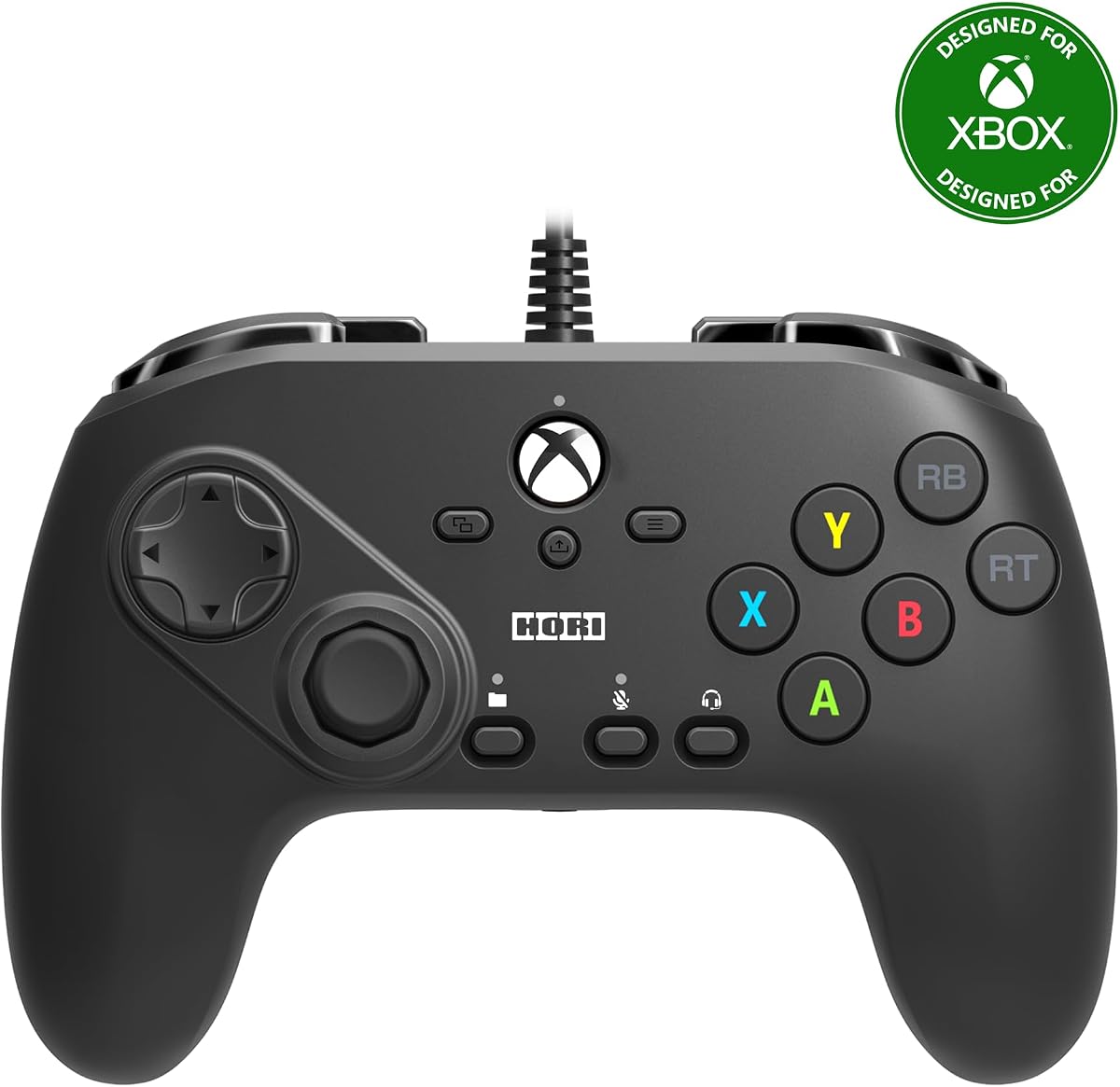


The HORI Fighting Commander OCTA stands out as a reliable choice for PC fighters. Rated 4.1 stars it combines tournament-ready features with everyday usability for serious players.
We may earn a commission when you buy through this link, at no additional cost to you.
Its Micro Switch buttons ensure crisp actuation perfect for executing rapid combos. The adjustable D-Pad and short throw analog stick enhance accuracy during intense matches.
While it lacks wireless capability the wired connection minimizes latency. The app customization adds value though some users may find settings limited compared to advanced alternatives.
This controller suits players seeking an official Sony licensed pad that delivers consistent performance on PC. It balances affordability with high-end components effectively.
Micro Switch technology provides reliable actuation reducing missed inputs during critical moments in matches.
Officially licensed by Sony it seamlessly connects with PlayStation systems and Windows PCs for broader compatibility.
We may earn a commission when you buy through this link, at no additional cost to you.
This model targets Xbox users but remains functional on Windows 10. Rated 3.5 stars it offers solid build quality and dedicated fighting game optimizations.
We may earn a commission when you buy through this link, at no additional cost to you.
Profile switching lets players save four distinct configurations. The six-button layout and adjustable D-Pad support tailored setups for different games and styles.
Some users report minor connectivity quirks on PC compared to Xbox. However the hardware quality and licensed features remain strong for dedicated Xbox gamers.
Ideal for Xbox Series X|S owners who occasionally play on PC. It delivers reliable performance with Microsoft approved quality assurance standards.
Save up to four profiles and switch instantly using the dedicated profile button for quick setup changes.
Certified by Microsoft ensures full compatibility and access to features exclusive to Xbox systems.
We may earn a commission when you buy through this link, at no additional cost to you.
The 8Bitdo M30 offers an entry-level option without sacrificing performance. Rated 4.2 stars it brings official Xbox licensing to PC players on a budget.
We may earn a commission when you buy through this link, at no additional cost to you.
Its USB-C connection ensures stable inputs with minimal latency. Three custom profiles let you adapt layouts for different fighters easily.
Lack of wireless or advanced macro tools limits pro use. But for casual and semi-competitive players it delivers excellent value.
Best for those wanting a retro-style pad that works reliably on PC. It balances cost and functionality well for starters.
Licensed by Xbox ensures full compatibility with Windows and Xbox consoles without needing extra drivers.
Connect via USB-C and start playing immediately with no installation required for most games.
We may earn a commission when you buy through this link, at no additional cost to you.
The DOYOKY leverless controller brings hitbox-style play to PC. Rated 4.4 stars it features hot-swappable switches and OLED for real-time feedback.
We may earn a commission when you buy through this link, at no additional cost to you.
Use web tools to adjust settings without installing drivers. The OLED screen shows SOCD and turbo status clearly during sessions.
Transitioning from sticks may take time. But the precision and customization make it worth the effort for serious players.
Recommended for fighters wanting tournament control without buying a full arcade stick. It bridges gap between pads and sticks.
Swap mechanical switches easily with included tools to tailor button feel without soldering skills.
Built-in OLED displays input mode and settings instantly for quick verification during play.
We may earn a commission when you buy through this link, at no additional cost to you.
This premium leverless controller delivers next-gen speed with Hall Effect tech. Rated 4.2 stars it offers adjustable trigger and LCD settings.
We may earn a commission when you buy through this link, at no additional cost to you.
Rapid Trigger and 8000Hz polling give edge in fast games. The LCD acts as control hub for modes and animations.
Price is steep compared to traditional pads. However the durability and responsiveness justify investment for competitors.
Best for high-level players wanting ultimate control and innovation. It sets new standard in fightpad technology.
Magnetic switches eliminate friction preventing wear and maintaining consistent performance over years.
50KHz scan rate ensures instant response reducing input lag for competitive advantage.
We may earn a commission when you buy through this link, at no additional cost to you.
The Tekken 8 edition offers familiar OCTA quality with exclusive branding. Rated 3.8 stars it includes Bandai Namco licensing and analog slide pad.
We may earn a commission when you buy through this link, at no additional cost to you.
Microswitch buttons ensure precise actuation for combos. The slide pad helps in navigating menus quickly.
Core specs mirror standard OCTA so unique advantages limited. Collectors may appreciate theme but gameplay unchanged.
Ideal for Tekken fans seeking official themed hardware. It delivers consistent performance with visual flair.
Endorsed by Bandai Namco ensures full compatibility and support for Tekken 8 features.
Analog slide pad aids quick in-game navigation reducing menu delays during matches.
We may earn a commission when you buy through this link, at no additional cost to you.
This wireless pad eliminates cable clutter with reliable connection. Rated 3.6 stars it adds rear buttons and swappable D-pads.
We may earn a commission when you buy through this link, at no additional cost to you.
Locking cable ensures stable charges. Firmware updates are required but improve performance and compatibility.
Price is significant compared to wired rivals. Wireless convenience may justify cost for some players.
Best for players prioritizing mobility without sacrificing tournament features. It offers premium wireless fighting experience.
Add extra inputs for macros or complex combos enhancing strategic depth.
Choose from three D-pad styles to match personal preference and game requirements.
We may earn a commission when you buy through this link, at no additional cost to you.
This renewed OCTA offers full features at reduced price. No official rating yet it comes with Amazon Renewed guarantee.
We may earn a commission when you buy through this link, at no additional cost to you.
Identical to new OCTA but inspected for quality. Macros and layout remain same for competitive play.
Risk exists but return policy protects buyers. Savings make it attractive for budget gamers.
Ideal for cost-conscious players wanting OCTA quality. It balances value with trusted functionality.
Inspected and tested by Amazon for condition ensuring reliable performance before use.
Save complex sequences for one-button execution improving execution consistency in matches.
We may earn a commission when you buy through this link, at no additional cost to you.
The F310 is a classic gamepad that doubles for fighters. Rated 4.4 stars it has floating D-Pad and extensive buttons.
We may earn a commission when you buy through this link, at no additional cost to you.
Profiler software allows key remaps enhancing control customization. The layout mirrors Xbox 360 for easy familiarity.
Lacks dedicated fighting features like microswitches. But reliability and ease make it solid general-purpose controller.
Best for casual players seeking affordable reliable pad. It balances simplicity with broad compatibility.
Four switches under D-Pad enhance direction change speed accuracy for better movement.
Ten programmable buttons enable deep customization for different game mechanics.
We may earn a commission when you buy through this link, at no additional cost to you.
The Fighting Stick Mini delivers arcade feel in small package. Rated 4.2 stars it features V-cut joystick and eight buttons.
We may earn a commission when you buy through this link, at no additional cost to you.
Portable design suits travel and small desks. Official Sony license ensures full compatibility across systems.
Limited customization compared to pro sticks. But build quality and price make it great entry stick.
Ideal for players wanting stick control without full desk setup. It brings arcade precision home effectively.
Original HORI housing provides smooth movement and consistent directional accuracy.
Lightweight design allows easy transport between gaming sessions or events.
We may earn a commission when you buy through this link, at no additional cost to you.
Selecting the right fightpad involves understanding key features that impact performance and comfort. Use this guide to prioritize specifications aligned with your playstyle.
Most fightpads use microswitch or hall effect switches for speed and durability. Microswitches offer tactile feedback while hall effect switches eliminate wear for long life.
Choose hall effect for competitive longevity or microswitch for traditional feel.
Standard six-button layouts suit most games but fourteen or sixteen-button options offer more input flexibility for complex combos.
Consider the game requirements and your comfort level when selecting button count.
Wired USB connections provide minimal latency compared to wireless. Some wireless models use proprietary dongles to maintain low lag.
Prioritize wired or low-latency wireless for competitive play.
Ensure the fightpad supports your operating system and console platforms. Licensed controllers often provide plug-and-play functionality without drivers.
Check official licensing labels for guaranteed compatibility with your setup.
Advanced controllers include apps to remap buttons or save profiles. Browser-based tools offer flexibility without installing bloatware.
Look for profiles that enable switching between setups quickly during gameplay.
Materials and grip affect comfort during long sessions. Rubberized bases prevent sliding while ergonomic contours reduce hand fatigue.
Invest in durable plastics and metal parts to withstand frequent play.
Fightpads range from affordable gamepads to premium leverless controllers. Warranty terms often reflect build quality and manufacturer confidence.
Balance cost against expected usage frequency and durability needs.
Compact designs fit easily in bags while sticks may require dedicated cases. Weight and cable length influence transport convenience.
Choose portable options if you travel to tournaments or LAN events.
Connect the controller to a USB port and install required software if applicable. Ensure firmware updates are applied for optimal performance and compatibility.
Clean buttons and surfaces regularly with a soft dry cloth to prevent dust buildup. Avoid exposing the device to liquids or direct sunlight.
Store the fightpad in a protective case when not in use to prevent damage. Check cable connections periodically to ensure stable inputs during gameplay.
Most modern fightpads support XInput or DInput standards compatible with major PC titles. Always verify game compatibility in the product description or manufacturer website.
Yes, many licensed controllers support Windows 10 and 11 via USB. Some may require third-party drivers if not natively recognized.
Leverless controllers offer faster input execution but require adaptation. Traditional sticks provide tactile feedback preferred by some players.
Most licensed pads work plug-and-play on Windows. Advanced customization usually requires optional companion software from the manufacturer.
Microswitches often last tens of millions of presses. Hall Effect switches theoretically have infinite lifespan due to contactless design.
Yes, but standard gamepads may offer better ergonomics for action games. Fightpads can still map inputs for broader gameplay.
The HORI Fighting Commander OCTA leads as overall best balancing performance and reliability. Alternatives like Akko FUNBOX suit advanced players needing hall effect technology.
Prioritize compatibility and connection type when selecting a fightpad. Comfort and customization features enhance long-term usability.
Review current listings before purchase to confirm availability and pricing. Stay informed to make the best choice for your competitive setup.