
myTRACKS Groovebox – Sequencer, Sampler, Drum Machine
4.6Editor score
No experience required
Build complete tracks
Record world sounds
Shape your sound
This expert guide compares the top 10 grooveboxes for live performance, evaluating features, portability, and sound quality for musicians seeking standalone
Choosing the right groovebox for live performance requires balancing portability, sound quality, and workflow efficiency. Musicians need reliable hardware that delivers powerful audio without demanding a laptop setup on stage.
We evaluated ten standout models based on standalone capabilities, sequencing depth, and integration options. Our analysis focuses on how each device handles real-time performance tasks and creative flexibility during live sets.
Each selection highlights unique strengths for different performance styles and budgets. Please note that prices and availability change frequently, so verify current details before making your final purchase decision.
4.6Editor score
4.5Editor score
4.7Editor score
The following table compares all ten selected grooveboxes side by side. It highlights essential specifications to help you quickly identify which model aligns with your specific performance needs and budget constraints.




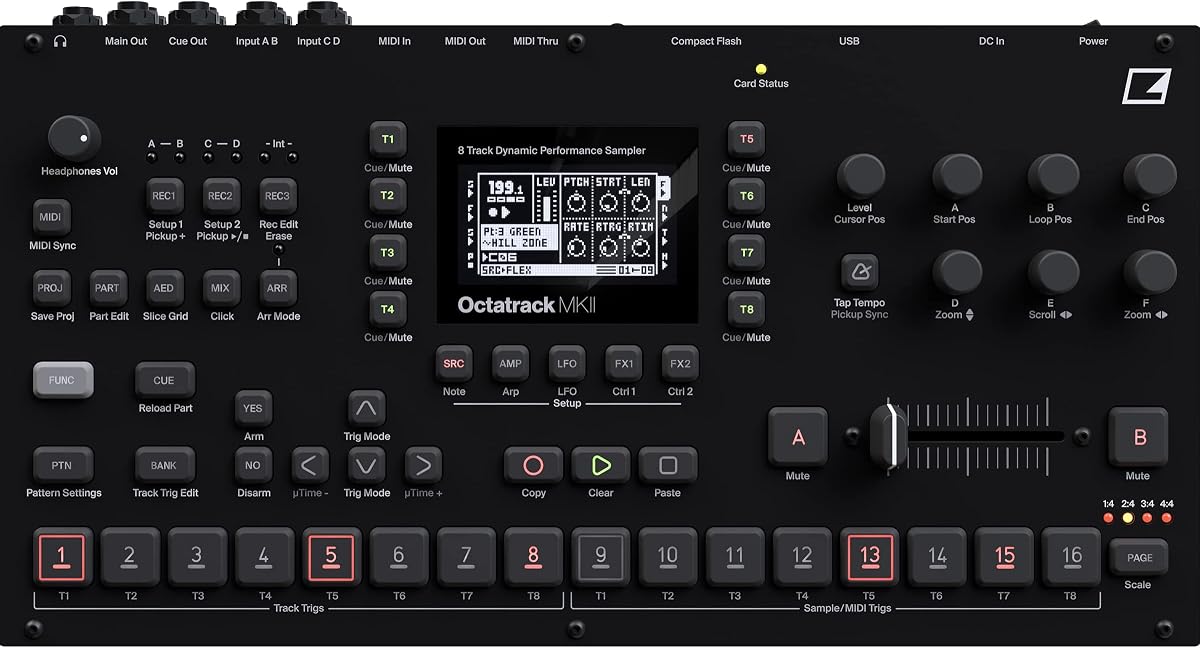
The Elektron Octatrack MKII stands as a premier choice for live performers needing deep sampling and sequencing capabilities. Its high rating reflects strong user satisfaction with its robust audio and MIDI handling.
We may earn a commission when you buy through this link, at no additional cost to you.
Key strengths include its eight stereo audio tracks and eight dedicated MIDI tracks, allowing complex layered setups without a computer. The real-time pitch shifting and time stretching ensure flexible audio manipulation during dynamic performances.
Trade-offs involve a steeper learning curve for beginners and a higher investment cost compared to entry-level units. These are acceptable given the device's durability and professional-grade feature set designed for rigorous touring.
Performers requiring granular control over samples and sequencing should prioritize this model. Its comprehensive I/O and OLED screen make it a reliable centerpiece for advanced live rigs.
Real-time pitch shifting and time stretching allow for dynamic audio changes without stopping playback.
The 16-track sequencer supports eight internal audio tracks and eight MIDI tracks for complex arrangements.
We may earn a commission when you buy through this link, at no additional cost to you.
The myTRACKS Groovebox offers an incredibly accessible entry point for those new to music production and live performance. Its rating highlights user appreciation for the intuitive design that eliminates complex setup steps.
We may earn a commission when you buy through this link, at no additional cost to you.
Its main strength lies in allowing users to build complete tracks without prior musical knowledge. The ability to capture voices and everyday sounds via the built-in sampler encourages creative experimentation right out of the box.
Users may find it lacks the advanced synthesis options found in professional-grade units. This limitation is acceptable for beginners or educators focused on rapid creativity and basic music creation.
Musicians seeking a simple tool for jamming or teaching will find this model invaluable. It effectively removes barriers to entry, making live performance feel more like natural play.
Musical notes automatically work with each set, making it easy to create music that sounds good immediately.
Capture voices, instruments, and everyday sounds, then transform them into music using the built-in sampler.
We may earn a commission when you buy through this link, at no additional cost to you.
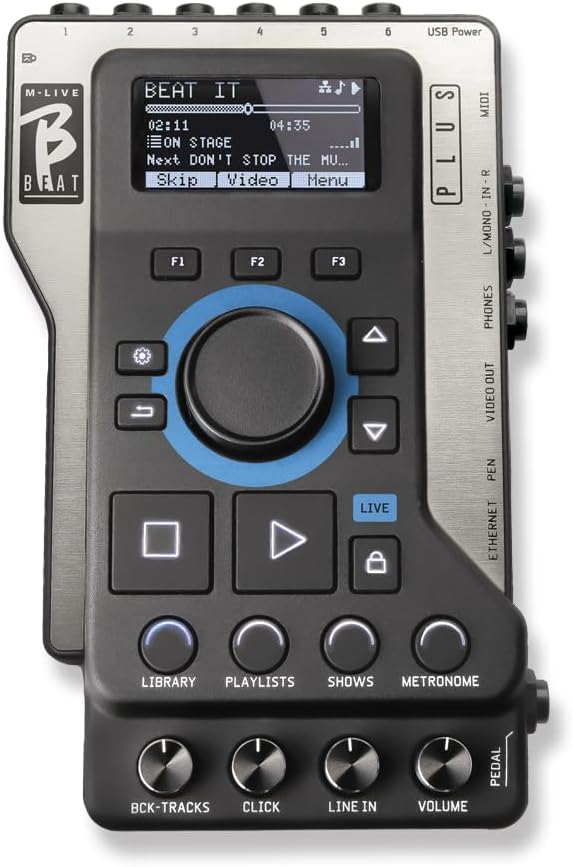
The M-Live B.Beat Plus is the top choice for bands wanting to replace laptops with a robust standalone backing track system. Its high rating underscores reliability and professional features crucial for large venues.
We may earn a commission when you buy through this link, at no additional cost to you.
It delivers pristine sound with up to sixteen mono or eight stereo tracks, plus HDMI sync for visuals. The included software supports real-time mix tuning and setlist management for seamless show execution.
While specialized, it requires a significant investment compared to basic sequencers. This cost is justified for professional acts needing total show automation and video integration on stage.
Bands and solo artists seeking full control over backing tracks should consider this model. It streamlines live setups, allowing performers to focus entirely on the music without technical interruptions.
Sync backing tracks with video or images via HDMI for a synchronized visual and audio experience.
Define song sections using markers and create loops to repeat, extend, or jump between parts during performances.
We may earn a commission when you buy through this link, at no additional cost to you.
The Ableton Move excels as a highly portable instrument designed for sketching and performing without a computer. Its excellent rating reflects user satisfaction with its tactile interface and sound quality.
We may earn a commission when you buy through this link, at no additional cost to you.
Strengths include thirty-two velocity-sensitive pads with polyphonic aftertouch and direct integration with Ableton Live 12. The built-in microphone and speaker allow immediate sound capture and playback anywhere.
Trade-offs involve a limited track count compared to larger workstations and reliance on Wi-Fi for cloud features. These are acceptable for a device prioritizing portability and rapid idea capture.
Musicians needing a compact tool for travel or on-the-go composition will find this invaluable. It bridges the gap between hardware feel and software flexibility efficiently.
Built-in rechargeable battery and speaker enable fully untethered performance and creative sketching anywhere.
Control Live Mode turns Move into a control surface for seamless integration with Ableton Live software.
We may earn a commission when you buy through this link, at no additional cost to you.
The Akai MPC Sample brings the legendary MPC workflow into a compact portable package. Its high rating indicates strong approval from beatmakers valuing its intuitive hands-on controls.
We may earn a commission when you buy through this link, at no additional cost to you.
It features sixteen responsive pads, a built-in speaker, and battery power for true mobility. The included factory kits and FX processors provide immediate creative opportunities without needing external samples.
It has limited sequencing depth compared to full workstations like the Octatrack. This is acceptable for users focusing on sampling and drum programming rather than complex melodic composition.
New and experienced beatmakers seeking a portable solution should consider this model. It offers a straightforward path from raw sound to finished groove anywhere.
Battery-powered design with built-in speaker enables recording, editing, and playback anywhere without computer or DAW required.
Features 16 responsive MPC pads and hands-on workflow for fast sampling, chopping, and beatmaking.
We may earn a commission when you buy through this link, at no additional cost to you.
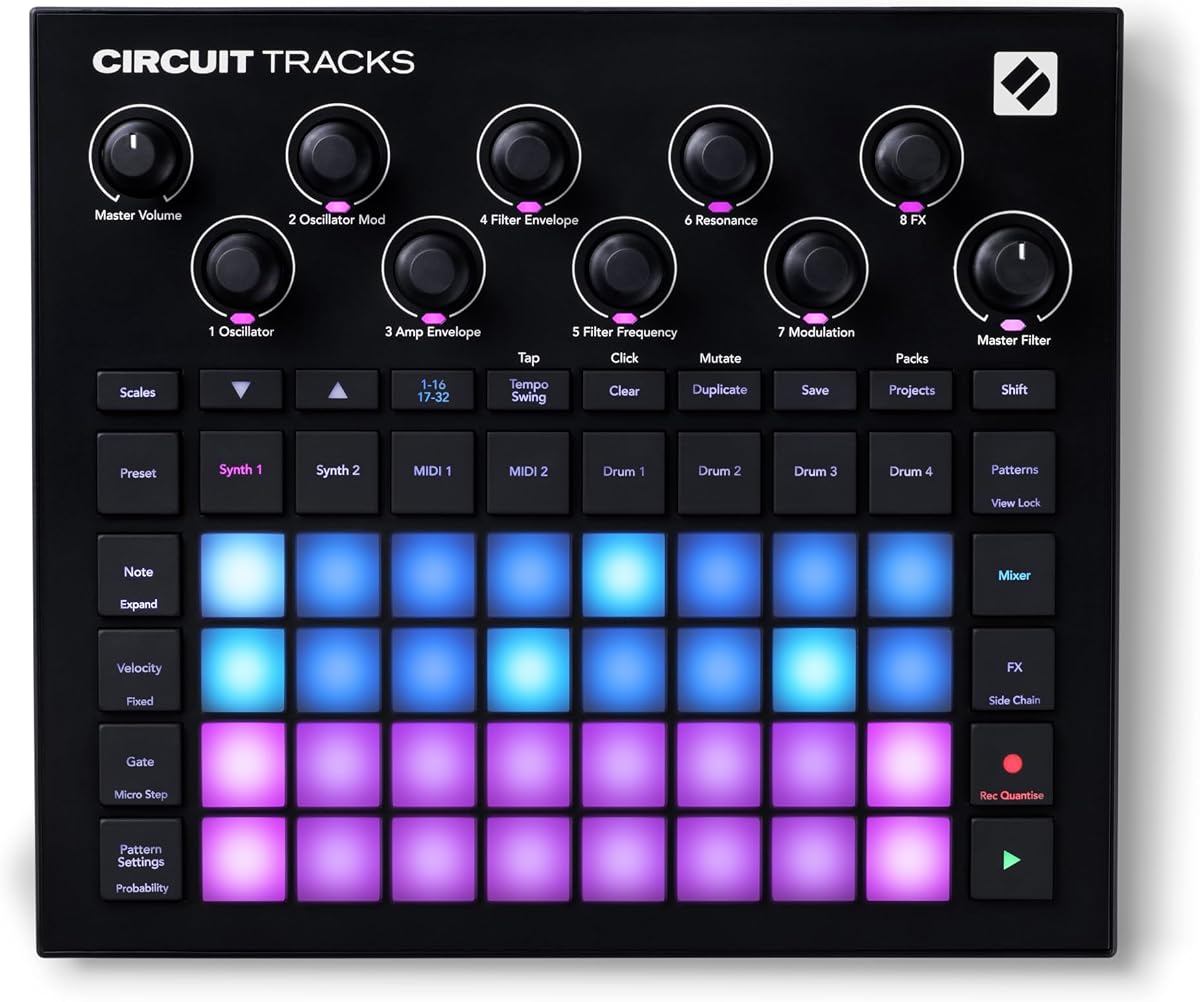
The Novation Circuit Tracks combines synthesized tones and drum sequencing into a single flexible device. Its rating reflects strong user satisfaction with its sound engine and customizable patches.
We may earn a commission when you buy through this link, at no additional cost to you.
It offers two refined polyphonic synth tracks, four drum tracks, and two MIDI tracks for external control. The ability to chain patterns and adjust probability makes evolving tracks easy to execute.
Users may find the workflow slightly proprietary compared to open platforms. This limitation is acceptable for those prioritizing sound quality and pattern-based sequencing over deep audio recording.
Performers needing a reliable tool for live synthesis and sequencing should prioritize this model. It effectively balances creative flexibility with straightforward operation.
Expand your sonic capabilities with two refined polyphonic digital synth tracks for diverse musical styles.
Create 32-step patterns, chainable for up to 256 steps sequences per track for complex arrangements.
We may earn a commission when you buy through this link, at no additional cost to you.
The Roland MC-707 is designed for professional use, offering a complete standalone production environment. Its rating suggests reliability and sound quality appreciated by serious producers.
We may earn a commission when you buy through this link, at no additional cost to you.
It provides eight tracks with 128 clips, extensive effects processing, and comprehensive connectivity options. The included SD card ensures ample room for extensive music libraries and project data.
Its weight and interface complexity might be daunting for beginners compared to simpler units. These trade-offs are acceptable given the depth of features and high-quality sound engine.
Producers requiring extensive onboard effects and recording capabilities should consider this model. It serves well as a central hub for both studio work and live sets.
Complete music production and recording workstation designed for professional use without computer dependencies.
Track Multi-Effects, Reverb, Master Effects, and EQ provide vast sonic shaping options during performance.
We may earn a commission when you buy through this link, at no additional cost to you.
The Elektron Digitakt II specializes in drum sequencing and sampling with powerful track effects. Its rating reflects appreciation from users valuing deep rhythmic control.
We may earn a commission when you buy through this link, at no additional cost to you.
Key features include 16 audio tracks, 128-step sequencing, and assignable LFOs for modulation. The Euclidean sequence generator allows for complex rhythmic patterns without complex coding.
It focuses heavily on drums, limiting melodic synthesis compared to other units. This focus is ideal for percussionists or producers needing a specialized drum machine.
Users seeking advanced rhythmic manipulation and sampling should choose this device. Its robust feature set ensures precise control over drum lines and percussive elements.
The Euclidean sequence generator enables complex rhythmic patterns with precise step programming.
Delay, reverb, chorus, and overdrive per track add character to individual samples easily.
We may earn a commission when you buy through this link, at no additional cost to you.
The Roland MC-101 offers a compact four-track version of the larger MC-707 for portable production. Its bundle value includes essential accessories like MIDI and instrument cables for immediate use.
We may earn a commission when you buy through this link, at no additional cost to you.
It uses ZEN-Core synthesis for high-quality Roland sounds, with custom sample loading and effects. The device runs on AA batteries for approximately five hours, aiding true mobility.
Its track limit restricts complex arrangements compared to larger units. This is acceptable for focused composition and portable sketching where simplicity is key.
Musicians prioritizing portability and bundle value should consider this model. It provides a robust production environment in a highly mobile form factor.
Small yet effective tool sharing sounds and capabilities of the MC-707 in a compact four-track version.
Uses ZEN-Core Synthesis System to deliver Roland sounds defining electronic and dance genres.
We may earn a commission when you buy through this link, at no additional cost to you.
The Akai APC40 MKII serves as a versatile control surface for live performance using Ableton Live. Its rating indicates strong user satisfaction with its responsive control and integration.
We may earn a commission when you buy through this link, at no additional cost to you.
It offers hands-on control of Ableton's clip matrix, mixer parameters, and effects seamlessly. The assignable crossfader allows dynamic DJ-style mixing for transitions during sets.
It requires a computer connection, meaning it is not standalone like other grooveboxes. This trade-off is acceptable for those prioritizing deep DAW control over standalone production.
Performers using Ableton Live who need tactile control should choose this model. It effectively transforms any laptop setup into a dynamic live performance rig.
Trigger clips, loops and samples using a 5X8 clip-launch matrix with RGB feedback for status.
9 channel faders, 8 control knobs, and 8 device controls provide essential mix management.
We may earn a commission when you buy through this link, at no additional cost to you.
Selecting the ideal groovebox requires evaluating how its features align with your performance needs. This guide outlines key factors to consider before making your investment.
A standalone groovebox should operate without a computer, allowing you to perform without technical dependencies. Look for devices with internal storage and battery options to ensure uninterrupted shows.
Verify the device can handle all required audio and MIDI tasks independently for true mobility.
Consider how many audio and MIDI tracks the unit supports for your arrangement complexity. More tracks offer greater flexibility for layered performances and external hardware control.
Ensure the unit supports sufficient MIDI and audio tracks for your typical setlist.
If you need to record or manipulate sound live, the unit must offer robust sampling tools. Features like chopping and time stretching are essential for dynamic performance manipulation.
Choose a unit with intuitive sampling controls for quick adjustments during live sets.
For touring, physical size and power options are critical. Lightweight units with built-in speakers and battery life ensure you can play anywhere without heavy loads.
Prioritize models with battery operation and compact footprints for travel and venues.
Comprehensive I/O like XLR, TRS, or MIDI ensures compatibility with existing stage setups. Check for balanced audio inputs and multiple outputs for mixing with external gear.
Confirm the device has the necessary jacks to integrate with your current equipment.
Advanced performers may need pattern chaining or complex sequencing logic. Look for units that allow creating multi-step arrangements and probability-based variations.
Select a sequencer that supports the complexity of your compositions.
Touchscreen versus physical controls dictate how quickly you can adjust parameters live. Physical knobs and pads are generally faster for dynamic performance adjustments.
Choose an interface that allows you to access essential controls quickly.
The quality of synths and samples defines the sonic character of your set. Ensure the device includes high-quality sounds or supports custom sample loading effectively.
Verify the sound engine meets your tonal requirements for live performance.
Before each show, fully charge the battery or ensure stable power is connected. Test all audio outputs and MIDI connections to avoid technical issues during performance.
Use the sample storage and export features to back up your projects regularly. This ensures your setlist and sound design remain safe and transferable between devices.
Keep the unit clean by storing it in a protective case when not in use. Dust and moisture can damage sensitive controls and ports over time.
A groovebox is an all-in-one music production device that combines a synthesizer, sequencer, and sampler. Using it for live performance eliminates the need for a laptop, reducing complexity and technical failures on stage.
Many modern grooveboxes are fully standalone and do not require a computer. However, some devices can integrate with software for additional sound library management or editing.
Yes, most advanced grooveboxes include internal audio recording capabilities. You can capture external sounds or instruments directly into the device for immediate playback and manipulation.
Grooveboxes typically feature MIDI In, Out, and Thru ports to communicate with other hardware. They can send and receive note and control data seamlessly.
Some models are designed with intuitive workflows and preset sounds to simplify the learning process. However, professional units may require time to master their full capabilities.
Essential accessories include an SD card for storage, a power adapter, and quality cables for connecting to audio interfaces. Carrying cases also help protect the device during transport.
The top picks like the Elektron Octatrack MKII and M-Live B.Beat Plus offer exceptional performance features for various needs. Whether you prioritize drum sequencing or backing track management, each model provides unique strengths.
When deciding, focus on the aspects that support your specific workflow and portability requirements. Ensure the device offers the necessary standalone capabilities for uninterrupted shows.
Prices and availability for these grooveboxes fluctuate based on market conditions. Always verify current details on the product page before finalizing your purchase decision.