
Heated Mouse Pad Hand Warmer for Desk
4.3Editor score
Foldable design for easy storage and portability
Low noise operation under fifteen decibels
Multiple safety protections against tipping and overheating
Discover the top hand warmer mouse pad options for 2026. We compare heating speed, safety features, and comfort to help you choose the best desk warmer.
Cold hands can ruin your productivity and comfort during long work or gaming sessions. A hand warmer mouse pad provides consistent heat directly where you need it most. These devices combine the functionality of a desk surface with gentle warmth to keep fingers and wrists cozy without cluttering your workspace.
We evaluated ten popular models based on heating technology, safety certifications, and ergonomic design. Our comparison considers power efficiency, noise levels, and ease of use for daily office or home setups. Each product offers unique features ranging from enclosed cocoons to open desk heaters that allow full mouse movement.
This guide shows you exactly what each pick offers so you can make an informed decision for your specific needs. Prices and availability change frequently so check current listings before buying. Find the perfect balance of warmth, safety, and comfort for your desk setup today.
4.3Editor score

4.2Editor score
4.5Editor score
This side-by-side comparison highlights key specifications across all ten models so you can quickly identify the right fit for your desk setup and budget needs.


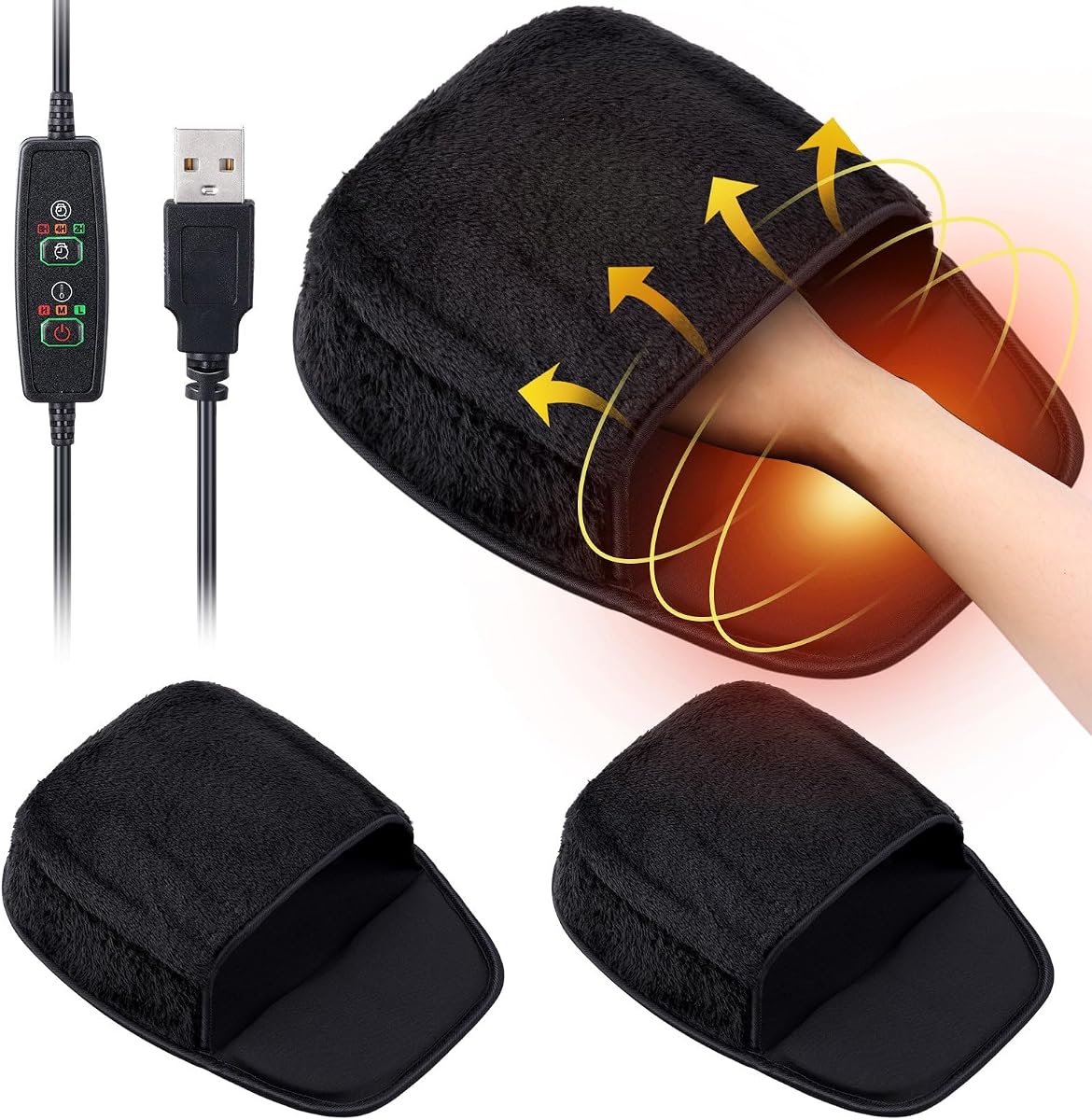

This heated mouse pad wraps your entire hand in a soft neoprene shell providing consistent warmth for fingers knuckles and palm. It holds a solid rating from users who value comprehensive hand coverage over standard flat mats. The enclosed cocoon design sets it apart by keeping heat trapped efficiently while you work or game.
We may earn a commission when you buy through this link, at no additional cost to you.
Key strengths include three adjustable temperature levels ranging from gentle warmth to hot settings suitable for severe cold. Built-in auto shut-off timers ensure safe operation without worry of leaving it on accidentally. The ergonomic wrist rest supports a neutral position reducing strain during long sessions.
Trade-offs involve the need for a USB port and slightly higher bulk compared to slim mats. These are acceptable given the superior warmth retention and safety features. The removable heating element also makes maintenance straightforward for long-term use.
Ideal for remote workers gamers and anyone battling cold hands at their desk. This pick balances comfort safety and performance making it a top recommendation for most users seeking reliable hand warmth.
The neoprene shell ensures no heat escapes allowing your fingers and knuckles to stay warm even in cold rooms.
Auto shut-off timers and certifications like UKCA and CE give you peace of mind during extended use.
We may earn a commission when you buy through this link, at no additional cost to you.
This premium hand warmer uses a ceramic heating element to deliver quick and even warmth without disturbing your workspace noise. It rates highly for its super quiet operation and ability to let you move your mouse freely under the dome. The design feels like a mini personal heater tailored for desk use.
We may earn a commission when you buy through this link, at no additional cost to you.
Strengths lie in its three heating modes with cycling for efficiency and a high mode for intense warmth. The tip-over protection and over-temperature sensors add layers of safety. Energy-saving chip maintains constant temperature without consuming excessive power.
It requires a wall outlet which limits portability compared to USB models. The price point is higher but justified by the build quality and noise performance. For fixed office setups it remains a top tier choice.
Best for users who prioritize silence and rapid heating in a dedicated office or gaming room. Its robust safety features and efficient power use make it a reliable premium option for daily warmth needs.
Advanced PTC ceramic heating warms hands quickly while running under twenty decibels for a silent workspace experience.
The dome allows thirty-sixty degree hand warmth without pressing against your hand back like slipper-style pads.
We may earn a commission when you buy through this link, at no additional cost to you.
This budget friendly warmer uses MCH and PTC ceramic heating to keep hands warm without breaking the bank. It receives good ratings for reliability and ease of use during winter work sessions. The foldable design makes it convenient to store when not in use.
We may earn a commission when you buy through this link, at no additional cost to you.
Key strengths include three temperature options and built-in protections against tipping and overheating. The anti-skid bottom keeps it stable on any surface while quiet operation ensures it does not distract from focus. Smart chip maintains constant temperature efficiently.
Materials may feel less durable than premium models and the control is basic. However these are minor trade-offs given the low cost and effective performance. It meets essential needs for warmth and safety well.
Ideal for students or budget conscious users who want reliable hand warmth without extra frills. This pick offers excellent value with solid features that protect against common safety hazards while keeping costs low.
The foldable design allows you to tuck it away easily when not in use saving valuable desk space.
Tip-over and overheat protection automatically cut power if the device is knocked or gets too hot.
We may earn a commission when you buy through this link, at no additional cost to you.
This set includes two heated mouse pads allowing you to cover home and office desks or share with a partner. It offers a large size that accommodates mouse movement comfortably while keeping wrists warm. The USB connection makes setup simple for most computers.
We may earn a commission when you buy through this link, at no additional cost to you.
Strengths include the detachable heating element which aids cleaning and maintenance over time. The soft plush material feels comfortable under hands and the size ensures ample space for work or games. Having two units provides good value for money.
User ratings are lower suggesting potential inconsistency in heating or durability. Users should unplug after extended use to avoid burns as noted in instructions. These factors temper enthusiasm but the price remains attractive for basic needs.
Best for those needing multiple units for different locations without spending heavily. While not perfect it delivers functional warmth and comfort for typical office or gaming use at an entry level price point.
Getting two pieces in one box lets you equip multiple desks or keep a spare for travel.
The detachable heating pad allows you to wash the surface to keep it clean and fresh.
We may earn a commission when you buy through this link, at no additional cost to you.
This bundle offers two heated mouse pads with thick plush material designed for comfort during long work sessions. It provides a large internal space so you can move your mouse freely while keeping hands warm. The detachable heating element allows for cleaning and longer use.
We may earn a commission when you buy through this link, at no additional cost to you.
Strengths include the soft skin-friendly surface and the convenience of having extra units for different desks. USB connection is standard and works with most devices. The large size ensures you have room for your hand and the mouse without crowding.
Some users note limited heating element durability so unplugging after use is recommended. It is a basic model without advanced temperature controls but offers consistent warmth. The value comes from the two-pack nature.
Ideal for families or offices with multiple workstations needing affordable warmth solutions. While it lacks high-end features it delivers steady comfort and covers more desk real estate than single units at a low price.
The thick plush material offers a gentle tactile experience that feels nice against your skin all day.
With two pads you can warm hands at home and office simultaneously without buying separate units.
We may earn a commission when you buy through this link, at no additional cost to you.
This heated desk pad covers a large area allowing both your keyboard and mouse to rest on warm surface. It receives high ratings for build quality and functionality during winter months. The PU leather surface is durable and resistant to water spills.
We may earn a commission when you buy through this link, at no additional cost to you.
Key strengths include three heat settings indicated by color codes and a four hour auto shut-off to prevent accidents. The waterproof material makes it easy to wipe clean if drinks are spilled. It serves as a multi-functional pad for writing and typing.
The size means it occupies significant desk space and requires a dedicated wall outlet. It is less portable than smaller USB warmers but excels at protecting your entire desk from cold. The safety features add confidence for all day use.
Perfect for users wanting a unified warm surface for their entire setup. The large footprint is justified by the comprehensive coverage and safety controls making it a practical choice for home offices.
At over thirty-one inches wide it keeps your entire workspace warm protecting both hands and arms from cold.
The PVC and PU leather construction repels liquids so cleaning up spills is quick and easy.
We may earn a commission when you buy through this link, at no additional cost to you.
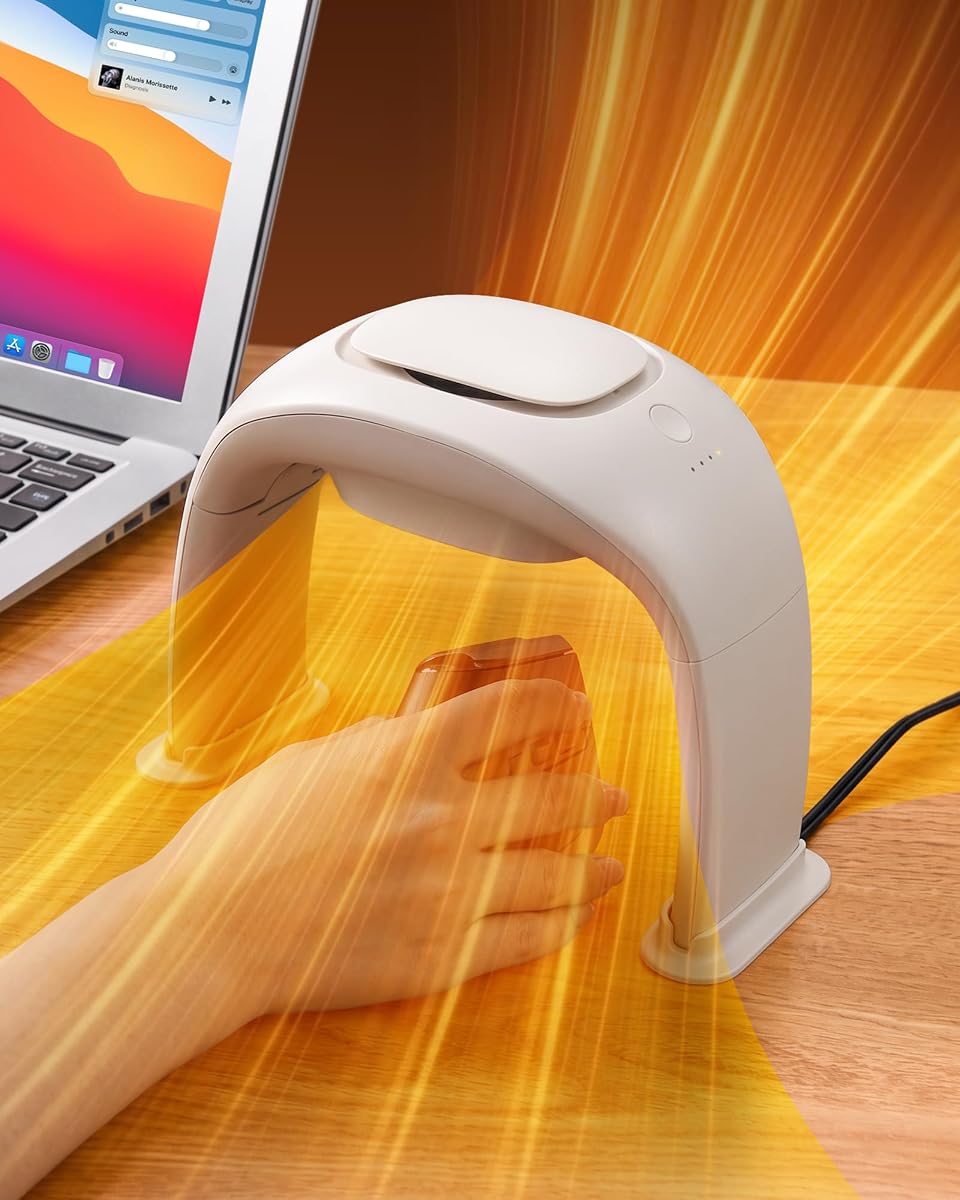
This model delivers strong heat using a 100W power output to warm hands quickly in cold rooms. It features foldable legs that allow it to stand securely and then be tucked away when not in use. The white design fits well in many office aesthetics.
We may earn a commission when you buy through this link, at no additional cost to you.
Strengths include three temperature settings for customization and quiet operation that does not disturb work or reading. The intelligent energy-saving chip adjusts power to maintain temperature efficiently. It offers flexible warming for wrists and fingers.
The reliance on a wall outlet limits portability compared to USB options. Build quality is functional but may not match premium materials. However it remains reliable for daily use in fixed locations.
Best for users needing robust warmth without excessive noise. The foldable legs and lightweight design make it convenient for homes and offices where a power outlet is available nearby.
Legs fold flat for compact storage in a bag or under the desk saving space when not needed.
The smart chip reduces power once the target temperature is reached to save energy over time.
We may earn a commission when you buy through this link, at no additional cost to you.
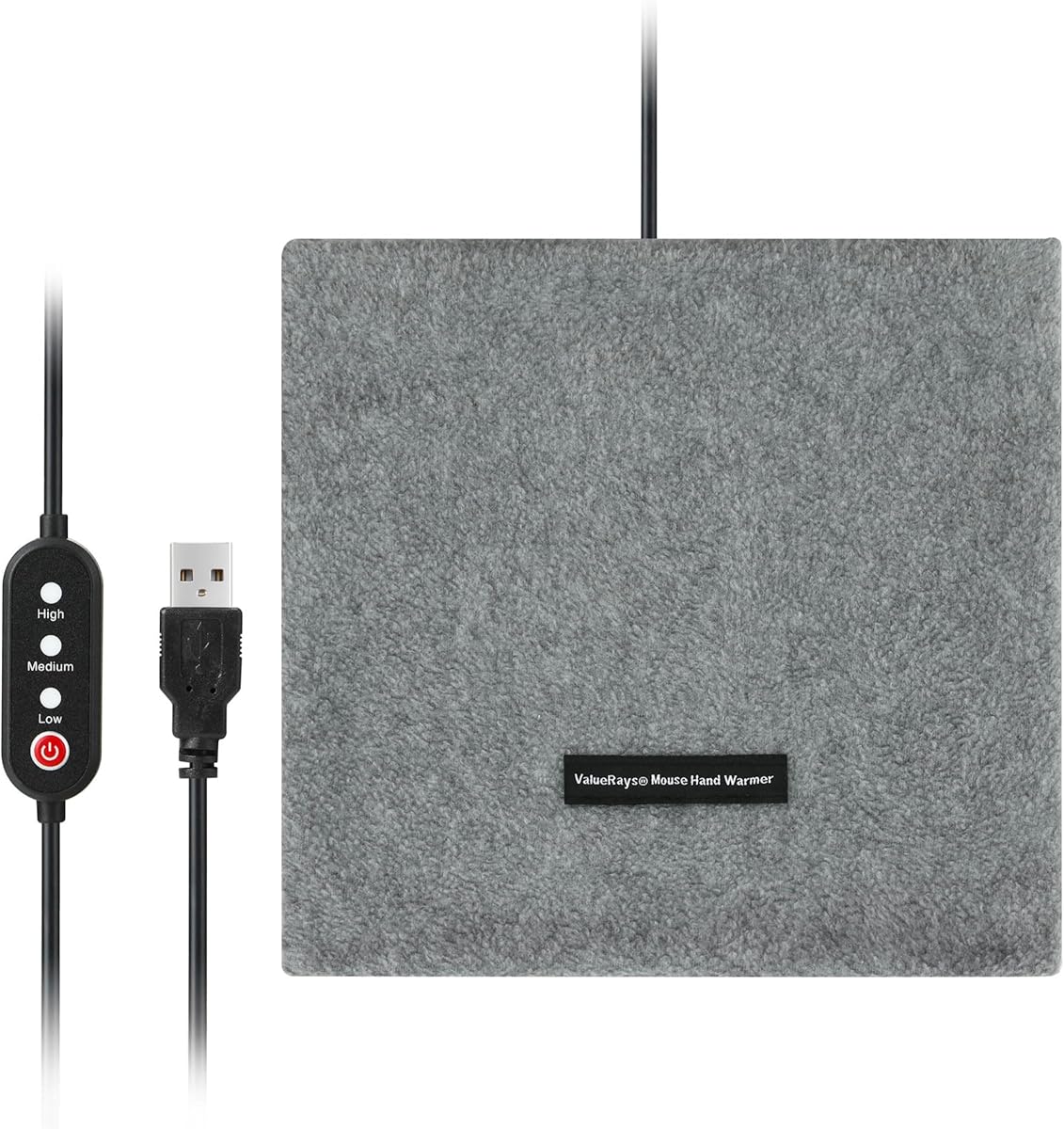
This infrared heated mouse pad uses manual control to provide consistent warmth via a simple switch. It offers a no-fuss approach for users who just want a warm surface without complex settings. USB connection allows you to power it from laptops or power banks.
We may earn a commission when you buy through this link, at no additional cost to you.
Strengths include the simplicity of operation which reduces clutter on the desk. Infrared heating technology is often associated with gentle and comfortable warmth. The design is basic but functional for everyday use.
Lack of temperature adjustment means less customization compared to other models. Limited detail in specifications makes it harder to assess performance deeply. It suits those seeking basic functionality above features.
Ideal for users who prefer straightforward tools without extra buttons or modes. While minimal it provides essential warmth for hands and mouse movement during cold work days.
One manual switch toggles heat on or off removing the need for complex menus or dials.
Infrared heating provides steady ambient warmth that feels natural to your skin and hands.
We may earn a commission when you buy through this link, at no additional cost to you.
This set includes two pads designed with built-in wrist cushions to reduce strain during long sessions. It offers three temperature modes and timed auto off for safety and energy efficiency. The non-slip rubber base keeps the pad secure on any surface.
We may earn a commission when you buy through this link, at no additional cost to you.
Strengths lie in the ergonomic focus which helps prevent wrist fatigue. The timers allow you to set it and forget it without worrying about overheating. The rubber base ensures the mouse moves smoothly without the pad sliding.
User feedback suggests durability might be a concern compared to premium options. While the features are compelling the build quality varies. It remains a good entry point for ergonomic warmth needs.
Best for users prioritizing wrist support and safety features. The dual pack and ergonomic design make it useful for home office workers who spend many hours at the computer.
The built-in wrist cushion follows your hand curve reducing pressure and fatigue during long use.
A thick non-slip rubber bottom grips tightly to wood or glass for stable mouse control.
We may earn a commission when you buy through this link, at no additional cost to you.
This large desk pad uses premium PU leather to provide an elegant look alongside functional warmth. It supports full desk coverage with a non-slip bottom for stability during intense typing or gaming. Three temperature settings allow you to find the right comfort level.
We may earn a commission when you buy through this link, at no additional cost to you.
Key strengths include the durable surface that protects desks from scratches and stains. The large size ensures you have enough room for keyboard and mouse. It combines style with utility for modern workspaces.
Lack of user ratings makes it hard to gauge real-world performance. The auto-off feature may not be adjustable compared to other models. However the design promises solid utility and aesthetic appeal.
Ideal for users wanting a stylish large pad that warms the entire desk. The PU leather material offers a sleek look while keeping hands and wrists warm during cold weather work.
The high-quality PU leather gives a professional look that matches modern office decor and style.
At thirty-one inches wide it covers enough space for your keyboard mouse and writing area.
We may earn a commission when you buy through this link, at no additional cost to you.
Selecting the right hand warmer mouse pad depends on your workspace setup and how much control you need over temperature and power.
Most models use PTC ceramic heating which warms quickly and maintains temperature safely. Some use infrared elements for gentler warmth while others rely on simple resistive heating. Ceramic is generally preferred for efficiency and durability in desk settings.
Look for PTC or MCH technology to ensure even heat distribution and longer device life.
You will find both USB powered and wall outlet powered options. USB warmers are portable and work with laptops while wall plugs deliver higher wattage for stronger heat. Choose based on where your desk is located relative to outlets.
USB is best for portability but wall plugs provide more consistent high power for large pads.
Safety is paramount so check for tip-over protection and overheat sensors. Auto shut-off timers prevent devices from staying on too long and reduce burn risks. Certifications like UL or CE indicate tested electrical safety.
Always prioritize models with auto shut-off and overheat protection to prevent accidents.
Pads come in small enclosed formats or large desk mats. Enclosed models trap heat better while large mats cover keyboard and mouse space. Decide if you need warmth only for hands or for the whole desk.
Enclosed designs keep hands warmer while larger mats protect your entire workspace from cold.
Look for models with multiple temperature settings ranging from gentle to hot. Adjustable levels let you fine tune warmth without getting too hot or leaving hands cold. Simple switches lack this flexibility.
Three or more temperature settings allow customization for different weather and sensitivity.
Some pads include wrist rests or cushions to reduce strain during typing. These add comfort alongside warmth which is crucial for long work hours. Check if the shape supports a neutral hand position.
Built-in wrist support helps prevent fatigue and pain during extended sessions.
Quieter models operate below twenty decibels ensuring no distracting hum. Ceramic fans may produce slight noise but should be minimal for office use. Consider if noise matters for your concentration.
Choose ultra-quiet options if you need silence during calls or focus work.
Materials like PU leather and neoprene resist stains and wear better than cheap fabric. Detachable heating elements allow you to wash the surface easily. This extends lifespan and keeps the pad looking clean.
Removable heating parts and durable fabrics make maintenance simpler and increase device life.
Place the pad on a stable flat surface near your computer mouse and keyboard. Ensure there is enough space for your hand and the device to move freely without obstruction.
Connect the USB cable to your computer or plug it into a wall outlet depending on the model. Use the control switch or dial to select your desired temperature level and let it warm up for a minute.
Clean the surface regularly with a damp cloth and avoid harsh chemicals. If your model has a detachable heating element remove it before washing the fabric to prevent damage and extend its lifespan.
Most modern pads include auto shut-off timers that turn off the heating after a few hours. However it is still recommended to unplug or turn off the device when not in use for maximum safety and energy saving.
Most heated mouse pads stay between 100°F and 145°F to provide safe warmth without burning. Always check the max temperature of your specific model to ensure it fits your comfort needs.
Yes these pads work with any type of mouse including wireless and Bluetooth models. The heating element does not interfere with wireless signals and the surface supports standard mouse tracking.
Wall plug models require standard US 110V outlets while USB models work with any USB port. Check the power requirements before buying to make sure your desk has the right access.
Many pads have removable heating elements that allow hand washing. For fixed units wipe the surface with a damp cloth and mild soap to avoid damaging the internal heating components.
Most ceramic heated pads reach comfortable temperature in one to three minutes after powering on. Look for models with quick warm up specs if you need instant relief from cold hands.
The surface materials are smooth and consistent so optical and laser mice track normally. Some fabrics might slightly change friction but most users find tracking remains stable during use.
Not every model includes a wrist rest so check the product details before purchasing. Some focus on warmth only while others combine ergonomic support with heating for added comfort.
Choosing the right hand warmer mouse pad depends on balancing warmth safety and desk space. Our top picks range from enclosed cocoon styles to large desk mats offering versatile comfort for any setup.
Prioritize safety features like auto shut-off and temperature controls especially if you leave your desk often. Also consider power needs and cleaning options to ensure the device fits your daily routine.
Prices and availability fluctuate so always check current listings before finalizing your purchase. These picks provide solid starting points to keep your hands warm and productive throughout the winter season.