
MAIWO Hard Drive Docking Station Cloner for 2.5 3.5 Inch SATA HDD SSD
4.5Editor score
Affordable price point
Includes 3x USB hub ports
Simple LED clone progress indicators
Finding the right hard drive duplicator cloner docking station is essential for IT professionals and home users who need reliable data migration. These devices allow you to copy data between drives without a computer, saving time and reducing the risk of human error during critical backups.
We evaluated ten top models based on cloning speed, compatibility with different drive types, ease of use, and build quality. Our analysis covers dual bay and multi bay options that support SATA, NVMe, and various form factors to ensure you find the perfect tool for your storage needs.
Each pick below highlights specific strengths such as offline cloning capabilities, USB C connectivity, and maximum storage capacity. Prices and availability change frequently so always verify the latest details on the product pages before making your final purchase decision for your workspace.
4.5Editor score

4.4Editor score

4.5Editor score
As an Amazon Associate we earn from qualifying purchases.
The table below provides a side-by-side comparison of all ten selected hard drive duplicator cloner docking station models to help you quickly identify the best fit for your specific data management requirements and budget constraints.





The SABRENT Dual-Bay USB-C Hard Drive Docking Station & Cloner stands out as a top choice for modern storage needs with its sleek design and robust performance. It holds a strong rating among users who appreciate the convenience of offline cloning without needing a host computer for every task.
We may earn a commission when you buy through this link, at no additional cost to you.
Its standout feature is the ability to copy data from one SATA drive to another using a dedicated button, achieving speeds up to 60MBps independently. This makes it ideal for system migrations or quick backups where connecting to a PC is inconvenient or unnecessary for the task at hand.
Users should note that this model strictly supports SATA drives and does not accommodate IDE or M.2 NVMe drives which might limit its use in mixed hardware environments. Additionally the reliance on a USB-C port means older computers may require an adapter to utilize the full potential of the device.
Overall this docking station is perfect for IT technicians and power users who need a reliable tool for drive cloning and data access. The tool-free design ensures quick drive changes and the separate mounting of both bays allows for easy file transfers between connected drives.
The one-touch cloning feature allows you to duplicate drives in minutes without software or drivers simplifying your workflow significantly.
With USB-C support you get faster data rates and better compatibility with newer laptops and desktops compared to older USB-A models.
We may earn a commission when you buy through this link, at no additional cost to you.
The MAIWO Hard Drive Docking Station Cloner offers exceptional value for users who need basic cloning capabilities without breaking the bank. It maintains a high user rating due to its simplicity and ability to handle large capacity drives up to 24TB per bay for a total of 48TB.
We may earn a commission when you buy through this link, at no additional cost to you.
One of its most practical features is the inclusion of three extra USB 3.0 ports which turn the docking station into a small hub for your workspace. This allows you to connect keyboards mice or flash drives while keeping your setup tidy and reducing the need for separate hubs.
The trade-off for the lower price is a more basic plastic construction and lack of modern USB-C connectivity which might not appeal to those with newer devices. The cloning speed is standard for the category and relies on a simple LED indicator system rather than a detailed screen.
This model is highly recommended for home users or small businesses looking for an entry-level solution for drive backups and data transfers. Its ease of use and additional utility as a USB hub make it a versatile addition to any computer desk.
The three additional USB ports provide extra connectivity for other peripherals adding significant value to the base price of the docking station.
Supporting up to 48TB of total storage ensures you can use this device for years as drive capacities continue to increase over time.
We may earn a commission when you buy through this link, at no additional cost to you.
The StarTech.com 4-Bay Hard Drive Duplicator and Eraser is a professional grade tool designed for users who need robust security and capacity in their data management workflow. It supports secure wiping standards that are essential for businesses handling sensitive information that must be permanently removed from old drives.
We may earn a commission when you buy through this link, at no additional cost to you.
With four bays you can clone one drive to three targets simultaneously or erase multiple drives at once which dramatically speeds up bulk operations. The LCD screen provides detailed feedback on the process such as drive health and completion percentages offering a level of control not found in simpler models.
The main drawback is the cost and size which may be overkill for casual home users who only need occasional backups. It is a substantial investment that is best justified for IT departments or professional services where data security and high volume throughput are daily requirements.
This device is the clear choice for professionals who need a reliable standalone duplicator that adheres to security standards. The ability to perform certified erasure ensures compliance with regulations and gives peace of mind when decommissioning hardware.
The secure erase feature meets NIST standards allowing you to sanitize drives properly before disposal or resale to prevent data breaches.
The four bay design allows for 1:3 cloning which is ideal for deploying system images to multiple devices in a short amount of time.
We may earn a commission when you buy through this link, at no additional cost to you.
The SABRENT USB 3.0 Dual Bay Hard Drive Docking Station & Cloner is a classic choice for users who prefer USB-A connectivity and proven reliability. It supports offline cloning and standard transfer speeds making it a solid option for general data migration tasks without requiring complex setup.
We may earn a commission when you buy through this link, at no additional cost to you.
This model handles up to 10TB drives and allows for easy swapping of 2.5 and 3.5 inch SATA drives. The cloning function is straightforward with a dedicated button for initiating the process which is great for users who need a simple tool without advanced features.
The limitations include the lack of USB-C which might limit its longevity as older ports become less common on new computers. Also the offline cloning speed is capped which is fine for small drives but slower for very large data transfers compared to some newer competitors.
It is a good fit for users upgrading legacy systems or those who already have a setup centered around USB-A ports. The reliable performance and simple interface make it a stress-free option for everyday backup and cloning needs.
SABRENT is known for quality storage accessories ensuring you get a durable product that will withstand regular use in various environments.
No drivers are needed to get started allowing you to connect and clone drives immediately without installing software on your computer.
We may earn a commission when you buy through this link, at no additional cost to you.
The ICY BOX USB-C 10Gbps TripleBay Hard Drive Docking Station is an excellent choice for users who work with modern NVMe SSDs in addition to traditional SATA drives. Its ability to handle multiple drive types makes it a versatile tool for mixed storage environments.
We may earn a commission when you buy through this link, at no additional cost to you.
With support for up to 10Gbps transfers it offers significantly faster speeds than standard USB 3.0 models which is crucial when working with high capacity NVMe drives. The three bay design gives you more flexibility to manage multiple drives simultaneously for complex backup projects.
The main consideration is the price and physical size which are higher than dual bay options. It is also a bit more complex to configure for offline cloning across different drive types so it may take some time to learn the specific steps for your setup.
This docking station is recommended for tech enthusiasts and professionals who need to manage both SSD and HDD assets. The high speed and versatile compatibility ensure it remains useful as your storage technology evolves over time.
Unlike many dual bay docks this model supports M.2 NVMe drives allowing you to clone or access high speed storage directly.
The 10Gbps USB 3.2 Gen 2 connection ensures that data transfers are quick and efficient reducing wait times on large backups.
We may earn a commission when you buy through this link, at no additional cost to you.
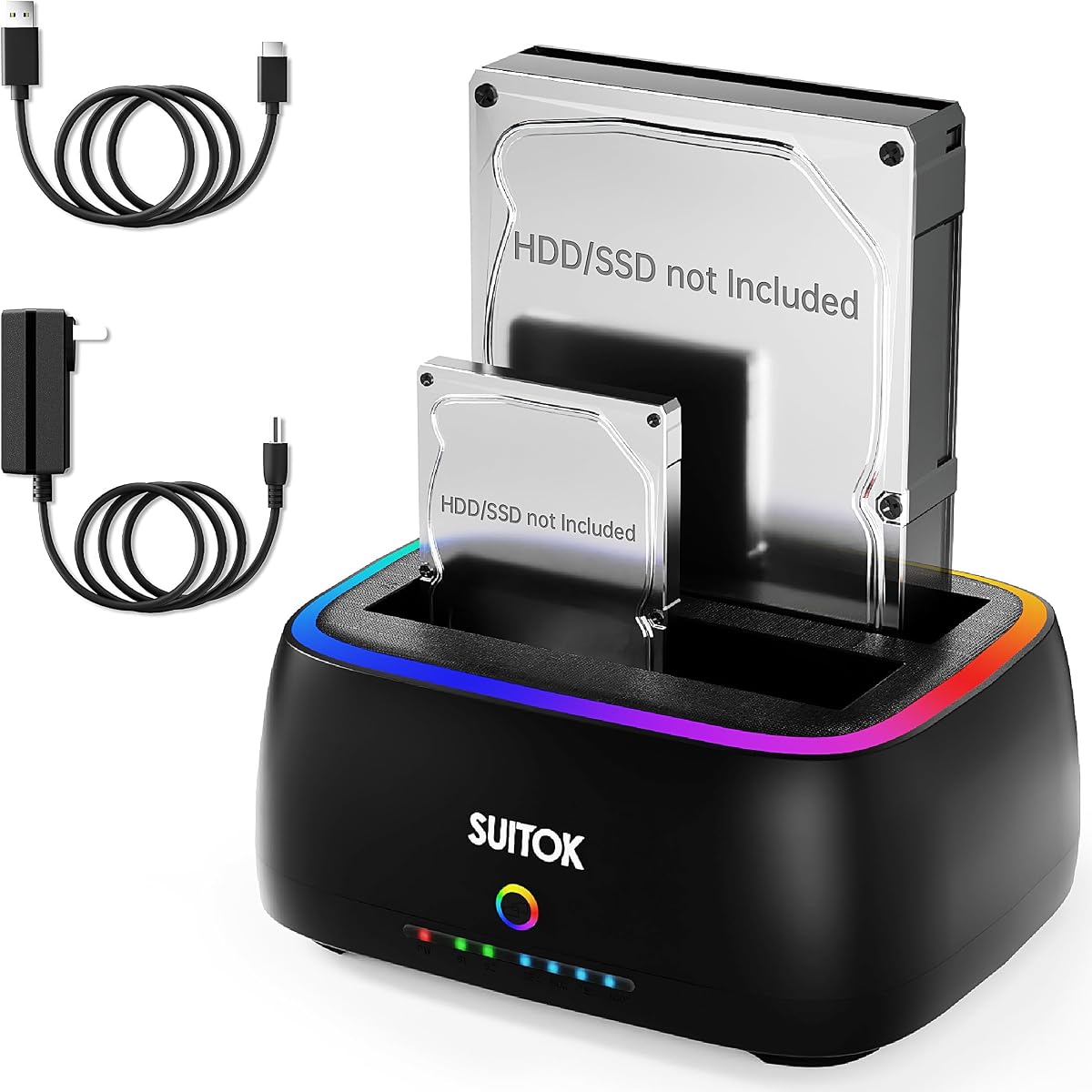
The Dual Bay SATA Hard Drive Cloner Dock USB C stands out for its modern design which includes RGB lighting and a premium fabric top panel. It combines functionality with style making it a good fit for home offices where aesthetics matter alongside performance.
We may earn a commission when you buy through this link, at no additional cost to you.
It supports SATA drives with a USB-C connection for fast data transfers and includes features like UASP for improved speed. The cloning process is straightforward with an LED progress bar that helps you monitor the task without needing to check a computer screen.
While the design is attractive the RGB lighting might not be suitable for all professional environments and can be turned off if preferred. The performance is solid for general use but not the fastest available which is a reasonable trade-off for the price and style.
This model is ideal for users who want a docking station that looks good on the desk and performs well for daily backups. The tool-free design and sturdy base ensure that it is easy to use and reliable for regular tasks.
Customizable RGB lights allow you to match the docking station to your desktop setup adding a personal touch to your workspace.
The anti-slip silicone pads keep the dock stable during operation preventing vibration that could damage sensitive drive components.
We may earn a commission when you buy through this link, at no additional cost to you.
The StarTech Dual-Bay 2.5/3.5in SATA Duplicator Dock is built for professionals who need fast and reliable cloning with strong support. It offers sector-by-sector copying which ensures an exact replica of the source drive including empty sectors for complete data accuracy.
We may earn a commission when you buy through this link, at no additional cost to you.
With speeds up to 28GB per minute it is one of the faster options in its class which saves significant time on large drive transfers. The top-loading design makes it easy to insert and remove drives without lifting the unit and it includes TRIM support to keep SSDs healthy.
The higher cost is justified by the durability and the excellent technical support that comes with the product. However it does lack USB-C connectivity which might be a downside for users with only modern ports on their computers.
This dock is an excellent choice for IT professionals who need a tool that can handle daily heavy use without fail. The robust construction and fast performance make it a reliable asset for any data management workflow.
The cloning process copies every bit of data ensuring the target drive is a perfect mirror of the source for critical backups.
A two-year warranty and lifetime technical assistance provide peace of mind and support if you encounter any issues.
We may earn a commission when you buy through this link, at no additional cost to you.
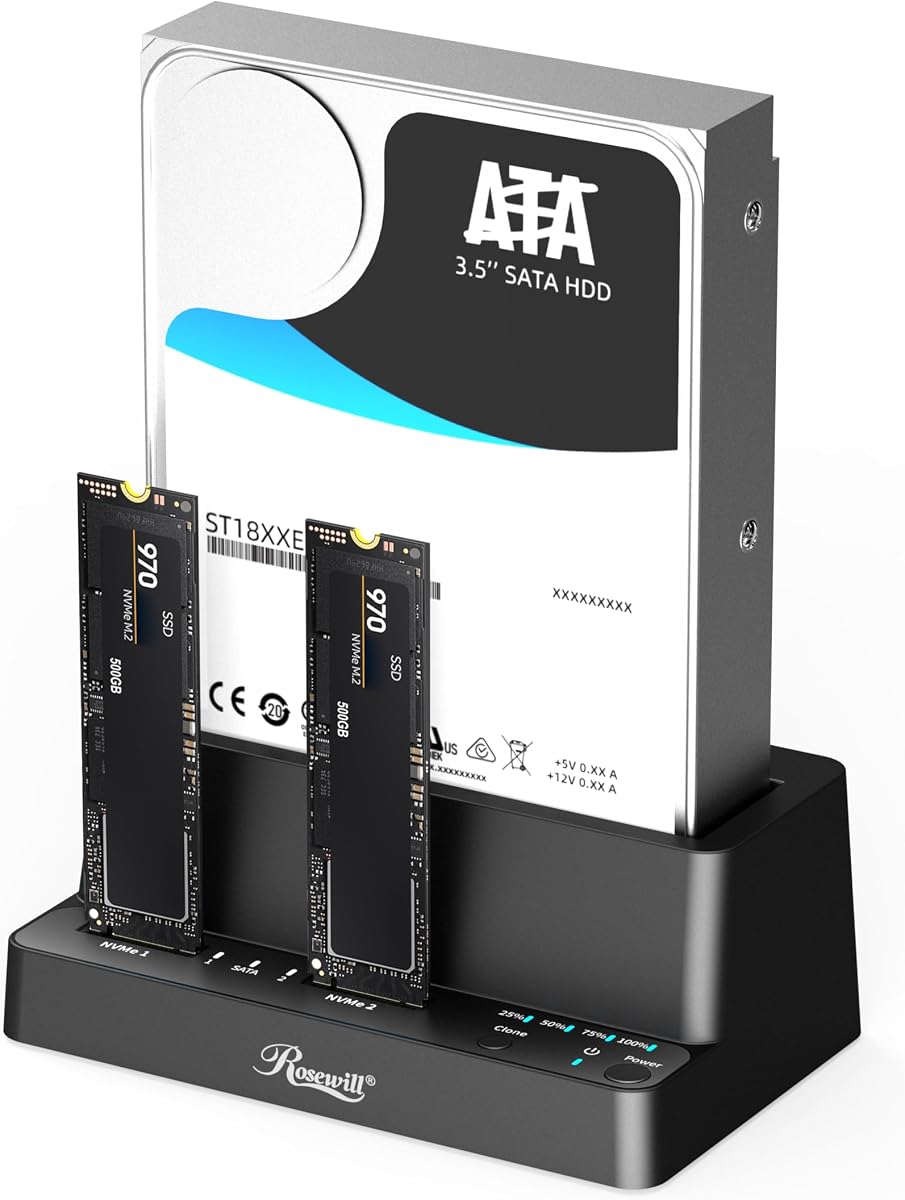
The Rosewill M.2 NVMe & SATA SSD Cloner Docking Station is designed for portability and speed making it ideal for users on the go. It combines the ability to read NVMe and SATA drives in one compact unit which is rare in this price range.
We may earn a commission when you buy through this link, at no additional cost to you.
It delivers lightning-fast transfer speeds up to 10Gbps ensuring that you can move large files quickly when connected to a compatible host. The tool-free design allows you to swap drives effortlessly without needing screwdrivers or other tools which simplifies the workflow.
The compact size is great for travel but may offer less airflow than larger models so it is best to use it in a well-ventilated area. Also it focuses on modern drives so older IDE or PATA drives are not supported in this setup.
This docking station is perfect for digital nomads or tech enthusiasts who need to access different drive types on the go. The combination of speed and versatility makes it a powerful tool for managing storage across multiple devices.
The 10Gbps USB 3.2 Gen 2×1 interface ensures that large file transfers are completed quickly saving you valuable time.
The lightweight design makes it easy to carry in a laptop bag so you can work on data tasks anywhere you need.
We may earn a commission when you buy through this link, at no additional cost to you.
The ORICO USB C 5 Bay Hard Drive Docking Station is built for users who need massive storage capacity and the ability to duplicate one drive to four others simultaneously. It is a powerful tool for professionals dealing with large volumes of data and high-resolution media files.
We may earn a commission when you buy through this link, at no additional cost to you.
Its aluminum alloy construction helps dissipate heat effectively which is important when running multiple drives at once. The 1:4 offline duplication feature saves time by creating multiple backups without needing to connect each drive individually to a computer.
The main trade-off is the higher price point and the complexity involved in setting up multi-drive cloning correctly. Users should be cautious to backup data before cloning since the process overwrites the target drives which can lead to data loss if not planned carefully.
This docking station is best suited for photographers and video editors who need to create multiple copies of large projects quickly. The high capacity and fast cloning make it an efficient solution for heavy-duty data management tasks.
Creating four copies of a source drive at once reduces the time needed for backups compared to cloning one by one.
The aluminum housing helps keep drives cool during extended use which helps maintain performance and drive longevity.
We may earn a commission when you buy through this link, at no additional cost to you.
The WAVLINK USB 3.0 and USB C to SATA Dual-Bay Docking Station offers a flexible connection option with both USB 3.0 and USB C ports. It supports the UASP protocol which enhances transfer speeds compared to standard protocols making it a solid choice for various computers.
We may earn a commission when you buy through this link, at no additional cost to you.
Its auto sleep mode helps save energy after periods of inactivity which is a nice feature for users who leave their stations connected for long periods. The tool-free design and hot-swapping support make it easy to use with different operating systems without needing to reboot.
One limitation is that it is not compatible with M1 or M2 based Macs so Apple users with newer silicon should look for alternative models. The cloning speed is also limited to 60Mbps which is acceptable for small backups but slow for massive data sets.
This docking station is a good choice for general users who need flexibility in connectivity and energy efficiency. Its broad compatibility with Windows and Linux makes it a versatile option for most standard data backup tasks.
UASP technology allows for faster read and write speeds which improves overall performance when moving data between drives.
Automatic sleep after 30 minutes of inactivity helps reduce power consumption and extends the life of your hardware.
We may earn a commission when you buy through this link, at no additional cost to you.
Selecting the right hard drive duplicator cloner docking station requires understanding your specific data needs and the types of drives you own. This guide outlines the key factors to consider so you can make an informed decision that fits your workflow and budget.
The first and most important factor is ensuring the docking station supports the interfaces of your current drives. Most modern docks support SATA II and SATA III for 2.5 and 3.5 inch drives but some also offer support for M.2 NVMe or IDE which are crucial for older or specialized hardware. If you plan to upgrade your storage to NVMe SSDs in the future choosing a dock that supports both SATA and NVMe can save you money and ensure longevity.
Always check the product specifications for any exclusions or limitations such as not supporting IDE or specific capacities to avoid compatibility issues.
Offline cloning is a key feature for standalone data migration without needing a computer. Look for a model that offers a dedicated cloning button or easy menu navigation to start the process quickly. Some models allow 1:1 cloning which copies one drive to another while others offer 1:3 or 1:4 cloning which is useful for creating multiple backups or deploying systems to several machines at once.
Ensure the cloning speed meets your needs as slower speeds can make large data transfers tedious and time-consuming.
Data transfer speeds are determined by the USB version and protocol used by the docking station. USB 3.0 offers speeds up to 5Gbps while USB 3.2 Gen 2 can reach 10Gbps which is significantly faster for large files. Additionally support for UASP protocol can improve performance by reducing latency and increasing throughput compared to traditional USB mass storage.
Choosing a model with USB-C connectivity is recommended for newer laptops and desktops as it provides better durability and faster data rates.
The number of bays determines how many drives you can connect at once which impacts your workflow efficiency. A dual bay is sufficient for simple backups or drive swaps but a triple or quad bay allows for more complex tasks like cloning one source to multiple targets. Capacity limits are also important as some docks support up to 10TB per bay while others support 20TB or more.
Select a bay count that matches your typical workload to avoid bottlenecks or underutilization of the hardware.
For users handling sensitive data or decommissioning drives security features are vital. Some advanced docks include secure erase functions that follow NIST standards to ensure data cannot be recovered after deletion. This is essential for businesses that need to comply with data privacy regulations and protect client information.
If you plan to dispose of or sell drives regularly look for a model with certified wipe capabilities to prevent data breaches.
Build quality affects the durability and safety of your drives during operation. Metal cases help dissipate heat better than plastic which is important when running multiple drives that generate significant thermal output. Look for features like cooling vents anti-vibration pads or built-in fans to keep your hardware running smoothly and extend its lifespan.
A sturdy design also ensures the docking station remains stable on your desk reducing the risk of accidental drops or disconnections.
Ensure the docking station is compatible with your operating system whether you use Windows macOS or Linux. Most modern models are plug and play and work across systems but some may have limitations with newer Macs like M1 or M2 chips. Checking for driver requirements is also important as you want a device that works immediately without complex software setup.
Cross-platform compatibility ensures you can use the same dock across different environments if you work with multiple systems.
Prices vary widely from basic dual bay docks to professional grade multi-bay duplicators with secure erase features. Determine your budget based on how often you need to clone drives and the complexity of your tasks. While a cheaper model may suffice for occasional home use a professional tool is worth the investment for daily business operations.
Consider the long-term value of the dock including warranty and technical support which can save money if issues arise later.
To use the docking station safely start by powering it off before inserting any drives to prevent electrical surges. Slide the drives into the bays securely ensuring they are aligned correctly with the connectors. Once connected plug in the power adapter and the USB cable to your computer if you plan to use it as a standard dock.
For cloning tasks ensure the source drive has data you want to copy and the target drive is empty or contains data you can overwrite. Press the clone button or select the cloning mode from the menu and wait for the progress indicators to show completion. Do not remove the drives until the process is fully finished to avoid data corruption.
Regularly clean the docking station with a dry cloth to remove dust which can block vents and cause overheating. Store the device in a cool dry place when not in use to protect it from humidity and physical damage. Always use the provided power adapter to ensure stable voltage and prevent potential harm to the internal circuits.
Yes many hard drive duplicator cloner docking stations allow offline cloning without a computer. You simply connect the source and target drives to the dock and press a dedicated cloning button. The dock copies data directly between the drives using its internal controller.
Cloning creates an exact copy of a drive including the operating system and files while backing up usually copies specific files to another location. Cloning is often used for system migration while backups are for data protection against loss or corruption.
Most modern hard drive docking stations are plug and play and do not require driver installation. They use standard USB mass storage protocols that are recognized by Windows macOS and Linux automatically upon connection.
Only docking stations that specifically support M.2 NVMe drives can be used with NVMe SSDs. Many dual bay models support only SATA drives so check the specifications to ensure compatibility with your NVMe drive type.
Check the maximum capacity and interface specifications listed in the product details. Ensure your drive is SATA or NVMe if supported and falls within the capacity limits such as 10TB or 20TB per bay to avoid potential issues.
Cloning a drive with bad sectors can be risky as errors may be copied to the target drive. It is better to use data recovery software or tools that handle bad sectors carefully before cloning to ensure data integrity on the new drive.
Yes you can connect the dock to a computer and use it as an external hard drive to access files. Both bays will appear as separate drives allowing you to copy files between them or access them like any other storage device.
Cloning time depends on the size of the drive and the speed of the dock. Small drives may take a few minutes while large drives can take several hours especially if the dock has slower offline cloning speeds.
Choosing the right hard drive duplicator cloner docking station can significantly streamline your data management and backup processes. Whether you need a simple dual bay model for home backups or a powerful multi-bay solution for professional cloning our guide highlights top options that meet various needs.
Prioritize features like offline cloning speed drive compatibility and build quality based on your specific workflow. Investing in a reliable tool ensures your data is safe and accessible while saving you time on routine tasks.
Prices and availability can change so be sure to review the latest product details before purchasing to confirm that the model meets your requirements and fits your budget. Always check for current offers and warranties to get the best value for your investment.