
HP Smart Tank 5003
4.1Editor score
3 years ink included
Mess-free refill system
AI-capable printing
This guide compares the top ink tank printers for home and office, evaluating print quality, ink savings, connectivity, and reliability for smart buyers in
Ink tank printers have revolutionized home and office printing by offering massive ink savings and high-volume capabilities without the hassle of tiny cartridges. These devices use refillable reservoirs that can last for years, making them ideal for families and businesses with frequent printing needs.
We compared ten leading models based on their ink capacity, print speed, connectivity options, and overall value. Our analysis focuses on real-world performance metrics like page yield and maintenance requirements to help you find a reliable device that fits your specific workflow demands.
Each pick in this list highlights key strengths and potential trade-offs so you can make an informed decision. Prices and availability change frequently so always check current listings before purchasing to ensure you get the best deal on your new printing solution.
4.1Editor score

4.1Editor score

3.8Editor score
This side-by-side comparison highlights the core specifications of each model so you can quickly identify which printer matches your volume and feature requirements.




The Canon MegaTank G3270 stands out as a top choice for home users seeking reliability and efficiency. With a solid rating, this model delivers exceptional value by including enough ink to last up to two years straight out of the box.
We may earn a commission when you buy through this link, at no additional cost to you.
Its core strength lies in the massive page yield provided by the single set of inks. You can print thousands of pages without worrying about frequent refills. This feature alone saves users significant money over time compared to traditional cartridge-based systems.
While the display is small and printing is limited to single-sided output, these trade-offs are acceptable for casual users. The device focuses on core functionality rather than advanced paper handling features.
If you need a printer that reduces ongoing costs and works seamlessly with wireless networks, this is a strong candidate. It is ideal for families who print documents, school projects, and occasional photos regularly.
The included ink supply is equivalent to hundreds of cartridges which drastically reduces waste and cost per page significantly over time.
You can print directly from smart devices without needing cables which makes sharing documents easy among multiple users in the home.
We may earn a commission when you buy through this link, at no additional cost to you.
The HP Smart Tank 5003 offers an incredible value proposition with up to three years of ink included. It is designed for home users who want to avoid the hassle of frequent cartridge changes and high maintenance costs.
We may earn a commission when you buy through this link, at no additional cost to you.
Its standout feature is the mess-free refill system. You simply plug the ink bottles into the tank and let them drain without squeezing or spilling. This makes maintaining your printer straightforward and clean for everyone.
Although it lacks advanced paper handling, the AI capabilities enhance print quality by optimizing text and colors automatically. Users appreciate the consistent results for everyday documents and basic graphics.
For those on a budget who still demand high-volume printing capabilities this model is a perfect fit. It balances affordability with performance ensuring you get reliable printing without breaking the bank initially.
The refill process requires no tools or special techniques so you can quickly replenish ink without mess or frustration in your workspace.
Artificial intelligence adjusts settings for sharper text and richer colors which improves output quality without manual configuration from the user.
We may earn a commission when you buy through this link, at no additional cost to you.
The Epson EcoTank ET-2803 combines reliability with advanced features like Micro Piezo heat-free technology. This ensures sharp text and vibrant colors while using less energy than competitors. It earns a high rating for consistent performance.
We may earn a commission when you buy through this link, at no additional cost to you.
Its EcoFit ink bottles make filling tanks worry-free and simple. You save significantly compared to buying individual cartridges as each set is equivalent to about eighty bottles. This reduces waste and frequent replacement needs.
Users must stick to genuine ink to avoid damage and warranty issues. While this is a restriction it ensures longevity. The voice-activated printing adds a modern touch for smart home integration.
If you prioritize eco-friendly features and print quality this printer is excellent. It suits users who want a robust device that performs well for both documents and color photos.
This technology produces sharp prints while using less power than laser printers which is great for energy efficiency and heat reduction.
Using refillable tanks reduces the amount of plastic cartridge waste ending up in landfills which helps the environment significantly over time.
We may earn a commission when you buy through this link, at no additional cost to you.
The Canon Megatank G3290 improves on previous models by adding auto two-sided printing. This feature reduces paper usage and is convenient for office environments. The larger touchscreen also makes navigation easier for all users.
We may earn a commission when you buy through this link, at no additional cost to you.
Like other Canon models it includes up to two years of ink and offers substantial savings over cartridge systems. You can print thousands of pages without interruption which is perfect for busy households.
The touch screen adds convenience for settings adjustments and menu navigation. It streamlines the user experience compared to models with basic displays or buttons only.
This model is best for those who print frequently and want paper-saving features. The extra cost is justified by the automatic duplexing and enhanced usability for daily tasks.
Printing on both sides of paper automatically saves materials and time which is crucial for high-volume document processing and organization.
The color LCD display simplifies menu navigation so you can easily change settings and check printer status without complex steps.
We may earn a commission when you buy through this link, at no additional cost to you.
The Epson EcoTank ET-4800 delivers solid performance for both printing and scanning needs. It uses Heat-Free technology to produce sharp text and vibrant color graphics on various paper types effectively.
We may earn a commission when you buy through this link, at no additional cost to you.
Its high-capacity tanks mean you rarely need to refill ink. This design helps reduce cartridge waste significantly which is beneficial for the environment. The EcoFit bottles make refilling straightforward and clean.
Some users report inconsistent experiences with the scanner quality. However for the core printing functionality remains reliable for daily documents and general home office use without major issues.
This printer is a good middle-ground choice for small home offices. It balances cost and performance well for those who need consistent output without frequent maintenance interruptions.
The Micro Piezo technology ensures text is sharp and photos have impressive colors which meets expectations for most home printing needs.
The uniquely keyed bottles prevent mix-ups during refilling so you can easily manage ink levels without making mistakes.
We may earn a commission when you buy through this link, at no additional cost to you.
The Epson EcoTank ET-2903 is designed for speed and reliability. With up to 11 pages per minute for black text and zero warmup time it handles large jobs efficiently without long waits.
We may earn a commission when you buy through this link, at no additional cost to you.
It includes enough ink for up to three years which reduces the frequency of maintenance tasks. The EcoFit bottles ensure refills are simple and stress-free for busy users with tight schedules.
Mobile printing is enhanced through the Smart Panel app supporting AirPrint and Mopria. This makes it easy to print from phones or tablets without needing a computer connection.
For those needing fast output and easy mobile support this is a strong option. It is ideal for home offices that prioritize quick turnaround times on documents.
Instant start means you do not have to wait for the printer to heat up saving time on urgent print jobs and small tasks.
Support for major mobile standards lets you print directly from devices which is convenient for on-the-go users.
We may earn a commission when you buy through this link, at no additional cost to you.
The HP Smart Tank 5003 variant offers a reliable experience for home use. It emphasizes ease of setup so you can start printing quickly. The mess-free refill system remains a key benefit for maintaining cleanliness.
We may earn a commission when you buy through this link, at no additional cost to you.
Its AI capabilities help ensure sharp text and richer colors which improves the visual quality of documents. Users find it dependable for everyday tasks without complex maintenance requirements.
Borderless printing allows for photo-quality outputs which adds versatility. This feature is useful for casual photo printing without needing a separate dedicated device.
If you need a cost-effective printer for basic home needs this is a solid choice. It balances simplicity and performance well for users who want consistent results.
This feature allows you to print images without margins so photos look professional and polished on standard paper sizes.
AI adjustments optimize print settings automatically so you get better quality without manual tuning of color and contrast.
We may earn a commission when you buy through this link, at no additional cost to you.
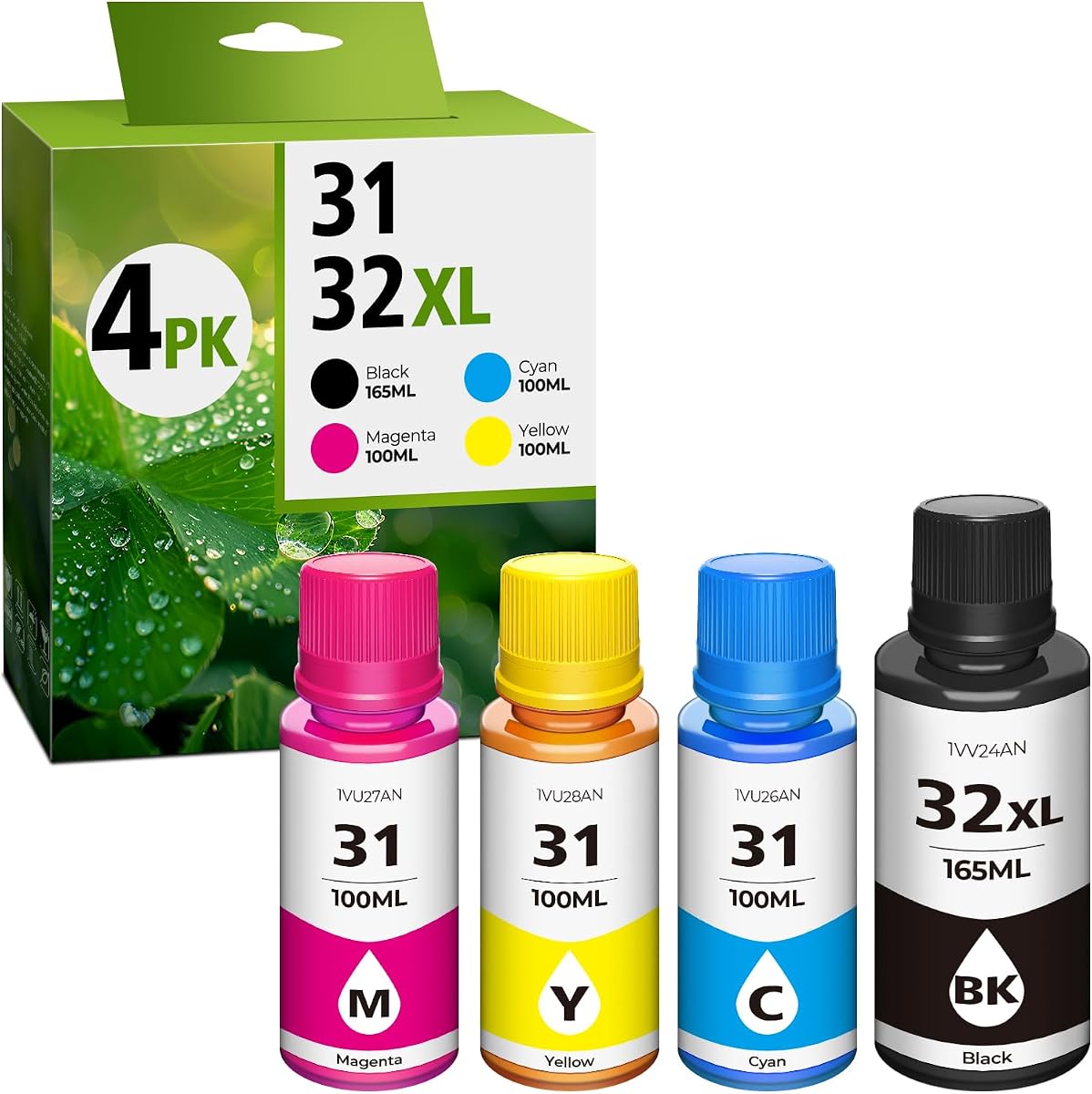
This accessory is ideal for users who already own compatible HP Smart Tank printers. It offers a cost-effective way to maintain your printer with high yield bottles. Each black bottle can last up to 9500 pages which reduces frequent buying.
We may earn a commission when you buy through this link, at no additional cost to you.
The bottles are designed for easy refilling with minimal effort and no leakage. This makes maintenance simple and helps keep your workspace clean during ink replacements.
However these are dye inks so they are not compatible with pigment black ink without cleaning. This distinction is important to maintain print quality and avoid potential damage.
For those looking to save on ongoing ink costs this is a practical option. It suits users who can manage the compatibility requirements effectively.
The higher capacity bottles mean you replace ink less often which saves time and money over long-term printer usage.
Support for many models lets you find a fit for your existing printer so you do not need to buy new hardware.
We may earn a commission when you buy through this link, at no additional cost to you.
The Epson EcoTank ET-2980 offers reliable performance with up to three years of ink included. It is designed to minimize interruptions by providing a long-lasting ink supply for continuous printing tasks.
We may earn a commission when you buy through this link, at no additional cost to you.
Refilling is simple thanks to supersized tanks and unique EcoFit bottles. This design ensures you can manage ink levels without worrying about the ink drying out during the process.
Genuine ink is strongly recommended to support optimal quality. This protects your investment and ensures consistent results for documents and photos.
This model is suitable for users who need a dependable device for home work. It balances ease of use with cost-effective printing capabilities.
With enough ink to last years you can focus on your work instead of constantly buying new supplies for your printer.
The design prevents messes so refilling is quick and clean which keeps your workspace tidy and organized.
We may earn a commission when you buy through this link, at no additional cost to you.
The Epson EcoTank ET-2800 is designed for reliability in home environments. It features Micro Piezo Heat-Free technology which ensures vivid detailed prints and documents consistently. This helps it finish large jobs efficiently.
We may earn a commission when you buy through this link, at no additional cost to you.
It includes up to two years of ink which reduces frustration about running out during important tasks. You can print thousands of pages without changing supplies frequently which is great for steady use.
This model helps reduce cartridge waste which is good for the environment. It aligns with eco-friendly practices by using refillable reservoirs instead of disposable plastic cartridges.
For families needing a solid printer for daily tasks this is a good pick. It delivers quality without complex features ensuring it meets basic needs effectively.
The durable design ensures the printer works well over time without frequent breakdowns which is crucial for home office tasks.
Using less energy during operation helps lower electricity bills and keeps your workspace cooler compared to heat-based models.
We may earn a commission when you buy through this link, at no additional cost to you.
Choosing the right printer involves evaluating key factors that impact cost efficiency, speed, and usability. Here is what to look for.
Ink yield is the most critical factor for tank printers. Check how many pages the included ink can print. Higher yields mean fewer refills and lower costs per page.
Look for models offering at least 4500 pages black and 7000 pages color. This ensures long-term value and avoids frequent maintenance interruptions.
The refill mechanism affects how easy it is to maintain the printer. Mess-free systems prevent spills and make the process cleaner for all users.
Choose tanks with easy-access bottles and clear markings. This reduces the risk of errors and keeps your workspace tidy.
Speed matters for large jobs or busy households. Check ISO pages per minute ratings to understand real-world performance for black and color outputs.
Aim for models with zero warmup time. This ensures you can start printing immediately without waiting for the device to prepare.
Wireless features allow printing from multiple devices without cables. Look for support for AirPrint or mobile apps for seamless integration with smartphones.
Ensure the printer supports your network type. This guarantees stable connections and easy setup for modern devices.
Automatic two-sided printing saves paper and reduces costs. It is a valuable feature for document-heavy environments.
If eco-friendliness is a priority, prioritize duplex models. This helps reduce waste significantly over time.
A larger LCD screen makes navigation easier for settings and status checks. Touchscreens streamline interactions compared to basic buttons.
Ensure the display is user-friendly. This reduces frustration when changing settings or managing ink levels.
Some printers use pigment black ink for sharper text while others use dye. Dye ink is usually better for photos but may smear easily.
Check if the printer supports genuine ink only. This ensures optimal quality and protects warranty coverage.
A high-resolution flatbed scanner allows for quality document digitization. Check if it supports duplex scanning for double-sided originals.
Ensure the scanner matches your volume needs. High-resolution models handle photos and detailed documents better.
Set up the printer on a stable surface near an outlet. Connect to Wi-Fi following the manual steps. This ensures all devices can print wirelessly.
Fill ink tanks using the provided bottles. Align the nozzle with the tank opening. Wait for ink to drain before removing bottles to prevent spills.
Run a nozzle check periodically to maintain print quality. Clean print heads if text appears faint. This keeps your documents sharp and professional.
Ink tanks typically last for years depending on your volume. Check the page yield. If you print moderately, you may not refill for months.
It is not recommended as it may damage the printer and void warranty. Use genuine ink for optimal quality and to avoid potential issues.
Dye ink is better for vibrant colors while pigment offers sharper text. Dye may smear easily while pigment is more water-resistant.
Most models with heat-free technology have zero warmup. You can start printing immediately without waiting for heating cycles to finish.
Stability depends on your network. Ensure strong Wi-Fi signals near the printer. This reduces dropouts during printing tasks.
Use the maintenance menu to run cleaning cycles. For stubborn clogs, consult the manual for manual cleaning steps to avoid damage.
Sets usually cover thousands of pages. For example, a set might yield 4500 black and 7500 color pages. Check specs for exact counts.
Yes, most support borderless prints. Check resolution specs for photo quality. High DPI ensures vibrant colors for standard paper.
We highlighted top picks like the Canon G3270 for overall value and the HP Smart Tank 5003 for budget needs. These models offer reliable performance.
Prioritize ink yield and refill ease. A larger tank saves money. Ensure connectivity matches your devices for a smooth workflow.
Always check current prices before buying. Listings fluctuate and models may be on sale. This ensures you get the best deal possible.