
BENFEI USB 3.0 Switch
4.1Editor score
Four USB 3.0 ports
Plug and play compatibility
Includes power supply slot
This guide compares the top ten keyboard and mouse switch for 2 computers to help you share peripherals efficiently across multiple devices without constant
Managing multiple computers often means juggling multiple keyboards and mice which creates desk clutter and reduces workflow efficiency. A dedicated switch allows you to share these peripherals seamlessly between machines. It simplifies your workspace and ensures you can focus on tasks rather than hardware management.
We evaluated ten top rated models based on speed compatibility and build quality to find the most reliable solutions for dual PC setups. Our analysis covers USB 3 0 models and advanced options supporting various device types. This ensures you find a switch that fits your specific technical requirements and budget constraints.
Each pick highlights key strengths like data transfer rates and ease of use so you can make an informed decision quickly. Please note that availability and pricing fluctuate frequently on online marketplaces. Always verify current specifications before purchasing to ensure the product meets your latest needs.
4.1Editor score

4.0Editor score

4.3Editor score
The following table provides a side-by-side comparison of all ten products to help you quickly identify the best fit for your dual computer setup needs based on port count and features.


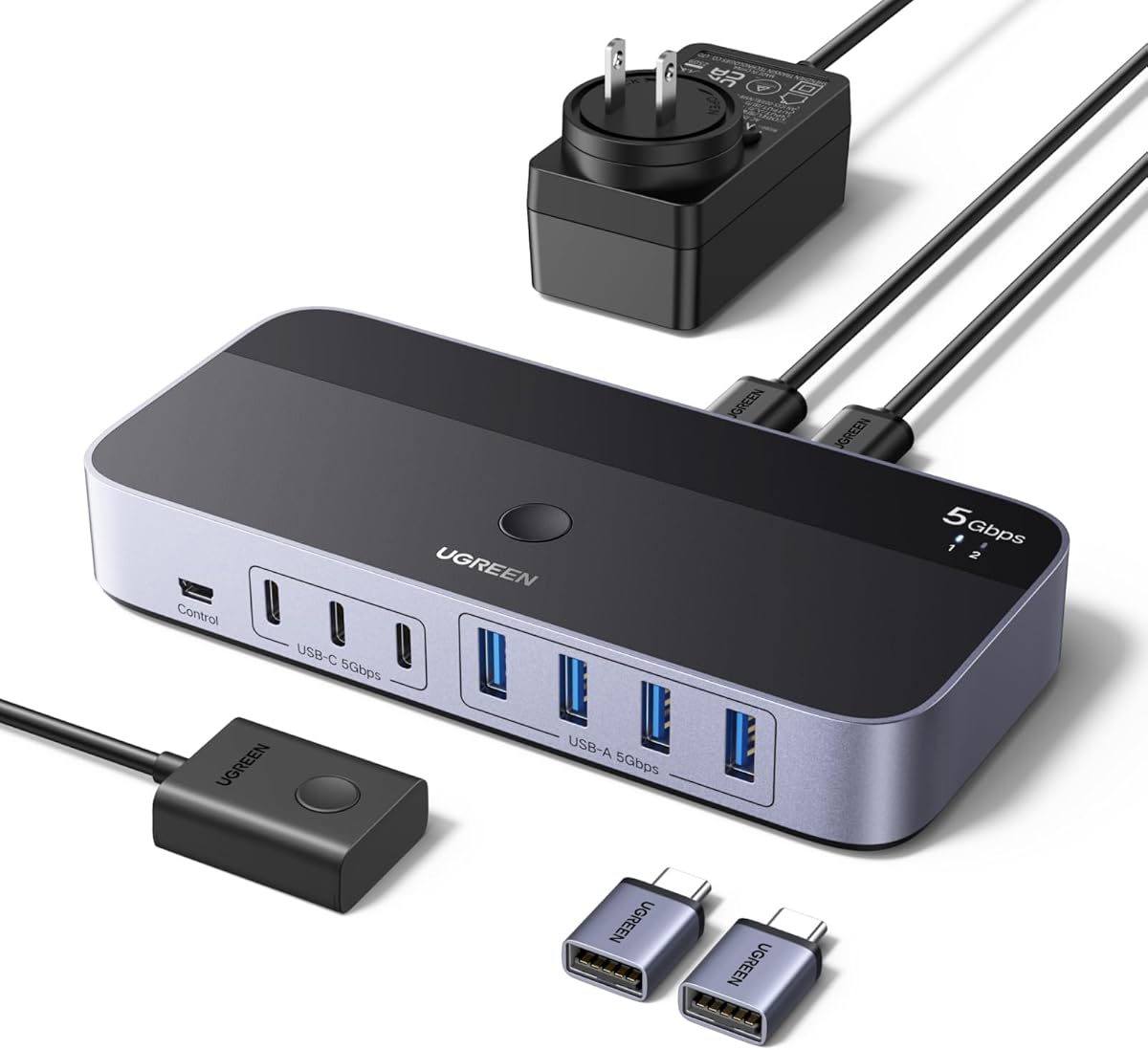

The UGREEN USB 3.0 Switch offers a robust solution for users needing to share multiple peripherals between two computers without constant cable swapping. It features a 4 port design with mixed USB A and C inputs to accommodate modern and legacy devices effectively. The included controller ensures you can switch devices effortlessly without reaching behind your setup.
We may earn a commission when you buy through this link, at no additional cost to you.
This model supports data transfer speeds up to 5Gbps which is essential for efficient file sharing between machines. The optional USB-C power supply port helps maintain stability when connecting high power devices like external hard drives or headsets. You can connect keyboards mice printers and cameras simultaneously across your workspace.
While it excels at peripheral sharing it does not support video transmission so it is not a replacement for a full KVM switch. Users must ensure they use compatible adapters if their computers rely heavily on USB C ports without standard A connectors. The build quality is solid and it handles daily switching tasks well.
Ideal for professionals managing dual workstations this switch maximizes efficiency by consolidating your peripheral connections. It is the top pick for those who need flexible port options and reliable performance without paying for video capabilities they do not need.
The ability to connect both USB A and USB C devices reduces the need for extra adapters and simplifies your cable management significantly.
The dedicated power port ensures that power hungry devices remain stable during operation preventing disconnections that can interrupt your workflow.
We may earn a commission when you buy through this link, at no additional cost to you.
The BENFEI USB 3.0 Switch provides an affordable entry point for users looking to share basic peripherals between two computers without breaking the bank. It offers four USB 3.0 ports allowing you to connect keyboards mice and printers easily. The simple design focuses on core functionality without unnecessary features.
We may earn a commission when you buy through this link, at no additional cost to you.
Data transfer speeds reach up to 5Gbps ensuring that file movements between computers remain fast and efficient. The LED indicator clearly shows which computer is currently active reducing confusion during switching. It supports various operating systems making it versatile for mixed office environments.
The unit does not include a physical remote controller so you must press the button on the device to switch. This might be less convenient for users with deep desktop setups but keeps the unit compact. It is best suited for those who prioritize value over advanced ergonomics.
This is the ideal choice for students or home office workers who need a reliable switch for essential devices. Its low cost and solid performance make it the best budget option on this list for basic dual PC setups.
You get reliable USB 3.0 speeds and multiple ports for a fraction of the cost of more complex switchers making it highly accessible.
The straightforward button interface means there is no learning curve and anyone can start using it immediately after plugging it in.
We may earn a commission when you buy through this link, at no additional cost to you.
The UGREEN 2-in 7-Out USB 3.2 Switch stands out as a premium solution for users who demand maximum speed and port availability. It supports 10Gbps transfer speeds which is double the standard USB 3.0 rate allowing for rapid file transfers. The seven port layout accommodates numerous devices simultaneously without conflict.
We may earn a commission when you buy through this link, at no additional cost to you.
This model includes Type C converters and a dedicated power adapter ensuring that all connected devices receive stable power and correct interface types. The robust design supports high bandwidth tasks making it suitable for creative professionals who transfer large media files frequently. You can share multiple drives and input devices with ease.
The physical size is larger than standard switchers due to the increased port count and power requirements which might be a consideration for tight desks. The price reflects its advanced capabilities but it offers significant value for those with specific high speed needs. It is built to handle heavy daily workloads.
If you need the fastest data transfer and most connectivity options this premium switch is the clear winner. It justifies its cost through superior speed and versatility for power users managing complex multi computer workflows efficiently.
With 10Gbps speeds you can transfer large video files in seconds rather than minutes significantly speeding up your creative workflows.
Seven ports allow you to connect every device you need without unplugging others giving you true flexibility across your two computers.
We may earn a commission when you buy through this link, at no additional cost to you.
This compact 2 in 2 Out USB 3.0 Switch offers a minimalistic approach to sharing peripherals between two computers efficiently. It focuses on providing two high speed ports for essential devices like keyboards and mice without unnecessary complexity. The aluminum shell helps manage heat during extended operation periods.
We may earn a commission when you buy through this link, at no additional cost to you.
With 5Gbps transfer speeds you maintain efficient data flow between systems for typical office tasks. The package includes necessary cables making it ready to use immediately upon arrival. It is designed for users who only need to share a couple of devices at a time.
The limited port count means you cannot connect multiple printers or scanners simultaneously with this unit. It is strictly for scenarios where you prioritize simplicity and space savings over connectivity variety. The build quality is sturdy and the LED indicator provides clear status feedback.
Perfect for minimalists this switch provides reliable performance for basic dual computer setups. It is a top choice for those who want a clean desk solution without extra ports they will never use.
The compact form factor ensures the device takes up minimal space on your desk allowing you to keep your workspace organized and clean.
Included cables mean you do not need to purchase additional accessories and can start sharing your peripherals right away without delay.
We may earn a commission when you buy through this link, at no additional cost to you.
The UGREEN USB 3.0 Switch 2 in 2 Out is a dependable choice for users seeking a straightforward way to share essential peripherals. It provides two ports for connecting devices like keyboards mice and webcams across two computers. The unit is designed for plug and play operation without needing driver installation.
We may earn a commission when you buy through this link, at no additional cost to you.
You benefit from 5Gbps transfer speeds which are standard for efficient USB 3.0 communication. The LED indicator allows you to see at a glance which computer is currently controlling the connected devices. It supports a wide range of operating systems including Windows Mac and Linux.
Like other simple switchers it lacks a remote controller so you must reach the device to switch ports. This is a reasonable trade-off for the compact size and affordability of the unit. The build quality ensures it withstands regular switching actions over time.
This switch is ideal for home offices where simplicity and reliability are more important than advanced features. It delivers consistent performance for standard keyboard and mouse sharing tasks without complications.
The button switching mechanism is intuitive and responsive making it easy to switch between work and personal computers instantly.
Support for multiple operating systems ensures that it works seamlessly regardless of the specific software environment you are using.
We may earn a commission when you buy through this link, at no additional cost to you.
The Hearvo USB 3.0 HDMI KVM Switch is distinct because it supports video transmission allowing you to share a monitor alongside peripherals. It is a complete solution for users who want to reduce monitor clutter by using one display for two computers. It supports 4K resolution for high quality visuals.
We may earn a commission when you buy through this link, at no additional cost to you.
It includes four USB 3.0 ports for connecting keyboards mice and other accessories effectively. The wired remote switch allows you to place the unit out of sight while keeping switching controls accessible on your desk. Adaptive EDID ensures stable image transmission between devices.
Setup is more involved than standard USB switchers as it requires HDMI connections and monitor configuration. However this extra complexity provides significant desk space savings for dual computer users. It is fully compatible with major operating systems for seamless integration.
If you need to share a monitor along with your keyboard and mouse this is the top choice. It simplifies your visual workspace while maintaining full control over both connected computers efficiently.
By allowing one monitor to control two computers it frees up valuable desk space and reduces cable clutter significantly.
The wired remote ensures that you can switch computers effortlessly without reaching behind your desk which improves daily convenience.
We may earn a commission when you buy through this link, at no additional cost to you.
This UGREEN USB 2.0 switch offers a cost effective way to share multiple peripherals between two computers with four available ports. It is ideal for users who do not require high speed data transfers and primarily use keyboards mice and printers. The one button swapping feature is simple and effective.
We may earn a commission when you buy through this link, at no additional cost to you.
It includes a separate micro USB port for optional power which helps maintain stability with multiple devices connected. The LED indicator shows which computer is active providing clear visual feedback during operation. It supports a wide range of operating systems including Windows and Mac.
The data transfer speed is limited to USB 2.0 standards which may be slow for large file movements. However for basic peripheral sharing this is rarely a bottleneck in daily office work. The build is solid enough for regular home or office use.
Best for those prioritizing affordability this switch provides reliable access to shared devices without expensive hardware. It is a practical choice for legacy systems or low bandwidth needs.
You can share four devices between two computers at a fraction of the cost of newer models without sacrificing basic functionality.
The optional power port ensures that the switch operates reliably even when multiple peripherals draw power from the unit.
We may earn a commission when you buy through this link, at no additional cost to you.
The UGREEN USB 3.0 Switch Selector provides a classic 4 port solution for sharing peripherals across two computers efficiently. It supports high speed data transfers up to 5Gbps which is suitable for most standard office and home tasks. The build quality is designed to last with a robust enclosure.
We may earn a commission when you buy through this link, at no additional cost to you.
A dedicated USB C power port allows you to connect external power if needed for high power devices like hard drives. It comes with two USB 3.0 cables ensuring you have everything needed to connect your systems immediately. The one button switching is intuitive and responsive.
While it does not include a remote controller it is compact enough to place conveniently on the desk. The power adapter is not included so users with high power needs may need to source one separately. Performance is consistent and reliable for daily use.
This model is a solid middle ground for users who need USB 3.0 speeds without paying for premium features. It is a reliable workhorse for standard multi device sharing across two systems.
The 5Gbps speed ensures that your data moves quickly between computers keeping your workflow efficient and uninterrupted.
Having a dedicated power port gives you the option to add power for demanding devices when your setup requires extra stability.
We may earn a commission when you buy through this link, at no additional cost to you.
This UGREEN switch offers an impressive seven ports allowing you to share a wide array of devices between two computers. It supports both USB A and C devices natively reducing the need for external adapters. The included power adapter ensures all connected peripherals have stable power during operation.
We may earn a commission when you buy through this link, at no additional cost to you.
The device supports 5Gbps data transfer speeds ensuring that file movements remain fast and efficient across systems. You can connect multiple storage drives printers and input devices without needing extra hubs. The controller allows for convenient switching even when the unit is hidden.
The larger physical size is necessary to accommodate the seven ports and power components. It requires more desk space than simpler models but provides unmatched connectivity in a single switch. It is a comprehensive solution for complex setups.
Ideal for users with many peripherals this switch consolidates connections effectively. It balances speed and port count well making it a top choice for those who need extensive sharing capabilities.
Seven ports allow you to connect almost every device you own to a single switch eliminating the need for multiple hubs.
The included power adapter removes the hassle of finding compatible power sources and ensures consistent performance for all devices.
We may earn a commission when you buy through this link, at no additional cost to you.
This entry level switch offers a basic two port solution for sharing keyboards and mice between two computers. It is designed for simplicity and affordability making it a good starting point for users new to switching technology. The external controller keeps your desk tidy by allowing remote switching.
We may earn a commission when you buy through this link, at no additional cost to you.
The unit operates on USB 2.0 standards which are sufficient for input devices but not for fast data transfers. It draws power directly from the computers so no extra adapters are needed. The package includes cables so you can start using it immediately.
The external controller adds convenience but the unit itself is limited to two devices. If you need more ports or faster speeds you will need a more advanced model. It is a reliable budget choice for basic needs.
Best for those who just need to share a keyboard and mouse this switch delivers on its promise. It is a practical and cost effective solution for very simple dual computer setups.
The external controller keeps the main unit out of sight while giving you easy access to switching controls.
Since it draws power directly from the computers you avoid the need for extra cables and power adapters on your desk.
We may earn a commission when you buy through this link, at no additional cost to you.
Selecting the right switch depends on your specific device count speed requirements and whether you need video support for your setup.
Determine how many peripherals you need to connect such as keyboards mice printers and drives. Ensure the switch supports both USB A and C types if your devices vary widely in connector styles.
Look for models with enough ports to cover all devices so you do not need additional hubs.
USB 3.0 offers faster data transfer speeds than USB 2.0 which is important if you plan to move files frequently between computers. Choose 5Gbps or 10Gbps models for efficiency.
Prioritize higher speed standards if you work with large media files regularly.
Most switches only handle USB devices and not video signals. If you want to share a monitor you need a KVM switch that supports HDMI or DisplayPort connections.
Confirm if the device supports video transmission before purchasing if monitor sharing is a requirement.
Some switches have a button on the unit while others include an external remote controller. Remote switches are more convenient if the unit is hidden under a desk or behind a computer.
Consider where you plan to place the switch to decide between manual and remote switching options.
High power devices like external hard drives may need extra power supply to work stably. Some switches include a dedicated power port or adapter for this purpose.
Check if the model supports external power if you plan to connect power hungry peripherals.
Ensure the switch is compatible with your operating systems such as Windows Mac Linux or Chrome OS. Most modern switches are plug and play across these platforms.
Verify driver free support to ensure easy installation without software issues.
Look for durable materials like aluminum shells that help with heat dissipation during long use. A good warranty provides peace of mind against manufacturing defects or failures.
Choose brands with solid reputation and customer support for long term reliability.
Prices vary based on port count and features like remote control or high speed support. Determine how much you are willing to spend before comparing specific models.
Balance your feature needs against the cost to find the best value for your setup.
Begin by connecting your two computers to the switch ports using the provided USB cables. Then plug your keyboard mouse and other peripherals into the switch outputs on the device.
Use the button on the unit or the remote controller to switch control between your two systems. Watch for the LED indicator to confirm which computer currently has control over the devices.
Regularly check connections and dust the unit to maintain optimal performance. If using high power devices ensure the power adapter is connected to avoid unexpected disconnections.
A USB switch only shares USB peripherals like keyboards and mice between computers while a KVM switch also shares the monitor and video signal. This means a KVM switch allows you to control everything including the display with one setup.
Most modern USB switches are plug and play and do not require any driver installation. They work immediately on Windows Mac and Linux systems as long as you connect them properly.
Yes you can share external hard drives but you may need to connect extra power to the switch for stability. Ensure the switch supports high power devices to avoid data loss or disconnections.
Many switches support USB C ports directly but some may require an adapter if you only have USB C inputs. Always check the product specifications to confirm compatibility with your laptop's ports.
The number of devices depends on the number of ports the switch has such as two four or seven. You can connect any USB device to each port as long as the total power usage is within limits.
Yes USB switches are designed to allow safe switching while devices are connected without risking damage. Just ensure you press the switch button gently to avoid stressing the internal components.
We reviewed ten excellent switches including the UGREEN USB 3.0 and Hearvo KVM models to help you find the perfect fit. Each offers unique benefits for sharing keyboards and mice across multiple systems efficiently.
Prioritize port count and speed if you have many high performance devices to connect. Consider video capabilities if you need to reduce monitor clutter with a single display.
Always check current prices and availability on Amazon as they change frequently. Selecting the right switch will streamline your workspace and boost your daily productivity significantly.