
HDMI KVM Switch 3 Monitors 2 Computers 4K@60Hz
4.5Editor score
Affordable triple monitor support
4 USB 3.0 ports
Panel and remote switching
This guide compares the top 10 KVM switches for triple monitors in 2026, evaluating compatibility, resolution support, USB features, and ease of use for dual
Managing multiple computers with a triple monitor setup requires efficient hardware solutions. A quality KVM switch allows you to share displays and peripherals between systems seamlessly. This ensures your workspace remains organized while maintaining full productivity across different machines.
We evaluated ten leading KVM switches designed for triple monitor configurations. Our analysis focused on resolution support, USB connectivity, switching methods, and overall compatibility with modern operating systems. Each product was assessed based on its ability to handle complex multi-monitor workflows effectively.
Each pick highlights unique strengths and potential limitations for various user needs. From budget-friendly options to premium docking stations, this list covers diverse requirements for professionals and enthusiasts. Remember that availability and pricing may fluctuate, so verify current details before purchasing.
4.5Editor score

4.9Editor score

4.2Editor score
The following table provides a side-by-side comparison of the top ten KVM switches for triple monitors. It highlights key specifications including supported resolutions, port configurations, switching options, and unique features to help you identify the best fit for your specific multi-computer environment.





This AV Access KVM docking station stands out as a top choice for users needing a comprehensive triple monitor solution. With a high rating and advanced features, it bridges the gap between a standard switch and a full docking station. It supports up to three displays while keeping your workspace organized.
We may earn a commission when you buy through this link, at no additional cost to you.
The device enables a single USB C cable to handle video, data, and charging for laptops. This reduces cable clutter significantly. Desktops can connect via DisplayPort or HDMI for maximum resolution. The switch allows you to toggle between systems easily without disconnecting peripherals.
While the premium price might be a consideration, the multifunctionality offers long-term value. It replaces separate hubs and docks. Note that MacBook users should verify compatibility as extended displays are not supported on all models. Otherwise, it is highly recommended for professional workstations.
Ideal for IT professionals or power users managing two computers simultaneously. The Ethernet sharing ensures your network stays active on both machines. Whether you are coding, designing, or trading, this KVM provides the stability and connectivity required for demanding workflows.
The USB C connection simplifies laptop setups by handling video and power through a single cable.
Unlike some switches, this model keeps the Ethernet connection active on both computers during switching.
We may earn a commission when you buy through this link, at no additional cost to you.
This HDMI KVM switch offers an excellent entry point for those seeking triple monitor support without high costs. It allows two computers to share three monitors and four USB devices. The setup is straightforward, making it accessible for home offices or small businesses needing efficient resource sharing.
We may earn a commission when you buy through this link, at no additional cost to you.
It supports resolutions up to 4K@60Hz, ensuring clear visuals for everyday tasks. The included power adapter helps maintain stability for high power USB devices like hard drives. You can switch using a panel button or a wired remote for added convenience.
While it lacks keyboard shortcut toggling, the physical controls are reliable. Ensure your computers support triple displays before purchasing. The price point makes it an attractive option for users who prioritize budget over premium features like 8K support.
Best for users with standard HDMI monitors looking for a cost-effective solution. It handles common peripherals well and works across Windows and Mac systems. If you need a basic yet functional switch for daily use, this model delivers solid performance at a fraction of the cost.
USB 3.0 ports enable fast data transfer for connected storage devices and peripherals.
Choose between on-panel buttons or a remote to switch between computers effortlessly.
We may earn a commission when you buy through this link, at no additional cost to you.
This premium AV Access model delivers outstanding performance for professionals requiring the highest visual fidelity. It supports 8K resolution and functions as a full docking station. This means you get keyboard mouse, network, and audio sharing in one device. It is ideal for demanding workloads.
We may earn a commission when you buy through this link, at no additional cost to you.
The USB C port provides up to 100W power delivery which charges your laptop while in use. You can transfer files quickly with USB 10Gbps ports. The switch maintains your network connection even when changing between computers. This ensures downloads or syncs continue uninterrupted.
The cost is higher than standard switches but the versatility justifies it. You save desk space by eliminating separate docks or hubs. Ensure your monitors and graphics cards support 8K to get the most out of this switch. Mac users should check display limitations before buying.
Perfect for content creators or developers needing multi-tasking capabilities. The robust build quality and feature set offer a future-proof solution. If budget allows, this represents the best in class for dual PC triple monitor setups needing seamless integration.
Achieve crystal clear visuals with 8K support for detailed design work or data analysis.
Power your laptop while switching computers so you never lose charge during work.
We may earn a commission when you buy through this link, at no additional cost to you.
This unique KVM switch supports up to four computers sharing three monitors which is rare in the market. It is perfect for shared workstations or training rooms where multiple systems need to access the same displays. The resolution supports up to 8K ensuring high quality visuals across all inputs.
We may earn a commission when you buy through this link, at no additional cost to you.
It includes a wired remote to simplify switching between the four PCs. The 4 USB 3.0 ports allow you to share peripherals easily. You get a complete package with power adapters and cables included. This makes installation faster compared to buying extra accessories separately.
Ensure your PCs can output three monitors each to utilize all screens. The setup requires careful cable management but offers great flexibility. If you need to control more than two machines with one setup this switch fills that gap effectively without needing multiple units.
Ideal for educational or corporate environments with multiple workstations. It consolidates hardware usage and reduces costs. Users looking for multi-computer support will find this model highly functional and reliable for professional applications requiring extensive connectivity.
Connect four computers to one monitor setup to maximize resource usage.
All necessary cables and adapters are included for immediate plug and play setup.
We may earn a commission when you buy through this link, at no additional cost to you.
This KVM switch supports high refresh rates making it a strong candidate for gaming or fast-paced work. It allows two computers to share three monitors and multiple USB devices. The 8K support ensures future proofing while maintaining compatibility with older devices for versatility.
We may earn a commission when you buy through this link, at no additional cost to you.
A dedicated power switch allows you to restart the KVM without unplugging cables. This helps resolve signal issues quickly. You can use wired controllers to switch between computers conveniently. The device works well with various operating systems including Windows and Linux.
It recommends short cables to maintain maximum resolution stability. This is a standard requirement for high bandwidth signals like 8K. If you have monitors requiring high frame rates this model provides the necessary throughput to avoid tearing or stuttering during use.
Recommended for gamers or creators needing smooth motion across multiple screens. The support for VRR and FreeSync adds to its appeal. Ensure your setup matches the port requirements to get the best performance. It balances cost and features well for high-end needs.
VRR and FreeSync support reduce screen tearing for a smoother gaming experience.
A separate power switch makes resetting the device easy without hardware reconnection.
We may earn a commission when you buy through this link, at no additional cost to you.
This HDMI focused KVM switch leverages HDMI 2.1 technology for high resolutions and refresh rates. It supports 2 computers and allows three monitors to share one peripheral set. The simplicity of HDMI connections makes it easy to integrate with existing monitors or gaming consoles.
We may earn a commission when you buy through this link, at no additional cost to you.
It is fully plug and play requiring no software drivers. The wired controller provides a clean way to switch between systems. The included power adapter ensures stable operation for connected devices. This reliability is crucial for maintaining consistent performance during long sessions.
While it lacks DisplayPort inputs, the HDMI bandwidth is sufficient for most modern setups. Ensure your HDMI cables support the desired resolution to avoid bottlenecks. This model is ideal for users who prefer HDMI simplicity over DisplayPort complexity.
Best for users with HDMI capable monitors or TVs. It offers a straightforward solution for sharing peripherals and screens. If you prioritize ease of use and HDMI compatibility this switch delivers reliable performance for home or office environments efficiently.
Native HDMI 2.1 support ensures high bandwidth for 8K and 120Hz outputs.
Instant setup with plug and play functionality saves time and technical effort.
We may earn a commission when you buy through this link, at no additional cost to you.
This KVM switch allows three computers to share a triple monitor setup which is ideal for testing or multi-user environments. It offers high resolution support and fast USB data transfer. The wired remote helps manage switching between the three systems easily without reaching for buttons.
We may earn a commission when you buy through this link, at no additional cost to you.
Each computer connects via DisplayPort and HDMI ports. This flexibility allows for diverse hardware configurations. The device is driver-free ensuring quick setup across Windows and Linux systems. You can switch displays quickly to compare outputs or manage different workflows.
Make sure each PC supports triple output to use all monitors. The cabling requirements are higher than 2 PC models but manageable. This device is great for QA testing or shared labs where multiple machines need access to the same workspace.
Perfect for environments needing more than two computer inputs. It balances cost and capability well. If you manage a small network or need to compare three systems directly this switch provides a robust solution for multi-computer display sharing.
Unique ability to connect three separate computers to one monitor setup for flexible workflows.
The included wired remote keeps switching accessible without moving around your desk.
We may earn a commission when you buy through this link, at no additional cost to you.
This DisplayPort focused switch offers excellent stability for high refresh rate workflows. It is designed for two computers sharing three monitors. The 4K@144Hz support makes it suitable for professional animation or gaming where fluidity matters. Each computer needs three DP outputs to use all screens.
We may earn a commission when you buy through this link, at no additional cost to you.
USB 3.0 connectivity ensures fast peripheral sharing for keyboards and mice. The wired controller allows smooth switching between systems. The plug and play design removes the need for complex drivers. This makes it easy to maintain a stable dual-computer workflow.
Ensure your graphics cards have three DP outputs each. This requirement might limit compatibility with some standard PCs. However if you have the right hardware the signal integrity is superior. It is a great option for workstation users prioritizing performance.
Ideal for workstations needing reliable high-speed connections. The consistent signal transmission helps maintain workflow without interruptions. If your setup relies on DisplayPort this switch provides the performance and ease of use needed for daily professional tasks.
Consistent 144Hz support ensures smooth visuals for animation or gaming work.
No drivers required means quick installation and immediate use across systems.
We may earn a commission when you buy through this link, at no additional cost to you.
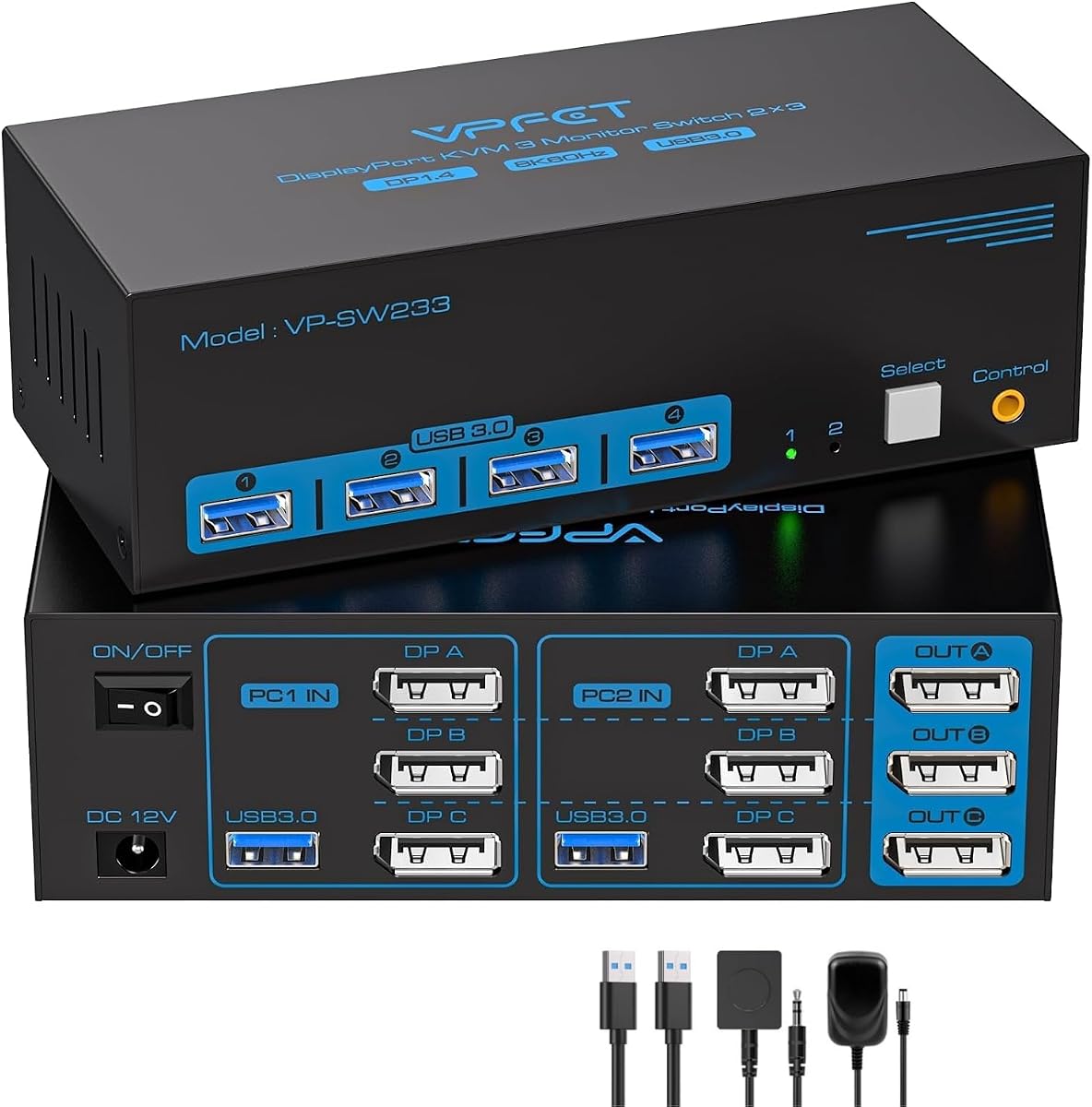
This KVM switch offers excellent value with a high rating and comprehensive included accessories. It supports 8K resolution and comes with HDMI and DP cables plus a remote. This complete package saves you from buying extra parts separately. It is reliable for general office or home use.
We may earn a commission when you buy through this link, at no additional cost to you.
USB 3.0 ports support fast data transfer for your devices. The included 1-year warranty provides peace of mind for buyers. You can switch between two computers easily with the remote. The LED indicator shows which system is active clearly.
Ensure you connect the power adapter to avoid issues with USB devices. This helps maintain stability for peripherals like hard drives. If you want a complete solution without hunting for extra cables this switch is a solid choice for most needs.
Best for users who want a ready-to-use solution. The strong support and warranty add to its appeal. It balances features and usability well for anyone needing triple monitor switching between two machines without extra hassle.
Includes HDMI and DP cables plus remote to minimize extra purchase needs.
A 1-year warranty ensures reliability and customer support for potential issues.
We may earn a commission when you buy through this link, at no additional cost to you.
The UGREEN KVM switch features a durable aluminum housing that dissipates heat effectively. It supports up to 8K resolution for clear visuals. The desktop controller lets you place switching out of reach for a cleaner desk. This build quality is robust for daily use.
We may earn a commission when you buy through this link, at no additional cost to you.
It supports HDR and VRR which helps with gaming and creative work. The switch is driver-free making setup simple across systems. However it does not support EDID emulation which might cause detection issues for some users. Verify your monitors before buying.
If build quality is a priority this model is strong. It handles high bandwidth well but ensure you have the right cables. The aluminum case helps prevent overheating during long use sessions. It is a good option for those valuing hardware durability.
Best for users wanting a sturdy metal switch. It offers solid performance if your setup matches its requirements. The desktop controller is a nice touch for ergonomics. Consider checking compatibility details carefully before purchase.
Aluminum housing provides durability and better heat management than plastic models.
Support for VRR and HDR ensures smooth visuals for gaming or editing tasks.
We may earn a commission when you buy through this link, at no additional cost to you.
Choosing the right KVM switch requires evaluating several technical factors. This guide explains what to look for to ensure compatibility and performance.
Ensure the KVM supports your monitor resolution like 4K or 8K at desired refresh rates. Higher resolutions require HDMI 2.1 or DisplayPort 1.4 cables.
Always check if the device supports your specific resolution to avoid blurry or distorted images.
Select a switch that matches your computer output ports. Some models use HDMI only while others support DP or USB C.
Verify your PCs have the necessary ports before buying a KVM with specific connection requirements.
Look for USB 3.0 ports to ensure fast data transfer for storage devices and peripherals.
More USB ports allow you to share more devices like printers or webcams without extra hubs.
Choose between panel buttons or wired remote controllers based on your desk layout.
Remote controllers allow convenient switching from a distance without reaching behind the device.
Always use the provided external power adapter to ensure stable performance for all devices.
Proper power supply prevents disconnections or failures of high power USB devices.
Confirm the KVM works with your operating system and supports extended display modes.
Check if your computers support multiple displays simultaneously before purchasing the switch.
Aluminum or metal housings offer better heat dissipation and durability than plastic.
A sturdy build ensures the device lasts longer under daily heavy usage conditions.
Compare price versus features to find a model that fits your budget while meeting your needs.
Look for models with warranty support to ensure protection against potential defects.
Connect your computers to the KVM using the correct video cables like HDMI or DisplayPort. Ensure each monitor is connected to the KVM outputs securely to avoid signal loss. Proper cable management helps keep your workspace tidy and safe.
Plug in the USB cables from your computers to the KVM inputs to share peripherals. Connect your power adapter and turn on the switch. Verify that all lights indicate correct connections. Test switching between computers to ensure peripherals work on both systems.
Keep the KVM in a well-ventilated area to prevent overheating. Use soft cloth to clean dust from the device periodically. Avoid placing heavy objects on top of the KVM to maintain its internal components. Regular checks on cables prevent loose connections during use.
A KVM switch allows you to control multiple computers with a single set of monitors and peripherals. If you have two or more systems needing access to the same screens a KVM switch simplifies your workflow and reduces cable clutter.
Most modern KVM switches support both extended and duplicate display modes. You can use Windows P to select your preferred layout. Ensure your computers output triple displays simultaneously for extended mode to work correctly.
A blank screen often results from incompatible cables or unsupported resolutions. Check that your cables are HDMI 2.1 or DisplayPort 1.4 for high resolutions. Also verify that both computers support the same video settings.
Yes many KVM switches work with laptops that support video output via HDMI or USB C. If using USB C ensure the port supports video. Always connect the external power adapter to maintain stability.
Most KVM switches are plug and play and require no drivers. This works across Windows Linux and Mac systems. Just connect the cables and switch inputs to begin using shared peripherals.
Yes you can share printers and other USB devices between connected computers. Simply plug the printer into one of the USB ports on the KVM. It will be accessible on whichever computer is currently active.
If a PC supports only two screens you cannot use all three monitors on that system. The third monitor will remain inactive. Ensure your hardware supports triple displays before buying the KVM.
No a KVM switch allows you to toggle between computers without unplugging cables. Use the panel button or remote controller to switch inputs. This keeps your setup connected and ready for use at all times.
The AV Access KVM Docking Station remains the top choice for those needing a complete solution. It combines high resolution support with extensive USB features. For budget users the HDMI switch offers solid performance without breaking the bank.
Prioritize resolution and connection types that match your current hardware. A KVM that supports your monitor setup will ensure smooth switching without issues. Check USB requirements to make sure you can share all necessary devices.
Remember to verify current product details before buying. Prices and availability may change over time. With the right KVM switch you can enjoy a seamless multi computer workflow that boosts productivity and keeps your desk organized.