
HP OmniBook 3 17 inch FHD Laptop
5.0Editor score
AMD Ryzen 5 Processor
17.3 Inch Full HD Display
Up to 12 Hours Battery
This guide compares the top laptops featuring WiFi 7 technology to help you choose the best model for speed and connectivity needs today.
Modern computing demands faster wireless speeds and efficient AI processing. Laptops with WiFi 7 offer groundbreaking connectivity, delivering lower latency and higher throughput for seamless multitasking and streaming experiences anywhere.
We evaluated ten leading models based on processor power, display quality, battery life, and specific connectivity features. Each selection represents a distinct value proposition tailored to professionals, students, and creative users seeking next-gen performance.
Each pick highlights unique strengths like AI capabilities, port selection, and screen size. Prices and availability fluctuate frequently so check the links below for the most current deals before making your final purchasing decision.
5.0Editor score

5.0Editor score

4.7Editor score
The following table provides a side by side comparison of all ten selected laptops highlighting their core specifications and key differentiators for easy evaluation.




This HP OmniBook 7 stands out as a top tier device featuring next generation connectivity and powerful AI hardware. Its 5.0 rating reflects strong user satisfaction with its performance and display quality.
We may earn a commission when you buy through this link, at no additional cost to you.
The Intel Core Ultra 7 258V processor delivers exceptional speed thanks to a 47 TOPS NPU making complex tasks like video editing or AI workloads smooth and efficient. The 32GB of RAM ensures multitasking remains fluid even with many applications open.
While the price is higher than standard models the investment pays off in longevity and capability. The only trade-off is the touchscreen which may drain battery slightly faster but the overall endurance remains impressive for a large screen device.
Ideal for professionals needing high performance and reliable WiFi 7 speeds this laptop is a solid recommendation. Its combination of power connectivity and display quality makes it the best overall choice on this list.
The 47 TOPS NPU provides on-device intelligence for faster workflows and intelligent automation without relying on cloud services.
A large 17.3 inch touchscreen with 400 nits brightness ensures crisp visuals for detailed work and media consumption.
We may earn a commission when you buy through this link, at no additional cost to you.
The HP OmniBook 3 delivers excellent value by including WiFi 7 at an accessible price point making it a standout budget option. Users rate it highly for its responsiveness and screen quality.
We may earn a commission when you buy through this link, at no additional cost to you.
Powered by an AMD Ryzen 5 processor this laptop handles daily tasks efficiently. The 17.3 inch Full HD IPS display offers comfortable viewing for streaming or work with vibrant colors and wide angles.
Some users may find 8GB of RAM limiting for heavy multitasking but it suffices for most standard workflows. The lack of a touchscreen keeps costs down while still providing a functional experience.
For students or home users needing fast connectivity without breaking the bank this model is an ideal pick. It balances cost and performance well offering modern features like WiFi 7 in an affordable package.
Get access to the latest wireless speeds without paying premium prices often associated with new connectivity standards.
The expansive 17.3 inch screen provides ample room for spreadsheets documents and multitasking windows.
We may earn a commission when you buy through this link, at no additional cost to you.
Apple introduces the M5 chip in this MacBook Air delivering powerful AI capabilities and efficient performance. With WiFi 7 support it ensures future proof connectivity for Mac users.
We may earn a commission when you buy through this link, at no additional cost to you.
The M5 chip provides blazing speeds for creative workflows while the 16GB unified memory ensures smooth multitasking. The Liquid Retina display offers vibrant colors and sharp text ideal for design work and media.
Port selection is limited to Thunderbolt and MagSafe which may require dongles for older peripherals. However the build quality and battery efficiency make these compromises acceptable for most mobile professionals.
This laptop is perfect for those invested in the Apple ecosystem seeking premium quality and long battery life. Its speed and WiFi 7 readiness make it a top tier choice for demanding users.
The M5 chip optimizes power usage delivering high performance without the noise or heat of traditional laptops.
The Liquid Retina screen supports billions of colors ensuring accurate and vibrant visuals for all content.
We may earn a commission when you buy through this link, at no additional cost to you.
This HP OmniBook 3 balances AI performance with practical features like a backlit keyboard and generous storage. It aims to support modern business needs with strong connectivity.
We may earn a commission when you buy through this link, at no additional cost to you.
The Intel Core Ultra 7 processor supports efficient multitasking and AI workflows. The 16GB DDR5 RAM and 1TB SSD offer fast responsiveness and ample space for large files and applications.
Users appreciate the comfortable keyboard and spacious display for productivity. However the lack of a rating in the data suggests it is a newer model with fewer user reviews.
It suits professionals needing reliable storage and processing power for daily business tasks. The WiFi 7 ensures rapid connectivity while the AI features provide a modern computing experience.
The 1TB PCIe SSD provides quick access to large projects and media files for efficient workflows.
16GB DDR5 RAM allows multiple applications to run smoothly without slowdowns or lag.
We may earn a commission when you buy through this link, at no additional cost to you.
The Acer Aspire 14 offers a unique balance of portability and AI power. While it features Wi-Fi 6E it includes advanced Copilot+ PC capabilities that enhance productivity and creativity.
We may earn a commission when you buy through this link, at no additional cost to you.
With up to 22 hours of battery life this device supports long work sessions without frequent charging. The WUXGA display provides clear visuals and the 16GB LPDDR5X ensures fast performance.
The compact 14 inch form factor makes it easy to carry but might feel small for extended desktop work. Users appreciate the lightweight build and modern AI features integrated into the system.
This model is great for travelers needing a reliable machine with strong battery life. The AI capabilities provide an intuitive experience even if it lacks the latest WiFi 7 standard.
Rated up to 22 hours in video playback scenarios making it ideal for travel and fieldwork.
Access AI features like Recall and improved search to streamline daily tasks and content management.
We may earn a commission when you buy through this link, at no additional cost to you.
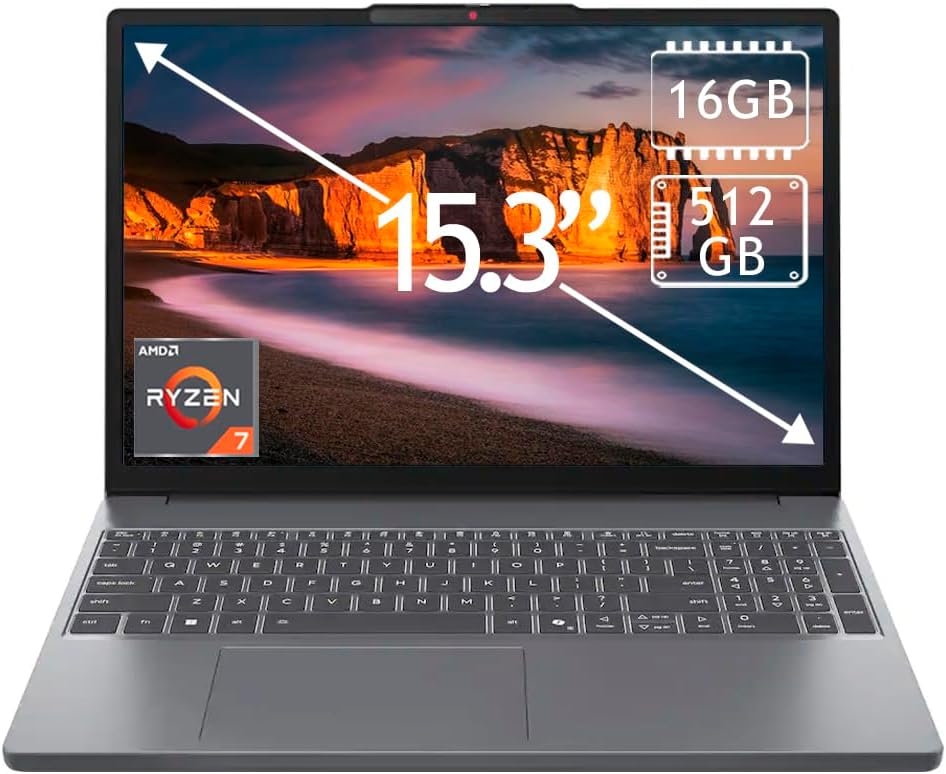
This IdeaPad Slim 3 features a sharp 2K touchscreen that enhances interaction and visual clarity. Its high user rating indicates satisfaction with its build and performance quality.
We may earn a commission when you buy through this link, at no additional cost to you.
The AMD Ryzen 7 170 processor handles daily tasks efficiently while 16GB DDR5 RAM ensures smooth multitasking. The 15.3 inch screen offers a larger workspace than typical 14 inch models.
While it uses Wi-Fi 6 instead of the newest standard the speed remains sufficient for most home or office networks. The touchscreen adds versatility for navigation but may impact battery life slightly.
Ideal for users preferring touch input and high resolution visuals this laptop offers strong value. It provides a modern Windows experience with a responsive display and reliable performance.
The 2K resolution provides crisp text and detailed images for a better viewing experience.
Touchscreen capabilities allow intuitive navigation and content interaction directly on the screen.
We may earn a commission when you buy through this link, at no additional cost to you.
The Dell 16 Plus is a robust business machine designed for professionals needing serious power and security. It features WiFi 7 and high-end specs suitable for demanding workflows.
We may earn a commission when you buy through this link, at no additional cost to you.
With an Intel Core Ultra 9 processor and 32GB memory it handles complex applications and virtual machines effortlessly. The 16 inch screen provides ample space for spreadsheets and multi window work.
While it is priced higher than average consumer models the build quality and enterprise features justify the cost. The WiFi 7 ensures rapid and stable connections for remote work and collaboration.
This laptop is perfect for IT departments and business users requiring reliability and speed. Its combination of security and performance makes it a leading choice for professional environments.
Built with vPro platform support ensuring robust security and manageability for enterprise environments.
The 16 inch display offers more real estate for detailed work and multitasking windows.
We may earn a commission when you buy through this link, at no additional cost to you.
This HP 15.6 laptop prioritizes memory and storage for users dealing with large files or heavy multitasking. The 32GB RAM ensures smooth performance across various applications.
We may earn a commission when you buy through this link, at no additional cost to you.
The AMD Ryzen 7 7730U provides solid processing power for daily tasks. A 1TB SSD offers ample space for media and documents while the touchscreen adds convenience.
It uses Wi-Fi 6 which is fast and reliable but not the latest WiFi 7 standard. The moderate ratings suggest it is a functional workhorse rather than a premium device.
Suitable for users who need significant internal resources at a reasonable price this model delivers value. It balances hardware capacity and usability for home office and general use.
32GB of memory supports running multiple demanding applications simultaneously without slowing down.
1TB SSD provides generous space for files photos and videos without needing external drives.
We may earn a commission when you buy through this link, at no additional cost to you.
The Acer Aspire Go 15 offers a lightweight and functional experience for everyday computing tasks. Its design focuses on portability and basic responsiveness for students or general users.
We may earn a commission when you buy through this link, at no additional cost to you.
Powered by the Ryzen 7 7730U it handles browsing and productivity well. The 16GB RAM and 512GB SSD provide a solid baseline for smooth performance and storage.
While it lacks WiFi 7 the Wi-Fi 6 connectivity remains fast enough for most home environments. The build is utilitarian but practical for carrying around school or home.
This model suits users seeking a no fuss laptop for daily needs. It balances cost and performance providing a reliable device for basic work and entertainment.
A lightweight chassis makes it easy to carry between rooms or during travel.
Standard specs like 16GB RAM ensure consistent performance for common daily tasks.
We may earn a commission when you buy through this link, at no additional cost to you.
This variant of the Aspire Go 15 highlights AI readiness through Windows 11 Copilot integration. It offers a modern interface and tools to help users work more efficiently.
We may earn a commission when you buy through this link, at no additional cost to you.
The PCIe Gen4 SSD delivers fast data access while the IPS display provides comfortable viewing. AcerSense software helps manage battery and storage settings to optimize performance automatically.
It uses DDR4 memory and Wi-Fi 6 which are slightly older than the newest standards but still effective. The price point makes these choices reasonable for casual users.
For users wanting AI features without high cost this laptop is a practical choice. It balances new software capabilities with reliable hardware for everyday tasks.
Windows Copilot provides a central assistant for organizing and completing tasks quickly.
AcerSense tools simplify system control and optimize settings for better battery performance.
We may earn a commission when you buy through this link, at no additional cost to you.
Selecting the right laptop requires balancing connectivity specs with performance and budget. This guide breaks down key factors to help you find the best match.
WiFi 7 offers significantly faster speeds and lower latency compared to previous standards. Ensure the laptop explicitly supports WiFi 7 to benefit from the latest wireless technology for streaming and gaming.
Look for models advertising IEEE 802.11be support to confirm compatibility with future routers and networks.
Modern laptops feature AI optimized processors like Intel Core Ultra or Apple M series. These chips handle generative AI tasks and multitasking more efficiently than older CPUs.
Prioritize CPUs with Neural Processing Units (NPUs) if you plan to use AI tools regularly for work or creative projects.
16GB of RAM is the sweet spot for most users ensuring smooth performance across multiple applications. Storage should be at least 512GB SSD to accommodate modern software and files.
Larger storage options like 1TB are beneficial for professionals handling large media files or extensive project libraries.
Screen size affects portability and workspace. A 15 to 17 inch screen offers more room for multitasking while 13 to 14 inches are easier to carry.
Look for IPS panels with at least 300 nits brightness and Full HD resolution for comfortable viewing and color accuracy.
Battery life impacts how long you can work away from an outlet. Aim for models rated for at least 10 hours of real world use for all-day productivity.
Consider power efficient processors and battery technologies like OLED or high capacity cells to maximize runtime during travel.
USB-C and Thunderbolt ports are essential for connecting external drives and monitors. Ensure the laptop has enough ports to avoid constant dongle usage.
Check for HDMI and headphone jacks if you need direct connectivity to monitors or audio devices without adapters.
Materials like aluminum or magnesium alloy provide better durability and heat dissipation than plastic. This ensures the laptop withstands daily wear and tear.
A solid hinge and robust chassis are crucial for maintaining screen integrity over years of regular use.
Security is paramount for business users. Look for features like fingerprint readers Windows Hello support or TPM chips for data protection.
Physical webcams and privacy shutters add an extra layer of security against unauthorized access during video calls.
To maximize WiFi 7 performance ensure your router also supports the standard and is placed in an open area. Avoid physical obstructions like walls that might block the signal.
Keep the laptop cool by using it on hard surfaces. Avoid soft fabrics like beds that can trap heat and reduce battery life or performance.
Regularly update your drivers and Windows to maintain stability and security. Using built-in battery saver modes extends life when you are away from power sources.
Yes WiFi 7 is fully backward compatible with previous Wi-Fi standards. You can still connect to older routers but you will not get the full speed benefits unless both device and router support Wi-Fi 7.
For general browsing and office work 8GB is sufficient but 16GB is recommended for smooth multitasking. If you plan to edit video or run virtual machines consider 32GB.
AI optimized processors like Intel Core Ultra or Apple M series include dedicated NPU units. These handle local AI tasks like background blur and noise cancellation efficiently saving battery.
Not necessarily screen size mainly impacts portability and workspace. Performance depends on the processor and graphics hardware not the physical dimensions of the display panel.
Use battery saver modes and reduce screen brightness to extend life. Avoid running too many background apps and keep the device cool to prevent unnecessary power consumption.
A touchscreen is useful for intuitive navigation and creative work but drains more battery. Consider it if you prefer direct interaction or use the device as a tablet often.
The HP OmniBook 7 and Apple MacBook Air stand out as top performers offering exceptional speed and future proof connectivity. These models deliver the best blend of power and efficiency for demanding users.
Prioritize your needs whether it is budget AI capabilities or portability when choosing. Each model on this list provides unique strengths tailored to different workloads and preferences.
Prices and availability change frequently so verify details before purchasing. Check current deals and warranty options to ensure you get the best value for your investment.