
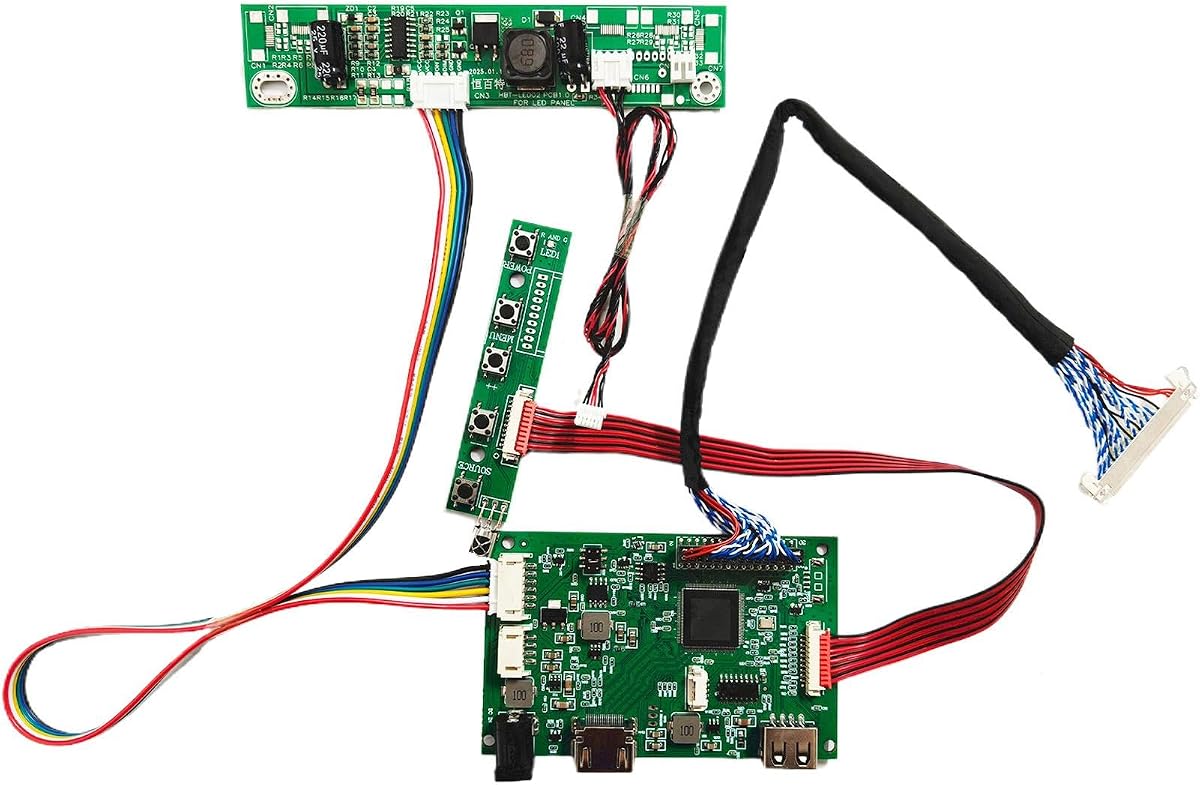
VSDISPLAY H/D VGA DVI LVDs Controller Board 40Pin for 15.6 1366×768
4.4Editor score
VGA DVI video input support
40 pin LVDS interface compatible
Audio output speaker connector included
Choosing the right LCD Controller Board for Laptop Screen is essential for successful DIY monitor projects. The board must match your panel's resolution and interface to ensure proper signal transmission and display quality.
We compared ten real products based on compatibility, input options, power requirements, and user feedback. This list covers boards for eDP and LVDS interfaces, supporting resolutions from HD to Full HD.
Each pick shows key specs, pros, and cons to help you decide. Note that prices change frequently, so check current listings before purchasing your chosen controller board kit.
4.4Editor score

4.4Editor score

4.1Editor score
As an Amazon Associate we earn from qualifying purchases.
This side by side comparison lists all ten products with their key specifications to help you find the right board for your specific laptop screen panel model.




This controller board is specifically designed for HD resolution 1366×768 LCD panels with a 30-pin eDP interface. It has a strong 4.4 rating from users who need reliable signal transmission for DIY monitor projects or screen repairs. The board ensures a stable high-quality output when paired with the correct panels.
We may earn a commission when you buy through this link, at no additional cost to you.
Key strengths include its precision design for HD panels and the pre-connected signal cable which simplifies installation. The energy-saving features help prevent flickering. You must ensure your screen model is listed such as NT156WHM-N42 or B156XTN04.1 before ordering to avoid compatibility issues.
The main trade-off is that it strictly supports 1366×768 resolution. If your panel is 1920×1080 this board will not display correctly. You also need to provide your own 12V 2A power adapter as it is not part of the package contents.
This board is ideal for users with common 11.6 to 15.6 inch panels who need an affordable and stable driver solution. If your screen matches the supported models this kit provides a dependable path to restoring display functionality without replacing the whole laptop.
The board is optimized to deliver consistent video signals to your panel which reduces artifacts and flickering during operation.
Installation is easier since the signal cable comes attached to the board you just need to align it with Pin 1 on your screen.
We may earn a commission when you buy through this link, at no additional cost to you.
This budget-friendly board works with 15.6 inch 1366×768 40 pin WLED LVDs LCD displays. It holds a 4.4 rating and supports video input via VGA and DVI. It is a solid choice for users with common LP156WH2 or LP156WH3 panels.
We may earn a commission when you buy through this link, at no additional cost to you.
Its key strengths are the broad compatibility with standard 15.6 inch models and the inclusion of an audio speaker connector for sound. The self check LED helps verify board functionality quickly. The setup is plug and play when using a compatible signal cable.
The main trade-offs are the lack of an HDMI input and the need for your own power adapter. You must prepare a 12V DC adapter yourself. Also ensure the board is in an insulated environment to prevent short circuits during use.
This option is perfect for DIYers on a tight budget who need to revive a standard 15.6 inch screen. It covers essential VGA and DVI inputs and works well with older laptop panels that use the 40 pin LVDS standard.
Compatible with popular panel models like LP156WH2 and B156XW02 making it a safe choice for many laptop repairs.
The board provides a 4-pin PH2.0 connector for speakers allowing you to add sound to your DIY monitor setup.
We may earn a commission when you buy through this link, at no additional cost to you.
This board is designed for high-definition 1920×1080 LCD panels with a 30-pin eDP interface. It has a 4.1 rating and promises vibrant color reproduction for DIY projects. It is field tested for popular models like B156HAN01.1 and LP156WF4-SP.
We may earn a commission when you buy through this link, at no additional cost to you.
Its key strengths are the Full HD support and the universal 30-pin connector which ensures seamless integration with modern laptop screens. The pre-connected signal cable simplifies the installation process. Technical support is available for compatibility checks.
The main trade-offs are that it does not work with 1366×768 panels and lacks HDMI inputs in its current specs. You must provide your own 12V 2A power adapter to ensure stable operation without restarting issues.
This is the top pick for users with modern Full HD laptop screens who need a reliable eDP controller. If your screen matches the supported models you will get a sharp and stable display for your DIY monitor or repair.
Optimized for 1920×1080 resolution to deliver crisp image quality and accurate color reproduction for your screen.
The connector type fits a wide range of modern laptop internal screens from 11.6 to 17.3 inches easily.
We may earn a commission when you buy through this link, at no additional cost to you.
This controller board works for 11.6 to 17.3 inch 1920×1080 30Pin eDP WLED LCD screens. It has a 4.0 rating and requires a 12V DC power adapter. It supports many models including B156HAN01.1 and N156HGE-EA1.
We may earn a commission when you buy through this link, at no additional cost to you.
Its key strengths are the broad compatibility with sizes up to 17.3 inches and the direct plug and play setup which needs no driver installation. The LED indicator helps users check board status quickly during testing.
The main trade-offs are the need for a specific power adapter and some troubleshooting steps if the screen does not light up. You must double check cable connections and resolution settings to avoid black or white screen issues.
This board is suitable for users with larger laptop screens who need a reliable Full HD controller. It works with a variety of panel models and simplifies the DIY process with its straightforward connection requirements.
Compatible with panels from 11.6 inches up to 17.3 inches allowing flexibility for different laptop repairs.
The board connects directly without needing software drivers making it easier to set up and use right away.
We may earn a commission when you buy through this link, at no additional cost to you.
This board works for 1280×1024 30Pin 5V LVDs LCD displays up to 19 inches. It has a strong 4.6 rating and supports video input via VGA and DVI. It is ideal for 17 inch gaming panels like M170EG01 or M170EN01.
We may earn a commission when you buy through this link, at no additional cost to you.
Its key strengths are the high user rating and support for larger screens like 17 and 19 inch models. The inclusion of an audio speaker connector makes it better than basic boards. The plug and play setup makes initial testing easy.
The main trade-offs are the need for a higher current 12V 3A power adapter which is not included. It is limited to LVDS inputs and may not support newer HDMI standards directly. Ensure your power supply is strong enough.
This board is excellent for users with older 17 inch panels who want a stable controller with audio support. The high rating indicates good performance and reliability for common M series panel models in DIY projects.
With a 4.6 rating users report stable performance and successful integration with common 17 inch laptop screens.
Includes a speaker connector for audio allowing you to add sound to your monitor or display setup easily.
We may earn a commission when you buy through this link, at no additional cost to you.
This controller board works with 21.5 inch and 23.8 inch 1920×1080 screens. It has a 4.2 rating and supports LVDS interfaces. It includes a USB cable for touch screens like LM238WF5 SSA1 and an inverter board for extra support.
We may earn a commission when you buy through this link, at no additional cost to you.
Its key strengths are the support for large desktop sizes and the inclusion of a touch screen USB cable. This makes it versatile for building larger DIY monitors. The inverter board adds value for certain panel configurations.
The main trade-offs are that it does not work with the LM215WF3-SLA1 model and requires a 12V 3A adapter. You need to check your panel model against the compatible list to ensure full functionality before buying.
This board is ideal for users with large 21.5 or 23.8 inch panels who need Full HD support. The extra accessories like the touch cable make it a strong choice for advanced DIY monitor projects.
Designed for larger screens allowing you to build bigger DIY monitors with full 1080p resolution easily.
Comes with a USB cable compatible with touch models like LM238WF5 SSA1 enabling touch functionality if needed.
We may earn a commission when you buy through this link, at no additional cost to you.
This universal board supports 10 to 65 inch LCD screens with HDMI DVI VGA and LVDS inputs. It has a 4.0 rating and uses the NT68676 chipset. OSD language options include English and many others like German and French.
We may earn a commission when you buy through this link, at no additional cost to you.
Its key strengths are the wide size range and multiple video inputs which make it adaptable for various panels. The OSD menu allows language customization. The key functions are simple for basic control.
The main trade-offs are that specific screen models are not listed and it is focused on the Asia-Pacific market. You may need to verify compatibility manually. The board does not include a power adapter.
This board is for users who need a versatile controller for many different screen sizes and inputs. It is useful when you need HDMI and DVI inputs for a DIY project that requires broad compatibility.
Works with screens as small as 10 inches and as large as 65 inches offering great flexibility for DIY builds.
Includes HDMI DVI VGA and LVDS inputs letting you connect various signal sources to your screen easily.
We may earn a commission when you buy through this link, at no additional cost to you.
This board works with 21.5 inch and 23.8 inch 1920×1080 screens. It has a perfect 5.0 rating and supports HDMI USB video input. It allows image rotation and includes speaker support for audio playback.
We may earn a commission when you buy through this link, at no additional cost to you.
Its key strengths are the unique USB video playback feature and the perfect user rating. The HDMI input ensures compatibility with modern devices. The image rotation helps when screens are mounted in landscape or portrait.
The main trade-offs are the need for a 12V 2A power adapter and limited compatibility with specific 1080p models. You must verify your panel against the supported list to avoid issues with incompatible display types.
This board is excellent for users who want USB video playback and HDMI inputs on a large DIY monitor. The 5.0 rating suggests high satisfaction and reliable performance for supported panels.
Allows you to play videos and images directly via USB making it more versatile than standard HDMI only boards.
Supports 180 degree image rotation which is useful for mounting screens in different orientations easily.
We may earn a commission when you buy through this link, at no additional cost to you.
This controller board is compatible with 15.6 inch 1366×768 panels like LP156WH4 and B156XW02. It supports HDMI and VGA inputs with a 40-pin LVDS interface. It offers optimized image quality and stable operation monitoring.
We may earn a commission when you buy through this link, at no additional cost to you.
Its key strengths include the precise signal transmission and the support for multiple external functions like gaming consoles. It adjusts brightness and contrast dynamically. The quick response to remote control commands reduces operation delay.
The main trade-offs are the lack of a user rating and the need for your own power adapter. It is limited to 15.6 inch panels with 40-pin interfaces. Ensure your screen matches the compatible models before purchasing.
This board is suitable for users with common 15.6 inch laptop screens who need HDMI and VGA inputs. The optimized image quality features enhance the visual experience for general use and gaming.
Adjustable parameters for brightness contrast and color make colors vivid and details clearer for better viewing.
Stably receives and decodes video signals to prevent lagging or distortion ensuring a smooth and accurate display.
We may earn a commission when you buy through this link, at no additional cost to you.
This controller board is designed for B173HW01 V0 V5 and B173HW02 V0 V1 17.3 inch panels. It has a perfect 5.0 rating and supports VGA and HDMI inputs with a 40-pin LVDS interface. It includes low-power mode support.
We may earn a commission when you buy through this link, at no additional cost to you.
Its key strengths are the specific support for common 17.3 inch models and the perfect user rating. The HDMI and VGA inputs allow flexible connection options. The small integration size makes it ideal for laptop repair.
The main trade-offs are the very specific model support which limits general use and the need for your own power adapter. You must confirm your panel is B173HW01 or B173HW02 series to ensure it works correctly.
This board is perfect for users with 17.3 inch laptop screens needing a Full HD repair solution. The high rating suggests it works reliably for the specific models it supports.
Designed to correspond to specific panel models ensuring strict adaptability and reducing communication errors.
Supports low-power modes which help extend battery life when used with laptop power systems effectively.
We may earn a commission when you buy through this link, at no additional cost to you.
Choosing the right controller requires matching your screen's specs carefully. Here are the key factors to consider before buying.
The controller board must match your panel's native resolution exactly. Some boards support 1366×768 while others support 1920×1080. If the resolution does not match the screen will show no signal or incorrect image.
Check the label on the back of your screen for the resolution number and pick a board that supports that exact value.
You need to know if your screen uses eDP or LVDS and how many pins it has such as 30 or 40. Mismatching the interface will prevent the signal from reaching the display panel.
Count the pins on your cable connector and verify the board description says it supports that interface type.
Most boards need a 12V power adapter but some require 2A while others need 3A. Using a weak adapter can cause flickering or constant restarting.
Ensure you have or buy an adapter that meets the exact voltage and amperage listed in the product specs.
Some boards only have VGA while others have HDMI or USB. HDMI is better for modern devices like gaming consoles or laptops.
Pick a board that has the inputs you need for your signal source devices.
Controllers are often limited to certain screen ranges like 11.6 to 15.6 inches or 17.3 to 19 inches. Verify your screen size is included.
Check the product description for the list of compatible screen dimensions to ensure it fits your panel.
Many boards list exact panel models like B156HAN01.1 or LP156WH4. If your model is listed it is a safe choice.
Search for your exact panel model number in the product description to confirm compatibility before buying.
Most kits do not include the power adapter. You may need to buy it separately. Some kits include a signal cable.
Review the packing list to see what is included and what you must supply yourself.
Because compatibility is critical check if the seller offers easy returns or support. Some sellers can help verify your model via messages.
Choose sellers who offer clear support channels in case the board does not work with your screen.
Connect the signal cable to the screen ensuring Pin 1 is aligned with the red circle or mark on the board. Secure the cable gently to avoid bending the pins.
Attach the power adapter and turn on the board before connecting the video signal. If the LED light is green the board is ready to accept video input.
Keep the board in a dry well-ventilated area to avoid overheating. Clean the connectors with compressed air to remove dust and ensure good contact.
Check the connector on the back of your screen. eDP is usually a flat wide connector while LVDS has more pins. Look up your model number online for the exact type.
No the board must match your screen's resolution and interface. Use the panel model number on the back to verify compatibility before buying.
Most boards do not include the power adapter. You need to buy a 12V adapter with the correct amperage separately.
Flickering often means the power adapter is too weak. Use an adapter that matches the exact voltage and amperage required by the board.
The number of pins changes how the signals are transmitted. The board must match the pin count of your screen for proper communication.
If the board has an HDMI input you can connect most gaming consoles. Check the product description to confirm HDMI support.
We reviewed ten options for LCD Controller Board for Laptop Screen covering various resolutions and interfaces. The H/D LCD Controller Board for 11.6 to 15.6 1366×768 panels stands out as our top choice for common HD repairs.
Always prioritize matching your panel model and resolution before buying. The wrong board will not display correctly no matter how well it is assembled.
Prices change often so check the current listings on Amazon before you purchase. Ensure you have the right power adapter ready for smooth installation.