
Handheld Inkjet Printer Gun MS-Z10
3.9Editor score
0.08 to 0.5 inch print height
Portable lightweight design
Multiple DPI options available
This comprehensive guide compares the top 10 handheld inkjet printers for 2026, evaluating print quality, battery life, ink capacity, and versatility across
Handheld inkjet printers have revolutionized how businesses mark products on the go. These portable devices allow you to print dates, barcodes, and logos directly onto various surfaces without bulky machinery or complex setups.
We have carefully analyzed ten leading models available in the market today. Our comparison focuses on critical factors such as print resolution, battery endurance, ink longevity, and ease of use for diverse industries.
Each pick below highlights specific strengths tailored to different needs like logistics or manufacturing. Please note that pricing and availability change frequently, so verify current details before making a final purchasing decision.
3.9Editor score

4.7Editor score
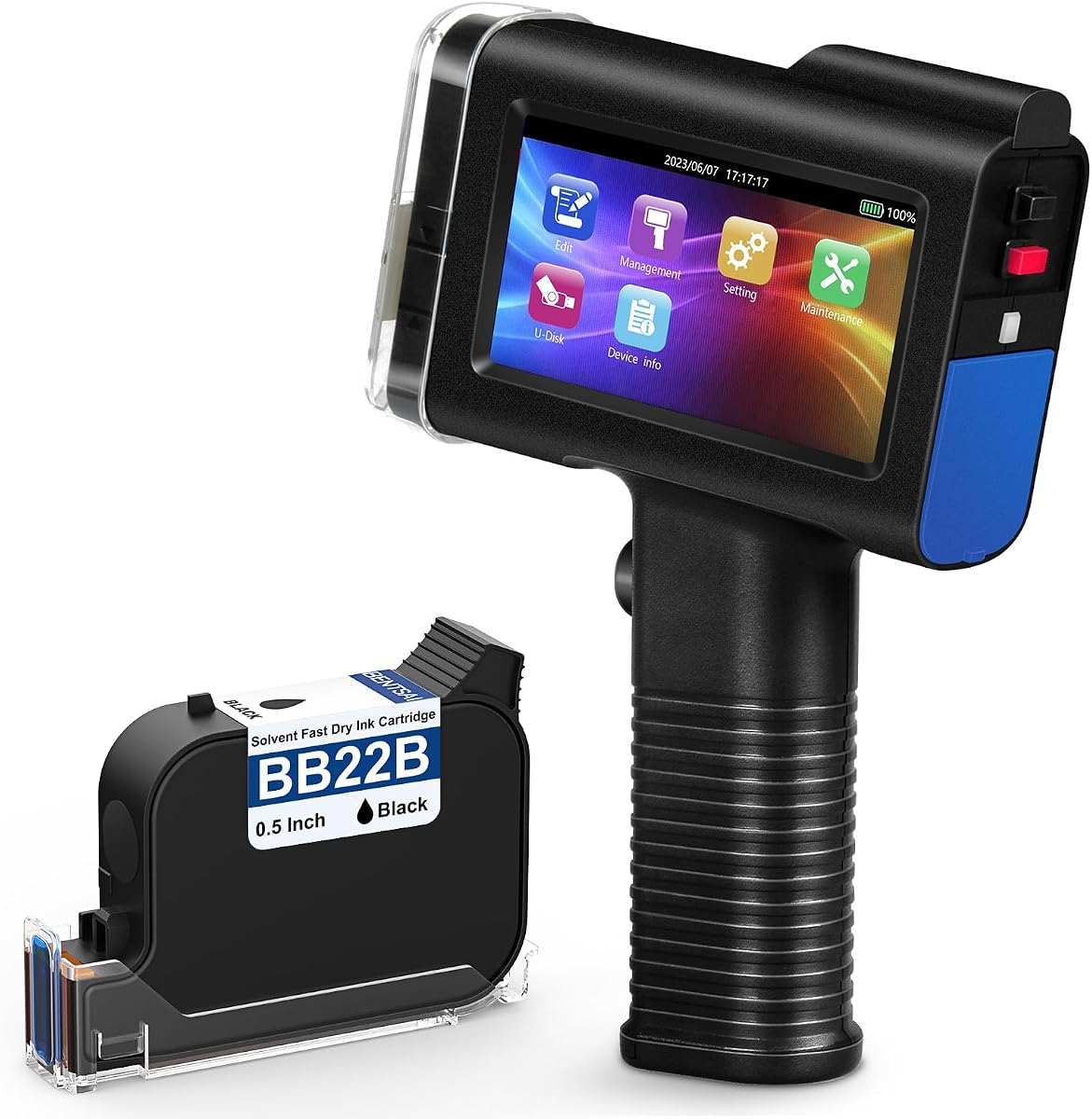
4.4Editor score
The following table provides a side-by-side technical comparison of the top ten handheld inkjet printers. Review these specifications to determine which device aligns best with your specific printing requirements and operational environment.


This portable handheld inkjet printer stands out as a top choice for businesses needing reliable coding on the go. With a strong rating of 4.7 stars, users praise its ability to print batch codes and expiration dates clearly on diverse materials.
We may earn a commission when you buy through this link, at no additional cost to you.
The device features an advanced power management system that delivers up to 16 hours of operation on a single charge. This extended battery life ensures that production lines or warehouse inventories are never halted due to power failures during critical shifts.
While it offers premium features like a 4.3 inch HD touchscreen and leak-proof self-locking cartridges, the price point reflects its high-end capabilities. However, the durability and speed justify the cost for professional environments requiring consistent performance.
If you need a printer that handles text, QR codes, and logos with speed and precision, this model is an excellent investment. It is particularly suited for companies managing large volumes of packaging or product identification tasks daily.
The 16-hour battery life allows teams to complete full shifts without recharging, maximizing productivity in busy environments.
Ink adhesion is engineered to work effectively on plastic, metal, glass, and cardboard, ensuring legible marks regardless of material texture.
We may earn a commission when you buy through this link, at no additional cost to you.
The JC01 handheld inkjet printer offers a compelling balance of performance and affordability. Weighing just 390g, it is designed for portability, making it ideal for workers who need to move quickly between different packing stations.
We may earn a commission when you buy through this link, at no additional cost to you.
Its all-day battery life supports over 16 hours of continuous operation, which is crucial for long shifts in manufacturing or warehousing. The standard 0.5 inch print height meets most common coding needs efficiently.
Users appreciate the drop-resistant design and included wrist strap, which protect the device in high-paced industrial environments. The fast-drying ink ensures that prints on plastic or carton are clear and ready for handling immediately.
This model is perfect for small businesses or those just starting with industrial coding. It provides essential features without unnecessary complexity, making it a smart entry-level choice for reliable marking.
The lightweight build and drop-resistant features reduce user fatigue and protect against accidental drops during frequent handling.
Included accessories like the protective suitcase ensure safe transport and storage, extending the device's lifespan in rugged conditions.
We may earn a commission when you buy through this link, at no additional cost to you.
The BENTSAI BT-HH6105B2 delivers professional-grade performance with its 600 DPI high-resolution printing capability. This ensures that logos and intricate codes remain sharp even on challenging surfaces like fabric or uneven cardboard.
We may earn a commission when you buy through this link, at no additional cost to you.
Its versatility shines with the ability to print on porous and non-porous materials alike, including leather, ceramic, and metal. The 42ml quick-drying ink cartridge offers a high yield of over 2 million characters, reducing replacement frequency.
While it commands a premium price, the investment pays off in precision and durability. The option to mount it on a conveyor line adds significant value for automated manufacturing setups seeking efficiency.
Choose this printer if your application requires high clarity and reliable performance on diverse substrates. It is robust enough for heavy industrial use while remaining user-friendly for individual operators.
The 600 DPI engine ensures crisp text and scannable barcodes, essential for compliance and inventory tracking accuracy.
Photoelectric printing allows automatic operation on conveyor lines, streamlining workflows and reducing manual handling.
We may earn a commission when you buy through this link, at no additional cost to you.
The BENTSAI BT-HH6205BL is engineered for applications requiring larger text visibility. With a print height adjustable up to 1 inch, it excels in marking heavy machinery, large containers, or outdoor equipment where legibility from a distance matters.
We may earn a commission when you buy through this link, at no additional cost to you.
Its unique motherboard technology supports over 16 hours of continuous printing without shutdown, making it ideal for long-duration production tasks. The upgraded 5-roller system ensures smoother movement across uneven surfaces compared to standard models.
Weighing 410g, it balances stability with portability. The ergonomic handle and HD touchscreen make it comfortable for extended use, reducing strain during repetitive marking jobs in logistics or construction settings.
This model is best for professionals who need larger character sizes for clear identification. It combines power with precision, offering a reliable solution for robust industrial coding needs.
The 1 inch height allows for easy reading on pallets, drums, or large industrial boxes in warehouse environments.
The 5-roller system provides superior stability, ensuring smooth ink flow and consistent print quality across irregular surfaces.
We may earn a commission when you buy through this link, at no additional cost to you.
The Phezer P15 stands out with its independent cortex-A9 quad core CPU system, meaning it operates without needing an app or computer connection. This independence simplifies the workflow for users who want immediate printing without complex data syncing.
We may earn a commission when you buy through this link, at no additional cost to you.
It supports 360-degree printing with positioning plates, allowing flexibility on cylindrical objects like bottles or pipes. The lightweight design enables one-handed operation, which is beneficial for quick checks on production lines.
With 25 languages and various ink color options, it adapts well to international environments or specific branding needs. However, users should note that while versatile, it may have limitations on highly curved compared compared to specialized 360-degree models.
This printer is a solid choice for diverse businesses needing a standalone device. It provides reliable coding for dates, logos, and batch numbers with minimal setup time.
The built-in memory card and independent system eliminate dependency on external devices, ensuring uninterrupted work even without internet.
Support for 25 languages makes this device accessible to global teams, ensuring interface usability across different regions.
We may earn a commission when you buy through this link, at no additional cost to you.
The MS-Z10 handheld printer is an entry-level option that still delivers on core functionality. It offers multiple DPI settings allowing users to adjust print resolution based on their specific quality requirements for labels or markings.
We may earn a commission when you buy through this link, at no additional cost to you.
Users appreciate the quick-drying ink which helps prevent smudging on cardboard and plastic. The auxiliary positioning plate helps ensure straight and accurate lines, which is vital for barcodes that need to scan properly.
While it has fewer advanced features than premium models, it remains reliable for daily tasks in retail or logistics. The compact packaging makes it easy to store and transport to different job sites when needed.
Ideal for small businesses or home workshops, this printer provides a cost-effective solution for essential coding needs. It balances simplicity with performance for regular labeling duties.
The ability to switch between DPI settings allows customization for high-detail logos or standard batch codes efficiently.
Its lightweight design and included suitcase make it easy to carry to different locations or store safely when not in use.
We may earn a commission when you buy through this link, at no additional cost to you.
This handheld inkjet printer offers a practical solution for those needing high-visibility marks. The 1-inch print height ensures text can be read from a distance, which is useful for labeling large storage containers or equipment.
We may earn a commission when you buy through this link, at no additional cost to you.
It features an infrared aiming assist that improves positioning accuracy, reducing errors during operation. The quick-dry ink dries in less than 2 seconds, preventing smearing and ensuring prints are durable immediately after application.
Designed with simplicity in mind, it includes a user manual for quick setup. The leak-proof mechanism ensures minimal waste, providing a smooth experience for users who may not be technical experts.
This device is great for general warehouse or construction use where clear, fast marking is priority. It delivers dependable performance without a steep learning curve.
The infrared aiming assist helps align the print head accurately, ensuring codes are placed correctly every time.
With under two seconds of drying time, ink does not smear on surfaces, allowing immediate handling of packaged goods.
We may earn a commission when you buy through this link, at no additional cost to you.
The XMINI printer is arguably the lightest option in this guide, weighing only 0.54 pounds. This makes it exceptionally easy to carry for long periods, reducing hand fatigue during repetitive marking tasks.
We may earn a commission when you buy through this link, at no additional cost to you.
Its 2.4 inch resistive touchscreen is durable and functional, allowing for quick data entry without external tools. The ER520 original ink cartridge is designed for efficiency, reducing waste while ensuring smooth and waterproof prints.
Although the screen is smaller than others, it remains effective for direct input. The device supports 28 languages, making it versatile for diverse international teams working in various regions.
Best for individuals prioritizing portability, this printer fits easily into pockets or tool belts. It provides solid functionality for general coding without the bulk of larger industrial units.
The ultra-light construction allows for seamless operation even during extended shifts or frequent travel between work sites.
ER520 ink cartridges are engineered to be more efficient than standard versions, extending the life of each refill.
We may earn a commission when you buy through this link, at no additional cost to you.
The E12 Mini combines versatility with a compact form factor. Its detachable handle allows it to convert between full handheld and compact mini mode, making it ideal for tight spaces like warehouse ladders or outdoor tasks.
We may earn a commission when you buy through this link, at no additional cost to you.
With dimensions of just 4 by 4.7 by 2 inches, it fits easily into pockets or small bags. The anti-clog nozzles ensure consistent performance even after periods of inactivity, preventing common issues faced with smaller units.
Despite its size, it delivers a waterproof adhesion in less than 3 seconds, ensuring durability. Users rate it highly for its ease of use and ability to handle challenging surfaces like corrugated cardboard or curved bottles.
This is a great solution for inventory managers or field workers needing a discreet yet powerful tool. It delivers professional results in a highly portable package.
The handle conversion feature allows users to switch modes based on the task, offering flexibility for large and small surfaces.
Anti-clog technology ensures consistent ink flow, minimizing downtime and maintenance issues for daily users.
We may earn a commission when you buy through this link, at no additional cost to you.
This model stands out for its direct USB data upload capability, allowing efficient batch coding without extra software. Users can simply plug in a drive to print TXT or JPG files, streamlining operations significantly.
We may earn a commission when you buy through this link, at no additional cost to you.
It maintains a long 16-hour continuous print time, ensuring readiness for sudden needs during shifts. The ergonomic grip and lightweight 390g body make it comfortable to hold during repetitive tasks.
The 0.5 inch nozzle size handles most common needs like text and barcodes effectively. With 25 language support, it remains accessible to diverse teams across different regions and workplaces.
Ideal for offices or logistics centers needing fast file updates, this printer balances utility with ease of use. It simplifies the workflow for those managing variable data frequently.
Upload files directly from a USB drive to print, removing the need for complex software setups or computer connections.
With a 16-hour battery and ergonomic grip, it supports long shifts without fatigue or interruption in workflow.
We may earn a commission when you buy through this link, at no additional cost to you.
Selecting the right handheld inkjet printer depends on your specific operational needs. This guide breaks down the essential factors to consider before making a purchase decision.
Print height determines the visibility and size of your text. Options range from 0.5 inches for standard packaging to 1 inch for large machinery. Ensure the device supports the size required for your industry standards.
Choose a printer that matches your labeling requirements. Larger prints improve readability but may take more ink, while smaller prints are better for tight spaces.
Continuous operation is vital for long shifts. Look for models offering at least 10 to 16 hours of battery life. This prevents workflow interruptions and ensures you can mark items whenever needed.
Prioritize units with quick charging or long endurance. This factor is critical for mobile workers who cannot stop to recharge frequently during the day.
Ink type affects durability and adhesion. Fast-drying inks prevent smudging on plastic or metal. Check the character yield per cartridge to estimate running costs and replacement frequency.
Select inks that are waterproof and fade-resistant. This ensures your codes remain legible even in humid or harsh storage environments.
Different materials require different ink formulations. Ensure the printer supports your primary surfaces like cardboard, glass, or fabric. Some models offer specific tips for curved surfaces or uneven textures.
Test compatibility before bulk buying. Adhesion issues can lead to unreadable codes and wasted materials in your production line.
A clear touchscreen simplifies coding tasks. Look for intuitive interfaces with support for multiple languages. This reduces training time for new staff and minimizes input errors.
Simplified controls increase efficiency. Choose devices that allow quick editing and saving of templates to speed up repetitive workflows.
USB or wireless connectivity allows importing logos and variable data. This is essential for businesses needing custom designs or frequent data changes. Ensure supported file formats like BMP or JPG work with your system.
Independent systems are useful if external tools are unavailable. Check if the device needs a computer or app for operation before purchasing.
Lightweight units reduce operator fatigue. If your staff moves frequently across a warehouse, choose models under 400 grams. Wrist straps or ergonomic handles also improve comfort.
Consider the overall package weight. A sturdy case protects the device during transport, extending its lifespan in rugged work environments.
Industrial environments demand robust devices. Look for drop-resistant designs and leak-proof mechanisms. Warranties protect your investment against mechanical failures.
Check support availability from the manufacturer. Prompt technical assistance ensures minimal downtime if issues arise during critical operations.
To ensure consistent print quality, always prime the device before use. Press the test button to clear any dried ink from the nozzle and allow a few drops to flow. This prevents blockages that can affect legibility.
Clean the print head regularly with the provided cleaning solution. Dust and dried ink can accumulate on the surface. Wipe gently with a soft cloth to maintain optimal performance and prevent streaks in your output.
Store the printer in a cool, dry place with the protective cap on the nozzle. Extreme temperatures can degrade the ink. Cover the nozzle when not in use to prevent air exposure and ensure the ink remains liquid for the next session.
Most standard models require clean, dry surfaces for best adhesion. However, some specialized ink formulas are designed to adhere better to oily substrates. Check the specific ink specifications before marking oily parts to ensure durability.
Fast-dry inks usually take between 2 to 5 seconds to dry on non-porous surfaces like metal or plastic. Porous materials like cardboard may dry instantly. Ensure you allow the ink to set before handling to avoid smudges.
Many modern handheld units are independent and do not require a computer. You can type text directly on the touchscreen. Some models support USB imports but function standalone for quick daily coding tasks.
If the ink dries out in the cartridge, the nozzles may clog. Most units come with protective caps to prevent this. If clogging occurs, clean the head with the recommended solution or replace the cartridge if cleaning fails.
Yes, most models support printing up to 5 or 10 lines depending on the print height. You can customize line spacing on the touchscreen to ensure readability and proper alignment for your specific needs.
Most brands offer certified support teams to help with setup and common issues. Many include video tutorials or manuals. Contact customer service directly through the product page if you face persistent operational problems.
Replacement ink costs vary by brand but are generally affordable compared to the value of manual labeling. High-capacity cartridges offer better long-term value. Check the estimated character yield to calculate your operating costs.
Yes, but avoid extreme heat or direct sunlight which can affect ink performance. Most units are designed for indoor use but can handle mild outdoor conditions. Ensure the device is stored properly when not in use.
Our review highlights that the best choice depends heavily on your operational environment and volume. High-capacity units like the BENTSAI models offer professional precision, while budget-friendly options like the MS-Z10 serve small businesses well.
When making your decision, prioritize factors like battery life and surface compatibility. These features directly impact daily efficiency and reliability. Ensure the device matches your specific marking needs to maximize return on investment.
Always verify current pricing and availability before purchasing. Prices fluctuate based on demand and inventory. We hope this guide helps you find the perfect handheld inkjet printer for your workflow.